
Every serious shortlist of AI automation platforms — Zapier, Make, n8n, Power Automate, an enterprise iPaaS, or your own backend code — will build the workflow you demo. They diverge on six things that only appear after the demo: whose credential the run uses, how narrowly it can be scoped, which actions it takes without asking, whether a single run can be reconstructed later, how you find out it stopped, and whose budget it hits. Answer those six before you open the builder.
Our position at LeapForce is that this is backwards in almost every buying process we see described publicly. Teams evaluate AI automation platforms on build ergonomics: how pleasant the canvas is, how many connectors exist, whether the AI step writes a decent email. Months later they discover that the expensive properties are run-time properties. The clearest public statement of the problem is not a vendor page. On 13 July 2026 an n8n user posting as thun described a scheduled workflow that had run correctly for days and then stopped: "The workflow remains active, but the scheduled executions no longer start." No failed executions. No error message. The platform's own logs said everything was fine (n8n community forum). A replier traced it to a crash inside the scheduler loop that never reaches the execution log because no execution is ever created.
That is the shape of the real risk. Not a workflow that fails loudly, but one that reports healthy while doing nothing. Or worse, one that reports healthy while doing something.
The short answer: Choose an AI automation platform on its unattended behaviour — identity, scope, approval, proof, failure signal, and cost attribution — because every credible option can build the workflow, and only some can be trusted to run it while nobody is watching.
Last updated: July 30, 2026.
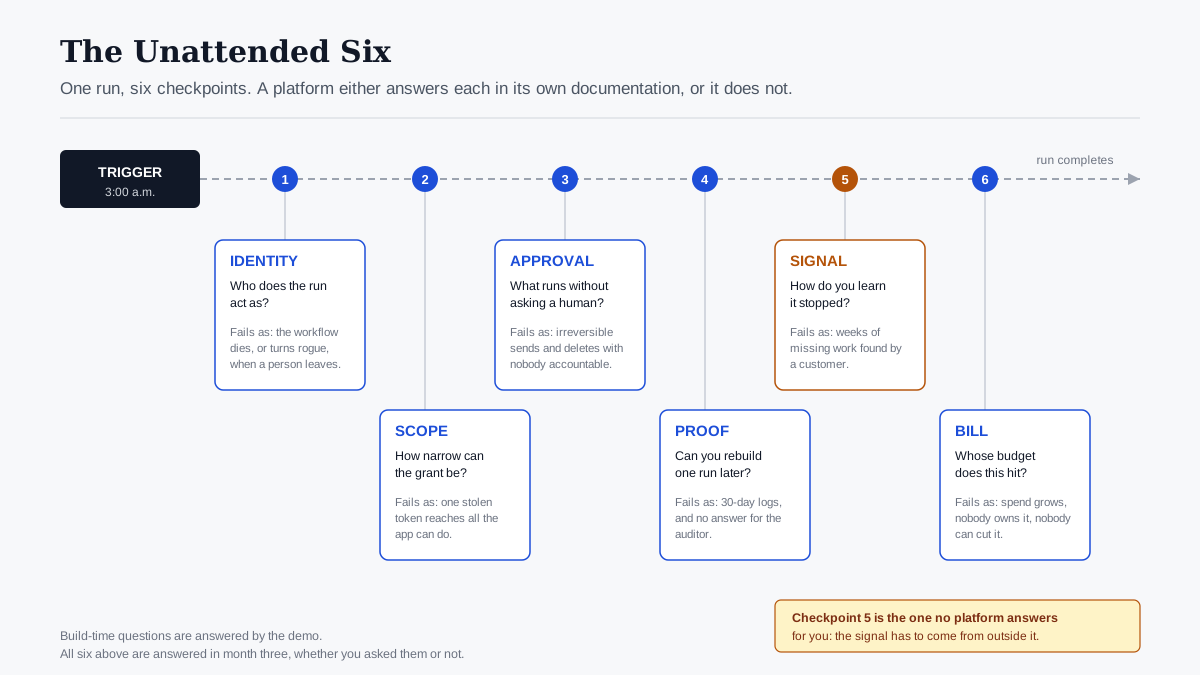
The Unattended Six, drawn as one run. Each checkpoint is a question a platform either answers in its own documentation or does not.
A note on method. We did not run a controlled bake-off of these platforms ourselves, and we will not imply that we did. What follows comes from vendor documentation and pricing pages fetched on 30 July 2026, published security research, and public practitioner threads, all linked inline and dated, because vendor pages change.
What an AI Automation Platform Actually Is
An AI automation platform is software that runs multi-step work across several business systems on a trigger, with at least one step performed by a language model rather than a fixed rule. The trigger might be a form submission, a new record, an inbound email, or a schedule. The steps read from and write to applications you already pay for. The AI step does the part that used to require a person to read something and decide.
That definition has two halves, bought at different times. Cross-app automation on a trigger is thirty years old and thoroughly commoditised; every platform in the category does it. A model making a judgement mid-run is new, and it is what changed the risk profile, because a rule-based step fails predictably and a model-based step fails plausibly.
Here is what an AI automation platform is not. It is not an AI agent framework, though the line is blurring: agent frameworks start from a goal and work out the steps, while automation platforms start from steps and insert intelligence into some of them. It is not an integration middleware replacement, since most teams run both. And it is not a governance layer, which is the distinction the rest of this piece is about, and which we argued at more length in our earlier analysis of what to ask any AI agent platform. That piece asks control questions about agents that reason. This one asks a narrower set about automation that runs unattended on a schedule.
Workflow automation as a category has real internal variety, and the marketing flattens it. A no-code visual automation builder aimed at a citizen developer in marketing operations and a developer automation platform aimed at a backend team share a category page and almost nothing else. Getting the archetype right matters more than getting the vendor right, which is why the comparison below is organised by archetype.
The build-time / run-time split
Every evaluation criterion in this category sorts into one of two buckets.
| Bucket | What it covers | When you feel it | How it is usually evaluated |
|---|---|---|---|
| Build time | Canvas ergonomics, connector count, AI step quality, templates, debugging during authoring | Week one | Demo, free tier, trial |
| Run time | Identity, scope, approvals, audit reconstruction, failure signalling, cost attribution | Month three and after | Rarely evaluated before purchase |
Build-time properties are easy to assess in an afternoon and broadly similar across the serious options. Run-time properties are hard to assess, differ enormously, and decide whether the automation survives a security review, an auditor, or a bad Tuesday. Almost every published comparison of AI automation tools scores the first bucket, using criteria like ease of use, integration depth and AI capability. The second bucket goes unscored.
Why AI Automation Platforms Diverge After the Demo
The demo tests a workflow that a human is watching, running once, against test data, with the builder logged in. Production tests a workflow nobody is watching, running two thousand times, against real customer records, using a credential that was connected eight months ago by someone who has since left. Those are different systems. Five specific failure classes account for most of the distance between them.
Silent stops. The problem card at the top of this article is the canonical case: the platform's status says active, the execution log is clean, and nothing is running. The failure happened one layer below the layer the platform logs. Detection therefore cannot come from inside the platform. The Google SRE book makes the general point when it argues that "It's better to spend much more effort on catching symptoms than causes" (Site Reliability Engineering, Chapter 6). The symptom is that leads stopped arriving in the CRM. The cause is a scheduler bug. Only one of those is visible from outside.
Loud stops that nobody sees. Zapier documents that it will automatically turn off a Zap that "Errors 95% of the time it runs" and "Has run more than 20 times in the past 7 days," notifying paid accounts first. Team plans get a 24-hour grace period and Enterprise 72 hours; free accounts get no advance notice at all (Zapier help). That is good engineering: a runaway failure gets contained. It is also a state change to a production integration, made automatically, communicated by an email to whichever address happened to own the account.
Blanket credentials. This is the one with a body count. Between 8 and 18 August 2025, an intrusion set that Google tracks as UNC6395 used stolen OAuth tokens belonging to the Salesloft Drift integration to systematically export data from corporate Salesforce instances, then went looking through the exported records for AWS keys, passwords and Snowflake tokens. Google's advisory was blunt about the scope, telling defenders to treat "all authentication tokens stored in or connected to the Drift platform" as potentially compromised, and its first hardening recommendation was to restrict connected app scopes to the minimum necessary (Google Cloud Threat Intelligence). Nothing in Salesforce was exploited. The integration's own permissions were the attack.
Drift is a chat product rather than an automation platform, and a security reviewer will rightly say so. The mechanism is what transfers: a third-party service holding long-lived OAuth tokens with broad scopes into a system of record. That description fits every AI automation platform on your shortlist, and most of them hold tokens into more systems than Drift did.
Unbounded actions. A workflow that can draft is categorically different from a workflow that can send, and a workflow that can read is categorically different from one that can delete. Most builders make these the same drag-and-drop gesture. The EU AI Act, whose high-risk obligations start applying on 2 August 2026, requires for the systems in its scope that a human be able to "interrupt the system through a 'stop' button or a similar procedure" (Article 14). Most automation platforms have a global off switch. Fewer have a per-action pause.
Cost that scales invisibly. Metering units differ so much between platforms that the same workflow can vary by more than an order of magnitude in price, and none of the common units map to a business object. You are billed in tasks, operations, credits, executions, or seats. You want to know what one processed lead costs. Nobody bills in leads.
The identity problem underneath all five
Each failure class above is a symptom of the same structural gap: the automation runs as somebody, and nobody manages that somebody. The Cloud Security Alliance, co-producing with the identity vendor Oasis Security, surveyed 383 IT and security professionals in August and September 2025 and published the results in January 2026. Read the vendor involvement as a reason to check the method rather than a reason to discard it. The sample and dates are stated, and the findings map onto this problem precisely. 78% of organisations have no documented, formally adopted policy for creating or removing AI identities; 92% are not confident their existing identity management can handle the risks from AI and non-human identities; and 24% take more than a day to rotate or revoke a credential after a suspected exposure (Cloud Security Alliance).
OWASP's Non-Human Identities Top 10 puts Improper Offboarding at number one, with Overprivileged NHI at five and Long-Lived Secrets at seven (OWASP). Those three, in combination, describe the average three-year-old Zap almost exactly: connected by an employee whose onboarding predates the current policy and whose offboarding missed it entirely, granted every scope the connector asked for, holding a refresh token that has never been rotated.
The wider breach data has moved in the same direction. Verizon's 2026 Data Breach Investigations Report reports that "31% of breaches now start with software vulnerabilities," overtaking stolen passwords as the leading way in (Verizon); in SecurityWeek's summary of the same edition, third-party involvement reached 48% of breaches, a 60% year-on-year increase, while credential abuse as an initial vector fell to 13% (SecurityWeek, 19 May 2026). We checked the prior edition before citing this: the 2025 DBIR put credential abuse first at 22% and third-party involvement at 30%, itself double the year before (Verizon, 2025). The direction of travel is what matters for this decision. The thing you connect to your systems is now a bigger exposure than the password on the front door.
The Unattended Six: A One-Sitting Diagnostic
The Unattended Six is our name for the six questions that separate AI automation platforms once the demo is over. Each one is answerable from a vendor's public documentation in an afternoon, without a sales call, and each has a concrete artefact that counts as an answer. If a vendor cannot answer a question from its own docs, that is the answer.
| # | Question | What counts as a real answer | What "no" costs you |
|---|---|---|---|
| 1 | Identity — who does the run act as? | A workflow-owned identity with a named human owner, separate from any employee session | The automation dies or turns rogue when a person leaves |
| 2 | Scope — how narrow can the grant be? | Per-action permissions, not per-app OAuth | One compromised connector reaches everything the app can do |
| 3 | Approval — what needs a human first? | A per-step gate that pauses the run and records the approver | Irreversible actions taken at 3am with no one accountable |
| 4 | Proof — can you reconstruct one run? | A per-run record including inputs, decisions, refusals and retention period | You cannot answer an auditor, or debug a bad outcome |
| 5 | Signal — how do you learn it stopped? | An external heartbeat or expected-volume alert, not the platform's own status | Weeks of missing work discovered by a customer |
| 6 | Bill — who pays for this run? | Cost attributable to a workflow, a team, or a cost centre | Spend grows, nobody owns it, nobody can cut it |
1. Identity: who does the run act as?
Ask the platform whether a workflow has an identity of its own, or whether it borrows a person's. The difference is visible in one test: what happens to this automation when the employee who built it is offboarded? If the answer is "it breaks," the workflow was running on that person's OAuth grant, and you have an availability problem. If the answer is "it keeps running," you have an accountability problem, because an identity that survives its owner and has nobody assigned to it is precisely OWASP's number-one non-human identity risk.
The correct answer is a third thing: the workflow runs under its own identity, and that identity has a named human owner who is reassigned during offboarding. This is the argument we made in detail in our earlier analysis of owner, scope and expiry for non-human identities, and it is the question that decides the other five, because each of them gets much harder to answer once this one is unanswered.
2. Scope: how narrow can the grant be?
There are two granularities in practice, and vendors describe them in similar language. App-level scoping means the automation holds an OAuth grant to an application, usually the broad scopes the connector requested at install time. Action-level scoping means the automation is permitted specific operations within the application, and nothing else.
Zapier's enterprise page names both controls explicitly. "App Access Controls" allow or block apps across a workspace; "Action Restrictions" exist to "define exactly which actions are allowed in each app" (Zapier Enterprise, fetched 30 July 2026). That is the right shape. Note where it sits in the price list.
The reason this matters more for AI automation tools than for classic ones is that a rule-based step can only do what it was configured to do, while a model-based step can attempt anything its credentials permit. Scope stops being a hygiene measure and becomes the enforcement boundary. This conversation, from the identity side, is the subject of a recorded discussion between SecureAuth's CEO Geoffrey Mattson and Semperis on the authorization gap that opens up when agentic systems inherit human-shaped permissions:

We also looked at how this plays out at the protocol layer for tool-calling connectors in our write-up on governing AI connectors and MCP servers.
3. Approval: what runs without asking?
Sort every action your workflow can take into three buckets: reversible, expensive-to-reverse, and irreversible. Sends, payments, deletions, and external-facing writes land in the third. The question for the platform is whether it can pause mid-run for a named approver on those specific steps, resume afterwards with its state intact, and record who approved what.
A global on/off switch is not an approval gate, and neither is a notification after the fact. Human-in-the-loop only means something when the loop can wait. The test is: can the run wait? A platform that cannot suspend a run for two days without losing context will push you toward approving in advance, which is not approving.
This is also where the regulatory floor is clearest. Article 14 of the EU AI Act requires, for high-risk systems, that overseers be able to "disregard, override or reverse the output" in any particular situation. Most business automation is not high-risk under the Act. Building the capability anyway is cheap insurance, and it is the same capability you need for the ordinary case where a model drafts something wrong.
4. Proof: can you reconstruct one run?
Pick a run from six weeks ago. Can you show what triggered it, what data it read, what the model decided, what it wrote, what it skipped, and who approved anything that needed approving? Then check how long that record survives.
Retention is where this question stops being philosophical. Make's pricing comparison, fetched 30 July 2026, shows execution log storage of 7 days on Free, 30 days on Core, Pro and Teams, and 60 days on Enterprise. Audit logs, SSO, two-factor enforcement and the analytics dashboard are all marked as Enterprise-only on that same grid. Zapier states that its Enterprise tier includes a "Complete audit trail" plus "Asset History — Access audit data programmatically through an API." n8n's pricing page lists log streaming, an external secret store and 365 days of insights under Enterprise.
The pattern is consistent enough to be a planning assumption: on every major AI automation platform, the evidence you need for an audit is a tier above the evidence you need to build. A 30-day log retention window does not survive a quarterly review, let alone a regulator asking about a decision made last year. For context on what a defensible record actually contains, see our earlier piece on audit trails that prove what an agent did.
The EU AI Act's Article 12 sets the direction for anything in its scope, requiring high-risk systems to "technically allow for the automatic recording of events (logs) over the lifetime of the system" (Article 12). Lifetime, not thirty days.
5. Signal: how do you learn it stopped?
This is the question the problem card exists to make unavoidable, and the one almost nobody asks during a trial. The answer must come from outside the platform, because the failure mode is the platform believing it is fine.
Three mechanisms work, in increasing order of quality:
- Error notifications from inside the platform. Necessary but insufficient. They fire when a run fails, not when a run never starts.
- A heartbeat or dead-man's switch. The workflow's last step pings an external monitor; the monitor alerts when the ping does not arrive on schedule. This catches the silent stop.
- An expected-volume alert on the business object. Alert when fewer than N leads reached the CRM today. This catches the silent stop, the partial failure, and the case where the workflow runs perfectly and writes garbage.
The third is the symptom-level alert the SRE literature argues for, and it is the only one that survives a platform whose own telemetry is the thing that broke. Almost no automation platform ships it, because it requires knowing what normal volume looks like, which is a business fact rather than a platform fact. In practice it lives wherever you already watch numbers: a scheduled query in your BI tool, a monitor on a database row count, or a threshold rule in the destination application. The build is an hour. The hard part is agreeing what "normal" is for each workflow, and that conversation is worth having anyway.
6. Bill: who pays for this run?
Two sub-questions. First, what is the metering unit, and how does it map to a business object? Second, can the cost be attributed to a team or a cost centre without an exported spreadsheet?
The second one is where AI changed the stakes. A rule-based automation has predictable cost per run. An automation with a model step has cost that varies with input length, model choice and retry behaviour, and a workflow that loops can generate a bill with no upper bound unless one is set structurally. We covered the routing side of this in how model routing cuts LLM costs; the attribution side is simpler and more neglected. If you cannot answer "which team's automation spent this," you cannot manage the spend, and the eventual response is a blanket freeze that kills the good workflows along with the bad.
Six Platform Archetypes, Scored on the Unattended Six
Vendor names change; the archetypes behind them do not. AI automation platforms fall into six of them, and below each is scored on the six questions, with a representative platform and its real published pricing, fetched 30 July 2026. This is not a ranking. Three of these archetypes are the correct answer for some organisation reading this, and the differences between them are about fit, not quality.
One honest exclusion first. Analyst grids, meaning Gartner's quadrants and Forrester's waves, are the sources a lay reader expects in a comparison like this, and they sit behind registration walls we could not read. G2 and Capterra resisted retrieval too. Rather than cite them secondhand, we left them out, and everything below comes from primary vendor documentation.
At a glance
| Archetype | Representative | Metering unit | Governance controls sit at | Best for |
|---|---|---|---|---|
| Consumer-grade trigger-action | Zapier | Task (per completed action) | Enterprise tier | Departmental automation with a real admin function |
| Visual scenario builder | Make | Credit (per module action) | Enterprise tier | Ops teams building branching, high-volume scenarios |
| Self-hosted developer platform | n8n | Execution (per whole workflow run) | Business / Enterprise tier | Engineering-adjacent teams that want the data in-house |
| Suite-native automation | Power Automate | Seat, or bot, or flow | Tenant identity platform | Organisations already standardised on one suite |
| Enterprise integration platform | Workato, Boomi, MuleSoft class | Not published | Included by default | Regulated environments with integration teams |
| Code plus an orchestrator | Temporal, Airflow, your backend | Infrastructure | Whatever you build | Teams with engineering capacity and few builders |
Consumer-grade trigger-action platforms
Best for: a department that needs dozens of small automations live this quarter and has someone who will administer them.
What it does well. The largest connector catalogue in the category, the lowest time-to-first-working-automation, and a genuinely mature admin layer at the top of the price list. Its enterprise controls cover app access controls, action restrictions, role-based access, and SSO with SCIM and domain capture. That is the most specific action-level scoping language published by any of the horizontal platforms.
Where it breaks unattended. Task metering makes multi-step AI workflows expensive at volume, because every completed action bills. The auto-disable behaviour is sensible engineering and an operational surprise: a production integration can change state on its own, with the notice going to an account owner rather than a rota. And the governance controls that make it defensible are Enterprise-tier, custom-priced features.
Real pricing (zapier.com/pricing, 30 July 2026). Free: 100 tasks per month, one user. Professional: from $19.99/month billed annually for 750 tasks, one user. Team: from $69/month billed annually for 2,000 tasks, 25 users; $119/month for 5,000 tasks. Enterprise: custom, unlimited users. Zapier defines the unit plainly: "A task is counted whenever Zapier successfully completes a unit of work for you."
Unattended Six verdict. Identity: weak by default, strong with enterprise administration. Scope: strong, at a price. Approval: limited. Proof: strong at Enterprise. Signal: platform-internal only. Bill: task-level visibility, weak team attribution.
Visual scenario builders
Best for: an operations team building branching, high-volume scenarios where per-action cost matters more than connector breadth.
What it does well. Fine-grained visual control over routing, iteration and error handling, and by far the cheapest per-action economics of the hosted options at mid volume. Real-time execution monitoring and full-text execution log search make debugging a live scenario genuinely pleasant.
Where it breaks unattended. The governance grid is stark. On Make's own plan comparison table, fetched 30 July 2026, audit logs, company single sign-on, two-factor enforcement, the analytics dashboard and the on-premise agent are all marked unavailable on Free, Core, Pro and Teams. Enterprise only. Execution log storage runs 7 days on Free, 30 on the three paid non-enterprise tiers, and 60 on Enterprise. If your security review requires SSO, there is exactly one tier that answers it, and it does not have a public price.
Real pricing (make.com/en/pricing, 30 July 2026). Free: up to 1,000 credits per month, two active scenarios, 15-minute minimum interval between runs. Billed annually: Core $9/month for 10,000 credits with unlimited active scenarios, Pro $16/month, Teams $29/month. Month-to-month the same tiers are $10.59, $18.82 and $34.12. Enterprise: custom. The unit is defined on the page: one credit per module action, where adding a spreadsheet row or fetching mailbox data is one action.
Unattended Six verdict. Identity: weak below Enterprise. Scope: app-level. Approval: limited. Proof: 30-day retention below Enterprise is the binding constraint. Signal: platform-internal only. Bill: excellent unit economics, weak attribution.
Self-hosted developer platforms
Best for: teams with engineering capacity who need the execution data to stay inside their own network.
What it does well. Whole-run metering rather than per-step metering, which inverts the cost curve for long workflows. Self-hosting puts the execution log and the credentials in your infrastructure. And n8n ships something the hosted platforms do not: a built-in security audit. Running n8n audit produces five risk reports covering credentials not used in any active workflow, expressions injected into SQL query fields, nodes touching the file system, risky and community nodes, and unprotected webhooks on the instance (n8n docs). A report listing credentials that no recently active workflow uses is, in one line, a report on OWASP's number-one non-human identity risk.
Where it breaks unattended. You now own the operational problem, including the failure mode in this article's problem card. A practitioner running n8n in production at a startup summarised the trade-off on Hacker News in May 2025, listing good observability and non-technical usability against a blunt conclusion: it was "faster and simpler to write some more backend code" given existing engineering capacity, with version control called out as a specific weakness (photon_garden on Hacker News). Identity features are also tiered: SAML SSO is available on Business and Enterprise plans, and custom granular roles on Enterprise only (n8n docs).
Real pricing (n8n.io/pricing, 30 July 2026). Starter: €20/month for 2,500 workflow executions with unlimited steps. Pro: €50/month for 10,000 executions. Business: €667/month for 40,000 executions. Enterprise: custom, adding log streaming, an external secret store, 200+ concurrent executions and 365 days of insights. Self-hosting the community edition carries no licence fee but no enterprise features either.
Unattended Six verdict. Identity: good with your own IdP at Business or above. Scope: yours to design. Approval: build it yourself. Proof: excellent if you keep the database. Signal: yours to build, and you must. Bill: predictable per run, model costs separate.
Suite-native automation
Best for: organisations already standardised on one productivity suite, where the automation inherits the tenant's identity model for free.
What it does well. Identity is solved before you start. The automation lives inside a directory that already has conditional access, lifecycle management and audit. That single fact answers question one better than any horizontal platform's enterprise tier.
Where it breaks unattended. Licensing is genuinely hard to model because the unit changes with the automation type, and the suite gravity is real: automating anything outside the suite is second-class.
Real pricing (Microsoft Power Automate pricing, 30 July 2026). Premium: $15.00 per user per month, paid yearly, covering cloud flows and attended desktop flows. Process: $150.00 per bot per month for unattended desktop flows, which is where classic RPA lives in this licensing model. Hosted Process: $215.00 per bot per month, adding a Microsoft-hosted virtual machine. Process Mining add-on: $5,000.00 per tenant per month. The jump from $15 per user to $150 per bot is the price of the word "unattended," which is a fair summary of this entire article.
Unattended Six verdict. Identity: strongest of the six. Scope: inherits tenant controls. Approval: native approval actions. Proof: tenant audit log. Signal: platform-internal. Bill: per-seat and per-bot, attributable through existing cost centres.
Enterprise integration platforms
Best for: regulated environments with an integration team and existing middleware, where governance is assumed rather than purchased.
What it does well. This archetype was built for the problem the others are retrofitting: environment separation, promotion pipelines, role separation between builder and approver, and full audit are baseline rather than tier-gated.
Where it breaks unattended. Time to first automation is measured in weeks, not hours, and the platform is unusable by the operations staff who generate most automation demand. That is exactly how shadow automation starts on a personal Zapier account. It is also the one archetype where we could not verify a single price.
Real pricing. Not published. Every vendor in this class quotes on request, and we are not going to estimate. Treat unpublished pricing as a genuine finding: it means the cost depends on your connector count and volume, and it means you cannot budget without a sales cycle.
Unattended Six verdict. Identity, scope, approval and proof: strongest of the six by design. Signal: usually integrated with existing enterprise monitoring. Bill: attributable, though the contract is the harder number.
Code plus an orchestrator
Best for: teams with engineering capacity, few citizen builders, and workflows that are few in number but critical in consequence.
What it does well. Everything is yours: the identity model, the scopes, the approval semantics, the retention period, the alerting, the cost accounting. Durable orchestration engines give you retries, resumability and a complete event history as a property of the runtime rather than a feature tier, and the maintenance burden is the same maintenance burden your services already carry.
Where it breaks unattended. It does not scale to the demand. Most automation requests come from people who cannot write the code, and telling them to file a ticket produces a queue, which produces a personal-account workaround. Code is the right answer for the top ten workflows and the wrong answer for the next two hundred.
Real pricing. Infrastructure plus engineering time. No licence line, which reliably makes it look cheaper than it is.
Unattended Six verdict. All six are exactly as good as what you build, which is the honest summary and also the warning.
Choose the Archetype That Matches the Blast Radius
The selection rule is not "which is the best AI automation platform." It is: match the archetype to the worst thing a workflow on it could do unsupervised. Blast radius is the variable; everything else is preference.
- Choose a consumer-grade trigger-action platform if your automations are read-heavy and internal-facing, you have an admin who will actually run the admin console, and you can afford the enterprise tier at the point where a workflow first touches customer data.
- Choose a visual scenario builder if volume and branching complexity are your constraint, per-action cost matters, and your workflows stay inside systems where a 30-day log is enough, or you can go straight to Enterprise for the SSO and audit grid.
- Choose a self-hosted developer platform if you have someone on call, data residency is a hard requirement, and you accept that the failure signal is now your responsibility to build.
- Choose suite-native automation if most of your systems are already in one suite and your identity team would rather extend a model they run than review a new one.
- Choose an enterprise automation platform of the integration-middleware class if you are in a regulated industry, the automations touch systems of record, and a security review that takes a quarter is normal rather than exceptional.
- Choose code plus an orchestrator if the workflow list is short, the consequences are high, and you have the engineering capacity. Pair it with one of the others for the long tail, because the long tail will otherwise route around you.
Most organisations of any size end up with two of these, deliberately or otherwise. The failure is not having two. The failure is having two and governing neither.
A four-week evaluation you can actually run
If you want to test the Unattended Six rather than read about them, this sequence fits in a month and produces artefacts rather than opinions.
- Week 1 — inventory. List every automation already running in your organisation, including personal accounts. Record, for each: who owns it, whose credential it uses, and what it can write. Most teams find the list is longer than expected and the owner column has gaps.
- Week 2 — paper diagnostic. Answer the six questions for each shortlisted platform from its public documentation only. Every unanswered question becomes a written question for the vendor. Record which vendor answers in docs and which requires a call.
- Week 3 — build the real workflow, wrong on purpose. Build one workflow that touches a system of record using a disposable test account rather than your own, then try to break the governance: disable that test account and see whether the workflow survives; check whether you can reduce its permissions after it already works; try to suspend a run mid-flight and resume it a day later. Using a throwaway identity is the point rather than a shortcut. It is the only way to simulate offboarding without breaking your own access.
- Week 4 — reconstruct and stop. Pick a run from week 3 and reconstruct it end to end from the platform's records. Then disable the trigger without touching the workflow and time how long it takes anyone to notice. That number is your real detection latency, and it is usually the most sobering output of the exercise.
Nothing in that sequence needs a sales engineer, and the week-four number will do more to settle an internal argument than any feature grid.
When Your Existing Automation Still Wins
Three situations where the answer is to keep what you have rather than shop for AI automation platforms at all.
The workflow is small, internal, and read-only. A scheduled report that reads a spreadsheet and posts a summary to a channel does not need an identity model. Applying the Unattended Six to it is ceremony. The framework is for workflows that write, send, pay, delete, or touch customer data, roughly the same line we drew between chat assistants and systems that act.
A cron job and fifty lines of code already do it. If the automation is stable, owned by an engineer, and version-controlled, moving it onto a platform trades a known system for a licensed one and gains you a canvas nobody needed. The Hacker News practitioner quoted earlier reached exactly this conclusion for a team that already had a backend.
You already bought the enterprise tier and it works. The most common bad outcome of an evaluation like this is a migration that consumes two quarters and delivers the governance properties you could have configured on the incumbent. Read the enterprise tier documentation of what you own before shortlisting replacements. On more than one of these platforms, the controls people believe are missing are present and switched off.
The honest version of the counterargument is stronger still: for a large share of automation none of this matters, because the workflow reads public data, writes to a scratch document, and would embarrass nobody if it ran twice. Governance applied uniformly is a tax; governance applied by blast radius is a control.
What One Unattended Run Actually Costs
Take one workflow: a form submission arrives, the record is enriched, a CRM record is written, a follow-up email is drafted by a model, and an activity is logged. Five actions per run, 1,000 runs per month. Here is what the same workflow costs on each metering model, using the published prices fetched on 30 July 2026 and dividing the plan price by the runs.
| Platform | Unit | Units consumed per month | Plan that covers it | Cost per run |
|---|---|---|---|---|
| Zapier | Task (completed action) | 5,000 | Team, $119/month annual | $0.119 |
| Make | Credit (module action) | 5,000 | Core, $9/month billed annually | $0.009 |
| n8n Cloud | Execution (whole run) | 1,000 | Starter, €20/month | €0.020 |
| Power Automate | Seat | n/a — flat per maker | Premium, $15/user/month | $0.015 per run for one maker |
| Enterprise iPaaS | Not published | — | Quoted | Not verifiable |
Three things follow, and only one of them is the obvious one.
The obvious one. Per-action metering costs roughly thirteen times per-credit metering for the same five-action workflow at this volume. If your workflows are long, the metering unit is your largest cost lever, and it is decided at platform-selection time.
The less obvious one. All of these numbers are small. At 1,000 runs a month the entire platform bill sits between nine and a hundred and nineteen dollars, and nobody escalates a $119 line item. Metering cost is not the financial risk; it is the thing that looks like it.
The one that decides the budget. Every governance control this article treats as necessary — SSO, audit logs, action restrictions, log retention beyond 30 days, granular roles — sits on an Enterprise tier at every hosted vendor examined here, and not one of them publishes that price. The real cost structure of AI automation platforms is therefore: trivial to run, unpriced to govern. Add the model spend on top, which is metered by your LLM provider and appears on none of the rows above.
The procurement move that follows is specific. Request the enterprise quote in week one of the evaluation, before a pilot has created switching cost, and request it for the tier that contains SSO, audit logs and action restrictions rather than the tier that contains the run volume you need. A quote obtained after four departments have built on the free tier is not a negotiation. This is the one place where an enterprise automation platform with published governance-by-default looks better than it does on a feature grid: the cost is knowable at the start.
Two more caveats on the table. The per-run figures are plan price divided by runs at this exact volume, not a marginal cost. Halve the volume and the per-run number roughly doubles, because you are still paying for the plan. And a fourth cost never appears on a pricing page at all: the detection latency you measured in week four. Two weeks of a silently stopped lead-routing workflow costs more than a decade of the Zapier line item.
The Control Plane Is a Separate Purchase
Once work is handed to AI rather than a person, the question stops being which AI automation platform is nicest to build in and becomes who owns this agent, what can it touch, what did it do, and what did it cost. That layer is what we build at LeapForce: a single governed layer across AI tools, connectors, models and agents, so identity, policy, cost and audit are properties of the organisation rather than settings inside each platform. Our Workflows product is designed around exactly the six questions above — every workflow with a named owner and its own identity, action-level connector scopes, human approval gates before a send, a payment or a deletion, policy checks applied at every step rather than only at the trigger, and per-run records covering trigger, steps, approvals, costs and outcome (Observability & Audit). Our published rollout model for the gateway underneath it is deliberately unglamorous: observe first, enforce second, optimize third. Teams that start with enforcement block work they did not know existed, and lose the mandate.
LeapForce does not replace Zapier, Make, n8n or your iPaaS, and the product page says so: existing schedulers and iPaaS automations can trigger LeapForce workflows and vice versa. LeapForce is also in active development, and per-capability build status (live, in development, roadmap) is disclosed on the site rather than blurred; take the descriptions above as the design and ask which parts ship today before you plan around them.
Where This Framework Is Still Uncertain
Four places where we would push back on our own argument.
The Unattended Six is a framework, not a measurement. It has not been validated against outcomes. We cannot tell you that organisations scoring well on all six suffer fewer incidents, because nobody has published that study. Each of the six maps to a documented failure class with a public source, which is a weaker claim than it may have read as. It is also a risk argument rather than a return argument: none of the six will make an automation faster or cheaper, and a buyer who needs an ROI case should build it on the workflow's outcome, not on this list. The archetype verdicts inherit the same softness. "Strong" and "weak" are judgements against the "what counts as a real answer" column in the diagnostic table, not scores from a rubric anyone else could reproduce identically.
The silent-stop evidence is thinner than the argument built on it. We have one well-documented public thread, one vendor's published auto-disable behaviour, and a general monitoring principle from SRE practice. That is enough to establish the failure mode exists and is not exotic. It is not enough to tell you how often it happens, and we found no published study that measures it. If you want a number, the week-four exercise generates one for your own environment.
Vendor documentation is a floor, not a truth. Everything in the archetype section comes from pages the vendors control, fetched on one day. Tiers move, features get promoted, and a control that is documented is not necessarily a control that works the way you assume. Treat the paper diagnostic in week two as a source of questions, not answers.
We did not test these platforms, and analyst evidence is missing. No bake-off, no dated run logs, no failure screenshots; every factual claim here is a link you can check rather than an experience you take on trust. Gartner, Forrester, G2 and Capterra are the sources many readers expect in a comparison of AI automation tools, and we could not retrieve them behind their registration and bot controls. That tilts the piece toward primary documentation and away from aggregate buyer sentiment.
The category is moving underneath the framework. Model-driven planning is starting to blur the line between an automation platform and an agent platform. If a system chooses its own steps at run time, question two changes character entirely, because you can no longer enumerate the actions in advance and must scope by capability rather than by step. That is a harder problem than the one this article describes, and we do not think anyone has solved it convincingly yet.
Frequently asked questions
An AI automation platform is software that runs multi-step work across several business applications on a trigger, with at least one step performed by a language model rather than a fixed rule. A form submission arrives, records are read and written across a CRM and a spreadsheet, and a model drafts a reply or classifies the request in the middle. The cross-app part is a mature commodity; the model step is what changes the risk profile, because a rule fails predictably and a model fails plausibly.
There is no best AI automation platform, only a best archetype for a given blast radius. Match the platform to the worst thing one of its workflows could do unsupervised: consumer-grade trigger-action tools for read-heavy internal automation with a real admin function, visual scenario builders for high-volume branching work, self-hosted developer platforms when data must stay in your network, suite-native automation when your identity model already lives in one suite, and an enterprise integration platform when the workflows touch systems of record in a regulated environment. Anyone answering this question with a single product name has not asked what the workflow is allowed to do.
A trigger fires: a webhook, a schedule, a record change, an inbound message. The platform then executes a sequence of steps under a stored credential, passing data between them. Some steps call an application's API; some call a model. The platform stores an execution record and, depending on tier, retains it for somewhere between seven days and a year. The architecturally important detail is the stored credential: it is what the workflow acts as, and it usually belongs to whoever clicked "connect."
No, though the gap is narrowing. An automation platform runs steps you defined and inserts intelligence into some of them; an agent decides which steps to run to reach a goal you defined. The practical difference is enumerability. With an automation platform you can list every action the workflow can take and scope permissions to that list. With an agent you cannot, so you have to scope by capability and enforce at the action boundary instead. That is why the two need different control models even when they share a canvas.
Reliably: routing and triage, data movement between systems, enrichment, drafting, summarising, classification against clear criteria, scheduled reporting, and first-pass review that a human confirms. Unreliably: anything where being wrong is expensive and the error is hard to spot. Pricing decisions, external commitments, irreversible writes, and judgement calls where the correct answer depends on context the workflow cannot see. The useful sorting question is not "can AI do this" but "what happens if it does this wrong at 3am and nobody notices for a week."
Ask the six unattended questions and require documentary answers: does a workflow have its own identity with a named owner, can permissions be scoped per action rather than per app, can a run pause for a named approver on irreversible steps, can a single run be reconstructed and for how long is that record kept, how does an alert reach a human when the workflow silently stops, and can cost be attributed to a team. Then check which tier each answer requires. On every hosted platform we examined, the governance answers live on an enterprise tier with no published price, so the security review and the budget conversation turn out to be the same conversation.
For a five-action workflow at 1,000 runs a month, using prices published on 30 July 2026: about $0.119 per run on Zapier's Team plan at 5,000 tasks, about $0.009 per run on Make's Core plan billed annually, about €0.020 per run on n8n's Starter plan, and about $0.015 per run for a single Power Automate Premium seat at $15 per user per month. Per-action metering runs roughly thirteen times the cost of per-credit metering for the same workflow at this volume. All of those totals are small, which is the trap. The governance tier and the LLM provider's bill are the numbers that actually move.
Not from the platform, because in the failure mode that matters the platform believes it is healthy. Use two external mechanisms. First, a heartbeat: the workflow's final step pings an external monitor, and the monitor alerts when the expected ping does not arrive. Second, and better, an expected-volume alert on the business outcome: page someone when fewer than the normal number of records arrive in the destination system. The second catches silent stops, partial failures, and the case where the workflow runs perfectly and writes nonsense.
Safer in some respects, and it moves work onto you in others. Self-hosting keeps execution data and credentials inside your network and lets you set your own retention, and n8n ships a security audit command on top of that, reporting unused credentials, unprotected webhooks and risky nodes. In exchange you own patching, availability and the failure signal. Identity features are still tiered too, with SAML SSO on Business and Enterprise plans and granular custom roles on Enterprise. Open source changes who is accountable for the run-time properties; it does not remove them.
The build is days; the run-time properties are the schedule. Budget roughly a month for the evaluation described above: inventory, paper diagnostic, an adversarial build, and a reconstruct-and-stop exercise. Then expect the security review to be gated on whichever governance features sit above your current tier. Teams that skip the inventory step usually discover mid-review that the automation they are formalising already exists three times on personal accounts, which resets the timeline.
No, and putting them everywhere is how they get switched off. Gate by consequence. Irreversible and externally visible actions, meaning sends to customers, payments, deletions and writes to systems of record, get a named approver who can pause the run. Reversible internal actions do not. The design test is whether the platform can suspend a run for two days and resume it with its state intact. If it cannot, teams will approve in advance to keep things moving, and an approval granted before the work exists is not an approval.
Ready to Govern Your AI?
Talk to LeapForce — one controlled layer for every AI tool, connector, model, and agent.
Comments