
Choose an AI work assistant app by the access it asks for, not the feature list. Metadata-only assistants are safe to approve this afternoon. Read-only access to a mailbox deserves a second thought. Anything asking to draft or send is a delegation decision, and it belongs to whoever owns the consequences.
Our position is narrower than the usual roundup: feature parity between these apps is now close enough that the differentiator has moved to the permission grant, and almost nobody reads it. Two apps that look identical on a pricing page can request access that differs by an order of magnitude in blast radius, and the screen where that difference is disclosed appears for about four seconds before you click through it.
On Hacker News in April 2026, a commenter posting as coffeefirst described connecting an AI assistant to their personal email and calendar and then hitting a wall: "I can't figure out what to do with it." The summary it produced took as long to read as the inbox. That is the sequence almost everyone follows. Grant first, work out the job later. It is backwards. The grant is the commitment. The job is the part you can change your mind about.
The short answer: Rank every AI work assistant app on the highest rung of the Grant Ladder it demands (metadata, read, draft, or act), then approve nothing above the rung its actual job requires, because the rung, not the feature set, is what you are living with for the next ninety days.
Last updated: July 30, 2026.
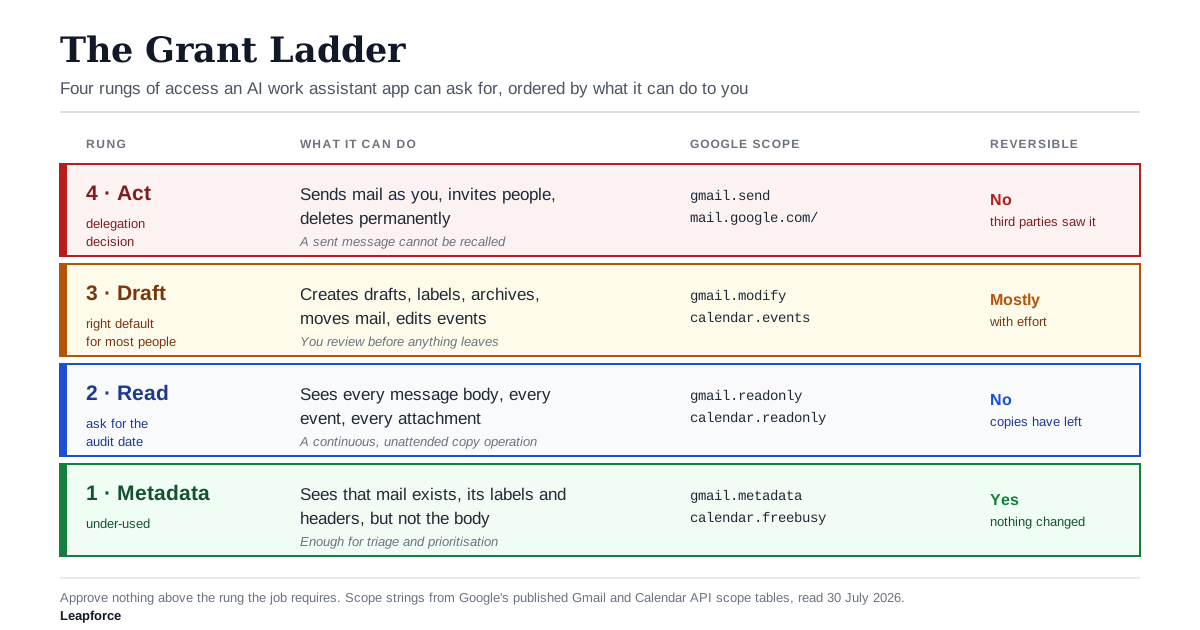
The Grant Ladder. Each rung is a different question, and only the top two are delegation decisions.
What an AI work assistant app is, and what the consent screen decides
An AI work assistant app is software that reads your work context, meaning mail, calendar, documents and meeting audio, and either answers questions about it or takes actions in it on your behalf. The dividing line the whole category turns on is that second clause. An assistant that only answers is a search box with better manners. An assistant that acts holds a credential.
What it is not: a chatbot you paste text into. That distinction gets repeated in every roundup and it is correct, but it is usually left as a capability claim. It is really a permissions claim. The reason an assistant can act is that at some point you handed it an OAuth grant against your Google Workspace or Microsoft 365 account, and that grant is enumerated, published, and legally binding on the vendor in a way the marketing page is not.
This is the part worth internalising before you compare a single feature. The consent screen is the only place in the entire purchase where you see a precise, machine-readable, vendor-independent statement of what the app can do. Everything else, the demo and the docs and the sales call, is a description of what the vendor currently chooses to do with that capability. Those are different things, and only one of them survives a change of product management.
A commenter on the Hacker News thread about agent plugin permissions in April 2026 put the general shape of the problem cleanly: the permission model is "all or nothing". Their example was a CI integration nobody would ship with read access to every repository in an org just because it needs to lint one file. Mailbox grants have exactly that structure, and we accept them without argument.
The Grant Ladder: four rungs of access an AI assistant for work can ask for
Every AI work assistant app sits on one of four rungs. The rungs are ordered by what the app can do to you if it misbehaves, is compromised, or is simply pointed at the wrong thread. They are not ordered by how much data it can see. That ordering matters, because the two are not the same.
| Rung | What it can do | Google scope example | Microsoft Graph example | Reversible? |
|---|---|---|---|---|
| 1. Metadata | See that mail exists, its labels and headers, not its body | gmail.metadata | Mail.ReadBasic | Yes, nothing changed |
| 2. Read | See every message body, every event, every attachment | gmail.readonly, calendar.readonly | Mail.Read, Calendars.Read | No — copies leave |
| 3. Draft and modify | Create drafts, label, archive, move, edit events | gmail.modify, calendar.events | Mail.ReadWrite, Calendars.ReadWrite | Mostly, with effort |
| 4. Act | Send mail as you, invite people, delete permanently | gmail.send, https://mail.google.com/ | Mail.Send | No — third parties saw it |
The scope strings are from Google's published Gmail API scope table, Google's Calendar API authorisation page and Microsoft's Graph permissions reference, all read on July 30, 2026.
Rung 1 is a genuine category and it is under-used. Google's gmail.metadata grants "View your email message metadata such as labels and headers, but not the email body." An assistant on rung 1 can tell you that you have eleven unanswered threads from clients and none from your CFO. It cannot tell you what any of them said. For triage, prioritisation and "what did I not reply to", that is often the entire job.
Rung 2 is where most inbox tooling lives, and it is the rung people misjudge most. Read-only feels harmless because nothing changes. But calendar.readonly is described by Google as "See and download any calendar you can access using your Calendar". Download is the operative word. A read grant is a continuous, unattended copy operation against everything in scope, running on the vendor's schedule, for as long as the token lives. Nothing is modified and everything has left.
Rung 3 is the rung that should be the default for anything drafting on your behalf, and the one most vendors skip past. An assistant that writes into your drafts folder and stops there has produced work you can inspect, edit or bin, and the outside world has seen nothing. This is the human-in-the-loop pattern we have written about separately as a control rather than a courtesy: the approval step is not politeness, it is the only place where a reversible action becomes an irreversible one under a named person's authority.
Rung 4 is a delegation decision and should be treated with the seriousness of giving someone your signature stamp. The specific reason is not that the AI will write something embarrassing. It is that a sent message is the one output in this whole system that cannot be recalled, cannot be edited, and has already changed a third party's understanding of your position.
Why blast radius, not data volume, sets the rung
Rank on reversibility and the ordering stops being intuitive but starts being useful. A rung-2 read grant over ten years of mail is a larger confidentiality exposure than a rung-4 send grant. The rung-4 grant is still worse, because a leak is a problem you discover and contain, while a sent message is a fact you now have to live with. Confidentiality failures are expensive. Integrity failures are unrecoverable.
Three things Google's own scope tables say that the feature list does not
Reading the actual scope documentation for ninety minutes produced three findings that contradict what a reasonable person would assume from the names. All three are verifiable in a single page.
One: gmail.compose is not draft-only. It can send. Google's own description of https://www.googleapis.com/auth/gmail.compose is "Manage drafts and send emails." If you are looking for the rung-3 scope that lets an AI email assistant write without transmitting, compose is not it. The word means something different here than it does in a mail client. The narrowest write-and-send-nothing posture in Gmail's model is gmail.modify, described as "Read, compose, and send emails from your Gmail account," which also sends. Gmail's scope model does not actually offer a clean draft-only rung. Microsoft Graph does: Mail.ReadWrite and Mail.Send are separate permissions, so an app can hold write access to the mailbox without the ability to transmit. If a strict draft-only posture matters to you, that platform difference is a real selection criterion and we have never seen it mentioned in a roundup.
Two: reading your mail is a higher-risk grant than sending it, in Google's judgement. gmail.send sits in Google's Sensitive scope table. gmail.readonly sits in the Restricted table, one tier above. Restricted scopes, per Google, "provide wide access to Google user data" and trigger the heaviest verification path. So an app that can email the world as you clears a lower bar than an app that can read your archive. That is a defensible position, since bulk historical data is the thing that can never be un-leaked, but it inverts most people's instinct, and it means "we only need read access" is not the reassurance it sounds like.
Three: a restricted-scope app owes an annual third-party security audit, and you can check. Google states that apps accessing restricted data "from or through a third-party server must undergo an annual security assessment by a Google-approved third party," and that to keep the scopes they must be reassessed "at least every 12 months after your assessor's Letter of Assessment (LOA) approval date." The framework is CASA, run through the App Defense Alliance. There are documented exceptions (personal use, development and staging environments, service-owned data only, internal use within a single organisation, domain-wide installation), and that matters, because a vendor can honestly say it has restricted scopes without having gone through CASA if it qualifies for one of those. A developer on Hacker News in March 2026 confirmed the shape of it from the vendor side, saying of the Gmail scope audit that "the audit is pretty intense". "Are you CASA-assessed for the Gmail scopes you request, and when was the LOA dated?" is a fair question to put in writing, and the answer is checkable.
| Scope tier | Google's verification burden | What it signals to a buyer |
|---|---|---|
| Non-sensitive | Basic OAuth app verification | Narrow by construction; low review value |
| Sensitive | Additional OAuth app verification | Specific data, reviewed, no audit requirement |
| Restricted | Restricted-scope verification plus annual third-party assessment | Wide access; ask for the LOA date |
The 30-minute grant audit you can run before you approve anything
This is the diagnostic. It needs no procurement involvement, no vendor call, and no trial licence, and it will tell you more about an AI work assistant app than a two-week pilot will. Run it in this order.
Minutes 0–5: read the consent screen and screenshot it. Trigger the OAuth flow but do not complete it. Screenshot the permission list. This is your only dated artefact of what was requested; vendors change scope requests between releases and the screen is the record. Note which rung the highest-numbered permission sits on.
Minutes 5–12: check the declared scopes against the marketplace listing. For anything distributed through the Google Workspace Marketplace, the listing page declares the app's OAuth scopes in the page source, which means you can read them without installing anything.
curl -s -L -A 'Mozilla/5.0' '<marketplace-listing-url>' \
  | grep -oE 'https://www\.googleapis\.com/auth/[A-Za-z0-9._-]+' \
  | sort -u
We ran that against the Google Workspace Marketplace listing for Reclaim's Google Calendar add-on on July 30, 2026. It returned six scopes: calendar.addons.execute, gmail.addons.execute, gmail.addons.current.action.compose, gmail.addons.current.message.metadata, userinfo.email, userinfo.profile. Every one is an add-on-context scope, and none of them is calendar or gmail.readonly. That is a rung-1-to-2 footprint for a calendar assistant, which is the shape you want to see.
Read the caveat, because it is the whole reason this check is worth doing carefully: those are the scopes declared by that Marketplace add-on, not necessarily the scopes the same vendor's standalone web application requests when you sign up on its own site. Many vendors ship both, and the two grants can differ substantially. The check tells you what one distribution channel asks for on a specific date. It does not tell you the vendor's maximum ask. Run it on the channel you actually intend to use.
Minutes 12–20: list what already has access. Before adding one more grant, look at the accumulated ones. Individuals: the Google Account permissions page and the Microsoft "My Apps" access review. Administrators: in Google Workspace, Admin console under Security, then Access and data control, then API controls, where Google's documentation describes the views as Configured apps, Accessed apps and Apps pending review, with the note that "details about apps typically appear 24–48 hours after authorization". In Microsoft Entra, the enterprise applications permissions review, which Microsoft documents as covering all applications added to the tenant via user or admin consent. That 24-to-48-hour lag is worth writing down: your inventory is always at least a day behind reality.
Minutes 20–26: ask the four grant-record questions. For the app you are about to approve, write down four answers. Who owns this grant when the person who created it leaves. What is the narrowest scope that still does the job. What is the expiry. Where does the record of what it did live. If you cannot answer all four, you do not have an approval, you have an intention.
Minutes 26–30: decide the rung, then negotiate down to it. Most vendors have a lower-scope configuration and do not lead with it, because it degrades a demo. Ask for it explicitly. The question that works is not "can you use fewer permissions" but "which features stop working on gmail.metadata only, and can you list them."
This is the access-side complement to the functional test; if you want the behavioural half, our earlier analysis of cold-trialling an automation app covers what to feed it once the grant question is settled.
If you want the broader industry framing of why agent identity breaks the models we inherited, this recorded conference session from Arize Observe 2026 covers it directly, with a speaker from WorkOS.

Category verdicts: what each kind of AI work assistant app actually needs
Four categories, one template each. The verdict is about the grant, not the vendor. Feature quality varies enormously inside each of these categories and you should still compare it. Just do that comparison inside a rung, not across rungs.
General assistants for tasks, projects and admin work
What it is for: reasoning over your material, drafting, summarising, answering questions that span sources.
The rung it usually asks for: 2 or 3, and increasingly 4 when connectors are enabled.
The rung it needs: 2 for most of the value, and often only against a narrow subset. A general AI assistant for work delivers most of its benefit from reading what you point it at, not from standing access to everything.
What the grant lets it do beyond its job: with gmail.readonly plus a broad drive scope, a general assistant can enumerate and copy your entire document and mail history continuously, including material you have forgotten exists and cannot review.
Approve if: you can scope it per-source and switch sources off individually, and the vendor supports incremental authorisation. Google's own developer guidance recommends requesting access at the moment of need, giving the example that an app wanting to save an event should not request Calendar access until the user presses the button.
Refuse if: the only configuration on offer is all connectors on, all the time. A commenter on Hacker News last April described the alternative posture he had adopted: he gave the agent its own email and forwards it what it needs, adding that he would not yet recommend handing over personal mail or bank access. That is rung 0 by construction, and for a general assistant it is often enough.
AI calendar assistants
What it is for: finding time, defending focus blocks, rescheduling.
The rung it usually asks for: 3, via calendar.events, which Google glosses as "View and edit events on all your calendars."
The rung it needs: frequently 1. Google publishes calendar.freebusy, which grants only "View your availability in your calendars," and calendar.events.freebusy. Scheduling is a busy-or-free problem. Titles, attendees, locations and descriptions are not required to find a gap, and a calendar is one of the most sensitive documents in a company, because it discloses who is talking to whom, which is exactly what a competitor, a recruiter or an attacker would like to know.
What the grant lets it do beyond its job: full calendar access includes, in Google's words, "See, edit, share, and permanently delete all the calendars you can access." Note share. A separate scope, calendar.acls, covers "See and change the sharing permissions of Google calendars you own," which is an authority most people would not knowingly grant to a scheduling helper.
Approve if: it works on free/busy, or on calendar.events.owned rather than every calendar you can see, and it writes events you can review.
Refuse if: it needs full calendar and cannot explain which feature requires the delete-and-share capability.
The counterargument, which is a good one: free/busy is not enough for every calendar assistant, and anyone who has used the auto-scheduling class of tool will say so. Finding a gap is a free/busy problem. Deciding that Tuesday's one-to-one can move but Thursday's client review cannot is a content problem. It needs event titles, attendees and often write access. So split the job before you split the scope. If what you want is booking, demand free/busy and hold the line. If what you want is a tool that rearranges your week for you, accept that it genuinely needs rung 3 and spend your negotiating room on something else: which calendars are in scope, whether it can touch invitations with external attendees, and whether it needs calendar.acls at all. That last one is almost always a no.
Verdict: this is the category where the gap between the ask and the need is widest, and it is the easiest place to win a partial concession, but only if you have first decided whether you are buying a booking tool or a rescheduling tool.
AI email assistants
What it is for: triage, summarising, drafting replies, unsubscribing, sorting.
The rung it usually asks for: 3 or 4.
The rung it needs: 1 for triage and prioritisation. 2 for summarising. 3 for drafting. 4 essentially never, unless you have explicitly decided to delegate sending.
What the grant lets it do beyond its job: https://mail.google.com/ is the widest of them all, granting "Read, compose, send, and permanently delete all your email from Gmail" — and Google explicitly warns to "request this scope only if your application needs to immediately and permanently delete threads and messages, bypassing the trash." If an AI email assistant asks for it, that is either a bad reason or no reason, and it is grounds to stop the evaluation.
Approve if: it can be configured to write to drafts and never send, and it says so in a scope, not a settings toggle. A settings toggle is a promise. A scope is a constraint. This is the distinction that decides whether your approval step is real.
Refuse if: it requests mail.google.com, or bundles send access into a tier you cannot decline.
Verdict: the highest-value and highest-stakes category. Insist on rung 3, accept rung 2, and treat rung 4 as a separate decision made by a named person on a named date.
AI meeting assistants
What it is for: recording, transcribing and summarising calls.
The rung it usually asks for: 2 or 3 on the calendar, so it can see and join meetings, plus recording rights inside the conferencing platform.
The rung it needs: the calendar side can often be rung 1. The recording side cannot be reduced by scope at all, which makes this category structurally different from the other three.
What the grant lets it do beyond its job: with calendar access it can enumerate every meeting you have, including ones it never joins. And its bot autonomously joins calls, which is a social and legal act rather than a technical one. A Hacker News commenter in July 2026 named the failure mode precisely: these notetakers "arrive to the web conf before their user". A bot in a call with clients, candidates or counsel is a disclosure event whether or not anyone objects.
Approve if: joining requires per-meeting confirmation rather than blanket calendar-wide auto-join, and you have decided who is responsible for telling other participants.
Refuse if: auto-join is on by default and the only control is a global switch, or you cannot answer where recordings are stored and for how long.
The part that is not a settings question: whether everyone in a call has to consent to being recorded depends on where the participants are, and requirements differ by jurisdiction. We are not going to summarise recording law here, because getting it wrong in a blog post is worse than not addressing it. The point for this article is structural: it is the one control in the whole category that no OAuth scope, no admin console and no vendor feature can give you, so somebody has to own it as a policy, and that somebody is usually counsel rather than IT.
Verdict: the one category where the important control is not an OAuth scope. Treat auto-join as the setting that matters, default it off, and get a written answer on consent and retention before the first client call.
| Category | Rung usually asked | Rung actually needed | Narrowest scope worth asking for |
|---|---|---|---|
| General assistant | 2–4 | 2, per-source | Incremental, per-connector |
| Calendar assistant | 3 | 1 | calendar.freebusy |
| Email assistant | 3–4 | 1–3 | gmail.metadata, then gmail.modify |
| Meeting assistant | 2–3 | 1 plus per-meeting join | calendar.events.readonly |
What happens after you click Allow: tokens, expiry, and the offboarding gap
An OAuth approval issues a refresh token, and that token, not your password and not your session, is what the app holds. Understanding when it dies is the difference between an access decision and a permanent one.
Google publishes the conditions under which a refresh token stops working: the user revokes access, the token has not been used for six months, the account exceeds its limit of live refresh tokens, a time-based grant expires, or an administrator sets one of the requested services to Restricted. And one more that deserves to be read twice: "The user changed passwords and the refresh token contains Gmail scopes."
Read the conjunction. Changing your Google password kills a token holding Gmail scopes. It does not, on that basis, kill a token holding only calendar or Drive scopes. So the reflex action after a suspected compromise, resetting the password, silently leaves your AI calendar assistant, your meeting notetaker and anything holding a Drive grant fully connected. Password reset is not a revocation mechanism. Revocation is.
Two more details from the same page are worth knowing. Google limits an account to 100 refresh tokens per OAuth client ID, and "if the limit is reached, creating a new refresh token automatically invalidates the oldest refresh token without warning". That is a plausible explanation for integrations that mysteriously stop working. And an app whose OAuth consent screen is still in "Testing" publishing status gets a refresh token that expires in seven days. If a tool you rely on demands reconnection every week, that is what you are looking at, and it means the app has not completed verification.
Microsoft's model differs in ways that matter operationally. Microsoft documents default refresh token lifetimes of 24 hours for single-page applications and email one-time-passcode flows, and "90 days for all other scenarios." Tokens replace themselves on every use, and Microsoft notes that the platform "doesn't revoke old refresh tokens when used to fetch new access tokens." Revocation behaviour varies by whether the client is confidential or public and by what changed, and Microsoft publishes the matrix. There is also a specific trap for federated setups: "Refresh tokens are not revoked for B2B users in their resource tenant. The token needs to be revoked in the home tenant."
| Question | Google Workspace | Microsoft 365 |
|---|---|---|
| Default refresh token life | Until revoked or unused 6 months | 90 days (24 hours for SPAs) |
| Killed by password change? | Only if it holds Gmail scopes | Depends on client class and change type |
| Idle expiry | 6 months unused | Token life, then reauth |
| Unverified app token life | 7 days in Testing status | Not applicable in the same form |
| Tenant-wide revocation | Admin sets service to Restricted | Revoke all refresh tokens for the user |
Now the gap that turns all of this into an organisational problem. Every one of these grants is attached to a person's account. When that person leaves, disabling their identity handles the human. It does not, on its own, produce a reliable answer to "which AI work assistant apps were holding tokens against their mailbox, what did those apps do, and are they still doing it." The assistant had no identity of its own. It borrowed one, and the borrowing is not on the offboarding checklist. This is the argument we made at length in our earlier analysis of giving AI agents an owner, a scope and an expiry, and it applies just as much to a nine-dollar calendar app as to a bespoke agent.
The company-side controls almost nobody switches on
Both major platforms ship the controls needed to make individual consent a governed decision rather than an unobserved one, and both ship them off or permissive by default.
Microsoft names its options directly. Microsoft's documentation on configuring user consent describes the built-in app consent policy microsoft-user-default-legacy as allowing "all users to consent to any permission that doesn't require admin consent, for any application," and the alternative microsoft-user-default-low as permitting consent only for "apps from verified publishers, for selected permissions" that an administrator has classified as low impact. Turning user consent down without turning on the admin consent workflow converts a governance improvement into a help-desk queue, so Microsoft pairs them: the workflow gives users an "Approval required" path that routes to designated reviewers.
Google's equivalent is App access control, under Security then Access and data control then API controls in the Admin console, where third-party apps can be marked Trusted, Limited, restricted to specific Google data, or Blocked, with a pending-review queue for apps users have requested. The important operational detail is the one quoted earlier: app details typically appear 24 to 48 hours after authorisation. So treat this as an inventory tool, not a detection control. If your plan for catching an unwanted grant is "we will see it in API controls", your plan has a day of latency built into it, and the grant is live for the whole of it. Detection has to come from consent policy on the way in.
For administrators worried this turns them into a ticket queue, the workable shape is to vet grants per application rather than per request: approve a scope profile once, publish it, and let role assignment do the rest. The bottleneck is not the number of approvals, it is that each one is currently a fresh conversation.
For a baseline that is neither vendor's marketing, CISA's Secure Cloud Business Applications project publishes secure configuration baselines for both Microsoft 365 and Google Workspace, established in 2022 to address gaps exposed by SaaS intrusions, along with ScubaGear, described as a no-cost tool that verifies M365 tenant configuration against those baselines and made available to private sector organisations as well as federal agencies. If you want a defensible starting position on third-party app consent that you did not have to invent, that is where to get one.
The scale of the problem these controls address is measurable. Reporting on an Okta survey released in May 2026, Cybersecurity Dive found that more than half of employees said they used personal AI tools without approval, with two-thirds of US-based employees using unsanctioned AI, and 58% of executives reporting an AI-related security incident or close call in the prior year. The same survey found more than half of employees describing their organisation's policies as unclear, hard to find, or non-existent. That is the more actionable of the two findings, because unclear policy is a thing you can fix this quarter. We have covered the wider pattern in our analysis of ungoverned AI inside the company.
The cost question nobody asks until the invoice
The seat price of an AI work assistant app is the part of the cost you can look up. The part you cannot look up is what it consumes when it runs on a schedule instead of on a keystroke.
An assistant used interactively costs roughly what its usage pattern implies: you prompt it, it answers, the volume is bounded by your attention. The same assistant configured to watch an inbox, summarise every thread, monitor a calendar and pre-draft responses is doing inference continuously against a corpus that grows, on a trigger you did not consciously set. Nothing about the seat price changes. The metered consumption underneath it can change by a large multiple, and where that consumption is passed through to you, the first honest signal is an invoice.
We are not going to invent a number for this, because it depends entirely on your mail volume, the model behind the assistant, and the vendor's billing model, and any figure we published would be a guess dressed as a benchmark. What we can give you is the set of questions that turn it from a surprise into a budget line, and they are worth asking before approval rather than after.
- Is inference metered to us, or included in the seat? If included, what is the fair-use limit and what happens above it?
- What triggers a run: a user action, a message arriving, or a timer? A timer is the expensive answer.
- Is there a hard cap, expressed in currency, that stops work rather than merely alerting somebody?
- Can spend be attributed per team or per cost centre, or does it arrive as one line?
- What happens to cost when the assistant retries? Durable retries are correct behaviour and they multiply consumption.
If you need something to put in a business case rather than a risk register, the procurement action that produces a real number is a metered pilot with a hard currency cap and one team's actual volume behind it, then read the first full invoice before you widen the rollout. That is one billing cycle of patience in exchange for a figure that is yours rather than a vendor's average, and it is the only way we know of to price this honestly.
Budgets expressed in tokens are almost useless for this, because nobody in the approval chain thinks in tokens and the conversion moves. Budgets expressed in currency, with a hierarchy and chargeback, are the version a finance function can act on — the reasoning we set out in our earlier analysis of routing and cost control across models.
Both numbers, the rung and the cap, are decisions you make once and live with quietly. Getting the rung wrong is a security event. Getting the cap wrong is a finance event. Neither shows up on a comparison table.
Why an attacker wants your assistant's grant more than your password
This section exists because the grant you approve for productivity is the same object an attacker is trying to obtain, and the equivalence is not obvious until you see it stated.
A password gets an attacker one authentication attempt against your defences. An OAuth grant gets them a durable, pre-authorised, MFA-satisfying token with a documented lifetime and a scope you chose. Microsoft's security team described the mechanics of one such campaign in a March 2026 analysis of OAuth redirection abuse: the attack "begins with the creation of a malicious application in an actor-controlled tenant," configured with a redirect URI pointing at a malicious domain, after which the target is phished into authenticating to that application. Microsoft's own mitigation guidance is the same list of controls from the previous section. Organisations, Microsoft writes, "should closely govern OAuth applications by limiting user consent, regularly reviewing application permissions, and removing unused or overprivileged apps."
Read that mitigation list next to the way AI assistant adoption actually happens. Consent is unlimited by default. Permissions are reviewed never. Unused and overprivileged apps accumulate silently, because nothing about a dormant grant produces a signal. An organisation that has been enthusiastically adopting AI work assistant apps for eighteen months has been building, without meaning to, exactly the inventory an attacker would want to compromise: dozens of third-party applications holding read-or-better grants over executive mailboxes, most approved by an individual, none of them on an offboarding checklist.
The defence is not to refuse AI assistants. It is that the grant register has to exist and be small enough to read.
Choose by the grant: a decision tree
Work down this list and stop at the first line that matches. It resolves in one pass.
Choose a rung-1 metadata assistant if the job is triage, prioritisation, or "what have I not answered." You will be surprised how much of the perceived value of an AI email assistant is actually this, and it costs you nothing irreversible.
Choose a rung-2 read assistant if you need summarisation or retrieval across your own material, you can scope it to specific sources, and you have decided that a continuous copy of that material sitting with a third party is acceptable. Ask for the CASA Letter of Assessment date before you decide that.
Choose a rung-3 draft assistant if the job is producing work you will review: replies, agendas, follow-ups. This is the correct default for most people who think they want an AI assistant for work, and it is the rung that gets skipped.
Choose a rung-4 acting assistant if, and only if, a named person has decided to delegate sending, the categories where it may send are bounded, and there is a log good enough to answer "what did it send, to whom, on whose authority" without reconstructing it from a mailbox.
Choose free/busy-only if the assistant's job is booking time rather than rearranging your week. If it genuinely reschedules, it needs event content, and the concession to fight for is which calendars are in scope, not the rung.
Choose to give the assistant its own account if the material is sensitive and forwarding is workable. It converts a permission problem into a routing problem, and routing problems are easier.
Choose nothing yet if you cannot name the four grant-record fields: owner, scope, expiry, record. That is not caution, it is the minimum viable approval.
When a human assistant, or no assistant, still wins
An honest version of this article has to say where the whole category loses.
A human assistant still wins when the work requires judgement about people. Deciding which of two clients gets the earlier slot, knowing that a particular meeting must not be moved for reasons nobody wrote down, sensing that an email should be a phone call — these are not scope problems or capability problems, they are context problems, and the context lives in a person's head. Whether you need one at all is a different question, and we have set out a self-test for it separately.
No assistant wins more often than the market admits. Read coffeefirst's experience again: the inbox summary took as long to read as the inbox. That is not a bad product, it is a misapplied one. If your inbox is 40 messages a day, the honest answer is that filters and a rule about when you check it will beat any AI work assistant app, at zero permission cost. The category earns its grant at volume and under time pressure, not at moderate volume with mild annoyance.
And the incumbent wins on audit. A human assistant who sends a message on your behalf leaves a trail. They were in the room, they can be asked, they remember why. A rung-4 AI assistant leaves an API call. If the reason you want the assistant is regulated work where "who decided this" is a question someone may ask you under oath, the human's answer is currently better, and that is not a temporary state of affairs.
When an AI work assistant app stops being an app
There is a point in this progression where the framing breaks. Somewhere between an assistant you prompt and an assistant that holds a rung-4 grant, runs unattended on a schedule, and takes actions that reach other people, you have stopped installing software and started onboarding something. It has access, it has spend, it produces actions someone will be asked about, and it has no owner, no expiry, and no personnel file.
That is the layer LeapForce builds: one controlled layer for every AI tool, connector, model, and agent, so the questions this article makes you ask about one app can be answered about all of them at once. Our Access & Identity page puts the principle in one line: agents need what employees have had for decades, an identity, an owner, a scope, and an expiry. The Connectors registry is where the rung decision gets made once by IT rather than re-made badly by every employee at a consent screen; its action-level scoping goes below the app to the action, with search, read, draft, write, send and export each grantable separately, which is the Grant Ladder expressed as a control instead of a reading exercise. And our gateway rollout model is deliberately sequenced as Observe first. Enforce second. Optimize third., because the first thing almost every organisation discovers is that its real grant inventory looks nothing like the one it assumed.
One honest limit: LeapForce does not sell an AI work assistant app, and nothing here replaces choosing a good one. Pick the assistant on its merits and the rung on ours.
Limits, open questions, and what we could not verify
Four things this article does not settle, stated plainly.
We did not test the assistants. Nobody on our side ran a two-month trial of a dozen apps for this piece, and we are not going to imply otherwise. What we did do is read the platform documentation and the published scope declarations, and capture what they say on a stated date. That means our claims about what a scope permits are strong, and we have no first-hand claim at all about which app is pleasant to use. Feature and quality comparison is a genuine gap here, and a roundup that actually tested is a legitimate complement to this article.
Marketplace scope declarations are one channel, not the whole vendor. The Reclaim example is exactly what we said it is, namely the add-on's declared scopes on July 30, 2026. We did not complete OAuth flows against vendors' own web applications, so we cannot say whether any specific vendor's direct signup asks for more. Check your own channel.
Scope requests change and this is a dated snapshot. Every scope string and tier in this article was read on July 30, 2026. Google has reorganised its sensitivity tiers before and will again. If you are reading this later, re-run the checks; the method survives, the specifics may not.
We could not independently verify vendor security posture. Several vendors publish trust-centre pages asserting CASA assessment and SOC 2 status. We did not obtain or inspect any Letter of Assessment or audit report, so nothing in this article should be read as confirming or disputing any vendor's compliance claims. The pages are also generally behind consent walls or JavaScript that resisted fetching, which is why they are absent rather than summarised.
One genuinely open question we cannot answer for you: whether the industry converges on giving assistants their own identities, the approach bryan0 described, or on ever-finer delegated scopes attached to human accounts. Both directions have active work behind them. They imply very different governance models, and today you have to bet before the answer is in.
Frequently asked questions
An AI work assistant app is software that reads your work context — mail, calendar, documents, meeting audio — and either answers questions about it or takes actions in it on your behalf. The dividing line is action. Assistants that only answer are search with better manners; assistants that act hold an OAuth credential against your Google Workspace or Microsoft 365 account, and that credential, not the feature list, determines what they can do.
Choose by the rung of access it requires, then compare features within that rung. If the job is triage, a metadata-only assistant is enough. If it is summarising, read access. If it is drafting replies for you to review, draft access, which is the right default for most people. Send access is a separate delegation decision that deserves a named owner and a date, not a checkbox during setup.
It depends entirely on which scope. Google's gmail.metadata shows labels and headers but not message bodies, which is safe for triage. gmail.readonly is a continuous copy of everything, and Google classifies it as a Restricted scope requiring an annual third-party security assessment. https://mail.google.com/ includes permanent deletion and Google advises requesting it only if the app genuinely needs to bypass the trash. An AI email assistant asking for that last one should end the evaluation.
calendar.freebusy, which Google describes as viewing only your availability. Scheduling is a busy-or-free problem, and titles, attendees and locations are not needed to find a gap. Most AI calendar assistants ask for calendar.events or full calendar access instead. Full access includes editing, sharing and permanently deleting every calendar you can access. This is the category where the gap between what is asked and what is needed is widest, and the easiest place to negotiate down.
As an individual, use the Google Account permissions page or the Microsoft My Apps access review. As an administrator, Google Workspace exposes this under Security, then Access and data control, then API controls, with Configured, Accessed and Pending-review views; Google notes app details typically appear 24 to 48 hours after authorisation. Microsoft Entra's enterprise applications permissions review covers everything added to the tenant by user or admin consent.
Revoking the grant stops new access tokens, but an access token already issued remains valid until it expires, so treat revocation as effective within minutes rather than instantly. More importantly, changing your password is not revocation. Google's documentation states a refresh token is invalidated by a password change only when it contains Gmail scopes, so a calendar or Drive grant survives your password reset untouched. Revoke explicitly, per app.
Not for judgement about people, and not for accountability. Deciding which client gets the earlier slot, or knowing a meeting must not move for unwritten reasons, requires context that lives in someone's head. And a human who sent something on your behalf can be asked why; a rung-4 assistant leaves an API call. For regulated work where "who decided this" may be asked formally, the human's answer is still better.
Vet the grant once per app instead of once per request. Microsoft supports this directly: restrict user consent to verified publishers and low-impact permissions via the microsoft-user-default-low policy, then enable the admin consent workflow so users get an approval path rather than a dead end. Google's App access control offers Trusted, Limited, specific-data and Blocked settings with a pending-review queue. Turning consent off without turning on a request path just relocates the problem to your help desk.
More than the seat price, by an amount that depends on your mail volume, the underlying model and the vendor's billing model — which is why we will not publish a figure. Ask five questions before approving: is inference metered to you or included, what triggers a run (a timer is the expensive answer), is there a hard cap in currency rather than tokens, can spend be attributed per team, and what happens to consumption on retries.
Both, and the governance half is not solvable with scopes. Calendar access can usually be reduced to read-only or free/busy, but the recording itself cannot be narrowed by permission. The control that matters is per-meeting confirmation rather than calendar-wide auto-join, plus a decided answer on who informs other participants and where recordings live. A bot in a call with clients, candidates or counsel is a disclosure event whether or not anyone objects.
Inventory before policy. Pull the list of apps holding grants from Google's API controls and Microsoft Entra's enterprise applications review, note the highest rung each one holds, and revoke everything nobody can name an owner for. Dormant grants are the cheapest thing on the list to remove and the most attractive to an attacker. Only then set consent policy, because a policy written without knowing the current inventory will be written for the wrong problem.
Ready to Govern Your AI?
Talk to LeapForce — one controlled layer for every AI tool, connector, model, and agent.
Comments