
Automate repetitive tasks in four moves: log them for two weeks, name each trigger and input, isolate the one step that genuinely needs judgment, and give the finished automation an identity that is not your personal login. The fourth move is the one almost nobody makes.
Our position at LeapForce is that most automation advice sorts repetitive work by what kind of task it is (email, data entry, reporting) and then hands you a tool per category. That sorting predicts which tool you will buy. It does not predict whether the automation is still running in eighteen months. The thing that predicts that is far more boring: what the automation runs as, who owns it, and what happens when that person's account changes. A Zapier Community poster writing as Peak-Frameworks on 11 September 2025 described the situation exactly, asking how to move a company's automations off an old email account before losing it: "I'm going to lose access to that 1st account email soon" (Zapier Community). They had already paid $100 to upgrade a plan just to be allowed to transfer ownership, and were still facing the prospect of rebuilding everything by hand.
The short answer: Do not start with a tool. Spend two weeks filling in a repetition ledger — task, trigger, frequency, minutes, what it writes, whose login it uses — then automate the highest-frequency row whose worst outcome you can undo in under an hour, and give that automation its own credential, a named owner, and an expiry date on day one.
Last updated: July 30, 2026.
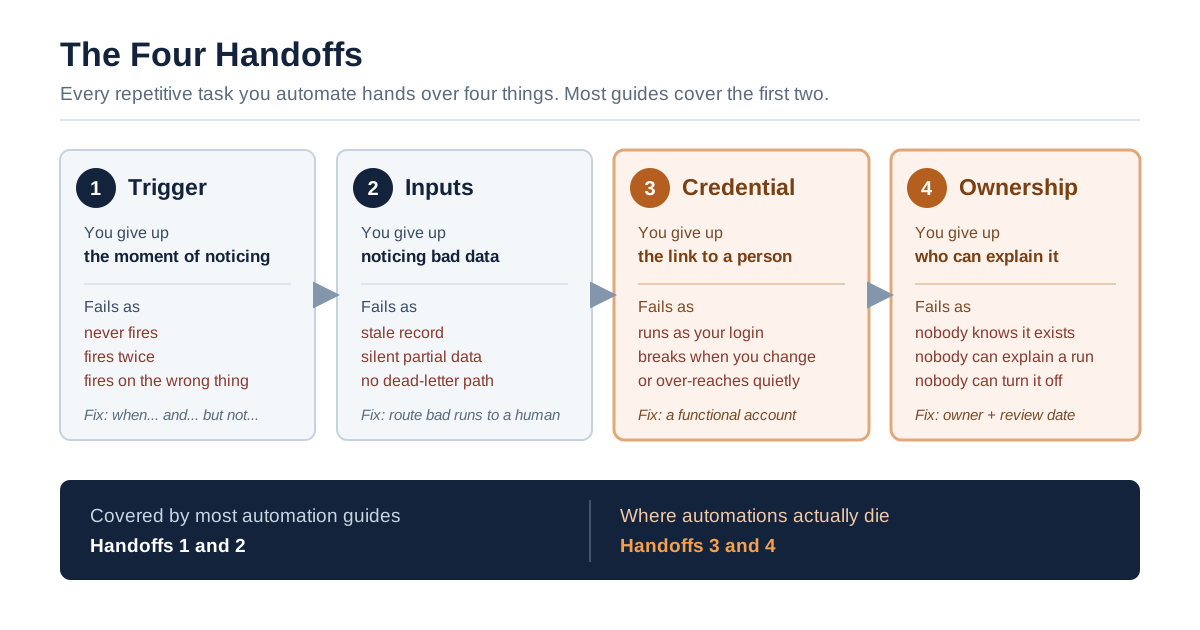
The Four Handoffs. Most guides cover the first two. Automations die at the third and fourth.
What Counts as a Repetitive Task
Before you can automate repetitive tasks you have to be able to name one. A repetitive task is work that starts from a predictable signal, follows the same path every time, and produces an output whose correctness you can check without thinking hard. Filing supplier invoices into the right folder qualifies. Deciding whether to extend a supplier's payment terms does not. The signal matters more than the tedium: if you cannot say what makes the task start, you cannot automate it, however boring it is.
The conventional test is that a task is automatable when it "needs little judgment." That test is popular because it is easy to apply and it is wrong often enough to be expensive. Plenty of low-judgment work touches systems of record. A script that files invoices also writes to the accounting system, and a script that tidies a CRM also deletes fields. The judgment content is near zero. The consequence of getting it wrong is not.
We use a two-part test instead, and it is the spine of everything below.
| Test | Question | Why it beats "needs little judgment" |
|---|---|---|
| Recurrence | Does a nameable event start this task, at least weekly? | Frequency is what pays for the build. A monthly task rarely repays two hours of setup. |
| Reversal cost | If it runs wrong fifty times before anyone notices, how long does the cleanup take? | This is the number that decides whether the automation runs unattended, runs behind an approval gate, or does not get built. |
Read the second row again, because it reframes the whole exercise. You are not sorting tasks into "boring enough to automate" and "too important to automate." You are sorting them by how expensive the undo is. A task can be extremely dull and still belong behind a human approval step, because the dull part writes to a ledger that an auditor will read.
What a repetitive task is not
Three things get mislabelled, and each one wastes a weekend.
A frequent but variable task is not repetitive. Answering customer emails happens forty times a day and follows no stable path; the shape of the reply depends on what was asked. Automating the retrieval and the draft is reasonable. Automating the send is not, at least not first.
A broken manual process is not a repetitive task, it is a symptom. If you reconcile two spreadsheets every Monday because two teams keep separate copies of the same list, the automation you build will make a data-integrity problem run faster and more quietly. Fix the duplicate list.
A one-person workaround is not repetitive at the company level. It repeats for you. If the person beside you does the same job a different way, you have a process disagreement wearing a script's clothing, and the automation will quietly encode your version as the company's.
The Two-Week Repetition Ledger
The cheapest way to automate repetitive tasks badly is to open a builder on day one. Spend two weeks filling in a ledger instead. The prerequisite is not a tool, a budget or a mandate. It is a written record of what you actually repeat, because memory systematically over-reports the annoying and under-reports the frequent. Two weeks is the shortest window that catches both the daily and the weekly rhythms, and it is short enough that people finish it.
We have not run this ledger ourselves in a controlled trial, and this article does not report a first-hand time-saved measurement. The structure below is assembled from documented failure modes and published research, not from our own logged experiment. Treat the columns as a checklist that closes known gaps, not as a validated productivity method.
Prerequisites
You need five things before day one. None of them cost money.
- A single sheet with seven columns, listed below. A spreadsheet is fine; a notebook is fine.
- A capture habit. Log the row when the task ends, not at the end of the day. Retrospective logging is where the frequency data goes bad.
- Read access to your own account settings in the apps involved, so you can answer the credential column honestly.
- The name of whoever administers those apps. Usually IT, sometimes an ops lead, occasionally nobody, which is itself a finding.
- Permission to change the process, not just to script it. If you cannot change the process, you are automating someone else's decision and you should say so out loud.
The seven columns
| Column | What goes in it | Why it earns its place |
|---|---|---|
| Task | A verb and an object: "file supplier invoice" | Forces one task per row instead of a blurry "admin" |
| Trigger | The event that starts it: "invoice PDF lands in shared inbox" | If this cell is empty, the row is not automatable yet |
| Times per fortnight | A count, not an estimate | Multiplies against minutes to give the real prize |
| Minutes each | Timed once, then reused | Guards against the 30-second task that felt like ten minutes |
| Writes to | Every system the task changes, including "nothing" | This is the blast radius, in plain language |
| Runs as | The login the work currently happens under | The column nobody thinks to add, and the reason automations die |
| Undo time | How long to reverse fifty bad runs | Turns "risky" into a number you can compare across rows |
The sixth column is the unusual one. For manual work the answer is always "me," which feels too obvious to write down, and that is exactly the point. Writing it down makes visible the fact that when you automate the task, "me" quietly becomes a standing, unattended permission to act on those systems. The whole second half of this guide follows from that one cell.
What the fortnight usually reveals
Three patterns show up often enough to predict.
The long tail beats the headline. People expect the ledger to be dominated by one hated task. It usually is not. Fifteen two-minute tasks that each recur daily outweigh the forty-minute monthly report by a wide margin, and the two-minute tasks are far cheaper to automate.
The trigger column is half empty on the first pass. That is useful information rather than a failure. A blank trigger cell means the task starts because you remembered, and an automation cannot remember. Filling that cell, by adding a label, a shared inbox, a status field or a scheduled time, is often the whole automation.
The "runs as" column has more than one name in it. Shared logins, a colleague's saved connection, a service account somebody set up in 2022 and left. Every distinct name is a separate thing that can break independently.
If two weeks is too long
The most common objection to this section is fair: two weeks of logging before you are allowed to build anything is how good intentions die, and plenty of people have a ledger they abandoned on day three. If that is you, run the one-day version. Pick the single task you are most tired of, log it for one day, and fill in all seven columns for that row only, including "runs as" and "undo time." Build it. Then start the fortnight ledger while the first automation is in its shadow week, so the logging happens alongside something visibly useful rather than instead of it.
What you lose by skipping the fortnight is the ranking. You will automate the most annoying task rather than the most valuable one, and those are rarely the same. That is an acceptable trade for a first build and a bad one for your fifth.
Scoring the Ledger: Which Row Goes First
Score each row as (times per fortnight × minutes each) ÷ undo time in minutes, then automate the highest score whose undo time is under sixty minutes. The formula deliberately punishes rows that are expensive to reverse, so the first automation you ship is one where a mistake costs an afternoon at worst.
Here is a filled scoring pass on a small operations team's ledger. The numbers are illustrative, not measured by us.
| Task | Times / fortnight | Minutes each | Fortnightly minutes | Undo time | Score | Verdict |
|---|---|---|---|---|---|---|
| File supplier invoice into folder + log row | 40 | 3 | 120 | 15 min | 8.0 | Automate first |
| Copy new signup into the CRM | 26 | 4 | 104 | 20 min | 5.2 | Automate second |
| Post weekly status summary to channel | 2 | 25 | 50 | 5 min | 10.0 | Low prize, do third |
| Chase overdue invoices by email | 18 | 5 | 90 | 240 min | 0.4 | Gate it |
| Approve discount above 15% | 6 | 6 | 36 | 480 min | 0.1 | Do not automate |
| Reconcile two divergent spreadsheets | 10 | 12 | 120 | 90 min | 1.3 | Fix the process first |
Two rows deserve comment. Chasing overdue invoices scores badly not because the task is hard but because sending fifty wrong dunning emails to customers takes days to unwind in relationships, not minutes in a database. It belongs behind an approval gate, not off the list. Approving discounts is a decision with a commercial consequence and a person's name attached; automating it moves accountability somewhere nobody can find it.
The status summary is the interesting case. High score, small prize. That is what a ratio does when the denominator is tiny. Read the raw fortnightly minutes alongside the score, always. The score ranks safety-adjusted value, the raw minutes tell you whether the win is worth an afternoon.
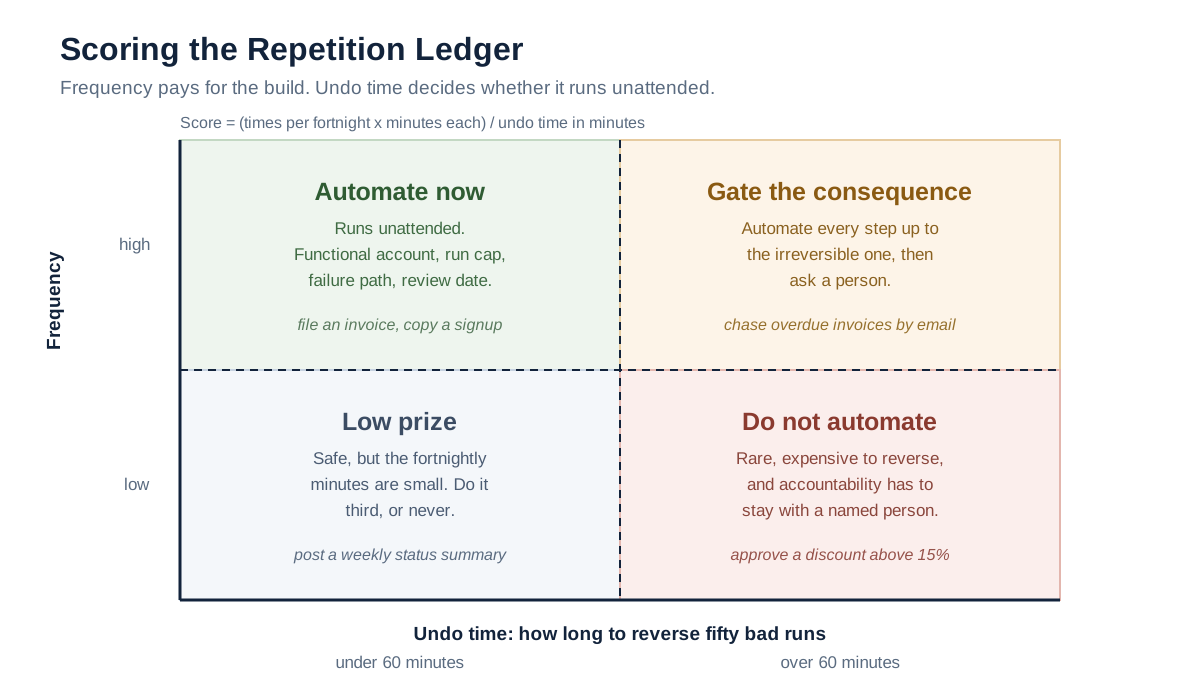
Frequency pays for the build. Undo time decides whether it runs unattended.
The Four Handoffs Every Automation Has to Survive
To automate repetitive tasks is to hand over four different things, and guides tend to cover the first two. Every automation that quietly stopped working, or kept working when it should not have, failed at one of these four points. We call it the Four Handoffs, and it is the checklist we would use on any repetitive task automation regardless of the tool or the integration pattern behind it.
| Handoff | What you hand over | What it looks like when it fails |
|---|---|---|
| 1. Trigger | The decision to start | The automation never fires, or fires on the wrong events, or fires twice |
| 2. Inputs | Getting the data in front of the work | Wrong file, stale record, silent partial data, no dead-letter path |
| 3. Credential | The authority to act on systems | The automation runs as a person; when that person's access changes, it breaks or over-reaches |
| 4. Ownership | Accountability for what it does | Nobody knows it exists, nobody can explain a run, nobody can turn it off |
Handoff one: the trigger
You are giving up the moment of noticing. That moment did more work than you think. It filtered. When you filed invoices by hand you skipped the duplicate, ignored the one from the supplier you already argued with, and paused on the one with the odd amount. A trigger does not filter, so the filtering has to become an explicit condition or it disappears.
Practical rule: write the trigger as a sentence with a "when… and… but not…" shape. "When a PDF arrives in the invoices inbox, and the sender is on the approved supplier list, but not if an invoice with the same number is already filed." Most trigger bugs are the missing "but not."
Handoff two: the inputs
You are giving up the ability to notice bad data. Half the automations that appear to work are producing wrong output on a small percentage of runs that nobody checks. Decide up front what happens when an input is malformed, missing or ambiguous. "The run fails silently" is a decision, just a bad one. Route those runs somewhere a human will look.
Handoff three: the credential
You are giving up the link between an action and a person. This is the handoff that most guides skip entirely, and it is covered in its own section below because it is where the long-run failures come from.
Handoff four: ownership
You are giving up the guarantee that someone can explain what happened. On day one you are the owner by default and it feels unnecessary to write it down. On day four hundred, when the automation posts something odd into the finance system and you have changed roles, "who owns this" is the only question anyone will ask. Write down an owner, a reviewer, and a review date at build time. It takes ninety seconds and it buys more than anything else in this guide.
Handoff Three: What Your Automation Actually Runs As
When you automate repetitive tasks, the automation needs to act on the same systems you do, so it borrows your authority. In most no-code builders that means it stores an OAuth connection tied to your account. The automation is now a standing permission to act as you, running unattended, for as long as that connection remains valid, and it stops being valid the moment your account changes.
Microsoft documents this failure mode explicitly for Power Automate. "An orphaned flow is a flow that no longer has a valid owner. These flows can fail if they use connections tied to that user account," reads Microsoft's troubleshooting guidance, updated 11 June 2026. The remediation is administrative archaeology: an admin scans an environment for flows with no owner listed, or loops through every flow in PowerShell checking whether any listed owner still exists in the directory. That entire procedure exists because personal credentials were used to run company work.
Zapier's answer has the same shape from the other end. Its documentation for removing a member from a Team or Enterprise account states that "you can transfer ownership of their Zap workflows and app connections to any other user in your account" (Zapier Help), which is a good feature and also an admission that the default binds automations to individuals. The Community poster quoted at the top had paid for a plan upgrade purely to unlock the transfer, and still could not move the automations out of the original organisation.
The scale of the borrowed-authority problem
This is not a niche concern for large enterprises. Machine identities now outnumber human ones by 109 to 1 across 2,930 surveyed cybersecurity leaders, according to Palo Alto Networks' 2026 Identity Security Landscape, which also reports that 9 in 10 organisations experienced a successful identity-related breach in the previous twelve months. The direction of travel is steep: the same research programme, published as CyberArk's 2025 Identity Security Landscape the year before, put the ratio at 82 to 1 and found that 42% of machine identities held privileged or sensitive access while 68% of respondents said their organisations lacked identity security controls for AI.
Credentials remain the connective tissue of real incidents. In the Verizon 2026 Data Breach Investigations Report, exploited vulnerabilities became the leading initial access vector at 31% of breaches, displacing stolen credentials for the first time in the report's nineteen-year history, but credential abuse still appears somewhere in 39% of breaches overall, and 62% of breaches involved a human element, as summarised by Abnormal AI's DBIR analysis. The same edition records shadow AI as the third most common non-malicious insider action in data-loss-prevention telemetry, a fourfold increase year on year, reported by Help Net Security. Push Security's read of the same report adds that 45% of employees are now regular AI users on corporate devices and 67% of those use non-corporate accounts; we have found that pair of figures in only one secondary source, so treat them as indicative rather than settled.
The gap that explains everything
Two official measurements, taken months apart, describe the same country and disagree by more than double.
| Measurement | Figure | Source |
|---|---|---|
| Share of US firms that had adopted AI, end of 2025 | ~18% | Federal Reserve FEDS Note, 3 April 2026 |
| Share of US businesses reporting AI use, Dec 2025 – May 2026 | 17%–20% | US Census Bureau BTOS, 26 May 2026 |
| Share of the workforce reporting work-related generative AI use, Nov 2025 | ~41% | Federal Reserve FEDS Note, 3 April 2026 |
| Share of the labour force at firms that have adopted AI | ~78% | Federal Reserve FEDS Note, 3 April 2026 |
Roughly a fifth of firms say they use AI. Roughly two-fifths of workers say they use it for work. That gap is not a measurement error, and the Fed note by Jeffrey S. Allen is careful about why the units differ: firm counts are dominated by very small businesses, worker counts are not. But read from where you are sitting, the gap says something plain: a large amount of automation is happening one person at a time, on individual accounts, below the level at which the company records it. Each of those is a handoff-three problem waiting to happen.
A recorded panel from OASIS Security in January 2026 covers the provisioning side of this in detail: why the moment a machine identity is created, rather than the moment it is audited, is where governance has to start. It runs an hour and is worth it if you administer these systems rather than just build in them.

What to do instead, in ascending order of effort
You do not need an identity platform to fix handoff three on your first automation. You need to move one rung up this ladder.
| Rung | What it means | When it is enough |
|---|---|---|
| 0. Personal login | The automation uses your OAuth connection | Never, for anything that writes |
| 1. Documented personal login | Same, but the owner, systems and revocation route are written down | A read-only automation you will retire within a quarter |
| 2. Shared functional account | A named account like ops-automation@, owned by a team, with its own MFA | Most small-team automations that write |
| 3. Scoped service credential | A dedicated credential limited to specific actions, with an expiry date | Anything touching finance, customer data, or external communication |
| 4. Brokered credential | The automation never holds the secret; a broker issues short-lived access per run | Multi-step automation across several systems, or anything with an agent in it |
Most teams reading this should be moving from rung 0 to rung 2 this month. That is a real improvement and it costs one account.
One important caveat, and it comes straight from the people who administer these systems. Create the functional account with your app administrator, not around them. A shared account nobody in IT knows about is not an improvement on a personal login; it is the same problem with a worse name on it, and it is exactly the sprawl an identity team is trying to reduce. Plenty of organisations also prohibit shared accounts outright, for good reasons. A shared credential breaks the link between an action and a person just as thoroughly as borrowing yours does, and it is harder to attribute afterwards.
If your policy forbids rung 2, the honest path is to go to rung 3 through IT: ask for a dedicated service credential scoped to the specific actions on your card, with an expiry. That request is much easier to grant when you arrive with the card filled in, because you are asking for a named, bounded, time-limited thing rather than "access to SharePoint." If neither is available yet, stay at rung 1, a documented personal login, read-only, with a retirement date, and be explicit that it is an interim state rather than the design.
Pick the Mechanism, Not the Brand
There are four mechanism families you can use to automate repetitive tasks, and the choice between them is mostly determined by where the work already lives, not by feature lists. We are deliberately not ranking vendors here; our earlier analysis of AI workflow tools does that job, and it argues you should choose for the failure mode rather than the demo.
| Mechanism | Best when | Default identity | What breaks it |
|---|---|---|---|
| Native in-app automation (rules in your CRM, inbox, project tool) | The whole task lives inside one product | Usually the record or the workspace, sometimes the creator | Vendor changes the rule engine; logic hidden from anyone outside the app |
| Connector platform (trigger-and-action, no-code) | The task moves data between two or three apps | The creator's stored connection | Owner leaves; a connection expires; an API version changes |
| Script plus scheduler | The task needs real logic, loops, or an API with no connector | Whatever account the script's token belongs to | Nobody else can read it; the token has no expiry; it lives on one laptop |
| AI agent | The step in the middle requires reading unstructured input and deciding | Usually a stored key plus whatever tools it is given | Non-determinism; excessive scope; no record of why it chose an action |
Two practical notes.
No-code automation is not no-consequence automation. The phrase describes who can build it, not what it can do. A connector platform's whole value is that it can write to the systems you care about, so the governance question arrives at the same time as the convenience.
Start where the task already lives. If eight of your ledger rows sit inside one CRM, the native rules in that CRM will beat a connector platform on reliability, cost and support, even though they are less impressive. Reach for a connector platform when the task genuinely crosses a boundary.
A word about the oldest mechanism of all. Recorded macros and Excel formulas still automate a large share of repetitive office work, and they are a legitimate answer for a task that never leaves one spreadsheet. They fail the identity test differently: the macro runs as whoever opens the file, so its scope is the opener's, and there is no run history at all. If a spreadsheet macro is writing anywhere outside its own workbook, treat it as a script and give it the same card as everything else. Vendor templates and prebuilt integration recipes have the same caveat. A template configures the trigger and the action for you, never the identity, the owner or the failure path.
Automate the Step, Gate the Consequence
The useful cut is not between tasks you automate and tasks you do not. It is between the step, which you automate freely, and the consequence, which you gate when it is expensive to reverse. Reading, fetching, classifying, drafting and preparing are steps. Sending, paying, deleting, publishing and granting are consequences.
Apply this rule: gate any action that writes to a system of record, communicates externally, moves money, or changes permissions, unless you can undo fifty of them in under an hour. Everything else runs unattended.
| Category of repetitive task | Automate freely | Gate the consequence |
|---|---|---|
| Communication and admin | Triage, label, summarise, draft, prepare meeting notes | Sending an external email; accepting a meeting on someone's behalf; anything to a customer |
| Moving data between apps | Read, transform, validate, stage | The write to the source-of-truth record, especially updates and deletes |
| Project and workflow routing | Create tasks, set due dates, assign owners, move statuses | Closing an item, notifying a client, changing a contractual date |
| Reporting and documents | Pull, join, compute, render a draft | Distribution outside the team; anything numbers-based going to a board or a regulator |
That table is where our reframing of the standard four-category taxonomy lands. The categories are useful; what they should sort on is the consequence, not the tedium.
An approval gate only counts as a control if a reviewer can realistically say no, with enough context, enough time, and few enough items to look at. Our earlier analysis of human-in-the-loop automation works through when approval is real control and when it degrades into a click-through, which is the failure mode you should expect once volume rises.
OWASP frames the same risk from the security side. Its Top 10 for LLM applications defines excessive agency as the vulnerability that lets damaging actions be performed in response to unexpected, ambiguous or manipulated model output, and names three root causes (excessive functionality, excessive permissions, and excessive autonomy) with mitigations that include limiting extensions to the minimum necessary and requiring human approval for high-impact actions (OWASP LLM06). Read "extension" as "the things your automation is allowed to touch" and the guidance applies to a no-code automation just as well as to an agent.
Build It: Nine Steps From Ledger Row to Running Automation
Take one scored row and run these nine steps in order. The order matters: steps 5 through 8 are the ones people skip, and they are the ones that determine whether the automation is still trusted next year. Budget ninety minutes for a first build, of which perhaps twenty-five go on the identity and failure-path work.
- Write the trigger as a sentence in "when… and… but not…" form. If you cannot finish the sentence, the row is not ready; go back and add the label, status field or shared inbox that makes the start point explicit.
- List the inputs and where each comes from. For each one, write what a bad version looks like. An invoice with no supplier number. A signup with a malformed email. This list becomes your validation conditions.
- Mark the judgment step, if there is one. Most repetitive tasks have exactly one: the moment where a human currently reads something and decides. Our earlier analysis of AI automation examples argues that this single step is what AI actually contributes; everything either side of it is plumbing. If there is no judgment step, do not use a model. Rules are cheaper, faster and auditable.
- Write the consequence line. One sentence: what this automation changes in the world. "It moves a file and appends a row" is a different animal from "it emails a customer."
- Choose the identity. Pick a rung from the ladder above. At minimum, create a functional account rather than using your own. Give it its own MFA and record where the recovery codes live.
- Scope the credential to the actions you listed in step 2, not to everything the connector offers. Most platforms request broad scopes by default because it makes setup easier. Narrow them once and you never think about it again.
- Set an owner, a reviewer and a review date. Owner is the person who fixes it. Reviewer is the person who checks it still should exist. Review date is a real calendar entry, ninety days out for a first build.
- Design the failure path before the happy path. Where does a bad run go? Who sees it? What is the maximum number of runs before it stops itself? A run cap is the cheapest safety device in automation: if the normal volume is forty a fortnight, stop at eighty.
- Run it in shadow mode for one week. It does everything except the consequence. It prepares the file move, drafts the email and stages the record, then writes what it would have done to a log you read. Compare against what you did manually. Then turn on the consequence.
Step 9 is where the two-week ledger pays for itself a second time, because you already know the expected volume and can spot a trigger that fires five times too often on day one.
Shadow mode is the step people cut for time, and there is one case where cutting it is defensible: when the consequence is fully reversible in minutes, affects nothing outside your own team, and reaches no customer. Filing a document into a folder qualifies. Anything that sends, pays, deletes or grants does not, and for those the shadow week is cheaper than the apology.
Common variations
If two people do the task differently, do not automate until you agree which way is right. The automation will become the definition of the process whether you intended that or not.
If the task spans a team boundary, get the owner of the destination system to agree in writing before you build. A write into someone else's system without their knowledge is how automations get switched off in a hurry.
If the volume is spiky, set the run cap against the peak, not the average, or you will disable your own automation during month-end.
Worked Example: One Complete Automation Card
Here is one full example, carried end to end. The task is filing supplier invoices, the top-scoring row from the ledger table above. This is a constructed example built to show the artifact, not a customer engagement.
Ledger row
| Column | Value |
|---|---|
| Task | File supplier invoice into folder and log a row |
| Trigger | Invoice PDF arrives in invoices@ shared inbox |
| Times per fortnight | 40 |
| Minutes each | 3 |
| Writes to | SharePoint folder; invoice tracking sheet |
| Runs as | Me (personal Microsoft 365 account) |
| Undo time | 15 minutes (move files back, delete rows) |
Score: (40 × 3) ÷ 15 = 8.0. Undo time under sixty minutes. This one gets automated first.
The Automation Card
| Field | Entry |
|---|---|
| Name | Supplier invoice filing |
| Trigger sentence | When a PDF attachment arrives in invoices@, and the sender domain is on the approved supplier list, but not if an invoice with the same supplier + invoice number already exists in the tracking sheet |
| Inputs | PDF attachment; sender address; extracted supplier name; extracted invoice number; extracted total |
| Bad input looks like | No attachment; attachment is not a PDF; no invoice number found; total does not parse as a number; supplier not on the list |
| Judgment step | Extracting supplier name and invoice number from a PDF whose layout varies by supplier. One step. Everything else is rules. |
| Consequence line | It copies a file into a folder and appends one row to a tracking sheet. It does not pay anything and it does not email anyone. |
| Identity | ops-automation@ functional account (rung 2), own MFA, recovery codes in the team password vault |
| Scope | Write to /Finance/Invoices/2026/ only. Append-only on the tracking sheet. No delete permission anywhere. No mailbox send permission. |
| Owner | Operations lead |
| Reviewer | Finance manager |
| Review date | 90 days from go-live, in the shared calendar |
| Failure path | Any run that fails validation moves the message to an invoices-exceptions folder and posts one line to the ops channel. No silent failures. |
| Run cap | 80 runs per fortnight, then pause and alert |
| Gate | None. The consequence is a file copy and an append, both reversible in 15 minutes. |
| Shadow week result | Compare the automation's proposed filings against manual filings for five working days before enabling the copy |
| Retirement condition | If the finance system gains native invoice ingestion, this automation is deleted, not left running |
Two fields there do the unusual work. Scope is written as a list of what the credential may do, not what the automation intends to do; that distinction is the whole difference between a permission and a promise. Retirement condition exists because automations almost never get deleted, and a company with two hundred live automations and no retirement discipline has an inventory problem that no tool solves.
Now change one thing and watch the card change. Suppose the same automation also emails the supplier a confirmation. The consequence line becomes external communication, the undo time jumps from fifteen minutes to "you cannot unsend forty emails," and the Gate row changes from None to a batched daily approval. Same task, same tool, different card, because the consequence moved.
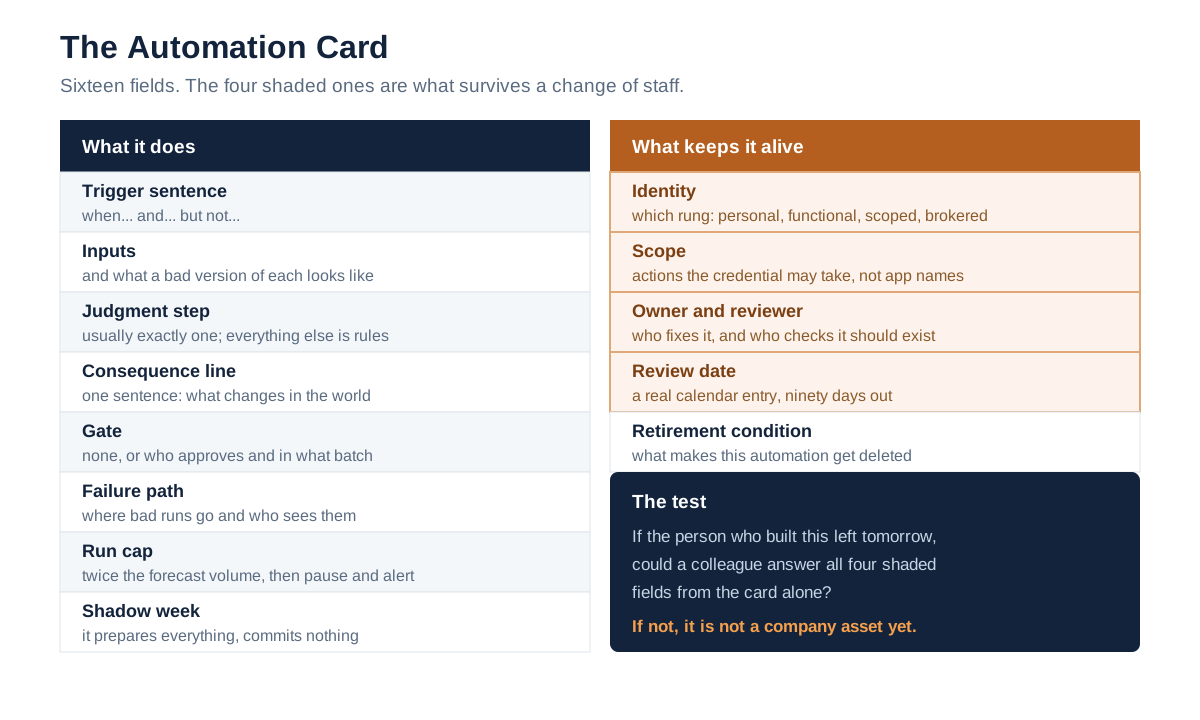
The Automation Card. The four shaded fields are the ones that survive a change of staff.
Eleven Ways People Get This Wrong
These are the recurring ways attempts to automate repetitive tasks go wrong. Most are recoverable. The last three are the expensive ones.
- Automating a broken process. The reconciliation you run every Monday exists because two systems disagree. Automating it hides the disagreement and makes it permanent.
- Starting with the most complex chain. The first build should be one trigger, one consequence, no branching. Ambition on build one is why the ledger's other nineteen rows never get automated.
- No failure path. Silent failure is the default in most builders. Decide where bad runs go before you enable anything.
- Estimating instead of counting. Frequency estimates are wrong in both directions. The two-week ledger exists precisely because your memory is not a data source.
- Choosing the mechanism first. Picking a connector platform before writing the trigger sentence means bending the task to the tool.
- Optimising for the demo. The demo path is the happy path. Design against the malformed input, the duplicate, the retry storm.
- No run cap. An automation with no ceiling will, given one bad trigger condition, do the wrong thing several hundred times at machine speed.
- Confusing "no-code" with "no review." Who can build it and what it is allowed to do are separate questions. The second one belongs to whoever owns the destination system.
- Leaving it on your personal login. The most common mistake in this list and the one with the longest tail. It works perfectly until your role changes, and then it either dies or keeps running with authority nobody has reviewed.
- No owner and no review date. An automation without a named owner is not a company asset, it is a rumour that writes to your database.
- Never retiring anything. Automations accumulate. Without a retirement condition on the card, year three arrives with a hundred running jobs, and no one can say which ones still matter.
Mistakes nine through eleven are the same mistake at different time scales: treating an automation as a script you wrote rather than as a thing that acts on the company's systems without supervision.
What Changes When It Is an AI Agent, Not a Rule
Using a model to automate repetitive tasks, rather than a rule, changes three properties at once. The path stops being predictable, the permissions usually get wider, and the reason for each action stops being readable from the configuration. All three of your controls need to tighten, not loosen, at exactly the moment the technology feels more capable.
The market data supports caution. Gartner predicted in a press release dated 25 June 2025 that over 40% of agentic AI projects will be cancelled by the end of 2027, citing escalating costs, unclear business value and inadequate risk controls, and estimated that only about 130 of the thousands of self-described agentic AI vendors are genuine. Senior Director Analyst Anushree Verma's framing in that release is worth holding onto for a guide about personal repetitive work: organisations should "focus on enterprise productivity, rather than just individual task augmentation." Individual task augmentation is precisely what a personal automation is until somebody promotes it.
Meanwhile the incident count is climbing. Stanford HAI's 2026 AI Index Report documents 362 AI incidents in 2025, up from 233 in 2024, roughly 55% higher year on year, alongside organisational AI adoption reaching 88%. Adoption and incidents are rising together, which is what you would expect when capability outruns oversight.
Three adjustments, then, when the middle step becomes a model.
Narrow the tools, not the prompt. A model that cannot call the delete endpoint cannot be talked into deleting. Prompt-level restrictions are advisory; scope-level restrictions are enforced. This is OWASP's "minimise extensions" mitigation in plainer words.
Log the inputs and the chosen action, not just the output. With a rule, the configuration is the explanation. With a model, you need a record of what it saw and what it decided, or you cannot answer a question about a run three weeks later. The EU AI Act makes a version of this a legal requirement for high-risk systems: Article 12 requires that such systems "technically allow for the automatic recording of events (logs) over the lifetime of the system" (EU AI Act, Article 12). Most repetitive-task automation is nowhere near the high-risk category, but the record-keeping habit is worth borrowing before anyone makes you.
Give it a budget, not just permissions. Model calls cost money per run and a loop can spend a lot of it quickly. Our earlier analysis of the autonomy budget works through how to bound what an agent may spend and how far it may go before it must ask.
If you want the general framework rather than the automation-specific version, NIST's AI Risk Management Framework organises this work into four functions (Govern, Map, Measure and Manage) and was released on 26 January 2023 for voluntary use. The Govern function is the one that maps to owner, scope and review date on your card.
Six Numbers That Show It Is Working
Measure six things, monthly, on one dashboard screen. Time savings is the number everyone reaches for and the least reliable of the six, because it is estimated rather than observed, which also makes it the weakest basis for an ROI claim.
| Number | How to get it | What a bad reading means |
|---|---|---|
| Runs per period | The platform's run history | A count far above the ledger's forecast means the trigger is too broad |
| Success rate | Successful runs ÷ total runs | Below ~95% and someone is doing manual cleanup you have not counted |
| Exception volume | Items landing in the failure path | Rising exceptions usually mean an upstream format changed |
| Manual touches after the run | Count them for one week per quarter | If people fix the output every time, the automation moved work rather than removing it |
| Time to disable | Stopwatch: how long from "stop it" to stopped | Over five minutes means you have a control problem, not a speed problem |
| Automations with a valid owner | Owners still employed ÷ total automations | Anything under 100% is your orphan count |
Two of these deserve a note on how to read them. Success rate is not an error rate: a run can succeed technically and still produce a wrong result, which is what the manual-touches count is for. A rising exception volume with a flat success rate almost always means an upstream format changed and your validation caught it, which is the system working. Set one notification on exception volume and none on the others; alerting on all six trains people to ignore all six.
The last two are unusual and both are cheap. Time to disable is worth rehearsing once, deliberately, on a live automation. The number of teams who discover they cannot quickly stop something is higher than you would guess, because the off switch lives in an account somebody else controls. Automations with a valid owner is the metric that catches the Microsoft orphaned-flow scenario before an admin has to go looking.
Those last two are also the pair that survives contact with a manager who wants a business case. Recovered minutes are the benefit and they are easy to argue. Time to disable and valid-owner coverage are the risk side, and they are the two numbers that turn "I automated some things" into a position you can defend in a review, because the alternative reading of an unowned automation is an unattended permission the company did not know it had granted.
When One Person's Automations Become a Company's
Everything above helps one person automate repetitive tasks with a handful of builds, and none of it needs a platform. The change arrives at roughly the point where the number of live automations exceeds the number of people who can name them all, usually somewhere between fifteen and thirty. Past that line, the per-automation card is still right and the manual bookkeeping around it stops holding.
This is the layer LeapForce builds: one controlled place where every AI tool, connector, model and agent gets an identity, a scope, a budget and a record. In our platform, non-human identities are first-class: every agent carries a named owner, a scope and an expiry, so an unowned automation is not a thing that can exist. Connectors are vetted once by IT and scoped at the action level rather than the app level, which is the difference between "can use SharePoint" and "can write to one folder." Observability and audit covers the record of what ran, and what was refused. Our rollout model for the gateway is deliberately gradual, and it is the same sequence we would recommend for automation governance generally: observe first, enforce second, optimize third. You cannot write a sensible policy about automations you have not yet counted.
To be honest about the fit: LeapForce is not a no-code automation builder, and nothing here replaces the connector platform or the scripts you are using to actually build the automations from your ledger. It is the layer underneath them. If you have three automations, a shared functional account and a written card will serve you better than any platform, ours included. Our earlier analysis of turning personal prompts into owned assets covers the promotion path in more detail, and the non-human identity model sets out owner, scope and expiry as a concrete specification rather than a slogan.
Where This Guidance Is Uncertain
Four honest caveats, and one thing we could not verify.
We have not run the two-week ledger as a measured experiment. No time-saved figure in this article is our own observation. The ledger's columns are assembled from documented failure modes (orphaned flows, credential sprawl, missing failure paths) rather than from a controlled trial, and a reader who runs it and finds the fortnight too short or too long has better data than we do.
The scoring formula is a heuristic, not a model. Dividing frequency-weighted minutes by undo time produces a ranking that behaves sensibly at the extremes and can mislead in the middle, particularly for low-volume tasks where the ratio inflates a small prize. Read the raw minutes alongside the score. We chose the formula for legibility over precision, and a team with real incident data should replace our undo-time estimates with their own.
The sixty-minute threshold for unattended running is a judgment call. It is not derived from published research. Sixty minutes is short enough that a bad batch is an inconvenience rather than an incident, and long enough that most file-and-log automations qualify. A regulated finance team should set it far lower; a marketing team scheduling social posts can reasonably set it higher.
Vendor identity defaults change. The "default identity" column in the mechanism table reflects how these products behaved when we checked in July 2026. Connector platforms have been steadily adding service-account and organisation-owned connection options, so verify against current documentation rather than trusting a table in a blog post.
One source class we could not verify independently. We could not reach Reddit or Glassdoor-style aggregators through any of our fetch methods, so the practitioner voices in this piece come from the Zapier Community and from vendor support documentation rather than from the wider forums where people complain about this most freely. That skews the evidence toward situations that produced a support ticket, and away from the automations that simply stopped and were never mentioned again. The pair of figures on employee AI use, 45% regular users and 67% on non-corporate accounts, appears in one secondary analysis of the Verizon report and we could not confirm it in the primary document, which is why it is flagged rather than headlined.
Frequently asked questions
A repetitive task is work that starts from a predictable trigger, follows the same path each time, and produces output you can check quickly. The usual definition adds "needs little judgment," which is where it goes wrong: plenty of low-judgment work writes to systems of record and is expensive to reverse. Use two tests instead. Does a nameable event start it at least weekly, and how long would it take to undo fifty bad runs. The first decides whether automating pays. The second decides whether it can run unattended.
The easiest first automation has three properties: it happens daily, it moves or files something rather than sending or paying, and you could reverse a fortnight of mistakes in under an hour. File routing, saved-search alerts, and copying a new record from one system into another all qualify. Avoid anything that emails a customer on run one, however simple it looks. External communication cannot be undone, and it turns a small build error into an apology.
No. You can automate repetitive tasks with connector platforms and native in-app rules, which cover most of what a two-week ledger turns up, and no-code automation handles trigger-and-action work without a line of code. Recorded macros and spreadsheet formulas still cover a surprising amount of it too. What you do need is the ability to write the trigger as a precise sentence and to answer the identity question: what account this runs as. Coding skill mostly changes which mechanism you pick, not whether the automation survives; the automations that fail long-term fail on ownership, not syntax.
Budget ninety minutes for a first simple build, plus a one-week shadow run before you enable the consequence. About sixty-five of those minutes go on the trigger, the inputs and the actual wiring; the remaining twenty-five go on the identity, scope, owner, review date and failure path. That last block is the part that people skip to finish in forty minutes, and it is also the part that determines whether the automation is still trusted a year later.
There is no single best tool to automate repetitive tasks, and the question is usually the wrong one. The mechanism matters more than the brand. If the task lives entirely inside one product, use that product's native rules. If it crosses two or three apps, use a connector platform. If it needs real logic or an API with no connector, use a script on a scheduler. If the middle step requires reading unstructured input and deciding, add a model to that one step only. Our analysis of AI workflow tools argues for choosing on failure behaviour rather than feature lists.
It depends almost entirely on what identity the connection uses and how narrowly it is scoped, not on the platform's marketing. Most builders default to storing an OAuth connection tied to your personal account with broad scopes, which means the automation can do anything you can do, unattended, indefinitely. Move to a functional or service account, narrow the scopes to the specific actions the automation performs, and confirm you can revoke access in one step. Credential abuse still appears in 39% of breaches in the Verizon 2026 DBIR, so the concern is proportionate.
They either break or keep running with authority nobody is reviewing, and which one you get depends on the platform. Microsoft's guidance for Power Automate documents the first outcome plainly: a flow with no valid owner can fail if it uses connections tied to that user account, and admins must scan for orphaned flows and reassign them. Zapier supports bulk ownership transfer during offboarding. The fix on both is the same and it happens at build time: a functional account, a named owner, and a documented revocation route.
Split it. A branching process is usually several small automations plus one decision, and the decision is where a human or a model belongs. Automate each straight segment separately, route the branch point to a person or a classifier, and connect the segments through a shared status field rather than a single long chain. Long conditional chains are the hardest thing to debug in any builder, and they fail in ways that are difficult to attribute to a step.
Calculate ROI by comparing fortnightly minutes recovered against build time plus maintenance, and count manual touches after the run rather than trusting a time-savings estimate. Take the ledger figure, times per fortnight multiplied by minutes each, as the ceiling, then subtract the minutes people still spend fixing output. Over one quarter, an automation that recovers 120 minutes a fortnight repays a 90-minute build several times over. An automation that recovers 120 minutes but generates 40 minutes of cleanup has moved the work, not removed it.
Refuse anything whose worst outcome cannot be reversed and whose accountability has to stay with a named person: approving spend or discounts, hiring and firing decisions, anything with a legal or regulatory consequence, and any communication to a customer about a problem. Also refuse, for now, any task where two colleagues do it differently. Automating it silently makes one version official. These are not permanent bans. They are things that should stay behind an approval gate rather than running unattended.
Adoption fails for two reasons, and both are fixable at build time. The first is that people cannot see what it did, so run a visible log they can check without asking you. The second is that they do not know how to stop it, which makes trusting it irrational. Publish the automation's card (trigger, consequence, owner, how to disable) somewhere the team already looks. An automation nobody can explain or halt is one that people quietly work around.
Five questions, and they take about ten minutes. What identity does it run as, and is it a person's? What exactly can that credential do, in actions rather than app names? Who owns it and when is it reviewed? Where do failed runs go and who sees them? How fast can it be turned off, and by whom? None of these are about the builder's features. They are about what happens after the person who built it moves on, which is when the cost of a missing answer arrives.
Ready to Govern Your AI?
Talk to LeapForce — one controlled layer for every AI tool, connector, model, and agent.
Comments