
A document parser is software that turns a PDF, scan or email into structured fields you can write somewhere: structured data extraction from unstructured input. Choosing one is not an accuracy contest. It comes down to two numbers you set yourself: the confidence floor each field must clear, and the share of documents your team can afford to review by hand.
Almost every buying guide for this category ranks vendors on extraction accuracy. Our position is that accuracy is the wrong axis, because no parser reaches 100% and the interesting question is what happens to the fields it gets wrong. On Hacker News in January 2025, a commenter walked through feeding a seven-page tabular PDF of polling stations to a frontier multimodal model. It handled split tables, repeated header rows and title-casing correctly. It also found eleven repeated addresses and then reported ten, missed a church, and counted one polling station as two. Their conclusion was the whole problem in one line: "If I was writing an invoice parser, I would want this to be very predictable" (michaelt, Hacker News). Mostly-right is the failure mode, not the exception.
The short answer: Pick the document parser that publishes a per-field confidence score you can threshold on, hand you a retention and training policy in writing, and refuse to auto-commit any field below your floor — then set that floor from the review capacity you actually have, not from a vendor accuracy claim.
Last updated: July 30, 2026.
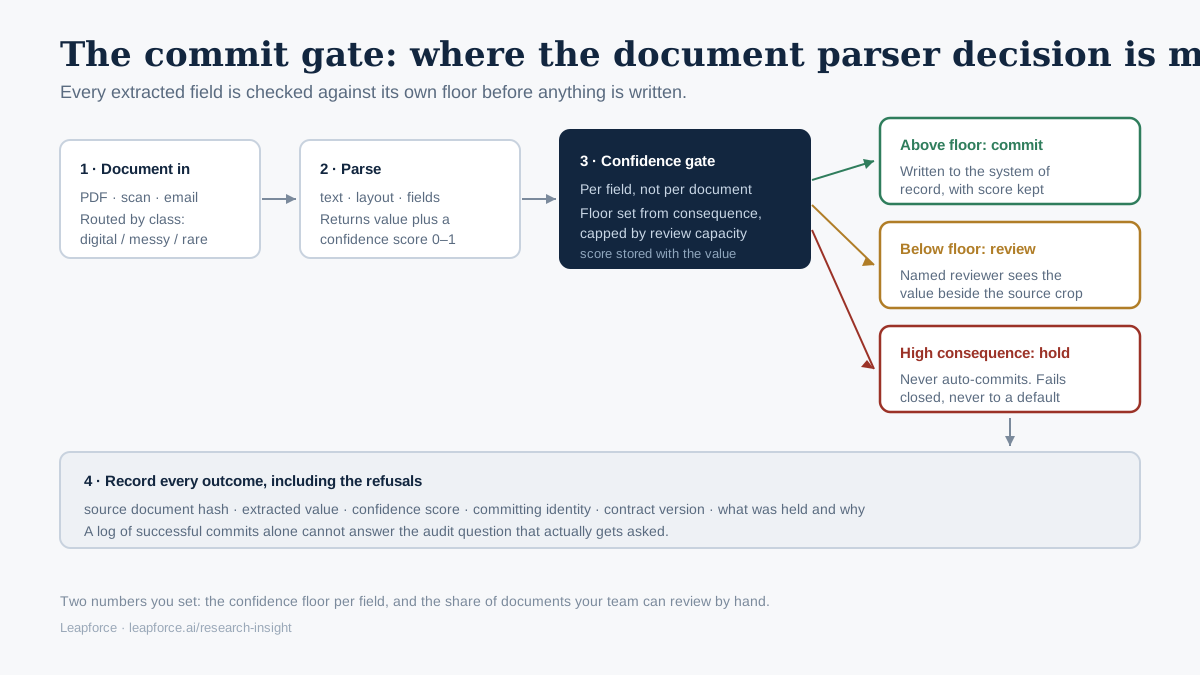
The commit gate is the part the roundups do not rank: every field either clears its floor, goes to a reviewer, or is refused.
A note on our evidence, because it matters for how you read the rest: we have not run a controlled bake-off of parser products for this article. There is no LeapForce test corpus and no per-vendor accuracy number of our own here. What follows is built from vendor documentation we fetched and quoted directly, published pricing pulled on July 30, 2026, peer-reviewed benchmark work, regulation text, and practitioner accounts we have linked so you can read them in full. Where a claim needs a measurement we do not have, we say so instead of implying one.
What a Document Parser Actually Returns
A document parser returns three things per extracted value, not one: a field type, the text it believes belongs to that field, and a confidence score. Google's Document AI documentation describes the score plainly: "The confidence score communicates how strongly your model associates each entity with the predicted value. The value is between zero and one, the closer it is to one, the higher the model's confidence" (Google Cloud, custom extractor overview).
That third element is the one buying guides skip and the one your architecture depends on. A parser that returns {"invoice_total": "4,182.60"} gives you nothing to act on. A parser that returns {"invoice_total": "4,182.60", "confidence": 0.62} lets you build a rule: below 0.90, a person looks at it.
The distinction runs deeper than a JSON field. Broadly, a parser does up to four separable jobs, and vendors bundle them differently:
| Job | What it produces | Where it usually breaks |
|---|---|---|
| Text recovery | Characters, in some order | Scans, low DPI, unusual fonts, CJK and Arabic script |
| Layout reconstruction | Reading order, blocks, tables | Multi-column pages, merged cells, tables split across pages |
| Field extraction | Named values (total, due_date, vendor_tax_id) | Layout variation between senders; unlabelled values |
| Normalisation | Typed values (a date, a decimal, a currency) | Ambiguous formats, locale differences, silent coercion |
Most disappointment traces to buying a tool that is strong at job one and assuming it does job three. PDF parsing in the narrow sense, meaning text recovery from clean digital PDFs, has been largely solved for years. Field extraction from documents whose layout varies by sender has not been, and a benchmark score on the first tells you very little about the second. This is also why the market category name, intelligent document processing, is unhelpful when you are shortlisting: it covers all four jobs and commits to none.
The academic picture supports the split. OmniDocBench, presented at CVPR 2025, built a parsing benchmark across nine document sources including handwritten notes and densely typeset newspapers, evaluating text, tables, formulas and reading order separately across 19 layout categories and 15 attribute labels. Its explicit finding is that conventional extraction pipelines and end-to-end vision-language models have different strengths on different document types. Which is another way of saying there is no single best document parser, only a best fit for your document mix.
If you want a short, current primer on the modern parsing stack before you evaluate anything, this IBM Technology explainer on document conversion for AI pipelines is a reasonable eight minutes.

The Ten-Document Drill
Here is a diagnostic you can finish in one sitting, before you contact a single vendor. We call it the Ten-Document Drill, and its purpose is to convert "we need a document parser" into a specification.
- Pull ten real documents, not clean samples. Include the two worst ones anybody can find, the faxed one, the phone photo, the one where a supplier redesigned their invoice template.
- Write down the fields you actually need. Not every field on the page. The ones a downstream system consumes. For a typical accounts-payable case that is six to twelve, not forty.
- For each field, write the consequence of it being silently wrong. Not "an error" — the actual consequence. "We pay the wrong bank account." "The renewal date in the CRM is off by a year and nobody notices until the contract auto-renews."
- Key all ten documents by hand and time it. This is your baseline cost per document and your ground truth. Ten documents is small enough that the timing is honest.
- Score field-level, not document-level. A parser that gets 95% of fields right on a ten-field invoice gets the whole invoice right roughly 60% of the time if errors are independent. Document-level accuracy is the number that matters to your reviewers, and it is always worse than the field-level number vendors quote.
- Count disagreements, not just errors. Run the same document twice, or through two tools. Where they disagree is where your confidence thresholds will earn their keep.
The drill produces four outputs: a field list, a per-field consequence rating, a hand-keying baseline in minutes, and a rough sense of which fields are hard. Everything later in this article consumes those four things. Skipping it is why so many evaluations end with a spreadsheet of feature checkmarks and no decision.
One caveat we owe you: ten documents is a triage instrument, not a statistical sample. It is large enough to reveal which fields are hard and roughly what hand-keying costs, and far too small to estimate an accuracy rate you would put in a business case. Treat its output as a specification for a larger pilot, not as the pilot.
Number One: The Confidence Floor
The first number is the confidence floor: the score below which a field does not get committed automatically. Set it per field, not per document, and set it from consequence rather than from convenience.
This is not a theoretical control. It is the primary integration surface of every major document AI service. Amazon's documentation for Augmented AI describes two distinct thresholds: "Identification confidence – The confidence score for key-value pairs detected within a form" and "Qualification confidence – The confidence score for text contained within a key-value pair in a form", and states that "If you specify a confidence threshold, Amazon A2I routes only those predictions that fall within the threshold to human reviewers. You can adjust these thresholds at any time to achieve the right balance between accuracy and cost-effectiveness" (AWS, Core Concepts of Amazon A2I).
Google's Document AI takes a different default, and it is worth knowing which one you are inheriting. Its evaluation tooling "automatically computes the optimal threshold, which maximizes the F1 score, and by default, sets the confidence threshold to this optimal value" (Google Cloud, Evaluate performance). That default is a statistically defensible choice and an operationally wrong one for a field where a false accept costs you money and a false reject costs you thirty seconds of somebody's attention. F1 treats those two errors as equally bad. Your accounts-payable process does not.
So the floor is a business decision dressed as a hyperparameter. A workable starting pattern:
| Field consequence if silently wrong | Suggested starting floor | Behaviour below the floor |
|---|---|---|
| Money leaves the company | Highest tier; effectively always reviewed | Hold, route to a named approver |
| Legal or contractual date | High | Route to reviewer, block downstream write |
| Identifier used to match records | High | Route to reviewer, or fail closed to "unmatched" |
| Descriptive text, human-read later | Low | Commit with the score stored alongside |
| Field nobody has consumed in six months | Do not extract it | Delete from the schema |
Two rules make the floor behave. First, store the confidence score alongside the value, permanently. A value in a database with no score attached cannot be re-triaged later when you discover a supplier template that broke. Second, never let a low-confidence field silently become a default. An empty due_date that becomes "today" somewhere downstream is worse than a rejected document, because it is invisible.
The floors in the table above are starting positions for the drill, not benchmarks. We have not measured them against a corpus, and any number you adopt should be moved by what your own review queue tells you in the first month.
Number Two: The Review Rate You Can Staff
The second number is the share of documents your team can review by hand without the automation becoming a net loss. It is a staffing constraint, and it caps how aggressive your confidence floors can be.
The arithmetic is unforgiving and takes two minutes. Suppose 40,000 invoices a year, a hand-keying baseline of four minutes each from your drill, and one reviewer who can spend 20 hours a week on exceptions. That reviewer has roughly 1,040 hours a year, which is 62,400 minutes, which at four minutes each is 15,600 documents — 39% of volume. If your floors send 60% of documents to review, you have not automated anything; you have added a machine step to a manual process.
| Volume | Review capacity (hours/yr) | Minutes per review | Documents reviewable | Max review rate |
|---|---|---|---|---|
| 10,000 | 260 | 4 | 3,900 | 39% |
| 40,000 | 1,040 | 4 | 15,600 | 39% |
| 40,000 | 1,040 | 2 | 31,200 | 78% |
| 200,000 | 1,040 | 2 | 31,200 | 16% |
| 200,000 | 4,160 | 2 | 124,800 | 62% |
Read that table the other way round and it becomes a design brief. At 200,000 documents a year with one reviewer, you need a review rate under 16%, which means either your floors are low, your document mix is uniform enough to hit high confidence, or you accept committing values you have not checked. Nobody tells you this in a product demo, because the demo document is always clean.
The review interface matters as much as the rate. Two minutes per review instead of four doubles your capacity, and the difference is almost entirely whether the reviewer sees the extracted value next to a highlighted crop of the source document, or has to open the PDF and hunt. When you evaluate tools, time a reviewer on ten exceptions. That measurement moves your economics more than a two-point difference in extraction accuracy.
There is a third thing this number governs, and it is the one that gets forgotten: the review queue needs an owner and an SLA. A queue that nobody drains becomes a backlog, and a backlog becomes pressure to raise the auto-commit rate. That is how a carefully specified confidence floor quietly becomes 0.5 eighteen months later.
Four Ways to Parse a Document, With a Verdict on Each
Document parsing software divides into four broad approaches, and the honest framing is that most production systems end up using two or three of them for different document classes. Below, each gets the same treatment: what it is best for, how it fails, what it costs, its governance profile, and a verdict.
Deterministic text extraction
What it is. Libraries that read the PDF's own content stream: pdfplumber, PyMuPDF, pdftotext, and give you characters and coordinates with no model involved.
Best for. Digitally generated PDFs you or a known counterparty produced, with stable layout. Bank statement exports, system-generated reports, e-invoices.
How it fails. It cannot read scans at all without an OCR step. Reading order on multi-column layouts is heuristic and there is no single correct answer. Tables are recovered as positioned text, and turning positioned text back into rows and columns is your problem.
Cost. Compute only. Effectively free per page; the cost is engineering time maintaining rules against layout drift.
Governance profile. The strongest of the four. The document never leaves your infrastructure, there is no vendor retention question, no model training question, and the output is fully reproducible — the same input always yields the same output.
Verdict. Underrated. If a meaningful slice of your document mix is digital-native and layout-stable, route that slice here and stop paying per page for it. The mistake is trying to stretch it across the messy slice too.
Template and zonal extraction
What it is. OCR plus a per-layout template: for this sender's invoice, the total lives in this region. Rules, regexes and positional anchors do the extraction.
Best for. A narrow, repeating document type from a small, stable set of senders. Utility bills, a fixed set of carrier documents, internal forms.
How it fails. Every layout change breaks the template silently, producing a plausible wrong value rather than an error. Template count grows with sender count, and maintenance is linear in that count forever.
Cost. Low per page, plus continuous template maintenance labour that rarely appears in the business case.
Governance profile. Good and easy to reason about: a rule is auditable in a way a model is not. You can point at a template and explain exactly why a value was extracted.
Verdict. Correct choice, and often the cheapest, when your layouts genuinely do not change. Paying for adaptive extraction on a document that has looked identical for six years is waste. Wrong choice the moment sender variety grows, because the maintenance curve does not flatten.
Trained document AI services
What it is. The hyperscaler and specialist services (Amazon Textract, Google Document AI, Azure AI Document Intelligence and their competitors) offering prebuilt models for common document types plus custom models you train on your own labelled examples.
Best for. High volume of a recognisable document class with real layout variation, where you need calibrated confidence scores and a supported human-review path.
How it fails. Prebuilt models cover the document types their vendors chose. Anything outside that means custom training, which means a labelled corpus, which means the work you were trying to avoid. Custom model quality is bounded by your labelling discipline.
Cost. Metered per page, and the spread inside a single vendor is larger than the spread between vendors: see the next section.
Governance profile. Mixed, and it is worth reading the fine print rather than the trust page. Google states of Document AI: "No. Google does not use any of your content (such as documents and predictions) for any purpose except to provide you with the Document AI service" (Google Cloud, Document AI security). Microsoft states that Document Intelligence "stores submitted input data and analyze results for 24 hours after an analysis operation completes" and deletes both automatically, with a Delete Analyze Result API to do it sooner (Microsoft Learn, Data, privacy and security for Document Intelligence). AWS is the one that requires an action from you: its Organizations documentation lists Amazon Textract among services that "may store and use customer content processed by those services for the development and continuous improvement of other AWS services," and tells you that "As an AWS customer, you can opt out of having your content stored or used for service improvements" (AWS, AI services opt-out policies). Opting out is an organization-level policy, and it is not the default.
Verdict. The default answer for most mid-to-high volume production cases, chosen on confidence-score quality and human-review integration rather than on headline accuracy. Read the retention posture before you sign, and if you are on AWS, attach the opt-out policy before your first production batch, not after.
Vision-language model extraction
What it is. Send a page image to a frontier multimodal model with a schema and ask for JSON.
Best for. Long-tail document types where you will never have enough examples to train anything, and for a fast first pass at a corpus you do not yet understand.
How it fails. In ways that are hard to detect. The Hacker News account that opens this article is the shape of it: the model handles genuinely hard structure well and then miscounts. A commenter describing back-office automation on Hacker News in November 2025 put the QA problem crisply: a model can invent realistic-looking column values instead of extracting the real ones, and because you cannot guarantee two runs invent the same thing, "To get a real human check, you'd need to re-do the task as a human" (lumost, Hacker News). Confidence scores, where they exist at all, are token likelihoods rather than calibrated field-level probabilities, which makes the thresholding pattern in this article harder to apply honestly.
Cost. Per token, so it scales with page complexity rather than page count, and it is the hardest of the four to forecast.
Governance profile. Depends entirely on which endpoint and which contract. OpenAI states that data sent to its API is "not used to train or improve OpenAI models (unless you explicitly opt in to share data with us)," with abuse-monitoring logs "retained for up to 30 days" by default and a Zero Data Retention option (OpenAI, Your data). Anthropic states that "Conversation content (your prompts and Claude's outputs) is not retained by default," that "Retained data is never used for model training without your express permission," and offers a zero-data-retention arrangement per organization (Anthropic, API and data retention). Those are strong postures, and they apply to the first-party API, route the same traffic through a cloud marketplace or a third-party wrapper and you are reading a different policy.
Verdict. Excellent for exploration, classification and long-tail documents. For a repeating high-consequence field at volume, prefer an approach that gives you a calibrated per-field score, or wrap the model in your own verification. A second extraction, a checksum, an arithmetic reconciliation: treat agreement as your confidence signal.
What Document Parsing Actually Costs Per Page
List prices for document parsing span roughly 80x, and the biggest cost decision is not which vendor you choose but which API you call. These figures were fetched on July 30, 2026 from each vendor's published pricing, US regions, standard pay-as-you-go tiers.
| Vendor | API / model | Price per 1,000 pages | Volume tier |
|---|---|---|---|
| AWS Textract | DetectDocumentText | $1.50 | first 1M pages/month |
| AWS Textract | DetectDocumentText | $0.60 | above 1M |
| AWS Textract | AnalyzeExpense (invoices/receipts) | $10.00 | first 1M |
| AWS Textract | AnalyzeDocument, Tables | $15.00 | first 1M |
| AWS Textract | AnalyzeDocument — Forms | $50.00 | first 1M |
| Google Document AI | Enterprise Document OCR | $1.50 | 1,000 to 5M/month |
| Google Document AI | Enterprise Document OCR | $0.60 | above 5M |
| Google Document AI | Custom extractor / Form Parser | $30.00 | to 1M |
| Google Document AI | Custom extractor / Form Parser | $20.00 | above 1M |
| Azure AI Document Intelligence | Read (S0) | $1.50 | standard tier |
| Azure AI Document Intelligence | Prebuilt (S0) | $10.00 | standard tier |
| Azure AI Document Intelligence | Custom (S0) | $30.00 | standard tier |
Sources: Amazon Textract pricing, Google Document AI pricing, and the Azure Retail Prices API for Azure Document Intelligence meters in East US. Prices change; re-fetch before you model anything.
Three things fall out of that table that a starting-price column in a roundup cannot show you.
The intra-vendor spread beats the inter-vendor spread. On AWS, raw text is $1.50 per thousand pages and form key-value extraction is $50: a 33x difference inside one product. Across vendors at equivalent capability, the numbers are close enough to be a rounding error in most business cases. If you are optimising cost, optimise which API each document class goes to, not which logo is on the invoice.
Routing by document class is where the money is. Take 200,000 pages a year where 60% are digital-native with stable layout. Send that 120,000 to deterministic extraction at effectively zero marginal cost and the remaining 80,000 to a custom extractor at $30 per thousand, and you pay about $2,400 a year. Send all 200,000 to the custom extractor and you pay about $6,000. Same outputs, 2.5x the bill. This is the same reasoning we apply to model choice in our earlier analysis of AI model routing, route on the properties of the work, not on a single default.
The per-page price is rarely the dominant cost. At 40,000 invoices a year, a $10-per-thousand prebuilt model costs $400 annually. One reviewer spending 20 hours a week on the exception queue costs orders of magnitude more. Optimising the $400 while ignoring the review rate is the most common analytical error in this category, and it is why the second number in this article's title matters more than the first.
If the API bill is that small, a fair question is why invoice parsing is a project at all rather than a purchase. The answer is that three of the four real costs are not metered: the review labour above, the integration and security review before the first production batch, and the ongoing monitoring that catches a supplier template change before it has quietly written four hundred wrong values. Email parsing adds a fourth, because inbound mail brings attachments of unpredictable type and an authentication question the parser does not answer. Budget for those and the per-page rate stops being the interesting line.
Where Your Documents Live After the Parse
Ask three questions of any document parser vendor before accuracy: where is the document processed, how long is it kept, and is it used to train anything. The answers vary more than the accuracy does, and unlike accuracy they are contractual facts you can verify today.
| Question | Why it decides the purchase |
|---|---|
| Processing region | Determines whether contracts, medical records or personnel files cross a border your legal team cares about |
| Retention period | Determines your exposure window if the vendor is breached |
| Deletion control | Determines whether you can prove deletion to an auditor, or only assert it |
| Training use | Determines whether your customer's pricing terms improve a model your competitor also calls |
| Sub-processors | Determines how many organisations your document actually touched |
The published answers from the three services quoted earlier are genuinely different in shape. Microsoft's is a fixed short window with a customer-callable deletion API: input data and results held 24 hours, deleted automatically, deletable sooner on request. Google's is closer to no retention at all for the synchronous path — its security documentation states that for synchronous processing "the document data (sent in the request) is processed in memory, encrypted in flight, and not persisted to disk," while batch operations delete the stored document "typically immediately after the processing, with a failsafe Time to live (TTL) of one day." AWS's is the one that shifts the burden: opting out of content use for service improvement is available, organization-wide, and off unless you turn it on. The same page also notes that "The AWS artificial intelligence (AI) services need to store your data even if you opt-out from AWS using your data for service improvements."
That synchronous-versus-batch split is worth noticing for a second reason. It is also the real-time question: the synchronous path returns in seconds and suits a user waiting at a screen, while the batch path buys you throughput and higher page limits at the cost of latency. The two paths frequently carry different retention behaviour from the same vendor, as Google's documentation shows, so "can it do real-time processing" and "where does my document sit" turn out to be the same question asked twice.
None of that makes one vendor right. It makes the comparison table in most roundups incomplete in the column that a regulated buyer actually needs. If you are sending contracts, invoices carrying customer bank details, or anything with health or employment data into a third-party parser, the retention and training row belongs beside the price row, and it belongs in the shortlist, not the FAQ. The same logic drives our thinking on masking sensitive fields before they leave the network: the cheapest way to win the data-residency argument is to send less data.
Writing the Extraction Contract
The Extraction Contract is the artifact we think this category is missing. It is one table, one row per field, and it is the thing you hand to the vendor, the auditor and the engineer building the integration. Four clauses per row and it fits on a page.
| Field | Confidence floor | Destination | Reviewer |
|---|---|---|---|
vendor_bank_account | never auto-commit | payments master data | AP manager, named |
invoice_total | 0.95 | ERP invoice header | AP clerk queue |
invoice_date | 0.90 | ERP invoice header | AP clerk queue |
po_number | 0.90 | matching engine; fail closed to unmatched | AP clerk queue |
line_item_description | 0.60 | ERP line detail | none; score stored |
supplier_address | not extracted | — | — |
Read a row aloud and it says something a business person can approve: the invoice total goes into the ERP header automatically when the parser is at least 95% confident, otherwise a clerk sees it; the vendor bank account never goes in automatically, and a named AP manager owns it. That sentence is a policy, a test plan and an audit answer at once.
Four rules make the contract worth the paper:
- Destination is a system, not a database. "ERP invoice header" is a destination. "The extraction table" is a staging area, and staging areas are where ungoverned writes hide.
- Reviewer is a named role, never "the team". An unnamed reviewer is an unattended commit with extra steps. When a value is later found wrong, the first question is who was supposed to have seen it.
- The
not extractedrow is the most valuable one. Every field you extract is a field you store, secure, retain and eventually answer a subject-access request about. Fields nobody consumes should be deleted from the schema, not carried "just in case". - The contract is versioned and dated. When a supplier changes their template and your accuracy drops, you need to know which version of the contract was in force for the documents already committed.
We have not published a validated numeric calibration for the floors in that example. The numbers there are illustrative and deliberately conservative, and the drill plus your first month of queue data should replace them.
The Moment the Extracted Value Reaches a System of Record
The parse is not the risky operation. The write is. A parser that produces a wrong number in a JSON blob has caused nothing; the same number posted to an ERP, a payment run or a customer record has caused an incident. Almost all of the governance work in document processing belongs at that boundary, and almost none of the buying guides put it there.
Two pieces of regulation make this concrete rather than philosophical, and both apply to deployers rather than model builders.
GDPR Article 22 establishes that "The data subject shall have the right not to be subject to a decision based solely on automated processing, including profiling, which produces legal effects concerning him or her or similarly significantly affects him or her," and where automated processing is permitted, the controller must implement measures including "at least the right to obtain human intervention on the part of the controller, to express his or her point of view and to contest the decision" (Art. 22 GDPR). If your parser reads a document and the extracted value determines an outcome for a person (a claim, a benefit, a credit decision, an employment step), an unreviewed auto-commit is exactly the pattern the Article addresses.
The EU AI Act's Article 14 pushes in the same direction for high-risk systems, requiring that they "be designed and developed in such a way, including with appropriate human-machine interface tools, that they can be effectively overseen by natural persons during the period in which they are in use," and that oversight enable a person "to remain aware of the possible tendency of automatically relying or over-relying on the output produced by a high-risk AI system (automation bias)" and "to decide, in any particular situation, not to use the high-risk AI system or to otherwise disregard, override or reverse the output" (European Commission AI Act Service Desk, Article 14).
Automation bias is the precise risk of a confidence-scored parser with a well-designed review queue. Give a reviewer a screen that says 0.94 next to a value and they will approve it. Give them the same screen four hundred times and they will approve all four hundred. The design response is not more review; it is fewer, better-targeted reviews with the source crop visible and the extracted value not pre-selected as the default answer.
Three implementation patterns follow from all of this, and they are cheap:
- Fail closed, never fail default. A field below its floor produces an unmatched or held state, not a plausible substitute value.
- Make the write the gated step. The approval belongs immediately before the commit, holding the specific value, not at the start of the batch. We argued this at length in our earlier analysis of where approval actually functions as control, and document extraction is the cleanest example of it we have found.
- Log the refusal, not just the commit. The audit question months later is rarely "what did we write" — it is "did anything get through that shouldn't have". That question is unanswerable unless rejections are recorded with the same rigour as acceptances, a point we make about agent action audit trails generally.
Choose This If: A Decision Tree
Run this after the drill, in order. The first matching branch is your answer.
Choose deterministic text extraction if your documents are digitally generated, you or a known counterparty control the layout, and the layout has not changed in a year. You will pay nothing per page and get perfectly reproducible output. Revisit if sender variety grows.
Choose template and zonal extraction if you have fewer than roughly twenty distinct layouts, they are stable, and volume per layout is high. The template maintenance burden is real but bounded, and you get an auditable rule rather than a model prediction. Do not choose this if a business development team is actively adding suppliers.
Choose a trained document AI service if you have volume, layout variation, and a document class the market recognises: invoices, receipts, identity documents, common forms. Choose specifically the one whose confidence scores and human-review integration fit the Extraction Contract you wrote, and whose retention posture your legal team will sign. Budget for a labelled corpus if your document type is not prebuilt.
Choose vision-language model extraction if the document type is long-tail, the volume is low or bursty, or you are exploring a corpus you do not yet understand. Add your own verification layer before any high-consequence field reaches a system of record.
Choose two of the above if your document mix is genuinely mixed, which it usually is. Routing by document class changes your bill and your review rate more than any other choice here, and it is available to you at any scale.
Choose none of the above if parsing is one step inside a workflow you have not designed yet. A standalone parser bought before the workflow exists produces a JSON file nobody owns. Design the destination, the gate and the reviewer first; the parser is then a component choice rather than a strategy.
When the Incumbent Still Wins
Three cases where buying a document parser is the wrong move, stated plainly because a decision guide that never says "don't" is marketing.
Manual keying still wins at low volume with high consequence. At a few hundred high-value documents a year, the total cost of specifying, integrating, tuning and monitoring an extraction pipeline exceeds the cost of a person reading them. The break-even is not about the per-page price; it is about the engineering and oversight overhead, which does not scale down.
The module you already own often wins. Most ERP, AP-automation and content-management platforms ship an extraction capability. It is usually less accurate than a specialist tool and already integrated, already covered by your existing data processing agreement, and already in scope for your existing audit. A specialist parser that is five points better and needs a new vendor review, a new DPA and a new integration frequently loses on total time-to-value.
Fixing the input beats parsing it. If a meaningful share of your documents come from counterparties you have a commercial relationship with, asking for a structured feed (an e-invoicing format, a CSV, an API) removes the problem rather than mitigating it. This is unglamorous and slow and it is permanently cheaper than any parser. The counterparties who refuse are your real parsing workload, and they are usually a smaller set than the total.
There is a fourth case worth naming: if your organisation cannot staff a review queue at all, do not deploy extraction into a high-consequence path. An unreviewed extraction pipeline with a confidence floor nobody enforces is a slow-motion data quality incident, and it is harder to unwind than never having started.
What We Are Still Uncertain About
We would rather mark the edges of this analysis than imply it covers more than it does.
We did not run a controlled bake-off. No LeapForce test corpus, no per-vendor field-level accuracy numbers of our own. Every accuracy statement here is either a vendor's, a published benchmark's, or a practitioner's, and is linked as such. That is a real limitation for a decision guide, and the Ten-Document Drill is offered precisely because your corpus beats anybody's benchmark.
Confidence calibration across vendors is not comparable. A 0.90 from one service and a 0.90 from another are not the same probability of correctness, because they are produced by different models with different calibration. Any floor you set is vendor-specific and must be re-derived if you switch. We are not aware of a published cross-vendor calibration study that would let you translate between them.
Benchmark methodology is itself contested. Practitioners evaluating table extraction have published detailed criticism of the standard benchmarks: that structural metrics penalise harmless formatting differences, that spatial-tolerance parameters can mask real failures, and that some ground-truth sets contain errors. One such account, from a team that audited a thousand ground-truth files, is on Hacker News. Separately, academic work benchmarking 20+ PDF parsers on mathematical formula extraction found that an LLM-as-a-judge evaluation correlated with human judgment at r=0.78 while character-level matching reached only r=0.34 (Horn and Keuper, arXiv 2512.09874) — meaning even the scoring method changes the ranking.
Pricing moves. The table above is a July 30, 2026 snapshot of list prices in US regions. Committed-use tiers, regional variation and negotiated enterprise pricing all change the picture, sometimes by a lot.
Two sources a reader would reasonably expect are missing. We could not verify vendor-published accuracy claims independently, because none of the three major services publishes a reproducible accuracy figure for a named public corpus. We also could not use G2 or Capterra review content: both returned HTTP 403 to our fetches on July 30, 2026, so any review quotes here would have been unverifiable. Rather than quote unverifiable numbers we have left them out, which is why this article contains no "97% accurate" claims in either direction.
Governing the Parser After You Have Picked It
This is the one section where we talk about our own platform, and the honest framing is that LeapForce is not a document parser and does not intend to become one. We do not extract fields from PDFs. What we build is the layer around the extraction: the gateway every AI call passes through, the identity the extraction service runs under, the approval gate before a commit, and the record of what happened.
That layer is where the two numbers in this article get enforced rather than documented. On Leapforce Workflows, confidence thresholds route edge cases to people. The routine volume clears automatically and the exceptions arrive in a human queue with context attached. Approval gates pause a run for a named person before a send, a payment or a deletion, with the trail recording who approved and when. Runs are durable, so a workflow that pauses on Friday for sign-off resumes Monday where it stopped. That is the Extraction Contract expressed as running configuration instead of a spreadsheet.
Two adjacent pieces matter for document work specifically. A parsing agent that reads inboxes and writes to an ERP is a non-human identity with standing access, and it should have an owner, a scope and an expiry like any other account — the argument we set out in our analysis of owner, scope and expiry for AI agents. And the deployment sequence we recommend for the gateway applies just as well to extraction: Observe first. Enforce second. Optimize third. Point traffic at the gateway in observe mode, learn what is actually being sent where and what it costs, then add rules, then tune routing.
In keeping with how we describe our own build status: gateway endpoints, tracing and SSO are live today; several capabilities including vaulted keys, inline data-loss prevention and dollar budgets are in development, and shadow-AI discovery and compliance evidence packs are on the roadmap. If you need all of that shipping this quarter, we are not the answer this quarter.
Frequently asked questions
No. OCR is one stage inside a document parser. Optical character recognition converts pixels into characters; a document parser additionally reconstructs layout and reading order, identifies named fields such as invoice total or due date, and normalises them into typed values. A tool that only does OCR hands you text and leaves the extraction problem entirely with you. This distinction is why an OCR benchmark score tells you little about field extraction performance on your documents, and why the two capabilities are priced very differently: on AWS, raw text detection lists at $1.50 per 1,000 pages against $50 per 1,000 for form key-value extraction.
There is no defensible single number, and any vendor quoting one is quoting it against their corpus, not yours. Two things matter more than the headline figure. First, ask whether the number is field-level or document-level: at 95% field accuracy on a ten-field document, roughly 60% of documents are fully correct if errors are independent, and your reviewers experience the second number. Second, ask what the parser does when it is unsure. A tool at 92% accuracy with well-calibrated confidence scores is more useful in production than one at 96% that cannot tell you which extractions to distrust.
Start from consequence, not from statistics. Rank each field by what a silent error costs, then set high floors on the money and identity fields and low floors on descriptive text. Do not accept the platform default without checking what it optimises: Google's Document AI "automatically computes the optimal threshold, which maximizes the F1 score", which weighs false accepts and false rejects equally, usually wrong for a payment field. Then move the floors using real queue data from your first month, and keep the confidence score stored next to every committed value so you can re-triage retrospectively.
Better than they used to, and still the weakest case. Handwriting appears explicitly in serious benchmark design — OmniDocBench includes handwritten notes among its nine document sources precisely because they are a hard case, and results vary enormously with writing quality, form structure and language. The practical advice is unchanged: run the Ten-Document Drill with your actual handwritten samples, expect a materially higher review rate for that document class, and route it separately from your printed volume rather than accepting one blended threshold across both.
It depends on the vendor and sometimes on a setting you have to change. Google states it does not use your content "for any purpose except to provide you with the Document AI service". Microsoft states Document Intelligence input and results are deleted after 24 hours and offers a delete API for sooner. AWS lists Amazon Textract among services that "may store and use customer content processed by those services for the development and continuous improvement of other AWS services", with an organization-level opt-out policy available, meaning the protective setting is not the default. Get the answer in writing, per service, before your first production batch.
List prices in July 2026 range from about $0.60 per 1,000 pages for high-volume raw text extraction to $50 per 1,000 for form key-value extraction on AWS — roughly 80x across the range, with most of that spread inside individual vendors rather than between them. At typical mid-market volumes the API bill is small: 40,000 invoices a year through a $10-per-1,000 prebuilt model is about $400. The dominant cost is almost always human review time, which is why the review rate deserves more analysis than the per-page price.
Building the text-recovery and layout stage from open-source components is reasonable and often free for digital-native PDFs. Building field extraction with calibrated confidence scores, a review interface, retraining pipelines and monitoring is a multi-year product, and the teams who have done it publicly describe the hard part as production integration rather than extraction quality. A defensible middle path is to build the routing and governance layer yourself (which document class goes where, which fields gate on approval) and buy the extraction models underneath it.
Tables are the consistent answer: multi-page tables, merged cells, multi-column spans and dense financial layouts. Formulas and non-Latin scripts follow closely; practitioners auditing benchmark ground truth have reported garbled OCR specifically on CJK and Arabic content. Beyond document type, the hardest property is variation — a moderately complex layout that is identical every time is far easier than a simple layout that changes per sender. Sender variety, not visual complexity, is usually what breaks a template-based approach.
Possibly, and it depends on what the extracted value decides rather than on the parsing itself. GDPR Article 22 gives data subjects the right not to be subject to decisions "based solely on automated processing" that produce legal or similarly significant effects, with a right to obtain human intervention where such processing is permitted. The EU AI Act's Article 14 requires high-risk systems to be designed so they "can be effectively overseen by natural persons", including the ability to override or reverse the output. If an extracted field feeds a decision about a person, design the human step in from the start and record it.
You need four things stored at the time of extraction, and they are cheap then and impossible to reconstruct later: the source document or a hash of it, the extracted value, the confidence score, and the identity of whoever or whatever committed it. Add the version of the Extraction Contract in force. The most commonly missing element is a record of what was refused: audit questions are usually about whether something got through that should not have, and a log containing only successful commits cannot answer that.
The extraction proof of concept is typically days; production is limited by the things around it. Budget realistically for a labelled corpus if you need a custom model, a vendor security and data-processing review, building the review interface, and a parallel-run period where the pipeline and the existing manual process both operate so you can measure disagreement. Teams that skip the parallel run tend to discover their true error rate in an incident rather than in a report.
The common pattern is a pilot on clean documents that produces an impressive accuracy number, followed by production documents that are messier, followed by a review queue nobody owns. Practitioners describe the same shift, the hard part has moved from raw extraction quality to integration and exception handling in production. The structural fix is to design the exception path before the happy path: decide who owns the queue, what the SLA is, and what happens to a document that fails twice, and only then tune the extraction.
Ready to Govern Your AI?
Talk to LeapForce — one controlled layer for every AI tool, connector, model, and agent.
Comments