
Relevance AI pricing is $0 on Free, $19 per month on Pro and $234 per month on Team when billed annually, with Enterprise quoted privately. Underneath those subscriptions sit two usage meters that bill separately: Actions at $0.08 each and Vendor Credits at $0.002 each.
Our position on this is narrower than the usual "usage pricing is unpredictable" complaint, and we think it is more useful. The meters are not unpredictable. They are unowned. Every input that moves them, from how many tool calls an agent decides to make to how many times it retries a failure and how much context it drags between turns, is a decision the agent makes at runtime, not a decision the buyer made at purchase. A budget you cannot forecast is really a budget nobody has been given authority over. That distinction changes what you do about it, and this article gives you the arithmetic to do it. On 21 July 2026 a poster in r/AI_Agents put the buyer's version of this plainly while trying to price everyday agent tasks: "Most of these services use a credit system, but it's incredibly opaque" (u/Automatic-Pay-4121, r/AI_Agents). They were not asking for a plan table. They were asking what one completed task costs, and no vendor page answers that.
The short answer: Price Relevance AI by the meter, not the plan. A single moderately busy agent modelled here lands at about $159 a month on Pro, of which the $19 subscription is roughly 12%, and the first Action past your allowance costs about 22 times what the Actions inside it do.
Last updated: July 30, 2026.
One disclosure up front: we have not run a paid Relevance AI deployment ourselves. Every price, allowance and platform behaviour below is quoted from Relevance AI's own published documentation, fetched on 30 July 2026 and linked inline; every number we calculate from those figures is labelled DERIVED, and every input we chose for a worked example is labelled ASSUMED. Nothing here is a measurement from our own bill.
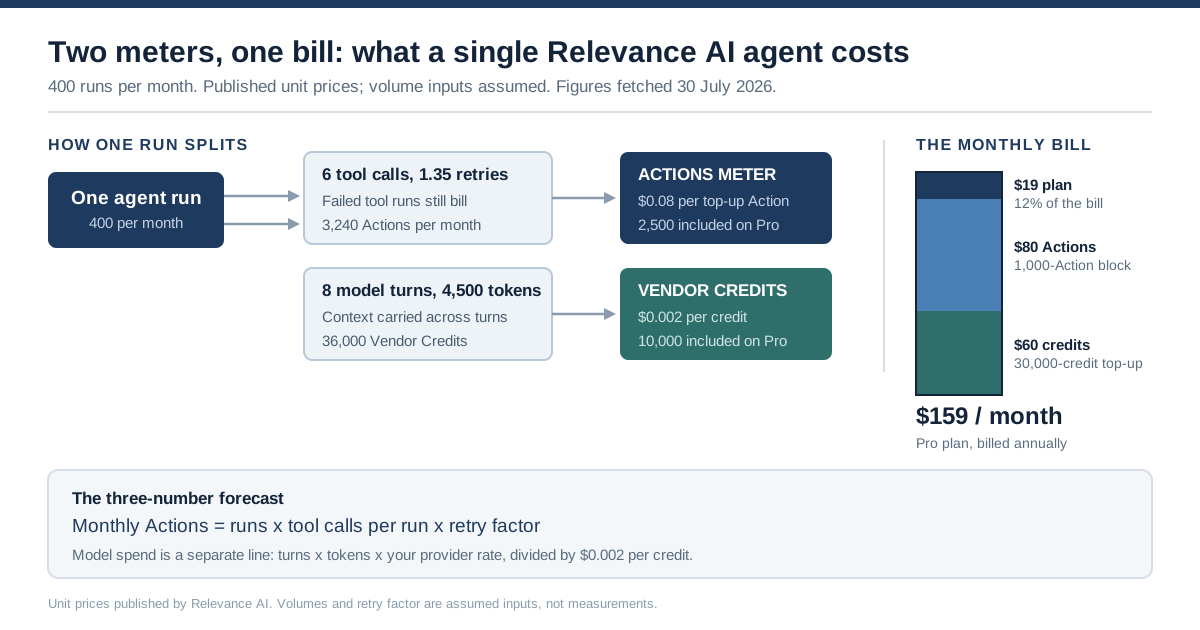
One agent run feeds two independent meters, and the subscription is the smallest slice of the resulting bill.
What Relevance AI Pricing Actually Charges For
Relevance AI pricing has two layers. The subscription buys you seats, features and a monthly allowance; two meters underneath count what your agents actually do. An Action is one run of a tool. A Vendor Credit is a unit of model and tool consumption passed through at wholesale. Both are consumed by agent behaviour, not by user headcount, which is why seat-based intuition fails here.
Relevance AI's own documentation is unusually direct about the first meter. "An Action is a single run of a Tool. Each time a tool runs, it counts as an action — whether it's a simple task like sending one email or running a complex workflow with many steps," says the Plans and credits page. The second meter is described as pass-through: "Vendor Credits are the cost of running the AI model. This is the cost of the LLM, and the cost of the tools you use."
Here are the current Relevance AI pricing plans, taken from the pricing documentation on 30 July 2026.
| Plan | Billed annually | Billed monthly | Actions / month | Vendor Credits / month | Build users | Task history |
|---|---|---|---|---|---|---|
| Free | $0 | $0 | 200 | 1,000 (one-time) | 1 | 30 days |
| Pro | $19 / month | $29 / month | 2,500 | 10,000 ($20) | 2 | 90 days |
| Team | $234 / month | $349 / month | 7,000 | 35,000 ($70) | 5 (+45 end users) | 90 days |
| Enterprise | Custom | Custom | Custom | Custom | Unlimited | Custom |
Two things about that table are worth pausing on before any arithmetic.
First, the subscription is not the price of the product. It is the price of the door. A Pro seat at $19 a month tells you nothing about what a busy agent will cost, in the same way that a phone line rental tells you nothing about a month of international calls. Every meaningful cost decision you make about this platform happens below the subscription line.
Second, the allowances are organisation-wide, not per user. Relevance AI's documentation confirms that on Free, Pro and Team, "Subscriptions are applied at the Organization level, not to individual users or projects. Everyone in the Organization shares the plan's Actions, Vendor Credits, and feature access." That single sentence is the difference between a predictable bill and a shared bathtub. Five people building agents on a Team plan are drawing from one 7,000-Action pool, and nothing in the plan structure attributes the draw back to whoever caused it.
There is also a structural change buyers should know about, because it explains why so many pages about Relevance AI pricing disagree with each other. The public marketing page at relevanceai.com/pricing no longer lists self-serve prices at all. Fetched on 30 July 2026, it shows only the Enterprise tier and a "Talk to sales" button. The Free, Pro and Team numbers now live in the documentation. If you are comparing articles written months apart, some of them are quoting a plan lineup that has been reorganised at least once; the older three-tier framing of Free, Team at $349 and Enterprise predates the Pro tier and annual pricing shown above.
The Unit Prices Relevance AI Publishes, and the One It Does Not
The two meters have published top-up prices, and those prices are the only unit costs Relevance AI states directly. Actions cost $80 per 1,000, sold in 1,000-unit increments. Vendor Credits cost $20 per 10,000, sold in 10,000-unit increments. Divide, and you get $0.08 per Action and $0.002 per Vendor Credit. The unit price Relevance AI does not publish is the one that matters most: the effective cost of an Action inside your plan allowance, which is dramatically lower.
Start with a reconciliation, because it validates the whole model. If one Vendor Credit is $0.002, then Pro's stated "$20 / month" of Vendor Credits should be 10,000 credits, Team's "$70 / month" should be 35,000, and Free's "$2 bonus" should be 1,000. The feature comparison table on the same documentation page lists exactly those three figures. The dollar-denominated and credit-denominated descriptions of the same allowance agree to the cent, which tells you the pass-through claim is arithmetically real rather than marketing language.
Now the derivation Relevance AI leaves to you.
| Line | Provenance | Free | Pro (annual) | Pro (monthly) | Team (annual) | Team (monthly) |
|---|---|---|---|---|---|---|
| Subscription per month | PUBLISHED | $0 | $19 | $29 | $234 | $349 |
| Vendor Credits included, at $0.002 | PUBLISHED | $2 once | $20 | $20 | $70 | $70 |
| Subscription net of credit value | DERIVED | $0 | −$1 | $9 | $164 | $279 |
| Actions included | PUBLISHED | 200 | 2,500 | 2,500 | 7,000 | 7,000 |
| Effective cost per included Action | DERIVED | $0 | at or below $0 | $0.0036 | $0.0234 | $0.0399 |
| Cost per top-up Action | PUBLISHED | n/a | $0.08 | $0.08 | $0.08 | $0.08 |
| Top-up multiple vs included | DERIVED | n/a | not meaningful | 22x | 3.4x | 2.0x |
The negative row is not a typo and it is not a trick. Pro billed annually costs $228 a year and includes $240 a year of Vendor Credits. At list, the model credits included in the plan are worth more than the plan. The 30,000 annual Actions come at no incremental charge on top. We are not claiming Relevance AI loses money on Pro. Wholesale rates are not list rates, and plenty of Pro customers never draw the full allowance. We are pointing out what the arithmetic means for a buyer: on the entry paid tier, the subscription price carries almost no information about your costs. Anyone reading Relevance AI pricing as "$19 a month" has read the least significant number on the page.
A fair challenge to that table: netting the Vendor Credit value out of the subscription shrinks the denominator and inflates the multiple. We do it because Vendor Credits are dollar-denominated pass-through, so counting them as part of what the subscription buys you double-counts money you would spend on models anyway. If you prefer the blunt version, divide Pro's monthly-billed $29 by 2,500 Actions and you get $0.0116 each, which still makes the $0.08 top-up rate a roughly 7x multiple. Netted or not, overage is priced as a multiple rather than a margin, and that is the finding.
The row that should actually govern your purchasing decision is the last one. On Pro billed monthly, the first Action past your 2,500 costs roughly 22 times what the Actions inside your allowance effectively cost. On Team billed annually it is about 3.4 times. Overage on this platform is not a gentle slope. It is a step, and the step is priced in $80 blocks. Because Actions can only be bought in thousands, going one Action over your allowance costs $80, not eight cents.
Vendor Credits behave better. They are dollar-denominated pass-through in both directions, so a top-up Vendor Credit costs exactly what an included one is worth. There is no cliff on the model meter. All the pricing risk in this platform lives on the Action meter, and that is the meter driven by how many tools your agents call.
The Three-Number Forecast: Runs, Tools, Retries
You can forecast the Action meter with three numbers and one multiplication. We call it the three-number forecast: monthly Actions equal runs times tools per run times retries. Runs is how often the agent is triggered. Tools per run is how many distinct tool invocations one successful pass makes. Retries is a multiplier above 1.0 covering failed tool runs, re-planning loops and reruns. Everything else is detail.
Monthly Actions  =  R (runs per month)
                 ×  T (tool calls per successful run)
                 ×  F (retry factor, ≥ 1.0)
The model meter needs a second, separate line, because Vendor Credits do not track tool count at all. They track token consumption:
Monthly Vendor Credits = (R × turns per run × tokens per turn × your model's $/token) ÷ $0.002Three things make this formula more useful than the "usage costs vary" hand-waving that dominates this topic.
R is the only number you control cleanly. Runs per month is a business input: leads per day, tickets per week, invoices per month. If you cannot state R to within about 20%, you are not ready to price the deployment, and no vendor page will save you. Get R from the process, not from the platform.
T is the number people guess wrong, and they guess low. Buyers count the tools they designed into the agent. The agent counts the tools it called. An agent given a CRM connector, a web search, an enrichment tool, a Slack notifier and an email sender has five tools available, but a single run that looks up a record, fails to find it, searches the web, enriches, writes back, notifies and drafts a reply has spent seven Actions. Multi-agent handoffs multiply this again: Relevance AI supports agent-to-agent delegation inside a Workforce, and every tool a delegated agent runs is still an Action on your organisation's meter. When we compared how governance costs scale in our earlier analysis of enterprise AI implementation cost, this was the same pattern at a different altitude: the licensed thing is cheap and legible, and the metered thing underneath it is neither.
F is the number nobody puts in the model at all. We will spend a whole section on it below, because it is where forecasts break.
Write the three numbers down before you look at a plan. If R × T × F lands under 2,500, Pro covers you. Between 2,500 and about 4,600, Pro plus top-ups is still cheaper than Team on annual billing. Between about 4,600 and 7,000, Team wins outright. Above 7,000 you are in top-up territory again on either plan, and the conversation has become an Enterprise conversation whether or not you wanted one.
A Complete Worked Bill for One Agent
Here is one agent, fully costed, with every input labelled. The agent qualifies inbound leads: it reads a form submission, looks up the company in the CRM, enriches it, runs a web search when enrichment is thin, writes the qualification back to the CRM, notifies the owning rep in Slack, and drafts a first-touch email for human approval. This is a deliberately ordinary agent. Nothing about it is exotic, and that is the point.
| Input | Value | Provenance |
|---|---|---|
| Runs per month (R) | 400 | ASSUMED — 20 inbound leads per business day |
| Tool calls per successful run (T) | 6 | ASSUMED — CRM lookup, enrich, web search, CRM write, Slack, email draft |
| Retry factor (F) | 1.35 | ASSUMED — illustrative, see the retry section for how we chose it |
| Model turns per run | 8 | ASSUMED — planning plus one turn per tool result |
| Tokens per turn | 4,500 | ASSUMED — 4,000 in, 500 out, context carried across turns |
| Blended model rate | $5 per million tokens | ASSUMED — illustrative only, not a quote from any provider |
| Action price | $0.08 | PUBLISHED |
| Vendor Credit price | $0.002 | PUBLISHED |
Now the arithmetic, all DERIVED from the table above:
- Actions: 400 × 6 × 1.35 = 3,240 Actions per month
- Tokens: 400 × 8 × 4,500 = 14.4 million tokens per month
- Model cost: 14.4M × $5/M = $72 per month = 36,000 Vendor Credits
And the bill, on each self-serve plan:
| Cost line | Pro (annual) | Team (annual) |
|---|---|---|
| Subscription | $19 | $234 |
| Actions included | 2,500 | 7,000 |
| Action shortfall | 740 | 0 |
| Action top-up purchased (1,000 increments) | 1,000 = $80 | $0 |
| Vendor Credits included | 10,000 | 35,000 |
| Vendor Credit shortfall | 26,000 | 1,000 |
| Vendor Credit top-up (10,000 increments) | 30,000 = $60 | 10,000 = $20 |
| Total for the month | $159 | $254 |
Read the Pro column again. The subscription is $19 of a $159 bill, about 12%. The other 88% is two meters that no purchase order approved, moved by an agent doing what it was built to do. This is the artefact that is missing from almost every page written about Relevance AI pricing: not a plan table, but one agent converted end to end into dollars.
Three observations fall straight out of it.
The top-up increments make you pre-buy capacity you did not ask for. The agent needed 740 extra Actions and 26,000 extra Vendor Credits. Because top-ups sell in blocks, it had to buy 1,000 and 30,000. DERIVED: that leaves 260 unused Actions worth $20.80 and 4,000 unused Vendor Credits worth $8, so roughly $29 of the $140 in top-ups is capacity this month did not consume. Neither is wasted outright. Vendor Credits "roll over indefinitely while you're subscribed" per Relevance AI's documentation, and purchased Action top-ups roll over too, even though base plan Actions reset. Rounding costs you cash flow rather than value, provided you keep the subscription alive. Cancel, and the rollover protection ends with it.
Cutting T is the cheapest optimisation available. Take one tool call out of the run, by caching the enrichment result or skipping the web search when the CRM record is already complete, and Actions drop from 3,240 to 2,700. Take two out and you are at 2,160, back inside the Pro allowance, and the $80 top-up disappears entirely. Two lines of agent design are worth $80 a month here, which is more than four times the subscription. No plan change achieves that, because plan changes buy capacity rather than remove demand.
The model meter dwarfs the Action meter here. $72 of model spend against $80 of Action spend, and the model side scales with how chatty the agent is rather than how many tools it touches. If your agents carry long context between turns, or re-read a large knowledge base each turn, the Vendor Credit line will pull away from the Action line quickly. That is the meter our analysis of how model routing cuts LLM costs addresses directly, and it is the one you can move without touching the agent's design at all.
Why the Meter Moves When Nobody Touched Anything
The single most consequential sentence in the entire Relevance AI pricing documentation is this one, from the Plans and credits page: "If the Tool fails, this will still count as one Action." Failures bill. Retries bill. An agent that stumbles through a task and eventually succeeds costs strictly more than one that succeeds first time, and neither the buyer nor the agent's author decides which of those happens on any given run.
That would be a footnote if agents were reliable. They are not, yet. Stanford HAI's 2026 AI Index Report reports agent task success on OSWorld, a benchmark of real computer tasks across operating systems, rising from 12% to about 66% in a year, while noting that agents "still fail roughly 1 in 3 attempts on structured benchmarks." That is a genuinely impressive year-over-year jump and a genuinely alarming budgeting input at the same time.
We want to be careful about how far that number travels. OSWorld measures whole-task success for agents driving a computer, not tool-call success inside a hosted platform with curated connectors, and those are not the same failure surface. A vetted CRM connector fails far less often than an agent trying to operate a GUI. So we did not set the retry factor F to 1.5. We set it to 1.35 in the worked example above, which assumes roughly one in four runs incurs one extra tool call. That is a judgement, labelled as one. If your agents touch flaky third-party APIs, browse the live web, or chain several delegated agents together, F will be higher than 1.35, and you should say so in your own model rather than inherit ours.
Here is what actually pushes F up, in rough order of impact:
| Driver | What it does to the meter | Who controls it |
|---|---|---|
| Failed tool runs | Bills as a full Action, then bills again on the retry | Nobody, at runtime |
| Agent re-planning after an unexpected result | Adds unplanned tool calls mid-run | The model, per run |
| Flaky or rate-limited third-party APIs | Multiplies retries in bursts, often at the worst time | The vendor of that API |
| Agent-to-agent delegation | Each delegate's tool calls hit the same org meter | The agent's designer |
| Scheduled triggers on a growing dataset | R grows silently as the business grows | Nobody watches it |
| A new team pointing at the same organisation | Shares your allowance without asking | Your org structure |
The last two rows are the ones that produce genuine surprise bills, and they are structural rather than technical. Relevance AI's allowances are pooled at the organisation level. Growth in the underlying business, in leads, tickets or documents, increases R without anyone shipping a change. Nothing in a per-agent design review catches that.
This is why "watch your usage" is the wrong instruction. Watching is a report. A report tells you what already billed. What a metered agent platform needs is a control that refuses the next call when a limit is reached, and that is a different mechanism entirely. Relevance AI ships one; we cover it two sections down, along with the one that quietly does the opposite.
The 22x Cliff: Top Up, Upgrade, or Bring Your Own Keys
There are exactly three levers once your agents outgrow a plan allowance, and Relevance AI pricing makes the choice between them arithmetic rather than opinion. Buy top-ups at $80 per 1,000 Actions. Upgrade the plan. Or bring your own LLM API keys, which removes the Vendor Credit meter from the equation entirely on any paid plan. The breakeven between the first two is a single number, and it is not where most buyers guess.
Pro plus top-ups versus Team, on annual billing. Team costs $215 a month more than Pro. It also includes $50 a month more Vendor Credits, and because those are dollar-denominated pass-through, they offset the subscription increase dollar for dollar. Net additional cost of Team: $165 a month, buying 4,500 additional Actions. That is $0.0367 per extra Action against $0.08 on the top-up rate. DERIVED: Team becomes cheaper once your monthly Action overage on Pro exceeds $165 ÷ $0.08 = 2,063 Actions, or a total of 4,563 Actions a month.
| Monthly Actions used | Cheapest self-serve route (annual billing) | Monthly cost, Actions only | Provenance |
|---|---|---|---|
| Up to 2,500 | Pro, no top-up | $19 | DERIVED |
| 3,000 | Pro + one 1,000 top-up | $99 | DERIVED |
| 4,500 | Pro + two 1,000 top-ups | $179 | DERIVED |
| 4,600 | Team | $234 | DERIVED |
| 5,000 | Team | $234 | DERIVED |
| 7,000 | Team, no top-up | $234 | DERIVED |
| 9,000 | Team + two 1,000 top-ups | $394 | DERIVED |
| Sustained above ~10,000 | Enterprise conversation | Quoted | JUDGEMENT |
One refinement, because block granularity moves the line slightly. The continuous crossover is 4,563 Actions, but top-ups only sell in thousands, so Pro's two-block price of $179 actually covers you all the way to 4,500. At 4,501 Actions you need a third $80 block, Pro jumps to $259, and Team's flat $234 wins. In practice: switch at 4,500.
On monthly billing the crossover moves out to roughly 5,900 Actions, because Pro's monthly rate is proportionally closer to Team's. Both crossovers are worth calculating for your own numbers rather than inheriting ours, but the shape holds. There is a wide band, roughly 2,500 to 4,500 Actions, where topping up Pro beats upgrading, and a hard edge above it where topping up is simply the expensive way to buy the same thing. This is the part of usage-based pricing that rewards arithmetic over instinct.
The third lever is different in kind. Relevance AI states that you can "bring your own API keys" to "bypass Vendor Credits entirely," available on paid plans only. This is genuinely valuable and under-discussed. It moves model spend out of the platform's meter and into your own provider account, where you already have billing alerts, negotiated rates, committed-use discounts and, if you run one, a gateway in front of every call. In the worked example above, bringing your own keys removes $60 of Vendor Credit top-up from the Pro bill and replaces it with $72 of direct model spend, and the $20 of credits included in the plan simply goes unused. Nominally that is worse on paper. It is materially better if your negotiated provider rates beat the wholesale pass-through, and structurally better regardless, because the spend becomes visible in a system you already control.
The honest counterweight: you now own two bills instead of one, and you own the model failure modes too. If a provider degrades, that is your incident. For a two-person team, one bill is worth more than the control. For anyone with a finance function, the split is usually right.
A costed hybrid, which is what most teams actually end up doing. Keep the platform subscription low, move the model meter out, and buy Action top-ups only when the forecast says so:
| Component | Route | Monthly cost | Notes |
|---|---|---|---|
| Platform subscription | Pro, annual | $19 | Covers 2,500 Actions, 2 build users |
| Action overage | Top-up as needed | $80 per 1,000 | Only above 2,500; rolls over |
| Model spend | Own provider keys | $72 at the example's volume | Billed by your provider, not Relevance AI |
| Governance and routing | Your own layer | Varies | Where budgets and audit actually live |
| Total at the worked example's volume | $171 | DERIVED, versus $159 all-in on Relevance AI |
The hybrid is about $12 a month more expensive at this volume and buys you a model meter you can see, cap and attribute. Below a few hundred dollars a month, that is not obviously worth it. Above a few thousand, it is not obviously optional.
Three Buyers, Three Bills
Relevance AI pricing lands very differently on three common buyers, and the deciding variable is almost never headcount. It is how many tool calls the organisation's agents make and how much governance the organisation is required to produce. Below, each buyer is costed with the same three-number forecast, with all volume inputs labelled ASSUMED.
The solo operator, evaluating. One person, two or three agents, a few dozen runs a week. ASSUMED: R = 150, T = 4, F = 1.2, giving 720 Actions a month. That is three and a half times what the Free plan allows. Free's 200 Actions and one-time 1,000 Vendor Credits are an evaluation budget rather than an operating one, and the documentation is explicit that Free users cannot buy top-ups at all, so the first real agent pushes this buyer onto Pro. There, 720 Actions sit comfortably inside the 2,500 allowance and only the model meter moves: 150 runs at the worked example's rates is about $27 of model spend against $20 included, so one $20 Vendor Credit block covers it. Total: $39 a month, half of it meter. Relevance AI pricing is genuinely cheap at this scale, and the free tier's job is to carry you to the moment where it stops being.
The five-person GTM team, in production. Five builders sharing one Team plan, four production agents. ASSUMED: R = 1,600 across all agents, T = 6, F = 1.35, giving 12,960 Actions a month against Team's 7,000. Shortfall: 5,960, rounded to six top-up blocks = $480. Model spend at the example's per-run rates: roughly $288, or 144,000 Vendor Credits against 35,000 included, so 110,000 in top-ups = $220. Total: about $934 a month, of which the subscription is $234, or 25%. This buyer is the one who gets surprised, because they priced the plan and not the meters, and because five people drawing on one pool means no individual sees their own contribution.
The regulated enterprise. Volumes stop being the interesting variable and the feature matrix takes over. SSO via SAML, role-based access control, audit logs and multi-organisation management are all listed as Enterprise-only on the published comparison table, each showing a cross on Free, Pro and Team. So does Agent Evaluations, and so do Work Hour Controls. This buyer cannot deploy on Team at any volume, not because of cost but because the controls their auditors expect are gated behind a quote. Their real question is not what Relevance AI pricing costs; it is what the Enterprise quote includes, and whether the retention and export terms satisfy their obligations. We cover that next.
| Buyer | Actions / month (ASSUMED) | Plan | Meter spend | Subscription as share of bill |
|---|---|---|---|---|
| Solo operator evaluating | ~720 | Pro annual | ~$20 | ~49% |
| Five-person GTM team | ~12,960 | Team annual | ~$700 | ~25% |
| Regulated enterprise | Not the constraint | Enterprise | Quoted | Not disclosed |
The Spend Controls Relevance AI Ships, and What Each One Does
Relevance AI ships three separate money-adjacent controls, they are named confusingly similarly, and two of them do opposite things. Usage alerts send an email. Usage limits hard-stop consumption. Spend Controls automatically buys more credit so you never stop. If you enable the third and assume it is the second, you have removed the ceiling from your bill while believing you installed one.
| Control | What it does | Where it applies | Availability |
|---|---|---|---|
| Usage alerts | Emails named recipients when usage reaches a threshold | Organisation or project, per calendar month | Documented without a plan restriction |
| Usage limits | "Hard stop usage when you reach a specified limit," plus an email | Organisation or project, per calendar month | Documented without a plan restriction |
| Spend Controls | Auto-recharges Actions or Vendor Credits when the balance falls below a threshold | Account level | "Pro and Team plan users (monthly and annual)" |
The usage limits documentation is the important page, and it is the one to read first: "Usage limits allow you to hard stop usage when you reach a specified limit." That is a real refusal mechanism, settable at organisation or project level, and it is the closest thing the platform has to a budget that binds. Set it before you set anything else.
Spend Controls is the mirror image, and its stated purpose is "ensuring your account never runs out of credits unexpectedly." The appeal is obvious to anyone whose agents have stalled overnight. It is also the control that converts a capped bill into an uncapped one, and its recharge arithmetic catches people out. Relevance AI's own worked example uses a balance of 1,000 credits, a minimum threshold of 10,000 and a top-up amount of 1,000, and states you would be charged for 10,000 credits, ending at 11,000 rather than 2,000. The recharge fills you to threshold plus top-up, not to threshold. Your first auto-recharge is therefore much larger than the top-up amount you typed into the box.
Neither control attributes spend. Limits are set per organisation or per project; the meters are pooled; and there is no published mechanism that tells you which agent, which workflow or which requesting human consumed which share of a 7,000-Action allowance. Analytics dashboards arrive at Team, and Agent Evaluations at Enterprise, but a dashboard answers "what happened" rather than "who owes what." For a five-person team sharing one pool, that gap is the whole problem.
One more operational detail worth flagging because it can bite: usage limits and alerts are documented as being "set per calendar month" and resetting "at the beginning of each month," while plan Actions are documented as resetting "at each renewal." If your billing anniversary is not the first of the month, those are two different windows, and a limit that looks like it guards a billing cycle may be guarding a calendar month that straddles two. We have not tested this behaviour and Relevance AI does not address the interaction directly; confirm it with support before you rely on a limit to protect a specific invoice.
The Governance Line Items That Are Not on the Price Page
Every published comparison of Relevance AI pricing we found priced the plans and stopped. None of them added the rows a governance-minded buyer actually needs: who can log in, who can see what, what is recorded, and how long the record survives. Those rows change the answer, because on Relevance AI they are not features of the product. They are features of the tier.
Here is the same plan table, rewritten with the rows that matter to a security review. Every cell is from Relevance AI's published feature comparison, fetched 30 July 2026.
| Governance line | Free | Pro | Team | Enterprise |
|---|---|---|---|---|
| SOC 2 and GDPR compliance | Yes | Yes | Yes | Yes |
| SSO (SAML) | No | No | No | Yes |
| Role-based access control | No | No | No | Yes |
| Audit logs | No | No | No | Yes |
| Multi-organisation management | No | No | No | Yes |
| Task history retention | 30 days | 90 days | 90 days | Custom |
| Agent evaluations | No | No | No | Yes |
| Work hour controls | No | No | No | Yes |
| Analytics dashboard | No | No | Yes | Yes |
| Event streaming to your own storage | No | No | No | Enterprise only |
Read the SSO row against the seat structure and a specific risk appears. Team supports five build users and forty-five end users, fifty people in total, with no SAML, no RBAC and no audit log. Fifty people can reach agents that hold brokered credentials to your CRM, your email and your data warehouse, and the platform's own answer to "who did what" is a task history, not an audit trail. That is the same non-human identity problem we set out in our analysis of owner, scope and expiry for AI agents, arriving through a pricing page rather than a security review.
The retention row deserves its own paragraph, because it is the one with an external legal reference point. Under the EU AI Act, deployers of high-risk AI systems "shall keep the logs automatically generated by that high-risk AI system to the extent such logs are under their control, for a period appropriate to the intended purpose of the high-risk AI system, of at least six months" (Regulation (EU) 2024/1689, Article 26(6)). Article 12 of the same regulation requires that high-risk systems "technically allow for the automatic recording of events (logs) over the lifetime of the system." Relevance AI's published task history on Pro and Team is 90 days. Ninety days is less than six months.
That comparison needs three honest caveats, and we would rather state them than let the point land harder than it deserves. First, it only bites if your deployment is high-risk under the Act's classification, and most sales-prospecting agents will not be. Second, task history is a product feature and is not necessarily the same artefact as the regulation's automatically generated logs; a deployer can satisfy the obligation by exporting records elsewhere. Third, Relevance AI's own security overview describes retention differently from the pricing page, stating that agent and tool run logs are kept "30 days (free tier). For other tiers, the data is stored until you choose to delete it." Those two pages disagree, on the same site, on the same day we fetched both. We are not resolving the contradiction; we are telling you it exists so you put it in writing before you sign, because "90 days" and "until you delete it" are very different answers to an auditor.
Our verdict on the retention row, stated plainly so it does not dissolve into caveats: this is a contract question, not a blocker. Nothing here should stop a sales team from deploying agents on Team. It should stop a regulated team from deploying without a written retention term and a tested export path, and it should be on the procurement checklist rather than discovered during an audit.
The export path exists, and it is worth knowing where. Relevance AI documents event streaming in OpenTelemetry format, delivering audit logs and execution traces to your own S3 bucket, where "you control their retention through your bucket's lifecycle policy." That is a genuinely good design: vendor-neutral format, your storage, your lifecycle rules. It requires an Enterprise plan. So the clean answer to the retention problem is available and it is on the far side of a sales conversation. Budget for that, not just for Actions. The general principle is the one we argued in our work on audit trails that prove agent actions: a record you cannot export on your own terms is a record you do not really hold.
Where LeapForce Fits, and Where It Does Not
LeapForce does not replace Relevance AI. It is not an agent-building platform and we are not going to pretend the comparison is apples to apples. If you need to build and run agents, you need something like Relevance AI, and this article has spent nine sections helping you price one honestly. What we build is the governance layer that sits in front of whatever you choose: one controlled endpoint for model traffic, non-human identities with an owner, a scope and an expiry, connector access that IT vets once, and cost attributed per team and per agent rather than pooled at the organisation. On the specific problems this article surfaced, that layer is where two of them get solved: the "bring your own API keys" path moves model spend to a place where model routing and dollar budgets can act on it, and observability and audit is where an exportable record lives when the platform's own retention is a tier feature. Our published rollout sequence for that is deliberately unglamorous. Observe first, enforce second, optimize third, because a team that turns on enforcement before it has a month of real traffic data caps the wrong things. Honesty requires one note in the other direction: LeapForce is in active development and per-capability build status is disclosed on our site, and dollar-denominated budget enforcement is part of the gateway's design rather than a shipping guarantee we would ask you to bet a quarter's budget on today.
Honest Limits and Open Questions
Several things in this analysis are uncertain, and a pricing article that hides its uncertainty is worse than one that has less of it. Here is everything we could not close.
We have not run a paid deployment. Every published figure is quoted and linked; every worked number is derived from those figures; every volume input is assumed and labelled. There is no bill of ours behind any of it. A real invoice would beat this whole article, and if you have one you are willing to share, we would rather publish your numbers than our arithmetic.
The retry factor is a judgement, not a measurement. F = 1.35 is our translation of a general benchmark result into a specific platform's cost model, and reasonable people would pick 1.1 or 1.6. The Stanford HAI figure it draws on measures a different failure surface. Treat F as the input you should replace first with your own observed data, ideally after two weeks of running the agent at low volume with a hard usage limit in place.
Two Relevance AI documentation pages disagree about retention. 90 days on the pricing comparison, "until you choose to delete it" on the security overview. We reported both rather than picking one.
Concurrency is unquantified. The published tiers describe concurrent agent task capacity as "Less," "Standard," "More" and "Custom." No numbers. If throughput matters to your use case, whether that is burst traffic, webhook-driven agents or a large scheduled batch, you cannot forecast it from public documentation at all, and Relevance AI's own guidance is to watch the concurrency chart in the product and upgrade when you hit the ceiling. That is a real gap in the published Relevance AI pricing information and the main thing we would ask sales about first.
Enterprise pricing is genuinely unknown. We will not estimate it. Anyone publishing a number for the Enterprise tier is guessing, and the tier is where all the governance features live, which means the most governance-relevant price on the platform is the one nobody can verify.
Some sources a buyer would expect are unreachable. G2, Capterra, Trustpilot and Relevance AI's own community forum all refused automated fetches from this machine, so no user-review evidence appears in this article. Aggregated claims about what reviewers say, including the ones circulating about cost unpredictability, are not something we could verify at the source, so we left them out rather than pass them along.
Prices move. Relevance AI has restructured its plans at least once, and the public pricing page no longer carries self-serve numbers at all. Everything here reflects documentation fetched on 30 July 2026. Re-fetch before you build a business case on it.
Frequently asked questions
Neither, mostly. Relevance AI pricing charges a subscription that includes a number of build users, but agents and tools are unlimited on every tier including Free. What you actually pay for is consumption: Actions when a tool runs, Vendor Credits when a model runs. Adding a tenth agent costs nothing by itself; adding a tenth agent that runs 500 times a month costs whatever its tool calls and tokens cost.
Eighty cents per ten, or $0.08 each, if you are buying top-ups. Relevance AI sells Actions at $80 per 1,000 in 1,000-unit increments. Inside your plan allowance the effective cost is far lower: dividing Pro's monthly-billed subscription net of its included Vendor Credits by its 2,500 Actions gives roughly $0.0036 each, and Team's annual rate works out near $0.0234. That gap, roughly 22x on Pro, is the single most important number in Relevance AI pricing.
Yes, and Relevance AI says so plainly: "If the Tool fails, this will still count as one Action." Retries bill again. Because agents still fail a meaningful share of attempts, with Stanford HAI's 2026 AI Index recording roughly one in three failures on the OSWorld benchmark, you should carry an explicit retry multiplier in any forecast rather than costing only the happy path. We used 1.35 in this article's worked example and labelled it an assumption.
Vendor Credits roll over indefinitely while your subscription stays active, including both the plan's included credits and any top-ups you buy. Plan Actions reset to your plan default at each renewal, but purchased Action top-ups roll over to the next cycle. The practical consequence is that over-buying top-ups costs you cash flow rather than value until you cancel, at which point the rollover protection ends with the subscription.
At roughly 4,600 Actions a month on annual billing. The derivation: Team costs $215 a month more than Pro, but includes $50 a month more Vendor Credits which offset dollar for dollar, leaving $165 of net additional cost for 4,500 additional Actions. Divide $165 by the $0.08 top-up rate and you get 2,063 Actions of overage as the crossover, on top of Pro's 2,500. On monthly billing the crossover moves out to about 5,900 Actions.
Not necessarily on the sticker, but usually on the control. Relevance AI passes model costs through at wholesale with no markup, so your own provider rates may or may not beat theirs. What changes is where the spend lives: in your provider account you have your own billing alerts, any committed-use discounts you have negotiated, and the option to put a gateway in front of every call so budgets and routing apply. The feature is paid-plans-only and it removes the Vendor Credit meter entirely.
As fetched on 30 July 2026, relevanceai.com/pricing displays the Enterprise tier and a "Talk to sales" call to action; the Free, Pro and Team numbers live in the product documentation instead. We are not going to speculate about why. The practical effect for buyers is that the most-linked page about Relevance AI pricing no longer contains the prices, and any comparison article you read may be quoting a plan lineup that has since been reorganised.
Yes. Usage limits, settable at organisation or project level, "hard stop usage when you reach a specified limit" according to Relevance AI's documentation, and they are distinct from usage alerts, which only send email. Be careful not to confuse either with Spend Controls, which does the opposite: it auto-recharges your balance so agents never stall. Turning on Spend Controls while believing you set a cap is the most expensive configuration mistake available on this platform.
It depends on the shape of your agents, and the shape is easy to read. Tool-heavy agents that make many small integration calls burn Actions first. Conversation-heavy or context-heavy agents that carry long histories or re-read large knowledge bases burn Vendor Credits first. In the worked example in this article the two landed close together, $80 of Action top-ups against $60 of Vendor Credit top-ups, but that balance is a property of that agent, not of the platform.
Yes. On Relevance AI's published feature comparison, SSO via SAML, role-based access control, audit logs and multi-organisation management are all marked unavailable on Free, Pro and Team, and available on Enterprise. Since Team supports up to fifty people, a fifty-person deployment on the highest self-serve tier has no SAML, no RBAC and no audit log. For most security reviews that makes Enterprise the only viable tier regardless of usage volume.
Possibly not, and it depends on which regime you are under. The EU AI Act requires deployers of high-risk AI systems to keep automatically generated logs for at least six months, per Article 26(6) of Regulation (EU) 2024/1689. Relevance AI's pricing comparison lists 90 days of task history on Pro and Team, while its security overview says non-free tiers retain run logs until you delete them. Those two statements conflict. Get the retention term written into your contract, and treat Enterprise event streaming to your own storage as the reliable path.
Budget the meters, not the plan, and give someone authority over them. Forecast monthly Actions as runs times tools per run times a retry factor, forecast model spend separately from token volume, then set a hard usage limit at the number you are willing to defend rather than the number you expect. Review the two meters monthly against forecast for the first quarter. Treat any month where a meter exceeds forecast by more than about 20% as a design review of the agent, not a request for more budget.
Ready to Govern Your AI?
Talk to LeapForce — one controlled layer for every AI tool, connector, model, and agent.
Comments