
Vertex AI pricing has no single price. You are billed on six independent meters — model tokens, serving capacity, training compute, agent runtime, pipeline runs, and a tail of ancillary charges — and at pilot scale the token rates everyone quotes accounted for 7% of the bill we costed below, while one always-on serving node accounted for 72%.
That inversion is the thing worth knowing. Our position is that Vertex AI pricing is misread as a rate problem when it is really a permission problem: the rate card is public, stable and easy to find, but nothing on it tells you who in your company is allowed to start a meter, or how you would attribute a running one to a person once it exists. A Hacker News commenter put the failure mode plainly in June 2025, describing "a $1000 bill running a model on vertex.ai continuously for a little test" they forgot to shut down (u/albeebe1, news.ycombinator.com). Nothing about that bill was mispriced. Every hour was charged exactly as published. The problem was that a node stayed up and nobody owned it.
The short answer: Vertex AI charges per token, per node-hour, per vCPU-hour and per pipeline run with no single list price, so forecast it by counting meters and asking who can start each one, not by looking up a rate.
Last updated: July 30, 2026.
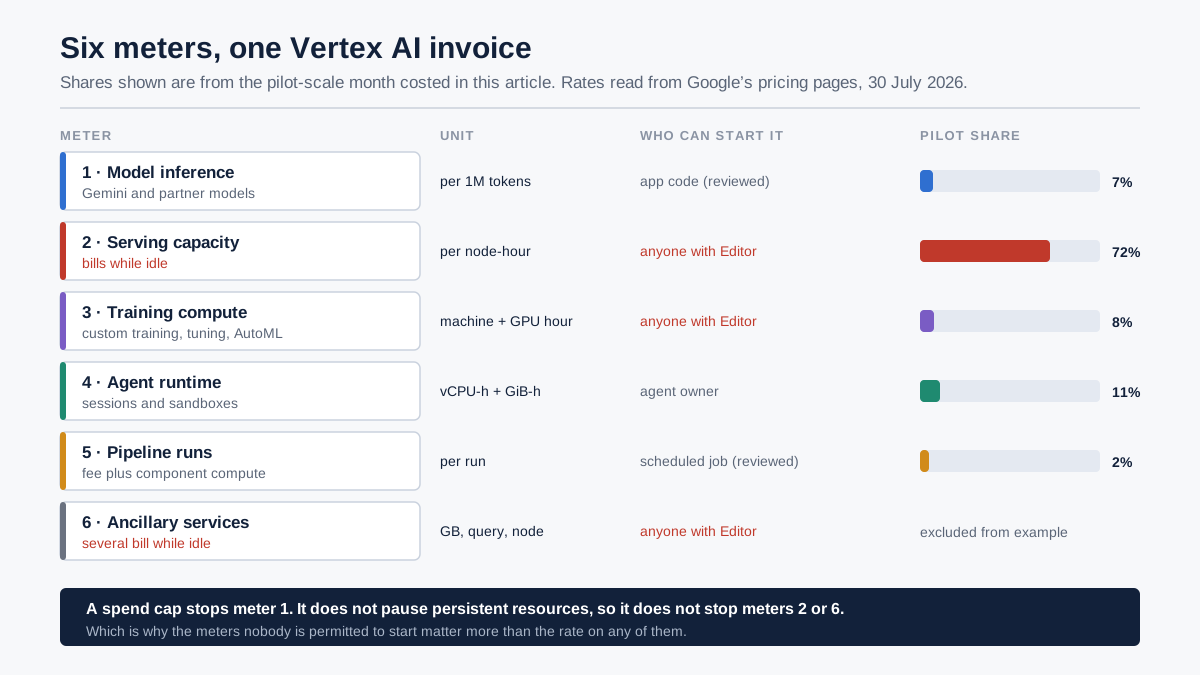
The six meters that produce a Vertex AI bill, and the control question attached to each one.
What "Vertex AI pricing" even means in 2026
If you search for Vertex AI pricing today you land on a page titled Gemini Enterprise Agent Platform pricing. Google announced the change on 23 April 2026, stating that "all Vertex AI services and roadmap evolutions will be delivered exclusively through the Agent Platform, rather than as a standalone service" (Google Cloud blog). The rate card did not reset. The product name did.
This matters more for procurement than for engineering. The API endpoints are unchanged, so nothing in your codebase breaks. But every internal document, every vendor-risk questionnaire, every budget line and every third-party comparison article that says "Vertex AI" now refers to a product Google no longer markets under that name — and the pricing page you were bookmarking has quietly reorganised around agents rather than models. When we re-read Google's own billing documentation on 30 July 2026, the spend-cap eligibility list named the service as "Gemini Enterprise Agent Platform (formerly Vertex AI)" (Cloud Billing documentation). That parenthetical is the only bridge between the term your finance team uses and the term your invoice uses.
There is a second-order effect worth naming. The reorganisation put agents at the centre and pushed model training, AutoML, the Model Registry and endpoints underneath them. That is not cosmetic for cost, because agent runtime is now a first-class meter with its own rate, and agents are the workload type most likely to run for hours without a human watching. A platform reorganised around long-running agents is a platform whose default spending pattern is duration, not requests.
Throughout this article we use "Vertex AI" for the thing you are searching for and name the current product where the distinction changes an answer. Every figure below was read directly from Google's published pricing pages on 30 July 2026 and is quoted with the meter it belongs to. Prices change; the structure has been stable for years, and the structure is the part you can plan against.
The six meters behind a Vertex AI bill
A Vertex AI bill is the sum of six meters that run independently, on different units, started by different actions. All six are usage-based billing in the strict sense: nothing here is a seat, a licence or a flat platform fee. But they measure very different kinds of usage, and that is what makes the total hard to predict. No single one of them is "the price." The table below is the map; the sections after it work through each meter in turn.
| # | Meter | Unit | What starts it | Stops when |
|---|---|---|---|---|
| 1 | Model inference (Gemini and partner models) | per 1M input / output tokens | An API call | The call returns |
| 2 | Serving capacity (online prediction endpoints) | per node-hour | Deploying a model to an endpoint | Someone undeploys it |
| 3 | Training compute (custom training, AutoML, tuning) | per machine-hour + accelerator-hour | Submitting a training job | The job finishes or is cancelled |
| 4 | Agent runtime | per vCPU-hour + per GiB-hour | An agent session or sandbox starts | The turn completes |
| 5 | Pipeline orchestration | per pipeline run + component compute | A pipeline triggers | The run completes |
| 6 | Ancillary services | varies (per GB, per query, per node) | Monitoring, grounding, Workbench, storage, egress | Varies — several are always-on |
Two structural facts fall out of that table immediately. First, only meters 1, 3 and 5 are bounded by an event you initiated; meters 2 and 6 keep running until someone takes an action to stop them, which means their cost is a function of forgetfulness rather than usage. Second, the meters have different owners in most organisations — a data scientist starts meter 3, a platform engineer starts meter 2, an application developer starts meter 1. No single person sees the whole invoice until finance does.
That split is the reason cost surprises on Vertex AI feel structural rather than accidental. Consumption billing distributes the spending decision across everyone with console access, while the total cost of ownership lands in one place at the end of the month. The FinOps Foundation's State of FinOps 2026 survey, drawing on 649 respondents representing more than $83bn in annual cloud spend, found that 98% of respondents now manage AI spend, up from 31% two years earlier, and identified visibility into AI costs as the top challenge practitioners face, followed immediately by allocating those costs to business units (data.finops.org). Allocation is the harder of the two, and it is the one a rate card can never help with.
Token rates: the number everyone quotes
Gemini inference on Vertex AI is priced per million tokens, split into input and output, with a higher tier above 200,000 input tokens on the Pro models and a heavily discounted rate for cached input. Output is where the money is: on every model below, the output rate is between four and eight times the input rate.
Standard (on-demand) rates, global endpoint, read from Google's generative AI pricing page on 30 July 2026:
| Model | Input / 1M | Output / 1M | Cached input / 1M | Above 200K input |
|---|---|---|---|---|
| Gemini 3.1 Pro (Preview) | $2.00 | $12.00 | $0.20 | $4.00 in / $18.00 out |
| Gemini 3.5 Flash | $1.50 | $9.00 | $0.15 | same rate |
| Gemini 3.5 Flash-Lite | $0.30 | $2.50 | $0.03 | same rate |
| Gemini 2.5 Pro | $1.25 | $10.00 | $0.13 | $2.50 in / $15.00 out |
| Gemini 2.5 Flash | $0.30 | $2.50 | $0.03 | same rate |
Three levers sit on top of those numbers, and each one is a genuine multiplier rather than a rounding adjustment.
Context caching cuts input to a tenth. Gemini 2.5 Flash cached input is $0.03 against $0.30 standard; Gemini 3.5 Flash is $0.15 against $1.50. For any workload that resends the same system prompt, policy document or product catalogue on every call — which describes most enterprise assistants — caching is the single largest available saving on meter 1, and it requires no change to which model you use.
Batch and Flex halve the rate. Gemini 3.1 Pro drops from $2.00/$12.00 to $1.00/$6.00 on Flex/Batch; Gemini 3.5 Flash drops from $1.50/$9.00 to $0.75/$4.50. That is a flat 50% across the models we checked, in exchange for giving up latency guarantees. Any workload that produces output nobody reads within the minute — nightly enrichment, backfills, document classification, evaluation runs — is being overcharged by exactly 2× if it runs on the standard tier.
Priority costs 1.8×. Gemini 3.1 Pro Priority is $3.60/$21.60 against $2.00/$12.00 standard; Gemini 3.5 Flash Priority is $2.70/$16.20 against $1.50/$9.00. Both work out at 1.8 times the standard rate. Priority is worth buying for the interactive slice of a workload and worth refusing everywhere else, which is a routing decision rather than a pricing one. Our earlier analysis of how AI model routing cuts LLM costs works through the mechanics.
The spread across model tiers is larger than most teams assume. Output on Gemini 2.5 Flash is $2.50 per million; on Gemini 3.1 Pro it is $12.00. That is 4.8× for the same token count, before the above-200K tier doubles the Pro rate again. A workload that defaults every call to the strongest available model is not slightly more expensive. It is a different order of bill.
One meter worth flagging because it is easy to trigger accidentally: grounding with Google Search. On Gemini 3.x models, 5,000 search queries per month are included, aggregated across all Gemini 3 models, with excess charged at $14 per 1,000 queries; on Gemini 2.5 models the allowance is a daily one (10,000 grounded prompts per day on 2.5 Pro, 1,500 combined on Flash and Flash-Lite) with excess at $35 per 1,000 grounded prompts. A single "always search the web before answering" instruction in a system prompt converts a free allowance into a per-query meter without anyone editing a budget.
Serving capacity: the meter that runs when nothing is happening
Online prediction endpoints bill per node-hour, and Google's documentation is explicit that a node hour "represents the time a virtual machine spends running your prediction job or waiting in an active state (an endpoint with one or more models deployed)" (Agent Platform pricing). You are renting capacity, not buying answers. An endpoint that served zero requests all month costs the same as one that served millions, up to the point where autoscaling adds a second node.
At $0.219 per node-hour for an n1-standard-4 online-prediction node in the US regions listed on that page, the arithmetic of forgetting is unforgiving:
| Forgotten for | Nodes | CPU-only cost | With one A100 attached |
|---|---|---|---|
| A weekend (48h) | 1 | $10.51 | $151.30 |
| A month (730h) | 1 | $159.87 | $2,301.62 |
| A month (730h) | 3 | $479.61 | $6,904.85 |
| A year (8,760h) | 1 | $1,918.44 | $27,619.47 |
The A100 column uses Google's published accelerator rate of $2.933908 per hour, from the same page. It is the column that explains the Hacker News commenter's $1,000: a GPU-backed endpoint left running for roughly two weeks lands almost exactly there.
Two further details compound this. Google charges Agent Platform Inference management fees in addition to your infrastructure usage: the underlying VM is billed at Compute Engine rates and the platform fee sits on top, so a Compute Engine price list understates the real endpoint cost. And Vertex AI Workbench instances carry their own management fees on the same pattern: $0.005 per vCPU, $0.035 per standard GPU (T4, P4) and $0.25 per premium GPU (P100, V100, A100), charged while the instance is in states including STARTING, PROVISIONING, ACTIVE, UPGRADING and RESTORING. A notebook nobody has opened since April is a live meter as long as it is not stopped.
This is the meter that most changes the shape of a bill at small scale, and it is the one that Lindy-style pricing explainers, which lead with token rates, systematically under-weight. At pilot volume the tokens are noise and the idle capacity is the bill.
A worked month at three volumes
Here is the thing missing from almost every Vertex AI pricing article: a total. Below is one workload — a customer-operations assistant with a fine-tuned classifier behind it — costed at three volumes with the arithmetic visible. Every rate is the published figure quoted above, read on 30 July 2026, using us-central1 for node-hour pricing and Gemini 2.5 Flash at standard on-demand rates for tokens.
One disclosure before the numbers, because it changes how you should read them: we have not run this workload on Vertex AI. There is no measured log behind this table. The rates are Google's published figures, verified by us on the date given; the volumes are assumptions we chose so the shape of the bill is legible. Treat the shares as the finding and the totals as a template.
The assumptions differ only in scale:
| Input | Pilot | Production | Scaled |
|---|---|---|---|
| Input tokens / month | 20M | 400M | 4,000M |
| Output tokens / month | 4M | 80M | 800M |
| Always-on endpoint nodes (n1-standard-4) | 1 | 3 | 10 |
| Agent runtime | 2 vCPU / 8 GiB, 100h | 4 vCPU / 16 GiB, 600h | 8 vCPU / 32 GiB, 2,000h |
| Pipeline runs (0.5h component compute each) | 30 | 600 | 4,000 |
| Training jobs | 1 × 6h, 1 A100 | 4 × 8h, 4 A100 | 12 × 10h, 8 A100 |
And the resulting bill:
| Meter | Pilot | Production | Scaled |
|---|---|---|---|
| Model tokens | $16.00 | $320.00 | $3,200.00 |
| Serving capacity (idle-inclusive) | $159.87 | $479.61 | $1,598.70 |
| Agent runtime | $24.20 | $290.40 | $1,936.00 |
| Pipeline runs + component compute | $4.19 | $83.70 | $558.00 |
| Training compute | $18.91 | $382.53 | $2,842.77 |
| Monthly total | $223.17 | $1,556.24 | $10,135.47 |
The derivations, so you can substitute your own numbers:
- Tokens (pilot): 20 × $0.30 + 4 × $2.50 = $6.00 + $10.00 = $16.00.
- Serving (pilot): 1 node × 730 hours × $0.219 = $159.87.
- Agent runtime (pilot): (2 vCPU × 100h × $0.085) + (8 GiB × 100h × $0.009) = $17.00 + $7.20 = $24.20, using Google's published Agent Compute and Agent Memory rates.
- Pipelines (pilot): (30 runs × $0.03) + (30 × 0.5h × $0.219) = $0.90 + $3.29 = $4.19. The $0.03 per-run execution fee is trivial; the component compute underneath it is not.
- Training (pilot): 6h × ($0.21849885 machine + $2.933908 accelerator) = 6 × $3.15240685 = $18.91.
Now read the shares, because they invert as you scale:
| Meter | Pilot share | Production share | Scaled share |
|---|---|---|---|
| Model tokens | 7% | 21% | 32% |
| Serving capacity | 72% | 31% | 16% |
| Agent runtime | 11% | 19% | 19% |
| Pipeline runs | 2% | 5% | 6% |
| Training compute | 8% | 25% | 28% |
At pilot scale, nearly three-quarters of the bill is capacity you rented and barely used. By the time the workload is scaled, tokens have become the largest single meter and idle capacity has fallen to a sixth. This is why the same platform gets described as "surprisingly cheap" by one team and "impossible to forecast" by another. They are standing at different points on this curve and both are describing it accurately.
The practical consequence: optimising tokens during a pilot is the wrong first move. At $223 a month, shaving 30% off the token bill saves $4.80. Undeploying the endpoint on Friday and redeploying on Monday saves $10.51 on that weekend alone. The highest-value optimisation changes as the workload grows, and any cost model that only counts tokens will point a pilot team at the smallest available lever.
Two honest complications on that advice. Undeploy-and-redeploy is cheap in money and expensive in patience: bringing an endpoint back means waiting for provisioning and a cold model load, which is fine for an internal pilot and unacceptable for anything a customer touches. And the fixed node counts in the table above are a simplification: online prediction endpoints autoscale, so a production endpoint sized at three nodes will bill more than three nodes during peaks. Treat every serving figure here as a floor set by the minimum replica count you configure, not a ceiling. The floor is the number nobody watches, which is exactly why it deserves the attention.
The free trial, the credits, and the cliff after them
There is no standing Vertex AI free tier in the way that phrase is usually meant. What exists is a time-boxed trial. Google's free trial gives "$300 in Welcome credit to spend over 90 days," and Google states you "will not be billed for any Google Cloud usage during your Free Trial" (Google Cloud free features documentation). If you neither upgrade nor exhaust the credit within 90 days, the trial billing account is closed and its associated projects and resources are stopped.
Two things about that make the trial a poor forecasting instrument.
The first is arithmetic. Against the pilot month costed above, $300 covers about 40 days. Against the production month it covers under six. A team that spends its trial on the pilot-shaped workload and then scales after upgrading experiences a step change that has nothing to do with a price rise. They simply crossed from a subsidised month into an unsubsidised one, at a moment when their usage was also growing. That reads as a pricing surprise and is actually a sequencing one.
The second is behavioural. During the trial, the idle-capacity meter is invisible, because the thing that would make it visible is an invoice. Every habit a team forms in those 90 days — leaving endpoints deployed, keeping notebooks warm, deploying a model per experiment — is formed in an environment where those habits are free. The trial teaches the wrong operating discipline and then hands you a bill shaped by it.
If you want the trial to be predictive rather than merely generous, spend part of it deliberately: deploy the endpoint you intend to run, leave it up for a full week, and read the billing export for that week in isolation. That single number, multiplied out, is a better forecast than any calculator, because it includes the meters you forgot you started.
What actually stops a Vertex AI bill
This is where the common claim that Vertex AI "has no spending ceiling" has become outdated, and where the accurate answer is more useful than either the old myth or the marketing. There are four different controls, they do very different things, and only one of them is a real ceiling.
| Control | What it does | What it does not do |
|---|---|---|
| Budget alert | Emails you at thresholds | Does not cap or stop anything |
| Spend cap budget | Blocks new usage of one eligible service in one project | Does not pause persistent resources |
| Quota override | Limits a specific resource's volume | Not a project-wide spend limit |
| Disable billing (automated) | Terminates all services in the project | Not reversible without loss; lags real cost |
Budget alerts do not cap spending. Google's documentation is unambiguous: "Setting an alerts-only budget doesn't automatically cap Google Cloud or Google Maps Platform usage or spending," and alert emails "don't automatically prevent the use or billing of your services" when thresholds are exceeded (Cloud Billing documentation). Most teams that believe they have a budget have this.
Spend cap budgets are a real cap, with real edges. Google now offers spend cap budgets for a short eligible-service list that includes Gemini API, Gemini Enterprise Agent Platform (formerly Vertex AI), Cloud Run and Cloud Run functions. They are scoped to a single project and a single service, on monthly billing periods only, and when triggered they block new usage until you manually lift the cap (spend cap documentation). Two limitations decide whether this solves your problem: in-flight requests are processed to completion and accrue charges, and — the important one — "Spend caps don't pause any on-going, fixed usage associated with persistent resources (such as compute and storage services), which remain active and continue to accrue charges."
Read that against the worked example above. A spend cap stops meter 1. It does not stop meter 2. At pilot scale, where serving capacity is 72% of the bill, a spend cap set at exactly the right number would have prevented roughly a quarter of the spend it was set to prevent.
Quota overrides are volume limits, not money limits. Reducing a quota below its default caps how much of a specific resource can be consumed, which is useful for blast-radius control, but Google's own framing is that these are for granular control of service volumes and are not designed as a project-wide spending cap.
Automatically disabling billing is the only true stop, and it is a demolition charge. Google publishes a pattern for disabling billing on a project when a budget threshold is crossed, with two warnings attached: the tutorial "removes Cloud Billing from your project, shutting down all resources" and "Resources might be irretrievably deleted"; and "There's a delay between incurring costs and receiving budget notifications, so you might incur additional costs for usage that hasn't arrived at the time that all services are stopped" (Cloud Billing documentation). It works. It is also a control you can only use on a project you are willing to lose, which in practice means sandboxes and never production.
The honest summary: Google now gives you a genuine per-service, per-project ceiling on the token meter, and no automatic ceiling at all on the capacity meters short of destroying the project. Anyone who tells you Vertex AI has no spend cap is a year out of date. Anyone who tells you a spend cap makes Vertex AI predictable has not read the persistent-resources clause.
The costed hybrid: batch, standard and priority in one workload
Most cost articles present tiers as a choice. In practice the right answer is a mix, and the mix is worth costing rather than asserting. Take the production month from above — $320 of Gemini 2.5 Flash tokens, all at standard on-demand rates — and split the same traffic by what it actually needs.
Suppose 60% of the token volume is offline enrichment that no human waits for, and of the remaining interactive 40%, one tenth genuinely needs the latency guarantee.
| Slice | Volume | Rate basis | Cost |
|---|---|---|---|
| Offline enrichment (60%) | 240M in / 48M out | Batch, 50% of standard ($0.15 / $1.25) | $96.00 |
| Interactive, standard (36%) | 144M in / 28.8M out | Standard ($0.30 / $2.50) | $115.20 |
| Interactive, priority (4%) | 16M in / 3.2M out | Priority, 1.8× standard | $23.04 |
| Mixed total | $234.24 | ||
| All-standard baseline | 400M in / 80M out | Standard | $320.00 |
The mix costs $234.24 against $320.00, a saving of $85.76, or 26.8%, on the same tokens with better latency where it matters. Nothing about the workload changed. What changed is that three classes of request stopped being billed as one class.
The prerequisite is unglamorous and it is where most teams stall: you need to be able to tell which class a request belongs to at the moment it is issued. That is a routing capability and a tagging discipline, not a pricing decision, and it has to be built before the saving is available. A team that cannot distinguish its offline traffic from its interactive traffic cannot buy the 50% discount even though it is sitting right there on the price list.
Two more discounts sit adjacent to this and are worth checking before you model anything. Committed use discounts flow through when you use Compute Engine reservations with Agent Platform Inference, and Spot VMs are billed at Compute Engine Spot rates. Both are documented on the Agent Platform pricing page, and both apply to the capacity meter rather than the token meter, which is precisely the meter that dominates small deployments.
Who can start a meter: the permission question behind the price
Everything above is arithmetic anyone can reproduce. This section is the part a rate card cannot answer, and it is where forecasting actually fails.
For each of the six meters, ask four questions:
- Who is permitted to start it? Which roles can deploy a model to an endpoint, submit a training job with eight A100s attached, or launch a Workbench instance? On most Google Cloud projects the answer is "anyone with Editor," which is not a permission model so much as an absence of one.
- What is the largest single action that role can take? Not the average — the maximum. A role that can attach eight A100s to a training job can, in one command, commit roughly $23.47 per hour of accelerator spend before anyone reviews it. A role that can deploy an endpoint can commit $2,301 a month with a GPU attached.
- Is the running meter attributable to a person? Not to a project, not to a label somebody may have set, but to a named human or a named agent with an owner. The FinOps Foundation's 2026 survey found allocating AI costs to business units to be the second-ranked challenge for practitioners applying FinOps to AI spend, immediately after visibility (data.finops.org), and allocation is strictly harder on a platform where one project hosts many teams' work.
- What happens to the meter when the person leaves? An endpoint deployed by a contractor whose access was revoked in March is still billing in July. Access offboarding and cost offboarding are different operations, and almost nobody runs the second one.
We call the shape of the answer the meter-start question, and it is worth writing down for each of the six meters before a platform decision is made rather than after the first surprising invoice. In our experience of how these deployments go wrong, the answers cluster: meters 1 and 5 are usually well-owned because they sit in application code that went through review; meters 2, 3 and 6 are usually unowned because they are started from a console by a person solving a problem in the moment.
The same logic applies with more force to agents. Google's April 2026 announcement introduced Agent Identity, Agent Registry and Agent Gateway, describing the goal as ensuring "every agent — whether built on Agent Platform or sourced from our partner ecosystem — has a trackable identity and operates within enterprise-grade guardrails," with each agent receiving "a unique cryptographic ID" that creates "a clear, auditable trail for every action an agent takes." That is a direct acknowledgement from the platform vendor that agents need owners. It is also scoped to one cloud, which is the limitation to plan around if your AI estate is not entirely inside Google. Our earlier work on non-human identity — owner, scope and expiry for AI agents sets out the identity contract we think an agent needs regardless of which platform hosts it.
Cost governance is the same discipline as access governance pointed at a different object. If you already know how to answer "who is allowed to read this data and what did they do with it," you already have the machinery to answer "who is allowed to start this meter and what did it cost." Most organisations simply never point it that way.
Where this model breaks down
The six-meter frame is a planning tool, not a forecast, and there are several places it will mislead you if taken literally.
The worked example is illustrative, not measured. We did not run this workload. Every rate in it was read from Google's published pricing pages on 30 July 2026 and every total was computed from those rates, but the volumes are assumptions we chose to make the shape legible. Substitute your own and the shares will move, sometimes a lot. A workload with no fine-tuning has no meter 3 at all, and its curve looks completely different.
Region and machine-type variation is real and we have flattened it. Node-hour rates differ by region and by machine family, and the figures here use one machine type in the US region group. A team in Sydney or Mumbai should re-read the same tables with their region selected; the structure holds, the numbers do not.
Preview pricing moves. Gemini 3.1 Pro is a preview model at the time of writing, and preview rates are the least stable numbers on the page. Google also noted that grounding billing on Gemini 3.x models began on 5 January 2026: a meter that was free became chargeable, which is exactly the class of change no model can anticipate.
Egress and storage are outside our six meters. Data transfer out of Google Cloud, Cloud Storage for training data and model artifacts, and BigQuery for whatever feeds the pipeline are all billed on their own schedules and can be material for data-heavy workloads. We excluded them because they are not Vertex AI charges, which is defensible for a pricing article and unhelpful if you are the one paying the invoice.
We could not independently verify third-party benchmark comparisons. Comparative "Vertex AI vs OpenAI vs Bedrock" cost figures circulate widely; almost all of them are undated, and we found none we could trace to a reproducible methodology. We have therefore left them out rather than repeat them. For the same reason we have not attempted a total-cost comparison against self-hosting, which depends on GPU procurement terms nobody publishes.
This is not a verdict on whether to buy. A buyer who wants a single figure to compare against a per-seat product will not find one here, and should be suspicious of anyone who offers one. If your workload needs custom training, managed endpoints, or Google's model estate under your existing cloud agreement, Vertex AI is priced normally for what it is: raw platform capacity. If your workload is a handful of assistants that call a model and nothing else, you are paying a comprehension and operations cost for meters you will never start, and a simpler API or an application-layer product will price better. The six-meter count is how you tell which of those you are.
Enterprise negotiation is not modelled. Published rates are the starting point for a committed-spend conversation, and large commitments change them. Nothing here reflects what a negotiated agreement looks like, because those terms are not public. If your annual spend is heading past six figures, the list price is a benchmark rather than a bill.
One more caveat about the wider market: Stanford HAI's 2026 AI Index reports U.S. private AI investment reaching $285.9 billion in 2025 (Stanford HAI). Capital at that scale is still buying market share, and vendor pricing in a land-grab phase is not a long-run signal. Model rates have moved repeatedly in both directions; build your plan on the meter structure, which has been stable, rather than on any specific number in this article.
Making AI spend attributable, not just visible
This is the one section about what we build, and the honest boundary first: LeapForce is not a cheaper Vertex AI and not a substitute for it. If you need custom training, managed endpoints and Google's model estate, you need Google Cloud. What we build is the governance layer that sits in front of the models your company uses — including Google's — so that spend, access and audit answer to one control plane rather than to each cloud console separately.
The relevant capability is the AI Gateway: one governed endpoint through which requests are identified, policy-checked, routed and recorded, so that model, tokens, latency and cost are attributed to the caller on every call rather than reconstructed from a billing export afterwards. Our published rollout model for it is Observe first. Enforce second. Optimize third. Phase one points a single team's traffic at the gateway in observe mode with no rules, on the argument that you cannot govern spend you have not yet measured. On Model Routing we describe budgets in dollars rather than tokens, per team and per agent, with pacing alerts and monthly attribution exports that map spend to cost centres. LeapForce is in active development and per-capability build status — live, in development, roadmap — is disclosed honestly; treat the budget-enforcement capability as one to ask about specifically rather than assume. That transparency is deliberate, and it is the same standard we would want applied to a pricing article.
Frequently asked questions
On raw token rates the three are broadly comparable and the ranking changes with every model release, so a rate comparison made today is stale within a quarter. The structural difference is that Vertex AI bills several non-token meters — node-hours for endpoints, machine-hours for training, vCPU-hours for agent runtime, which a pure API provider does not. If your workload is only inference, compare token rates. If it involves hosting, tuning or long-running agents, compare the meters, because that is where the divergence lives.
Count meters, then size each one separately. For tokens, estimate calls per day, average input and output tokens per call, and multiply by the published per-million rate for the model you will actually use. For serving, multiply the node-hour rate by 730 for anything you will leave deployed, because idle time bills. For training, estimate job hours times machine plus accelerator rate. Add pipeline runs at $0.03 plus their component compute. The result will be wrong in detail and roughly right in shape, and the shape is what tells you which meter to control first.
Not in the usual sense. The Vertex AI free tier people are looking for is really the Google Cloud free trial: $300 in credit to spend over 90 days, during which Google states you will not be billed for usage. That is a trial rather than a standing allowance: when the 90 days elapse or the credit is exhausted, the trial billing account is closed and its projects and resources are stopped unless you upgrade. Treat it as a subsidised evaluation window, and deliberately leave one endpoint running during it so the idle-capacity meter shows up in your billing export before it shows up on an invoice.
Almost certainly a deployed endpoint, a running Workbench instance, or both. Google bills online prediction per node-hour, and a node hour includes time the machine spends waiting in an active state with a model deployed. No requests required. One n1-standard-4 node left up for a month is about $159.87; the same node with an A100 attached is about $2,301. Workbench instances additionally carry management fees while in states including ACTIVE, PROVISIONING and RESTORING. Check for deployed models and running notebooks before you look at anything else.
Partly. Budget alerts do not cap anything. Google's documentation says an alerts-only budget does not automatically cap usage or spending. Spend cap budgets are a genuine cap and now cover Gemini Enterprise Agent Platform (formerly Vertex AI), but they are scoped to one project and one service on a monthly period, and they explicitly do not pause persistent resources, which keep accruing charges. The only complete stop is automatically disabling billing on the project, which shuts down all resources and may delete them irretrievably. So: a real ceiling on the token meter, no automatic ceiling on the capacity meters.
Three levers, applied in this order. Move anything nobody waits for to Batch or Flex, which ran at 50% of standard rates on every model we checked. Cache repeated input, since cached input is roughly a tenth of standard input on the models above, and enterprise prompts repeat heavily. Then route by task rather than defaulting to the strongest model, since output on Gemini 2.5 Flash is $2.50 per million against $12.00 on Gemini 3.1 Pro. Combining the first two on our production example cut a $320 token bill to $234.24 while buying priority latency for the slice that needed it.
Google Cloud gives you project-level and label-level attribution through billing exports, which is sufficient when one project maps to one team and labels are applied consistently. It stops working when several teams share a project, when agents run under a shared service account, or when nobody enforces labelling at creation time. The durable fix is upstream: require an owner on every deployable resource and every non-human identity before it can be created, so attribution is a property of the thing rather than a report you assemble later. Without that, chargeback becomes an argument between teams about whose usage-based billing line belongs to whom. The FinOps Foundation's 2026 survey ranks allocating AI costs to business units as the second-hardest problem practitioners face in AI FinOps, after visibility.
They apply to the infrastructure meters rather than the token meter. Google's Agent Platform pricing page states you can use Compute Engine reservations with Agent Platform Inference and that you are then billed according to Compute Engine pricing including any applicable committed use discounts, and that Spot VMs used with inference are billed at Compute Engine Spot rates. Since serving capacity dominates small and mid-size deployments (72% of the pilot month costed above), a discount on that meter is worth more early than any token discount.
We could not verify a credible general answer and are not going to invent one. The comparison turns on GPU procurement terms, utilisation rate and the fully loaded cost of the engineers who keep a serving stack alive, none of which are published and all of which vary by an order of magnitude between organisations. What we can say from the rates above is that managed serving charges for provisioned time rather than requests answered, so the economics of self-hosting improve with utilisation and worsen with idle time, which is the same variable that dominates the managed bill. Our earlier analysis of self-hosted AI deployment versus SaaS covers the non-cost factors.
Six questions, one per meter: who can start it, what is the largest single commitment that role can make in one action, how is a running meter attributed to a named person or agent, what stops it, what happens to it when its owner leaves, and how quickly would we notice. Add one platform-level question: whether the spend cap covers the services you will actually use, given it does not pause persistent resources. A review that only asks about data residency and model rates will approve a platform whose main cost risk is a console button.
Often enough that any figure without a date is a liability. In the twelve months to July 2026 the product was renamed, agent runtime became a billable meter with its own rates, spend cap budgets appeared for the service, and grounding billing on Gemini 3.x models began on 5 January 2026 for usage above the included allowance. Every number in this article was read from Google's published pricing pages on 30 July 2026 and should be re-checked against those pages before you commit a budget to it.
Ready to Govern Your AI?
Talk to LeapForce — one controlled layer for every AI tool, connector, model, and agent.
Comments