
Workflow management software is the system that holds your team's repeatable processes: intake, routing, approvals, handoffs and the automations that move work between them. Choose it on four control facts, not feature lists: who an automation runs as, what happens when that person leaves, what the platform records, and what control costs.
Every serious platform in this category can draw a board and fire a rule. The thing they differ on, and the thing almost nobody compares, is what your process layer does the day the person who built it is deprovisioned. Our position is that this single question separates the platforms better than any feature grid, because it is the one place where the vendor's identity model becomes visible.
It is the question a Smartsheet customer asked in September 2024, in the vendor's own community, with an account already queued for deactivation: "the person who created those workflows has left the company." The accepted answer opened with three words no operations lead wants to read under a workflow they depend on: "I'm pretty sure".
The short answer: Pick workflow management software by running the Leaver Test. Pick your most business-critical automation, name the human account it runs as, and confirm in the vendor's own documentation what happens to it when that account is deactivated. Platforms differ enormously here, the answer is rarely in the feature comparison, and getting it wrong means silent process failure rather than a visible error.
Last updated: July 30, 2026.
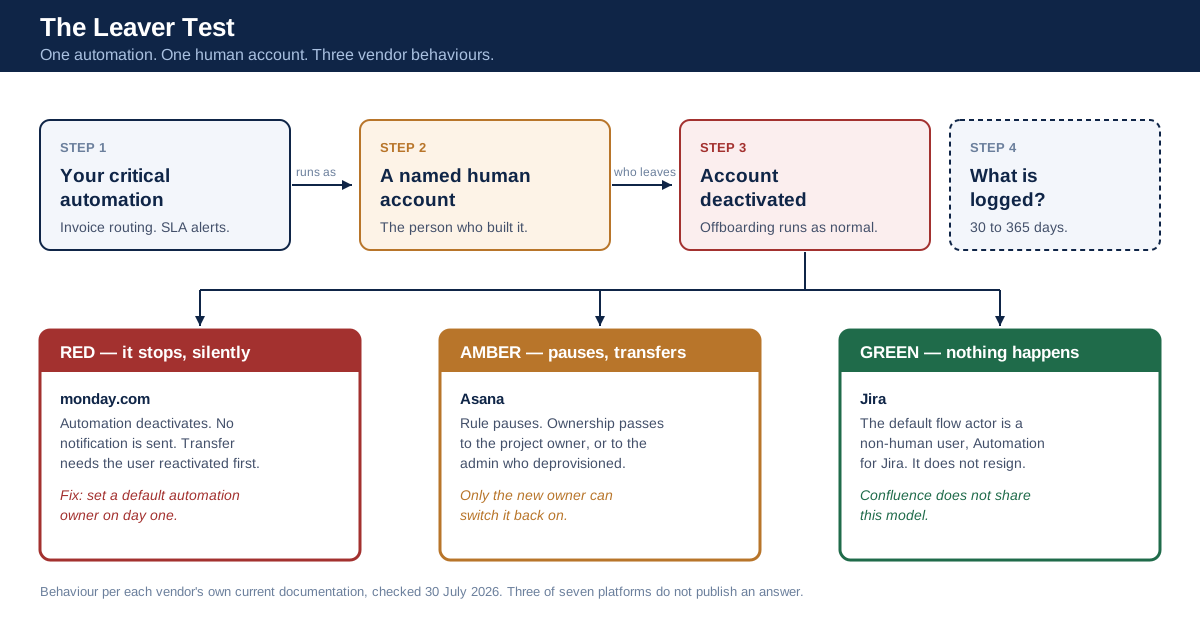
The Leaver Test in one picture: one automation, one human account, three very different vendor behaviours.
A note on method. We did not run a controlled side-by-side trial of these platforms in a paid tenant, and will not pretend otherwise. Everything in the platform sections below is sourced from the vendors' own current documentation and pricing pages, fetched and quoted on July 30, 2026, with the links inline so you can check each claim against the same page we read.
What Workflow Management Software Actually Does
Workflow management software turns an implicit process into an explicit one. It stores the steps, the order, the owner of each step, and the conditions that move an item forward, then fires automations when those conditions are met. Boards, timelines and dashboards show you the state; rules and integrations change it.
The distinction that matters for buying is between the two halves. The display half is commoditised. Every platform reviewed here gives you a table view, Kanban boards, a timeline, custom fields, and a rule builder that reads when this, then that. Task tracking, team collaboration and visual dashboards are table stakes across the whole category in 2026. If your shortlist is built on those, every option passes and you have not narrowed anything.
The state-changing half is where platforms genuinely differ, in ways that never appear in a features table. An automation that moves an item between groups is trivial. One that posts to a customer, writes to a finance sheet, files a ticket in another system or grants access to a folder is software acting inside your company with somebody's permissions attached. Workflow management tools have quietly become one of the largest populations of unattended software in the average company, and they are administered by operations teams rather than IT.
What it is not
Workflow management software is not business process management (BPM) in the heavyweight sense. BPM suites model processes formally, version them and treat compliance controls as a first-class concern. Work management platforms come at the same territory from the collaboration side, with a rule builder bolted to a task database. That origin explains most of what follows: the identity model was designed for humans clicking, and automations were fitted into it afterwards.
It is also not integration middleware. Native automations run inside the platform's own data model, so cross-system orchestration still needs an integration platform or the vendor's connector marketplace, and those connectors carry their own credentials and consent scopes.
The three artefacts every platform creates
Whatever you buy, the platform will accumulate three things that outlive the person who created them:
| Artefact | What it is | Why it becomes a governance problem |
|---|---|---|
| Automation rules | Stored logic that fires without a human present | Runs under an identity; that identity can be deactivated |
| Connected apps and integrations | OAuth grants, personal tokens, marketplace apps | Standing access to another system, often installed per-user |
| Guest and external shares | People outside the tenant with item-level access | Rarely reviewed; frequently outlives the project |
The Leaver Test: A 20-Minute Diagnostic
The Leaver Test is a four-question diagnostic you can run in one sitting, on a platform you already own or one you are evaluating in trial. It does not need a security team, a spreadsheet, or a vendor call. It needs one automation that matters and twenty minutes.
Pick the automation your business would notice within a day if it stopped. The invoice routing rule. The customer-response SLA alert. The nightly status roll-up that the ops meeting depends on. Then answer these four in order, and write down where you found each answer.
Question 1 — Whose account does it run as? Open the automation and find the identity attached to it. Some platforms show this plainly; some require you to hunt. If you cannot determine the answer from the interface within five minutes, that is your answer for governance purposes: nobody in your company knows either.
Question 2 — What happens when that account is deactivated? This one must be answered from the vendor's documentation, not from a guess. You are looking for one of three behaviours: the automation stops, the automation transfers to someone else, or the automation continues under a non-human identity.
Question 3 — Who finds out? If the behaviour is stops, does anyone get told? A silent stop is materially worse than a loud failure, because the process appears to be running until someone downstream notices the absence of something.
Question 4 — What is written down afterwards? If a rule ran, or was disabled, or was edited, does the platform's audit log contain that event, and for how long is it retained? A rule that fired and moved money leaves a trail in exactly one place, and if that place holds thirty days you have thirty days of provable history.
Scoring it
Score each answer green, amber or red:
| Question | Green | Amber | Red |
|---|---|---|---|
| Runs as | A named service or bot identity you control | A named human, visible in the UI | Cannot be determined from the interface |
| On deactivation | Continues under a non-human identity, or transfers automatically | Pauses and requires a documented transfer | Stops, and the docs do not say so |
| Notification | Admin alerted | Visible on an automation status page | Nothing |
| Audit | Rule events logged with retention past your compliance window | Logged, short retention | Rule events not logged at all |
Two reds on your most critical automation is a procurement finding, not a nitpick. It means the process you depend on is attached to an employment relationship, and your platform will not tell you when that relationship ends.
If your current tool fails the test
Failing is common and it does not mean migrating. Do three things in order. Nominate a durable owner for every automation that matters, using whatever mechanism the platform offers: a bot actor if it has one, a default-owner setting if it has that, a named administrator if neither. Add "list and reassign automations, integrations and shares" to the offboarding checklist as an explicit step with a named person responsible, because no platform here will prompt you. Then export the audit log somewhere you control, since the vendor's retention window is not yours to set.
On the shared-account objection this raises: a nominated fallback owner should be a named service or administrator account with a documented human accountable for it, recorded outside the tool. It should not be a shared login several people use, which trades one governance failure for a worse one.
The test is deliberately cheap, because expensive evaluations do not get run. It also has a useful property: the answers are almost always in public documentation, so you can run it on platforms you have not bought yet. The rest of this article is that test, already run, on six of the most widely deployed options.
Why Automations Inherit A Person, Not A Role
Here is the mechanism. Work management platforms grew out of collaboration tools, where every action had a human behind it. Permissions were modelled per user, on boards, sheets and pages. When automation arrived, the cheapest correct implementation was to have the rule act with the permissions of whoever created it — that way the rule can never do more than its author could, which is a genuinely sound security default.
Notion states the consequence plainly in its own documentation: if you want an automation to add or edit pages and databases, you need permission to edit those pages and databases, and automations will not take action on any pages whose access is restricted. The automation is bounded by its creator's reach. That is good design, and it has an unavoidable corollary. The automation is also bounded by its creator's continued existence.
monday.com documents the failure mode with unusual clarity. If the automation's creator is unsubscribed from a board with permissions enabled, has permissions revoked from a column the rule touches, or is downgraded to a viewer, the rule is deactivated and the error reads: "The user who created this automation doesn't have permissions to make changes on this board." A routine permission tidy-up in one board can therefore stop an automation that a different team depends on.
Atlassian is the interesting counterexample, because it built the abstraction the others mostly lack. In Jira, the default flow actor is a "user" called Automation for Jira, a non-human identity that does not resign. Admins can set anyone as the actor if they want the change attributed to a real person. In Confluence automation, by contrast, the actor is the person who created the flow, and per the same page you can set the actor as yourself but cannot change it to someone else. One vendor, two products, two identity models.
The pattern this produces at scale
Multiply one automation by three years of operations work and you get a specific shape of risk that has nothing to do with hacking:
- A population of unattended jobs, each attached to an individual employee.
- No inventory of that population outside the platform, because the platform is administered by an operations team and not by IT.
- A deprovisioning process built for humans (disable SSO, revoke the laptop, close the mailbox) that does not know these jobs exist.
- Integrations installed per-user, each holding a token to a second system.
Public breach data is a reasonable proxy for how much this category of standing access matters. In the 2026 Data Breach Investigations Report, published by Verizon on May 19, 2026, breaches involving a third party accounted for 48% of all breaches, and 31% of breaches began with vulnerability exploitation. Third-party involvement is not the same thing as an orphaned workflow automation, and we are not going to stretch the statistic into one. What it does establish is that the connections between your systems, rather than the systems themselves, now carry a large share of real-world breach exposure, and a workflow platform's connector list is exactly that kind of connection.
The standards vocabulary here is older than the problem. NIST's SP 800-53 Rev. 5 account management control (AC-2) lists the account types an organisation is expected to manage, and the list explicitly includes shared, group, guest, temporary and service accounts alongside individual ones. The same control expects a list of active system accounts with the name of the individual associated with each. Applied to workflow management software, that is a straightforward instruction: every automation should have a named owner recorded somewhere outside the tool, and that record should be checked when people leave.
We have argued a related case for AI agents before, in our earlier analysis of non-human identity and why every agent needs an owner, a scope and an expiry. The workflow automation is the same object, ten years earlier and with a friendlier user interface.
For a wider view of how movers and leavers create orphaned access across a whole SaaS estate, this short vendor explainer covers the lifecycle problem directly:

Platform By Platform: What Happens When The Builder Leaves
Six platforms, run through the Leaver Test using their own current documentation. Prices are list prices in USD, fetched July 30, 2026, and every platform prices per seat with the governance features concentrated at the top tier. That pattern is the subject of a later section.
At a glance
| Platform | Automation runs as | When the owner is deactivated | Are admins told? | Audit log tier and retention |
|---|---|---|---|---|
| monday.com | The creating user | Automation deactivates; ownership transfer requires reactivating the user first | No notification; visible on the board's Automation page | Enterprise; records not deleted after a set period |
| Asana | The rule owner | Rule pauses; ownership passes to the project owner, or the deprovisioning admin | Not documented | Enterprise+ or Enterprise with compliance add-on, via API |
| Jira (Atlassian) | "Automation for Jira" by default; admins can set any actor | Unaffected when the default bot actor is used | Not applicable in the default configuration | Requires Atlassian Guard or an Enterprise plan; 180 days |
| Confluence (Atlassian) | The person who created the flow, not changeable to someone else | Not documented on the actor page | Not documented | As above; 180 days |
| ClickUp | Not documented on the pages we checked | Not documented on the pages we checked | Not documented | Enterprise only; 30 days |
| Notion | Effectively the creator's permissions | Not documented on the automations page | Not documented | Enterprise; up to 365 days |
| Smartsheet | Not documented; community answer is hedged | Not documented in help content | Not documented | Enterprise add-on; six months, API only |
Three of the seven rows above say "not documented". That is a finding in itself, and it is the honest state of the evidence rather than a gap in our reading. Each cell reflects the vendor's own current help content, linked in the sections below.
monday.com
Best for: operations teams that want the failure mode written down, and admins who will actually use the default-owner setting.
monday.com is the only platform in this set that documents the leaver scenario end to end. Its help centre lists "Deactivated User" as a named cause of automation failure, gives the exact error text, "The automation owner was deactivated from your account", and states plainly that you will not receive a notification that the automation was deactivated. It also documents the awkward remedy: to transfer ownership of a deactivated user's automations, the user has to be reactivated in the account first.
Crucially, it also documents the fix. There is an account setting to keep automations running when users are deactivated, by nominating a default owner. That single toggle converts a red Leaver Test result into an amber one, and most buyers do not know it exists.
Control facts: the audit log is Enterprise-only, admin-only, and the documentation states that audit log records will not be deleted after a certain amount of time. The documented event set is security-centric (logins, failed logins, attachment downloads, board exports) and the page does not describe automation configuration events.
Pricing: per the pricing page, Work Management runs Basic $9, Standard $12 and Pro $19 per seat per month billed annually, with Enterprise on custom pricing. Automations and integrations are only available from Standard upward, and the allowance is metered in actions: 250 per month on Standard, 25,000 on Pro and 250,000 on Enterprise. monday.com's own note on that page is more useful than any third-party review: 250 actions a month is "typically exhausted within days" for accounts that notify several people or map several columns per automation.
Pros: documented leaver behaviour; a default-owner setting that actually solves it; indefinite audit retention. Cons: SSO, audit log and advanced permissions all sit behind Enterprise; the 250-actions-per-month Standard cap is low enough that a single busy board can exhaust it. Bottom line: the most transparent vendor in this comparison on the exact question that matters, and the only one whose documentation lets you pass the Leaver Test before you buy.
Asana
Best for: companies that want app and token control early, without waiting for an Enterprise contract.
Asana's rule ownership behaviour is documented, though we found it stated most plainly in Asana's community forum, where the deprovisioning section of the company's own guide on rules is quoted and restated by an Asana moderator. When a user is deprovisioned, their rules are paused and ownership of rules on projects passes to the project owner; where there is no project owner, ownership passes to the admin who performed the deprovisioning, and only the new owner can reactivate the rule. That is a better default than a hard stop, but it still requires a human to notice and act.
The practitioner experience of this is worth reading. In a long-running Asana forum thread on offboarding, the consultant Larry Berger describes a client whose IT manager was leaving after six years of heavy use, owning large numbers of custom fields and projects, and whose support requests for a simple list of what she owned came back empty. His summary: "My client strongly encourages Asana to address this gap in the product making offboarding painful." The thread has been maintained with updates through January 2026, which tells you how durable the problem is.
Control facts: the Audit Log API is restricted to service accounts on Enterprise+, legacy Enterprise, or an Enterprise domain with the compliance management add-on. Its event schema does include OAuth app names and rule names, so automation and integration activity is at least representable in the log, which is better than several competitors. Notably, app management controls that govern which third-party apps, personal access tokens and service accounts can connect are available from the Starter tier, per the pricing page, rather than being an Enterprise-only privilege.
Pricing: Starter $10.99 and Advanced $24.99 per user per month billed annually ($13.49 and $30.49 billed monthly), with Enterprise and Enterprise+ on contact-sales pricing. SAML SSO and SCIM provisioning begin at Enterprise.
Pros: automatic ownership transfer rather than a dead stop; app and token controls low in the range; audit schema covers apps and rules. Cons: the transferred rule stays paused until someone acts; audit log access is API-only and gated at the very top of the range. Bottom line: the best mid-market answer on connected-app control, with a leaver behaviour that degrades gracefully instead of failing silently.
Jira and Confluence (Atlassian)
Best for: organisations that want automations to run as software rather than as staff.
Atlassian is the only vendor here that gives you a first-class non-human identity for automations by default. In Jira, changes performed by a flow are attributed to the flow actor, and the default actor is the "Automation for Jira" user; app administrators can set anyone as the actor when human attribution is preferable. If you leave the default in place, deactivating an employee has no effect on the rules they wrote. The Leaver Test comes out green on question two without any additional configuration.
Confluence automation does not inherit this. The actor there is the person who created the flow, and the same page states you can set the flow actor as yourself but cannot change it to someone else. Buying the Atlassian suite therefore gets you two different answers depending on which product the automation lives in.
Control facts: the audit story has a sharp edge. Atlassian's documentation states that audit log activities are stored for up to 180 days and anything older is removed and cannot be recovered, and, more importantly, that organisation-level insights require an Atlassian Guard subscription or at least one Enterprise plan, without which "organization-level logs will not store or display any events". Not degraded. Not shorter. Not stored at all.
There is also a documented operational cliff on automation volume. Each plan tier carries a higher monthly automation limit, with Enterprise unlimited, and when you hit the limit Atlassian states that all rules for that product stop until the limit resets at the start of the next calendar month, with unused runs not rolling over. A busy month can therefore switch off your entire automation layer until the first of the following month.
Pros: a real bot actor as the default; the only platform here that solves the ownership problem structurally. Cons: no organisation audit events at all without Guard or Enterprise; a hard monthly automation ceiling that stops every rule; Confluence does not share Jira's actor model. Bottom line: structurally the strongest identity model in the category, paired with the strictest commercial gate on evidence.
ClickUp
Best for: teams that need cheap breadth and are prepared to compensate for a short audit window.
ClickUp publishes the most detailed event catalogue here. The workspace audit log includes User, Task, Fields, Hierarchy, Agents and Other logs, and the user log explicitly records "App connected" and "App disconnected" events, including external MCP server connections, alongside SCIM provisioning and deprovisioning events, SSO configuration changes and custom role changes. There is a dedicated Agents log tracking Super Agent activity by user, agent and activity type. For a 2026 buyer, that MCP line matters. It is the only mainstream work platform in this set that names the protocol in its audit events, and we have written separately on why MCP connectors need governing rather than trusting.
The catch is retention and reach. Audit logs are Enterprise-only, visible to Owners by default, and historical data is available for 30 days. Owners can grant admins access via a custom role permission. Thirty days is shorter than most internal incident review cycles and shorter than several regulatory minimums.
We could not find, on either audit page, an event type for automation rule creation or modification, and neither page documents what happens to an automation when its creator is deprovisioned.
Pricing: per the pricing page, Unlimited $7 and Business $12 per user per month billed annually, with Enterprise on custom pricing. Business includes 5,000 automations per month; Enterprise includes 250,000, plus SAML SSO, audit logs and unlimited custom roles.
Pros: the most granular published event catalogue, including app connections and MCP servers; low list price at the working tiers. Cons: 30-day audit retention is the shortest in this comparison; automation ownership behaviour on deprovisioning is undocumented; audit access defaults to Owners only. Bottom line: excellent visibility while the window lasts, and the window is short.
Notion
Best for: documentation-led teams whose automations are mostly internal state changes.
Notion's model is permission-bounded rather than ownership-bounded. Database automations can be created, edited or deleted by paid-plan users with full access to the database, and the platform will not act on pages whose access is restricted. Slack automations are the exception and can only be edited by the automation creator. Because editing rights are attached to database access rather than to the original author, a colleague with full access can usually pick up an orphaned automation without an admin transfer, which is the practical outcome most teams want.
Control facts: the audit log is available to organisation owners on the Enterprise plan, retains history for up to 365 days, and, unusually, captures integration lifecycle events including integration created, integration deleted and integration installation toggled, plus guest removals and guest-capability changes. That is the most integration-aware audit log in this comparison, and 365 days is the longest retention among the vendors that publish a number.
Pricing: per the pricing page, Plus $10 and Business $20 per seat per month, with Enterprise on custom pricing. SAML SSO starts at Business; SCIM and the audit log are Enterprise.
Pros: longest published audit retention; integration and guest events logged; automations are portable between colleagues with database access. Cons: no documented behaviour for automations when a creator is deprovisioned; the audit log itself is Enterprise-only. Bottom line: the strongest audit content in the set, sitting behind the same Enterprise gate as everyone else.
Smartsheet
Best for: structured, sheet-centric operations where automation volume is high and the Business tier's unlimited automations are the draw.
Smartsheet is where the evidence runs out. We could not find help content stating what happens to an automated workflow when its creator is deactivated; the workflow management article covers who can manage workflows by permission level but not ownership succession. The community thread quoted at the top of this article is the clearest public answer, and its accepted response is explicitly a guess about automations running under the sheet owner's context.
Control facts: Event Reporting is the audit mechanism. It requires the Enterprise plan, covers events going back up to six months, and is accessed through the Smartsheet Events API rather than an admin screen. That last detail is a real operational cost. Retrieving your own audit trail is a development task, not a filter and export.
Pricing: per the pricing page, Pro is $9 and Business $19 per member per month billed yearly, with Enterprise on custom pricing. Pro includes 250 automations per month; Business includes unlimited automations and unlimited free guests. SAML-based SSO and directory integrations begin at Enterprise.
Pros: unlimited automations from the $19 tier, which is the best automation-per-dollar position in this set; a six-month audit window. Cons: audit is API-only and Enterprise-gated; ownership succession for workflows is not documented publicly. Bottom line: strong economics on automation volume, weakest published answer on the leaver question.
Airtable, briefly
Airtable belongs on many shortlists here, and we checked it. Its automation management documentation sets out the permission split. Creator-level roles can create, delete, duplicate, configure and rename automations, while Editors can view an automation's configuration or copy its URL. But the page we read does not state whose permissions an automation executes with, or what happens when the automation's owner is removed. We are not going to fill that gap from third-party summaries, so Airtable sits outside the main comparison with an unresolved Leaver Test.
The Audit Question: What Gets Recorded, And For How Long
Retention is where the workflow category collides with regulation, and almost no buying process checks it. The pattern across the six platforms is consistent: the audit log is an Enterprise feature, its retention is set by the vendor rather than by you, and the published windows vary by more than an order of magnitude.
| Platform | Minimum plan for audit | Published retention | Access method |
|---|---|---|---|
| ClickUp | Enterprise | 30 days | Admin UI and API |
| Atlassian | Guard subscription or one Enterprise plan | 180 days | Admin console and export |
| Smartsheet | Enterprise (Event Reporting) | 6 months | API only |
| Notion | Enterprise | Up to 365 days | Admin UI |
| Asana | Enterprise+ or compliance add-on | Not published on the API page | API only, service accounts |
| monday.com | Enterprise | Not deleted after a set period | Admin UI, filterable |
Now put a legal number next to that column. Article 26(6) of the EU AI Act requires deployers of high-risk AI systems to keep the logs automatically generated by those systems, where the logs are under their control, for at least six months unless other Union or national law says otherwise. That obligation attaches to high-risk AI systems, not to workflow tools generally, so it does not apply to your invoice-routing rule as such. It matters because of where the category is heading: the same platforms are shipping AI agents into the same boards. ClickUp already logs Super Agent activity. Once an agent inside a workflow tool touches a high-risk use such as recruitment screening, worker evaluation or access to essential services, a 30-day audit window is below the floor the regulation sets, and the retention decision was made by your vendor's plan tier rather than by your compliance team.
Three practical consequences follow.
Export is not optional. If your platform's retention is shorter than your incident review cycle or your regulatory window, the audit log has to be streamed or exported into something you control. Atlassian says this explicitly, recommending regular export for longer record-keeping. Treat the vendor's log as a live buffer, not as your archive.
API-only audit has a staffing cost. Smartsheet's Event Reporting and Asana's Audit Log API both require someone to write and maintain a client. That is a real line item, and it is invisible in a per-seat price comparison. Budget for it or accept that the log will be consulted only after an incident, by whoever can be found to write the script that day.
Check what is actually logged, not just that logging exists. monday.com's audit log is a security log of logins, exports and downloads, and its documentation does not describe automation configuration events. ClickUp's catalogue covers app connections and SCIM lifecycle events but we found no automation rule events. Notion logs integration creation and deletion. Asana's schema carries rule names and OAuth app names. "Has an audit log" is not a yes or no answer; it is a question about which of your three risky artefacts leave a trace.
We have written at more length on what a defensible action trail looks like when software rather than people is doing the acting, in our analysis of AI observability and audit trails. The short version applies here without modification: a log that records what ran but not what was refused, changed or disabled will not answer the question you eventually need to ask it.
The Real Cost Of Control: Seat Price Is Not The Price
The published per-seat number tells you very little about what a governed deployment costs. Three separate mechanisms move the real figure, and all three are verifiable before you sign.
Mechanism one: the governance cliff
Across every platform in this comparison, the controls that make the tool safe to run at company scale (SAML SSO, SCIM provisioning, audit logs, custom roles, advanced permissions) arrive together at a single tier, and that tier is almost always contact-sales.
| Platform | Highest published per-seat price | What SSO requires | What audit requires |
|---|---|---|---|
| ClickUp | $12 (Business, annual) | Enterprise | Enterprise |
| Notion | $20 (Business) | Business | Enterprise |
| Smartsheet | $19 (Business, yearly) | Enterprise | Enterprise add-on |
| monday.com | $19 (Pro, annual) | Enterprise | Enterprise |
| Asana | $24.99 (Advanced, annual) | Enterprise | Enterprise+ or add-on |
Notion is the only platform here that publishes a price for a tier including SAML SSO. For every other option, the moment you require single sign-on you leave published pricing entirely, and the delta between the highest published tier and the negotiated Enterprise price is the actual cost of governing the tool. Ask for that number in the first vendor call, not the third.
Mechanism two: automation limits as a forced upgrade
Automation caps are the least-examined line in this category and the most likely to surprise you mid-year.
| Platform | Automation allowance by tier |
|---|---|
| monday.com | 250 per month (Standard), 25,000 (Pro), 250,000 (Enterprise) |
| ClickUp | 5,000 per month (Business), 250,000 (Enterprise) |
| Smartsheet | 250 per month (Pro), unlimited (Business and above) |
| Atlassian | Rises by tier, unlimited on Enterprise |
Two things follow. First, 250 actions a month is roughly eight a day across an entire account, and monday.com itself says that allowance is typically exhausted within days once automations notify several people or touch several columns. Treat the 250-action tiers at monday.com and Smartsheet as evaluation tiers, not operating tiers. Second, Atlassian's behaviour at the ceiling is the one to plan for: hitting the monthly limit stops every rule for that product until the calendar month turns over. If your automation layer is load-bearing, a usage cap is an availability risk rather than a billing detail.
Smartsheet's Business tier at $19 with unlimited automations is, on this axis alone, the strongest published position in the comparison.
Mechanism three: the seat you did not count
Guests, contributors and viewers are priced differently on every platform, and the differences are large. Smartsheet includes unlimited free contributors on Pro and unlimited free guests from Business, while capping Pro at ten members and requiring at least ten members for Enterprise. A per-seat comparison between two vendors stays close to meaningless until you model your actual roster, including externals and read-only stakeholders, against each vendor's seat classes and minimums.
A worked total
Take a 40-person operations team, moderately automation-heavy, needing SSO because IT requires it for anything holding customer data.
| Line | monday.com | Notion |
|---|---|---|
| Published tier that meets the automation need | Pro, $19 per seat | Business, $20 per seat |
| Does that tier include SAML SSO? | No, Enterprise required | Yes |
| Does that tier include an audit log? | No, Enterprise required | No — Enterprise required |
| Published annual cost at 40 seats | $9,120 (before the Enterprise uplift) | $9,600 |
| Additional cost to satisfy SSO and audit | Unpublished | Unpublished for audit |
The arithmetic is simple, and that is the point: at the tier where these tools become buyable for a governed team, published pricing stops being available for almost every vendor, and the comparison you thought you were making evaporates. The correct response is not to give up on comparison. It is to make each vendor put four numbers in writing during evaluation, before you shortlist:
- The Enterprise per-seat price at your exact seat count, including any minimum.
- The monthly automation allowance at that price, and the behaviour when it is exceeded.
- The audit log retention at that price, and whether streaming or export to your own storage is included or extra.
- The price of every guest, viewer or contributor seat class you will actually use.
Four answers make two vendors comparable. A feature checklist does not.
Choose This If: A Decision Tree That Commits
The Leaver Test does not produce a single winner, because different organisations fail differently. Here is where each option is the defensible choice.
Choose Jira if the automations must survive personnel change without anybody remembering to intervene. The default bot actor is the only structural answer to the ownership problem in this comparison. Accept in exchange that you must buy Atlassian Guard or an Enterprise plan to have any organisation-level audit events at all, and that Confluence automations do not inherit the same model.
Choose monday.com if you want the failure mode documented and a switch that fixes it. It is the only vendor that publishes the leaver behaviour, the exact error text, and a default-owner setting. Set that default owner on day one, before you have twenty automations rather than after.
Choose Asana if third-party app and token control matters more than audit depth. App management controls sit from the Starter tier rather than at Enterprise, rule ownership transfers automatically on deprovisioning, and the audit schema names both OAuth apps and rules. Accept API-only audit at the top of the range.
Choose Notion if your evaluation is weighted toward evidence retention and integration visibility. 365 days is the longest published window here, integration create, delete and toggle events are logged, and SAML SSO is available at a published $20 seat price rather than behind a sales call.
Choose Smartsheet if automation volume is your binding constraint and you have engineering capacity. Unlimited automations from $19 per member is the best automation economics in the set. Budget explicitly for the Events API client, and run the Leaver Test with the vendor directly, because the public documentation will not answer it.
Choose ClickUp if you need broad functionality at the lowest published price and can live with a 30-day window. The event catalogue is the most detailed published in this category, including MCP server connections. Pair it with log export from the first week, because 30 days will not cover a quarterly review.
Choose none of them yet if you cannot answer question one of the Leaver Test on your current tool. Migrating before you understand your existing ownership map moves the problem rather than solving it, and you will rebuild the same orphaned automations in a new interface.
When The Feature Comparison Still Wins
This article has argued for a control-first evaluation, and it would be dishonest to pretend that is always the right frame. Three situations where the ordinary feature comparison is the better guide.
When nothing the automations touch leaves the tool. If your rules only move items between statuses, assign owners and send in-app notifications, the blast radius of an orphaned automation is a stalled board that somebody will notice in a day. Usability, view types and mobile parity genuinely matter more than actor models in that world, and the competing roundups that rank on those criteria are giving you the right advice.
When the team is small enough to be its own inventory. In a company of eight, everyone knows who built the rule. Governance controls are a real cost: Enterprise tiers, SSO licences, admin time. Buying them for a team that can reconstruct its whole automation map in a standup is over-engineering.
When adoption is the actual risk. The most common workflow platform failure is not an orphaned automation; it is a beautifully governed platform nobody uses, with the real process still running in a spreadsheet and a group chat. If your last two rollouts stalled, weight ease of adoption heavily and revisit control once the tool has stuck. A governed system of record only helps if it is the system of record.
There is also a fair objection to the Leaver Test itself: it optimises for a low-frequency event. Most companies deprovision a workflow builder a handful of times a year. The reason we still put it first is asymmetry. The test is cheap and repeatable, and the failure it detects is silent. Most procurement criteria fail loudly, in a demo, in front of the buyer. This one fails quietly, three months after go-live, in a process the buyer has stopped watching.
Where AI Agents Change The Question
Everything above concerns rules, meaning deterministic logic that a person wrote and a platform executes. The category is now shipping something different into the same boards. ClickUp's audit log has an Agents section for Super Agent activity. monday.com ships AI agents. Every major vendor in this comparison has an AI roadmap that puts non-deterministic software inside the workflow, with the same identity model underneath.
That changes the four questions in a specific way. With a rule, "who does it run as" determines what it can reach. With an agent, it also determines what it can reach after being persuaded to do something its author never wrote down. The ownership question stops being an offboarding hygiene issue and becomes the primary control.
This is the layer our own platform is built for. LeapForce is a governance layer that sits in front of the AI tools, connectors, models and agents a company uses, so that access, policy, cost and audit are enforced in one place rather than configured separately in each SaaS product. Our Workflows product chains agents and connectors with explicit human approval gates, and our Access and Identity layer treats non-human identities as first class, with an owner, a scope and an expiry attached to every agent. That is precisely the record the workflow platforms in this comparison do not keep. Our rollout model for the gateway is deliberately incremental: observe first, enforce second, optimize third. Point traffic at the gateway in observe mode, learn what is actually running, and only then write rules. Per our published build-status convention, gateway endpoints, tracing and SSO are live today, while capabilities such as shadow-AI discovery and compliance evidence packs are still in development.
To be clear about what this does and does not do: LeapForce is not a workflow management platform and will not replace monday.com, Asana or Jira for your process boards. If you are choosing a tool to hold your team's projects, choose one of the platforms above.
Honest Limits: What We Could Not Verify
Four limits on this analysis, stated plainly.
We did not run these platforms. There is no paid tenant behind this article and no controlled deactivation test. Every platform claim comes from vendor documentation and pricing pages fetched on July 30, 2026, quoted with links. Documentation and behaviour can diverge, and the correct next step for a serious evaluation is to reproduce the Leaver Test in a trial workspace with a throwaway account. If you do, the result will be better evidence than anything on this page.
Three platforms have undocumented leaver behaviour and we left it undocumented. ClickUp, Notion and Smartsheet do not publish what happens to an automation when its creator is deprovisioned, on the pages we checked. Third-party guides state answers for some of them. We are not repeating claims we could not trace to a primary source, which is why those cells read "not documented" rather than carrying a number.
Enterprise pricing is unpublished almost everywhere, so the cost section is incomplete by construction. We can tell you which tier a control lives in and what the highest published tier costs. We cannot tell you the Enterprise delta, because no vendor in this set publishes it. Any total-cost model that claims to is estimating.
We cannot quantify the downside, so we have not tried. A fair challenge to this whole argument is "what does an orphaned automation actually cost?" There is no credible public dataset on losses attributable to workflow automations failing after an owner's departure, and inventing a figure would undermine everything else here. What we can say is that the failure is silent by the vendors' own documentation, and that silent failures are found late by definition.
Documentation goes stale fast. monday.com's audit log article was last modified in May 2026; Atlassian's automation limits changed materially in 2023; ClickUp's event catalogue already names MCP servers, which did not exist as a category three years ago. Re-check any figure here against the linked page before you put it in a business case.
One further limit on scope: this article is about the identity and audit behaviour of general-purpose workflow management software. It is not a review of how pleasant these tools are to use, and it is not an AI-first comparison. For that side of the decision, see our earlier piece on choosing AI workflow tools for the failure mode rather than the demo, which asks what each step is permitted to do when the model is wrong.
Frequently asked questions
No. They overlap heavily and increasingly ship in the same product, but they answer different questions. Project management software answers "is this project on schedule and who is blocked", organised around deliverables and dates. Workflow management software answers "what happens next and who does it", organised around repeatable processes that run continuously. Most platforms in this comparison do both; the distinction matters when you evaluate, because a strong project view can hide a weak automation and permission model underneath.
A workflow is the defined sequence of steps, owners and conditions, and it exists whether or not software runs it. An automation is a stored rule that executes part of that sequence without a human present. The practical significance is governance: a workflow is documentation, while an automation is running software with an identity attached, which is why the Leaver Test applies to automations and not to workflows in the abstract.
Published list prices in this comparison run from $7 to $25 per user per month billed annually as of July 30, 2026: ClickUp Unlimited $7 and Business $12, monday.com Basic $9, Standard $12 and Pro $19, Smartsheet Pro $9 and Business $19, Notion Plus $10 and Business $20, Asana Starter $10.99 and Advanced $24.99. Those are the working tiers. The tiers carrying SSO, audit logs and advanced permissions are contact-sales for every vendor here except Notion, so the governed cost is higher by an amount none of them publish.
For a team under about fifteen people whose needs are mostly task tracking and team collaboration, with automations that stay inside the tool, price and adoption should drive the decision; ClickUp's $7 Unlimited tier or Smartsheet's $9 Pro tier are reasonable starting points. Check the automation allowance first: Smartsheet Pro and monday.com Standard both cap at 250 actions per month, which one active board can exhaust. Small teams can safely defer the governance tiers, but should still assign automation ownership deliberately rather than by accident.
For a genuinely small, low-risk process, yes. For anything the business depends on, the constraints bite quickly. Free tiers in this category generally exclude SSO and audit logging, and automation is often absent entirely: monday.com states that automations and integrations are only available on the Standard plan and up. The realistic use of a free tier is validating that a process fits the tool's data model before you buy, not running the process indefinitely.
Not an individual contributor, wherever the platform allows an alternative. Where the platform supports a non-human actor, use it. Jira's "Automation for Jira" user is the model. Where it does not, nominate a durable owner: monday.com has an account setting to keep automations running when users are deactivated by designating a default owner, and using it on day one costs nothing. Where neither exists, keep the ownership map outside the tool and review it at every departure, which is exactly what NIST SP 800-53's account management control expects of any service account.
Start with the admin console's app or connections list, then check whether integrations can be installed per-user without admin approval. That is where the invisible ones live. Asana's app management controls, available from its Starter tier, cover third-party apps, personal access tokens and service accounts. Notion's audit log records integration created, deleted and installation-toggled events. ClickUp's user log records app connected and disconnected events including external MCP server connections. If your platform offers none of these, the connector inventory has to be assembled manually and it will be incomplete.
Longer than your vendor does, in most cases. Published retention across this comparison ranges from ClickUp's 30 days to Notion's 365 days, with Atlassian at 180 days and Smartsheet's Event Reporting at six months. For context on the direction of regulation, Article 26(6) of the EU AI Act requires deployers of high-risk AI systems to keep automatically generated logs under their control for at least six months. Set your retention from your own incident review cycle and regulatory obligations, then export or stream logs into storage you control rather than relying on the vendor's window.
Three numbers: the monthly action allowance at the tier you intend to buy, what happens when you exceed it, and whether unused allowance rolls over. Atlassian documents that all rules for a product stop until the limit resets at the start of the next calendar month and that unused runs do not roll over, which makes the cap an availability question rather than a billing one. monday.com's Standard tier allows 250 actions per month against Pro's 25,000, an increase of two orders of magnitude for a $7 per-seat difference, which tells you where the vendor expects real automation to begin.
Partly, and the gap is usually evidence rather than mechanics. Every platform here can require an approval step before an item advances. Fewer can prove afterwards who approved what, under which policy, within a retention window that satisfies an auditor. That requires the audit log to record the approval event and to retain it long enough, which returns you to the Enterprise tier and the retention table. For regulated processes, verify the evidence trail before you verify the approval feature.
Assume you will lose most of it. Task and item data generally migrates through the vendors' import tools or APIs; automation rules almost never do, because rule schemas are proprietary. Audit history does not migrate at all, so export it from the outgoing platform before the contract ends, since retention windows continue running and the 30-day and 180-day windows in this comparison will close during a typical migration. Rebuild automations deliberately in the new tool rather than recreating every legacy rule, and assign durable ownership as you go.
Operations should own the processes; IT should own identity, connectors and the audit trail. The failure pattern in this category comes from ops owning all four, because the person configuring an integration that writes to a system of record is usually not the person who would be asked to explain it. A workable split: IT approves which apps and connectors may be installed and holds the audit log export, while ops builds and owns the workflows inside those boundaries. That is the same argument we have made about shadow AI arriving through personal accounts: the tool is not the problem, the ungoverned connection is.
Ready to Govern Your AI?
Talk to LeapForce — one controlled layer for every AI tool, connector, model, and agent.
Comments