
Zapier pricing in 2026 starts at $0 for 100 tasks a month, then Professional from $19.99/month, Team from $69/month, and Enterprise by quote. Those are the small numbers. The bill you actually pay is tasks consumed, and since June 2026 a dropdown inside the Zap editor can triple or quintuple what a single step costs.
Our position is that the plan tier is close to irrelevant as a procurement decision. Zapier publishes eighteen task tiers on one ladder, and which rung you land on is decided by four multipliers that no one in finance controls: how often the workflow runs, how many billable steps sit inside it, which AI model tier the builder picked, and how often runs get replayed. Get those four right and the plan chooses itself. Get them wrong and you find out the way one Hacker News commenter did, describing the moment his team went looking for an alternative: their "Zapier bill started approaching $4k per month" (unclekev, Hacker News, January 2022).
The short answer: Forecast your Zapier bill as Runs × Billable steps × Model-tier multiplier × Replay factor, then pick the task tier. The multiplier is set by whoever builds the Zap, not by whoever signs the invoice.
Last updated: July 30, 2026.
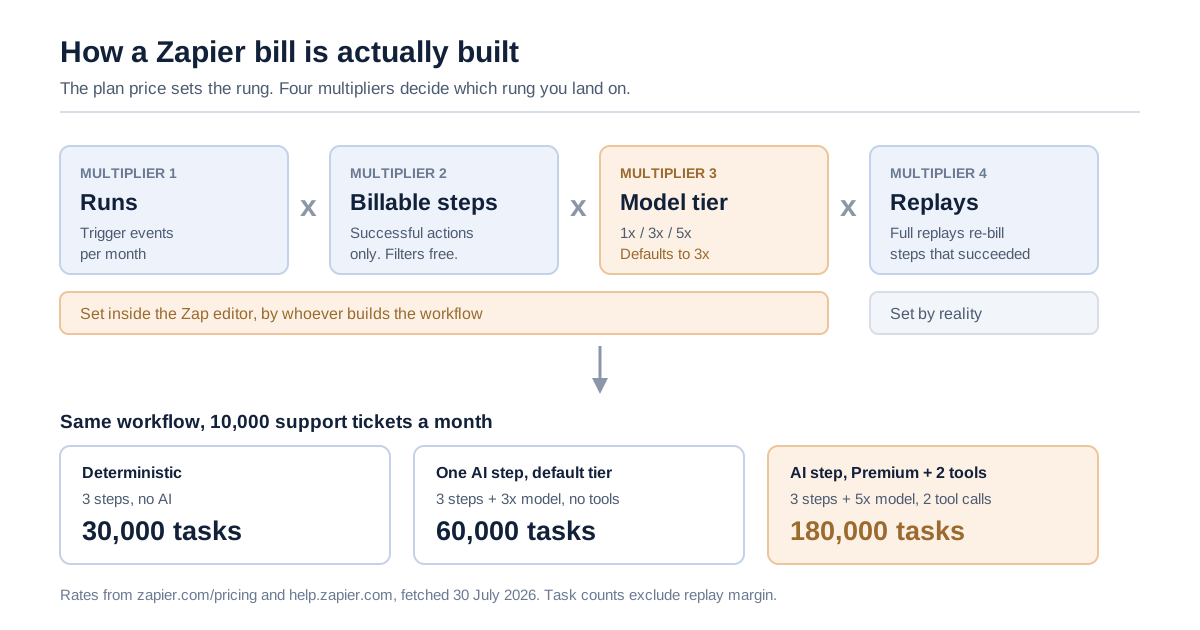
The four multipliers that turn a $19.99 plan into whatever you actually pay.
We have not run a Zapier invoice through a finance system ourselves. Everything costed below is arithmetic applied to rates Zapier publishes, fetched on July 30, 2026 and linked at each claim, so you can re-derive any line here against your own usage rather than take our word for it.
Zapier pricing in 2026: every number Zapier publishes
There are four Zapier pricing plans and eighteen task tiers. The plan sets the features and seat count; the task tier sets the price. According to Zapier's pricing page, fetched July 30, 2026, Free is $0/month with 100 tasks, Professional starts at $19.99/month, Team starts at $69/month, and Enterprise is quoted. Annual payment is advertised as saving 33% against monthly.
| Plan | Published price | Seats | Task allowance | The thing that actually gates you |
|---|---|---|---|---|
| Free | $0/month | 1 | 100 tasks/month | Two-step Zaps only; 15-minute polling |
| Professional | From $19.99/month | 1 | Task tier you select | Single seat; multi-step Zaps, webhooks, premium apps |
| Team | From $69/month | 25 | Task tier you select | Shared connections and folders, SAML SSO, 1-minute polling |
| Enterprise | Contact for pricing | Unlimited | Annual task limits | App access controls, action restrictions, observability API, SCIM, log streams |
The task ladder Zapier lists on the same page runs: 100, 750, 1.5K, 2K, 5K, 10K, 20K, 50K, 100K, 200K, 300K, 400K, 500K, 750K, 1M, 1.5M, 1.75M, 2M, and custom. Eighteen published rungs plus a negotiated one. Zapier states that "the higher the task tier, the lower the cost per task," so the ladder is not linear, climbing costs more in absolute dollars and less per unit of work.
Two details on that table matter more than they look. Professional is a single seat. The moment a second person needs to edit a Zap rather than just benefit from one, you are on Team at $69/month regardless of how few tasks you consume, a seat cliff, not a volume cliff. And live chat support, per the plan comparison, only starts at the Professional 2,000-task tier and above, so the cheapest paid rung is an email-support product.
There are three discounts on the record. Annual pre-payment saves 33% versus monthly. Non-profits get 15% off any paid plan, explicitly excluding pay-per-task charges. And a new account is auto-enrolled in a 14-day Professional trial with no card required.
What we could not get. Zapier renders per-tier prices through an interactive selector rather than publishing a static table, and we did not create an account to drive it. So this article gives you the four entry prices Zapier publishes and the full shape of the ladder, but not the price of the 50K rung. If you need that number, the selector on the pricing page produces it in two clicks; we would rather leave a hole than fill it with a plausible guess.
What counts as a task, and the steps that are free
A task is any successful action that runs in Zapier. Triggers never cost anything, polling never costs anything, failed steps never cost anything, and a surprising amount of the logic layer is free. Per Zapier's task-measurement documentation, updated July 21, 2026, the billable unit is the successful action step: not the run, not the Zap, not the seat.
That distinction is the single most useful thing to internalise before you forecast anything, because most estimates people carry in their heads are per-run when the meter is per-step.
| Element | Tasks used | Note |
|---|---|---|
| Trigger step | 0 | Every Zap's first step is free, always |
| Polling for new data | 0 | A 2-minute poll is over 20,000 checks/month, all free |
| Filter by Zapier / Paths | 0 | Routing logic is free |
| Formatter, Delay, Looping, Digest, Storage, Zapier Manager | 0 | The built-in utility apps are free |
| Zapier Tables and Forms steps | 0 | Free within a Zap |
| Action step that errors or halts | 0 | Only successful actions count |
| Steps skipped by a filter or path | 0 | Untaken branches are free |
| Successful action step | 1 | The base unit |
| Step inside an error-handler path | 1 | Recovery paths are metered like any other action |
| Step re-run during a full Zap replay | 1 | You pay again for steps that already succeeded |
| Action inside a sub-Zap | 1 each | Plus the Call and Return steps below |
| Call a Sub-Zap / Return from a Sub-Zap | 1 each | Two tasks of pure structural overhead per invocation |
| Search action, "proceed if nothing found" = yes | 1 | A lookup that finds nothing still bills |
| Search action, "proceed if nothing found" = no | 0 | The same step, configured differently, is free |
| Code by Zapier, standard runtime | 1 | More if you extend the runtime |
| Zapier MCP tool call | 2 | Failed calls are free |
| Zapier Lead Router, per lead routed | 5 | Now visible in Zap history since July 21, 2026 |
Four of those rows regularly surprise people who have been using Zapier for years.
Sub-Zaps carry 100% structural overhead at two actions. A sub-Zap containing two actions costs four tasks per invocation: the two actions, plus Call a Sub-Zap, plus Return from a Sub-Zap. Inline the same two actions and you pay two. Sub-Zaps are a maintainability decision that is also a pricing decision, and nothing in the editor tells you that.
Replays recharge work you already paid for. Replaying an entire Zap run re-bills the steps that succeeded the first time. A workflow with a flaky third-party API and a habit of full replays quietly runs a permanent surcharge.
Error handlers are metered. The steps inside your error path are ordinary action steps. Building good failure handling makes your bill go up, which is an unfortunate incentive to notice before you decide your error paths are too expensive.
One search checkbox flips a step between 1 and 0. A search action set to proceed when nothing is found costs a task every run; set to not proceed, it costs nothing. On a 10,000-run workflow that checkbox is 10,000 tasks.
The four multipliers: a Zapier bill you can forecast
Forecast the bill as Runs × Billable steps × Model-tier multiplier × Replay factor. Runs is the volume of trigger events you expect. Billable steps is the count of successful actions in a typical run, excluding the free elements above. Model tier is 1x, 3x, or 5x. Replay factor is one plus your full-replay rate. Everything else in Zapier pricing (plan name, seat count, app count) changes the price of the tier, not the number of tasks you burn.
We call this the four-multiplier estimate, and the reason it is worth naming is that three of the four multipliers are set inside the Zap editor by whoever builds the workflow, while the fourth is set by the business. Procurement negotiates the tier. Engineering, marketing ops, or a contractor sets the multiplier.
| Multiplier | Who controls it | Typical range | How wrong an estimate gets |
|---|---|---|---|
| Runs per month | The business and the trigger source | 100 to 1,000,000+ | Usually the best-understood input |
| Billable steps per run | Whoever builds the Zap | 1 to 15 | Off by 2x when free steps are counted as billable, or sub-Zaps are missed |
| Model-tier multiplier | A dropdown in the AI step | 1x, 3x, or 5x | Off by 5x on the AI step alone |
| Replay factor | Reliability of the upstream apps | 1.00 to 1.15 | Off by up to 15% |
Work them in that order. Runs first because it is the number the business already knows. Steps second, counted from the actual Zap rather than remembered. Tier third, because it is the one people forget exists. Replay last, as a percentage sanity margin rather than a precise figure.
The forecast that follows is not a price: it is a task count. Take that count to the tier selector and read off the rung. That indirection is deliberate on Zapier's part and it is why so many teams describe their bill as unpredictable: the thing you can compute and the thing you get charged are separated by a ladder whose spacing you have to look up.
AI model tiers: the 2026 change that broke old estimates
Since June 15, 2026, an AI by Zapier step no longer costs one task. It costs (1 × model rate) + (tool calls × model rate), where the model rate is 1x for Standard, 3x for Advanced, 5x for Premium, and 1x if you bring your own model API key. Per Zapier's model tier documentation, updated July 15, 2026, new AI steps default to Advanced.
That default is the most expensive line in this article. A builder who adds an AI step and touches nothing has tripled that step's cost relative to Standard, and every tool the model calls during the run bills at the same multiplier.
| Model tier | Multiplier | Tool support | Cost of one AI step with 0 tool calls | With 2 tool calls |
|---|---|---|---|---|
| Standard | 1x | No | 1 task | Not available |
| Advanced (default) | 3x | Yes | 3 tasks | 9 tasks |
| Premium | 5x | Yes | 5 tasks | 15 tasks |
| Your own AI account (BYOK) | 1x | Yes, with Advanced/Premium models | 1 task | 3 tasks |
Zapier's own published examples confirm the arithmetic: a Premium step with two tool calls is (1 × 5) + (2 × 5) = 15 tasks, and the same shape on your own API key is (1 × 1) + (2 × 1) = 3 tasks. A five-fold difference produced by a dropdown and a credential.
Two guardrails ship with this. If a single AI step reaches 75 tasks in one run, Zapier pauses it and asks for approval before continuing, a real runaway brake, and one of the few places where the platform stops rather than bills. And legacy AI steps created before June 15, 2026 keep working but cannot use tools or select a tier; as of June 30, 2026 legacy steps combining knowledge sources with a Standard model are paused outright.
The strategic read: Zapier has stopped pricing automation as plumbing and started pricing it as inference. Its own rates page describes the product as running "on a spectrum from pure determinism to full inference," and states plainly that the more reasoning a step requires, the more tasks it consumes. That is an honest framing, and it means the old mental model, a task is a thing moved from app A to app B — no longer predicts anything about your bill.
Three worked bills on the same workflow
Take one workflow and change only the reasoning in it. Inbound support ticket triage: a ticket arrives, the Zap filters out spam, writes a CRM record, posts to a Slack channel, and updates the ticket status. Ten thousand tickets a month.
Bill A: deterministic, no AI
Trigger free. Filter free. Three successful actions: CRM record, Slack message, ticket update.
3 billable steps × 10,000 runs = 30,000 tasks/month.
Add a 2% full-replay rate for a flaky ticketing API, 200 runs replayed at 3 tasks each, and you land at 30,600 tasks. That sits on the 50K rung of the ladder with headroom.
Bill B: one AI step, left on the default
Same three actions, plus one AI by Zapier step that reads the ticket and returns a category and priority. No tools attached. The builder does not touch the model dropdown, so it runs Advanced at 3x: (1 × 3) + (0 × 3) = 3 tasks.
(3 + 3) billable steps × 10,000 runs = 60,000 tasks/month, 61,200 with replays.
The workflow does one more thing than Bill A. The bill does twice as much. You have moved from the 50K rung to the 100K rung by adding a single step and accepting a default.
Bill C: the same AI step, made useful
Now the AI step is given two tools: look up the customer record, check the current SLA, and the builder switches to Premium because triage quality matters. (1 × 5) + (2 × 5) = 15 tasks for that one step.
(3 + 15) billable steps × 10,000 runs = 180,000 tasks/month, 183,600 with replays.
Six times Bill A, from the same ten thousand tickets. Two rungs further up the ladder, into 200K territory.
| Scenario | Billable steps/run | Tasks/month (10,000 runs) | With 2% replay | Ladder rung |
|---|---|---|---|---|
| A — deterministic | 3 | 30,000 | 30,600 | 50K |
| B: AI step, Advanced default, no tools | 6 | 60,000 | 61,200 | 100K |
| C, AI step, Premium, 2 tools | 18 | 180,000 | 183,600 | 200K |
| C-BYOK, same step on your own API key | 6 | 60,000 | 61,200 | 100K |
One caveat on all three: ten thousand runs a month is a flat assumption and almost no real workload is flat. If your volume peaks in the last week of the quarter, the tier has to absorb the peak month rather than the average, because overage bills at a premium rate and the allowance does not roll forward. Size on your worst observed month, not your mean.
The last row is the one to sit with. Bill C and Bill C-BYOK are the same workflow with the same model quality doing the same work. The difference is whose API credential the step uses. Bringing your own key drops the step from 15 tasks to 3 and moves the model spend onto your own provider invoice, where it is metered in tokens you can attribute rather than tasks you cannot.
That is not free: you now pay OpenAI or Anthropic directly, and you have to manage a key. It is a transfer, not a saving. But it is a transfer from an opaque meter to a transparent one, and for a governance-minded buyer that is usually the better trade even at parity.
The second meter: Agents activities, MCP, and the SDK
Zapier runs two independent meters. Zap workflows, AI steps, Code, MCP, and the SDK all draw from one shared task pool. Zapier Agents does not — it consumes activities on a separate quota, billed as an add-on. Per Zapier's Agents usage documentation, updated May 29, 2026, "using activities does not affect your Zapier task usage."
| Meter | What it bills | Free allowance | Paid | Per-run ceiling |
|---|---|---|---|---|
| Tasks | Successful action steps across Zaps, AI steps, Code, MCP, SDK | 100/month | Set by your task tier | 75 tasks per AI step run, then pause for approval |
| Activities | Agent triggers, actions, knowledge lookups, web browsing, web search, Chrome-extension messages | 400/month | Agents Pro $400/year ($33.33/month) for 1,500/month | 10 on Free, 40 on Pro and Enterprise |
An activity is any billable action the agent takes: using a trigger, answering from a knowledge source, running an action, browsing or scraping a page, running a web search, or receiving a message through the Chrome extension. Zapier's own worked example has an agent that checks an inbox, summarises one email, creates a Trello card, and sends a Slack message consuming four activities, and seven if two emails match, because the summarise-and-act pair repeats while the inbox check does not.
Do the division. Agents Pro is 1,500 activities a month. At four activities per daily run, one agent running once a day consumes about 120 a month, so twelve such agents fill the quota. At the 40-activities-per-run ceiling, a single ambitious agent run can take 2.7% of the monthly quota in one go. And on Team and Enterprise accounts, "all the users on your account will share the total number of activities": one person's experiment drains everyone's allowance.
Two more numbers belong here. Zapier MCP charges two tasks per successful tool call, so ten thousand MCP calls is twenty thousand tasks; failed calls are free. And the Zapier SDK is free while in beta, with Zapier committing to notify before that changes, which is a line to put in your renewal notes rather than your forecast.
Going over: pay-per-task and the 3x wall
Exceeding your task tier does not stop your automations; it switches you to pay-per-task billing at a rate Zapier describes as higher than your base subscription rate, visible only in your own Billing settings. Per Zapier's pay-per-task documentation, updated June 15, 2026, the overage is capped: "This is set at 3 times your plan's task limit."
Zapier's example is exact. A Professional 750 plan gets 750 base tasks plus 1,500 overage tasks, for a maximum of 2,250 tasks before Zap runs are held until the billing cycle resets.
| Usage against your tier | What happens |
|---|---|
| 0–80% | Nothing |
| 80% | Warning email |
| 100% | Email; pay-per-task begins, at a higher per-task rate |
| 100–300% | You are billed for overage; email at 80% of the overage allowance |
| 300% | Hard stop, Zap runs are held until the cycle resets or you upgrade |
Hitting the wall is a pause, not a loss. Zapier's documentation states that held Zap runs can be replayed once the billing cycle resets, you upgrade the plan, or you enable pay-per-task — so the failure mode is delayed work rather than dropped work. Whether a delay of up to a full billing cycle is acceptable is a question about the workflow, not about the invoice: it is survivable for a weekly digest and not survivable for order fulfilment.
Three operational facts sit inside that table. The exposure between your tier and the wall is 2x your tier at a premium rate, which is the real worst-case number to put in a budget rather than the tier price. Pay-per-task is on by default for anyone who joined after January 2024, and only the account owner can turn it off on Professional and Team, so the person who can cap the spend may not be the person watching it. And on Enterprise accounts created after June 2025, disabling pay-per-task requires your account manager.
There is also a live pricing change to check. Zapier's billing note states that for monthly plans, pay-per-task rates changed effective from the first billing cycle on or after July 15, 2026, and that annual plans are unaffected. Any overage estimate built before that date is stale, and the current rate is in your own Billing settings rather than on any public page, which is why this article gives you the cap as a multiple rather than a dollar figure.
Cost by team size and by workflow type
The published prices answer "what does a plan cost." They do not answer "what will this cost us," which depends on two slices: how many people touch automations, and what kind of work those automations do.
By team size. The seat structure has one sharp edge and one long flat stretch.
| Team shape | Plan forced | Why |
|---|---|---|
| One builder, everyone else a beneficiary | Professional | Single seat is enough; you buy tasks, not people |
| Two builders | Team, from $69/month | Professional is one seat: the second editor is the cliff |
| 3–25 builders across departments | Team | Shared connections and folders; the price does not move with headcount inside 25 |
| 25+ builders, or IT needs app-level control | Enterprise | Unlimited users, app access controls, action restrictions, SCIM, log streams |
Note what you are actually buying at each step. Team buys collaboration, shared app connections, shared workspace, folder permissions, SAML SSO. Enterprise buys control: app access controls, action restrictions, custom data retention, an observability API, analytics, log streams, and usage alerts you can set on a threshold. If your reason for wanting Enterprise is "we need to know what people are automating," that is the row you are buying, and it is not available lower down.
By workflow type. Zapier's own rates page sorts workflows into three shapes, and the cost profile of each is different in kind, not just degree.
| Workflow type | Steps are | Task cost per run | Forecastability |
|---|---|---|---|
| Deterministic | Fixed order, no AI, no branching | Equal to the count of successful actions | High — the number is stable |
| AI step in a fixed path | One step asks a model to draft, summarise, or extract | Actions + (1 + tool calls) × tier multiplier | Medium: stable if tool calls are bounded |
| Agentic | The model decides what happens next | Variable per run, up to the per-run ceiling | Low, you are forecasting a distribution, not a number |
Zapier is candid about why the third row behaves that way. Its Agents FAQ answers the question of why the same agent gives different outcomes with one word: non-determinism. That is exactly right, and it is the reason a cost forecast for an agentic workflow has to be expressed as a range with a ceiling rather than a figure.
Three ceilings Zapier gives you, and three controls it does not
Zapier ships more spend protection than its critics usually credit. It also leaves three gaps that a governance-minded buyer should price into the decision rather than discover at renewal.
It is worth naming what category this belongs to. An automation platform whose per-run step count is decided by a model is an AI system whose failure modes include financial ones, and the standard reference for managing that class of risk is the NIST AI Risk Management Framework, released in January 2023 for voluntary use and currently under revision. Runaway spend is not usually the risk people reach for that framework to address, but it is the one that shows up first on an invoice.
What you get. The 75-task pause on a single AI-step run, which stops a runaway before it becomes an invoice. The 3x pay-per-task wall, which bounds worst-case monthly consumption at three times your tier allowance. And the per-run activity ceiling on Agents (10 on Free, 40 on Pro and Enterprise), which Zapier explicitly describes as a safeguard preventing one run from consuming the monthly quota. Those are real, they are documented, and they are more than several competing platforms publish.
What you do not get.
No per-team or per-product budget. Zapier states that tasks are "shared across your account" and that Zap workflows, AI steps, code, MCP, and the SDK "all draw from the same task allocation, with no separate task budgets by product." One pool, no partitions. The marketing team's experiment and the finance team's month-end run compete for the same allowance, and the only structural separation available is buying separate accounts — which costs you the shared connections you moved to Team for.
No pre-spend approval gate. The controls are reactive: emails at 80% and 100%, threshold alerts on Enterprise, a CSV export of usage per account member on Team and Enterprise. All of those tell you what already happened. Nothing asks a human before an expensive step runs. The 75-task AI pause is the closest thing, and it triggers at a level most workflows never reach.
Agents sit outside Enterprise app controls. This is the gap that matters most and it comes from Zapier's own FAQ: "Zapier Agents doesn't currently support app and action restrictions that may be in place on an Enterprise account." If you bought Enterprise specifically for action restrictions, the agent product does not currently honour them. That is a scope question before it is a cost question, and Zapier deserves credit for stating it plainly rather than burying it.
| Control you want | Zapier's answer today | Gap |
|---|---|---|
| Stop a runaway AI step | 75-task pause per run | None |
| Cap total monthly spend | 3x tier wall, or disable pay-per-task | Only the account owner can disable it |
| Cap spend per team | Not available | One shared pool, no partitions |
| Approve before an expensive step | Not available | Alerts are after the fact |
| Attribute cost to a person | CSV export per member, Team/Enterprise | Post-hoc, not per-workflow or per-agent |
| Restrict what an agent may touch | App/action restrictions on Enterprise | Agents do not currently honour them |
The hybrid bill: what to keep on tasks and what to move
The choice is not Zapier or not-Zapier. The workable answer for most teams is a split, and it follows directly from the four multipliers: keep the work whose step count is fixed on the task meter, and move the work whose step count is decided by a model onto a meter you can see.
Concretely, using Bill C from earlier:
| Component | Keep on Zapier tasks | Move | Effect on the task meter |
|---|---|---|---|
| Trigger and filter | Yes | , | Already free |
| CRM write, Slack post, ticket update | Yes | : | 3 tasks/run, stable |
| Model call for triage | No | Your own model account (BYOK) or your own service | 15 tasks/run → 3 tasks/run |
| Tool lookups the model makes | Depends | Pre-fetch deterministically before the AI step | Tool calls billed at 1x instead of 5x |
| Anything agentic and open-ended | No | Purpose-built agent runtime with its own budget | Off the task pool entirely |
Run the arithmetic on the same 10,000 tickets: 180,000 tasks a month becomes 60,000 by changing the credential alone, and you can push it lower by pre-fetching the customer record and SLA deterministically, those are ordinary action steps at 1 task each rather than tool calls at 5. Three actions plus a pre-fetch plus a 1x AI step is 5 billable steps, or 50,000 tasks: a 3.6x reduction against Bill C with no change to what the workflow does or which model reads the ticket.
The cost you take on in exchange is real and worth stating. You now hold a model API key, you pay a token bill, and you have added a dependency your automation platform does not manage. We also cannot tell you what your token bill will be, because that depends on your prompt length, your model, and your volume, none of which we can see. Whether the trade is worth it depends on volume, and the thresholds we would use as a starting point are judgment rather than measurement: below roughly 20,000 tasks a month the operational overhead of holding a key probably exceeds the saving, and above 200,000 it rarely does. Test that against your own numbers before treating it as a rule.
There is a second reason to prefer the split beyond the arithmetic. A token bill is attributable. You can see which agent, which team, and which prompt spent the money. A task count aggregated across five products in one pool is not, and no amount of CSV export after the fact recovers the attribution you never captured.
When per-task billing is genuinely the cheaper deal
It would be dishonest to run the numbers above and conclude that task-based pricing is a trap. For a large class of work it is the cheapest option available, and the case for it is stronger in 2026 than the critics allow.
Idle costs nothing. A Zap that triggers eleven times in March and four hundred times in April bills for eleven and four hundred. Per-seat and per-workflow platforms bill for the capacity whether you use it or not. If your automation load is genuinely spiky, the meter is on your side.
The free logic layer is unusually generous. Filters, Paths, Formatter, Delay, Looping, Digest, Storage, Tables, and Forms are all free, and triggers and polling are free at any frequency. That means the entire routing and shaping layer of a workflow, often the majority of its steps — costs nothing. Platforms that bill per execution or per node charge for exactly this work.
Failures are free. Only successful actions count. On integrations against unreliable third-party APIs, that is a meaningful subsidy, and it is the opposite of how metered infrastructure usually behaves.
The long tail is the actual product. Zapier advertises 9,000+ app connections. If your workflow touches six niche SaaS tools with no shared standard between them, the honest alternative is not a cheaper automation platform, it is engineering time building and maintaining six integrations. At 30,000 tasks a month, the Zapier bill is very unlikely to approach the fully loaded cost of the developer who would otherwise own those connectors.
The place per-task billing turns against you is narrow and specific: high run volume, multiplied by a step whose count the model chooses. Everything else about the model is defensible. If your workflows are deterministic plumbing across a long tail of apps, this article's warnings mostly do not apply to you, and you should buy the tier that fits your run count and stop thinking about it.
The renewal checklist: eleven questions before you sign
Take these to the renewal meeting. Each one is answerable from your own account or from the vendor, and each maps to a number in the sections above.
- What is our actual task consumption for the last three complete billing cycles, not the tier we bought?
- How many of our Zaps contain an AI by Zapier step, and what model tier is each one set to? (New steps default to Advanced at 3x.)
- How many tool calls does each AI step make on a typical run, and are any of them pre-fetchable as ordinary actions?
- What is our full-replay rate, and how many tasks per month is it costing us?
- Which of our search actions are set to "proceed if nothing found," and does each one need to be?
- How many sub-Zaps are we running, and what is the Call/Return overhead on each per month?
- Is pay-per-task enabled, who is the account owner who can disable it, and are they the same person who sees the bill?
- What is our worst-case month, tier allowance plus 2x overage at the higher rate: and is that number in the budget?
- Are we on a monthly plan, and if so have we checked our current pay-per-task rate since the July 15, 2026 change?
- If we run Agents, how many activities are we consuming, and does anyone know that quota is shared across the whole account?
- If we are on Enterprise for action restrictions, do we have agents running that currently do not honour them?
Question two is usually the one that changes the number, because it is the only item on this list where Zapier pricing responds to a setting rather than to volume. In our reading of the documentation it is also the only one where a single dropdown, set once by a person who has no visibility of the invoice, moves the annual bill by a multiple.
Where a governance layer fits, and where it does not
LeapForce is not a workflow-automation platform and is not a substitute for Zapier, if you need 9,000 connectors and a visual builder, buy one of those. What we build is the governed layer that sits in front of the model calls those workflows make: one endpoint, per-team and per-agent budgets in dollars rather than tokens, and an audit record of what ran and what was refused. That is precisely the seam this article keeps arriving at — a shared task pool with no partitions, no pre-spend approval gate, and agent activity outside the app controls you bought Enterprise for. Our rollout guide for that layer is deliberately unglamorous: observe first, enforce second, optimize third, because the first useful artifact is not a policy, it is an honest picture of which teams and which agents are actually spending. Two caveats in one sentence, because the honest ones matter: dollar budgets and chargeback are still in development on our platform rather than shipping today, and a governance layer changes what you can see and cap, not what Zapier charges per task. For the fuller argument see our earlier analysis of how model routing cuts LLM costs and what enterprise AI implementation actually costs beyond the licence.
This is not a niche concern. The FinOps Foundation's 2026 State of FinOps survey, covering 1,192 respondents representing over $83bn in annual cloud spend, reports that 98% of practices now manage AI spend, up from 31% two years earlier, and that 90% now manage SaaS costs or plan to within the year. Automation platform spend has moved from a departmental card charge to something a cost-management discipline owns, which is exactly why "what tier are we on" is the wrong renewal question and "which multipliers are set where" is the right one.
Honest limits on this analysis
Several things in this article are less certain than the numbers make them look, and one of them is the derived per-task figure.
We did not test this on a real invoice. Nobody on our side has run a Zapier bill through a finance system. Every scenario above is arithmetic applied to Zapier's published rates. That method is auditable: you can re-derive any line from the linked documentation — but it is not the same as a measured invoice, and a measured invoice would beat it.
The per-tier price ladder is not public in static form. We can tell you the four entry prices and the eighteen rungs; we cannot tell you what the 50K rung costs without driving the selector from an account. Divide $19.99 by the 750 tasks Zapier's own billing example uses for entry Professional and you get roughly 2.7 cents per task, but treat that as an order of magnitude only: we could not determine from the static page whether $19.99 is the monthly rate or the annual-equivalent, and Zapier states per-task cost falls as the tier rises.
Overage rates are account-specific and recently changed. Zapier publishes the 3x cap but not the per-task overage rate, which lives in your Billing settings, and monthly-plan rates changed effective July 15, 2026. Anything you read about Zapier overage costs written before that date should be re-checked.
Rates are explicitly subject to change. Zapier's rates page says rates may change as new capabilities arrive, with advance notice. The June 15 and July 15, 2026 changes in this article are evidence that this is a live meter, not a fixed one, so treat every multiplier here as current-as-of rather than permanent.
Our buyer voices skew technical. Reddit is unreachable to our tooling behind its bot protection, and Glassdoor-style aggregators of vendor sentiment could not be independently verified, so the practitioner voices we could confirm and link come from Hacker News, a technical audience whose instinct is to self-host, which is not the median Zapier buyer. The $4k/month figure quoted at the top is one team's experience in 2022, not a benchmark.
We did not evaluate alternatives. This is a cost analysis of one platform, not a comparison. Whether Make, n8n, Workato, or building it yourself is cheaper for your workload is a different piece of work with different arithmetic, and anyone telling you the answer without your run counts and step counts is guessing.
Frequently asked questions
Yes, permanently, with real limits. The Free plan is $0/month for 100 tasks, one seat, two-step Zaps only, and 15-minute polling. Triggers, filters, paths and the built-in utility apps do not consume tasks, so 100 tasks means 100 successful actions rather than 100 workflow runs. New accounts also get an automatic 14-day Professional trial with no card required, which is the fastest way to find out whether your real workflows need multi-step Zaps.
Per Zapier's pricing page on July 30, 2026: Free is $0, Professional starts at $19.99/month, Team starts at $69/month, and Enterprise is quoted. Those are the entry prices for the four Zapier pricing plans, and the actual monthly figure depends on which of eighteen published task tiers you select, from 100 tasks up to 2 million plus a custom option. Paying annually is advertised as saving 33% against monthly, and registered non-profits get 15% off any paid plan excluding overage charges.
Forecast it as runs per month multiplied by billable steps per run, then add a replay margin. Billable steps means successful action steps only: triggers, polling, filters, paths, Formatter, Delay, Looping, Digest, Storage, Tables and Forms are all free. A three-action workflow running 10,000 times a month is 30,000 tasks. Add one AI step on the default Advanced tier and it becomes 60,000. Count from the actual Zap rather than from memory; most people over-count free steps and under-count AI multipliers.
Zapier does not publish a flat per-task price, and it states that the per-task cost falls as your task tier rises. Dividing the $19.99 Professional entry price by the 750 tasks Zapier's own billing documentation uses in its worked example gives roughly 2.7 cents per task at the bottom of the ladder, which is an order-of-magnitude figure rather than a quoted rate. Overage tasks are charged at a higher rate than base tasks, and that rate is visible only in your account's Billing settings.
No. Zapier's task documentation is explicit that all trigger steps are free, polling never charges regardless of frequency, and Filter and Path steps cost nothing. A Zap polling an app every two minutes performs over 20,000 checks a month at no cost. Steps that error or halt are also free, as are steps skipped because a filter or path condition sent the run elsewhere. Only successful action steps count.
Four common causes, in rough order of frequency. Someone added an AI step, which defaults to the Advanced tier at 3x. Someone attached tools to an existing AI step, and each tool call bills at the full model multiplier. An upstream API got flaky and full replays started re-charging steps that had already succeeded. Or usage crossed the tier limit and switched to pay-per-task at a higher rate. On monthly plans, pay-per-task rates also changed effective the first billing cycle on or after July 15, 2026.
Zapier MCP is available on all accounts and does not carry a separate subscription, but each successful tool call consumes two tasks from your plan's shared allowance. Failed tool calls are free. Because MCP draws from the same pool as your Zap workflows, AI steps, Code and SDK usage, heavy MCP traffic can push you into overage without any change to your Zaps, ten thousand MCP calls is twenty thousand tasks.
No. Agents is billed as a separate add-on on its own meter. The free tier allows 400 activities a month with a 10-activity ceiling per run; Agents Pro is $400 billed annually, equal to $33.33/month, for 1,500 activities and a 40-activity per-run ceiling; Enterprise is custom with agent sharing. Activities do not draw from your task pool. Two things to know before you buy: on Team and Enterprise accounts the activity quota is shared across every user, and Zapier states that Agents does not currently support the app and action restrictions an Enterprise account may have in place.
Buy Team if the problem is collaboration and Enterprise if the problem is control. Team, from $69/month, gives you 25 users, shared app connections and folders, folder permissions and SAML SSO. Enterprise adds the things IT usually actually wants: app access controls, action restrictions, SCIM provisioning, custom data retention, an observability API, analytics, log streams and threshold-based usage alerts. If your reason for upgrading is "we need to know and limit what people are automating," that capability set is only available at Enterprise, with the documented exception that Agents does not currently honour app and action restrictions.
Zapier advertises 33% off for annual pre-payment, which is a large discount by SaaS standards and worth taking if your volume is stable. Two additional considerations point the same way in 2026: annual plans were explicitly excluded from the July 15, 2026 pay-per-task rate change, and invoice or wire payment is only available on the latest annual Team or Enterprise plans. The argument against is the usual one — you are committing to a task tier for twelve months on a platform where a single model-tier dropdown can double your consumption, so size the commitment on your measured consumption rather than your forecast.
There is no true spend cap, but there are three real ceilings and one switch. Disabling pay-per-task billing makes Zap runs hold at 100% of your tier instead of continuing into overage, on Professional and Team only the account owner can do this, and on Enterprise accounts created after June 2025 it requires your account manager. Left enabled, overage is capped at 3x your tier limit, after which runs are held until the cycle resets. A single AI step that reaches 75 tasks in one run pauses for approval. And Agents runs are capped at 10 or 40 activities depending on plan. What does not exist is a per-team budget, a per-workflow budget, or an approval gate before an expensive step runs.
For deterministic work across a long tail of apps, yes, and the free logic layer makes it better value than the headline prices suggest, routing, formatting, delays, loops and failed steps all cost nothing. The case weakens in one specific place: high run volume multiplied by steps whose count a model decides. At that point you are paying task rates for inference, and moving the model call onto your own API credential cuts the same step from 15 tasks to 3 without changing the workflow. The honest test to apply to Zapier pricing is not "is this expensive" but "do we know who is allowed to set the multiplier."
Ready to Govern Your AI?
Talk to LeapForce: one controlled layer for every AI tool, connector, model, and agent.
Comments