
Any honest Agentforce review has to answer one question before features or price: what can the agent reach? For Agentforce the answer is not "whatever you granted the vendor." It is "whatever a Salesforce user can see," because Agentforce agents run as Salesforce users. Sometimes that is the logged-in human. Sometimes it is a dedicated agent user.
That single sentence changes how you evaluate it. Most agent platforms hand you a new credential to scope, so the evaluation is about the grant you are about to write. Agentforce mostly reuses grants you wrote years ago. Our position is that an Agentforce evaluation is really a permission-model audit of your own org, and the platform review is the smaller half of the work.
You can watch that collide with reality in public. On Salesforce Stack Exchange in March 2025, a builder called Van Jake described an Agentforce action failing to update a contact, traced it to the agent's own user, and hit a wall trying to fix it: "This permission cannot be assigned to the Einstein agent license." Nothing about the model was wrong. The identity the agent was running as could not be granted what the task required.
The short answer: Evaluate Agentforce by mapping every agent action to the identity it runs as, the objects and fields that identity holds, the records that resolves to under your org-wide defaults and sharing rules, and the proof that survives afterwards. In a CRM-native agent, reach is inherited rather than requested.
Last updated: July 31, 2026.
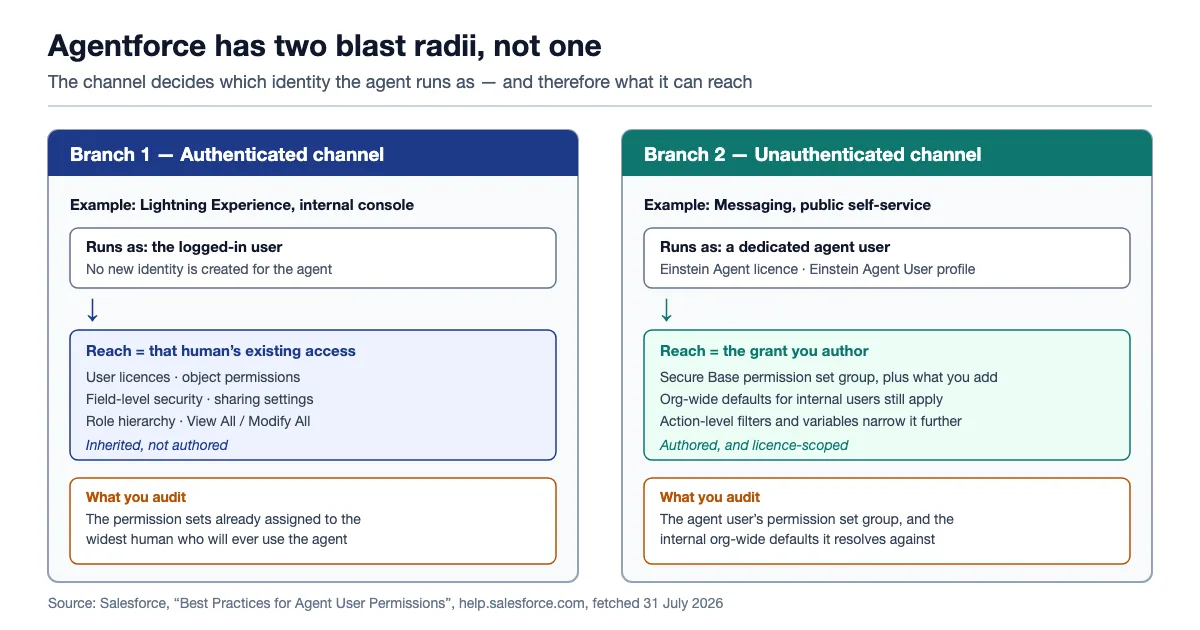
Agentforce has two blast radii, not one. Which you get is decided by the channel the agent is deployed on, not by the agent's design.
One disclosure first. This is a review in the search-intent sense, not the hands-on sense. We have not deployed Agentforce in a production Salesforce org, and nothing below is presented as first-hand testing. Every capability statement, price and constraint is attributed to Salesforce's published documentation with the date it was fetched, or to a named third party. Where Salesforce publishes nothing, this article says so rather than filling the gap. If you want a keystroke-level walkthrough of the builder, this is the wrong page. If you want the list of things to verify in your own org before you sign, this is the right one.
Verdict: who Agentforce fits, and who it does not
Agentforce fits organisations whose agent work happens inside Salesforce records and whose permission model is already deliberate. It fits badly where Salesforce is one system among many, or where the org's access model has drifted for a decade and nobody wants to open it. The deciding variable is not the agent builder. It is whether you can answer, per action, which identity runs it and what that identity can already see.
| Question | Agentforce answer | What it means for evaluation |
|---|---|---|
| What identity does the agent act as? | The logged-in user for most employee channels; a dedicated agent user for most customer channels | Two different audits, not one |
| Where is the authority defined? | Salesforce profiles, permission sets, permission set groups, roles, sharing rules, field-level security | Your existing model is the agent's model |
| Can you scope below the object? | Yes — field-level security, data category visibility, and per-action filters and variables | The fine-grained controls exist; using them is work |
| Is the grant new or inherited? | Inherited for employee agents, new for customer agents | Only half the risk is authored at agent-build time |
| Can you prove what it did? | Partly, and the parts have different retention windows and different price tags | Budget for proof separately |
| What does an action cost? | 20 Flex Credits per Agentforce action; 30 per Agentforce Voice action | Cost tracks actions, not conversations |
Two sentences of verdict, then. If your Salesforce org is the system of record for the work you want automated, and your permission sets already describe job functions rather than accumulated exceptions, Agentforce is a rational buy and its CRM-native permission inheritance is a genuine advantage over bolting a stranger onto your API. If either half of that is untrue, the honest sequence is to fix the permission model first and evaluate agents second, because an agent deployed onto a drifted org does not create the exposure. It exercises it.
What Agentforce actually is, in plain terms
Agentforce is Salesforce's platform for building AI agents that run inside a Salesforce org, take actions against Salesforce records through flows, Apex and prompt templates, and can be deployed to employee-facing surfaces such as Lightning Experience or customer-facing surfaces such as Messaging channels. It is not a general-purpose automation platform, and it is not the same thing as an assistant that summarises a record for you.
The distinction that matters for this review is not the marketing one between Agentforce and the older Copilot branding. It is the operational one: an Agentforce agent is a configured thing that runs as a Salesforce user, and a Salesforce user is the unit of authority in the platform. Every access decision an agent makes is resolved by machinery Salesforce has shipped for two decades: object permissions, field-level security, org-wide defaults, role hierarchy, sharing rules. Not an agent-specific policy engine invented last year.
That is genuinely reassuring in one direction and genuinely uncomfortable in the other. Reassuring, because the enforcement is mature and already integrated with the record model. Uncomfortable, because the agent's blast radius was set by decisions made long before anyone in your company had heard the word "agent", and nobody wrote them down expecting a non-human to inherit them.
What it is not
It is not a separate credential you scope from zero for employee-facing agents, and it is not a platform where "what can the agent touch" is a field in the agent's own configuration. It is also not an audit system on its own. Proof of what an agent did gets assembled from several Salesforce features with different licences and retention windows, which a later section works through.
The two blast radii: logged-in context versus the agent user
Agentforce does not have one execution identity. It has two, and Salesforce's documentation is unusually clear about the split. Understanding which one your use case lands on is the first fork in any serious evaluation, because the two produce completely different audit tasks.
Salesforce's Best Practices for Agent User Permissions page, fetched 31 July 2026, states the employee case directly: most agents that interact with employees connect to channels restricted to logged-in users, and "These agents run in the context of the logged-in user. The Salesforce access controls that you already have in place—such as user licenses, permissions, field-level security, and sharing settings—determine what the agent can access."
For customer-facing channels the same page describes the other branch: those agents connect to channels that are not restricted to logged-in users, so "the agent operates as an agent user–a Salesforce integration user with all the permissions that the agent needs to do its job."
Branch one: the agent inherits a human's reach
On the employee side, an Agentforce agent's maximum reach is exactly the reach of whoever is talking to it. If a sales manager with a broad role and an accumulated stack of permission sets asks the agent to update opportunities, the agent can update every opportunity that manager could have updated by hand. Nothing was granted to the agent. The agent is a faster way to exercise a grant that already existed.
This is, in one narrow sense, a correct security posture. OWASP's LLM06:2025 Excessive Agency entry lists exactly this as a prevention control: "Track user authorization and security scope to ensure actions taken on behalf of a user are executed on downstream systems in the context of that specific user, and with the minimum privileges necessary." Agentforce satisfies the first clause structurally. Whether it satisfies the second depends entirely on how tight that specific user's privileges were before the agent existed.
The two clauses are usually satisfied by different departments in different decades. The first is architecture. The second is hygiene, and hygiene is the one that rarely gets audited against the standard NIST sets out, where least privilege means "each entity is granted the minimum system resources and authorizations that the entity needs to perform its function" (NIST SP 800-53 Rev. 5, via the NIST glossary). A human with excess permissions is a latent risk that requires the human to act. An agent with the same permissions is a latent risk that a prompt can trigger.
Branch two: the agent gets its own user
On the customer side the picture inverts. Here Salesforce creates a distinct user record, and the same documentation gives its default shape for an Agentforce Service Agent created in Agent Creator: User License "Einstein Agent", Profile "Einstein Agent User", Last Name "EinsteinServiceAgent User", and Permission Set Group "AgentforceServiceAgentUserPsg", which contains the Agentforce Service Agent Secure Base permission set.
Salesforce recommends the New Agent User option specifically because it "creates an agent user with minimal access so that your agent is secure by default", and tells you to "follow the principle of least privilege" when adding what it needs. That is the right default, and it is the branch where your evaluation actually resembles evaluating a standalone platform: you are authoring a fresh grant.
But read Salesforce's own worked example, which opens by noting that most service agents require additional permissions beyond the secure base. For Messaging or Enhanced Chat, the page lists "Read, Create, Edit, Delete, View All Records, Modify All Records, or View All Fields access to Contact, Case, Case Related Issues, and Knowledge objects." That list starts at minimal access and ends at object-wide modify rights, and the difference between the narrow end and the wide end of that sentence is the difference between a scoped agent and one that can rewrite every case in the org. The documentation does not choose for you. Your implementation partner will.
The org-wide-default trap
There is a third thing to know, and Salesforce flags it as important rather than as a footnote. Org-wide sharing defaults determine access to records a user does not own, and the same page states that in an agent session with an authenticated user the session runs in the end user's context, while "In an agent session with an unauthenticated user, the session runs in the agent user's context and OWD for internal users apply."
Read that twice if you run a customer-facing agent. The unauthenticated session — the one talking to a member of the public — resolves record visibility using your internal org-wide defaults. If your internal defaults are permissive because you trust employees, the customer-facing agent starts from a permissive baseline and is pulled back only by whatever object permissions, filters and variables you configured. Salesforce's own recommendation for this is worth quoting as a design instruction: "we recommend using filters and variables to limit record access at the subagent and action levels. This strategy protects sensitive data regardless of your OWD."
What a Salesforce permission set actually lets an agent reach
A permission set in Salesforce is not a scope in the OAuth sense. It is a bundle of grants that combines with everything else assigned to that user, and it can only ever add. Understanding what it does and does not control is the difference between an evaluation that finds problems and one that produces a false pass.
Here is the honest decomposition of what determines whether an Agentforce action can touch a given record and field.
| Control | What it decides | Where it lives | Does the agent inherit it? |
|---|---|---|---|
| Object permissions | Whether the identity can read, create, edit or delete a type of record at all | Permission sets (and still, optionally, profiles) | Yes |
| Field-level security | Which fields on that object are visible or editable | Permission sets | Yes |
| Org-wide defaults | The baseline visibility of records the identity does not own | Sharing settings | Yes, with the unauthenticated caveat above |
| Role hierarchy | Whether the identity sees records owned by people below it | Roles | Yes |
| Sharing rules | Selective widening of the baseline | Sharing settings | Yes, and they can be written to exclude the agent user |
| View All / Modify All | Object-wide override that ignores sharing | Permission sets or profiles | Yes, and this is the one to grep for |
| Data category visibility | Which knowledge articles are reachable | Data categories | Yes, and it is separately configured |
| Action-level filters and variables | Which records a specific agent action may operate on | The agent configuration | This is the only agent-specific layer |
Only the last row is authored during agent design. Everything above it predates the project. That asymmetry is the whole argument of this review: a standalone agent platform makes you write a grant, so the grant gets reviewed; Agentforce makes you inherit one, so the review only happens if you schedule it.
The one lever that is genuinely agent-shaped
Salesforce does give you a real, agent-specific narrowing mechanism, and evaluators under-use it. Sharing rules can selectively grant access while "excluding the Einstein Agent User where appropriate", per the same documentation page. Combined with action-level filters, that means the answer to "can we make the agent narrower than the humans" is yes for the customer-facing branch — you can restrict internal org-wide defaults, then use sharing rules to give humans back what they need while leaving the agent user outside the widening.
That is a real capability and a real amount of work. It is also the most useful thing to make an implementation partner demonstrate live, because it is where a good Agentforce build separates from a fast one.
The thing you cannot do
You cannot log in as the agent user to see what it sees. The documentation is explicit: "You can't log into Salesforce with agent user credentials." Only admins can view or edit an agent user. So the usual admin technique of impersonating a user to sanity-check their view is unavailable for exactly the identity you most want to sanity-check. Your substitute is a mirror user, an ordinary user carrying the same profile and permission sets, plus sandbox testing, which Salesforce also recommends: "To make sure that your agent has the right access, test the agent in your sandbox before deploying it."
Here is Salesforce's own Dreamforce 2025 session on the topic, which walks the security posture from the platform side; it is the closest thing to a vendor-authoritative talk-through of these controls.

The Einstein Agent licence constraint nobody plans for
Return to the problem card, because it exposes a constraint that does not appear in any feature comparison. The builder on Salesforce Stack Exchange had an agent that could not update a contact. The agent user held an Einstein agent licence. When they tried to create a custom permission set to grant the missing access, Salesforce refused the assignment.
The documentation explains why, and the sentence is easy to skim past: "Custom permission sets that you assign to the agent user must be associated with the Einstein Agent license and Einstein Agent User profile."
That is a licence-scoped permission model. A permission set in Salesforce carries an associated user licence, and one built for a standard Salesforce licence cannot be assigned to a user on the Einstein Agent licence. Practically, it means your existing permission-set library is not directly reusable for agent users. Not the one your admins have curated for years, and not the one your change-management process knows how to review. You build a parallel set, and parallel sets drift.
Three consequences worth writing into an evaluation.
First, the agent's permissions are a new maintenance surface. Every future object, field or Apex class the agent needs is a change to a separate artefact that your normal permission review may not enumerate. Ask how the vendor or partner proposes to keep the agent's permission set group in sync with policy, and whether it appears in the same access review as human permission sets.
Second, feature-specific permissions stack up quickly. The documentation's own table maps features to required grants: prompt templates need the Prompt Template User permission set; flows need the Run Flows app permission or per-flow access; Apex actions need explicit Apex Class Access; and knowledge or Data 360 features need Allow View Knowledge, Access Conversation Entries, the Data Cloud User permission set, and data category visibility. Each of those is a small decision that an implementer makes under time pressure, and each is a place where "grant it broadly, narrow it later" quietly wins.
Third, the agent shows up in your record metadata. Salesforce notes that as the agent user works, "its username can appear in the Created By, Last Modified By, or Owner fields on records or in audit fields in Salesforce." That is good for forensics and disruptive for reporting. Every dashboard that groups by owner or last-modified-by now has a non-human row in it. Their practical tip is to rename each agent user's first name to the agent it belongs to and build a Users list view filtered on the Einstein Agent User profile. That is a five-minute setup step that saves an afternoon six months later.
The Reach Map: four columns per agent action
The evaluation method this article recommends is small enough to run in one sitting and specific enough to survive a procurement review. We call it the Reach Map, and it is one row per agent action with four columns.
- Identity. Which of the two branches does this action run under? Logged-in user, or agent user? If the same agent is deployed to both an internal console and a public channel, it has two rows.
- Objects and fields. Which objects does the action read or write, and which fields on them? This is answerable from the flow, prompt template or Apex the action calls, without waiting for a demo.
- Record set. Given that identity's role, org-wide defaults and sharing rules, which actual records does that resolve to? Not "Cases" — how many cases, and whose.
- Proof. If this action fires wrongly at 3am on a Sunday, which artefact tells you what happened, and how long does that artefact live?
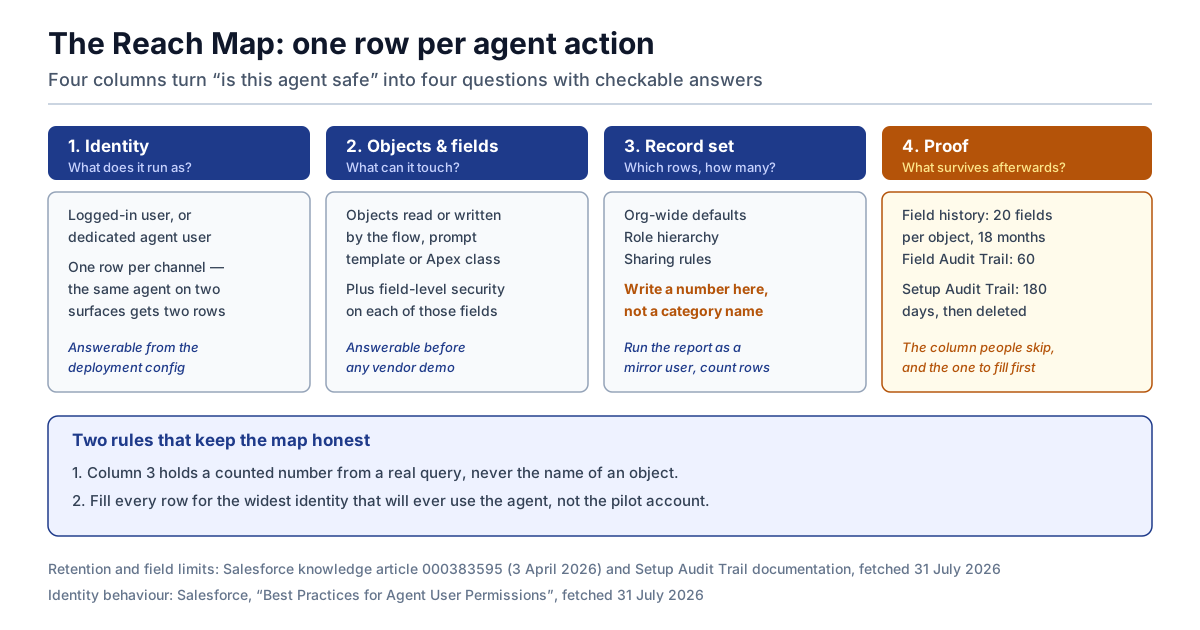
The Reach Map turns "is Agentforce secure" into four answerable questions per action.
The fourth column is the one people skip and the one that produces the most useful conversation, because it forces the audit question before the deployment rather than after an incident. It is also the column where Agentforce's answer is genuinely mixed, which the next-but-one section works through.
Two rules keep the Reach Map honest. Fill column three with a number from a real query, not a category name: run the report as a mirror user and count the rows. And fill every row for the widest identity that will ever use the agent, not the pilot user. Pilots run under carefully chosen accounts. Production runs under whoever asks.
This maps onto the broader diagnostic in our earlier analysis of five control questions to ask any AI agent platform, where identity and authority are the first two of five. The Reach Map is the CRM-native specialisation of the same idea: in Salesforce, questions one and two collapse into "which user, and what does that user already hold?"
Agentforce pricing, fetched 31 July 2026
Agentforce prices consumption in Flex Credits, with a per-conversation alternative and several per-seat wrappers. All figures below are quoted from Salesforce's Agentforce Pricing page, fetched 31 July 2026. The page itself carries the caveat that it "is provided for information purposes only and is subject to change."
| Line item | Published price (USD) | Notes from the page |
|---|---|---|
| Flex Credits | $500 per 100,000 credits | Pay per action; the page offers Pre-Purchase, PayGo and Pre-Commit, and labels Pre-Commit "Widely available later this year" |
| Agentforce action | 20 Flex Credits | "Agentforce actions are 20 Flex Credits" |
| Agentforce Voice action | 30 Flex Credits | Voice usage types and multipliers differ; see the rate card |
| Conversations | $2 per conversation | Pre-Purchase only; optimised for external customer agents |
| Agentforce User License | $5 per user per month | "(Requires Flex Credits)"; access to limited Salesforce CRM objects |
| Agentforce add-ons (Sales, Service, Field Service) | $125 per user per month | Unmetered Agentforce usage for employees |
| Agentforce Industries add-ons | $150 per user per month | Includes everything in the Sales and Service add-ons |
| Agentforce 1 Editions | from $550 per user per month | Includes the add-on and 2.5M Flex Credits per org per year |
| Salesforce Foundations | $0 | Agentforce Builder, Prompt Builder, Agent Script, Agentforce Coworker, Agentforce Vibes |
At $500 per 100,000 credits a Flex Credit is half a cent, so a 20-credit action is $0.10 and a 30-credit voice action is $0.15. That gives you an arithmetic you can run yourself: cost per task equals the number of actions the task consumes, times ten cents.
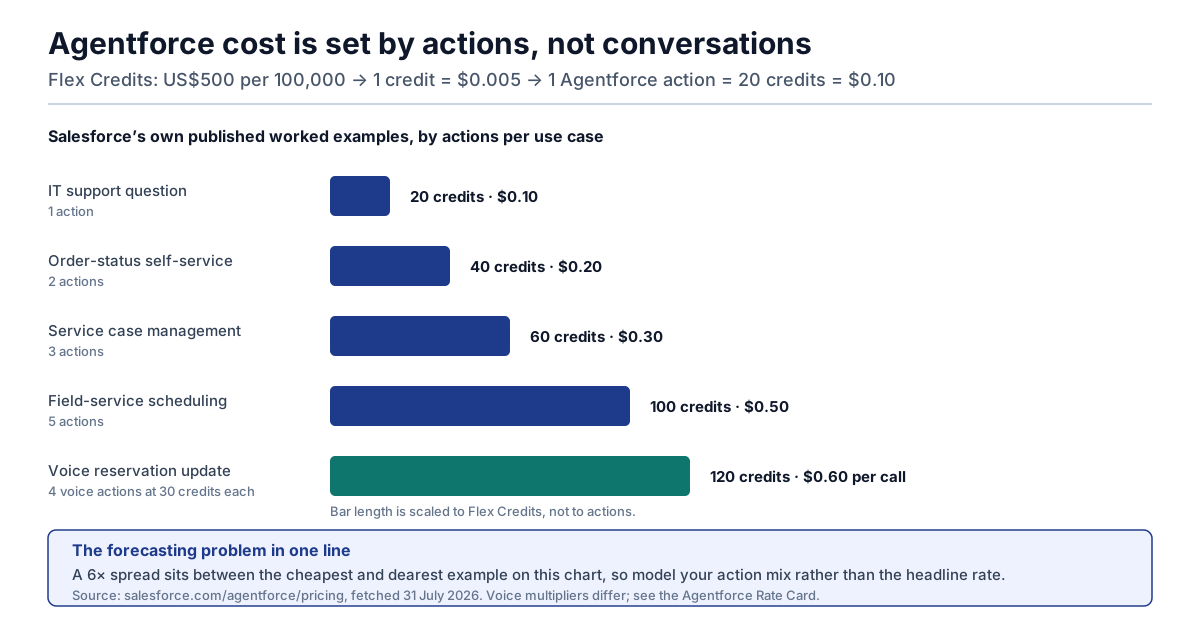
Agentforce cost is a function of actions per task, not conversations. The same request costs twice as much if it takes twice as many steps.
Salesforce publishes five worked examples on the same page, and their spread is the most useful thing on it.
| Published example | Actions per use case | Credits | Cost per use case | Published monthly total |
|---|---|---|---|---|
| Customer self-service, "Where is my order" | 2 | 40 | $0.20 | $120 |
| Service case management | 3 | 60 | $0.30 | $1,800 |
| Field service appointment scheduling | 5 | 100 | $0.50 | $300 |
| IT support, new-employee onboarding question | 1 | 20 | $0.10 | $10 |
| Agentforce Voice reservation management | 4 | 120 | $0.60 per call (see note) | $180 |
One reconciliation note, because the numbers only agree if you read the column carefully. For the four non-voice examples, Salesforce's "Flex Credit cost" column is the cost of the whole use case. For the voice example the same column prints $0.15, which is the cost of one 30-credit voice action rather than of the four-action call; the call itself is 120 credits, or $0.60, and 300 calls a month at $0.60 is the $180 monthly total the page states. The arithmetic is right, the column label just switches units on that row.
The 5× spread between a one-action question and a five-action scheduling task is the forecasting problem in a single table. Your bill is set by how many discrete actions your prompts decompose into, and that number is not stable — it changes when an implementer adds a lookup, and it changes when a topic is rewritten. Model the action mix, not the headline rate. Our analysis of platform-level cost control makes the same point about every consumption-priced agent platform: a per-unit price is only a forecast when the unit count is under your control.
Three commercial mechanics from the page's own FAQ that belong in a procurement checklist. Flex Credits and Conversations "will not be supported in the same org", so this is a per-org choice, not a per-team one. Unused Flex Credits "do not roll over into subsequent subscription terms". And on overage, "There is no overage penalty. If you exceed your entitlement, your rate is your contracted rate billed monthly in arrears" — which is friendlier than most consumption contracts, and also means there is no hard stop; the ceiling is Digital Wallet alerts, not a wall.
We are not able to publish Salesforce's Agentforce Rate Card contents here. The rate-card page at salesforce.com/agentforce/rates is public and returns a page, but for an anonymous visitor it renders only the product headings and an instruction to contact an account executive; the rate tables themselves do not appear. Voice multipliers in particular live there. Ask for it in writing.
What proof survives, and for how long
This is the section where a CRM-native agent looks best and worst at the same time. Best, because Salesforce has real audit machinery and a customer-facing agent's writes land in ordinary record metadata. Worst, because "the audit trail" is not one feature. It is at least three, with different licences, different scopes and different retention windows, and none of them alone answers "reconstruct what this agent did six months ago."
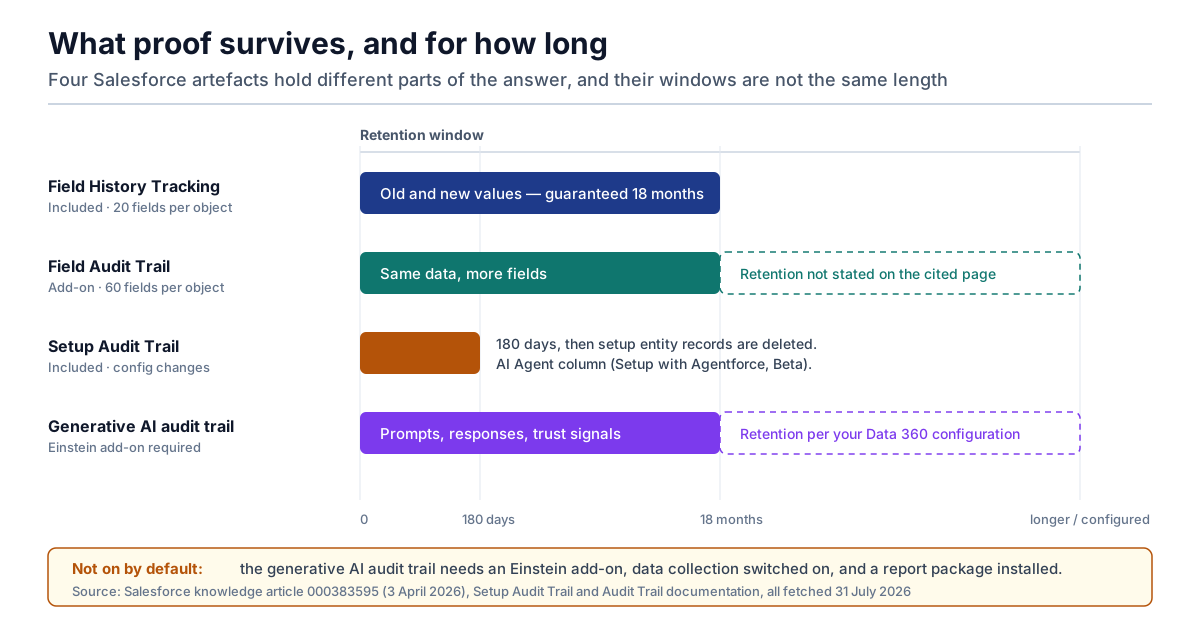
Four different Salesforce artefacts hold different parts of the answer, and their windows are not the same length.
| Artefact | What it holds | Limit | Retention | Extra cost |
|---|---|---|---|---|
| Field History Tracking | Old and new values for selected fields | 20 fields per object | 18 months guaranteed | Included |
| Field Audit Trail | The same, wider | 60 fields per object | Not stated on the cited page | Add-on |
| Setup Audit Trail | Configuration changes, including permission set and profile edits | Last 20 shown in UI; full download | 180 days, then deleted | Included |
| Generative AI audit trail | Prompts, responses, masking and toxicity signals, stored in Data 360 | Per Trust Layer scope | Per Data 360 configuration | Requires an Einstein add-on and explicit enablement |
Every figure in that table comes from Salesforce's own pages, with one deliberate gap. The field limits and the standard retention window are from the Field History Tracking: Storage Limits and Data Retention knowledge article, published 3 April 2026, which states that with Field Audit Trail "you can track up to 60 fields per object", that standard Field History Tracking lets you "track only 20 fields per object", and that field history data "is only guaranteed to be retained for 18 months if your org was created after June 1, 2011." That article does not state a retention window for Field Audit Trail, so this article does not assert one — ask Salesforce for it in writing rather than assuming the add-on extends the clock. The setup window is from Monitor Setup Changes with Setup Audit Trail: you can download "your org's complete setup history for the past 180 days", and "After 180 days, setup entity records are deleted."
The twenty-field ceiling is the one to plan around
Twenty tracked fields per object sounds generous until an agent is writing to a case. Status, priority, owner, subject, description, resolution, several custom fields your service team added, and the SLA fields. A mature Case object can exhaust twenty before anyone thinks about the agent. The moment the agent writes to a field that is not tracked, the only surviving evidence is the current value and a Last Modified By stamp. You know the agent touched the record. You do not know what it changed it from.
That is a procurement question with a price attached, and it should be asked before the pilot rather than after the first dispute: which fields will the agent write, are they tracked today, and does tracking them require Field Audit Trail?
The prompt trail is a separate purchase
The Einstein Trust Layer is the layer that masks sensitive data before it reaches an external model, enforces zero-data-retention agreements with model providers, scores toxicity, and logs audit signals. Its grounding behaviour is directly relevant to this article's argument: the page describes "Secure data retrieval of Salesforce data for grounding the prompt based on the permissions of the user executing the prompt", and says the mechanism "preserves in place all standard Salesforce role-based controls for user permissions and field-level security when merging grounding data from your CRM instance or Data 360." So the permission model governs retrieval as well as action. The agent cannot ground a prompt in a field the executing identity cannot read.
The audit half is more conditional. Salesforce's Audit Trail page lists required editions as "Enterprise, Performance, and Unlimited Editions with an Einstein for Sales, Einstein for Platform, Einstein for Service, Einstein 1 Service, or Einstein GPT Service add-on", and notes that to access the data stored in Data 360, "you'll need to turn on the Einstein generative AI data collection and storage and install the report package."
So the record of what the agent was asked and what the model said is not on by default, requires an add-on, and requires deliberate enablement plus a report package. That is not a criticism of the design. It is a fact that belongs in the cost model and in the go-live checklist, and it sits several clicks away from any feature summary. Our earlier work on proving agent actions after the fact argues the general version: an audit capability that is available is not an audit capability that is running.
One genuinely good detail
Setup Audit Trail now carries an AI Agent column. Salesforce's page states that if an admin makes a change using an AI agent via Setup with Agentforce (Beta), "the agent's name and ID are listed in the AI Agent column. The admin using the agent is listed in the User column." That is the right shape for agent accountability: the non-human actor and the human principal recorded separately, in the same row. Small, and more than most platforms do.
Three grant models, compared
The reason this review is structured around permissions rather than features is that the grant model is what actually differs between Agentforce and the alternatives a buyer is weighing. Feature lists converge; grant models do not. Here are the three shapes, with the evaluation each one demands.
Model A: CRM-native inheritance (Agentforce)
Best for: work whose system of record is Salesforce, in orgs with a deliberate permission model.
How authority is granted: inherited from the logged-in user on employee channels; authored as a dedicated agent user on customer channels, constrained by licence-scoped permission sets.
What you evaluate: your own org. The audit is a permission review, and its cost is proportional to how much drift you have.
Strengths: mature record-level enforcement; field-level security and sharing apply to grounding as well as action; agent identity appears in record metadata and setup audit rows.
Weaknesses: the largest part of the blast radius was set before the project; agent permission sets are a parallel library that can drift from the human one; proof is assembled from several separately-licensed features.
Bottom line: the strongest option when Salesforce is where the work lives, and the option whose risk is hardest to see, because inherited authority rarely appears as a line item on anything you sign.
Model B: tenant-native inheritance (the Microsoft-shaped alternative)
Best for: work whose system of record is the productivity tenant rather than the CRM.
How authority is granted: the same inheritance pattern in a different substrate. The agent acts under a directory identity and reaches what that identity reaches. The failure mode is identical in structure: over-broad standing access that a prompt can now exercise.
A deliberate omission: we are not scoring specific products in this model, because we have not verified their current permission documentation to the standard applied to Salesforce's here, and a comparison built on one verified side and one remembered side is not a comparison.
Bottom line: if your answer to "where does this work live" is the tenant rather than the CRM, run the same Reach Map against that platform's own published permission docs.
Model C: a standalone platform with its own scoped credential
Best for: work that crosses systems, or teams that want the grant to be explicit and reviewable at build time.
How authority is granted: you create a credential and scope it. Nothing is inherited.
What you evaluate: the grant you are about to write, plus the platform's ability to constrain it: action-level scoping, expiry, revocation, and whether the credential is a service account nobody owns.
Strengths: the review happens by construction, because someone must decide what to put in the scope; cross-system work is native rather than an integration project.
Weaknesses: you now hold a second permission model that must stay consistent with the first; a standing credential outside the CRM is exactly the artefact that turns an agent mistake into an incident, which is why owner, scope and expiry for non-human identities is the discipline that has to come with it.
Bottom line: explicit beats inherited for reviewability and loses to it for enforcement maturity. Neither is free.
| Model A: CRM-native | Model B: tenant-native | Model C: standalone credential | |
|---|---|---|---|
| Grant origin | Inherited, mostly pre-existing | Inherited, mostly pre-existing | Authored at build time |
| Where the audit happens | Your existing permission model | Your existing directory model | The new scope document |
| Enforcement maturity | Two decades of record-level machinery | Mature directory machinery | Varies widely by vendor |
| Cross-system reach | Weak outside the CRM | Weak outside the tenant | The point of the model |
| Easiest thing to get wrong | Never scheduling the inherited-permission review | The same | Leaving a standing credential unowned |
Choose Agentforce if — an explicit decision path
Reviews that end at "it depends" waste the reader's time. Here is the path, in the order the questions actually resolve.
Start: is Salesforce the system of record for the work you want the agent to do?
- No, and the work spans three or more systems → Agentforce is the wrong shape. A CRM-native agent whose reach stops at the CRM boundary will need integrations that reintroduce Model C anyway, and you will end up maintaining two permission models to get one workflow. Evaluate a cross-system platform and write the scope explicitly.
- No, but Salesforce holds the record you care about and the rest is read-only context → viable. Scope the agent to the Salesforce side and keep the external context in grounding rather than in actions.
- Yes → continue.
Next: can you produce, this week, a list of every permission set assigned to the users who will talk to the agent?
- No → stop and fix that first. This is not a delay tactic; it is the actual evaluation. On employee channels the agent's blast radius is that list, and you cannot review what you cannot enumerate.
- Yes, and it is mostly job-function permission sets → continue, and expect a clean build.
- Yes, and it is mostly accumulated exceptions and a few View All grants → continue, but budget the remediation as part of the project rather than pretending the agent is a separate thing.
Next: is the agent customer-facing?
- Yes → the agent user branch applies. Review internal org-wide defaults specifically, because unauthenticated sessions resolve against them. Plan to use action-level filters and variables, and plan to write sharing rules that exclude the Einstein Agent User where widening is not intended.
- No → the inheritance branch applies. Your control surface is the human permission model plus action-level filters.
Finally: which fields will the agent write, and are they tracked?
- Tracked, and under the twenty-field ceiling → proceed.
- Not tracked → price Field Audit Trail, or accept that you will know the agent changed a record and not what it changed it from. Decide that deliberately, in writing, before go-live.
When a standalone agent platform still wins
An honest review names the cases where the incumbent answer beats the one the article is about, and there are three here.
When the work crosses systems. Agentforce's advantage is that authority resolution is native to the record model. That advantage evaporates the moment the workflow's second step lives in a ticketing system, a data warehouse or a finance tool. At that point you are building integrations, and the integration's credential is a Model C grant with none of Model A's enforcement. The worst of both.
When you need the grant to be visible to a reviewer who does not know Salesforce. A scope document that says "read contacts, create cases, no deletes, expires in 90 days" can be reviewed by a security team in ten minutes. "The agent runs as the logged-in user, subject to org-wide defaults, role hierarchy and eleven permission sets" cannot. If your governance process depends on non-specialists being able to read the grant, inheritance is a structural disadvantage regardless of how good the enforcement is.
When the org's permission model is the thing you are trying to escape. Some organisations reach for agents precisely because their existing access model is unmanageable. Deploying a CRM-native agent onto that model does not simplify it. It adds a fast execution path through it. In that situation a narrow, explicitly-scoped agent outside the CRM, doing less, is a better first step than a capable agent inside it.
And one case where doing nothing wins: if the task you want automated is genuinely low-volume, the arithmetic in the pricing section is not the constraint. The permission remediation is. A twenty-minute-a-week task does not justify a permission-model audit, and the audit is the real cost of the first Agentforce agent, not the credits.
Twelve checks to run before the demo
Every item below is answerable from your own org or from Salesforce's public documentation. None of them needs a sales conversation, which is the point. Walk into the demo with these already answered and it becomes a verification rather than an education.
- List every channel the agent will be deployed to, and mark each as authenticated or unauthenticated. This determines which identity branch each deployment lands on.
- For each authenticated channel, export the permission sets and permission set groups assigned to the widest user who will use it.
- Grep that export for View All Records, Modify All Records, View All Fields and Modify All Data. Each hit is an agent capability you did not intend to grant.
- Record your org-wide defaults for every object the agent will touch, for internal users specifically.
- For customer-facing agents, confirm whether the planned agent user's object permissions land at the narrow or wide end of Salesforce's own example list for service agents.
- Draft the action-level filters and variables before the build, not after. Salesforce recommends them explicitly as the protection that holds regardless of org-wide defaults.
- Check whether any sharing rule would widen access to the Einstein Agent User, and whether it should be rewritten to exclude it.
- Enumerate the fields the agent will write. Count them against the twenty-field field-history ceiling per object.
- Confirm whether you have an Einstein add-on that makes the generative AI audit trail available, and whether data collection and the report package are actually enabled.
- Decide who owns the agent user record, by name, and who reviews its permission set group on what cadence.
- Model cost as actions per task times $0.10, using the real number of actions your intended tasks decompose into, and compare it against the $2 per conversation and per-seat alternatives for the same volume.
- Plan the Digital Wallet threshold alerts you will set before the first production traffic, since the published overage behaviour is billing in arrears rather than a hard stop.
Run those twelve and you will know more about your Agentforce exposure than a published review can tell you, because a review evaluates the agent and this list evaluates the org. That is the same instinct behind our blast-radius approach to enterprise agent deployment: the capability question is easier than the reach question, and only the second one determines what a bad day looks like.
The stale facts still circulating about Agentforce
Two things widely repeated in current write-ups are out of date, and both matter for this evaluation.
"Permissions on profiles are being retired in Spring '26." They are not. Salesforce published Permissions in Profiles Retirement Cancelled on 6 June 2026, stating that the previously announced retirement "has now been cancelled based on customer feedback and remaining feature gaps." Profiles continue to support permissions. Salesforce still recommends the permission-set-led model. The same article says to "Assign users the Minimum Access – Salesforce profile (or a clone)" and "Avoid adding permissions directly to profiles where possible." But the forced migration is off. If an implementation plan you are reading treats the migration as a deadline, it was written before June and its sequencing assumptions are wrong. The recommendation survives; the compulsion does not.
"Agentforce costs $2 per conversation." That is one of several current models rather than the model. The published page as of 31 July 2026 leads with Flex Credits at $500 per 100,000, prices an Agentforce action at 20 credits, and states plainly that Flex Credits and Conversations "will not be supported in the same org." A comparison that quotes only the conversation price is comparing against a model you may not be on, and a per-conversation figure cannot be reconciled with a per-action one without knowing how many actions your conversations contain.
The general lesson: fetch the vendor's pricing page on the day you build the model, and record the date next to the number. Both corrections above came from primary sources published within the last four months.
Where this evaluation is still uncertain
Several things in this review are unresolved, and saying so is more useful than a confident gloss.
We have not used Agentforce. This is an evaluation guide built from primary documentation, not a hands-on test. Nothing here reports what the builder feels like, how well topic classification works in practice, or how often the agent picks the wrong action. Those are real evaluation criteria and this article does not address them. Treat published hands-on reviews as the complement to this one, and treat their permission claims with the same scepticism you would apply to ours.
The Agentforce Rate Card is not public in a form we could retrieve. Voice multipliers and the full list of metered usage types live there. Every voice figure in this article is limited to what the pricing page itself states.
Reddit and several vendor-comparison sites were not reachable through our fetch methods, so the practitioner voices here come from Salesforce Stack Exchange, which skews toward admins and developers rather than the service leaders who usually sponsor these projects. A buyer-side sample would likely surface different complaints, and its absence is a real limitation of this piece rather than a stylistic choice.
Salesforce documentation moves quickly. Every Salesforce page cited here was fetched on 31 July 2026, and two of the knowledge articles were published within the last four months. Re-fetch before you rely on a specific sentence.
The question of whether inherited authority is better or worse than an explicit grant is genuinely contested. This article argues that inheritance produces mature enforcement and poor reviewability. A reasonable practitioner could argue the opposite priority: that a mature, centrally-enforced model beats a reviewable but newer one, particularly under audit. We do not think that argument is wrong; we think it should be made explicitly rather than assumed, and the Reach Map is designed to make it visible either way.
Where LeapForce fits, and where it does not
LeapForce does not compete with Agentforce inside Salesforce, and we are not going to pretend otherwise: if the agent's work is Salesforce records, Salesforce's own permission machinery is the right enforcement point and we would tell you to use it.
What LeapForce builds is the layer above the individual tool — one controlled layer for every AI tool, connector, model and agent, so that access, policy, cost and audit have a single answer rather than one per platform. That matters here for one reason. The moment a second agent platform appears alongside Agentforce, you have two permission models, two spend meters and two audit stories, and nothing reconciles them. Our Access and Identity layer treats non-human identities as first-class, with owner, scope and expiry on every agent, and our Observability and Audit layer records what was refused as well as what ran. Per our honesty convention, the build status of each capability is published per-capability on those pages, and you should read the labels rather than assume everything ships today.
The sequencing we recommend for a gateway rollout is the one named on our AI Gateway page — Observe first. Enforce second. Optimize third. — and it maps neatly onto an Agentforce evaluation. Observe: run the Reach Map and find out what the identities already hold. Enforce: narrow with action-level filters, sharing-rule exclusions and permission-set discipline. Optimize: model the action mix and tune the cost once the reach is correct. Doing those in the other order is how pilots become incidents.
Frequently asked questions
It is worth it when Salesforce is the system of record for the work you want automated and your permission model is deliberate enough to review. The published pricing is legible — $500 per 100,000 Flex Credits, 20 credits per action, so ten cents an action — and the enforcement machinery is mature. The cost that does not appear on the invoice is the permission audit: on employee channels the agent inherits the reach of whoever talks to it, so the real project is enumerating and tightening that reach. If your org cannot produce a permission-set inventory this week, the honest answer is "not yet."
It depends on the channel, and Salesforce documents both cases. Agents on channels restricted to logged-in users "run in the context of the logged-in user", with existing licences, permissions, field-level security and sharing settings determining access. Agents on channels that are not restricted to logged-in users operate as an agent user — a Salesforce integration user created with minimal access by default, on the Einstein Agent licence and Einstein Agent User profile. The same agent deployed to both surfaces has two different blast radii.
$0.10 per standard action and $0.15 per Agentforce Voice action, derived from Salesforce's published rates on 31 July 2026: Flex Credits are $500 per 100,000, Agentforce actions are 20 credits and Voice actions are 30. Salesforce's own worked examples range from one action ($0.10) for a knowledge question to five actions ($0.50) for field-service appointment scheduling, so the per-task cost swings 5× depending on how many steps a request decomposes into. Model the action mix rather than the rate.
Yes, for both retrieval and action, according to Salesforce's own documentation. The Einstein Trust Layer page describes secure data retrieval "based on the permissions of the user executing the prompt" and states that it "preserves in place all standard Salesforce role-based controls for user permissions and field-level security when merging grounding data from your CRM instance or Data 360." That means the agent cannot ground a prompt in a field the executing identity cannot read. The caveat is that this is a statement about enforcement, not about scope: field-level security only helps if the executing identity's field access was tightened in the first place.
Salesforce's own recommendation is to use filters and variables to limit record access at the subagent and action levels, because that protection holds regardless of your org-wide defaults. Beyond that, you can restrict internal org-wide defaults and then use sharing rules to grant access selectively while excluding the Einstein Agent User. For employee-facing agents you cannot narrow the inherited reach at the identity level. You tighten the human's permission sets, or you constrain what the actions themselves are allowed to do.
Partly, and it depends on what you bought and what you enabled. Field History Tracking records old and new values for up to 20 fields per object, guaranteed for 18 months; Field Audit Trail raises that to 60. Setup Audit Trail keeps configuration changes for 180 days, after which "setup entity records are deleted", and now includes an AI Agent column naming the agent when a change is made through Setup with Agentforce (Beta). The record of prompts and responses lives in the generative AI audit trail in Data 360, which requires an Einstein add-on plus turning on data collection and installing a report package. None of the three is complete alone.
No. Salesforce cancelled the permissions-in-profiles retirement on 6 June 2026, and profiles continue to support permissions. Salesforce still recommends a permission-set-led model, advising the Minimum Access profile as a baseline and avoiding permissions directly on profiles. For an Agentforce evaluation the practical point is separate from the migration: agent users need custom permission sets associated with the Einstein Agent licence and Einstein Agent User profile, so your existing permission-set library is not directly reusable for them regardless of which model you run.
The platform half takes days; the org half takes as long as your permission drift demands. The twelve checks in this article are designed to run in one sitting against your own org, and most of the answers already exist in Setup. What extends the timeline is remediation. Every View All Records grant you find on a user who will talk to the agent is a decision to make, and those decisions involve people who did not ask to be in an AI project.
They are different generations of Salesforce's assistant and agent tooling, and Salesforce has renamed and reshaped this surface more than once. We are not going to adjudicate the naming here, because we could not retrieve a current Salesforce page that states the relationship cleanly, and a branding claim sourced from third-party summaries is not worth making. For a permissions evaluation the branding matters less than the execution identity anyway. Whatever the surface is called, ask the same question: does this run in the logged-in user's context, or as an agent user? That answer determines the blast radius; the product name does not.
There is no single best alternative, because the alternatives differ by grant model rather than by feature. If the work spans several systems, a standalone platform where you author an explicit, scoped credential is the better structural fit, and the discipline it demands is owner, scope and expiry on that credential. If the work lives in a Microsoft tenant rather than a CRM, the tenant-native equivalent has the same inheritance trade-off as Agentforce and deserves the same Reach Map. If the work is genuinely inside Salesforce records, the honest answer is that the alternatives are worse at exactly the thing Agentforce is good at.
Ready to Govern Your AI?
Talk to LeapForce — one controlled layer for every AI tool, connector, model, and agent.
Comments