
An AI assistant is software you instruct in ordinary language that then does work inside your systems using your identity and your permissions. That last clause is the whole definition. Everything it can reach, it reaches because you can reach it.
Our position is that the standard definitions get the emphasis backwards. They describe the thing by what it can do (draft, summarise, schedule, search) and treat access as a footnote in a buying checklist. Access is not a footnote. It is the load-bearing part. A writing assistant with a mailbox token and a writing assistant without one are not the same product with different features; they are different risk objects wearing the same name. On Hacker News, product leader toddmorey put the reader's real question to a startup launching an assistant with wide personal access: does the AI "present as me or are my contacts aware" it is not a person (comment, August 2024). Nobody answered it in the thread, and most vendor explainers still do not.
The short answer: An AI assistant is a natural-language interface that acts inside your systems under a borrowed identity, usually yours, so the only classification that predicts its behaviour is whose credentials it uses, what those credentials can reach, who approves irreversible steps, and what the log records.
Last updated: July 30, 2026.
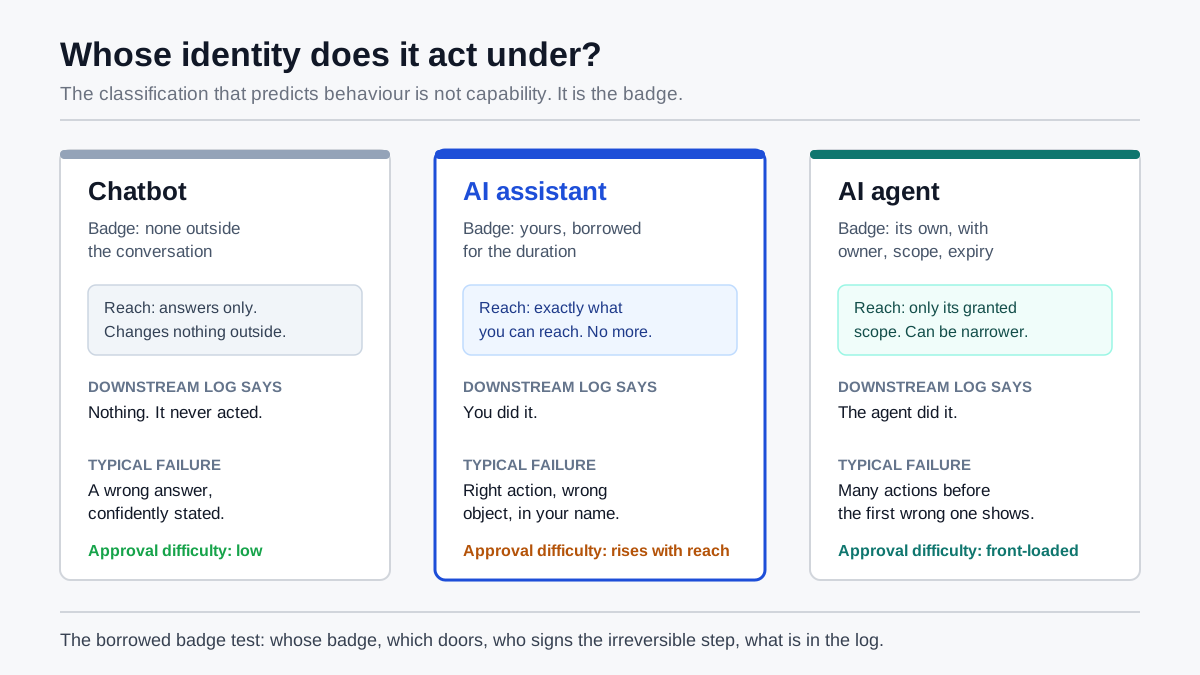
The only classification that predicts behaviour: whose credentials the software acts under.
One disclosure before we start. We have not run a controlled, instrumented test of a specific commercial product for this article, so nothing below is presented as a measurement of ours. Every number here carries a named external source, and where a claim is our judgement rather than a finding, it is written as our judgement.
What an AI Assistant Actually Is
An AI assistant is a natural-language interface layered over a language model and a set of connected tools, which turns an instruction into either an answer or an action inside a real system. The definition that matters operationally has three parts: it understands intent expressed in ordinary words, it holds enough context to act on your particular situation, and it reaches your data and applications through credentials that belong to somebody.
Most explainers stop after the first two. The third is where the category actually lives. Microsoft states the mechanism plainly in its own documentation: "Microsoft 365 Copilot only surfaces organizational data to which individual users have at least view permissions," and its retrieval layer "honors the user identity-based access boundary so that the grounding process only accesses content that the current user is authorized to access" (Microsoft Learn, updated July 2026). Read that as a product claim and it sounds like a safety feature. Read it as a definition and it tells you what an assistant is: a delegation mechanism. It does not have permissions of its own. It has yours.
That is not a Microsoft quirk. It is the design of nearly every workplace assistant on the market, because it is the only design that makes the product safe to sell. If the assistant had its own standing access to everything, every customer would need a bespoke security review before the first prompt. By inheriting the operator's rights instead, the vendor gets to say: we changed nothing about who can see what. Which is true, and which is also why the interesting questions all move one level up — to what the operator's rights were in the first place.
The adoption context makes this urgent rather than academic. Stanford HAI's 2026 AI Index reports that "organizational adoption reached 88%" for AI in at least one business function, alongside a rise in documented AI incidents "to 362, up from 233 in 2024" (2026 AI Index Report). Adoption is effectively finished as a story. Delegation is the story now.
The Borrowed Badge: Why an Assistant Inherits Your Permissions
An AI assistant works the way a temporary contractor works when you hand them your building pass instead of issuing their own: everything they do is logged as you, gated by your clearance, and invisible to anyone auditing for a second person in the room. We call this the borrowed badge, and the phrase is doing real work — it names the exact property that separates an assistant from an agent, and it predicts almost every problem people report.
Three consequences follow directly, and they are worth stating separately because organisations usually discover them one at a time and in the wrong order.
The assistant's blast radius equals the operator's, never less. A finance director's assistant can read what the finance director can read. If the finance director has stale access to a payroll folder from a role they left two years ago, the assistant has it too — and unlike the human, the assistant will actually go looking, because retrieval is what it does. Permission sprawl that was harmless while nobody exercised it stops being harmless the moment something exercises it exhaustively. This is the mechanism behind most "Copilot surfaced a document I should not have seen" reports: the permission was already wrong; the assistant simply used it.
Attribution collapses. When the assistant acts under your identity, the audit trail in the downstream system records you. Not you-via-assistant. You. If a file was moved, a message sent, a record updated, the log says the operator did it — and reconstructing whether a human or a model composed the action requires a second, separate record kept by the assistant itself. Most consumer-grade assistants do not keep one you can export.
Revocation is coarse. Turning off the assistant's access usually means revoking an OAuth grant or disabling a licence. There is rarely a middle setting that says "keep the summarisation, drop the send." Google's Workspace admin controls are more granular than most and still resolve to four app states: Trusted, which grants "access to all Google Workspace services (OAuth scopes)"; Limited, which "can only access unrestricted services"; a specific-scopes mode where an app "can request data access only to scopes that you specify when configuring the app"; and Blocked, which "can't access any Google service" (Google Workspace admin documentation). Granularity exists. Almost nobody configures it, because the default path through the consent screen is one click and the specific-scopes path is a project.
We wrote about the adjacent boundary, the moment software stops answering and starts changing things, in our earlier analysis of where write access draws the line between agents and chatbots. The borrowed badge is the identity half of the same question. Write access asks what the software may change. The badge asks who it appears to be while changing it.
Assistant, Chatbot, Agent, Automation: One Real Difference
Most treatments of AI assistant vs AI agent vs chatbot vs automation compare vibes: chatbots "answer", assistants "help", agents "act autonomously", automations "follow rules". Those distinctions blur the moment you look at a real product, since a modern chatbot can call tools and a modern agent can be trivially supervised. Sort them by identity and scope instead and the boundaries stop moving.
| Runs under whose identity | Can change things outside the conversation | Decides its own next step | Typical failure when it goes wrong | |
|---|---|---|---|---|
| Chatbot | None outside the session, or a shared service account for retrieval | No | No | Wrong answer, confidently stated |
| AI assistant | Yours, borrowed for the duration | Yes, within your permissions | Partly: it plans the steps, you approve the consequential ones | A correct action taken on the wrong object, attributed to you |
| AI agent | Its own identity, with an owner, a scope and an expiry | Yes, within its granted scope | Yes, in a loop, until the goal is met or a limit stops it | Many actions before anyone notices the first one was wrong |
| Rule-based automation | A service account fixed at build time | Yes, along one pre-declared path | No | Runs correctly on inputs nobody anticipated |
The row that matters is identity. A chatbot has none, which is why it is safe and limited. An automation has one, fixed, narrow, and reviewed once at build time. An agent has one of its own, which is the entire point of the design, since an identity that belongs to the agent can be scoped tighter than any human's, given an owner, and expired on a date. We argued the case for that pattern in our analysis of owner, scope and expiry for non-human identities.
The assistant sits in the awkward middle: it has the reach of an agent and the accountability record of a human, because it is using a human's credentials. That is the trade the category is built on. It buys instant deployment — no new identity to provision, no new access review — at the cost of every governance property you would want later.
One practical implication for buyers. When a vendor frames AI assistant vs AI agent as an upgrade path ("our assistant becomes an agent"), ask whether the agent gets its own identity or simply keeps borrowing the badge with a longer leash. Those are wildly different products. The first is a governance improvement. The second is the same delegation with less supervision, and it is the configuration behind most of the incidents people attribute to "agentic AI".
How AI Assistants Work, One Request at a Time
An AI assistant handles a request in five stages: it interprets what you asked in natural language, gathers grounding context from systems you can access, plans a response or a sequence of tool calls, executes those calls under your credentials, and records what happened. Understanding the stages matters because each one fails differently, and the mitigations are not interchangeable.
Interpretation. The model converts an instruction into a structured intent. This is where ambiguity bites: "reply to Sam about the contract" resolves against three Sams and two contracts, and the model picks one without telling you it chose. Interpretation failures are usually recoverable because they surface immediately in the draft.
Grounding. The assistant retrieves relevant material (documents, messages, records) filtered by your permissions. This is the stage vendors describe most and buyers understand least. The retrieval index is typically built once across the whole tenant and then filtered per user at query time. That filter is the security boundary. It is also, in every architecture we have read about, a filter applied to an index that already contains everything.
Planning. The model decides whether to answer or to act, and if to act, which connected tools to call in what order. Planning quality varies enormously by task. Stanford's 2026 index puts the shift in perspective: agentic systems went "from 12% to ~66% task success on OSWorld", the benchmark for real computer tasks, "though they still fail roughly 1 in 3 attempts" (2026 AI Index Report). A one-in-three failure rate is fine for a draft and unacceptable for an irreversible send.
Execution. Tool calls go out over connectors, whether an API token, an OAuth grant or an MCP server, carrying the operator's authority. This is the stage with no undo. It is also the stage where the assistant's behaviour is most sensitive to content it did not get from you.
Recording. What the assistant did lands in two places at best: the downstream system's own log, which attributes the action to the human, and the assistant's activity history, which may or may not be exportable, retained, or admissible. Microsoft, to its credit, documents both — Copilot interaction data is stored, is discoverable through Purview, and users "can delete their Copilot activity history" from the account portal (Microsoft Learn). Note the last part. A record the subject can delete is a convenience feature, not an audit trail.
For a longer treatment of the loop itself, including planning, tool selection and retries, see our breakdown of how AI agents work in practice. The mechanics are shared; only the identity differs.
This talk from NDC London 2026 covers the same ground from a developer's seat, and it is the best single video we found on scoping delegated authority rather than describing capabilities:

The Borrowed Badge Test: Four Questions
Before you adopt any assistant, ask four questions in this order: whose badge, which doors, who signs, what is logged. We call it the borrowed badge test, and it takes about ten minutes per tool. It replaces the usual feature comparison, because features tell you what the assistant can do on a good day and these four tell you what it can do on a bad one.
1. Whose badge does it carry? Does the assistant act under the individual user's identity, a shared service account, or its own dedicated identity? If the answer is "the user's", every subsequent control is bounded by that user's rights and every downstream log will name them. If it is "a shared service account", you have lost per-person attribution entirely and gained a credential that is probably over-privileged because it had to work for everyone. If it is "its own identity", ask who owns it and when it expires.
2. Which doors does the badge open? Enumerate the actual granted scopes, not the marketing description. There is a large difference between an assistant that can read a calendar and one that can write to it, and a larger one between reading mail and sending it. OWASP lists "excessive permissions" as one of three root causes of what it calls Excessive Agency, and its mitigation is blunt: "Limit the permissions that LLM extensions are granted to other systems to the minimum necessary in order to limit the scope of undesirable actions" (OWASP LLM06:2025). The test is not whether the scope list looks reasonable. It is whether you can name the single most damaging call available inside it.
3. Who signs for the irreversible steps? For every action that cannot be undone, from sending external mail to moving money, changing a permission, deleting a record or publishing anything, is there a human approval, and is that approval on the specific action rather than on the session? OWASP is unambiguous here: "Utilise human-in-the-loop control to require a human to approve high-impact actions before they are taken." Approving a category once at setup is not an approval; it is a policy decision dressed as one. We made the case for treating the approval step as the real control surface in our piece on when human-in-the-loop approval is actually control.
4. What is in the log, and who can read it? Can you answer, six weeks later, which assistant took which action on whose behalf under which prompt, and can you produce that answer to someone outside your team? A log the user can delete fails this. A log that exists only inside the vendor's console and cannot be exported fails this for any regulated process. A log that records successes but not refusals fails it in the specific case an auditor cares about most.
Four questions, in that order, because each one constrains the next. A tool that fails question one cannot pass question four, no matter what its logging page says.
Types of AI Assistants, Sorted by Reach
The conventional taxonomy of assistant types sorts by job function: writing, scheduling, email, support, coding, legal, medical, finance, HR. It is a fine list for discovering products and useless for deciding anything, because two assistants in the same category can differ by an order of magnitude in what they can touch. Sorting by reach produces four tiers that actually predict how hard the tool is to approve.
| Tier | What it can reach | Typical examples | Worst realistic outcome | Approval difficulty |
|---|---|---|---|---|
| Advisory | Nothing outside the chat window; you paste in, you copy out | General-purpose chat assistants used without connectors | Bad advice acted on by a human, plus whatever you pasted leaving the building | Low, but data-loss risk is real |
| Read-connected | Your documents, mail, calendar, tickets, read only | Search and summarisation assistants, meeting recap tools | Surfacing content the operator should never have had access to | Medium; depends entirely on permission hygiene |
| Write-connected | Everything above, plus creating and modifying objects | Scheduling assistants, inbox triage, coding assistants that commit | Correct action on the wrong object, attributed to the operator | High; needs approval gates |
| Externally acting | Everything above, plus actions visible to people outside the company | Email assistants that send, support assistants that reply to customers, voice assistants that call | An irreversible communication in your name to a third party | Highest; needs approval plus disclosure |
The tiers are cumulative, and most real products let you choose a tier at configuration time without ever saying so. A coding assistant is advisory when it suggests in the editor, write-connected when it opens branches, and externally acting when it comments on a public repository. Same licence, same vendor, three different governance problems. The question "which AI assistant should we buy" is far less consequential than "which tier are we switching on."
Two categories deserve a note because they cut across the tiers. Voice assistants compress the approval window to nothing. There is no draft to review before speech goes out, so they behave like externally acting tools even for read-only tasks. And role-specific assistants in regulated domains — medical, legal, financial advice — carry an obligation the tier table does not capture, because the harm is in the content rather than the action. For those, accuracy review is the control, and reach is secondary.
One Email Assistant, Four Delegation Settings
Here is the worked example, because the abstraction only becomes usable when you watch one product change character under four settings. Take a single AI email assistant connected to a corporate mailbox, and hold everything constant except the delegation configuration.
Setting A: read-only, draft in place. The assistant reads the thread, proposes a reply in the drafts folder, and stops. The badge is yours; the doors are read plus draft-create; nobody signs because nothing irreversible happens; the log is thin and it does not matter. This configuration is approvable in an afternoon. It is also where most of the measurable time saving lives, because reading and composing are the expensive parts and clicking send is not.
Setting B: read plus send, with per-message approval. Same reach, but the assistant can now dispatch, and every dispatch surfaces a confirmation showing recipients, attachments and body. The badge is still yours. The signing question is answered properly: approval attaches to the specific message, not to the session. The failure mode shifts from "wrong draft" to "approved without reading", which is a human-factors problem you can measure and design against — shorten the confirmation, highlight external recipients, block attachments by default.
Setting C: read plus send, blanket approval at setup. Identical technical scopes to Setting B, one checkbox different, and a materially different product. The assistant now sends without asking. Most organisations arrive here by accident, because the checkbox is presented as a convenience and its consequence, that every future external message is pre-approved, is rarely stated in those words. This is the configuration where a prompt-injection payload sitting inside an inbound email becomes an outbound action. Which is not hypothetical: NVD records CVE-2025-32711 as "AI command injection in M365 Copilot allows an unauthorized attacker to disclose information over a network", CVSS 7.5, published 11 June 2025 (NVD entry). The vulnerability was patched. The structural point survives the patch: content the assistant reads can influence what the assistant does, and in Setting C there is no human between the two.
Setting D: its own identity, narrow scope, expiry date. The assistant stops borrowing your badge. It gets a dedicated identity that can send only from a specific alias, only to domains on a list, only during business hours, expiring in ninety days unless renewed by a named owner. It is now, by our definition, an agent rather than an assistant — and it is the only one of the four configurations where the downstream log tells the truth about who acted.
| Badge | Doors | Signs | Log tells the truth | |
|---|---|---|---|---|
| A: draft only | Yours | Read, draft | Not needed | Adequate |
| B: send with per-message approval | Yours | Read, draft, send | You, per message | Attributes to you, which is accurate |
| C: send with blanket approval | Yours | Read, draft, send | Nobody, after setup | Attributes to you, which is now false |
| D: own identity, scoped | Its own | Narrow send | Owner, on renewal | Yes |
Notice that A and C differ by one checkbox and sit at opposite ends of the risk range, while B and C are technically identical and differ only in when consent was given. No feature comparison will ever show you this. The borrowed badge test will.
Five Failure Modes That Trace Back to Reach
Almost every complaint about AI assistants in production reduces to one of five failures, and four of the five are access problems wearing a capability costume. Naming them properly is how you pick the right fix instead of the loudest one.
1. Over-retrieval. The assistant surfaces content the operator technically could open but never would have found. The instinct is to blame the assistant; the cause is years of accumulated permissions nobody ever exercised. The fix is a permissions clean-up before rollout, not a smarter assistant. Treat any read-connected deployment as a permissions audit with a chat interface attached.
2. Silent object confusion. The assistant does the right thing to the wrong record: the wrong Sam, the wrong invoice, the wrong branch. Models are markedly better at deciding what to do than at confirming which object they are doing it to, and confidence is uniform either way. The fix is confirmation on the object, not on the action: show the resolved recipient, the resolved record ID, the resolved file path.
3. Injected instruction. Content the assistant reads contains instructions it follows. This is the failure mode with a genuine CVE behind it, and it is structural rather than a bug in any one product. A system that reads untrusted text and can also act on your behalf has no reliable way to tell data from command. OWASP's guidance is to reduce what the extension can do rather than to detect the attack: "Avoid open-ended extensions", and "Track user authorization and security scope to ensure actions taken on behalf of a user are executed on downstream systems in the context of that specific user, and with the minimum privileges necessary" (OWASP LLM06:2025). Detection is a race. Scope is a wall.
4. Attribution loss. Months later, nobody can say whether a human or an assistant took an action, because the downstream log records only the borrowed identity. This one is invisible until an investigation needs it, which is the worst possible discovery timing. It is also the cheapest to prevent, if you decide up front to keep an assistant-side action record and to export it somewhere the operator cannot edit.
5. Orphaned access. The person leaves; their assistant configuration, its tokens and its connectors do not. OWASP's Non-Human Identity Top 10 ranks "NHI1:2025 Improper Offboarding" first on its list, ahead of secret leakage and over-privileged identities (OWASP NHI Top 10, 2025). For borrowed-badge assistants, disabling the user usually does kill the access — that is one genuine advantage of the design. The orphans appear in the shadow layer: personal-account assistants connected to corporate data, which no offboarding process touches because IT never knew they existed. We covered that layer in our analysis of shadow AI.
Only the second failure, object confusion, is a genuine capability limit that better models will keep chipping away at. The other four are configuration decisions, which is good news, because configuration decisions are the kind you can make correctly on day one.
What an AI Assistant Is Not
It helps to bound the term, because three adjacent things get sold under it and each one misleads a different buyer.
An AI assistant is not a virtual assistant. A virtual assistant is a person, remote, who exercises judgement, absorbs ambiguity, and can be held accountable. The overlap in tasks is real and the overlap in properties is close to zero. If you are working out whether the underlying need is a person at all, that is a separate question with a separate answer — we wrote a self-test for it. The short version: delegate low-judgement, reversible work to software and high-judgement, irreversible work to a human, and be suspicious of any pitch that blurs the line.
An AI assistant is not an employee, however the vendor markets it. The "AI employee" framing is doing something specific: it borrows the intuition that employees have managers, scope, reviews and exits, none of which the product ships with by default. If you want those properties you have to build them, which is exactly what treating an assistant as a governed asset means. We set out what that record looks like in our piece on the AI employee's personnel file.
An AI assistant is not deterministic automation. A rules engine does the same thing on the same input every time and fails loudly when the input is unexpected. An assistant produces a plausible response to nearly anything, which means it fails quietly. If a workflow's value depends on it running identically every time, an assistant is the wrong tool no matter how good the demo looked — put a rule there and use the assistant for the step that genuinely needs judgement.
And an AI assistant is not, by itself, a governance layer. It is a thing that needs one. That distinction is the honest version of the product bridge later in this article.
What Delegation Actually Costs
The licence is the smallest line in the cost. Buyers who model only the per-seat fee consistently underestimate, and the three missing components are review time, variable execution spend, and the cost of the permission clean-up the deployment forces. We are describing the components rather than quoting a price, because published per-seat prices move monthly and any figure here would be stale before you read it.
| Cost component | What drives it | Why it is usually missed |
|---|---|---|
| Per-seat licence | Headcount with access | It is the only number on the pricing page |
| Variable execution | Tokens or actions consumed; grows with connector depth, not with headcount | Priced per unit, budgeted per month, reconciled never |
| Human review time | Number of irreversible actions × seconds per approval × frequency | It is the control you added, so it never appears in the savings case |
| Permission remediation | Years of accumulated over-access, surfaced the week retrieval switches on | It is charged to IT, not to the AI budget, so the AI business case looks better than it is |
| Incident and audit readiness | Log retention, export tooling, evidence production | Only priced after the first request for evidence |
Two of those deserve a sharper point. Review time is a real cost you are choosing on purpose, and pretending otherwise is how approval gates get quietly removed six weeks in. If an assistant proposes forty external emails a day and each confirmation takes eight seconds of genuine reading, that is a little over five minutes daily — trivial, and worth budgeting explicitly so nobody frames it as friction to be optimised away. If the same gate sits on four hundred actions a day, it is nearly an hour, and the honest conclusion is that the workflow needs narrower scope rather than a faster human.
Variable spend is the component that surprises finance, because it scales with how deeply the assistant is connected rather than with how many people use it. One heavily connected user running long retrieval chains can cost more than twenty people asking short questions. Budgeting in dollars per team, rather than in tokens, is the only version of this that a non-technical owner can actually govern — a position we set out in our analysis of how model routing controls LLM cost.
Recognisable-source note. Several figures a reader might expect here, namely vendor per-seat prices and independent time-savings studies, are either behind vendor gates that reject automated fetching or are vendor-published and self-interested. Rather than cite a number we could not independently verify, we have described the cost structure and left the arithmetic to your own numbers.
A Scoping Checklist IT Will Sign
This is the deployment checklist, ordered by what unblocks the next step. It assumes you have chosen a tool and are trying to get it approved, which is where most AI assistant projects actually stall.
- Pick one workflow with a reversible output. Draft, summary, search, triage. Not send, not publish, not pay. A pilot on a reversible workflow can be approved by a manager; a pilot on an irreversible one needs security, legal and a change process, and that is why it will not start this quarter.
- Enumerate the scopes before the consent screen, not after. Write down every permission the tool will request and what the worst available call under each one is. If the vendor cannot produce this list, that is the finding.
- Run a permissions sample first. Take five representative users and check what they can actually open today. If that sample surprises you, fix access before you add retrieval. The assistant will find everything the sample hinted at.
- Decide the identity model explicitly. Borrowed badge for the pilot is fine and normal. Write down the trigger that moves you to a dedicated identity, usually the first externally acting workflow, so the decision is made in advance rather than under deadline.
- Put approval on the action, not the session. For every irreversible step, a specific confirmation showing the resolved object. Measure how long people actually spend on it; if it is under two seconds, the gate is theatre.
- Require an exportable action record. Ask, in the security review, for a sample export of what the assistant did on a user's behalf. Not a screenshot of a console. A file.
- Set an expiry on the pilot itself. Ninety days, then a decision to renew, expand or stop. Assistants that quietly become permanent are how the shadow layer forms inside sanctioned tools.
- Name an owner who is not the vendor's champion. Someone accountable for what the assistant did, with the authority to switch it off.
- Decide the disclosure rule before anything speaks to a customer. If the assistant can produce text that reaches people outside the company, decide now whether they are told. The EU AI Act's Article 50(1) requires providers to ensure that people interacting directly with an AI system "are informed that they are interacting with an AI system, unless this is obvious", with transparency obligations applying from 2 August 2026 (Article 50, EU AI Act).
- Map the whole thing to a framework you already use. NIST's AI Risk Management Framework, whose four functions are Govern, Map, Measure and Manage, is "intended for voluntary use" and exists to help organisations "better manage risks to individuals, organizations, and society associated with artificial intelligence" (NIST). Voluntary is the point: it gives you a shared vocabulary with your auditors without committing you to a certification you did not ask for.
Nine of those ten items cost nothing but attention. The tenth costs a meeting.
Where This Is Still Uncertain
Several things in this article are our reasoning rather than settled fact, and it is worth marking them so you can weigh them accordingly.
We have not run a controlled test. Nobody on our side instrumented a commercial AI assistant, logged its calls and measured its error rate for this piece. The borrowed badge framing comes from reading vendor architecture documentation, security advisories and standards work, not from a bench test. A measured study would very likely sharpen or complicate the tier table, particularly on how often over-retrieval actually happens in a well-maintained tenant versus a neglected one.
The identity picture is moving fast. Delegated-identity standards for AI, meaning scoped, expiring, agent-owned credentials that downstream systems can distinguish from a human's, are being actively worked on across the identity industry, and the vocabulary is not stable. Some of what we describe as "build it yourself" may be a platform feature within a year, which would change the cost table more than the risk table.
Benchmark numbers travel badly. The OSWorld figures we cite measure agents on general computer tasks, not assistants on a narrow business workflow inside a familiar tenant. A well-scoped inbox assistant on a well-structured mailbox will beat that number substantially; a loosely scoped one on messy data may do worse. Treat it as evidence that reliability is improving and not yet sufficient for unsupervised irreversible action, which is all we claim from it.
The disclosure question is genuinely unsettled in practice. Article 50 states an obligation; what satisfies it for a half-drafted email that a human edited before sending is not something we can tell you, and the honest answer today is that your legal team decides and the answer may change. We are describing a requirement, not giving legal advice.
And the failure taxonomy is ours. The five failure modes are a synthesis we find useful, not an industry-standard classification. Where they overlap OWASP's categories we have cited OWASP; where they do not, they are our judgement and should be read that way.
When One Assistant Becomes Forty
Everything above is about one AI assistant. The governance problem changes character at roughly the point where a company has enough of them that no single person can list them, which happens far earlier than most leaders expect — usually before anyone has decided AI is a program rather than a set of individual tool choices.
At that scale, the four questions do not go away; they just cannot be answered per tool by hand. You need one place that knows which AI surfaces exist, which identity each one acts under, which connectors each one may call, and what every one of them did. That layer is what we build at LeapForce: SSO in front of every AI surface with non-human identities treated as first-class — every agent carrying an owner, a scope and an expiry — a curated connector registry that IT vets once with action-level scoping and human-in-the-loop gates, and tracing plus a tamper-evident action audit that records what was refused, not only what ran. Our rollout model for the gateway is deliberately unhurried: observe first, enforce second, optimize third — point one team's traffic at it in observe mode and find out what is actually running before writing a single rule.
The one disclaimer, and it is a real one: LeapForce does not sell an AI assistant. We do not compete with the writing, scheduling or inbox tools in this article, and if you need one, buy one. What we do is the layer underneath — who owns this thing, what may it touch, what did it do, what did it cost — which only becomes worth paying for once you have more assistants than memory. LeapForce is in active development and per-capability build status is disclosed on the site; treat anything marked in development as not shipping today.
Frequently asked questions
No. A chatbot answers inside the conversation and changes nothing outside it. An AI assistant connects to your systems and acts inside them under your identity, which is why it can save more time and cause more damage. The practical test is whether the software can change a record, send a message or move a file when you are not looking at it. If it can, it is not a chatbot regardless of what the interface looks like.
In the major workplace products, no. It is bounded by your existing permissions. Microsoft documents this directly for Copilot, which "only surfaces organizational data to which individual users have at least view permissions" (Microsoft Learn). The important caveat is that this guarantees no new access, not appropriate access. If your permissions are broader than your job requires, the assistant will exercise that breadth far more thoroughly than you ever did, which is why permission clean-up belongs before rollout rather than after the first complaint.
You check two records and expect a gap between them. The downstream system's log attributes the action to you, because the assistant used your credentials. The assistant's own activity history holds the prompt and response, and whether that history is exportable, retained and immutable varies widely by product. Before you deploy anything with write access, ask the vendor for a sample export of an action record — if the only answer is a console screenshot, you cannot reconstruct events later.
For a sanctioned, borrowed-badge assistant, disabling the person's account normally removes the assistant's access with it, which is a genuine advantage of the design. The problem is the unsanctioned layer: personal-account assistants connected to corporate data, which offboarding never touches because nobody knew they existed. OWASP ranks "Improper Offboarding" as the top non-human identity risk of 2025 (OWASP NHI Top 10). The fix is discovery before departure, not a better checklist on the last day.
Budget four components, not one: the per-seat licence, variable execution spend that scales with connector depth rather than headcount, the human review time your approval gates consume, and the permission remediation that retrieval will force into the open. The licence is usually the smallest of the four in a connected deployment. We deliberately do not quote per-seat prices here because published figures change monthly and we would rather you price your own configuration than trust a stale number.
If the assistant interacts directly with people, increasingly yes. The EU AI Act's Article 50(1) requires that people "are informed that they are interacting with an AI system, unless this is obvious", with transparency obligations applying from 2 August 2026 (Article 50). What counts as compliance for a mostly-AI draft that a human edited is genuinely unsettled and is a question for your legal team. Practically, decide the rule before you switch on anything that can reach a customer, not after.
Start in the read-connected tier on a workflow whose output is reversible: search, summarisation, triage, drafting. That is where most of the measurable time saving sits, because reading and composing are the expensive steps and dispatch is not, and it is the only tier a line manager can approve without a security project. Move to write-connected once you have a working approval gate, and to externally acting only once you have both a gate and a disclosure rule.
Yes, and at that point most people would call it an agent rather than an assistant. That is the whole of the AI assistant vs AI agent distinction, and it is a more useful line than any capability list. A dedicated identity can be scoped tighter than any human's, given a named owner, and set to expire — and the downstream log finally records something true about who acted. The trade is provisioning effort and an access review you avoided by borrowing the badge. Make the switch when the first externally acting workflow appears, and decide that trigger in advance.
Look for the setting that turns blanket session approval into per-action approval, and check what the confirmation actually shows: recipients, attachments, the resolved object. OWASP's mitigation list pairs limiting permissions to the minimum necessary with human-in-the-loop control "to require a human to approve high-impact actions before they are taken" (OWASP LLM06:2025). If a product has no per-action mode, treat it as externally acting by default and scope its connectors instead. A wall beats a prompt.
In our reading of how these projects actually run, three reasons dominate: the pilot picked an irreversible workflow and therefore needed a security review nobody scheduled; the permission clean-up surfaced by retrieval turned out to be a bigger project than the assistant; or the pilot produced no exportable evidence of what happened, so there was nothing to take to a governance forum. All three are avoidable by choosing a reversible workflow, sampling permissions first, and demanding an action export before signature.
It is governed by the same four questions and it usually lands in a different tier. A coding assistant that suggests inside the editor is advisory; one that opens branches is write-connected; one that comments on a public repository or triggers a deployment is externally acting. The mistake is treating the whole product as a single risk level because it arrived on one licence. Decide the tier per configuration and per repository, not per vendor.
Ready to Govern Your AI?
Talk to LeapForce — one controlled layer for every AI tool, connector, model, and agent.
Comments