
AI workplace search returns answers instead of links, and to do it, it builds a second copy of your company's documents and a second, slightly stale copy of your permissions. Evaluate it on how fast that second copy forgets, not on how good the answers look in a demo.
That is our position, and it runs against the way these tools are sold. Every vendor page for this category leads with retrieval quality: natural-language queries, cross-tool synthesis, follow-up questions. Almost none of them lead with the thing that decides whether the rollout survives its first security review, which is the lag between a permission changing in Google Drive or SharePoint and that change taking effect in the search index. On Hacker News in September 2024, a commenter posting as sushid asked the question that shows how invisible this is: why can't these providers index everything and then have the model "self-censor" when a reply would reference documents the user cannot access? It is a reasonable question, and in the same thread another commenter, foobiekr, had just written that retrieval "has many, many issues with document permissions" that make the current approaches bad for enterprises. The answer is that once the content is in the index, "self-censoring" is a model behaviour, not an access control, and models are not access controls.
The short answer: AI workplace search is safe to deploy when permission changes reach the index in minutes and you can prove it, and unsafe when nobody in the room can say how long revocation takes.
Last updated: July 30, 2026.
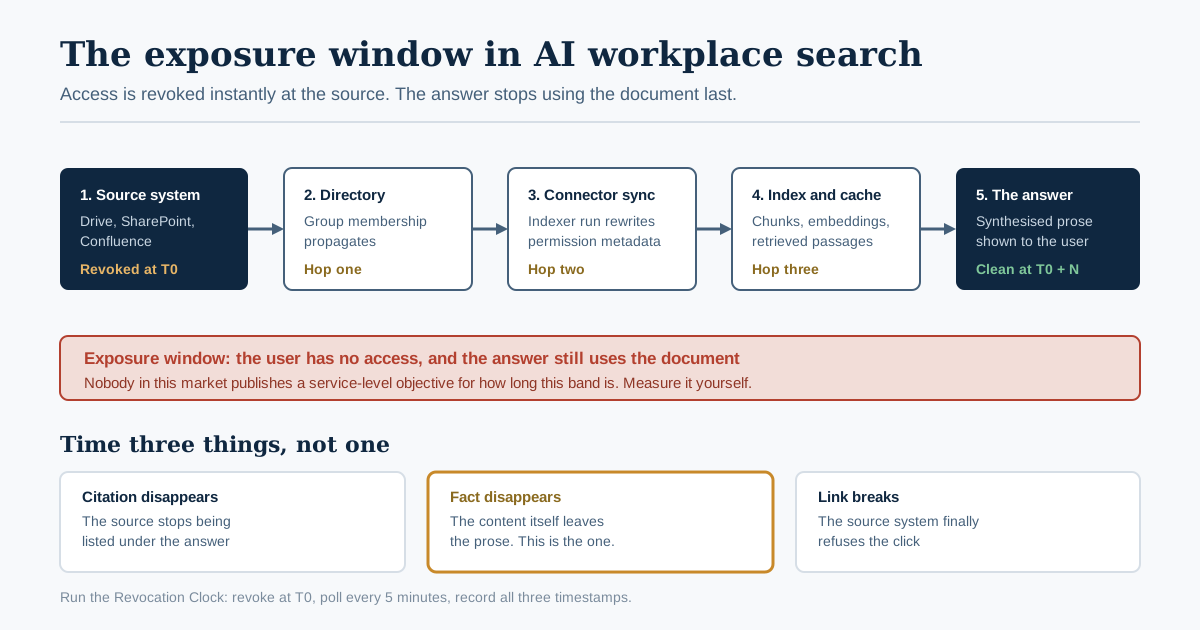
The permission change leaves the source system immediately and reaches the answer last. Everything between is the gap this article is about.
We have not run a controlled revocation test across the major AI workplace search products ourselves, so nothing below is presented as our own measurement. Every number here comes from a named vendor's own documentation or from published research, linked inline so you can check it against the version live on the day you read this.
What AI Workplace Search Actually Builds
AI workplace search is a natural-language layer over the tools a company already uses, which retrieves passages from many systems at once and composes an answer instead of returning a list of links. Mechanically it is retrieval-augmented generation pointed at internal content: connectors pull documents out of Drive, SharePoint, Slack, Confluence, Jira and the CRM, a pipeline chunks and embeds them, a retriever finds the passages that match a question, and a model writes prose over the top.
The part that gets skipped is that this requires a durable, queryable, centralised copy of material that was previously scattered across a dozen systems with a dozen different permission models. That copy is the product. It is also the risk.
Consider what the category sells against. Okta's Businesses at Work 2026 reports that 91% of organisations say they are already using AI agents while only 10% have a well-developed strategy for managing them, and that the average number of access requests per company has risen 1140% over two years. Access is proliferating faster than the governance around it. Dropping a system that reads everything into that environment does not create the exposure. It makes it queryable in plain English by anyone with a login.
Microsoft says the quiet part directly in its own deployment guidance. The secure and governed foundation blueprint for Microsoft 365 Copilot describes Copilot as "grounding responses in the data users already have permission to access" and then organises the entire deployment around three pillars, the first of which is remediating oversharing. A vendor does not build a three-pillar remediation blueprint for a problem its own product does not surface.
So the honest definition of AI workplace search is not "search that understands intent". It is: a permission-mirroring pipeline with a language model on the end. The language model is the part everyone evaluates. The permission mirror is the part that fails.
The vocabulary you will meet
Three terms recur across every vendor's security documentation, and knowing them changes the questions you can ask.
| Term | What it means | Why it matters to you |
|---|---|---|
| Security trimming | Filtering results so a user only sees what they are allowed to see | The generic promise every vendor makes; on its own it says nothing about when the check happens |
| Early binding | Access data is written into the index at ingestion time and filtered at query time from that stored copy | Fast at scale, but the index holds an aging snapshot of permissions |
| Late binding | The index is queried in full, then results are checked against the live source system before display | Always current, but slow, chatty, and it has to decide what to do when the source times out |
| Document-level access control | Per-document rather than per-source permissions | The minimum bar; per-connector or per-site permissions are not enough for a shared Drive |
The early/late distinction is not new and it is not an AI problem. Martin White laid it out for Reworked in July 2020, noting that early binding means changes to access control lists "may require partial or complete re-indexing", while late binding's flexibility is "offset by possible delays in query response times". What changed with AI workplace search is the consequence. A stale ACL in a 2020 intranet returned a document title in a result list that a user could not open. A stale ACL in an answer engine returns the contents of that document, summarised, with no file to click and no permission prompt to fail against.
The Four Copies Your Data Ends Up In
Turning on AI workplace search creates four distinct artefacts, each with its own lifecycle, its own retention, and its own way of going out of date. Most security reviews only examine the first one.
| Copy | What it holds | Who governs it | Typical staleness |
|---|---|---|---|
| 1. The source document | The original file in Drive, SharePoint, Confluence | The source system's own permission model | None; it is the truth |
| 2. The index | Chunks, embeddings, and a stored copy of the permissions | The search vendor's ingestion pipeline | Minutes to weeks, depending on the connector |
| 3. The retrieval cache | Recently retrieved passages held for latency | Often undocumented | Undefined in most products |
| 4. The generated answer | Synthesised prose, plus wherever the user pasted it | Nobody | Permanent |
Copy 2 is the one this article is about, but notice copies 3 and 4. A retrieval cache is the mechanism the ConfusedPilot research from UT Austin's Spark lab used to leak secret data; the paper's authors, Ayush RoyChowdhury, Mulong Luo, Prateek Sahu, Sarbartha Banerjee and Mohit Tiwari, describe a vulnerability that "leaks secret data, which leverages the caching mechanism during retrieval." Copy 4 has no governance at all, because the moment an answer is on screen it belongs to whoever is looking at it. We wrote about the custody question that raises in our earlier analysis of who keeps the transcript in a conversational AI platform; the same logic applies to a search answer, which is a one-turn transcript.
Ask your vendor to draw this diagram for your deployment. If they can only account for copies 1 and 2, you have found the gap before it finds you.
Why the Index Is Always Slightly Wrong About Permissions
The index is wrong about permissions because permissions change in the source system and arrive in the index later, by a mechanism with a name and a schedule. This is not a defect that a better vendor fixes. It is the architecture, and the best vendors document it plainly.
Microsoft's document-level access control documentation for Azure AI Search, updated 7 July 2026, states it without hedging: "a timing lag occurs before the 2026-05-01-preview recognizes changes to those access or permission restrictions." The same page explains the general rule for every token-based approach it supports: permission changes in the source system "are only reflected in search results after that metadata is synchronized to the index through the source-specific mechanism, for example, a subsequent indexer run, a push-API update, or a Purview-driven refresh."
Two details in that documentation deserve to be read twice by anyone signing off a rollout.
First, not all permission changes propagate the same way. For SharePoint content, Microsoft says ACL changes on items with unique permissions are "picked up incrementally on each successful indexer run", but changes inherited from a parent scope, meaning the site, library, list or folder, "require an explicit refresh." If you fix an oversharing problem by tightening permissions at the site level, which is exactly how a permissions remediation project works, that is the case that does not propagate automatically.
Second, the delay is measurable and it is sometimes long. Microsoft's Restricted Content Discovery documentation, updated 27 July 2026, gives a real number for the tenant-wide control organisations use to hide a site from Copilot while they review it: "For sites with more than 500,000 items, an update to Restricted Content Discovery could take more than a week to fully process and reflect in search and Copilot experiences." The same page notes that the control "doesn't remove content from the Microsoft 365 search index" and "doesn't change existing permissions." It changes discoverability, on a delay proportional to the size of the site.
Every serious vendor has the equivalent disclosure somewhere. Glean's indexing API documentation says that "permissions and memberships are processed asynchronously, there might be a small delay before documents are visible to groups / users in Glean searches." Google's Agent Search access control documentation is blunter about a different constraint: access control is a creation-time decision, and "you can't turn this setting on or off for an existing data store."
| Vendor disclosure | What it commits to | What it does not commit to |
|---|---|---|
| Azure AI Search | Incremental ACL pickup per indexer run for unique permissions | Any bounded time for inherited-scope changes without an explicit refresh |
| Restricted Content Discovery | Propagation across indexing systems | Under a week for sites above 500,000 items |
| Glean indexing API | Asynchronous permission and membership processing | A stated maximum delay |
| Google Agent Search | ACL enforcement per document via acl_info readers | Enabling access control after the data store exists |
Nobody publishes a service-level objective for revocation latency. That absence is the single most useful thing to notice about this market, and it is what the next section turns into a test.
The Revocation Clock: A One-Sitting Diagnostic
Run the Revocation Clock before you sign anything. It takes one afternoon, two people and one document, and it produces the number that no vendor will put in writing: how long your AI workplace search continues to answer from content a user has just lost access to.
The procedure, in full:
- Create a canary document in the source system that matters most to you, usually SharePoint or Google Drive. Give it a unique nonsense string as its subject, something like
revocation-canary-8842, and a distinctive fact inside it that would never appear elsewhere. - Grant access to one test user who is not an admin. Use the same grant mechanism your organisation actually uses: a security group, not a direct share, because group membership and direct grants often propagate on different schedules.
- Wait for it to become findable. Have the test user query the AI workplace search for the nonsense string until the answer includes the distinctive fact. Record this time as
T_index. This is your ingestion latency and it is useful on its own. - Revoke access at 0 minutes. Remove the test user from the group. Note the exact wall-clock time. Do not delete the document; revocation and deletion are different tests.
- Poll every 5 minutes with the test user, using both the nonsense string and a natural-language question whose answer requires the distinctive fact. Two queries, because retrieval and generation can fail differently.
- Record three separate timestamps, not one: when the document stops appearing as a citation, when the distinctive fact stops appearing in the answer text, and when a direct link to the document stops working. They are frequently not the same moment, and the middle one is the one that matters.
- Repeat once with an inherited permission change, tightening the parent folder or site rather than the group. Per Microsoft's own documentation this is the case most likely to need an explicit refresh, and in our reading of the market it is the case least likely to be tested during a pilot.
- Repeat once with an offboarding, disabling the test user's directory account entirely, and time how long their prior session and any agent acting on their behalf can still retrieve.
Record the result in a table your security reviewer can read.
| Test | Time to citation removed | Time to fact removed from answer | Time to link broken |
|---|---|---|---|
| Group membership revoked | |||
| Inherited (site or folder) permission tightened | |||
| Directory account disabled | |||
| Document deleted at source |
Three interpretation bands. These are our judgement about what a security policy can defend, not a measured industry benchmark, and you should argue with them if your risk appetite differs. Under 15 minutes across the board is a genuinely well-engineered permission pipeline and you can proceed on the vendor's terms. Between 15 minutes and a few hours is normal and manageable, provided you write the number into your incident runbook so that "revoke access" is understood to mean "revoke access, then wait N minutes before you can say the exposure ended". Anything measured in days means your AI workplace search cannot be part of an incident response, and any commitment you make to a regulator or a customer about how quickly you can cut off access is a commitment about the source system only.
The reason this diagnostic works is that it converts an architecture question the vendor will answer with adjectives into a number that either satisfies your policy or does not. It also gives you a repeatable regression test. Run it again after every connector upgrade, because the propagation behaviour is a property of the connector, not of the product.
Four Permission Architectures, With Verdicts
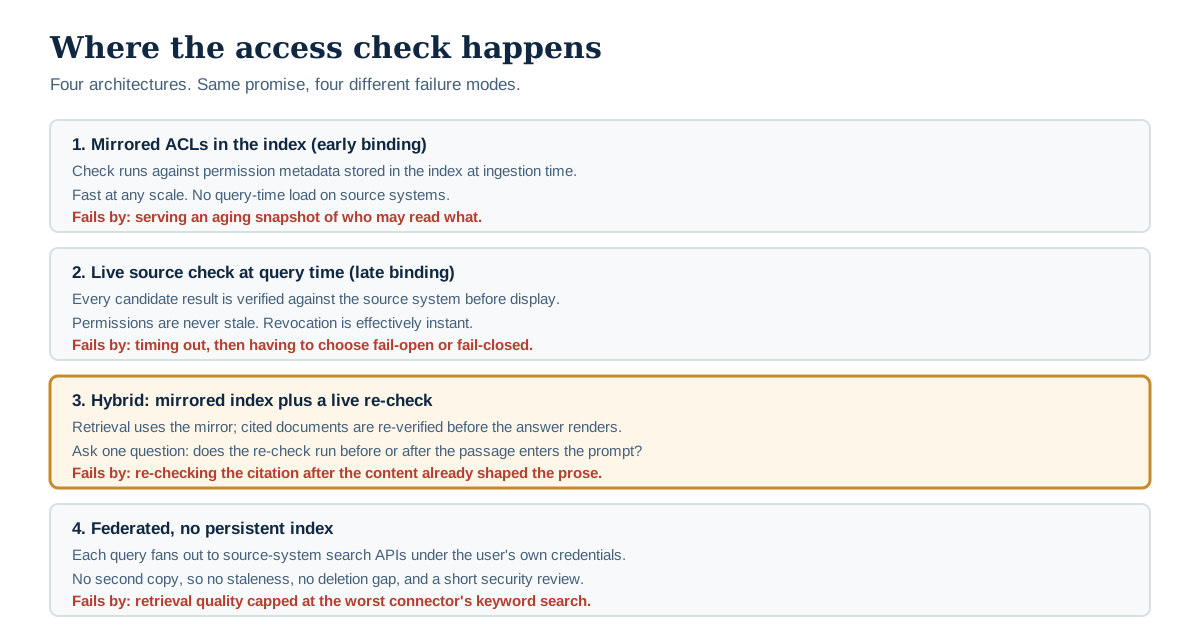
The same promise, four different failure modes. Ask which one you are buying.
There are four ways a workplace search product can decide what you are allowed to see. Every product on the market is one of these or a hybrid of two. Ask which one you are buying, in these words, and do not accept "we respect your existing permissions" as an answer, because all four of them do.
Architecture 1: Mirrored ACLs in the index (early binding)
How it works. The connector reads each document's access control list at ingestion and writes it into the index alongside the content. At query time, the user's identity claims are compared against the stored permission metadata and non-matching documents are excluded. This is what Azure AI Search's POSIX-like ACL and RBAC scope pattern does, passing the user's token in an x-ms-query-source-authorization header and filtering inside the search pipeline.
Best for. Large corpora, high query volume, Microsoft- or Google-centric estates where the identity provider is already the source of truth.
Pros. Fast at any scale. No load on source systems at query time. No custom permission code in your application; Microsoft's documentation specifically calls out that you avoid implementing nested group resolution and multilevel ACL traversal yourself.
Cons. The permission copy is as fresh as the last sync and no fresher. Inherited-scope changes may need an explicit refresh. Group membership changes propagate through your identity provider first and then through the connector, so the true latency is the sum of two systems you measure separately.
Verdict. The default and usually the right answer, on one condition: you have run the Revocation Clock and written the measured number into policy. Without that number this architecture is a promise, not a control.
Architecture 2: Live source check at query time (late binding)
How it works. The index is searched without permission filtering, then every candidate result is checked against the source system before it is shown or sent to the model.
Best for. Small, high-sensitivity corpora. Legal, clinical, deal rooms. Anywhere the document count is in the tens of thousands rather than the tens of millions.
Pros. Permissions are never stale, because the answer comes from the live system. Revocation is effectively instant, which makes the incident-response story straightforward.
Cons. Slow, and the slowness scales with result-set size. It generates heavy API traffic against source systems that have their own rate limits. Most importantly, it has to define a behaviour for the case where the source system does not answer in time, and "fail open" is a decision somebody makes at three in the morning under latency pressure.
Verdict. Correct for small sensitive corpora, and a trap at scale. If a vendor claims late binding across a million-document estate with sub-second latency, ask what happens on a source-system timeout and get the answer in writing.
Architecture 3: Hybrid — mirrored index plus a live re-check on citation
How it works. Retrieval uses the mirrored ACLs for speed, and then the specific documents about to be cited are re-verified against the source before the answer is rendered.
Best for. Mixed estates that need both scale and a defensible revocation story.
Pros. Most of early binding's performance with a meaningful reduction in exposure window, because the documents that actually reach the user are checked live.
Cons. This is the architecture where the citation removed and fact removed from answer timestamps in the Revocation Clock diverge most sharply. A re-check on citation does not necessarily prevent a revoked passage from having already entered the model's context and shaped the prose. Confirm whether the re-check happens before or after retrieval feeds the model.
Verdict. The best available compromise, and the one where the Revocation Clock's step 6 earns its keep. A hybrid that re-checks only at display time is marketing; a hybrid that re-checks before the passage enters the prompt is engineering.
Architecture 4: No persistent index — federated, live retrieval
How it works. Nothing is stored centrally. Each query fans out to the source systems' own search APIs, under the user's own credentials, and the model summarises whatever comes back.
Best for. Organisations that cannot accept a second copy at all: regulated data, data-residency constraints, or a corpus small enough that latency is not a problem.
Pros. No second copy means no second permission model, no index staleness, no deletion gap, and a dramatically shorter security review. The user's own token is the only authority in play.
Cons. Retrieval quality is capped by the worst source system's search API, which for most SaaS tools is keyword-only. Semantic search across the whole corpus is essentially impossible because there is no whole corpus. Latency is the sum of the slowest connector.
Verdict. Underrated, and the honest choice for a narrow high-sensitivity domain. It is not a general workplace knowledge management platform and no vendor selling one will recommend it.
Choose by the Failure You Can Live With
Every architecture above fails. The question is not which one is safe, it is which failure your organisation can absorb and evidence. Use this as the decision, not the feature matrix.
| Choose | If this is true of you |
|---|---|
| Mirrored ACLs (early binding) | You have more than roughly 500,000 documents, a single identity provider that is genuinely authoritative, and a security team willing to accept a measured, written revocation window |
| Live source check (late binding) | Your corpus is small, your data is sensitive enough that a 30-minute exposure window is a reportable event, and you can tolerate multi-second queries |
| Hybrid with pre-prompt re-check | You need scale and an incident-response story, and you can get the vendor to state in writing that the re-check happens before retrieval reaches the model |
| Federated, no index | Data residency, regulatory constraints, or a board that will not approve a second copy — and you accept keyword-grade retrieval as the price |
| None of the above yet | Your permissions are not in a state you would defend in an audit. Fix the source systems first; the search layer will faithfully reproduce whatever mess it inherits |
That last row is not a joke and it is the most common correct answer. Microsoft built an entire product feature, Restricted Content Discovery, for exactly this state: a temporary governance control, requiring a Microsoft 365 Copilot licence and SharePoint Advanced Management, that lets you hide a site from tenant-wide search and Copilot while owners review permissions. It is a holding pen for organisations that deployed before they were ready.
What the Answer Layer Leaks That a Result List Did Not
An answer engine can disclose the substance of a document without ever citing it, because synthesis is not the same operation as retrieval. This is the specific thing AI workplace search does that traditional enterprise search tools did not, and it is why old security models transfer imperfectly.
Three mechanisms, ordered by how often they actually bite.
Aggregation. Ten documents a user is entitled to see can, when summarised together, produce a fact none of them states alone. Salary bands from three approved offer letters plus a headcount plan plus an org chart is a compensation review that nobody authorised. No permission model catches this, because no individual access was violated. It is an emergent property of synthesis and the only control is scoping the corpus, not the query.
Negative disclosure. "I don't have access to that" is information. Ask an AI workplace search whether there is a document about Project Northwind and a refusal confirms Project Northwind exists. Ask a keyword search the same thing and an empty result set is genuinely ambiguous. Vendors rarely specify their refusal behaviour, and the difference between "no results found" and "you don't have permission to see the matching results" is a disclosure decision with real consequences during a redundancy round or an acquisition.
Retrieval-time injection. Content in the corpus can contain text that reads as instructions to the model. NIST's Generative AI Profile, AI 600-1, names this directly, warning that adversaries can "remotely (i.e., without a direct interface) exploit LLM-integrated applications by injecting prompts into data likely to be retrieved," and that researchers have demonstrated indirect prompt injections stealing proprietary data. A workplace search index is, by definition, data likely to be retrieved. Every document any employee can write to is an injection surface, which in most companies means every Confluence page and every Slack message.
The ConfusedPilot work is the concrete demonstration. The project page from UT Austin's Spark Research Lab describes an insider introducing a document combining corrupt data with strings that "suppress the correct documents related to the topic", and notes the finding that should stop a room: "this attack can persist after deleting content within the malicious document or the document itself." The researchers also state the problem is not Microsoft-specific, having observed it in other RAG systems built on LLAMA, Vicuna and OpenAI models.
This is the same failure class we described in our earlier analysis of why guardrails can never detect what you can forbid. A detection layer that reads content to decide whether content is dangerous is playing the attacker's game. Scoping the corpus is playing your own.
The Deletion Gap: When the Index Outlives the Document
Deleting a document from the source system does not delete it from the index, the retrieval cache, or anyone's saved answers. Treat deletion and de-indexing as two operations with two different timelines and two different owners.
Microsoft's Restricted Content Discovery documentation is explicit that the control "doesn't remove content from the Microsoft 365 search index" — it suppresses discovery while leaving the indexed copy in place, which is why Purview capabilities such as eDiscovery and auto-labeling keep working on restricted sites. That is deliberate and defensible. It is also exactly the property you must not confuse with removal.
The gap matters in four situations that come up in every organisation:
| Situation | What people assume | What actually happens |
|---|---|---|
| An employee deletes a draft they should not have written | It is gone | It remains retrievable until the next sync detects the deletion, and may persist in cached passages |
| Legal issues a preservation hold, then a release | Release means removal | Removal from source; the index needs its own instruction |
| A file is moved to a restricted site | It disappears from search | Discovery is suppressed on a delay proportional to site size |
| A data-subject erasure request under GDPR | One deletion satisfies it | Every copy in the four-copy table needs its own erasure path, and copy 4 has none |
The fourth row is the one that turns an architecture question into a legal one. If your retention schedule says a category of document is destroyed after seven years, and the search index holds chunks of that document with no independent retention policy, the schedule is not being met. Ask for the index's retention policy as a separate document from the product's data processing agreement. In our reading of published vendor documentation, most products do not publish one, and the honest answer from a vendor is usually that index retention follows source deletion on the connector's schedule — which returns you to the Revocation Clock, with a fourth row for deletion.
The Indexer Is the Most Privileged Account You Will Create
The connector that builds your index holds broader access than any human in the company, and in most deployments nobody owns it, nobody reviews it, and it never expires. This is the single most under-examined object in an AI workplace search rollout.
Look at what the permission actually is. Azure AI Search's SharePoint ACL ingestion, per Microsoft's documentation, "requires Microsoft Graph Sites.FullControl.All (to read SharePoint content and ACLs)", with User.Read.All additionally required to index list items or site pages. Full control across all sites, plus the ability to enumerate every user in the directory. There is no version of that grant that is least-privilege in any ordinary sense; it is the price of mirroring permissions accurately, and it is a fair price, but it has to be treated as what it is.
Okta's 2026 report puts the governance gap in numbers: 650% year-over-year growth in centrally managed service accounts, 58% of organisations naming AI governance and oversight as their top security concern, and only 32% securing AI agents with the same rigour they apply to human employees. An indexer is a non-human identity with a standing tenant-wide read grant. It belongs in the register with the others, with a named owner, an explicit scope, and an expiry date, which is the model we set out in our earlier analysis of owner, scope and expiry for non-human identities.
Four controls that cost nothing and are almost never applied to an indexer:
- A named human owner recorded somewhere other than the connector's config screen, so that when the connector's behaviour changes there is someone to ask.
- An expiry date on the credential, with a renewal that requires the owner to re-justify the scope. Standing grants that never expire are how a pilot becomes permanent infrastructure without a decision.
- Separate credentials per connector, so that revoking the Confluence connector does not mean revoking search entirely, and so that a compromised connector has a blast radius of one system.
- Alerting on indexer scope changes, because a connector upgrade that quietly widens the grant is indistinguishable from an attack, and vendors do change scopes between versions.
The consent-screen discipline here is the same one we set out for individual assistant apps in the grant ladder, applied to a service principal instead of a person. The difference is scale: one employee's assistant inherits one employee's access, while the indexer inherits everyone's.
Fourteen Questions to Put to a Vendor Before the Security Review
These are the questions that separate a product with a real permission model from one with a permission slide. Send them before the demo, not after, and expect the answers in writing. A vendor who answers all fourteen precisely has already done the work; a vendor who answers with "enterprise-grade security" has told you something too.
On the permission mirror
- Which of the four architectures above is this product, in those words?
- What is your measured p50 and p99 latency from a group membership change in our identity provider to that change taking effect in search results?
- Does an inherited permission change at a site, folder or space level propagate automatically, or does it require an explicit re-index?
- What happens if the connector cannot reach the source system during a sync: does the index keep serving the last known permissions, or does it fail closed?
On the index itself
- Where does the index live, in which region, and is it single-tenant or shared?
- What is the retention policy for indexed chunks and embeddings, stated separately from the retention policy for source documents?
- Is there a retrieval cache, what is its TTL, and are cached passages permission-checked on read?
- What is the process and the SLA for removing a specific document from the index on demand?
On the answer layer
- Is the permission check applied before or after retrieved passages enter the model's context?
- What does the product return when a user's query matches only documents they cannot see: an empty result, or an explicit refusal?
- What defences exist against instructions embedded in indexed content, and have they been tested by anyone outside your company?
On the operational reality
- Who is the owner of the connector's service identity, what scopes does it hold, and does the credential expire?
- What is logged for every query, who can read those logs, and for how long are they kept?
- When an employee is offboarded, what is the sequence that stops their queries, their sessions, and any agent acting on their behalf, and how long does it take end to end?
Question 9 is the one that most often produces a pause. It is the difference between a product that filters what it shows you and a product that filters what it reads.
What AI Workplace Search Costs Beyond the Per-Seat Price
The licence is the visible cost and rarely the largest one. The permissions remediation that has to happen before deployment is usually a bigger line item than the first year of seats, and it is almost never in the business case.
Published per-seat pricing gives an anchor for the visible half. As fetched on 30 July 2026, Microsoft's own pricing page lists Microsoft 365 Copilot Business as an add-on at $18.00 per user per month paid yearly under promotional pricing, or $25.20 per user per month billed monthly, with bundled plans at $23.50 (Business Standard with Copilot) and $32.00 (Business Premium with Copilot) per user per month paid yearly. Most dedicated AI workplace search vendors do not publish list pricing at all and quote per seat with an annual floor, which is a fact worth stating plainly rather than filling with an invented range.
The costs that do not appear on the quote:
| Cost | Why it appears | How to size it |
|---|---|---|
| Permissions remediation | The search layer surfaces every oversharing decision made in the last decade | Count sites with "everyone" or "all company" access before you start; that count is the project |
| Connector maintenance | Source APIs change; propagation behaviour changes with them | Assume a re-run of the Revocation Clock per connector per major version |
| Identity hygiene | Nested groups, stale memberships and orphaned accounts all become search-visible | Deprovisioning backlog, measured in accounts, not in tickets |
| Query log storage and review | Every query is a record of what an employee was looking for | Volume times retention, plus whoever has to answer requests for it |
| Content curation | Duplicate and contradictory documents produce confidently wrong answers | Owner time per knowledge domain, ongoing |
| Verification time | Somebody has to check the answers | See below |
That last row has a number attached now, from the vendor side of the market. Glean's Work AI Index 2026 reports that 87% of digital workers use AI at work and say it saves them 11 hours a week, while only 13% say their organisation is performing significantly better because of it — and that workers spend 6.4 hours a week "botsitting", with 69% admitting to shipping work they have not verified or do not fully understand. Read that as a vendor's own survey, with the incentives that implies. Read it also as the clearest published statement that individual time savings from this category are not currently converting into organisational performance, which is the number your CFO will eventually ask about.
The pattern is the same one we found looking at enterprise AI implementation cost beyond the license: the licence is the part you can forecast, and the part you cannot forecast is bigger.
When Plain Search, or No Workplace Search, Still Wins
For a lot of organisations the honest recommendation is not to buy this category at all yet, and there are three specific situations where the incumbent genuinely wins.
When the corpus is small and the permission model is clean. Under roughly 50,000 documents in two or three systems, native search plus a well-maintained wiki index page solves the actual problem for the cost of somebody's Friday afternoons. The failure mode of AI workplace search at this scale is not exposure, it is disappointment: a confident synthesis over a thin corpus is worse than a short list of the six documents that exist.
When the permissions are known to be wrong. If a permissions review would take six months, the search layer will spend those six months making the errors easy to find. Restricted Content Discovery exists precisely because Microsoft's customers hit this, and its own documentation cautions that "excessive use can reduce the amount of content available to organization-wide search", which is another way of saying that a heavily restricted deployment is not a deployment.
When the questions are procedural rather than exploratory. "What is the expenses policy?" does not need semantic search. It needs one canonical document that somebody owns. A large fraction of workplace search queries in most organisations are attempts to route around a knowledge base that nobody has maintained, and buying an answer engine to compensate is expensive avoidance. Workplace knowledge management is the cheaper fix and the unglamorous one. Govern the corpus first; we set out how in our earlier analysis of knowledge management governance in the retrieval era.
The situations where AI workplace search clearly earns its cost are the mirror image: a genuinely large corpus, spread across five or more systems, where the questions are exploratory, where the permission model is defensible today, and where somebody owns the answer quality after launch. If three of those five are true, proceed. If fewer, the honest sequencing is permissions, then curation, then search.
Common Mistakes That Sink a Rollout
These are the failures that recur, drawn from vendor documentation about what customers get wrong and from what practitioners report publicly.
Piloting on the cleanest corpus you have. The engineering wiki is well-permissioned, well-maintained and unrepresentative. It will produce a pilot that succeeds and a rollout that fails. Pilot on one messy shared drive and one clean system, so that the difference between them is visible in the results.
Measuring the pilot on answer quality alone. Answer quality is the easiest thing to measure and the least likely to be the reason the project is cancelled. Measure revocation latency, false-positive exposure and query-log volume in the same pilot.
Treating group membership as instantaneous. The path from an HR system to the identity provider to the connector to the index has three hops, each with its own schedule. Measure end to end; measuring any single hop produces a number that is true and useless.
Assuming the vendor's SOC 2 report covers the permission mirror. A SOC 2 Type II attests to controls the vendor selected. It does not certify that ACL propagation meets your revocation policy. Ask which specific control in the report covers permission synchronisation and read that control's description.
Forgetting that the query log is a new sensitive dataset. What people search for is often more sensitive than what they find. Somebody searching for the redundancy policy, the harassment reporting process, or a competitor's name has disclosed something. Decide who can read the query log before the first query, not after the first request for it. In several European jurisdictions a log of employee activity at this granularity also triggers works-council consultation before deployment rather than after, so check that with counsel while the contract is still in draft.
Letting each department buy its own. Three departments with three workplace search tools is three indexes, three connector identities, three retention policies and three permission mirrors going stale independently. This is the same control-plane sprawl we described in counting the control planes, and it is far cheaper to prevent than to consolidate.
Skipping the deletion test because the revocation test passed. They exercise different code paths. A product can be excellent at propagating a permission change and poor at propagating a deletion, because deletion detection often depends on a full crawl rather than an incremental one.
Where This Is Still Uncertain
Several things in this article are the best available reading rather than settled fact, and it is worth being explicit about which.
We have not run the Revocation Clock ourselves across products. The diagnostic is constructed from the propagation mechanisms vendors document, not from our own measurements across a vendor set. If you run it, your numbers are better evidence than anything here, and we would rather you trusted them than us.
Vendor documentation is a floor, not a ceiling. The disclosures quoted above are the behaviours vendors chose to document. Products often perform better than their documentation promises, and preview features change quickly; the Azure AI Search behaviour cited here is explicitly a preview API surface, and preview semantics change without a version bump in the way a general-availability contract would not.
Several sources a reader would expect are not reachable. Gartner's and APQC's research on knowledge-worker search time is widely quoted in this category and sits behind access controls or bot protection we could not get through, so it is excluded rather than cited second-hand. Reddit threads, where much of the practitioner discussion in this area happens, are likewise unreachable from our tooling, so every practitioner voice in this piece comes from Hacker News, which skews technical relative to the ops and knowledge-management audience that actually buys workplace search. Treat the practitioner colour accordingly.
The aggregation problem has no good answer yet. We have described it honestly and offered corpus scoping as the mitigation, but corpus scoping trades away exactly the cross-tool synthesis that makes the category valuable. Anyone claiming to have solved aggregation risk in a product is describing a research problem as a feature.
The economics are unsettled. The Glean survey finding that individual time savings are not converting into organisational performance is one vendor's survey at one moment. It may be a measurement artefact, an adoption-curve effect, or real. It is too early to treat as a durable finding, and we cite it as a question worth carrying into your business case rather than as a verdict.
Nothing here is legal advice. GDPR erasure and retention obligations as they apply to derived artefacts like embeddings are genuinely contested, and the position varies by jurisdiction and by regulator. Ask your own counsel about copy 2 and copy 3 specifically, because they are the ones most likely to be missed.
Where LeapForce Fits
LeapForce does not sell an AI workplace search product, and if you are shopping for one, the four architectures above are the decision, not us. What we build is the layer underneath it: one controlled place where every AI tool, connector, model and agent is identified, scoped, logged and costed. In practice that means the connector identity behind your index gets an owner, a scope and an expiry like any other non-human identity; the connectors themselves come from a registry IT vets once, with action-level scoping so that read, draft and send are separately grantable; and every call is attributed, so that "who asked what, and what did the system reach for" is a query rather than an investigation. Our rollout model on the AI Gateway is observe first, enforce second, optimize third — point one team's traffic at the gateway in observe mode, learn what is actually in use, and only then write rules. Applied to workplace search, observing first means running the Revocation Clock before you enforce a policy you cannot yet measure. Leapforce is in active development, and the site labels per-capability build status openly rather than presenting everything as shipped; check the status on the capability you actually need before you plan around it.
Frequently asked questions
Not quite. Enterprise search returns a ranked list of documents you are permitted to open. AI workplace search retrieves passages from those documents and composes an answer over them, which means content reaches the user without the user opening a file. The permission model can be identical and the exposure is not, because a stale access control list in a traditional result list shows a title the user cannot open, while the same stale list in an answer engine shows the contents summarised. Most modern enterprise search tools have added an answer layer, so the categories have effectively merged in the market even though the risk profiles have not.
The difference is what the model can read, not how well it reasons. A general assistant answers from its training data and whatever you paste into it; AI workplace search answers from your company's live systems through connectors that carry permission metadata. That makes it more useful for internal questions and gives it a governance surface a general chatbot does not have: an index, a connector identity, a retention policy and a revocation path. It also means the failure modes are different. A general chatbot's worst failure is confident invention. A workplace search engine's worst failure is confident, accurate disclosure of something the reader should not have seen.
Almost always yes, in the form of text chunks and vector embeddings, and often a retrieval cache on top. Federated architectures that query source systems live at every request are the exception and they trade retrieval quality for it. Ask specifically where the index lives, whether it is single-tenant, and what its retention policy is as a document separate from the data processing agreement. Embeddings are derived data and many organisations discover late that their retention schedule does not cover them.
Nobody publishes a service-level objective for this, which is why you should measure it. Microsoft's Azure AI Search documentation states plainly that "a timing lag occurs" before permission changes are recognised, and that changes are reflected only after metadata is synchronised to the index. For a related tenant-wide control, Microsoft's Restricted Content Discovery documentation says an update on a site with more than 500,000 items "could take more than a week to fully process". Glean's indexing API documentation says permissions are processed asynchronously with a possible delay. Run the Revocation Clock described above and get your own number.
Two things must happen and only one is automatic. Their directory account is disabled, which stops new queries once sessions expire. The documents they created remain indexed, and any content shared with them individually rather than through a group may keep an orphaned permission entry until the next sync reconciles it. Test this explicitly: disable a test account and time how long it takes for that user's sessions, and any agent acting on their behalf, to stop retrieving. Offboarding an agent an employee created is a separate question again, and it is the one most organisations have not answered.
Yes, through three mechanisms. Aggregation, where several documents you may legitimately see combine into a fact none of them states. Negative disclosure, where a refusal confirms that something exists. And retrieval-time injection, where content in the corpus contains text that reads as instructions to the model. NIST's Generative AI Profile warns explicitly about adversaries "injecting prompts into data likely to be retrieved", and the ConfusedPilot research from UT Austin demonstrated an attack that, in the researchers' words, "can persist after deleting content within the malicious document or the document itself."
This is a policy decision most organisations make by accident. Query logs record what people were looking for, which is frequently more sensitive than what they found — searches for the redundancy policy, a harassment procedure, or an acquisition codename are disclosures in themselves. Decide before launch who can read the logs, under what process, and for how long they are retained, and put the answer in the employee-facing announcement. The alternative is discovering the policy during the first HR request for it.
Accuracy claims in this category are almost never measured, and across the vendor pages ranking for this term we could not find one publishing a benchmark against a customer corpus. Build your own: assemble 50 questions your organisation actually asks, with answers a human expert has verified, and score the product on them before and after go-live. Include five questions whose correct answer is "there is no policy on this", because confident invention on absent content is the most common quality failure and it is invisible in a demo where every question has an answer.
If a permissions review would take you more than a quarter, then yes, and the search deployment should wait behind it. AI workplace search does not create oversharing; it converts existing oversharing into something any employee can find in plain English in one query. Microsoft's own Copilot deployment blueprint puts "remediate oversharing" as the first of three pillars, ahead of guardrails and regulatory work, which is a fair statement of the sequencing. A practical starting point is to count the sites and shared drives with organisation-wide access, because that count is the size of the project.
Bundled options anchor the low end. As fetched on 30 July 2026, Microsoft lists Microsoft 365 Copilot Business at $18.00 per user per month paid yearly under promotional pricing, or $25.20 billed monthly, with Business Standard and Business Premium bundles at $23.50 and $32.00 per user per month paid yearly. Most dedicated workplace search vendors do not publish list prices and quote per seat with an annual minimum, so treat any specific figure you see quoted for them as unverified. The larger and less predictable cost is permissions remediation, connector maintenance and content curation, none of which appear on the quote.
Both, depending on whether you can evidence the controls. It helps because a single governed retrieval layer produces logs that scattered personal AI accounts do not, and evidence is what these frameworks ask for. It hurts if you cannot state your revocation latency, cannot produce an index retention policy, or cannot say who owns the connector identity, because those are precisely the questions an assessor asks about an automated system processing personal data. The determining factor is documentation, not architecture: a mirrored-ACL deployment with a measured and written revocation window evidences better than a federated one nobody has characterised.
Pick two corpora deliberately, one clean and one messy, and run both. Score answer quality on 50 expert-verified questions. Run the Revocation Clock on all four rows of its table. Count how many documents surface in results that the pilot group is surprised to see, and treat that count as the headline finding rather than a footnote. Measure query-log volume so you can size the retention decision. Six weeks is usually enough, and a pilot that only reports on answer quality has answered the easy question and left the expensive one open.
Ready to Govern Your AI?
Talk to LeapForce — one controlled layer for every AI tool, connector, model, and agent.
Comments