
"Automation software" is one phrase covering four different products, and the one you need is decided by where the work happens: screen-layer automation drives applications the way a person would, API-layer automation calls services directly, record-layer automation owns the case file and routes it, and intent-layer automation picks its own path at run time. Pick the layer first. The vendor shortlist falls out of it.
Our position is narrower than the usual category advice, and it is the thing that makes this article worth your time: the layer you pick determines what the automation logs in as, and what it logs in as determines almost everything that goes wrong afterwards. Screen-layer tools borrow a human's session. API-layer tools hold a token that belongs to whoever clicked "connect". Record-layer tools run under a service account nobody has recertified since it was created. That single fact predicts the failure mode, the audit gap, and the cost of the day the builder resigns better than any feature comparison does. A practitioner put the ordinary version of this on Hacker News in April 2026, in a thread about long-lived keys: service accounts arrive as "a password which gets shared around via 1password", not as an identity with an owner and a permission list. Everything below is built around that gap.
The short answer: Choose automation software by the layer it acts at (screen, API, record, or intent), because the layer fixes the credential, and the credential fixes your failure mode, your audit trail, and your offboarding cost.
Last updated: July 30, 2026.
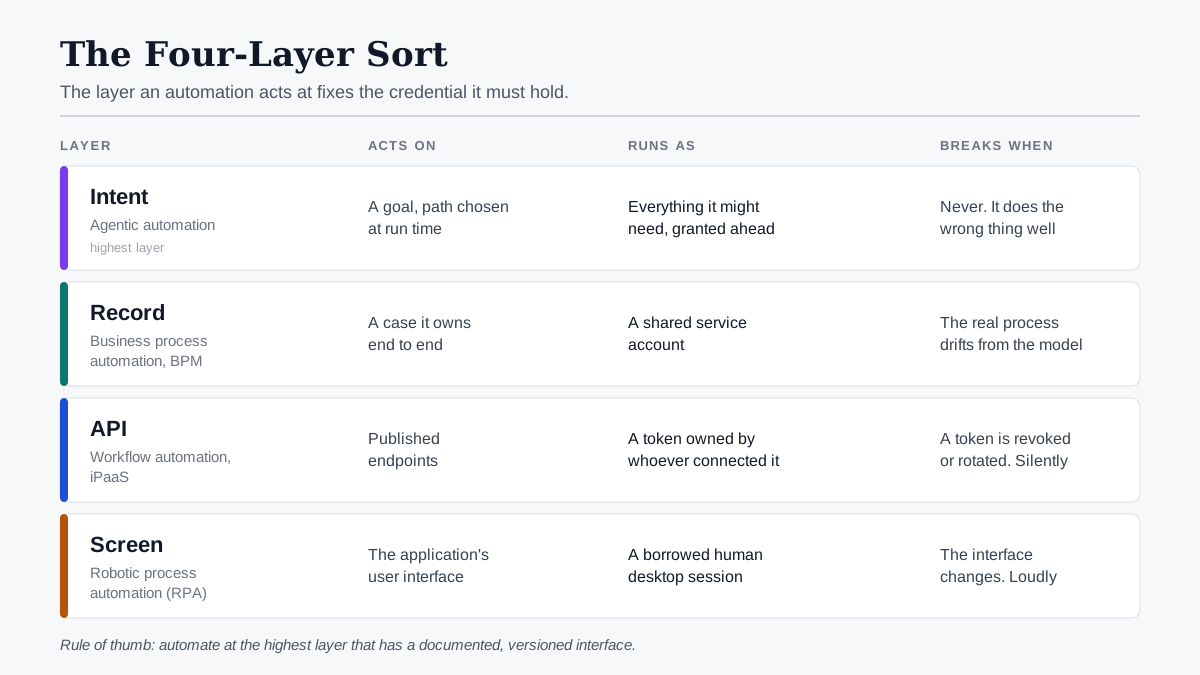
The Four-Layer Sort: the layer an automation acts at determines the credential it holds, and the credential determines how it fails.
We should say plainly what this piece is and is not. Nobody on our side ran seven platforms against an identical scenario and timed them. Where we quote a price, we fetched the vendor's own page on 30 July 2026 and say so; where a price is quote-gated, we say that instead of estimating. The analysis here is a reading of vendor documentation, published security research, and the mechanics of how each product authenticates — not a bench test.
What Automation Software Actually Is
Automation software is any tool that executes a defined sequence of business steps without a person performing each one: reading a trigger, moving data between systems, applying rules, and recording the result. The category covers desktop robots that click through screens, cloud services that call APIs on a schedule, process engines that own a case record, and newer agentic tools that decide their own next step.
That definition is broad because the market is. What matters for a buyer is that the four things it covers are not variations on a theme. They evolved from different problems, they are sold by different vendors with different pricing shapes, and — the point of this article — they authenticate in different ways. A tool that types into a screen must have a session on that screen. A tool that calls an API must hold a token for that API. A process engine must be the system of record for the case it is routing. An agent that chooses its own path must hold whatever it might need before it knows what it needs.
Three things get called automation software that are not:
- A scheduler. Cron, Windows Task Scheduler and their managed equivalents start things. They do not model a process, hold state, or recover a half-finished run.
- An integration library. An SDK that talks to Salesforce is a component. Automation software is the part that decides when to call it, what to do when it fails, and who is allowed to trigger it.
- A chatbot. A conversational front end that answers questions has no write access and no run history. The moment it can change a record, it stops being a chatbot and becomes intent-layer automation, which is a different purchase with a different risk profile.
The Four-Layer Sort
The Four-Layer Sort is the diagnostic this article is built on: before you look at a single vendor, decide which of four layers your process actually needs to be automated at. Each layer is defined by what the automation touches, and each touch point implies a credential.
| Layer | What it acts on | Classic name | What it must hold to work |
|---|---|---|---|
| Screen | The application's user interface | Robotic process automation (RPA) | A logged-in desktop session on a machine |
| API | A service's published endpoints | Workflow automation, iPaaS | An OAuth token or API key per connected app |
| Record | A case or process instance it owns | Business process automation, BPM | A service account with rights across the systems it routes to |
| Intent | A goal, with the path chosen at run time | Agentic automation | The union of everything it might need, in advance |
The sort is useful because it is decidable in minutes and it is stable. Vendors reposition constantly; the layer a product acts at rarely changes. Microsoft sells cloud flows and desktop flows in one product, but the two are different layers with different licences and different failure modes, and its own documentation keeps them separate for exactly that reason.
One objection to the sort deserves answering before it is used. APIs are not permanently stable either. Vendors deprecate endpoints, change authentication schemes and retire versions, and an API-layer workflow can break just as hard as a screen robot. The difference is notice and diagnosis: API changes usually arrive with a deprecation window and a version number, and a failed call returns an error you can read, whereas an interface change arrives without warning and produces a robot that clicked the wrong thing. Stability here means documented and versioned, not unchanging.
With that qualification, there is one rule of thumb worth carrying: automate at the highest layer that has a stable interface. If the system has a documented API, use the API layer. Drop to the screen layer only when there is no API and no realistic prospect of one. Climb to the record layer when the process, not the data movement, is the thing you are managing. Reach the intent layer only when the path genuinely cannot be enumerated in advance, which is rarer than the current marketing suggests.
Why the Layer Decides the Credential
Every automation acts as somebody. That is not a philosophical framing; it is a line in a log file. The layer you chose determines whose name appears on that line, and vendor documentation states it plainly enough that you can verify it before you buy.
Take the screen layer. Microsoft's own licensing documentation for Power Automate describes unattended desktop automation like this: when an unattended run is triggered, the unattended bot "securely signs into the machine on user's behalf", runs the desktop flow actions, then signs out. Attended runs are more direct still: the attended bot accesses the machine the person is already using. The same page notes that to trigger a desktop flow from a cloud flow, "the user whose connection is being used to run the desktop flow" needs a Premium licence. The connection belongs to a person. The robot is borrowing it.
The API layer is subtler and more common. When somebody in finance connects a workflow tool to the accounting system, the resulting token is minted against their account, carries their permissions, and lives until it is revoked. Nothing in the builder's interface tells the rest of the company that a production process now depends on one employee's grant.
The record layer usually ends up on a shared service account, because a process engine needs rights in several systems at once and nobody wants to manage four separate grants. That is where the Hacker News comment above lands: the credential is real, it works, and it is a password in a shared vault rather than an identity with an owner.
This is not a fringe concern. The Cloud Security Alliance's May 2026 whitepaper on non-human identity governance reports that machine identities (service accounts, API keys, OAuth tokens, and the credentials wielded by agents) now outnumber human users by an average of 45 to 1, reaching 144 to 1 in cloud-native estates. The same research finds 51% of organisations report no clear ownership of AI identities and only 20% have a formal process to offboard and revoke API keys. Those two numbers are the automation problem stated in identity terms.
The OWASP Foundation ranks the consequences. Its Non-Human Identities Top 10 for 2025 puts improper offboarding at number one, and the entry describes precisely the automation case: the original owner departs, the identity stays active without a designated owner, and the automation keeps running under a credential nobody is accountable for. Further down the list sit NHI5 overprivileged identities, NHI7 long-lived secrets, NHI9 identity reuse, and NHI10 human use of a non-human identity. Together they are a five-item description of what a mature RPA estate looks like after three years.
And the exposure is not theoretical. Verizon's 2026 Data Breach Investigations Report found that vulnerability exploitation has overtaken credential abuse as the leading initial access vector at 31%, with credential abuse down to 13%. But credential abuse still appears somewhere in 39% of breaches when you look at the full progression rather than only the front door. Automation credentials are long-lived, broadly scoped and rarely rotated. They are exactly the kind that show up in the middle of a chain rather than at the start of one.
Here is a short talk from the European Identity and Cloud Conference that treats non-human identity as a governance problem rather than a secrets-storage problem, which is the framing this section is arguing for.

Types of Automation Software, Sorted by What They Log In As
Below are the four layers as buying categories. Each block states what the layer is best at, how it authenticates, how it fails, what it costs, and the one control that contains it. Prices were fetched from vendor pages on 30 July 2026; where a vendor does not publish one, that is recorded rather than estimated.
Screen-layer: robotic process automation
Best for: driving systems that have no API and no prospect of one: mainframe terminals, desktop ERP clients, legacy insurance and banking applications, vendor portals you do not control.
How it authenticates: through a human-shaped session. The robot needs a logged-in Windows desktop and application credentials for each system it touches. UiPath handles this with credential assets in Orchestrator, which its documentation describes as containing "usernames and passwords that the Robot requires to execute particular processes, such as login details for SAP or SalesForce". The values are encrypted with AES-256 and can be hidden from the developers who build the process. That is a genuinely good control, and one that makes the underlying point rather than refuting it. The robot is holding a person-shaped credential; the platform's job is to keep the person from seeing it.
How it fails: the interface moves. A relabelled button, a new consent dialog, a browser update that shifts the DOM, an A/B test on a vendor portal. Any of these can stop a screen-layer robot that has no way to know what it is looking at. The fragility is inherent to the layer, and vendors are candid about it when asked directly. On the 2020 Launch HN thread for the RPA vendor ElectroNeek, the poster (u/Digitaltzar) answered a question about breakage by calling it "a fundamental challenge of GUI-level automation" with no silver bullet for eliminating bot maintenance. Six years and a great deal of AI marketing later, the layer's constraint has not changed: you are automating a surface designed for eyes.
A note on the evidence for that claim, because it is the article's central assertion about this layer. We could not find a primary, independently published study measuring screen-layer bot breakage rates. The figures that circulate widely ("30 to 50% of RPA projects fail", "45% of firms report weekly bot breakage") appear almost exclusively on vendor blogs selling the replacement, with no traceable methodology, so we are not quoting them. What we can show is the mechanism: the layer works by locating elements in a rendered interface, and vendors themselves describe eliminating maintenance as unsolved. Treat the brittleness claim as well-supported mechanically and unquantified empirically.
Second failure mode, less discussed: attribution collapse. When the robot signs in as a service identity that three processes share, the target system's audit log records the service identity. Reconstructing which process, run and requester caused a given change requires correlating the target system's log with the orchestrator's log — and only if both retain far enough back.
Real cost: Microsoft publishes list prices, which makes it the usable reference point. As of 30 July 2026 its Power Automate pricing page shows Power Automate Premium at $15.00 per user per month paid yearly, Power Automate Process at $150.00 per bot per month, and Power Automate Hosted Process at $215.00 per bot per month. The structure matters more than the numbers: a Premium user licence includes one attended bot; unattended running requires a Process or Hosted Process capacity licence per concurrent bot. UiPath's pricing page lists a Basic tier "starting at $25 per month" and puts Standard and Enterprise behind Contact Sales, with unattended robots as a separately purchased line item.
The control that contains it: a dedicated, non-shared machine account per process, with the target-system rights scoped to the screens that process touches, plus a run ledger that ties every orchestrator run to a requester. Everything else is hygiene.
API-layer: workflow automation software and iPaaS
Best for: moving data and triggering actions between systems that publish APIs: CRM to billing, form to ticket, ticket to Slack, storage to warehouse. This is the bulk of what most organisations mean when they say workflow automation.
How it authenticates: per-connection OAuth tokens or API keys, minted by whoever set up the connection. This is the layer's great convenience and its structural weakness. Setup takes ninety seconds and no ticket, which is why it spreads; the token inherits a person's permissions, which is why it becomes a governance problem at about the fiftieth workflow.
How it fails: quietly. A revoked token, a rotated key, an expired grant, a rate limit. The workflow stops and, unless someone built alerting, the first signal is a downstream human noticing that records stopped arriving. Silent stoppage is the API layer's characteristic failure, and it is worse than a loud one because the gap is discovered after the fact.
Real cost, metered per unit of work rather than per seat: Zapier's pricing page, fetched 30 July 2026, shows a Free plan with 100 tasks per month, a Professional plan starting at $19.99 per month billed annually, and a Team plan starting at $69.00 per month billed annually, with Enterprise quote-only; the metered unit is the task. n8n's pricing page on the same date shows Starter at €20 per month billed annually for 2,500 executions, Pro at €50 for 10,000, Business at €667 for 40,000 with self-hosting included, Enterprise quote-only, and a free self-hostable Community Edition, metered per workflow execution "regardless of complexity". Two different meters, and the difference is not cosmetic: a task meter charges per step, so a ten-step workflow costs ten times a one-step workflow; an execution meter charges per run.
The control that contains it: connection ownership. Every production connection should be held by a shared, IT-provisioned identity rather than an individual, and the platform should be able to answer "which workflows use this connection?" before you revoke it. If it cannot, you will find out during an offboarding.
Record-layer: business process automation and BPM
Best for: processes where the case is the thing: onboarding, claims, credit applications, procurement approvals. Anything with states, SLAs, escalation paths, and humans who need a queue.
How it authenticates: typically one service account with rights across every system the process routes into, because the engine is orchestrating rather than acting on one person's behalf. This is the most defensible identity model of the four when it is done deliberately, and the worst when it is done by default. A single account with union permissions across finance, HR and CRM is a blast radius, not a design.
How it fails: through drift between the modelled process and the real one. Record-layer automation is not brittle in the RPA sense; interfaces rarely break it. It fails when the business changes the process and nobody updates the model, so the engine keeps routing cases correctly according to a policy that no longer exists. That failure is invisible for months.
Real cost: largely quote-gated. Camunda's pricing page, checked 30 July 2026, offers self-managed development free and puts self-managed production and SaaS behind "talk to sales" with no list price. Workato's pricing page publishes no list price at all. Microsoft is again the exception, because business process flows are bundled into the Power Automate licences above. Practical consequence: at this layer you cannot budget from public information, and any figure you have seen in a roundup was either estimated or supplied by a vendor. Ask for the total including environments, non-production instances, and per-connector charges.
The control that contains it: split the service account by system boundary rather than by engine. One process engine with four scoped credentials is a different risk from one process engine with one credential that can do everything.
Intent-layer: agentic automation
Best for: work where the path is genuinely not enumerable: triage across heterogeneous inputs, research and summarisation, exception handling that currently falls to a human because the rules ran out.
How it authenticates: this is the unresolved one. An agent that decides its own next step must be granted, in advance, everything it might plausibly need. That is the structural inversion of least privilege, and the identity industry has noticed: the same CSA research reports that more than 16% of organisations do not track the creation of AI-related identities at all, and that 47% of non-human identities had gone unchanged for more than a year.
How it fails: by doing something reasonable that nobody wanted. A screen robot fails visibly and stops. An agent fails plausibly and continues. It takes an action inside its granted scope that a human would not have taken, and the log shows a permitted call. Detection is therefore a different discipline from the other three layers, which is why we have argued elsewhere that approval gates on irreversible steps are the control that actually contains this layer, rather than post-hoc monitoring.
Real cost: the licence is the smaller half. Model inference is metered per token and varies with input length, so the same workflow costs different amounts on different days. Budget for the variable component separately and cap it, or you will learn the number from an invoice.
The control that contains it: a scoped, owned, expiring identity per agent, plus a human gate on every irreversible action. Our earlier analysis of owner, scope and expiry for non-human identities sets out the fields that make an agent identity auditable; the short version is that an agent without an owner is an orphan on day one, not on the day its builder resigns.
At a Glance: Four Layers, Four Failure Modes
| Screen (RPA) | API (workflow/iPaaS) | Record (BPA/BPM) | Intent (agentic) | |
|---|---|---|---|---|
| Acts as | A borrowed human session | A per-connection token | A shared service account | A pre-granted union of scopes |
| Breaks when | The interface changes | A token is revoked or rotated | The real process drifts from the model | Never — it does the wrong thing successfully |
| Failure is | Loud and immediate | Silent | Invisible for months | Plausible |
| Offboarding risk | Bot account outlives the process | Token dies with the builder's account | Nobody owns the service account | No owner recorded at creation |
| List pricing | Partly public (per bot) | Public (per task or execution) | Mostly quote-only | Licence public, inference variable |
| Audit weakness | Attribution across two logs | No central inventory of connections | Union permissions | Intent is not recorded, only actions |
| Buy it when | There is no API | There is an API | The case is the unit of work | The path cannot be enumerated |
The Borrowed-Login Audit
The Borrowed-Login Audit is five questions you can run against any automation you already own, in one sitting, with no vendor involved. It takes about forty-five minutes for a first pass over a dozen automations, and its output is a list sorted by who would be paged.
Question 1 — Whose credential does this run under? Open the automation and find the identity. Record a name. If the answer is a person's name, that is your highest-priority finding regardless of what the automation does. If the answer is a service account, go to question 2. If nobody can tell you within five minutes, that is the same finding with worse ergonomics.
Question 2 — Who owns that identity today? Not who created it. Who is accountable for it now, by name, and would be asked to approve a change to its permissions. The CSA figure of 51% reporting no clear ownership of AI identities suggests you should expect blanks here. A blank is a finding.
Question 3 — What is the widest thing it can do? Not what it does. What it could do with the rights it holds. For an API-layer workflow, list the OAuth scopes on the connection. For a screen robot, list the systems whose credentials sit in its asset store. For a process engine, list every system its service account can write to. The answer is usually two to five times wider than the automation's actual job.
Question 4 — If the person in question 1 left tomorrow, what happens? Trace it concretely. Does the automation stop? Does it keep running under a credential that survived a leaver process? Both answers are problems, and they are different problems: the first is availability, the second is the OWASP number-one risk. This question is the fastest way to make automation governance legible to a finance or HR audience, because both outcomes have obvious costs.
Question 5 — Can you reconstruct one run from six months ago? Pick a specific run. Try to produce: what triggered it, what identity it used, what it changed, what it was refused, and who could have stopped it. If reconstruction requires correlating two systems' logs by timestamp, note the retention window on both — the shorter one is your real audit horizon.
When the answer to question 2 is "nobody". This is the common case and it stalls audits, so here is the default we would use: assign ownership to the owner of the system the automation writes into, not to the person who built it. The builder moves teams; the system owner is already accountable for what happens inside that system and already has a change process. If the automation writes into three systems, that is a signal to split its credentials by system boundary, which gives you three obvious owners instead of one argument.
Reading the result. Score each automation 0–5 on questions answered cleanly. Anything at 2 or below that can write to a system of record is where you start. Anything at 4 or 5 is fine, and telling the difference is the point: the audit is a triage instrument, not a compliance exercise. Run it before you buy anything new, because it tells you whether your problem is a missing tool or a missing owner. If it is a missing owner, no new tool fixes it.
What Automation Software Actually Costs
Automation software pricing splits into three visible shapes and one invisible one. The visible shapes are per-seat, per-run, and per-bot; the invisible one is the set of line items that only appear on a quote. Below are the figures we could verify on vendor pages on 30 July 2026, with the gaps stated rather than filled.
| Vendor | Layer | Published list price | Metered unit | What is quote-only |
|---|---|---|---|---|
| Zapier | API | Free (100 tasks/mo); Professional from $19.99/mo annual; Team from $69.00/mo annual | Task (per step) | Enterprise |
| n8n | API | Community Edition free self-hosted; Starter €20/mo annual (2,500 executions); Pro €50 (10,000); Business €667 (40,000) | Workflow execution | Enterprise |
| Power Automate | Screen + API | Premium $15.00 user/mo; Process $150.00 bot/mo; Hosted Process $215.00 bot/mo, all paid yearly | User licence and bot capacity | Volume agreements |
| UiPath | Screen | Basic "starting at $25 per month" | User and robot licences | Standard, Enterprise, unattended robots |
| Camunda | Record | Self-managed development free | Not published | Self-managed production, SaaS |
| Workato | Record + API | None published | Not published | All of it |
| Make | API | Could not verify | Could not verify | Could not verify |
Two honesty notes on that table. First, Make's pricing page returned HTTP 403 to every fetch method we tried, so we have left the row empty rather than reproduce a figure from a third-party roundup; Make is a widely used API-layer tool and its absence here is a gap in our data, not a judgement on the product. Second, the quote-only cells are the article's real finding. At the record layer, three of the best-known products publish no list price at all, which means every "automation software pricing comparison" you have read either estimated those numbers or was given them by a vendor with a deal attached.
The line items that do not appear in a list price. When you do get a quote, these are the ones that move the total, and each one traces back to a layer:
| Hidden line item | Which layer | Why it appears |
|---|---|---|
| Unattended bot licences | Screen | Attended is bundled with a user seat; unattended is capacity you buy per concurrent run |
| Non-production environments | Record, Screen | Dev and test instances are frequently separate SKUs |
| Premium connector tiers | API, Record | The connector you need for the system of record is rarely in the standard tier |
| Orchestrator or control-plane fees | Screen, Record | The scheduler and credential store can be priced separately from the robots |
| Model inference | Intent | Variable, per token, and not included in any seat price |
| Log retention beyond default | All four | Audit horizon is usually 30–90 days by default; longer costs more |
A worked estimate, with its assumptions on the table. Take one invoice-processing workflow at 4,000 invoices a month, currently done by hand. At the API layer with a six-step Zapier workflow, that is roughly 24,000 tasks a month, which sits in the Professional plan's paid tiers rather than its entry price. The exact figure depends on the task tier you select, and Zapier's page prices tiers from 750 to 2,000,000 tasks. On n8n the same workflow is 4,000 executions a month regardless of step count, which fits inside the Starter plan's 2,500 only if you halve the volume, and comfortably inside Pro at €50. At the screen layer, if the accounting system has no API, one unattended Power Automate Process bot at $150 per bot per month plus a Premium seat at $15 for the person who registers the machine is $165 a month before any connector premiums. So for that one workflow: roughly €50 a month on the per-execution path, $165 a month on the unattended screen-layer path, and a Zapier figure that lands between them but depends on which task tier you select. We are deliberately not collapsing those into one headline number, because the correct comparison depends on your step count and your meter, and any article that gives you a single figure has picked your assumptions for you.
And the return side, which cost tables usually omit. The comparison that matters is not licence versus licence but licence versus displaced minutes. If that invoice workflow takes three minutes of a person's time per invoice, 4,000 invoices is 200 hours a month, and any of the options above clears the bar by an order of magnitude. If it takes twenty seconds, none of them do. Measure the manual baseline before you price the tool, because the baseline decides the answer far more often than the vendor does.
Choose This Layer If
This is the decision, stated as directly as we can make it.
Choose screen-layer RPA if the target system has no API, no supported integration, and no vendor roadmap for one, and you have accepted that you are buying a maintenance commitment, not a one-time build. Budget for rework as a standing line item, not a contingency. Do not choose it because it is faster to demo; that is the trap the layer is famous for.
Choose API-layer workflow automation if every system in the process publishes an API and the process is essentially data movement with rules. This is the default and should be. Choose the per-execution meter over the per-task meter if your workflows are long; choose per-task if they are short and numerous. Choose self-hosting if your constraint is data residency rather than cost, because the licence saving is usually eaten by the operational load.
Choose record-layer BPA or BPM if the unit of work is a case that lives for days or weeks, passes through several hands, and has an SLA attached. The tell is that people currently ask "where is that application up to?". That question is a process engine's job description. Do not buy this layer for data movement; it is heavier than the job needs.
Choose intent-layer agentic automation if you have a step that currently escalates to a human specifically because the rules ran out, and you can name the irreversible actions in that step so they can be gated. If you cannot name them, you are not ready for this layer. Our earlier analysis of AI automation platforms and unattended operation works through the control questions in more depth.
Choose more than one, deliberately. Most estates end up with two or three layers, and that is fine when it is a decision. It becomes a problem when each layer arrives with its own credential model, its own log format, and its own idea of who owns a run, which is the state most organisations actually reach.
What Changes When You Add a Model to Each Layer
Every vendor in every layer is currently adding a language model, and the marketing treats this as a single upgrade. It is not. Adding inference changes each layer's risk profile in a different direction, and the differences are predictable from the layer's credential.
Screen + model. The model reads the screen and decides which element to click, which is genuinely useful. It is the most credible answer yet to selector brittleness. But it converts a deterministic failure into a probabilistic one. The old robot broke loudly when the button moved. The new one clicks something adjacent and continues, holding a borrowed human session with whatever rights that person had. The layer's worst property, borrowed credentials, is now paired with a non-deterministic path.
API + model. The model chooses which endpoint to call or drafts the payload. Risk moves from availability to correctness: the workflow no longer stops, it sends the wrong thing to the right place. Because API-layer tokens are scoped per connection, the blast radius is at least bounded by the connection's scopes, which is an argument for keeping those scopes narrow that has nothing to do with the model.
Record + model. The model classifies the case or decides the routing. This is where regulatory exposure concentrates, because the decision is about a person or an application, and the case record is the evidence. If the routing decision affects employment, credit or access to a service, the compliance question arrives with it.
Intent + model. There is no "plus" here — the model is the layer.
The regulatory line is sharper than most coverage suggests, and it is worth reading directly. The EU AI Act defines an AI system in Article 3(1) as "a machine-based system that is designed to operate with varying levels of autonomy and that may exhibit adaptiveness after deployment, and that, for explicit or implicit objectives, infers, from the input it receives, how to generate outputs". Recital 12 draws the boundary explicitly: the definition "should ... not cover systems that are based on the rules defined solely by natural persons to automatically execute operations".
Read those two together and the practical consequence is clear. Rule-based automation software (the RPA bot, the deterministic iPaaS workflow, the classic BPM engine) sits outside the AI Act's definition of an AI system. The moment you add an inference step, that changes. Not because a vendor labelled the product differently, but because the system now infers how to generate its outputs. Organisations that have been treating "we only use rule-based automation" as a scope exclusion should re-run that assessment against the AI features their existing vendors shipped in the last upgrade cycle, which in many cases arrived switched on.
One caution, because this is the point at which people over-read a scope exclusion. Falling outside the AI Act's definition of an AI system does not put an automation outside the law. Data protection rules apply to whatever personal data it processes regardless of whether a model is involved, sector rules for finance, health and employment apply to the decision rather than the mechanism, and contractual and audit obligations do not care about the definition at all. The AI Act boundary changes which obligations are added, not whether obligations exist. This is a reading of published text, not legal advice, and a scoping decision of this kind belongs with your counsel.
The Evidence an Auditor Asks For, Per Layer
Whatever the framework — SOC 2, ISO/IEC 42001, an internal audit, a customer security questionnaire, the questions converge on five things: who authorised this, what identity ran it, what did it touch, what was refused, and can you show me a specific instance. Each layer struggles with a different one.
| Question | Screen | API | Record | Intent |
|---|---|---|---|---|
| Who authorised this automation to exist? | Orchestrator, if change control is used | Usually nobody — self-service | Process model version history | Varies wildly |
| What identity ran it? | Machine account, often shared | Connection owner | Service account | Agent identity, if one was created |
| What did it touch? | Target system logs, correlated by time | Platform run log | Case record, well captured | Tool-call log, if retained |
| What was refused? | Rarely captured | Rarely captured | Rarely captured | Rarely captured |
| Can you reconstruct one run? | Two logs, two retention windows | One log, retention-limited | Yes, this is the layer's strength | Depends entirely on the platform |
The row that fails everywhere is "what was refused". Almost no automation platform records the attempted-and-blocked action, because from the platform's point of view nothing happened. From an auditor's point of view that record is more informative than the successful ones: it demonstrates the control was live and operating, not merely configured. This is one of the reasons we build observability and audit around refusals as first-class events rather than as an error log.
The second weak row is reconstruction at the screen layer, and it is weak for a structural reason rather than a product one. When the robot signs in as a machine account, the target system honestly records the machine account. Attribution to a process and a requester lives in the orchestrator, and joining the two requires that both retained the period in question. Check both retention windows before you promise anyone a two-year audit trail.
When the Boring Incumbent Still Wins
Three situations where the honest recommendation is to change nothing.
Your RPA estate is stable and the systems behind it are being replaced anyway. If the mainframe is on a three-year decommissioning path, migrating its robots to a new layer buys you a rebuild that gets thrown away. Freeze the estate, fix the credential model, and let the replacement carry the automation.
Your process is deterministic and small. A dozen well-understood workflows on a per-task plan, owned by someone who is still at the company, with alerting on failure, do not need a platform migration. Fix the ownership question and move on. Most "we need a better automation platform" conversations are actually "nobody owns these twelve workflows" conversations, and the second problem does not respond to procurement.
The system of record is genuinely closed. If your core application has no API, no supported integration and a vendor with no incentive to build one, the screen layer is not a compromise. It is the only layer that works. In that case the right move is not to escape RPA but to run it properly: dedicated machine accounts, scoped target rights, change control on the process definition, and a rebuild budget that assumes interface churn.
There is also a fourth case worth stating because vendors will not: sometimes the automation should not exist. If a process runs eleven times a month and takes four minutes, an automation with a credential, an owner, a licence and a maintenance tail is a worse deal than the four minutes. The threshold is not volume alone; it is volume times the cost of getting it wrong.
Six Buying Mistakes That Trace Back to the Login
- Buying the demo's layer. Screen-layer tools demo beautifully because they show a robot doing a visible thing. API-layer tools demo poorly because a successful integration looks like nothing happening. Demo quality is inversely correlated with maintenance cost here.
- Letting the builder own the connection. The person who sets up the connection should not be the person the token belongs to. Fixing this after fifty workflows is a project; doing it at workflow one is a checkbox.
- Comparing per-task and per-execution prices as if they were the same meter. A six-step workflow costs six tasks and one execution. Any comparison that ignores step count is arithmetic theatre.
- Treating attended and unattended as a preference. They are different licences with different costs and, more importantly, different identity models. Attended borrows a person who is present. Unattended borrows a person who is not.
- Assuming "rule-based" is a permanent regulatory exclusion. It is true today and it stops being true the moment a vendor upgrade adds an inference step to your flow. Re-check after every major version.
- Skipping the refusal log. Buyers evaluate what a platform records when things work. The differentiating question is what it records when a policy blocks something, and it is worth asking in the first vendor call because the answer is short and revealing.
Where LeapForce Fits, and Where It Does Not
LeapForce does not sell automation software. We do not compete with the four layers above; we are the control layer underneath whichever ones you already run: one governed place where every AI tool, connector, model and agent is identified, scoped, checked, and recorded. That is the whole of the product claim, and it is the only paragraph in this article making one.
Concretely, the parts that map to this article: Access and Identity treats non-human identities as first-class, so an automation gets an owner, a scope and an expiry rather than a shared password, and offboarding is one revocation instead of a search. Observability and Audit records what was refused alongside what ran, which is the row that fails in every column of the audit table above. The AI Gateway sits in front of model calls so the inference step you just added to a rule-based workflow is subject to policy before egress rather than after the fact, and we ship it against a deliberately unglamorous rollout model: Observe first. Enforce second. Optimize third. Point one team's traffic at the gateway in observe mode, learn what is actually in use, and only then write rules. We also publish per-capability build status honestly on the site, because some of what belongs in this picture is live and some is still in development, and telling you which is which is more useful than a feature grid.
Where This Analysis Is Uncertain
Several things in this article are weaker than the confident register might suggest, and it is better to name them.
We did not test these products. No one on our side ran an identical scenario across the platforms named here and recorded where each one stumbled. The layer analysis comes from vendor documentation, published research, and how each product authenticates. That is verifiable, but it is not a bench test, and a bench test would tell you things this cannot.
The pricing is a snapshot with a hole in it. Every figure was fetched on 30 July 2026 and vendor pricing moves. Make's page was unreachable to us. Three of the record-layer vendors publish nothing. Treat the table as a shape, not a quote.
The four-layer sort is a simplification and some products straddle it. Power Automate spans screen and API in one licence family. Several iPaaS vendors have added case-management features that push them toward the record layer. Agentic features are being retrofitted everywhere. The sort still works as a buying instrument because you can ask "which layer does this workflow need?" even when the product answers "all of them". But a taxonomy that clean is always doing some violence to the market.
The identity research is survey-based. The CSA figures come from self-reported organisational surveys, which are directionally useful and precisely unreliable. The 45-to-1 ratio in particular depends heavily on how an organisation counts identities, and cloud-native estates that count every ephemeral workload identity will produce very different numbers from those that do not.
We do not know how the intent layer settles. The identity model for agents is genuinely unresolved across the industry: competing proposals, no standard, and vendors shipping ahead of consensus. Anything written today about how agent credentials should work, including what we have written, should be expected to age within a year.
Frequently asked questions
Automation software executes a defined sequence of business steps without a person doing each one: it watches for a trigger, moves data between systems, applies rules, and records what happened. In practice the term covers four different products: desktop robots that drive application screens, cloud services that call APIs, process engines that own a case file, and agentic tools that choose their own path. They share a category name and very little else.
Sorted by what they act on rather than how they are marketed, there are four types of automation software. Screen-layer tools (robotic process automation) drive user interfaces. API-layer tools (workflow automation and iPaaS) call published endpoints. Record-layer tools (business process automation and BPM) own the case record and route it. Intent-layer tools (agentic automation) decide the path at run time. Each type authenticates differently, which is why each one fails differently.
No, and the difference is not a matter of degree. Robotic process automation drives an application's interface as a user would, so it needs a logged-in session and it breaks when the interface changes. Business process automation owns the process itself (states, queues, SLAs, escalation) and typically runs under a service account with rights across several systems. RPA is a way to reach a system that has no API; BPA is a way to manage a case that passes through many hands.
It depends on the layer and the meter, and a large part of the market does not publish a price. Verified on 30 July 2026: Zapier lists a free tier at 100 tasks per month with Professional from $19.99 per month billed annually; n8n lists Starter at €20 per month for 2,500 executions and a free self-hosted Community Edition; Power Automate lists Premium at $15 per user per month and Process at $150 per bot per month. Camunda and Workato publish no list price. Budget separately for unattended bot capacity, premium connectors, non-production environments and log retention, none of which appear in a headline price.
For building, often not — API-layer and record-layer tools are genuinely usable by an operations analyst. For running it in production, you need someone accountable for four things that are not building: who owns each connection, what happens when a token is revoked, who is paged when a run fails silently, and how a run from six months ago gets reconstructed. That role is not necessarily a developer, but it has to be somebody, and its absence is the most common reason automation programmes stall after the first dozen workflows.
Its own — a dedicated, named, non-human identity with a recorded human owner, a scope limited to the systems that specific process touches, and an expiry date that forces recertification. It should never run under an employee's personal account, and a shared service account used by several processes should be split by system boundary. The OWASP Non-Human Identities Top 10 ranks improper offboarding as the number-one risk in this category, and orphaned automation credentials are the textbook case.
Run question 4 of the Borrowed-Login Audit against every production automation: if this person left tomorrow, does it stop, or does it keep running under a credential that survived the leaver process? Both outcomes are defects. Fix them by moving every production connection off individual accounts and onto owned service identities before the offboarding, and by making "which automations use this identity?" a question your platform can answer in one query. If it cannot, that is the gap to close first.
For a small business with modern SaaS systems, an API-layer tool is almost always the right answer, and the meter matters more than the brand: pick per-execution pricing if your workflows have many steps, per-task pricing if they are short. Self-hosting an open-source option saves licence cost and spends operational time, which is usually the wrong trade at small scale. Avoid the screen layer unless a critical system genuinely has no API, and avoid the record layer unless you are managing cases rather than moving data.
Rule-based automation generally falls outside the Act's definition. Article 3(1) defines an AI system as one that infers how to generate its outputs, and Recital 12 states the definition should not cover systems based on rules defined solely by natural persons to automatically execute operations. That exclusion ends when you add an inference step: a model that classifies a document, decides a route, or reads a screen. Because vendors are adding those features into existing products, the practical advice is to re-run the scoping assessment after each major upgrade rather than treating "we only use rule-based automation" as a settled answer.
Building a first workflow at the API layer is usually days. Getting it to production reliably is limited by four decisions that have nothing to do with the tool: which identity it runs under, who owns that identity, what it is allowed to touch, and who is alerted when it fails. Organisations that settle those four before building tend to ship in weeks; organisations that build first tend to spend the same time afterwards, with a live workflow generating pressure. The layer matters too. Screen-layer automation adds machine provisioning and a rebuild budget that the other layers do not carry.
Yes, at a cost that depends on what the legacy system exposes. If it has an API, even an old SOAP one, the API layer reaches it, sometimes through a custom connector. If it has no API but a usable interface, screen-layer RPA reaches it, and you are accepting an ongoing maintenance commitment proportional to how often that interface changes. If it has neither, the honest options are a database-level integration with the vendor's blessing, or accepting that the step stays manual. Beware the middle path of screen automation used as a substitute for an API: it works, and it adds a fragile asynchronous layer on top of a system that was already hard to change.
Measure four things per automation and review quarterly: runs completed, runs failed, minutes of human work displaced, and the fully loaded cost including licence, connector premiums and any inference spend. The number that surprises people is not cost but usage. A meaningful share of automations in a mature estate are running against processes that changed or stopped, and nobody noticed because they never failed. An automation that succeeds at doing something nobody needs is the most expensive kind, because it looks healthy on every dashboard.
Ready to Govern Your AI?
Talk to LeapForce — one controlled layer for every AI tool, connector, model, and agent.
Comments