
Clay pricing in 2026 is two meters, not one. Free is $0. Launch starts at $185/month billed monthly or $167/month billed annually. Growth starts at $495/month monthly or $446/month annually. Enterprise is quoted. Each of those figures is the sum of an Actions price and a Data Credits price you select separately.
Our position is that none of those numbers is the price you should negotiate on. Clay does not charge you for a lookup that finds nothing — its pricing page states plainly that "if an enrichment returns no result, you're not charged Data Credits or Actions." What it charges for is a lookup that returns something, and what you actually need is a record a rep can act on. Between "returned" and "usable" sit your match rate and your bounce rate, and Clay publishes neither, guarantees neither, and controls neither. That gap is where your real unit cost lives. It is the same gap one practitioner named on Hacker News when explaining why teams tolerate waterfall tooling at all: without it you "end up with a list with 50% enriched instead of 90-95%" (AznHisoka, Hacker News, November 3, 2025).
The short answer: Price Clay per validated record you can actually use, not per credit. The waterfall meter is match-rate neutral; every row-priced step in the same table is not, and that is where a low match rate turns into a bigger invoice, the month it breaks the rung you bought.
Last updated: July 31, 2026.
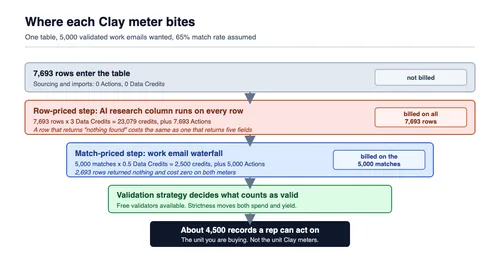
Where each meter bites between the rows you put in and the records you can actually use.
Nobody on our side has run a Clay invoice through a finance system. Everything costed below is arithmetic applied to rates Clay publishes, fetched on July 31, 2026 and linked at each claim, so you can re-derive any line here against your own volumes rather than take our word for it. Where a number is an assumption we chose rather than a figure Clay states, we say so in the same sentence.
Clay pricing in 2026: every number Clay publishes
Clay lists four plans and prices each one as the sum of two independently selected ladders: an Actions tier and a Data Credits tier. According to Clay's pricing page, fetched July 31, 2026, Free is $0, Launch starts at $185/month on monthly billing, Growth starts at $495/month, and Enterprise is custom with an annual commitment. Annual billing is advertised as saving 10%, which is where the $167 and $446 headline figures on the same page come from.
| Plan | Monthly entry | Annual entry (per month) | Included Actions | Included Data Credits | Seats |
|---|---|---|---|---|---|
| Free | $0 | $0 | 500/month | 100/month | Unlimited |
| Launch | $185 | $167 | 15,000/month | 2,500/month | Unlimited |
| Growth | $495 | $446 | 40,000/month | 6,000/month | Unlimited |
| Enterprise | Custom | Custom | 200,000+/month | 100,000+/month | Unlimited |
The composition is worth doing by hand once, because it is the thing the headline price hides. Launch at $185 is $60 of Actions capacity plus $125 of Data Credits. Growth at $495 is $205 of Actions plus $290 of Data Credits. Annual Launch at $167 is $54 plus $113; annual Growth at $446 is $185 plus $261. Every one of those pairs reconciles exactly against the two selectors on the pricing page, and both selectors move independently.
The Actions ladder, on monthly billing:
| Actions/month | Price on Launch | Price on Growth | Cost per Action (Launch) |
|---|---|---|---|
| 15,000 | $60 | not offered | $0.0040 |
| 40,000 | $150 | $205 | $0.0038 |
| 60,000 | $200 | $290 | $0.0033 |
| 100,000 | $290 | $450 | $0.0029 |
| 200,000 | $540 | $850 | $0.0027 |
Read the middle two columns against each other. Forty thousand Actions costs $150 on Launch and $205 on Growth; two hundred thousand costs $540 against $850. The same platform capacity is priced higher on the higher plan, because Growth also buys you CRM auto-sync, HTTP API integrations, webhook automation and web intent signals. Fair enough as packaging. It does mean "how many Actions do we need" and "which plan do we need" are two questions, and answering them in the wrong order costs money.
The Data Credits ladder is priced the same on Launch and Growth, and it is the more forgiving of the two. Growth simply starts one rung higher:
| Data Credits/month | Price | Cost per credit |
|---|---|---|
| 2,500 | $125 | $0.0500 |
| 6,000 | $290 | $0.0483 |
| 10,000 | $460 | $0.0460 |
| 20,000 | $880 | $0.0440 |
| 50,000 | $2,125 | $0.0425 |
Clay's own FAQ states that "Data Credits start at $0.05 each" and that "Actions start at less than $0.01 each," and both check out: $125 divided by 2,500 is exactly five cents, and $60 divided by 15,000 is four tenths of a cent. On annual billing, Launch's ladders run 180,000 Actions/year at $54/month up to 2.4 million at $486/month, and 30,000 Data Credits/year at $113/month up to 600,000 at $1,913/month. That top credit rung works out to $0.038 per credit, the cheapest published unit price on the page. The credit ladder is shared with Growth; the Actions ladder is not, and Growth's top annual Actions rung is $765 rather than $486.
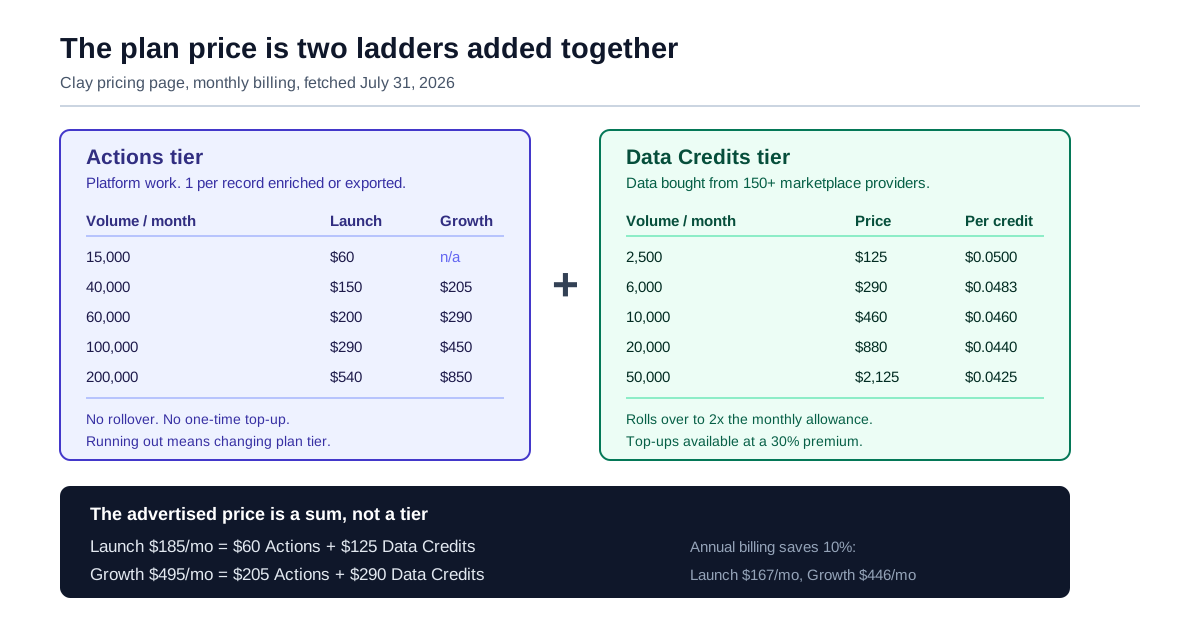
The advertised plan price is the sum of two ladders you choose independently.
Three details on those tables matter more than they look. Seats are unlimited on every plan including Free, so unlike most GTM tooling there is no seat cliff and no per-user maths to do. Free is a genuine free tier rather than a trial, but capped at 200 rows per table, which is enough to test a workflow and not enough to run one. And Enterprise is the only plan with an annual commitment, single sign-on included rather than as an add-on, role-based access control, and workbook-level credit budgets. We return to that last item, because it is the only real spend partition Clay offers.
Two meters: what an Action is and what a Data Credit is
An Action is Clay doing work. A Data Credit is Clay buying data on your behalf. Per Clay's Actions and Data Credits documentation, fetched July 31, 2026, "each record enriched or exported counts as 1 Action — regardless of data source or provider," while Data Credits vary "(0.5–10+ credits based on data type)" according to what the underlying provider charges.
Clay's own explanation of the split is worth quoting because it is unusually legible for this category: Actions "cover the platform work Clay does on your behalf — routing your request, calling the provider, running your workflow, and returning the result to your table," while Data Credits "cover the cost of the data itself." You can separate what you pay the software vendor from what you pay the data market.
| Activity | Actions | Data Credits |
|---|---|---|
| Sourcing lists of accounts or contacts | 0 | Yes, unless free data or your own key |
| Importing your own data from a CRM or warehouse | 0 | 0 |
| Enriching a record with net-new data, including signals | 1 per enrichment | Yes, unless your own key |
| Running an AI prompt or Claygent research | 1 per AI run | Yes, unless your own key |
| Exporting or syncing to a CRM, warehouse, ads platform or sequencer | 1 per record | 0 |
| Clay formulas, filters, scoring, normalization | 0 | 0 |
| Send Table Data, Lookup Single Row in Other Table | 0 | 0 |
| CSV export | 0 | 0 |
| Manual data entry | 0 | 0 |
The free column is generous. Sourcing 100 contacts through Find People costs no Actions; formulas, filters and scoring are free; moving data between Clay tables is free; a CSV download is free on both meters. If your workflow mostly shapes data you already own, large parts of it never touch either meter.
Two asymmetries between the meters decide most procurement outcomes. Data Credits roll over, up to 2× your monthly allowance on Launch and Growth, or 15% of the prior year's purchase on Enterprise renewal at equal or higher commitment, and they can be topped up mid-cycle at a stated "30% premium." Actions do neither: no rollover, and no one-time purchase at any price.
What you do instead when Actions run short is where Clay's own two descriptions stop agreeing, and the difference is worth money. The documentation says "to get more Actions, you must upgrade to a higher plan tier." The pricing page says you can "step into a higher Action tier at any time." The Actions ladder above settles it: a Launch customer moves from 15,000 to 200,000 Actions for $60 to $540 while staying on Launch. So the remedy is an Actions-tier step, not a plan migration. But you are buying the next rung, not the 3,000 Actions you were short.
The line Clay draws is "returned", not "usable"
Clay's meter does not charge for a lookup that comes back empty, and the flat version of the enrichment-cost complaint gets this wrong. The sentence on the pricing page is unambiguous: "if an enrichment returns no result, you're not charged Data Credits or Actions." The Work Email waterfall documentation says the same thing from the other direction — "you only pay credits for the provider that finds a match, making it one of the most credit-efficient ways to build email coverage at scale."
The whole of Clay pricing turns on that one distinction, and it is a real design choice for which Clay deserves credit. Repeat the flat version in a vendor call and you will be corrected, deservedly.
The problem is one layer down. The billable event is a provider returned a value. The event you care about is a rep can use this record. Those two are separated by three things Clay does not price against and does not promise:
| Stage | Who determines it | Does Clay bill it | Does Clay guarantee it |
|---|---|---|---|
| Row enters the table | You | No | n/a |
| Row-priced step runs (AI research, signals) | Your table design | Yes, every row | No |
| Provider returns a value | The provider's coverage of your segment | Yes | No published match rate |
| Value passes validation | Your validation strategy setting | Free validators available | No |
| Value is still true when a rep uses it | Time | No | No |
| Rep can act on it | All of the above | n/a | n/a |
Read that middle column top to bottom and the shape of the problem is clear. The meter is precise about the thing the vendor can observe — did a provider hand back a value — and silent about the thing you are buying, which is a record that survives contact with a human. The Work Email waterfall documentation is candid about the trade-off in one line: on validation strictness, "too strict and you'll over-spend chasing elusive emails; too loose and you'll accept results that bounce." That sentence is the whole economics of the product, written by the vendor, and it is buried three screens into a configuration guide.
This is a different failure from the one we described in our earlier analysis of who sets your Zapier task multiplier. There, a dropdown multiplies the price of a step that always succeeds. Here, the price of a step is fixed and honest, and the yield of the step is the variable. That is harder to see, because it does not appear on the invoice at all. The invoice for a 45% match rate and the invoice for an 85% match rate can look identical right up to the month one of them runs out of rung.
Cost per found record: the arithmetic that matters
Work the number as cost per validated record, not cost per credit. The formula has three inputs and one of them is not on any price list:
(Row-priced steps × rows processed) + (match-priced steps × records found), divided by records that survive validation. That is your cost per validated record, and neither meter reports it.
Rows processed is itself a function of match rate: to end up with 5,000 usable emails at a 65% match rate you have to put 7,693 rows through the table. Every row-priced step in that table bills on all 7,693. Every match-priced step bills on 5,000. We call this the found-record cost, and the reason it is worth naming is that it separates the part of the bill your match rate cannot touch from the part it multiplies.
Here is the same target — 5,000 validated work emails — run three times on Growth monthly pricing, changing only the match rate. The table carries one row-priced step (a Claygent web-research column on Clay's Argon model at 3 Data Credits per row, a rate published in Clay's AI pricing documentation) and one match-priced step (a Work Email waterfall at 0.5 credits per successful match, the rate in Clay's own worked example). All three scenarios consume enough credits to sit on the 50,000-credit rung at $0.0425 per credit, and Actions are priced at the Growth 40,000 rung, $205 for 40,000, or $0.005125 each.
The three match rates are ours, chosen to bracket a plausible range. Clay publishes no match rate for its waterfalls, so nothing in this table is a vendor figure except the per-unit rates. The table also stops at enrichment: exporting the 5,000 results to a sequencer or CRM costs a further 1 Action each, about $26 in every scenario, which we left out because it does not vary with match rate.
| 85% match | 65% match | 45% match | |
|---|---|---|---|
| Rows you must process for 5,000 results | 5,883 | 7,693 | 11,112 |
| AI research credits (3/row, every row) | 17,649 | 23,079 | 33,336 |
| Waterfall credits (0.5 per match) | 2,500 | 2,500 | 2,500 |
| Total Data Credits | 20,149 | 25,579 | 35,836 |
| Total Actions | 10,883 | 12,693 | 16,112 |
| Data Credit cost at $0.0425 | $856.33 | $1,087.11 | $1,523.03 |
| Action cost at $0.005125 | $55.78 | $65.05 | $82.57 |
| Total | $912.11 | $1,152.16 | $1,605.60 |
| Cost per usable email | $0.182 | $0.230 | $0.321 |
How to read those totals. Both meters are pre-bought in rungs, not billed by the unit, so the dollar rows above are modelled marginal costs rather than three different invoices. In all three scenarios you would in fact be buying the same 50,000-credit rung and the same 40,000-Action rung, so the invoice is identical and the difference shows up as headroom consumed. That becomes a real invoice the month the 45% table pushes you past the rung you bought. Modelling prepaid blocks as unit costs is our choice, not Clay's billing behaviour, and it is the right one for a procurement comparison because it is the only way to see what an outcome costs.
Sit with two lines of that table. The waterfall row does not move: 2,500 credits at every match rate, because misses are free. That is the meter behaving exactly as advertised. And the total moves 76%, from 18.2 cents to 32.1 cents per usable email, entirely because the row-priced research column billed 11,112 times instead of 5,883 to produce the same 5,000 outcomes.
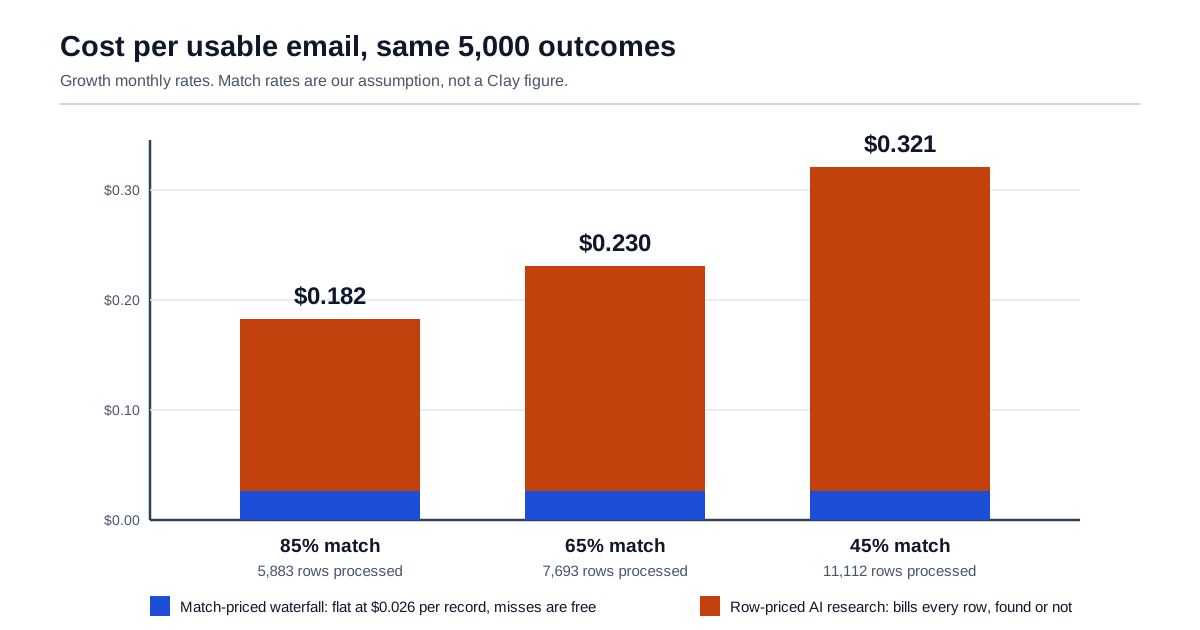
The waterfall component is flat across match rates. The row-priced component is what moves.
One scope condition, because it decides whether any of this applies to you. The swing exists only because a row-priced step sits in the same table as the waterfall. Strip the AI research column out and all three scenarios collapse to the same 2,500 credits and 5,000 Actions at every match rate. At Growth's included 6,000-credit rung that is $120.83 of credits plus $25.63 of Actions, or $146.46, which is 2.9 cents per usable email. A pure waterfall-and-export table is genuinely insulated from this, and if that describes your workflow you can choose between the Clay pricing plans on volume alone and skip the next four sections.
Now add the second variable Clay names but does not price: bounces. If a tenth of the returned emails bounce or reach the wrong person, the denominator drops to 4,500 and the 65% scenario becomes 25.6 cents per usable record. At a quarter bad, it is 30.7 cents. Those bounce rates are also ours, since Clay publishes no accuracy figure either. The direction is not in dispute, and it is the reason the validation-strategy setting three sections down is a finance control wearing a data-quality costume.
The practical consequence for a renewal conversation: the number to take into the room is dollars per record your reps actually contacted, measured from your own last three months, not credits consumed. Credits consumed is a number that goes up when you do more work and also goes up when your data gets worse, and it does not distinguish between the two.
Where you genuinely do pay for the misses
Three places where a result that helps nobody is billed anyway, and two floor costs that behave like misses on an invoice. All five are documented by Clay.
AI and Claygent columns bill every row processed. Clay's own troubleshooting list, under the heading of unexpected credit deductions, states it flatly: "AI columns: Every row processed incurs a cost." A research prompt that concludes "no information found" for a company consumed the same credits as one that returned a five-field answer. This is the single largest lever in the table above, and the rate depends on which model is selected:
| Model | Content generation | Web research | Cost of one column on 10,000 rows at $0.0425/credit |
|---|---|---|---|
| GPT-5 Nano | 0.2 | 0.5 | $85 to $213 |
| Gemini 2.5 Flash / Flash Lite | 0.5 | 1 | $213 to $425 |
| Clay Helium | — | 1 | $425 |
| GPT-5 Mini | 0.4 | 1 | $170 to $425 |
| Claude 4.5 Sonnet | 1.5 | variable | $638 plus |
| GPT-5.1 | 2 | variable | $850 plus |
| Clay Argon | — | 3 | $1,275 |
| o3 | 5 | variable | $2,125 plus |
| Claude 4.6 Opus | 7.5 | variable | $3,188 plus |
Figures are Clay's published per-row credit costs multiplied by our own $0.0425 credit price and a 10,000-row assumption. The spread between the cheapest and most expensive fixed-rate model on the same 10,000 rows is more than 37×. Clay states that fixed pricing covers "80% of models," including all of its own; the rest are variable, priced at "0% markup" on the underlying provider cost, with an estimate withheld up front at the 75th percentile of past runs and reconciled after the run: surplus refunded, shortfall deducted.
Interrupted runs still bill. Clay's troubleshooting list includes "Actions stopped midway: already-sent requests still consume Data Credits." Killing a run that is going wrong does not unwind the requests already in flight, so the cost of noticing a misconfigured column late is not zero.
Re-running a column is new usage. Auto-update, duplicate enrichments and re-running a column all trigger fresh charges; the same list names all three. The failure mode here is organisational rather than technical. Two people independently refreshing the same table is a billing event nobody planned.
Then two costs that are not misses but land the same way on an invoice.
Actions bill even when the data is yours. Bringing your own ZoomInfo, Apollo or Anthropic key removes the Data Credit but not the Action: Clay's FAQ answers "why do I pay Actions even when using my own API key?" with "Actions represent the platform orchestration Clay performs." That is a coherent position. You are renting the orchestration, not the data. But it means the floor on your bill is set by rows touched, not by data bought. One Hacker News poster described a cold-email operator paying "over $300/month just to use custom APIs in Clay," which he characterised as paying "just the permission to use his own APIs" (xnoyzi, Hacker News, November 1, 2025). Worth reading with the disclosure that the poster was announcing a competing product in the same comment; we cite the observation, not his conclusion.
Unused Actions expire. No rollover, ever, on any plan. Buying headroom for a quarterly campaign spike means paying for that headroom in the eleven quiet weeks too, and there is no mechanism to recover it. Data Credits behave better, banking to 2× the monthly allowance.
There is one refund path and it is narrower than it first reads. On invalid data, Clay says: "if a provider refunds us due to invalid data, we'll refund those Data Credits back to you." That is a pass-through, conditional on the upstream provider agreeing. It is not a quality guarantee, and no published document sets out what qualifies or how long it takes.
The match rate nobody publishes
There is no published match rate for Clay's waterfalls. We looked at the pricing page, the waterfall product page, the Actions and Data Credits documentation, the Work Email waterfall documentation and the AI pricing documentation, all fetched July 31, 2026, and the only coverage percentage Clay states about its own results is this one: "in Clay's internal testing on a software-industry dataset, the default first.last@domain.com pattern returned a valid email roughly 31% of the time." That figure describes the free inferred-email step at the top of the waterfall, not the waterfall as a whole.
The waterfall product page markets coverage without quantifying it — "access 150+ databases to maximize your coverage of contact info" — and the numbers it does carry are customer testimonials, including Adam Wall, a Head of Sales Operations quoted on both the pricing and waterfall pages saying his team saw "3x our enrichment rate with Clay's combination of data providers." A 3x improvement against an unnamed prior tool is not a match rate. The credits documentation uses "90% success" inside a worked example, but that is an illustration of the arithmetic, not a commitment: read in context it is Clay showing how 100 attempts at 0.5 credits becomes 45 credits, and the 90 is an input to the example.
Third-party match-rate figures for Clay circulate widely and we are not reproducing any of them. Several review sites publish match rates from their own test lists. We did not verify any of those numbers to a reproducible method, and we are not quoting a range from them, because the test list, the segment and the provider ordering determine the result more than the platform does. Take that as a statement about the evidence available, not about the vendor.
The consequence for a buyer is specific and it is not rhetorical: the input that determines your cost per usable record is the one input nobody will put in the contract. The only version of it that means anything is the one you measure on your own segment. Clay's own cost-optimisation guidance points the same way — "test on small batches first: run new workflows on 10–20 records to validate results before scaling" — and the Free plan's 200-row table cap is enough to run exactly that test before any money changes hands.
Clay's own Clay 101 lesson on waterfalls is a useful five-minute orientation to the mechanism before you run that test, because the provider ordering it demonstrates is the thing your measured match rate is actually measuring.

Validation strictness is a pricing control, not a quality setting
The Work Email waterfall exposes a Validation strategy with four settings, Conservative, Balanced, Aggressive and Advanced, and describes them in terms of risk tolerance. Conservative is "the safest approach, including all verified email types," recommended where "deliverability matters." Balanced includes catch-all domains. Aggressive is "good for casting a wide net" where "volume and coverage take priority over precision."
Read as a finance control rather than a data setting, the same dropdown says: how much am I willing to spend chasing a record, and how much bounce am I willing to accept in exchange? Clay's documentation makes the trade explicit in the sentence quoted earlier — too strict over-spends, too loose accepts bounces.
| Setting | What it accepts | Direction of credit spend per row | Direction of usable-record yield |
|---|---|---|---|
| Conservative | Verified types only | Higher — the waterfall keeps searching | Higher precision, lower coverage |
| Balanced | Includes catch-alls | Middle | Middle |
| Aggressive | Wide net | Lower — stops sooner | Higher coverage, more bounces |
| Advanced | Manually configured | Whatever you configure | Whatever you configure |
Alongside it sits a "require validation success?" toggle, which decides whether the waterfall accepts a result when validation was inconclusive, and an Infer Email step that inserts a free guess before any paid provider is called. That is the step with the 31% hit rate on Clay's internal software-industry dataset. Turning Infer Email on is the rare setting that reduces spend and does not reduce quality, because a wrong guess simply fails validation and the waterfall continues.
Here is the governance problem in one sentence. Every one of those settings lives in a table configuration panel, and every one of them moves the invoice, and the person who opens that panel is a GTM operator rather than anyone in finance. That is not a Clay-specific flaw; it is the standard shape of self-serve GTM tooling. It is, however, the reason a Clay renewal conversation that only covers plan tier and credit volume has skipped the two settings that determine what those credits buy.
What happens when each meter runs out
The two meters have different failure modes, different remedies and different prices, and Clay documents all six. This is the half of Clay pricing a renewal conversation usually skips, because none of it appears on the plan card.
| Actions | Data Credits | |
|---|---|---|
| Rollover | None. Reset each cycle | Yes — up to 2× monthly on Launch/Growth; 15% annually on Enterprise renewal |
| One-time top-up | Not available | Available, at a 30% premium |
| Tier change mid-cycle | Step up the Actions tier at any time; no one-time purchase | Adjust the credits tier at no premium |
| What stops | Further enrichment in that workspace | Processing stops; rows not yet started do not run |
| Cost of the fix | The price delta to the next Actions rung, whatever your shortfall | 1.3× the normal credit rate, or a tier step |
| Partition available | None below Enterprise | Workbook-level budgets on Enterprise only |
That asymmetry deserves a moment. Clay's stated design intent is that "plan tiers are designed so 90% of customers do not hit the limit of their Actions capacity," and that is a reasonable target for a vendor to set. But the remedy for being in the other 10% is granular only to the rung: you cannot buy 3,000 more Actions, you buy the next rung up. On Growth, a team that overshoots 40,000 by 5% steps to 60,000 at $290 and a team that overshoots by 100% steps to 100,000 at $450, so the fix is at least proportionate. It is simply never small, and it is a recurring monthly commitment rather than a one-off.
There is a genuine protection worth naming on the credits side. Clay's AI pricing documentation states that "if your data credit balance reaches zero during a run, processing stops. You will never be charged beyond your available balance." Rows that have not started do not run, and completed rows are kept. For a variable-priced AI column on a large table, that hard stop is the difference between a bad afternoon and a bad quarter. It is a real protection and Clay states it in writing, which is the part that counts at renewal.
Cost by team shape and by workflow type
Published prices answer "what does a plan cost." They do not answer "what will this cost us," which depends on how many rows your work touches and what kind of steps sit on each row.
By team shape. Seats are unlimited on every plan, so unusually for GTM software, headcount is not a pricing input at all. What matters is row volume and which integrations you need.
| Team shape | Plan usually forced | Why |
|---|---|---|
| One operator testing a motion | Free, then Launch | 200-row table cap on Free ends the experiment quickly |
| Small team running outbound lists | Launch | Phone enrichment, job-change signals, campaign integrations, 50,000-row tables |
| RevOps keeping a CRM enriched | Growth | CRM auto-sync and enrichment, HTTP API, webhook automation are Growth-and-up |
| Data team syncing a warehouse | Growth, possibly Enterprise | Clay's pages disagree: the Growth card and feature table say warehouse sync is included, the plan summary lists it under Enterprise. Ask before you buy |
| Any team that needs spend partitioned | Enterprise | Workbook-level credit budgets and RBAC are Enterprise-only |
Note what forces the step up in each case. It is almost never volume alone — it is one integration or one control. The most expensive version of that pattern is the last row: if the reason you want Enterprise is "we need to stop one workbook consuming the whole budget," that capability does not exist lower down at any price, and single sign-on is an add-on on Growth rather than included.
By workflow type. The ratio of row-priced steps to match-priced steps is what makes one workflow forecastable and another not.
| Workflow | Typical step mix | Cost behaviour | Forecastability |
|---|---|---|---|
| List building and email finding | Mostly match-priced waterfall steps | Scales with records found, not rows tried | High |
| CRM hygiene and re-enrichment | Match-priced, but re-run on a schedule | Scales with refresh frequency; auto-update is the risk | Medium |
| Account research with AI columns | Row-priced AI on every account | Scales with rows processed regardless of yield | Low without a row cap |
| Signal monitoring | Row-priced, continuous | Scales with the size of the watched set and the interval | Low |
| Export and sync | 1 Action per record, no credits | Cheap and linear | High |
The two low-forecastability rows are the ones that need a cap before they need a budget. A research column pointed at a 40,000-row account table on a 3-credit model is $5,100 of Data Credits at $0.0425 per credit for a single pass. That number is entirely predictable in advance and entirely invisible until someone does the multiplication.
The controls Clay gives you, and the ones it does not
Clay ships more spend protection than most GTM tools and less partitioning than a finance team will want. Both halves are worth stating precisely, because the gap is where a governance decision lives.
It is worth naming what category this belongs to. A pipeline whose per-row cost is decided by a model's token consumption is an AI system whose failure modes include financial ones, and the standard voluntary reference for managing that class of risk is the NIST AI Risk Management Framework, released on January 26, 2023 for voluntary use. Its relevance here is narrow and worth stating plainly: it is a measurement discipline before it is a budgeting one, and unit economics you have not instrumented cannot be governed.
What you get. A hard stop when the credit balance reaches zero, with completed rows retained. Per-run cost estimates shown in the enrichment panel before you run, with a tilde marking variable-priced models. A credit usage dashboard at workspace, workbook and table level on every plan. Rollover on credits. Reconciliation with refund of surplus on variable AI runs. And, on Enterprise, workbook-level Data Credit spend limits that block further runs once hit.
What you do not get.
No spend partition below Enterprise. Workbook credit budgets are Enterprise-only, and Clay's documentation is explicit that only workspace admins can set them. On Launch and Growth, every table in the workspace draws from one pool, and the marketing team's experiment competes with the RevOps team's monthly refresh.
No pre-spend approval gate. The controls are limits and dashboards, both of which act at or after the moment of spend. Nothing asks a second human before a 40,000-row research column runs. The credit-usage dashboard tells you where the money went, which is the right tool for a review and the wrong one for a prevention.
No per-person attribution below Enterprise RBAC. Seats are unlimited and unmetered, which is generous, but it also means the workspace has no native concept of whose run this was for cost purposes. Unlimited seats and per-person cost attribution are in tension, and Clay has chosen the generous side of it.
| Control you want | Clay's answer today | Gap |
|---|---|---|
| Stop a runaway AI run | Balance hits zero, processing stops | Only at total exhaustion, not per-table |
| See cost before running | Per-row estimate in the enrichment panel | Estimates only for variable models |
| Cap spend for one team | Workbook credit limits | Enterprise only |
| Approve before an expensive run | Not available | Dashboards are retrospective |
| Attribute cost to a person | Usage dashboard by workbook and table | Not by user below Enterprise RBAC |
| Cap Actions specifically | Not available | Actions can be re-tiered but never capped or bought one-off |
The hybrid bill: what to keep on credits and what to move to your own keys
The choice is not Clay or not-Clay. For most teams past the experimentation stage the workable answer is a split, and Clay both supports it and quantifies the saving: connecting your own provider keys "save[s] 50–80% on Data Credits while still consuming 1 Action per enrichment."
Applying that to the 65% scenario from earlier — 7,693 rows, 5,000 results, $1,152.16 of modelled marginal cost on Clay's marketplace:
| Component | Keep on Clay credits | Move to your own key | Effect |
|---|---|---|---|
| Sourcing the list | Yes | — | Free on Actions either way |
| LinkedIn and firmographic enrichment | Yes, unless you already own ZoomInfo or Apollo | Your existing data contract | Data Credits to zero, 1 Action per row remains |
| Work email waterfall | Yes | Only if you already hold provider contracts | Waterfall economics are the thing you are buying |
| AI research column | No, if volume is high | Your own OpenAI or Anthropic account | Removes the largest row-priced credit line |
| Export and sync | Yes | — | 1 Action per record, no credits, no alternative |
Cost the extreme version honestly, and compare plan price against plan price rather than plan against usage model. On Clay's marketplace, that scenario's 25,579 credits puts you on the 50,000-credit rung at $2,125 plus $205 of Actions: $2,330 a month. Move both the enrichment and the AI to your own keys and the credit requirement goes to approximately zero, while 12,693 Actions fits inside Launch's 15,000. So the Clay line becomes $185 a month, plus whatever your own providers invoice you. That is a genuine reduction in what you pay Clay, and for a team already holding a ZoomInfo or Apollo contract with unused capacity, some of the total is real too. Note what dropping to Launch costs you: HTTP API integrations and CRM auto-sync are Growth-and-up, and an own-key enrichment is often wired through exactly those.
The rest of it is a transfer, and three costs come with it. You now hold several provider contracts, each with its own minimum commitment, and B2B data minimums routinely exceed what the equivalent Clay credits would have cost at low volume. You lose the waterfall's core economic property — that a miss costs nothing — for any provider you call directly outside Clay's marketplace, unless that provider offers the same terms. And Clay notes a performance difference on the AI side: "AI runs are 2x faster using Clay's API keys compared to customers using their own because of the higher rate limits that Clay has negotiated with AI vendors."
Our reading, offered as judgment rather than measurement: below roughly 5,000 enriched records a month the operational overhead of holding and rotating multiple provider keys probably exceeds the saving, and above 50,000 it rarely does. Test that against your own contracts before treating it as a rule. We have not run it.
There is a second reason to prefer the split that has nothing to do with the arithmetic. A direct provider bill is attributable: you can see which key, which team and which run spent the money. A single pooled credit balance is not, and no dashboard reconstructs the attribution you never captured. The same logic drives our earlier analysis of how model routing cuts LLM costs, where the argument is about tokens rather than credits but the failure is identical.
When credit-based enrichment is genuinely the cheaper deal
It would be dishonest to run these numbers and conclude that credit pricing is a trap. For a large class of work it is the cheapest thing available, and the case is stronger than the critics allow.
Misses really are free, and that is rare. A meter that only charges on a returned result is unusual in data. The alternative most teams are comparing against is an annual seat-and-record contract with a data vendor, where you pay for the database whether your segment is covered or not. If your ICP sits in a segment with patchy coverage, a per-result meter transfers that risk to the provider in a way an annual licence does not.
No seat cost at all. Unlimited seats on every plan including Free is a genuine structural difference from ZoomInfo-class pricing, and it removes the most common reason GTM tooling gets rationed to a few power users. The cost of letting a fifth person into the workspace is zero.
The free layer is broad. Sourcing, imports, formulas, filters, scoring, cross-table lookups and CSV export all cost nothing on either meter. Much of the shaping work in a real table is free.
Credits roll over and get cheaper with scale. Banking to 2× the monthly allowance absorbs the spiky reality of campaign work, and the published unit price falls from $0.05 to $0.038 across the ladder.
The alternative is usually not a cheaper tool. If your workflow needs six providers with no common schema between them, the honest comparison is engineering time to build and maintain six integrations plus six contracts. At 5,000 records a month that is not close.
The place the model turns against you is narrow: high row counts multiplied by steps that bill per row rather than per result, on a segment whose match rate you have never measured. If your tables are mostly waterfalls and exports, size the plan to your volume and stop thinking about it.
The renewal checklist: twelve questions before you sign
Each of these is answerable from your own workspace or from Clay, and each maps to a number above.
- What is our measured match rate, by segment, on the enrichments we actually run, not the vendor's example rate?
- What share of returned emails bounced or reached the wrong person last quarter, and what does that do to our cost per usable record?
- How many of our columns are row-priced (AI, Claygent, signals) versus match-priced (waterfalls), and what is the ratio by spend?
- Which model is each AI column set to, and what does that column cost per 1,000 rows at our credit rate?
- Which of our AI columns are variable-priced, and what did the reconciliation actually settle at versus the withheld estimate?
- How many Actions did we consume in our three busiest months, against the tier we bought and the tier we would be forced into?
- Which tables have auto-update enabled, and does anyone own the decision to refresh them?
- What is our Validation strategy set to on each waterfall, and did anyone in finance know that setting existed?
- Is Infer Email enabled where it applies, and what is its measured hit rate on our data rather than Clay's software-industry sample?
- Which providers do we already hold direct contracts with, and are we paying Data Credits for data we have already bought?
- If one workbook consumed the entire credit balance tomorrow, what would have stopped it, and is that answer "nothing" because we are not on Enterprise?
- What did we pay per record a rep actually contacted, over the last three complete cycles?
Question one is the one that changes the number, and it is the only item on the list Clay cannot answer for you. Question twelve is the one to lead with, because it is the only figure on the list that a CFO can compare against anything.
Where a governance layer fits, and where it does not
LeapForce is not a data-enrichment platform and is not a substitute for Clay. If you need 150 providers behind one waterfall, buy Clay or something like it. What we build is the governed layer in front of the model calls those tables make: one endpoint, per-team and per-agent budgets expressed in dollars rather than tokens, and an audit record of what ran and what was refused. That is the seam this article keeps returning to. A single pooled balance with no partition below Enterprise, no approval before an expensive run, and a research column whose per-row cost is set in a configuration panel by someone who never sees the invoice. Our rollout guide for that layer is deliberately unglamorous: observe first, enforce second, optimize third, because the first useful artifact is not a policy but an honest picture of which teams and which runs are actually spending. One caveat, stated once: dollar budgets and chargeback are still in development on our platform rather than shipping today, and a governance layer changes what you can see and cap, not what Clay charges per credit. The adjacent argument, on proving what an automated process actually did rather than what it was configured to do, is in our earlier piece on AI observability and audit trails.
The wider cost of getting this wrong is not a software line item. Writing in MIT Sloan Management Review, data-quality researcher Thomas C. Redman put the cost of bad data at "15% to 25% of revenue for most companies," and argued that roughly two-thirds of that is identifiable and permanently removable. That estimate is from 2017 and we found no more recent figure from the same author or a comparable source, so treat it as an order of magnitude rather than a current benchmark. The mechanism it describes has not changed: the expensive part of bad contact data is never the credits, it is the rep hours and the sender reputation spent on records that were never going to work.
Honest limits on this analysis
Several things above are less certain than tables make them look.
We did not run a Clay invoice. Nobody on our side has held a Clay contract or reconciled a Clay bill. Every scenario here is arithmetic on published rates, which is auditable. You can re-derive any line from the linked pages. But it is not a measured invoice, and a measured invoice would beat it.
The match rates and bounce rates are ours. 85/65/45% and the 10%/25% bounce figures are illustrative brackets we chose, stated as such at each use. Clay publishes no match rate for its waterfalls and no accuracy guarantee, and we declined to borrow a number from third-party reviews whose method we could not reproduce. If that leaves the central table looking like a model rather than a measurement, that is because it is one.
Enterprise pricing is not public and we did not obtain a quote. Everything said about Enterprise here comes from the feature comparison on the pricing page: 200,000+ Actions, 100,000+ Data Credits, SSO, RBAC, workbook budgets, annual commitment. Not from a contract.
Per-provider credit costs vary and we costed two of them. Clay states that enrichment costs run 0.5 to 10+ credits by data type and that a fully enriched record "typically costs 6–20 Data Credits." We used the 0.5-per-email and 3-per-row rates Clay publishes; a phone-heavy or intent-heavy table will cost materially more per record and our tables do not model it.
One recognisable source was unreachable. We wanted a current government figure for job-change churn, the mechanism that makes contact data decay, from the US Bureau of Labor Statistics JOLTS release. bls.gov returned 403 to every fetch method available to us and we were unable to reach it through a browser, so no churn figure appears in this article rather than a second-hand one. Reddit was likewise unreachable, so the practitioner voices we could link come from Hacker News, whose audience skews more technical than the median Clay buyer.
Prices change and these are a single day's snapshot. Clay's current model separates Actions from Data Credits, and Clay's Actions and Data Credits documentation refers to "new pricing" inside a worked example when describing free validators, so the split is recent. We could not date the change from any published page, so we are not dating it. Material about Clay credits that does not mention Actions is describing a different pricing model. Every figure here was fetched on July 31, 2026, and the pricing page carries interactive selectors whose contents can change without notice.
This is not a comparison. Whether Apollo, ZoomInfo, Findymail, or building against provider APIs directly is cheaper for your segment is different work with different arithmetic, and anyone answering it without your match rate is guessing.
Frequently asked questions
Per Clay's pricing page on July 31, 2026: Free is $0, Launch starts at $185/month on monthly billing or $167/month billed annually, Growth starts at $495/month or $446/month annually, and Enterprise is custom with an annual commitment. Each Clay pricing figure is the sum of two separately chosen ladders — an Actions tier and a Data Credits tier. Launch's $185 is $60 of Actions plus $125 of credits; Growth's $495 is $205 plus $290. Seats are unlimited on every plan, so headcount does not change the price.
No. Clay's pricing page states that "if an enrichment returns no result, you're not charged Data Credits or Actions," and the Work Email waterfall documentation says you "only pay credits for the provider that finds a match." There are two documented exceptions worth knowing. AI and Claygent columns bill on every row processed regardless of what the model returns. And a run stopped part-way still consumes credits for requests already sent. So a lookup that finds nothing is free; a research prompt that concludes "nothing found" is not.
Data Credits start at $0.05 each and fall as the tier rises. On monthly billing the published ladder runs 2,500 credits for $125 ($0.050 each), 6,000 for $290 ($0.048), 10,000 for $460 ($0.046), 20,000 for $880 ($0.044) and 50,000 for $2,125 ($0.0425). Annual commitments go lower: 600,000 credits a year at $1,913/month works out to about $0.038 per credit. Actions are separate and much cheaper, from $0.0040 each at the bottom of the Launch ladder to $0.0027 at 200,000 a month.
Clay states that a fully enriched record "typically costs 6–20 Data Credits," depending on which fields you fill, how many of your own API keys you connect, and whether you are running waterfalls across multiple providers. Its own worked example prices a LinkedIn profile at 0.5 credits and a found email at 0.5 credits. Phone numbers are the expensive end. Clay says explicitly that "emails are cheap, phone numbers are expensive." At $0.0425 a credit, 6 to 20 credits is roughly 26 cents to 85 cents of data per record before any AI research. That is your cost per enriched record on the data meter alone; the cost per record you can actually use is higher, because it divides by the ones that survive validation.
Actions measure Clay's platform work — routing your request, calling the provider, running the workflow, returning the result — at 1 per record enriched or exported, regardless of provider. Data Credits buy the data itself from Clay's marketplace, which its FAQ calls 150+ providers and its product navigation calls 200+, at a variable rate by data type. The practical difference is what happens when each runs out. Data Credits roll over, can be topped up mid-cycle at a 30% premium, and their tier can be raised on its own. Actions do not roll over, cannot be topped up at any price, and running out means stepping up to the next Actions rung.
Data Credits do; Actions do not. On Launch and Growth, unused Data Credits accumulate up to 2× your monthly allowance, so a 10,000-credit plan can bank a 20,000 balance. Enterprise customers can roll over up to 15% of the prior year's purchased credits, provided they renew at an equal or higher commitment. Actions reset every billing cycle with nothing carried forward, because Clay treats them as fixed platform capacity rather than a currency. If you buy Actions headroom for a quarterly spike, you pay for that headroom in the quiet weeks too.
You step up to the next Actions rung. Clay's pricing page says you can "step into a higher Action tier at any time" without being pushed onto a higher plan, and the published ladder bears that out: a Launch account can run 15,000, 40,000, 60,000, 100,000 or 200,000 Actions a month for $60 to $540. What Clay does not sell is a one-time Actions top-up, on the stated grounds that Actions represent capacity rather than consumable currency, so the smallest fix available is the next rung and it is a recurring monthly increase. One caution: Clay's own documentation phrases the same remedy as "you must upgrade to a higher plan tier," which reads more expensively than the pricing page's version, so confirm which one your contract follows before budgeting for it.
No. Clay's documentation is direct about it: connecting your own provider keys removes the Data Credit but "an Action will still be consumed," because you are still paying for the orchestration. Clay estimates the saving at 50–80% of Data Credits. The trade is that you take on the provider contracts and their minimum commitments, you lose the waterfall property that a miss costs nothing for anything you call directly, and Clay notes that AI runs are about twice as fast on its own keys because of negotiated rate limits. The floor on your bill becomes rows touched rather than data bought.
None that we could find published. We checked the pricing page, the waterfall product page and the enrichment documentation on July 31, 2026, and Clay states no match rate or coverage guarantee for its waterfalls. The only percentage it publishes about its own results is that the free inferred-email step, using the default first.last pattern, "returned a valid email roughly 31% of the time" in internal testing on a software-industry dataset. Third-party reviews publish match rates from their own test lists, but we could not verify any to a reproducible method and are not quoting their figures. Measure it on your own segment using the Free plan's 200-row table.
Below Enterprise, you cannot. Workbook-level Data Credit spend limits are an Enterprise feature, settable only by workspace admins, and once a workbook hits its limit further runs are blocked with an error. On Free, Launch and Growth every table draws from one shared balance with no partition, so a single 40,000-row research column can consume the workspace's credits. What every plan does get is a credit usage dashboard by workspace, workbook and table, plus a hard stop when the balance reaches zero. Clay states you "will never be charged beyond your available balance."
For teams whose bottleneck is contact coverage across a fragmented provider market, the waterfall economics are genuinely good: misses cost nothing, seats are unlimited, credits roll over, and the free layer covers sourcing, formulas and exports. The case weakens where tables are dominated by row-priced AI research on segments with an unmeasured match rate, because that is where the same 5,000 outcomes can consume 76% more of a prepaid balance with nothing on the invoice to explain it. The honest test to apply to Clay pricing is not "is Clay expensive" but "do we know what a usable record costs us, and who set the settings that decide it."
Ready to Govern Your AI?
Talk to LeapForce — one controlled layer for every AI tool, connector, model, and agent.
Comments