
To create a Slack bot, register an app at api.slack.com/apps, choose bot token scopes, install it to a workspace, and invite it to the channels it needs. The build is an afternoon. The scopes are permanent.
Our position is narrower than the usual tutorial: the interesting decision in this whole exercise is not which framework you use or whether you write code at all. It is the pair of settings that decides what the bot can reach: the scopes on its token, and the conversations it sits in. Those two dials are set in about ninety seconds, they are almost never written down, and one of them cannot be turned back down without revoking the token entirely. On Hacker News in July 2026, a commenter posting as jillesvangurp described a few months of building team-chat bots and named the friction precisely: "the gazillion of permissions needed to end up with something that works" (comment). The pain is real. The response most teams reach for, ask for everything and sort it out later, is the part that costs.
The short answer: Create a Slack bot by registering an app, granting it the narrowest bot token scopes that make one named job work, and adding it only to the channels that job needs, because scope and channel membership are two independent dials, and Slack lets you add scopes to a token forever but never remove one without revoking it.
Last updated: July 30, 2026.
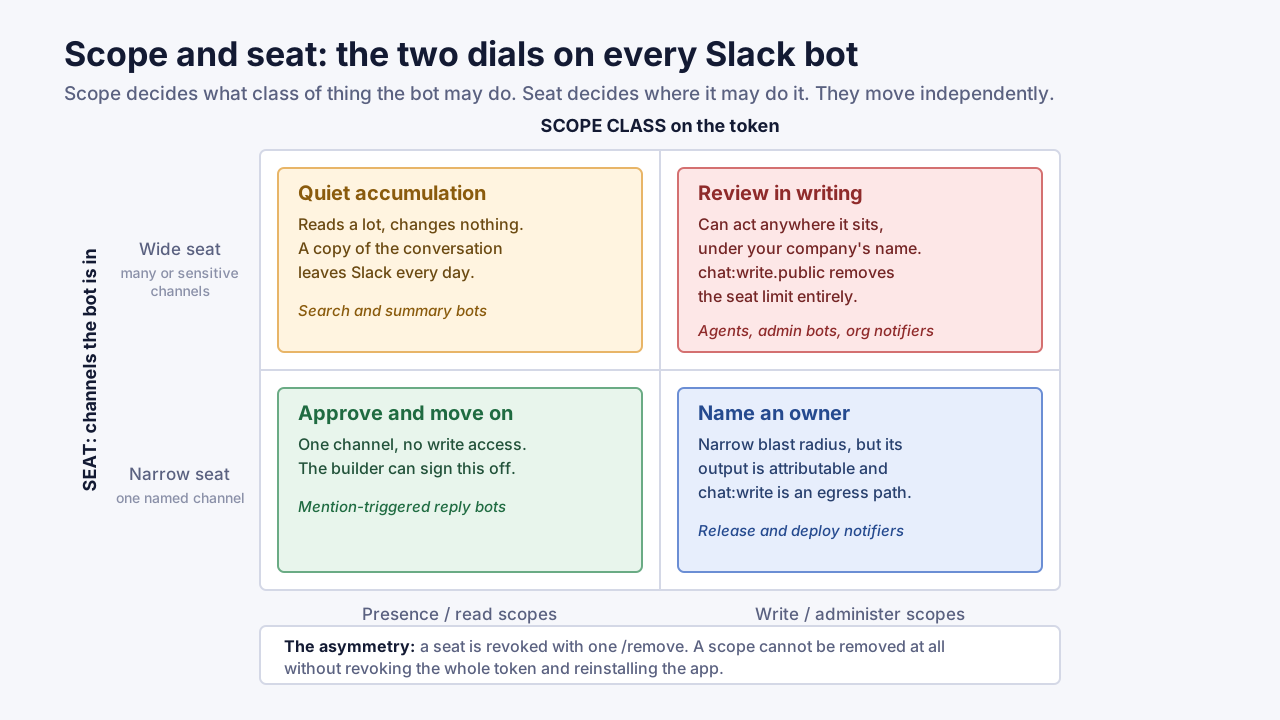
Scope and seat are independent. A bot can be narrow on one dial and wide open on the other.
What "create a Slack bot" means now: four paths, one permission model
There are four realistic ways to create a Slack bot in 2026, and they differ enormously in effort while sharing one permission model. Whichever path you take, the bot ends up holding an OAuth access token carrying a list of scopes, and Slack's Events API documentation is explicit that the events you receive "are directly tied to the OAuth permission scopes granted as users install your Slack app." The framework is a detail. The token is the commitment.
Most tutorials pick one path, usually the vendor's own, and present it as the answer. That is a sales decision, not an engineering one. Here is the honest set, with what each actually gives you.
| Path | Code needed | Who can build it | Token it holds | Best for |
|---|---|---|---|---|
| Slack Workflow Builder | None | Any member with permission | Workflow token (xwfp-), short-lived | Forms, routing, scheduled posts, approvals inside Slack |
| Marketplace app (install an existing bot) | None | Whoever can approve installs | Vendor's bot token in your workspace | Standard integrations already reviewed by Slack |
| Custom app built with Bolt or the Slack CLI | Yes | A developer | Your own bot token (xoxb-) | Anything with real logic, private data, or your own systems |
| An AI agent or MCP connector wired into Slack | Sometimes | A developer or a power user | A bot token, often broad | Summarising, answering from history, taking actions across tools |
The fourth row is new and it is where the risk has moved. An AI agent connected to Slack is, mechanically, a Slack bot: same OAuth flow, same scope list, same token. What differs is that its behaviour is decided at runtime by a model rather than at build time by you. OWASP's LLM06: Excessive Agency entry names the three root causes as excessive functionality, excessive permissions, and excessive autonomy. A Slack bot's scope list is exactly where the middle one is set. We covered the connector side of this in our earlier analysis of MCP server security; this piece is about the Slack-specific half.
One clarification worth making early, because it trips people up in search: "Slackbot" with no space is the built-in assistant Slack ships in every workspace. "A Slack bot" is a bot user attached to an app you or a vendor made. They are different things, and only the second one has scopes you choose.
Scope and seat: the two dials that decide what a Slack bot can reach
A Slack bot's reach is the intersection of two independent settings: the scope on its token, which decides what class of thing it may do, and the seat it occupies, which decides where it may do it. Slack's own scope reference makes the coupling explicit. channels:history is documented as the right to "view messages and other content in public channels that your Slack app has been added to" (Slack docs). Not every public channel. The ones it was added to.
That second clause is the single most under-read sentence in the Slack platform documentation, and it cuts both ways.
The good news: a bot token carrying channels:history in a workspace with 900 public channels can read zero of them until somebody invites it somewhere. Scope alone is not access. The bad news: the invite is a one-click action available to any member of a channel, it produces no approval step, and it is not what most people think they are doing when they type /invite @helperbot. They think they are turning on a feature. They are extending a grant.
So the two dials look like this.
| Dial | Set by | Changed by | Visible where |
|---|---|---|---|
| Scope | The developer, at install time | Reinstalling the app with new scopes | The OAuth consent screen; the app's OAuth page |
| Seat | Any channel member, any time | /invite and /remove in a channel | The channel's member list |
Scope gets reviewed once, by someone senior, on a screen designed for the purpose. Seat gets granted casually, by anyone, forever, with no record anyone reads. That imbalance produces a specific and under-discussed failure: the scope list was fine, and then somebody invited the bot into #legal-m-and-a.
There is one asymmetry to hold onto. Scope is sticky in a way seat is not. Slack's OAuth guide states plainly that installs are additive. Request channels:history today and channels:read next month and the token carries both. It then adds the sentence that should govern your whole approach: "There is no way to remove scopes from an existing token without revoking it entirely" (Slack docs). You can un-invite a bot from a channel in two seconds. You cannot un-grant a scope at all. You can only start over.
One clarification, because this trips up people who have edited Slack app permissions in the dashboard: you can delete a scope from the app's configuration. What that does not do is strip the permission from a token that was already issued. The old token keeps working with its old grant until it is revoked and the app reinstalled. Editing the config changes what future installs request; it does not retroactively narrow the credential already sitting on your server.
That asymmetry is the reason this article puts scope selection ahead of everything else, including whether you write code.
The Scope-and-Seat Review: four questions to run before you build
We call the pre-build check the Scope-and-Seat Review, and it is four questions with written answers. It takes about twenty minutes for a simple bot and it is the cheapest governance you will ever apply, because everything it decides is expensive to change afterwards.
Question 1 — Token: does this need a bot token or a user token? Default to a bot token. Slack's tokens guide notes that bot tokens are "not tied to a user's identity" and that "acting independently allows your app to stay installed even when an installing user is deactivated." A user token is the opposite: it "represents the same access a user has to a workspace." If the answer is "user token", write down which human's access you are borrowing, because that is what you are doing.
Question 2 — Scope class: read, write, or administer? Sort every scope you are about to request into one of three buckets and count them. A bot that reads and posts is a different animal from one that creates channels, invites users, or touches admin.*. If the count in the write bucket is greater than zero, somebody other than the builder signs off.
Question 3 — Seat: which conversations, named, and who can change that? List the channels by name. Not "the engineering channels". The names. Then decide whether the bot is allowed to be invited elsewhere and by whom. If your answer is "anyone, anywhere", you have not scoped the bot; you have scoped a class of bot.
Question 4 — Exit: who owns it, and what revokes it? Name a human owner, a review date, and the exact revocation step. For a Slack bot that step is usually uninstalling the app or calling auth.revoke, which Slack documents as requiring no scopes at all, so you can always kill your own token. Knowing that in advance is the difference between a five-minute incident and a two-day one.
If you are a team of one with no security function to escalate to, the review still works. You are simply all four approvers, and the value is that the answers exist in writing when someone eventually asks. Twenty minutes is the honest estimate for a bot with a single job; a bot touching private channels or holding a user token takes longer, and that extra time is the signal, not the overhead.
The four answers fit on half a page. Keep that half page with the code. It is the artifact an auditor, a new owner, or a security reviewer will ask for, and it is the one thing nobody generates by accident.
This is deliberately narrower than the access framework we published for consumer-facing assistants. Our grant ladder for AI work assistant apps ranks apps by the highest rung of access they demand across Google Workspace and Microsoft 365. Slack needs its own review because Slack has a second dial those platforms do not: channel membership. Ranking a Slack bot by scope alone gets the answer wrong in both directions.
Before you open the app dashboard: prerequisites
Have these five things settled before you create a Slack bot. Every one of them is faster to decide now than to renegotiate after the app exists.
- A workspace you are allowed to develop in. Slack recommends building in a development workspace and distributing later. Building directly in production is where most accidental over-granting happens, because the fastest way to make an error message go away is to add another scope.
- A one-sentence job description for the bot. Literally one sentence, in the form "when X happens, post Y in Z." If it takes two sentences, you have two bots, and two bots with narrow scopes beat one bot with the union of both.
- Your workspace's app approval setting, checked. This is the prerequisite everyone skips and it changes the whole plan. See the section below on who can install a bot today.
- A decision on where the bot runs. Slack offers two event delivery options: a public HTTPS request URL, or Socket Mode, which Slack describes as an alternative to designating "a public HTTP endpoint that your app listens on" (Events API docs). Socket Mode avoids exposing an endpoint, which matters if the bot lives inside a corporate network.
- A named owner and a review date. Write both down before the first line of code. A Slack bot with no owner is not a Slack bot; it is an orphaned credential with a friendly avatar.
One prerequisite people expect and do not need: engineering approval for the idea. Slack's default posture is permissive. What you actually need approval for is the scope list, and that is a different conversation with a different person.
Build it in eight steps, with the scope decision at step three
This is the procedure to create a Slack bot as a custom app, built with Bolt or the Slack CLI. It is the path that gives you the most control and the most rope. Add a slash command at step four if users will trigger the bot manually rather than by mention.
Step 1 — Create the app. Go to the Slack app dashboard and create a new app from scratch, or run slack create if you are using the Slack CLI, which Slack's quickstart installs with a single shell command. Name it something a stranger in a channel will understand. Pick your development workspace.
Step 2 — Write the job description into the app's description field. Nobody does this and it costs nothing. Six months from now, that field is the only place the bot's purpose exists in a form an admin can see without reading the repository.
Step 3 — Choose bot token scopes. This is the step that matters. Open OAuth and Permissions and add scopes one at a time, each with a reason you could say out loud. Slack's own Marketplace review guide sets the standard here: "You should be building your apps with the guiding principle of least privilege. Focus on requesting the smallest number of least permissive scopes you can while still providing a good experience" (review guide). That is Slack's rule for apps it reviews. It is a good rule for the ones nobody reviews.
Step 4 — Subscribe to events, and only the events the job needs. Event subscriptions and scopes are coupled: if you want message.channels events you need channels:history, and the reverse is not automatic. Subscribing to message.* across every conversation type is the most common way a "reply when someone says X" bot ends up with a firehose of the whole company's chatter passing through a server somebody set up in an afternoon.
Step 5 — Install to the development workspace and capture the token. The bot token begins xoxb-. Put it in a secret store, not an environment file in the repository. That fixed prefix is exactly what makes Slack tokens easy for secret scanners to spot, which is convenient when the scanner is yours and less so when it is somebody else's.
Step 6 — Turn on token rotation before you have users. Without rotation a Slack access token never expires; with it, the token expires every twelve hours and is exchanged using a refresh token (token rotation docs). Two things make this a step-6 decision rather than a later one. First, Slack warns that rotation "may not be turned off once it's turned on." Second, the Bolt frameworks handle rotation for you, so the cost of enabling it early is near zero and the cost of retrofitting it onto a live app with real installs is not.
Step 7 — Add the bot to exactly the channels on your list. Not a test in #general. Use the channels you named in Question 3 of the Scope-and-Seat Review. If the bot needs to post somewhere it is not a member, you have a decision to make, not a scope to add. See the chat:write.public discussion below.
Step 8 — Record the install. Owner, scope list with reasons, channels, review date, revocation step. This is the half page from the review, updated with what actually shipped. If your organisation has an internal service catalogue, the bot belongs in it, for the same reason a service account does.
A note on the paths that skip steps: Workflow Builder skips 3 through 6 entirely because the workflow token is issued just in time. Slack documents workflow tokens as expiring "either 15 minutes after being issued, or when a function step is completed successfully or returns an error, whichever occurs first," after which "the token is then revoked immediately" (tokens docs). If your job fits in Workflow Builder, that credential model is strictly better than anything you will build by hand, and choosing it is not a compromise.
The assembled artifact: a manifest and its scope justification record
Here is a complete, working example of a scoped Slack bot: it watches one channel for a keyword, replies in thread, and does nothing else. This is the whole thing, not an excerpt.
The app manifest:
display_information:
  name: Release Notifier
  description: Replies in #releases when a deploy tag is posted. No other channels.
features:
  bot_user:
    display_name: release-notifier
    always_online: false
oauth_config:
  scopes:
    bot:
      - app_mentions:read
      - channels:history
      - chat:write
settings:
  event_subscriptions:
    bot_events:
      - app_mention
      - message.channels
  socket_mode_enabled: true
  org_deploy_enabled: false
  token_rotation_enabled: true
And the record that ships with it, which is the part no tutorial includes:
| Field | Value |
|---|---|
| Job | When a message in #releases contains a deploy tag, reply in thread with the change list |
| Token type | Bot (xoxb-), rotation on |
app_mentions:read | Needed so a human can ask the bot directly; without it the bot cannot see its own mentions |
channels:history | Needed to read messages in #releases; grants nothing in channels the bot is not in |
chat:write | Needed to post the reply; also the scope that lets it post anywhere it is a member, see below |
| Scopes deliberately NOT requested | chat:write.public, groups:history, im:history, mpim:history, files:read, users:read |
| Seat | #releases only. Invitation elsewhere requires the owner's approval |
| Owner | Named platform engineer; review 6 months from install |
| Revocation | Uninstall from workspace, or auth.revoke on the stored token |
| Data leaving Slack | Message text of matching messages only, to the internal release service, retained 30 days |
Three things about that record are worth stealing even if you never build this bot. It states what was not requested, which is the only way a later reader can tell the difference between a considered choice and an oversight. It names the seat, so a future /invite into a sensitive channel is visibly a policy change. And it says what data leaves Slack, which is the first question any security reviewer asks and the one that is hardest to reconstruct from code.
Compare the scope list to what a broader version of the same bot tends to accumulate:
| Bot version | Scopes | What it can read | What it can write |
|---|---|---|---|
| Minimal (above) | app_mentions:read, channels:history, chat:write | Messages in channels it joined | Messages in channels it joined |
| "Make it work everywhere" | the three above plus groups:history, im:history, mpim:history, chat:write.public | Public and private channels it joined, DMs with it, group DMs | Any public channel, member or not |
| "Give it everything" | the same seven, on a user token | Every conversation the installing human can see | Anything, as that human |
Rows two and three carry an identical list of seven scopes. The only difference is which token they sit on, and that difference takes the bot from "the channels somebody invited it to" to "everything one employee can see." Count the scopes and the two rows look the same. That is why counting is a bad metric and classifying is a good one.
What each class of Slack bot OAuth scope actually exposes
Slack's scope reference runs to dozens of families, each holding several scopes, and the names are honest but terse. Sorting them into four classes turns the list into a decision you can delegate. The class, not the count, is what a reviewer should see.
| Class | Examples | What it really means | Who should approve |
|---|---|---|---|
| Presence | app_mentions:read, commands | The bot can be spoken to. Nearly harmless | The builder |
| Read | channels:history, groups:history, im:history, mpim:history, files:read | The bot can read content in conversations it belongs to; a copy leaves Slack | The channel owner |
| Write | chat:write, chat:write.public, channels:manage, channels:write.invites | The bot changes the workspace, and its output is attributable to your company | A named owner plus one reviewer |
| Administer | admin.*, auditlogs:read, search:read | Workspace-wide reach that ignores channel membership | Security or IT, in writing |
Three details in that table do more work than they look like they should.
Read scopes are per-conversation-type, and people forget three of the four. channels:history covers public channels; private channels need groups:history, direct messages with the bot need im:history, and group DMs need mpim:history (conversations.history reference). A bot with only channels:history genuinely cannot read your private channels, and that is a feature you should use rather than a limitation you should work around.
The administer class is where Slack itself draws a line. Its Marketplace review guide says an app must not "request legacy/restricted scopes, scopes that provide extensive access to workspace data, or coded workflow scopes," and then names them: identity.*, workflow.steps:execute, read, post, client, admin.*, search:read, triggers:* (review guide). Slack will not distribute an app carrying those. Your internally built bot can request every one of them and no reviewer will ever see the request.
That contrast is, to us, the most useful thing in the entire Slack platform documentation and almost nobody uses it. Slack has already done the hard work of deciding which scopes are too much for an app whose behaviour it cannot vouch for. Apply the Marketplace scope rules to your internal bots and you inherit a security review you did not have to run. If your internal bot needs a scope Slack would refuse to distribute, that is not a blocker. It is a signal that this specific bot deserves the conversation an external vendor would have been forced into.
The obvious counterargument is that some internal bots exist precisely to automate administration, and telling them not to hold admin.* scopes would defeat the point. That is right, and it is why the rule is an escalation trigger rather than a ban. An internal provisioning bot with admin.users:write is a legitimate design. It is also a bot whose Slack app permissions should be reviewed by whoever owns identity in your company, not by the person who wrote it, and Slack's refused-scope list is a cheap way to work out which bots those are.
auditlogs:read is plan-gated and narrower than it sounds. The Audit Logs API is available only on Slack's Enterprise plan, requires org-level installation by an Enterprise Owner. Importantly, Slack states that these methods "do not enable monitoring of message content" (audit logs guide). It records who did what to the workspace, not what was said in it. If your compliance story assumes Slack audit logs will show you what a bot read, it will not.
chat:write looks harmless and is an exfiltration channel
Of every scope on the list, chat:write is the one people wave through, because "it can only post messages" sounds like the definition of low risk. It is not. A bot that can post is a bot that can transmit, and Slack renders link previews by fetching the URLs in a message.
Slack's own chat.postMessage reference is unambiguous about the default: "By default, we unfurl all links in any messages posted by users and Slack apps" (method reference). A bot that posts a URL causes Slack to go and fetch that URL.
This is not hypothetical. On 24 June 2025, the security researcher who publishes as wunderwuzzi at Embrace The Red released an advisory against Anthropic's own reference Slack MCP server, showing that because the server "does not disable unfurling of hyperlinks" when posting to channels, an attacker who controls the agent's input via prompt injection can have it post a link containing stolen data and let Slack's own preview fetchers deliver that data to an attacker-controlled server (Embrace The Red). The advisory notes the data is leaked more than once, through Slack's separate link-expanding, Slackbot and image-proxy fetchers. It was assigned CVE-2025-34072 with a CVSS score of 9.3, categorised as information disclosure affecting all default deployments.
The researcher's own walkthrough of the attack is the clearest demonstration we found of why a write-only scope is a data-egress decision:

The mechanism generalises past MCP. Any Slack bot that (a) can be influenced by content it did not author, (b) can see something confidential, and (c) holds chat:write has the full path. Simon Willison's phrase for that combination, "the lethal trifecta", is the one the advisory uses, and a Slack bot assembles it more easily than most systems because posting is the reason it exists.
Two practical consequences.
First, chat:write.public deserves far more scrutiny than its position in the scope list suggests. Slack documents it as the ability to "send messages to channels your Slack app isn't a member of" (scope reference). It is the one scope that defeats the seat dial completely. A bot with chat:write plus chat:write.public has write access to every public channel in the workspace, permanently, regardless of who invited it where. If you need it, you need it. A notification bot posting to per-team channels genuinely does. But it belongs in the write class with a named approver, not in the "obviously fine" pile next to commands.
Second, treat outbound link rendering as a setting, not a default. chat.postMessage accepts unfurl_links and unfurl_media parameters, so the posting app decides per message. For any bot that relays model output or content it did not compose, suppressing unfurls is a one-field change that removes the specific channel this CVE used.
Assumption about chat:write | What is actually true |
|---|---|
| It is read-only in effect | It is an outbound network channel via link unfurling |
| It only affects channels the bot joined | Only until chat:write.public is added |
| Its output is obviously machine-generated | Messages post under the app's name and are attributable to your company |
| Prompt injection is a model problem | With chat:write, it becomes a data egress problem |
Bot token or user token: the decision that moves blast radius most
If you change one thing after reading this, make it this one. Slack's documentation contains a single sentence that resolves most Slack bot permission confusion, and it is easy to read past: user tokens "gain the resource-based OAuth scopes requested in the installation process (e.g. asking for channels:history grants a user token access to conversations.history for any public channel)" (tokens docs).
Read that against the bot-token behaviour from earlier. The same scope string produces two completely different grants depending on which token carries it.
Bot token (xoxb-) | User token (xoxp-) | |
|---|---|---|
channels:history grants | History in public channels the bot was added to | History in any public channel |
| Identity | The app's own | The installing human's |
| Survives the installer leaving | Yes | No |
| Actions appear as | The app | The person |
| Seat dial applies | Yes | No |
That last row is the whole story. A user token has no seat dial. It carries a human's entire visibility into the workspace, and Slack is explicit that "write actions with user tokens are performed as if by the user themselves." A bot posting under a real person's name is not a technicality; it is an attribution failure that will surface at exactly the wrong moment.
There is one common, legitimate reason to reach for a user token: some capabilities exist only there. search:read is user-token-only, which is why "let the bot search the workspace" quietly becomes "let the bot see everything this person sees." Slack has also marked search:read as a legacy scope and recommends the more granular scopes associated with its Real-time Search API instead (scope reference), worth checking before you accept the old trade.
The workflow token has a third behaviour worth knowing about, because it looks like a hole and is not. Slack documents "borrowed visibility": a workflow token can sometimes reach private channels its bot user is not a member of, but only when the human who ran the workflow is in that channel and the channel is either where the workflow was triggered or one picked in the workflow's form. Slack is explicit that this "does not allow the bot user to act on behalf of a user" or "bypass any organization policies" (tokens docs). It is a scoped, per-run delegation with a fifteen-minute credential, which is roughly the design most hand-built bots should be copying.
Who can install a Slack bot in your workspace today
Before you plan a governance process, check the setting that determines whether you have one. Slack's help documentation states it flatly: apps connect third-party services to Slack, "and by default, members can install them without approval from a Workspace Owner" (app approval help).
Read that again if you work somewhere that assumes IT gates integrations. On a standard Slack workspace with default settings, a member can install an app and grant it the scopes it asks for, and no owner has to sign anything.
Enterprise Grid changes the default position. An Org Owner can set an app management policy from Organization Settings, and Slack notes that "setting an app management policy turns on app approval for every workspace in an org" (org policies help). Below Enterprise, a Workspace Owner has to enable approval deliberately, per workspace.
Here is what the control surface looks like across plans, as documented.
| Control | Where it lives | Plan | Default |
|---|---|---|---|
| Members can install apps freely | Workspace app management settings | All | On |
| Require pre-approved apps only | App Management Settings, per workspace | All | Off |
| App managers other than owners | App Management Settings | All | Off |
| Automation rules for app requests | App approval automations | All | Off |
| Org-wide app management policy | Organization Policies, Apps tab | Enterprise | Off |
| Restrict installs to Marketplace apps only | Organization Policies, Apps tab | Enterprise | Off |
| Audit Logs API | Org-level app install | Enterprise | Not installed |
Two of those rows deserve emphasis. Slack's approval documentation notes explicitly that "when approving a request to install an app, you are approving the scopes it will use to take actions in your workspace." The approval is a scope approval, and reviewers who treat it as a vendor-trust decision are reviewing the wrong thing. And the Enterprise-only "only allow members to install apps from the Slack Marketplace" policy is, in effect, a switch that outsources scope review to Slack's own reviewers, whose restricted-scope list we quoted earlier.
The audit you can run this afternoon. If you have Org Owner, Org Admin or Integrations Admin access on Enterprise Grid, the Integrations section of the admin dashboard lists every installed app with an Installed on, Source and Access level column, where Source reads "Marketplace", "Internal if built by someone in your organization, or Distributed if a developer hasn't submitted it to the Slack Marketplace for review." Slack provides an Export CSV button in the Installed Apps section (enterprise app management). Export it, sort by Source, and look at the Internal and Distributed rows first. Those are the bots nobody outside your building has ever reviewed. On smaller plans the same list is reachable per workspace through app management, without the CSV.
The scale of the underlying problem is not Slack-specific. IBM's 2026 Cost of a Data Breach Report, published on 29 July 2026, puts the global average breach cost at USD 4.99 million, a 12% rise and a record high, and reports a 56% increase in AI-driven attacks. Reporting on the same study, Cybersecurity Dive notes that 92% of organisations that suffered attacks on their AI models "failed to properly control access to those tools", that only four in ten organisations limited access to their AI systems, and that the share of security incidents involving shadow AI more than doubled year over year to 43%. That last figure is the one to sit with while you read a CSV of internally built Slack apps.
To be fair to the standup bot: none of those figures are about standup bots, and stretching a breach-cost average onto a three-scope reply bot would be dishonest. What the numbers establish is narrower and still relevant: access control around AI tooling is where organisations are currently failing, and that Slack app permissions are one of the places where an organisation's access control is decided by whoever clicked Allow.
Data-currency note: our own earlier writing on connector governance cited the 2025 edition of this report, where the equivalent access-control figure was 97% and shadow AI featured in one in five breaches. The 2026 edition supersedes both. If you are quoting the older numbers in a business case, update them.
Common mistakes when teams create a Slack bot
These are the failure patterns that recur, ordered by how much they cost to undo.
Adding a scope to make an error go away. The Slack API returns clear scope errors, and the fastest fix is always to add the missing scope and reinstall. Because scopes are additive and unremovable without revocation, a week of that debugging loop produces a token carrying a permission set nobody chose. The discipline is boring and it works: when you hit a scope error, first ask whether the feature is needed.
Confusing a scope error with a membership error. A bot with perfect scopes still cannot read or post in a channel it was never added to. Teams routinely respond to not_in_channel by broadening scopes, which does not fix it and does permanently widen the grant. The fix is an invite. This exact confusion has been in the public record for years. A 2016 Stack Overflow question on what OAuth scopes a listen-and-reply bot needs works through a developer discovering that behaviour "will be different, depending on which user installed my bot", and the same question is asked in new words every month.
Subscribing to every message event because one of them matters. Event subscriptions are where read scope turns into read volume. A trigger-word bot that subscribes to message.channels, message.groups, message.im and message.mpim is receiving a copy of most of the company's conversation. Subscribe to app_mention if a mention is the trigger; it is a far smaller firehose and needs only app_mentions:read. The caveat worth knowing before you make that swap: direct messages to the bot do not arrive as app_mention events, so a bot that must also answer in DMs needs message.im and im:history alongside it. Narrowing events is a real reduction, not a free one.
Shipping without token rotation, then never adding it. Retrofitting rotation onto a live app with real installs is a migration; adding it on day one, with Bolt, is a checkbox. And because Slack does not let you turn rotation back off, the decision is genuinely one-directional in both senses.
Storing the token in the repository. A xoxb- prefix is a pattern any scanner can match on sight, and the people running scanners across public code are not all on your side.
Treating the AI layer as the risky part and the Slack app as plumbing. When a bot is a wrapper around a model, attention goes to prompts, models and outputs. The token is the part that touches your company's data. OWASP's excessive-agency guidance is direct about where the fix lives: minimise extension permissions, implement authorisation in downstream systems rather than trusting the model to decide, and require human approval for high-impact actions.
Letting one bot accumulate jobs. The most expensive Slack bots we hear about are the ones that started as a standup reminder and now also file tickets, page on-call, and summarise threads, each addition justifying one more scope and one more channel. Two bots with narrow grants are easier to review, easier to revoke, and easier to hand over than one with the union.
After launch: owner, expiry, revocation, and the leaver test
A Slack bot is a non-human identity with a credential, and it should have the three properties every non-human identity needs: an owner, a scope, and an expiry. We have argued this at length in our analysis of owner, scope and expiry for AI agents, and Slack is the environment where the absence of all three is most visible, because the bot is sitting in a channel with a name and an avatar and everyone assumes somebody owns it.
Run the leaver test on every bot you have: if the person who built it left tomorrow, what breaks, who gets paged, and who can revoke the token? A bot token survives its installer's deactivation by design, which is a resilience feature and an offboarding hazard in the same sentence.
This is the one place LeapForce is directly relevant, so we will keep it to a paragraph. We build an enterprise governance layer for corporate AI, one controlled layer for every AI tool, connector, model and agent, and our connectors and access and identity surfaces exist for exactly the gap this article describes: a curated registry IT vets once, action-level scoping, credential brokering rather than tokens handed out, and non-human identities that carry an owner, a scope and an expiry like any other principal. Our rollout model is deliberately unglamorous: observe first, enforce second, optimize third. An inventory of what is already installed beats a policy nobody can enforce. What we do not do is create your Slack bot for you or replace Slack's own admin controls; the scope decisions in this article are yours to make in Slack, whatever else sits around them.
For the bots that take consequential actions, the control that matters most is not a scope at all. It is an approval step in front of the action, which is a different mechanism from a permission and one we have written about separately in human-in-the-loop automation. A bot that can file a ticket should file it. A bot that can close an account should ask.
Limits, open questions, and what we could not test
We did not build and install a Slack app while writing this. Every operational claim here traces to Slack's published documentation, a public advisory, or a named practitioner's post. None of it comes from a first-hand test on our side, and where our reading of a doc could be wrong, it could be wrong.
Other honest limits:
Slack's platform changes faster than articles do. The scope reference now lists mcp and assistant scope families that did not exist two years ago, and the documentation for some of them was not reachable to us at the URLs the scope index implied. Treat any specific scope name here as a pointer to check against the live reference, not as a fixed fact.
We could not independently verify plan-level entitlements. Slack documents the Audit Logs API as Enterprise-only and org policies as Enterprise features, and we have quoted those statements, but we have no access to a paid Grid org to confirm what a given plan surfaces in practice.
The seat dial has no published audit trail we could confirm. Slack's Audit Logs API covers workspace actions, and Slack states it does not monitor message content, but we could not establish from the documentation whether every /invite of a bot into a channel produces a retrievable audit event across all plans. If your control depends on detecting that, test it before you rely on it.
We are describing a floor, not a threat model. The Scope-and-Seat Review will stop the ordinary over-granting that produces most incidents. It will not stop a determined insider, a compromised vendor, or a supply-chain attack on a dependency your bot pulls in.
The video and one measurement stream were unavailable. The YouTube Data API returned a quota error during this research, so we could not enrich the video shortlist with duration and view counts; the one video linked above was verified through Slack-independent metadata rather than the Data API. Reddit remained unreachable, so the practitioner voices here come from Hacker News and Stack Overflow, which skew technical. The ops and HR teams who build the most Slack bots are under-represented in the evidence for that reason.
Frequently asked questions
Slack's Workflow Builder is the fastest path and needs no code: you build the flow inside Slack's own interface and it runs on short-lived workflow tokens that Slack revokes as soon as the step finishes. If the job is a form, a routing rule, a scheduled post or an approval, start there. Move to a custom app only when you need logic, private data, or a connection to your own systems. At that point you are choosing scopes, and the twenty minutes of the Scope-and-Seat Review is the cheapest part of the build.
No, for a large class of useful bots. Workflow Builder covers no-code automation inside Slack, and the Slack Marketplace has thousands of pre-built apps you install rather than build. Code becomes necessary when the bot has to make a decision your workflow cannot express, talk to an internal system, or hold state between messages. The permission model is identical either way: whichever path you take, an OAuth token with a scope list is created, and someone should be able to explain each entry on it.
Three, usually: app_mentions:read so it can see when it is addressed, chat:write so it can reply, and channels:history if it must read messages that do not mention it. If the trigger is always an explicit mention, drop channels:history entirely and subscribe to the app_mention event instead. That single choice is the difference between reading one message per mention and receiving a copy of every message in the channel. Add commands if you want a slash command.
Not with a bot token. Slack's scope reference defines channels:history as viewing content "in public channels that your Slack app has been added to", so membership is a hard prerequisite for reading. Two exceptions matter. A user token behaves differently: the same scope on a user token reaches any public channel that person can see. And a workflow token can borrow visibility into a private channel for one run, but only when the human who triggered the workflow is a member of that channel.
A bot token (xoxb-) belongs to the app; a user token (xoxp-) borrows a person's access. Slack documents user tokens as representing "the same access a user has to a workspace", with write actions performed "as if by the user themselves", while bot tokens are not tied to a person and survive that person's deactivation. The practical rule: default to a bot token, and if a feature only works with a user token, write down whose visibility you are borrowing and get that person's manager comfortable with it.
You cannot. Slack states that installs are additive and that "there is no way to remove scopes from an existing token without revoking it entirely." The remedy is to revoke the token, using auth.revoke, which requires no scopes, or by uninstalling the app, then reinstall with the corrected list. That is why scope selection belongs before the build rather than during debugging, and why "add a scope to clear the error" is the most expensive habit in Slack app development.
Almost always one of three things, in this order. The bot is not in the channel, in which case no scope will help and an invite fixes it. The event subscription is missing. Scopes and event subscriptions are separate settings and granting channels:history does not automatically subscribe you to message.channels. Or the conversation type is wrong: private channels need groups:history, direct messages need im:history, and group DMs need mpim:history. Check membership first; it costs nothing and it does not permanently widen a grant.
Review the scope class, not the bot. Presence-class scopes go through automatically; read-class needs the channel owner's sign-off; write-class needs a named owner plus one reviewer; administer-class comes to security in writing. Then borrow Slack's own list: the scopes Slack refuses to distribute through its Marketplace, meaning admin.*, search:read, client, identity.* and the rest, are a ready-made escalation trigger for internal bots too. On Enterprise Grid you can encode part of this as automation rules that route requests to a channel rather than to an inbox.
The Slack side is usually free; the costs sit around it. You are paying for wherever the bot runs, for whatever the bot calls, and for the review time the scope list generates. Two plan-gated items surprise people: the Audit Logs API and org-wide app policies require Slack's Enterprise plan, so the governance controls you may be planning around may not exist on your current tier. If the bot wraps a language model, the model spend is the variable cost and it scales with message volume, not with users.
On Enterprise Grid, open the Integrations section of the admin dashboard, view Installed Apps, and use the Export CSV button. The Source column tells you whether each app came from the Slack Marketplace, was built internally, or is a distributed app that was never submitted for Slack's review. The internal and unreviewed rows are where to start. Below Enterprise, the same list is available per workspace through app management, without the export. Do this before writing any policy; an inventory changes what the policy needs to say.
Mechanically, no: it installs through the same OAuth flow and holds the same kind of token with the same scopes. Behaviourally, yes, in the way that matters. A scripted bot does what you wrote, while an agent decides at runtime, so its scope list is the only hard boundary on what a bad decision can reach. OWASP's excessive-agency guidance treats over-broad tool permissions as a top-ten risk for exactly this reason. Scope an agent as if its instructions could be written by someone hostile, because through content it reads, they can be.
Ready to Govern Your AI?
Talk to LeapForce — one controlled layer for every AI tool, connector, model, and agent.
Comments