
Custom GPT Actions still work. They are the mechanism that lets a Custom GPT call your API — an OpenAPI schema you paste into the GPT editor, plus an authentication choice. What changed is that on ChatGPT Business, Enterprise, Edu and Teachers plans they are on a stated path to replacement, and the four configuration fields that actually decided how much damage an action could do will not travel with the rebuild.
Our position: the migration everyone is planning is a rebuild project, and it should be a re-grant project. Copying an OpenAPI schema into a workspace agent takes an afternoon. Re-answering who the API call authenticates as, which endpoints it can reach, what it may do without asking, and who owns it when the builder leaves is the part nobody wrote down the first time — and it is the part that determines what a bad prompt can do on a Tuesday afternoon. A workspace admin posting to OpenAI's developer forum on 16 May 2026 hit exactly this seam: after connecting an MCP tool to a shared agent as an agent-owned account, "those members see the MCP as 'Disconnected' with no option to connect" (Kirill2, OpenAI Developer Community). The agent was built. The identity question was not settled.
The short answer: Before you migrate a Custom GPT Action, write down four fields for it — Caller, Reach, Confirmation, Owner — because none of the four survive a copy-paste of the OpenAPI schema, and three of them changed shape in April 2026.
Last updated: July 30, 2026.
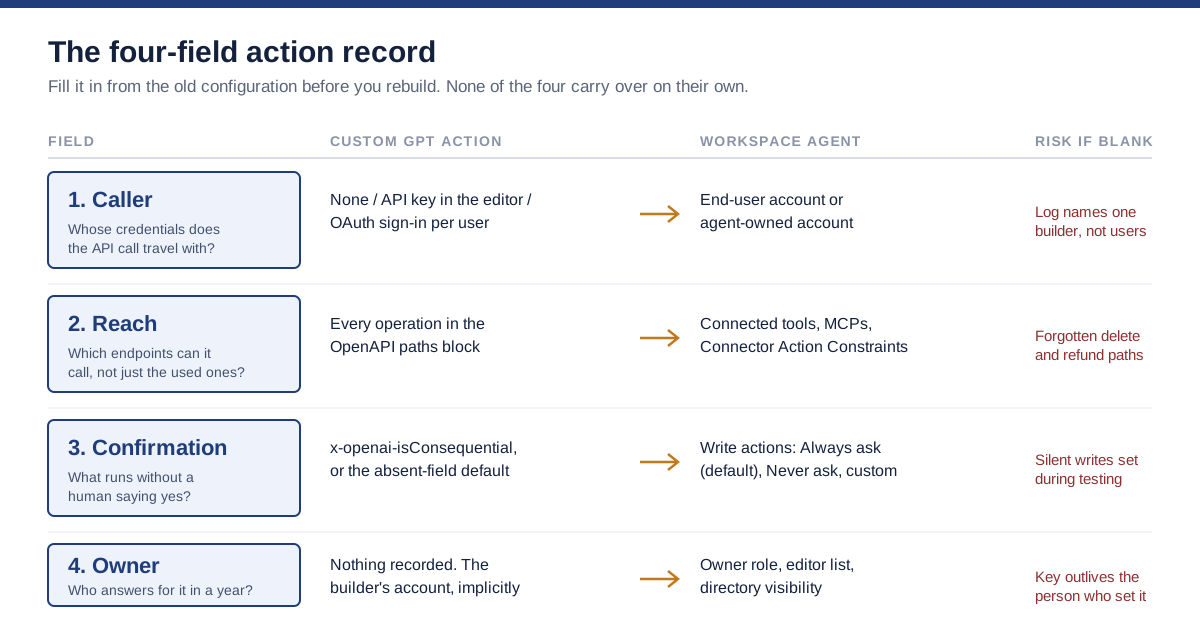
The four fields a Custom GPT Action carried implicitly, and where each one has to be re-declared after migration.
One disclosure before we start. We have not run an enterprise-scale Custom GPT Action migration ourselves, and this article contains no first-hand timing or measurement from one. Everything below is built from OpenAI's own published documentation and launch material, practitioner reports on public forums, and standards work on agent authorization. Where a number would have to come from a migration we did not run, we say so rather than estimate.
What a Custom GPT Action actually is
A Custom GPT Action is a described API call that ChatGPT is allowed to make on your behalf. OpenAI's developer documentation puts it plainly: GPT Actions "empower ChatGPT users to interact with external applications via RESTful APIs calls outside of ChatGPT simply by using natural language," and "at their core, GPT Actions leverage Function Calling to execute API calls" (OpenAI, GPT Actions). You supply an OpenAPI schema; the model reads the endpoint descriptions and decides when a user's sentence should become a request.
That is the whole mechanism, and its simplicity is why so many of them exist. Two months after GPTs launched, OpenAI reported that "users have already created over 3 million custom versions of ChatGPT" (OpenAI, Introducing the GPT Store, January 2024). A large fraction of those were toys. A meaningful fraction were not: a GPT wired to a ticketing system, a GPT that queried a warehouse, a GPT that posted into a CRM.
Three things get configured when you build one, and only the first is visible in the schema file.
The schema. Paths, operations, parameters, and per-operation descriptions. The descriptions matter more than people expect. They are the instructions the model uses to pick an operation, which means a vague description is a functional defect, not a documentation one.
The authentication. OpenAI supports three modes. No authentication, "for applications where users can send requests directly to your API without needing an API key or signing in with OAuth." API key, entered by the builder in the GPT editor: "We allow API key authentication through the GPT editor UI. We encrypt the secret key when we store it in our database to keep your API key secure." And OAuth: "Actions allow OAuth sign in for each user," after which "each time a user makes a request to the action, the user's token will be passed in the Authorization header" (OpenAI, GPT Actions authentication).
The consequence flag. A per-operation extension in the schema, x-openai-isConsequential, that governs whether ChatGPT asks before it acts. OpenAI's production notes are exact: if the field is true, ChatGPT treats the operation as "must always prompt the user for confirmation before running"; if it is false, ChatGPT shows the "always allow button"; and "if the field isn't present, ChatGPT defaults all GET operations to false and all other operations to true" (OpenAI, Production notes on GPT Actions).
Read those three together and the shape of the risk is obvious. A Custom GPT Action is a credential, a set of reachable endpoints, and a default about when a human is consulted. It is an access grant with a chat window attached.
What changed in April 2026, stated precisely
On 22 April 2026 OpenAI introduced workspace agents and described them in one sentence: "Workspace agents are an evolution of GPTs" (OpenAI, Introducing workspace agents in ChatGPT). They are Codex-powered, run in the cloud, can be scheduled or triggered by API, can be deployed into Slack, and are available in research preview on Business, Enterprise, Edu and Teachers plans.
Precision matters here, because a lot of coverage of the custom GPT deprecation has run ahead of what OpenAI actually published. The launch post's editor's note says: "GPTs will remain available while teams test workspace agents with their workflows. Soon, we'll make it easy to convert GPTs into workspace agents." That is a continuity statement, not an obituary.
The deprecation language comes from reporting around the launch rather than from the announcement page. VentureBeat's Carl Franzen wrote on the day that "OpenAI says it is deprecating the custom GPT standard for organizations in a yet-to-be determined future date, and will require Business, Enterprise, Edu and Teachers users to update their GPTs to be new workspace agents," adding that individuals who built Custom GPTs can keep using them for the foreseeable future (VentureBeat, 22 April 2026).
So the honest status, as of this writing:
| Question | Answer, as documented |
|---|---|
| Are Custom GPT Actions switched off? | No. GPTs remain available. |
| Is a shutdown date published? | No. Reporting describes a "yet-to-be determined future date". |
| Who is affected? | Business, Enterprise, Edu and Teachers plans. |
| What about individual Plus/Pro users? | Reported as unaffected for the foreseeable future. |
| Is there a conversion tool? | OpenAI says it will "soon" make conversion easy. Not shipped at the time of writing. |
| Is the replacement generally available? | Research preview; off by default at launch for ChatGPT Enterprise workspaces pending admin enablement. |
Two other constraints from the same reporting are worth writing on the whiteboard before anyone plans a timeline: workspace agents were free only until 6 May 2026, after which credit-based pricing began, and they were not available at all to Enterprise customers using Enterprise Key Management.
The practical read is not "panic". It is that you have an unusual and probably temporary luxury: a forced inventory with no deadline attached to it yet. That is the best conditions anyone ever gets for cleaning up access.
The rebuild is the easy half
Here is the part that most migration advice skips. Every migration guide currently circulating says roughly the same thing: port the instructions, convert the knowledge files, rebuild the Actions, test in parallel, retire the GPT. All true, all mechanical, all achievable by the person who built the GPT in the first place.
None of it asks the question that made the action risky.
A Custom GPT Action carried authority through configuration that lived in three different places: the schema file, a text box in the GPT editor, and an OpenAI default that applied when a field was absent. Only the schema file is a document. The API key is a secret in someone else's database. The confirmation behaviour, if x-openai-isConsequential was never written, was a platform default nobody chose. And the owner was whoever happened to click Create.
When you rebuild that action inside a workspace agent, all three of those non-document facts get re-decided. They get re-decided by whoever runs the migration, at speed, in a builder UI, under deadline pressure, without a record of what the previous answer was. That is not a migration. That is a fresh grant of access wearing a migration's clothes.
This is the same failure pattern we described in our earlier analysis of how an AI assistant inherits your access: the tool does not have permissions of its own, it borrows a badge, and nobody writes down whose badge it borrowed. Custom GPT Actions made that borrowing explicit in a schema file, which was actually a small gift. The migration is where the gift gets thrown away.
The fix is unglamorous: write the four fields down before you touch anything.
The four-field action record
The four-field action record is a single row per action, filled in before the rebuild, from the old configuration. It is not a security framework and it does not replace a review. It exists so that the person rebuilding the action has to make each authority decision deliberately instead of inheriting it from a default.
| Field | The question it forces | Where the old answer lives | Where the new answer lives |
|---|---|---|---|
| Caller | Whose credentials does this API call travel with? | GPT editor authentication setting: none, API key, or OAuth | Workspace agent connection type: end-user account or agent-owned account |
| Reach | Which endpoints does the schema make callable, not just the ones we use? | The paths block of the OpenAPI schema | Connected tools, apps, custom MCPs, and Connector Action Constraints |
| Confirmation | What can run without a human saying yes? | x-openai-isConsequential per operation, or the platform default if absent | Write-action approval setting: Always ask, Never ask, or custom |
| Owner | Who answers for this in twelve months, and who can revoke it? | Nothing. The builder's account, implicitly | Agent Owner role, editor list, and directory visibility |
Four fields, four columns, one row per action. If you have forty actions, this is a morning's work for one person with access to the GPT editor, and it is the only artifact from the migration that will still be useful in a year.
Notice what the table exposes. Three of the four old answers were never written down anywhere a reviewer could read them, and the fourth, Owner, did not exist as a concept. That is why the migration keeps getting described as a rebuild: from the outside, there was nothing to migrate but a schema.
The rest of this article works through each field, then assembles them into a procedure and one complete worked example.
Field one: Caller, or whose credentials make the call
The Caller field records the identity your API sees when the action fires. Under Custom GPT Actions there were three possible answers, and they behave completely differently under audit.
No authentication. Your endpoint is open. The action is a convenience wrapper on a public API, or you have quietly published an internal endpoint to the internet. Record which one it is; the second case is a finding, not a configuration.
API key. The builder types a key into the GPT editor. OpenAI encrypts it at rest, which addresses storage but not attribution. Every user of that GPT makes calls that arrive at your API as the same principal — the builder's key. Your access log has one name in it, and that name belongs to a person who may not have run a single one of those requests. If sixty people use the GPT, your log says one.
OAuth. Each person signs in individually and "each time a user makes a request to the action, the user's token will be passed in the Authorization header" (OpenAI, GPT Actions authentication). Your API sees the actual human. Permissions are theirs. The audit trail names them.
That distinction was the very first thing builders asked about, and they asked in 2023. On OpenAI's developer forum in November of that year, a builder posting as barisozcelik opened a thread with the question "Is there a way for each user to use their own credentials for API calls?" (OpenAI Developer Community). It is a two-and-a-half-year-old thread about a product that is being replaced, and the question is still the load-bearing one.
Workspace agents keep the same fork and give it clearer names. OpenAI's help documentation describes two connection types: "End-user account - each person running the agent authenticates with their own account" and "Agent-owned account - the agent uses a shared connection, so people running the agent do not need to authenticate during the run." It then adds an instruction that should be read as a warning: "If you use an agent-owned account, use a service account when possible. Do not use a personal account unless you understand the risks. We recommend limiting access to only what the agent needs" (OpenAI Help Center, ChatGPT Workspace Agents).
Read that against the OWASP Foundation's guidance on LLM06:2025 Excessive Agency, which tells builders to "track user authorization and security scope to ensure actions taken on behalf of a user are executed on downstream systems in the context of that specific user" (OWASP GenAI Security Project). End-user account mode satisfies that directly. Agent-owned mode does not, and cannot — which is precisely why the service-account instruction exists. A service account can be scoped to the minimum; a personal account carries everything its owner can reach.
There is a real cost to choosing correctly, and it is worth naming rather than pretending away. Agent-owned connections exist because per-user authentication is friction, and friction is where adoption dies. The forum report we opened with is that friction failing loudly: an admin configured an agent-owned MCP connection specifically so members would not have to authenticate, and members got a "Disconnected" state with no way to fix it themselves (OpenAI Developer Community, 16 May 2026). Whichever way you go, expect a support conversation.
How to fill the field. Write one of four values: open, shared-key (builder: name), shared-service-account (account: name), or per-user-oauth. Then write the sentence that matters more than the value: when this action writes to a downstream system, the log will name ______. If the blank is a service account or a person who is not the requester, you have just discovered why your incident response will be slow.
Field two: Reach, or every endpoint the schema exposes
Reach is the field people get wrong most often, because they record what the action does rather than what it can do. Those are different, and the gap between them is the blast radius.
An OpenAPI schema pasted into the GPT editor makes every operation in its paths block available to the model. If you exported the schema from an existing internal service, that block probably contains operations nobody ever intended ChatGPT to have. The model chooses among them using the descriptions, and the model is agreeable. A prompt does not have to be malicious to reach an endpoint you forgot was in the file; it only has to be phrased in a way that matches a description you forgot was in the file.
OWASP names this pattern first among the causes of excessive agency: excessive functionality, where the agent can reach tools beyond its task scope, followed by excessive permissions on the downstream system and excessive autonomy in acting without a human. All three compound, and Reach is where the first one gets fixed cheaply.
How to fill the field. Open the schema. Count the operations. Write the count, then list the operations you actually rely on. For every operation on the difference, decide now: delete it from the schema, or write one sentence justifying why it stays. Do not carry an unjustified operation into the new build "to be safe" — that phrase means the opposite of what it says here.
Workspace agents change the mechanics of Reach in a way that is genuinely better and worth understanding before you rely on it. Instead of an arbitrary schema, agents connect to apps, tools and custom MCP servers, and builders can add Connector Action Constraints, which OpenAI describes as limits on "what an app or connector can do when an agent uses it" — for example allowing an email action to send only to recipients at a specific domain, or allowing an agent to read only from a specific Google Doc.
Read the caveat OpenAI publishes alongside it, though, because it is the sort of detail that decides whether a control is a control. "Connector Action Constraints govern what the agent can ask a connector to do. They do not filter or restrict the data a connector returns in response. For example, a builder could block an agent from searching email for the term 'confidential,' but the constraint would not prevent the connector from returning an email that contains that term through an otherwise permitted action" (OpenAI Help Center).
That is a request-side control, not a data-side one. It narrows what the agent asks for. It does nothing about what comes back. If your reason for allowing an agent near a mailbox was that you could stop it seeing certain content, the constraint does not do that job, and you need a different control — masking at the boundary, a filtered view of the source, or simply not connecting the source.
There is a second wrinkle specific to custom MCP servers, which is where most teams will land when they port a bespoke action rather than an off-the-shelf integration. An MCP server you stand up is your surface, with your tool list and your auth. The governance questions there are the ones we worked through in our analysis of MCP server security and connector governance — a vetted registry, action-level scoping, and brokered credentials rather than pasted ones. Porting an action to MCP does not by itself narrow anything; it moves the same decision to a place where you can enforce it properly, which is only an improvement if you then do.
Field three: Confirmation, or what runs without a human
Confirmation records which operations execute without anyone clicking yes. In the Custom GPT world this was determined by a single OpenAPI extension per operation — and, far more often, by the absence of one.
Recall the exact default: "if the field isn't present, ChatGPT defaults all GET operations to false and all other operations to true" (OpenAI, Production notes). Read literally, that is a sane default. Reads flow; writes ask. The problem is what happens next in real builds. A confirmation dialogue on every single write is irritating, and the fastest way to make it stop is to set x-openai-isConsequential: false, which restores the "always allow" button — after which one user clicks "always allow" once, and that write path is silent for them from then on.
So the field you are recording is not really "did the builder set the flag". It is "did anyone deliberately decide that this write should be silent, and if so, who". Nine times out of ten the honest answer is that nobody decided; the flag was flipped to stop the popup during testing and never flipped back.
How to fill the field. For each operation, write the HTTP method, the flag value (true, false, or absent), and the resulting behaviour. Then add a single word from this list describing the worst realistic outcome of that operation running unattended: noise, rework, money, data, or regulatory. Anything above rework with a silent write path is your migration's first ticket.
Workspace agents restate this control as a UI setting rather than a schema field, and the default is stricter: "By default, write actions for apps and connectors are set to Always ask during an agent run," with the option to set specific actions to Never ask or configure a custom approval policy. OpenAI's own note on the page is blunt: "Use write approvals carefully for workflows that can send, edit, post, or delete content."
Stricter defaults are good news, but they change the shape of the migration risk rather than removing it. Under Custom GPT Actions, a silent write was a line in a schema file — greppable, reviewable, visible in version control if you kept the schema in a repo. Under workspace agents, it is a toggle in a builder interface. Toggles are easier to change and much harder to review at scale, and the person who flips one is doing it in the middle of getting an agent to work.
The wider question of when an approval gate is a genuine control rather than a rubber stamp is one we have worked through separately, in our analysis of human-in-the-loop automation and when approval is actually control. The short version relevant here: a gate only controls something if the person at the gate can realistically say no, and a gate that fires forty times an hour cannot. OWASP's own recommendation is narrower and more usable than "add approvals" — it says to "utilise human-in-the-loop control to require a human to approve high-impact actions before they are taken." High-impact. Not all.
That is why the noise/rework/money/data/regulatory word in your record does real work. It tells you which small subset of operations deserves a gate that people will still respect in month three.
Field four: Owner, or who answers for it in a year
Owner is the field with no legacy value at all. Under Custom GPT Actions there was no owner concept beyond the account that built the GPT. If that person changed teams, the action kept running with their key. If they left the company, one of two things happened: the key was rotated during offboarding and the GPT quietly broke, or it was not, and an API key belonging to a former employee kept making authenticated calls into a production system.
Neither of those is exotic. Both are the direct consequence of a design where the identity of the automation is a person.
We have argued at length that agents need the same lifecycle metadata as staff, meaning an owner, a scope and an expiry, in our earlier piece on non-human identity: owner, scope and expiry for AI agents. The Custom GPT Action migration is the rare moment when that argument is not theoretical, because the platform now gives you somewhere to put the answer.
Workspace agents have an explicit ownership model. OpenAI's documentation describes three access levels. Can chat, Can edit, and Owner, where Owner has "full editing access, permission management, workspace distribution controls, and deletion" — plus version history, group-based sharing that follows group membership, and a set of owner-only controls that editors cannot touch, including channel setup, directory visibility, ownership transfer and deletion. It also notes a dependency that matters for the Owner field: "Some dependencies remain associated with the agent owner. For example, collaborators may only attach certain connector accounts or shared skills that belong to the owner."
That last sentence is the leaver problem in a single line. Editing is shared; some connections are not. If the owner leaves, an agent with edit-shared configuration can still be holding a connection nobody else can reattach.
How to fill the field. Write three things: a named human who owns the action, a named backup, and a review date. Then run the test we use for anything that acts on a company's behalf — if this person resigned tomorrow, what breaks, who notices, and how long until someone can fix it? If the answer to "who notices" is nobody, the action should not be migrated at all; it should be switched off and rebuilt only if someone asks.
Before you start: prerequisites
You cannot fill in the record without a specific set of accesses, and discovering that halfway through is how a one-morning job becomes a two-week job. Assemble these first.
| Prerequisite | Why you need it | Who usually has it |
|---|---|---|
| Admin view of workspace GPTs | To enumerate what exists, including GPTs shared by link rather than published | ChatGPT workspace admin |
| The OpenAPI schema files themselves | Reach cannot be assessed from the GPT editor summary | Whoever built each GPT |
| Access-log visibility on the target APIs | To see what actually fired, versus what was configured | API or platform team |
| The credential inventory | To match each API key in a GPT editor to a real secret and its scope | Security or IT |
| A decision-maker for scope reductions | Someone who can say "delete that endpoint" without a change board | Engineering lead |
| Workspace agents enabled | They are off by default at launch for Enterprise workspaces | ChatGPT workspace admin |
| Confirmation you are not on EKM | Reporting indicates workspace agents were unavailable to Enterprise customers using Enterprise Key Management | Security architecture |
One prerequisite is deliberately not on that list: the conversion tool. OpenAI has said it will "soon" make it easy to convert GPTs into workspace agents. Building your plan around an unshipped tool means your plan has no dates in it. Build the record now; the tool, when it arrives, will make the rebuild faster and will not fill in a single one of the four fields for you.
The migration procedure, in nine steps
This is deliberately boring and deliberately front-loads the recording. The rebuild sits at step six, after four steps of inventory, because every hour spent on the record removes a decision from the person under deadline pressure at step six.
Step 1. Enumerate. List every GPT in the workspace, including link-shared ones. For each, note whether it has actions at all. Most will not. The ones that do are your entire scope; the rest are prompt templates and can be handled casually.
Step 2. Pull the schemas. For each GPT with actions, retrieve the OpenAPI schema and store it in a repository. Do this even for actions you plan to delete. The schema is the only durable evidence of what the action could reach, and once the GPT is gone, so is it.
Step 3. Fill the four-field record. One row per action. Caller, Reach, Confirmation, Owner, as described above. Resist the urge to fix anything yet — recording and remediating in the same pass produces a half-remediated inventory and no record.
Step 4. Reconcile against reality. Take the Reach column to the API team and compare it with access logs. You are looking for two things: operations that are exposed but never called (delete candidates), and calls from the action's principal that nobody can account for (investigate before migrating anything).
Step 5. Triage. Sort every action into one of four outcomes: retire (nobody uses it), replace (a first-party connector now does this properly), rebuild as agent (genuine multi-step work with a real owner), or leave (an individual's personal GPT on a plan that is not affected). Expect retire and replace to cover more than half. That is a success, not a shortfall.
Step 6. Rebuild, one at a time, from the record. In the agent builder, set the connection type from the Caller field, add only the tools in the reduced Reach list, set write approvals from the Confirmation field, and assign the Owner. If a field in the record says something you are not willing to reproduce, that is the record doing its job — fix the grant, do not copy it.
Step 7. Run in parallel. Keep the GPT and the agent live together for a defined window with the same users. Compare outputs on real requests. This is also when you find out whether an agent-owned connection behaves for members the way it behaves for you.
Step 8. Cut over and revoke. Switch users to the agent, then rotate or revoke the old credential. Credential rotation is the only part of this procedure that has a hard, verifiable finish line. Revocation is the step that gets skipped, and skipping it means the old path is still live and now unmonitored. If the old key cannot be revoked because something else uses it, that is a finding worth more than the migration itself.
Step 9. Set the review date. Put the record somewhere a reviewer will look, with the review date from the Owner field. An inventory nobody re-opens decays into fiction in about two quarters.
Steps 1 through 5 are the ones nobody schedules. They are also the ones that make step 6 a fifteen-minute job instead of an argument.
A worked example: one lookup action, recorded end to end
Here is a single action taken through the whole record. The scenario below is constructed to show the artifact, not drawn from a client engagement. No company, person, or number in it is real, and it is written the way it is because a filled-in example teaches the format better than an empty template does.
The action as it existed. A GPT called "Order Helper" used by a support team. It had one action pointed at an internal orders service. The schema was exported wholesale from the service's existing API documentation. Authentication was an API key the team lead pasted into the GPT editor. No x-openai-isConsequential values were set anywhere in the file.
The record, filled in:
| Field | Recorded value | What the value revealed |
|---|---|---|
| Caller | shared-key (builder: team lead) | Every one of roughly forty support agents' lookups arrives at the orders service as the team lead. The access log cannot distinguish them. |
| Reach | 14 operations in the schema; 2 in actual use (GET /orders/{id}, GET /orders/search) | The other 12 include POST /orders/{id}/refund and DELETE /orders/{id}. Neither was ever intended to be reachable from a chat window. |
| Confirmation | absent on all 14 | The two reads are silent, correctly. The refund and delete operations default to true and therefore prompt — which is the only reason this has not already gone wrong. |
| Owner | Not recorded anywhere; de facto the team lead | The team lead moved to a different team four months ago. The key still works. |
What the record changes about the migration. Without it, the rebuild is "recreate Order Helper as an agent, paste the same schema, add the same key". With it, four decisions become unavoidable:
- Caller. Reads by forty people through one identity is a reporting problem and an incident-response problem. The rebuild uses an end-user account connection if the orders service supports per-user auth; if it does not, it uses a dedicated service account scoped to read-only, and the team accepts that the log will name the service account and correlates through ChatGPT's own analytics instead.
- Reach. The schema is cut from 14 operations to 2 before it goes anywhere near the new build. The refund and delete paths do not get a confirmation dialogue; they get removed.
- Confirmation. With writes gone, there is nothing left to gate. The record's outcome word for the remaining operations is
noise, and the correct setting is no gate at all. This is the case people forget exists: the right answer is sometimes fewer approvals, arrived at by removing capability rather than adding friction. - Owner. A current team lead is named as owner, a deputy is named as backup, and the review date is set six months out. The former lead's API key is revoked at cut-over — which, in this scenario, is the single most valuable outcome of the entire exercise and had nothing to do with agents.
That is the whole artifact. Four rows, one paragraph of consequence each. Multiply by the number of actions you actually have, which after step 5's triage is usually far smaller than the number you started with.
Mapping the old configuration onto the new one
For the rebuild itself, this is the translation table. Every row is drawn from OpenAI's published documentation for both products.
| Custom GPT Action setting | Workspace agent equivalent | What genuinely changes |
|---|---|---|
| Authentication: none | Custom MCP with no auth, or a public tool | Same exposure; now visible to admins as a workspace app |
| Authentication: API key in the GPT editor | Agent-owned account connection | OpenAI now explicitly recommends a service account over a personal one |
| Authentication: OAuth per user | End-user account connection | Same model, clearer name; each person runs as themselves |
OpenAPI paths block | Connected apps, tools, and custom MCPs | Reach is now a list you assemble, not a file you paste |
| No endpoint-level restriction | Connector Action Constraints | Request-side only; does not filter returned data |
x-openai-isConsequential: true | Write action set to Always ask (the default) | Now a default rather than an opt-in |
x-openai-isConsequential: false | Write action set to Never ask | Now an explicit choice in the UI |
| Field absent | Always ask for writes | Stricter than the old absent-field default for non-GET |
| Builder account as de facto owner | Owner role, plus Can edit and Can chat | Ownership exists as a concept for the first time |
| No versioning | Version history with republish of earlier versions | Configuration change becomes reviewable |
| No usage data | Agent analytics: unique users and runs over time | Usage becomes measurable |
| No admin record of configuration | Compliance API coverage of configuration, updates and runs | Admin-side record now exists |
The last three rows are the reason a migration is worth doing on its merits rather than under duress. OpenAI's launch material states that the Compliance API "gives admins visibility into every agent's configuration, updates, and runs, so they can monitor and control how agents are being built and used," and that admins can suspend agents (OpenAI, Introducing workspace agents). None of that existed for a Custom GPT Action. If you have been unable to answer "what did our AI actually do" — the question we examined in our work on observability and audit trails that prove agent actions — this migration is the first time the platform gives you a real answer.
The record you build during the migration also happens to be the artifact governance frameworks keep asking for. The US National Institute of Standards and Technology built its AI Risk Management Framework, organised around the functions Govern, Map, Measure and Manage, "to better manage risks to individuals, organizations, and society associated with artificial intelligence (AI)" (NIST) — and every one of those functions starts from knowing what exists. The EU AI Act is more literal still: Article 12 requires that high-risk systems "shall technically allow for the automatic recording of events (logs) over the lifetime of the system" (EU AI Act, Article 12). A four-field record is not compliance evidence on its own. It is the inventory without which none of the evidence can be assembled.
One caution about the API trigger path, since teams reach for it immediately: OpenAI's help documentation notes that the API "queues the agent run and returns 202 Accepted with no response body. It does not return a run ID, and the agent's response cannot currently be retrieved through the API." If you were planning to chain agent runs into an existing pipeline and read the result back, that does not work today.
Eight mistakes that show up in the first month
These are the failure patterns the four-field record is designed to prevent, stated as the mistakes themselves so they are recognisable when you are making one.
1. Migrating everything. The instinct is to preserve. Most Custom GPTs with actions are used by two people occasionally, and several are used by nobody. Triage first; a retired action is a migrated action that costs nothing to run and cannot be exploited.
2. Copying the schema wholesale. The paths block was over-broad the first time. Copying it forward is the single decision most likely to produce an incident, because the new runtime is more capable and more autonomous than the old one.
3. Choosing agent-owned by default because it is easier. It is easier, and for some workflows it is right. A scheduled report that runs at 6am has no user to authenticate. But it should be the answer to a question, not the path of least resistance. When it is chosen, use a service account, as OpenAI's own documentation instructs.
4. Reusing a personal account as the shared connection. This is the specific case OpenAI warns about. A personal account brings everything that person can reach, to every user of the agent, permanently. It is the exact inverse of least privilege: the agent inherits a human's full grant instead of the minimum its task needs.
5. Treating Connector Action Constraints as data controls. They restrict what the agent may ask for, not what comes back. Building a data-protection story on them will not survive contact with a security review.
6. Setting Never ask during testing and forgetting. The exact analogue of x-openai-isConsequential: false, with the added problem that a toggle leaves no diff. If you relax an approval to get through testing, put the reversal in the same ticket.
7. Not revoking the old credential. Cutting over without rotating the key leaves a live, unmonitored path into the same system. This is the step that turns a migration into a dormant risk.
8. Assuming the deprecation has a date. It does not, publicly. Teams both over-react (emergency migration of forty GPTs in a fortnight) and under-react (nothing happens for a year). The record is the middle path: cheap, durable, and useful whichever way the timeline goes.
If you are staying on Custom GPT Actions for now
Plenty of readers are on individual plans, or on a team plan where nothing has been announced, or have simply decided to wait for the conversion tool. Waiting is defensible. Waiting without the record is not, because the four fields are worth filling in even if you never migrate — they are a description of an access grant you already made.
Three things are worth doing this quarter regardless of your migration timeline.
Audit the paths block of every live action. This costs an hour and is the highest-value hour in this article. You are looking for operations that are reachable and should not be. Delete them from the schema, republish, done.
Write x-openai-isConsequential explicitly on every operation, including the ones where you agree with the default. An explicit false on a read is a decision someone made. An absent field is a decision nobody made that happens to match. The two look identical at runtime and completely different in a review.
Match every API key in a GPT editor to a real secret with a real scope. For each one, answer whether it is a personal credential, whether it is over-scoped for what the action does, and whether it would be caught by your offboarding process. If a key belongs to someone who has left, you have found something more urgent than a migration.
None of that depends on OpenAI's roadmap. All of it survives whatever the roadmap turns out to be.
What the platform still does not give you
Being straight about the gaps is more useful than a clean summary, so here is where this is genuinely uncertain and where the new controls stop.
No published shutdown date. Everything about timeline in this article is conditional. OpenAI has said GPTs remain available and conversion is coming; reporting says organizational deprecation is planned for an undetermined date. If you need a date for a compliance plan, you do not have one, and you should say so in the plan rather than inventing a quarter.
The conversion tool is unshipped and its behaviour is unknown. Whether it carries authentication settings across at all, and what it does with an over-broad schema, is not documented because it does not exist yet. It is entirely possible that a one-click conversion faithfully reproduces an over-permissive action, which would make the record more valuable rather than less.
Research preview is not a stability guarantee. Workspace agents launched in research preview, off by default for Enterprise, and unavailable under Enterprise Key Management. Any of those conditions can change in either direction.
The controls are per-agent, not per-organisation. Connector Action Constraints, write-approval settings and connection types are configured by the person building each agent. There is admin-level control over which tools and actions user groups can access, and the Compliance API records configuration — but the day-to-day scoping decisions live with builders. That is a distribution of authority, and whether it holds depends on how many builders you have.
Prompt injection defences are asserted, not proven. OpenAI states that built-in safeguards help agents stay aligned when they encounter misleading external content. That is a reasonable claim from a serious team; it is not evidence, and an agent with write access to a system of record is exactly the target that will be probed.
We have not run this migration. As disclosed at the top, this article carries no first-hand timing, cost or defect data from an enterprise migration we performed. The nine-step procedure is derived from documented platform behaviour and from what has broken in comparable connector rollouts, not from a stopwatch. If you run it, your step-3 duration is the number we would most like to be able to publish.
Two well-known sources are also absent for a reason worth stating: we could not retrieve OpenAI's community threads through Reddit or find enterprise survey data on GPT Action counts from a research firm that was reachable and current, so nothing in this article is sourced from either. The practitioner voices here come from OpenAI's own developer forum and Hacker News, both of which skew technical relative to the population of people who actually built Custom GPTs.
Where LeapForce fits
Once a workflow is handed to an agent rather than a person, the durable questions stop being about which builder you use and become the four in the record: who does it authenticate as, what can it reach, what may it do unattended, and who owns it when the builder leaves. That layer is what LeapForce builds — Connectors as a registry IT vets once with action-level scoping and brokered credentials rather than pasted keys, Access and Identity that treats a non-human identity as first-class with an owner, a scope and an expiry, and a gateway rollout we describe as Observe first. Enforce second. Optimize third. — see the current build status per capability on the AI Gateway page, since some of it is still in development and we label it that way deliberately. We do not migrate your Custom GPTs and we are not a replacement for ChatGPT workspace agents; the four-field record above works entirely without us, which is why it is written that way.
Frequently asked questions
Nothing has been switched off. Custom GPT Actions still function as documented: an OpenAPI schema plus an authentication choice that lets a Custom GPT call an external API. What changed is that on 22 April 2026 OpenAI introduced workspace agents and called them "an evolution of GPTs", and reporting from the launch says the custom GPT standard will be deprecated for organizations at an undetermined future date. OpenAI's own announcement says GPTs remain available and that conversion will be made easy "soon".
Not yet, and the answer depends on your plan. Reporting around the April 2026 launch states that Business, Enterprise, Edu and Teachers users will be required to update their GPTs to workspace agents at a date that has not been set, while individuals on personal plans can continue using Custom GPTs for the foreseeable future. No shutdown date has been published by OpenAI. Treat the custom GPT deprecation as directional and undated: real enough to plan for, not urgent enough to justify an emergency migration.
Yes. API integration with ChatGPT through a Custom GPT Action works exactly as it did: you supply an OpenAPI schema, choose no authentication, an API key, or OAuth, and optionally mark operations with x-openai-isConsequential to control confirmation prompts. If you are building something new on a business plan, though, building it as a workspace agent is the better bet, because that is where the ownership model, version history and admin visibility live.
For teams already on ChatGPT Business, Enterprise, Edu or Teachers plans, workspace agents are the direct successor and the lowest-friction option: same platform, better governance, explicit ownership. For work that needs to run outside ChatGPT, or that has to be portable across model vendors, an MCP server is the more durable target, because it makes the tool surface yours rather than the chat product's. Third-party no-code AI automation platforms are a reasonable answer when the workflow is mostly integration glue with little judgement in it. The wrong answer is choosing on features alone; choose on which option lets you answer the Caller and Owner questions.
Not automatically, and this is the single most important thing to record before migrating. In Custom GPT Actions the choice was none, API key, or OAuth. In workspace agents it is an end-user account connection, where each person authenticates as themselves, or an agent-owned account connection using one shared connection. OpenAI's help documentation recommends a service account for the agent-owned case and warns against using a personal account. A conversion tool has been promised but not shipped, so at the time of writing every connection is re-established by hand.
There is no licence cost to the migration itself, but three cost lines are real. First, workspace agents moved to credit-based pricing on 6 May 2026, so runtime is metered where a GPT conversation was not. Second, the inventory work in steps 1 to 5 is people-time: filling one record per action, plus a reconciliation session with whoever owns the target APIs. Third, any scope reduction you discover may require work on the downstream service, such as creating a scoped service account that does not exist yet. We have not run this migration ourselves and are not going to publish an estimate we did not measure.
The honest framing is that the rebuild is fast and the inventory is not. Recording the four fields is bounded by how many actions you have and how quickly you can get the schema files. Reconciling reach against access logs depends entirely on the API team's availability. The rebuild for a single triaged action is short; the parallel-run window is a policy choice, and running both systems for at least one full business cycle of the workflow is the pattern that catches problems. Any plan that quotes a total duration before step 1 is complete is guessing.
Split it by field. The builder owns Reach and the rebuild, because only they know what the action was for. Security owns Caller, because credential and identity decisions should not be made by the person under deadline. IT or the workspace admin owns enumeration and enablement, since workspace agents are off by default for Enterprise and only admins can see link-shared GPTs. Owner is a management decision, not a technical one — someone has to agree to be named. Migrations that assign all four to the builder reproduce the original problem exactly.
It is an OpenAPI extension used in Custom GPT Actions. Set to true, ChatGPT treats the operation as one that must always prompt for confirmation before running and hides the "always allow" button. Set to false, the "always allow" button appears. If it is absent, ChatGPT defaults GET operations to false and everything else to true. You still need it for any Custom GPT Action you are keeping — and you should set it explicitly even where you agree with the default, so a reviewer can tell a decision from an omission. Workspace agents replace it with a write-action approval setting that defaults to Always ask.
Only from your own side, and only as well as the Caller field allows. Your API's access log is the record, and if the action used a single API key, every call in that log carries the builder's identity rather than the requester's. With OAuth, each call carries the actual user's token and the log names them. This is the gap workspace agents close: OpenAI states that its Compliance API gives admins visibility into every agent's configuration, updates and runs, and the agent analytics view reports unique users and run counts. Auditability is a reason to migrate on its own merits.
It is a genuine option and often the better one for anything you want to survive a platform change, because the tool surface becomes yours rather than a chat product's. Workspace agents can connect to custom MCP servers, so this is not an either/or. The trade is effort and responsibility: you now run an authenticated service with its own scoping and its own attack surface, which is a real engineering commitment rather than a schema paste. Choose MCP when the same tools need to be reachable from more than one AI surface, or when you need enforcement your vendor does not offer.
The three causes we see named most often in public accounts are not technical ones. Nobody can produce a complete list of what exists, because link-shared GPTs are invisible without admin access. Nobody owns the credential decision, so the migration stops at the first action whose API key belongs to a person who has left. And the pilot is scoped as "prove the agent works" rather than "prove we can revoke it", so it succeeds on the demo and produces nothing a security reviewer can sign. Filling the four-field record first removes the first two and reframes the third.
Ready to Govern Your AI?
Talk to LeapForce — one controlled layer for every AI tool, connector, model, and agent.
Comments