
Customer experience automation is software that fires messages and actions at a customer automatically, based on what that customer did, across every stage of the relationship. The part nobody owns is the sum: five or six systems each send inside their own limits, and no one counts the weekly total per person.
Our position is that the useful governance object in a customer experience automation stack is not the journey map, the segmentation model, or the chatbot. It is a register of every automated trigger that can reach a human being, with a channel, a class, a cap and a named owner on each row. The reason it does not exist in most companies is structural, and one Hacker News commenter described the structure exactly while talking about unsubscribes: "A user unsubscribes. This creates an entry in one specific system" (lwf, Hacker News, July 2019), after which it has to be copied somewhere central and synced back out, by a pipeline that in his telling ran every few days and often broke. Frequency is the same shape of problem as suppression, minus even the pipeline.
The short answer: Customer experience automation is behaviour-triggered messaging across the whole lifecycle; govern it with a send register — every trigger listed with its system, channel, class, cap, exemption and owner — because each platform caps only its own sends and the per-person weekly total is nobody's number.
Last updated: July 31, 2026.
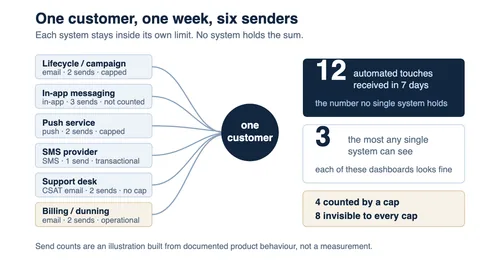
Twelve automated touches in seven days. The most any single platform can see is three.
We have not run this audit inside a customer's stack, and nothing below is presented as a measurement we took. Every platform behaviour described here comes from the vendor's own current documentation, fetched on July 31, 2026 and linked at the claim, so you can check each line against your own configuration rather than take our word for it.
Customer experience automation, defined without the brochure
Customer experience automation (CXA) is the use of behaviour triggers, customer data and automated delivery to run interactions across the entire customer lifecycle rather than one funnel stage. In practice that means a set of rules of the form when this person does X, send Y — spread across an onboarding flow, a lifecycle campaign tool, an in-app messaging layer, a push service, an SMS provider and a support desk, each configured by a different team.
What it is not matters more than what it is, because three adjacent categories get used as synonyms:
| Category | What it is built around | What it does not do |
|---|---|---|
| CRM | The record of the customer | Does not originate outbound sends on its own |
| Marketing automation | The acquisition funnel and campaign calendar | Stops caring after the deal closes |
| Customer service automation | The inbound ticket and its resolution | Sees only conversations the customer started |
| Customer experience automation | The whole lifecycle, triggered by behaviour | Does not, by itself, count what the other three sent |
That last cell is the whole subject of this article. CXA is usually sold as the layer that unifies the others, the one that finally makes the customer journey a single object rather than four disconnected ones. It unifies the data about a customer far more often than it unifies the outbound volume reaching them, and those are different problems with different owners.
For a broader strategic view of where automated customer experience is heading, McKinsey published a recorded discussion on agentic AI in customer operations that is worth the twenty-five minutes:

The reason the volume problem hides is that every individual decision is defensible. The onboarding email is genuinely useful. The push notification is genuinely timely. The satisfaction survey is genuinely good practice. Nobody in the chain is wrong, and the customer still receives a week that looks like harassment.
The five senders: who is messaging your customer this week
Most stacks have five distinct systems capable of firing a message at a person without a human pressing send. They are rarely listed together, because each one was bought by a different function for a different reason. Each also owns a slice of the customer journey, which is why the whole set of touchpoints rarely gets drawn on one page.
| Sender | Typical owner | Channel | Trigger style |
|---|---|---|---|
| Lifecycle / campaign platform | Marketing or growth | Email, SMS | Segment membership, event, flow step |
| In-app messaging or product tours | Product | In-app modal, banner, tooltip | Feature release, usage milestone, session count |
| Mobile push service | Mobile or growth engineering | Push notification | Event, dormancy, re-engagement window |
| SMS / conversational provider | Marketing, sometimes support | SMS, WhatsApp | Delivery status, alert, promotion |
| Support desk automation | Support operations | Email, in-widget | Ticket state change, satisfaction survey |
There is usually a sixth that nobody counts at all: billing and dunning. Invoices, card-expiry warnings, failed-payment retries and renewal notices are automated, behaviour-triggered messages to a human being, and they are almost never in scope for any frequency discussion because finance owns them and they are classed as operational.
The support desk one is the quietest and the most instructive, because it fires without any marketer's involvement. In Zendesk, the customer satisfaction survey is sent by a default automation "24 hours after the customer's ticket has been solved (not closed)", per Zendesk's own documentation on customising CSAT timing. Solve three tickets for one person in a week and that is three additional emails that no marketing frequency cap has ever heard of.
A worked week for one account admin
Take a single person at a mid-market B2B customer, in one ordinary seven-day window. She opened two support tickets, hit an activation milestone, and her company's card expired.
| Day | Sender | Channel | Message | Counted by a cap? |
|---|---|---|---|---|
| Mon | Lifecycle platform | Onboarding flow, day-3 step | Yes | |
| Mon | In-app messaging | In-app | New-feature announcement | No |
| Tue | Push service | Push | Milestone congratulation | Yes |
| Tue | Support desk | CSAT survey, ticket 1 | No | |
| Wed | In-app messaging | In-app | Product tour resume prompt | No |
| Wed | Billing | Card expiring notice | No | |
| Thu | Lifecycle platform | Product announcement campaign | Yes | |
| Thu | SMS provider | SMS | "Your report is ready", classed transactional | No |
| Fri | Push service | Push | Dormant-feature nudge | Yes |
| Fri | Support desk | CSAT survey, ticket 2 | No | |
| Sat | In-app messaging | In-app | Upgrade prompt | No |
| Sat | Billing | Payment retry failed | No |
Twelve automated touches in seven days. Four of them were counted by any frequency cap anywhere in the stack; eight were invisible to every cap the company has configured. And the largest number any single system can report is three. That is the in-app layer, which counts nothing toward caps in the first place. Every platform's dashboard shows a restrained, well-behaved programme. The person's inbox and lock screen show something else.
That arithmetic is the argument. You do not need a benchmark study to know twelve is a lot. You need someone whose job is to produce the number twelve.
What a frequency cap actually counts, platform by platform
Frequency capping is not missing from these products. It is present, well documented, and scoped in ways that make a cross-system total structurally impossible. Four vendors' current documentation, read side by side, shows the same shape of boundary.
| Platform | Scope of the cap | What sits outside it |
|---|---|---|
| Braze | Up to 10 rules per workspace, each on a chosen channel or across all of them, max window 30 days | "In-app messages and Content Cards are not counted as or toward caps on campaigns or Canvas components" |
| Klaviyo | Smart Sending window, email default 16 hours, SMS default 24 hours | "All channels have separate Smart Sending windows" |
| Microsoft Dynamics 365 Customer Insights - Journeys | Per-channel caps on email, text and push, rolling 24h / 7d / 30d | "only commercial messages will be capped; transactional messages are always excluded" |
| Pushwoosh | "Global capping limits marketing messages" across push, email, in-app, SMS and WhatsApp | "Transactional messages are not subject to frequency capping" |
Read the right-hand column as a list of the ways a message legally escapes counting. This is what omnichannel usually means in practice: the same person reachable on five channels, and counters that mostly do not compare notes.
Braze's rate limiting and frequency capping documentation goes further than Klaviyo's or Microsoft's inside its own boundary. You can add up to 10 rules per workspace, a rule's time frame can be "measured in minutes, days, or weeks (seven days), with a maximum duration of 30 days", and a rule can target "push, email, SMS, webhook, WhatsApp, LINE, or any of those channels" — that last option being a genuine all-channel cap, which neither Klaviyo nor Microsoft offers. The documentation's own worked example describes a multichannel delivery counting once toward the push rule, once toward the email rule and once toward the all-channel rule.
Two details limit it anyway. Global frequency capping "is scheduled based on the user's time zone, and is calculated by calendar days, not 24-hour periods", so two messages twenty minutes apart that straddle local midnight both satisfy a one-per-day rule. And the all-channel rule is all-channel within Braze. It has no visibility of the support desk, the billing system or a second messaging vendor, which is the point of this article rather than a criticism of the product.
Klaviyo's Smart Sending documentation is even more explicit about the boundary: the email default window is 16 hours, the SMS default is 24, and "All channels have separate Smart Sending windows." A customer can therefore receive an email and an SMS within the same hour with both windows fully respected, because the two windows never speak to each other.
Microsoft's frequency cap documentation for Customer Insights - Journeys adds a detail worth copying regardless of your stack: when a message is blocked by the cap, "the user will be able to continue down the journey", and blocked recipients appear in message analytics and can be exported to a CSV. That export is the closest thing any of these products gives you to evidence that a ceiling was enforced. Microsoft also warns that "Messages sent before a frequency cap was added for a particular channel will not be counted towards the cap for future messages", so the day you switch capping on, your counters start at zero regardless of what the customer has already received.
Pushwoosh's global frequency capping documentation is the one that covers in-app alongside push, email, SMS and WhatsApp, which makes it the broadest of the four — and it still carves out transactional messages entirely.
None of these are defects. Each vendor is capping what it can see, which is its own sends. The defect is organisational: five vendors each honestly capping their own share, and no row anywhere holding the sum.
The exemption is the real control, and the sender holds it
Every cap in the table above has a documented way around it, and in each case the person who decides to use it is the person who wants the message to go out.
There are four escape routes, and they compound:
- Different system. A cap in Braze knows nothing about a send from Klaviyo. Two platforms, two independent budgets.
- Different channel. Klaviyo's windows are per channel by design, and Microsoft's caps are set per channel. In a stack built on either of those, one message on each of three channels breaches no cap at all. Braze and Pushwoosh are the exceptions: both can cap across their own channels, which closes this route inside their own boundary and nowhere else.
- Message class. Mark it transactional and it leaves the counted population. Pushwoosh describes this as an API-level choice: set
message_typeoremail_typeto transactional. Microsoft states plainly that transactional messages "are always excluded". - Per-campaign override. Braze's documentation describes toggling frequency capping off during campaign scheduling, and then separately choosing whether that campaign still counts toward future caps. A single campaign can therefore both ignore the ceiling and leave no trace in the counter.
Route 3 is the one that turns a technical setting into a governance question. Nothing in the documentation for these four products describes a check on whether a message labelled transactional actually is one. The label is an assertion made by whoever built the send, and it is the only thing standing between a "your report is ready" notification with an upsell in the footer and the frequency cap it just bypassed.
In our earlier analysis of the marketing agent's three keys, we argued that an AI agent doing marketing work needs its Voice, its List and its Wallet governed separately — what it may say, who it may contact, what it may spend. That piece governs one agent's permissions. This one is about the quantity that no single agent's permissions can bound: the total volume arriving at one person from five systems, none of which is misbehaving by its own rules. You can grant every agent a correct List and still carpet-bomb a customer.
So the honest description of the current state is not "we lack frequency capping". It is: we have four frequency caps, four sets of exemptions, and no register of who granted which exemption to whom.
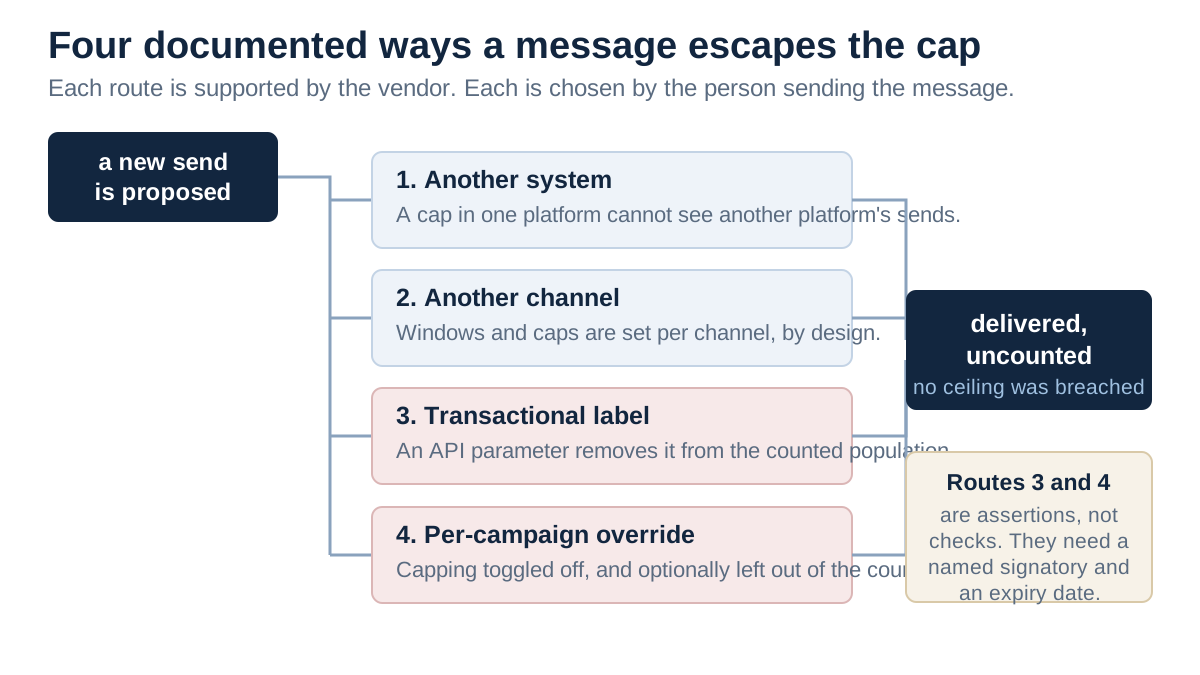
The four exemption routes. Each is documented, supported and set by the sender.
The send register: seven fields per trigger
The object that closes this gap is boring on purpose. It is a list, it lives somewhere everyone can read it, and it has one row per automated trigger that can reach a customer. We call it the send register.
Seven fields per row, and the reason each earns its place:
| Field | What it records | Why it is on the row |
|---|---|---|
| Trigger name and ID | The stable identifier used in the source system | Without it, two teams argue about "the onboarding email" and mean different objects |
| Source system | Which platform actually delivers it | Determines which cap, if any, applies |
| Channel | Email, SMS, push, in-app, in-widget | Caps are almost always per channel |
| Firing condition | The event plus the eligibility rule | The difference between a rare trigger and a daily one |
| Class and who assigned it | Commercial or operational, with a name | The transactional label is the main exemption route; it needs an author |
| Cap and exemption status | The rule that applies, plus any override and its expiry | An override without an expiry becomes permanent by default |
| Owner and review date | A named person, and when this row is next re-read | An unowned trigger fires forever |
Two of those fields do work the others do not. Class and who assigned it turns an invisible API parameter into an attributable decision. Cap and exemption status with an expiry stops the standard failure mode where a Black Friday override is still live in March.
One clarification, because the words get used loosely. A touchpoint is any moment the customer experiences you, including ones you did not send. A row in the register is narrower: an automated trigger you own and can switch off. Count the second; you cannot govern the first.
The register does not need to be a product. A spreadsheet with those seven columns, reviewed quarterly, outperforms every stack that has capping switched on and nobody reading the exemption list. What it must be is single: one register covering all senders, not one per team, because the entire point is the sum.
The register is also the artifact that makes an audit answerable. If somebody asks "how many automated messages can one customer receive from us in a week, worst case?", a register lets you add up a number. Without one, the honest answer is that nobody knows, and the honest follow-up is that nobody could find out quickly.
The Seven-Day Count: a diagnostic you can run in one sitting
Before arguing about the right ceiling, produce the current number. This is a deliberately small exercise: five customers, seven days, one afternoon. Its output is two figures per person.
- Pick five real customers, not test accounts, across your actual segments: one new, one long-tenured, one who contacted support recently, one on a paid plan mid-renewal, one dormant. Dormant matters because re-engagement triggers stack on exactly those people.
- List every system that can send. Include the ones nobody puts on the list: support desk automations, billing and dunning, security and account notices, in-app messaging, product tours.
- Export seven days of sends per person from each system. Campaign and push platforms generally expose this on the profile. In-app messaging and support desk automations are the two that usually fight back, because their delivery records live in product analytics rather than in a messaging log. Budget most of the afternoon for those two and accept a reconstructed count if an export is not available.
- Put them on one timeline per person, ordered by timestamp, with the channel visible.
- Record two numbers. Total automated touches received, and the highest count any single system can see on its own.
- The gap between those two numbers is your governance debt. In the worked week above, twelve against three.
Two rules keep this diagnostic honest. Count what the person received, not what you intended to send. Bounced and blocked messages come out. And include operational messages in the total even though they will be exempt from any ceiling you set, because the customer does not experience a category, they experience a volume.
What you do with the result is the part that decides whether this was an exercise or a control. The number goes into the register as a baseline. The register gets an owner. The owner gets the right to say no.
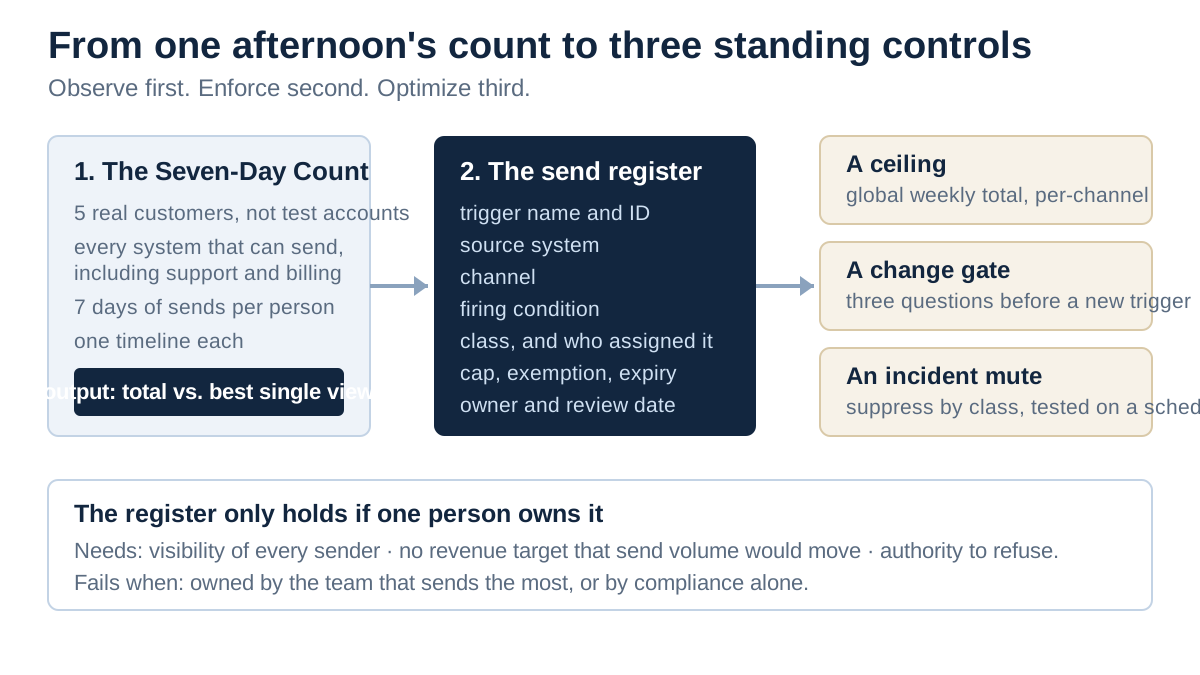
From diagnostic to standing control: the count produces the register, the register produces three decisions.
Setting a ceiling you can defend
We looked for a published number that tells you how many automated messages a customer should receive per week and did not find one, and an article that hands you a figure without saying where it came from has invented it. Microsoft's own documentation says so directly: "The right limit for a message will be different for each brand, industry, and channel. Even marketing communication benchmark studies offer various answers."
So derive the ceiling from things you can actually measure, and treat externally enforced limits as the outer fence rather than the target.
The clearest of those fences is delivery. Google's email sender guidelines define a bulk sender as anyone who sends "more than 5,000 messages per day to Gmail accounts", and require that "Marketing messages and subscribed messages must support one-click unsubscribe, and include a clearly visible unsubscribe link in the message body." On complaint rate the guidance sets two numbers, and it is worth quoting both: "Keep spam rates reported in Postmaster Tools below 0.10% and avoid ever reaching a spam rate of 0.30% or higher." The two figures do not carry the same weight. The 0.30% line sits in the guidance's requirements for senders of 5,000 or more messages a day; the 0.10% figure sits in its monitoring advice, so read it as the operating target rather than as a rule. What matters for a ceiling is that neither number is yours to set. A mailbox provider applies them to your mail whether or not your CX team has an opinion about frequency, and drifting toward them degrades delivery for every message you send, including the ones customers wanted.
Push has its own fence, set by the platform rather than by a mailbox provider. Apple's App Review Guidelines state at 4.5.4 that "Push Notifications should not be used for promotions or direct marketing purposes unless customers have explicitly opted in to receive them via consent language displayed in your app's UI, and you provide a method in your app for a user to opt out from receiving such messages", and that "Abuse of these services may result in revocation of your privileges" (Apple App Review Guidelines). A marketing push sent without in-app consent language is not a frequency problem; it is a distribution risk.
Between those fences, a defensible ceiling has four parts:
| Component | What to set | Where the evidence comes from |
|---|---|---|
| Global weekly ceiling | Total commercial touches per person per week, all channels | Your Seven-Day Count baseline, then moved deliberately |
| Per-channel sub-ceilings | Because a push and an email are not equivalent intrusions | Existing platform caps, tightened to fit under the global number |
| Exempt classes | Named explicitly: billing, security, service disruption, legally required notices | The register's class field |
| Trip-wires | Spam-complaint rate, unsubscribe rate, per-channel opt-out rate | Postmaster Tools and your own send analytics |
The trip-wires matter more than the ceiling number, because the ceiling is a guess and the trip-wires are feedback. If you have to choose one thing to instrument first, instrument the rate at which people leave a channel. It is the cheapest available proxy for "too much", and unlike an open rate it cannot be inflated by image-loading privacy proxies.
Setting the ceiling too low has a real cost, and it is worth knowing what that cost looks like before you pick a number. A blocked message is not usually a rescheduled message. Microsoft's implementation is the instructive one: the send is blocked but "the user will be able to continue down the journey", so the customer silently skips a step rather than receiving it later. If the blocked step was the one carrying the renewal reminder, you have traded a frequency complaint for a churn risk, and the only way to see it is the blocked-recipient export. Whatever ceiling you set, read that export for the first few weeks and check what it is actually suppressing.
A related question is worth answering here: why not buy a customer data platform and let it hold the number? A CDP is genuinely useful here, because it can hold the unified profile and the per-person event history that makes the count cheap to produce. What it does not hold is authority. It will not tell the support desk that its survey pushed someone over the ceiling, and in most deployments it becomes another sender in its own right, with its own triggers and its own row in the register. Buy it for the data layer if you need one; do not buy it expecting it to supply an owner.
One caution on picking the initial number. The temptation is to set the global ceiling at whatever the current total happens to be, so that nothing breaks. That is not a ceiling, it is a description. Set it somewhere that would have blocked at least one message in the worked week, then make the blocked message someone's problem to justify.
Who may add a trigger
A ceiling with no admission control drifts upward one reasonable request at a time. The register needs a gate on the front of it, and the gate can be three questions long.
Anyone proposing a new automated trigger answers:
- How many additional touches per week will an affected person receive? Not "it's one email" — the expected count for someone who qualifies repeatedly. A re-engagement trigger with a seven-day cooldown is one per week per dormant user, forever.
- What class is it, and who is signing that classification? If the answer is operational or transactional, a named person signs it, because that signature is what removes the message from every counter in the stack.
- Does it need an exemption, and when does the exemption expire? Default to no exemption. If one is granted, it carries an expiry date and reverts automatically.
Three questions is a deliberately low bar. The purpose is not to make triggers hard to add; it is to make the count and the class attributable. A gate that takes two weeks gets routed around, and the routing-around is how shadow triggers appear in systems the register never hears about.
Who runs the gate is the harder question, and there is no universally right answer. The register's owner needs three properties: visibility of all five senders, no revenue target that a send volume would move, and enough authority to refuse. In practice that points at customer operations, CX operations, or whoever owns the customer data platform. Rarely at the campaign team, whose incentives run the other way, and rarely at engineering, which has visibility but no standing in the argument.
Two anti-patterns are worth naming. A register owned by the team that sends the most becomes a description of what that team already does. A register owned by legal or compliance alone becomes a document nobody consults between audits. The owner needs to be operationally close enough that adding a row is a normal Tuesday.
If nobody will grant that authority, which is a common enough outcome, the count is still worth producing. Publish it anyway, per person, with the sender breakdown intact. A number that says one customer received twelve automated messages last week is a harder thing to argue with than a request for a governance forum, and it tends to create the forum on its own. Authority is easier to ask for once the number exists than before.
Incident time: when a campaign fires into an outage
The failure that turns a frequency problem into an escalation is timing. A scheduled campaign lands while the product is down, and the customer reads a cheerful message about a feature they cannot currently reach. Nobody chose that. The campaign was approved weeks earlier and the outage was not.
Incident response frameworks already have the role that should own this. Google's SRE book describes the communication lead as "the public face of the incident response task force", whose duties "most definitely include issuing periodic updates to the incident response team and stakeholders" (Managing Incidents, Google SRE Book). Outbound customer messaging during an incident is a communications decision. The gap is that the communications lead usually has authority over the status page and the incident email, and no authority at all over the five systems in the register.
Closing that gap needs one control, agreed before the incident, with three properties:
- It operates on class, not on cap. Frequency caps are the wrong lever here. A transactional-labelled send bypasses them entirely, and during an outage the transactional sends are often exactly the ones firing wrongly. The mute suppresses everything classed commercial, across every sender in the register, for a declared window.
- The incident commander or communications lead can pull it without a marketing approval chain. If pulling the mute requires finding whoever owns Klaviyo on a Saturday, it will not be pulled.
- It is tested. An untested kill switch is a belief, not a control. Test it the way you test a failover: on a schedule, in production, with the result written down.
The practical obstacle is that each platform's suppression mechanism is different, and several of them are not instant, because queued sends may already be in flight. So the mute is best specified as a target state with a known lag, and the register is where that lag gets recorded per system. Knowing that one platform takes fifteen minutes to drain a queue is worth more during an incident than believing all five stop immediately.
There is a second, quieter incident case: the customer who is in the outage, contacts support, gets a resolution, and then receives an automated satisfaction survey twenty-four hours later asking how the experience was. That survey is technically correct and reputationally expensive. A register that knows the CSAT automation exists is the only way anyone thinks to hold it.
Why compliance will not hand you the number
Teams reach for the compliance function at this point, and it is the wrong door. Consent and exit are one object; how much you send to somebody who has consented and not left is a different object, with a different owner, and the second does not arrive as a by-product of the first.
We are not going to tell you what any statute requires of you. That is counsel's work, it varies by jurisdiction, by channel and by the nature of the relationship, and a blog post is the wrong place to get it. What we will say is structural: an opt-out obligation is discharged per person who asks, while a ceiling has to be decided for everyone who has not. A stack can handle the first flawlessly and still have no answer to the second, and that is the state most of the systems described above are in.
Two questions are worth taking to counsel, and both feed the register rather than replacing it:
- How must a message that is part operational and part promotional be classed, in each market we send into? This is the exact decision the register's class field forces someone to make, and it is the one that determines which sends leave the counted population.
- What must we be able to evidence about consent, opt-out and suppression, and does the register need to hold any of it?
Whatever comes back goes into the register and gets cited in the class field, so the classification stops being an engineer's default and becomes a decision with an author. If the answer happens to include a number, treat it as the floor under your ceiling rather than as the ceiling.
What a register does not fix
A register counts messages. It has nothing to say about whether any of them were wanted, and it is worth being blunt about the limits of counting.
It does not measure relevance. Twelve highly relevant touches may be welcome and three irrelevant ones may not be. The count is a proxy, chosen because it is cheap, comparable across teams, and unlike relevance it cannot be argued away by the team that sent the message.
It does not capture the human cost directly, and the research that would let anyone quantify that cost is thinner than the topic deserves. The most directly relevant study we could verify is small and now nine years old: Pielot and Rello's Productive, Anxious, Lonely — 24 Hours Without Push Notifications had 30 volunteers disable notifications for a day, and found the expected result alongside an unexpected one — without notifications participants "felt less distracted and more productive", but "they also felt no longer able to be as responsive as expected, which made some participants anxious". Thirty people in 2016 is not a basis for a corporate policy.
A more recent and smaller study points the same way. Eddington, Warren, Poulsen and Edwards' Student programming behavior with and without phone notification suppression, submitted in May 2026, followed 22 students and found that assignments completed with notification suppression showed "significantly lower break rates and longer intervals of focus". The part worth carrying across to a CX register is the caveat, not the headline: the authors report "a remarkable bimodality in the effect across students -- many students are positively affected, a small number are negatively affected, and very few experience little or no effect". Twenty-two students are not your customers, and neither study licenses a corporate policy. Together they are a reason not to assume that fewer messages is monotonically better for everyone, and a reason to instrument opt-outs per segment rather than theorise about an average.
It does not stop bad content. A register with a ceiling of six will happily pass six poor messages.
And it does not survive neglect. The failure mode is not that someone deletes the register; it is that a new system arrives, its triggers never get rows, and within two quarters the register describes a stack that no longer exists. The review date field is the main defence against that, and it only works if the review actually happens.
Where LeapForce fits, and where it does not
LeapForce does not send marketing messages, does not sit between your campaign platform and your customers, and does not implement frequency capping inside Braze or Klaviyo — those caps stay where they are configured today.
What LeapForce governs is the layer above: the AI agents and automated workflows that increasingly decide to fire those triggers. Once a coworker or workflow can create a send rather than a human scheduling one, the register's fields stop being documentation and start being enforcement points. Workflows chain agents and connectors into event-triggered automation with human approval gates, which is where the "who may add a trigger" question gets an actual mechanism. Observability and Audit records what an agent was refused as well as what it did, which is the evidence trail an exemption with an expiry needs in order to mean anything.
The sequencing we use for the AI gateway applies here without modification: observe first, enforce second, optimize third. Run the Seven-Day Count before you set a ceiling, set the ceiling before you tune the content, and resist the reverse order. Tuning message content against a volume nobody has measured is how the tuning stops converging.
Honest limits on this analysis
Five things about this piece are worth knowing before you act on it.
We have not run the Seven-Day Count inside a customer's stack. The worked week is an illustration built from the documented behaviour of real products, not a measurement. Your own count is the only number that matters, and it will not look like ours.
Two sources a reader would reasonably expect are missing. McKinsey's personalization research and the ACM Digital Library's notification-interruption literature both returned HTTP 403 to our automated retrieval on July 31, 2026, so nothing from either is cited here. Where a widely repeated figure exists but could not be verified at a primary source — the frequently quoted claims about personalization lifting revenue by a specific percentage are the clearest example — we have left it out rather than repeat it with a vague attribution.
Vendor documentation moves. Every platform behaviour above was read on July 31, 2026. Defaults change, and Klaviyo's 16-hour email window or Braze's ten-rule limit could be different by the time you configure yours. Check the current page before you design around a number.
The human-cost evidence is thin and borrowed. The two studies cited above measured students and volunteers managing their own phones, not customers receiving a brand's lifecycle programme. We use them for one narrow point — that the effect of message volume is not uniform across people — and for nothing else. There is no study here that tells you what your own audience tolerates.
The ceiling recommendation is a method, not a value. We are confident that a single register with a named owner beats four independent caps. We have no basis for telling you whether your number is four a week or nine, and anyone who does have that number without seeing your data is guessing.
Frequently asked questions
Customer experience automation is the use of behaviour triggers, customer data and automated delivery to run interactions across the entire customer lifecycle — onboarding, support, retention and renewal — rather than only the acquisition funnel. In practice it is a large set of when this happens, send this rules spread across several systems owned by several teams.
Marketing automation is organised around the acquisition funnel and stops mattering once the deal closes. A CRM is organised around the customer record and does not originate outbound sends by itself. Customer experience automation spans the whole lifecycle and is triggered by behaviour rather than by a campaign calendar. The practical difference is scope: CXA can reach a customer who is not in any campaign, which is exactly why its volume is harder to count.
Customer care automation is the subset that handles inbound service: routing tickets, deflecting repeat questions, drafting agent replies, and firing post-resolution follow-ups such as satisfaction surveys. It is worth naming separately because its outbound messages — the CSAT survey in particular — are usually invisible to marketing frequency caps. Zendesk's default automation sends that survey 24 hours after a ticket is solved.
Five senders and one data layer. The senders are a lifecycle or campaign platform, an in-app messaging layer, a mobile push service, an SMS or conversational provider, and support desk automation. The data layer, a CDP or the CRM, supplies the segments and events they all trigger on. Billing and dunning is a sixth sender that is rarely included in the definition and reaches the customer regardless.
Inside one platform, sometimes. Across platforms, no. Braze rules can target "push, email, SMS, webhook, WhatsApp, LINE, or any of those channels", that last option being a real all-channel cap, and Pushwoosh's global capping spans push, email, in-app, SMS and WhatsApp. The other two do not: Klaviyo's documentation states that "All channels have separate Smart Sending windows", and Microsoft's Customer Insights caps are set per channel. All four have carve-outs regardless — Braze excludes in-app messages and Content Cards from counting at all, and Microsoft and Pushwoosh both exempt transactional messages. And no platform, including the two with all-channel rules, can see another vendor's sends. Check your own configuration rather than assuming either answer.
We looked for a published number that holds across industries and did not find one, and Microsoft's own frequency-cap documentation says benchmark studies disagree. Set the ceiling from your own baseline instead: run the Seven-Day Count, then pick a number that would have blocked at least one message in that week. Watch spam-complaint rate, unsubscribe rate and per-channel opt-out rate as trip-wires. Google's sender guidelines give the useful outer bounds for email — keep the Postmaster Tools spam rate below 0.10%, and never approach 0.30%.
Usually not. Microsoft states that "only commercial messages will be capped; transactional messages are always excluded", and Pushwoosh that "Transactional messages are not subject to frequency capping", set by an API parameter on the send. Nothing in the documentation for these products describes a check on the label. That makes the transactional classification a governance decision with a named signatory, not a technical field, and it is the single most important column in a send register.
Someone with visibility of every sender, no revenue target that message volume would move, and enough authority to refuse a request. That usually points at customer operations, CX operations, or the team that owns the customer data platform. Avoid two arrangements: ownership by the team that sends the most, which turns the register into a description of current behaviour, and ownership by compliance alone, which turns it into a document nobody opens between audits.
One agreed control that suppresses everything classed commercial, across every sender, for a declared window, pullable by the incident commander or communication lead without a marketing approval chain. It has to operate on message class rather than on frequency caps, because transactional-labelled sends bypass caps entirely. Record each system's drain lag in the register, and test the control on a schedule. An untested mute is a belief rather than a control.
Start with the count, not the tooling. Pick five real customers, pull seven days of sends from every system that can message them including support and billing, and put them on one timeline each. That produces two numbers per person: total touches, and the most any single system saw. Build the register from the triggers that showed up, give it an owner, and only then argue about the ceiling. The whole first pass fits in an afternoon and needs no procurement.
They are different problems and only one of them has an owner in most companies. Compliance work concerns consent, opt-out and what you must be able to evidence, and it is genuinely necessary. It does not produce a weekly volume ceiling, and it does not tell you which of five systems was allowed to add the trigger that pushed a customer over one. Take the classification question to counsel — specifically how a message that is part operational and part promotional should be classed in each market you send into — then put the answer in the register's class field and cite it there. The ceiling itself stays a governance decision with a named owner.
An agent can help produce the count and can enforce a ceiling it has been given, but it does not supply the missing thing, which is a decision about what the ceiling is and who may exceed it. Adding agents without a register makes the problem worse, because an agent is one more sender with its own reasons. Govern the agent's permissions and govern the cross-system total as two separate objects. The first bounds what one agent may do, the second bounds what the customer receives.
Ready to Govern Your AI?
Talk to LeapForce — one controlled layer for every AI tool, connector, model, and agent.
Comments