
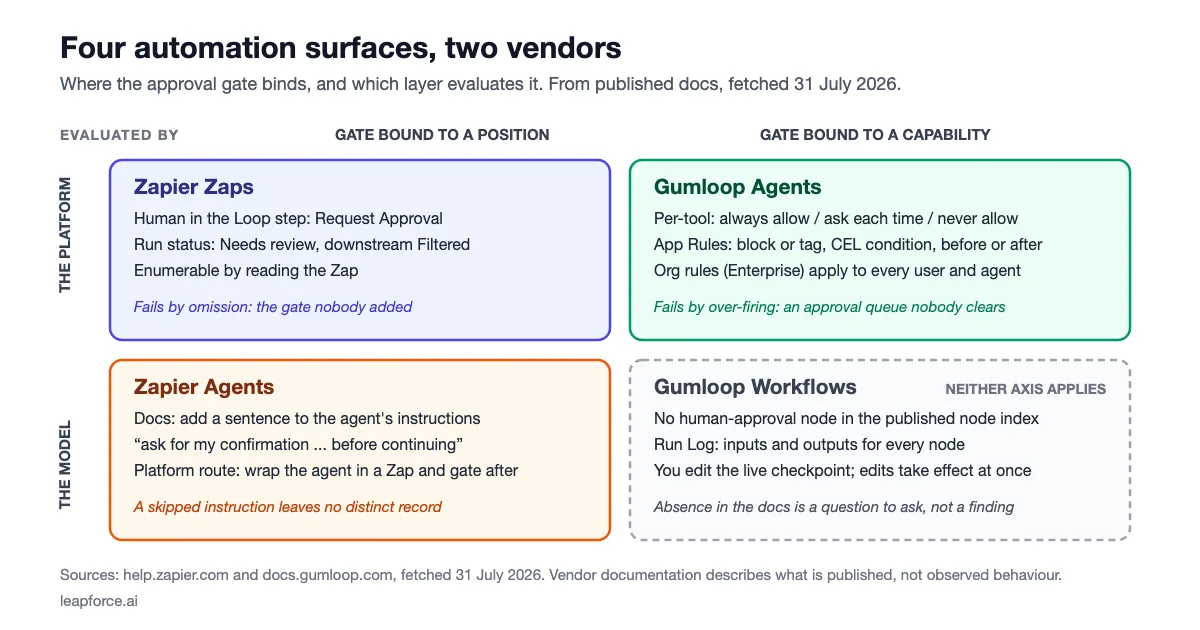
Gumloop vs Zapier is not a contest between an AI builder and a connector library. Both vendors ship two products each — a deterministic step graph and a tool-calling agent — and the question that actually decides your purchase is where an approval gate binds on each of those four surfaces, and who evaluates it when it fires.
Our position is that the interesting difference is not "AI-native versus connector-first" at all. It is a layer question. On one of these four surfaces, the gate is a documented setting the platform enforces before a tool call runs. On another, the vendor's own documentation tells you to gate the agent by writing a sentence into its instructions and asking it to pause. Those two things look identical in a demo and are not the same control. The problem shows up the way a Hacker News commenter framed it in November 2025, asking how a competing tool differs from "glean, gumloop agents, chatgpt apps, claude code with mcp and thousand others". Read at feature level, a lot of this category does now describe itself in the same words, which leaves the mechanics underneath as the part still worth comparing.
The short answer: Choose on the surface, not the vendor — Gumloop's agents enforce approval as a platform-evaluated per-tool policy with CEL conditions, while Zapier's approval strength lives in Zaps (a real Human in the Loop step with its own run status) and its agent-side guidance is an instruction to the model rather than an enforced rule.
Last updated: July 31, 2026.
We have not run either platform under a paid enterprise plan for this article. Everything below is taken from each vendor's published documentation and pricing pages, fetched on July 31, 2026, with the exact wording quoted so you can check it against what your own account shows.
Gumloop vs Zapier at a glance
Both vendors sell a visual step graph and a conversational agent, so a fair comparison is four columns, not two. The table below is built entirely from documentation pages fetched on July 31, 2026; each claim is sourced in the section that follows it.
| Zapier Zaps | Zapier Agents | Gumloop Workflows | Gumloop Agents | |
|---|---|---|---|---|
| Unit of work | a step | a tool call | a node | a tool call |
| Approval primitive | Human in the Loop step | a sentence in the agent's instructions | none published in the node index | per-tool approval setting + App Rules |
| Who enforces it | the platform | the model | n/a | the platform, before the call runs |
| Gate is bound to | a position in the graph | the instruction text | n/a | the capability, org-wide or per agent |
| Per-step data visible after the run | Data in / Data out | via the parent Zap's history | inputs and outputs for every node | App Activity tool-call log |
| How long you can look back | 60 days guaranteed, up to 10,000 runs | same | not stated in the run log docs | Enterprise custom data retention |
| Editing the live thing | draft, then publish a new version | instructions edited in place | you edit the live checkpoint directly | agent config edited in place |
Two rows do most of the work in a procurement conversation. The "who enforces it" row is where the AI-native-versus-connector-first story falls apart: the AI-native vendor has the platform-enforced gate and the connector-first vendor's agent product does not. The "gate is bound to" row is where the two philosophies genuinely differ, and it is the one this article is built on.
What each platform treats as the unit of work
Zapier's unit is a step, and it has a billing definition that makes the boundary unambiguous. Zapier's help article "How is task usage measured in Zapier?" states that "A task is any successful action that runs in Zapier. Only successful actions count toward your task usage." Triggers, Filter steps, Path steps, Formatter and Delay do not consume tasks. That definition draws a hard line between routing and acting, and it is the same line the run record uses.
Gumloop's workflow unit is a node on a canvas, and its agent unit is a tool call. Gumloop's credits documentation is explicit that the agent side is not a fixed-size unit: "The same agent might cost 2 credits for a quick question and 200 for a deep research task." It goes further about what one message does under the hood — when an agent uses tools it "loops: decide which tool to call, read the result, then respond", and "Each step is billed separately, which is why a chat that uses tools costs more than a simple question".
That last sentence is the seed of the assumption this article set out to test. If one user message expands into an unknown number of internal steps, the intuition says you have lost your step boundary and therefore lost your gate. The intuition is wrong, and the vendor documentation says so plainly. Gumloop bills each internal step separately and it exposes each one as an interception point. The looping is a cost surface, not an opacity surface.
There is one asymmetry worth naming before the comparison goes further. Zapier's step is a unit the author chose. Gumloop's tool call is a unit the model chose at runtime. A Zap's steps can be enumerated by reading the Zap; a Gumloop agent's tool calls cannot be enumerated in advance because the sequence is decided per conversation. That difference does not remove the boundary. It moves the boundary from design time to run time, and it changes what kind of control can sit on it — which is exactly the subject of the next two sections.
Where the approval gate binds: a position or a capability
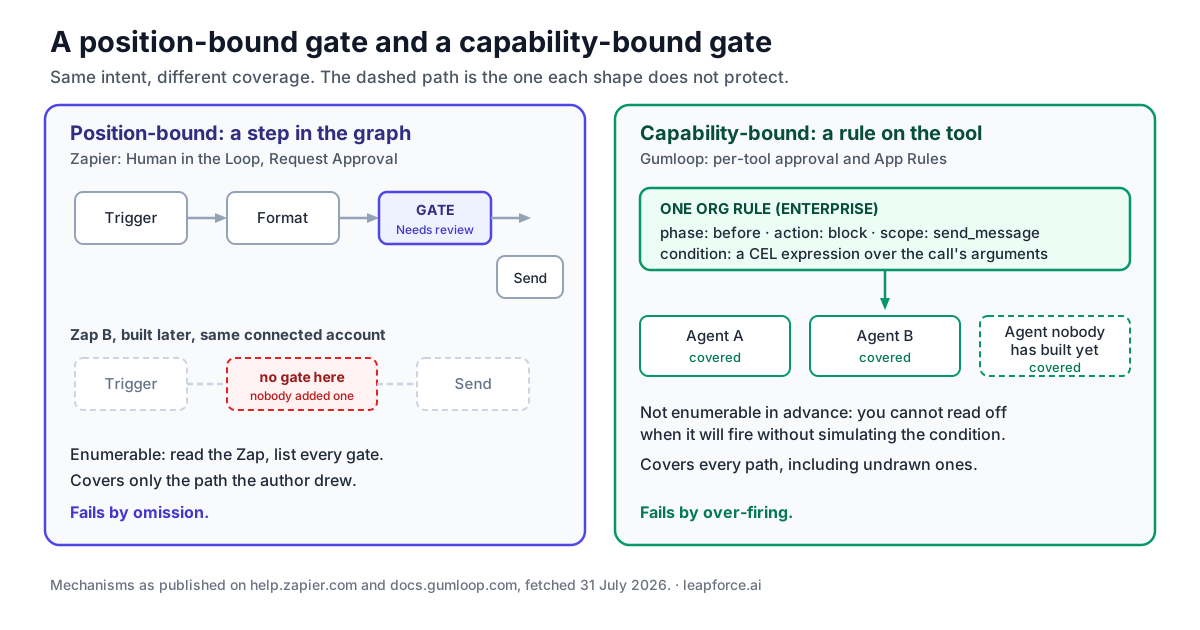
An approval gate binds to one of two things: a coordinate in a graph, or a capability the automation can exercise. Zapier's Zap product binds to the coordinate. Gumloop's agent product binds to the capability. Everything downstream — coverage, enumerability, review workload — follows from that choice.
Zapier's Human in the Loop is described as "a built-in tool that lets you pause a Zap at a certain step so a human can review before your workflow continues." It ships three pieces: a Collect Data action, a Request Approval action, and a New Approval Requested trigger that fires when a Human in the Loop step runs in another Zap.
Human in the Loop needs a paid Zapier account. That is worth stating plainly, because the help article carries a badge reading "Available on plans: Free Professional Team Enterprise" and the badge is wrong. Zapier's sibling Request approval how-to lists under Prerequisites: "A paid Zapier account. Human in the Loop is a premium app on Zapier." Zapier's premium apps page confirms what that classification means — "Premium apps on Zapier are only available to users on a paid Zapier plan or while on a free trial." The pricing page corroborates it twice over: it does not mention Human in the Loop anywhere, and it gives Free "Two-step Zap workflows" against "Multi-step" on every paid tier, while a trigger plus a gate plus an action is three steps. The same misleading badge sits on the App access policies article whose own opening sentence scopes that feature to "members of your Enterprise account". Plan against the prerequisites and the two-step limit, not the badge.
The gate is a step you place. That has a property procurement people like: it is enumerable. Anyone with edit access can open a Zap and read off every gate in it, in order, with no ambiguity about whether a gate will fire. And it produces a first-class artefact in the run record — Zapier's run-status documentation defines that "The Needs review status indicates that a step requires human review before the Zap can proceed", and that "All subsequent steps will have Filtered statuses until a reviewer completes the review." A held run is visibly held, and the downstream steps are visibly not-run.
The cost of binding to a position is coverage. A position-bound gate protects the path the author drew. It protects nothing else. Build a second Zap that sends the same kind of email through the same connected account and it carries no gate until someone remembers to add one. There is no published way to express "every Zap that sends external email pauses first" as a single object. Enterprise app access policies come closest, and they are an allow-or-deny list rather than something a pause can hang off.
Gumloop's agent product binds the other way. Its Human in the Loop page opens with "Human in the Loop lets you decide exactly when your agent needs to pause and ask for permission before taking an action." and the strongest sentence on the page is the guarantee: "The agent never executes a gated tool call without your explicit go-ahead."
The gate attaches to the connector, and it has four documented modes:
| Mode | What it does |
|---|---|
| Always allow | The agent can use all tools from this app without asking. This is the default. |
| Ask each time | Every tool call requires your approval, whether it reads or writes data. |
| Ask for writes/deletes | Read-only tools run freely. Write and delete operations require approval. |
| Custom | Set approval requirements on a per-tool basis. You control each tool individually. |
Under Custom, tools are grouped into read-only and write/delete sets, and each individual tool gets one of three states: Always allow, Ask each time, or Never allow. The docs give the shape of a realistic configuration directly: you might allow "Add Comment To Issue" freely, require approval for "Create Repository", and block "Delete Repository" entirely.
Above per-tool settings sit App Rules, which the documentation describes as letting you "intercept individual tool calls for any third-party app your organization uses and either block them or tag them for review." Each rule has four parts: a phase (before to check the call before it runs, after to check the result), an action (block or tag), a scope (specific tool names, or every tool on the app), and a condition written in CEL with access to args, tool_name, server_id, and — in after rules — output. The docs' own example is args.channel == "C05QG7RF30A", which fires whenever Slack's send_message targets that specific channel.
The scope is the part that matters for governance. Organization-level rules "apply to every user and agent in your organization." That is the object a position-bound gate cannot produce: one rule, written once, that covers every path including the ones nobody has drawn yet. One tiering caveat belongs here rather than in a footnote, because it changes the price of the idea: Gumloop's pricing-page comparison strip lists "Connector Policies & Guardrails" as Agent-scoped on Pro and Org-wide on Enterprise. The per-agent approval modes are the cheaper control; the organisation-wide rule described in this section is an Enterprise capability.
Both bindings have a failure mode, and neither vendor's marketing will tell you which one you have. A position-bound gate fails by omission — the gate you forgot to add. A capability-bound gate fails by over-firing — a condition that catches more than intended and turns an autonomous agent into a queue of approvals nobody has time to clear. Gumloop's rule builder acknowledges the second one directly: the AI rule builder re-runs each candidate rule against recent tool calls and shows the verdict for each, and the docs instruct you to "Confirm it catches what you want (no false negatives) and doesn't catch anything unexpected (no false positives)."
Who evaluates the gate: the platform or the model
This is the sharpest difference between the two vendors, and it sits on the agent surface where the naive comparison expects Zapier to be safer.
Zapier's documentation on adding approval steps to an agent's instructions tells you to add a sentence like "ask for my confirmation through [messaging app] before continuing to the next instructions." The gate is a line of natural language inside the prompt. The model is asked to honour it. There is no documented setting that stops a specific tool from being called, and no rule engine sitting between the model's decision and the connector.
Gumloop's equivalent is a setting the platform reads. Approval mode is configured on the connector in the agent's config panel, and App Rules are evaluated by Gumloop "automatically every time a tool call runs". A blocked call fails with a fixed message — "This action has been restricted by your organization's security policy" for an org rule, or "This action has been restricted by a rule configured for this agent" for an agent rule — and the docs note that the user "doesn't see the rule's name, its condition, or which field tripped it" while admins get full context in the rule's Activity tab.
The distinction is not about model quality. A well-instructed agent will usually pause when asked to. The distinction is what happens on the run where it does not, and whether that run is distinguishable afterwards from one where it did. A prompt-level gate produces no artefact when it is skipped; there is no "the model was supposed to ask and did not" record, because the instruction and the compliance live in the same text stream. A platform-evaluated gate produces a status either way.
Zapier is not defenceless here, and the honest reading is that its answer is structural rather than agent-native: put the agent inside a Zap. The same help article notes that if the agent is part of a Zap, you can add a Human in the Loop action step after the Agents step. That does give you a platform-enforced gate — but it gates the agent's handoff, not the agent's individual tool calls. If the agent calls three tools and then hands a result to the next Zap step, the gate sits after all three.
Zapier's other real control is admission rather than approval. App access policies let an Enterprise account run either an open policy ("Members can use any app on Zapier unless it's on your restricted list") or a closed one ("Members can only use apps on your allowed list"). The documentation is direct about the consequence for agents: "Members will no longer be able to publish any new or edited Zap that includes a prohibited app, and Agents that use a prohibited app may not run as expected." That is a genuine capability-bound control, and it is more granular than "block the whole app": the same page lists "Prohibit specific actions in an allowed app" among what a closed policy can do, and Zapier's pricing page carries an Enterprise line item called "Action restrictions". What it is not is an approval mode. It resolves to allow-or-prohibit rather than pause-and-ask, there is no published per-tool ask/approve state, and the page does not say whether an action prohibition binds an agent's individual tool calls or only the steps a Zap publishes. It is also Enterprise-only.
Dave Ebbelaar's walkthrough, "How to Build Human-in-the-Loop for AI Agents (Practical Guide)", is worth watching if you want the engineering shape of the problem rather than the vendor framing of it.

The framing that survives all of this is the one the NIST AI Risk Management Framework uses. Its MAP 3.5 subcategory reads: "Processes for human oversight are defined, assessed, and documented in accordance with organizational policies from the govern function." Documented is the operative word. A gate that exists only as a sentence inside a prompt is not documented in any sense a reviewer can check — you cannot diff it, you cannot list every place it applies, and you cannot prove it fired.
What the run record shows after the fact
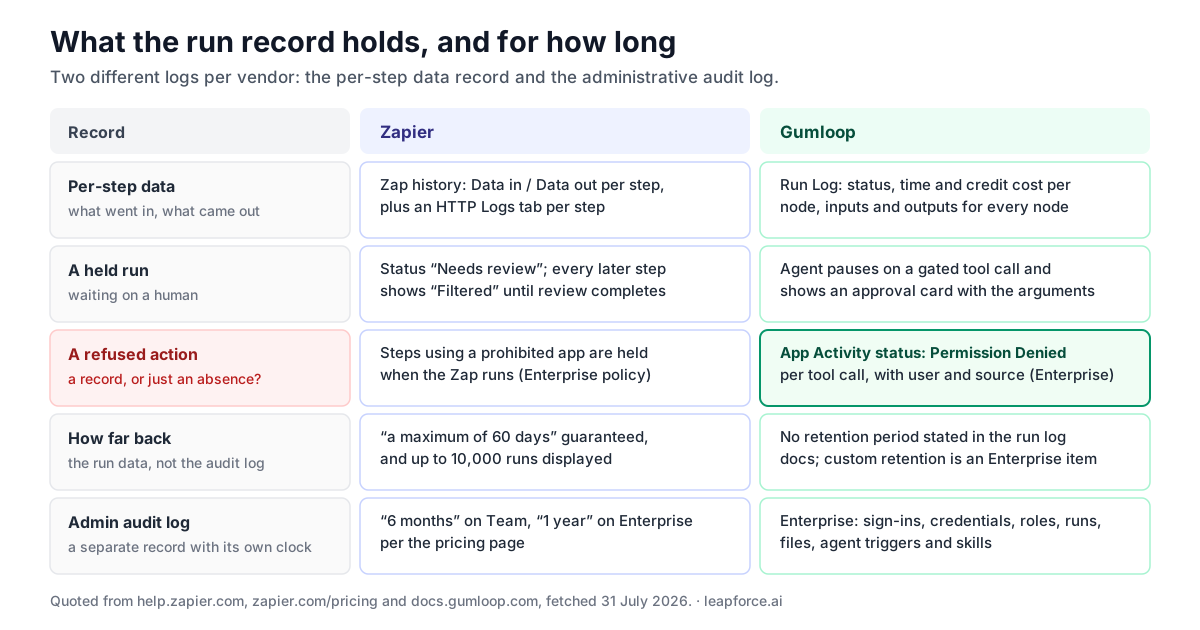
Both platforms show per-step inputs and outputs. The difference is retention, scope, and whether a refusal is recorded as a distinct thing.
Zapier's Zap history "displays a log of all Zap workflows that have run" with Data in and Data out per step, and a per-step Logs tab carrying HTTP detail. The retention line is the one to read into a contract: "Zapier can only guarantee a maximum of 60 days of Zap run data in your Zap history and will display up to 10,000 runs." Sixty days is a short window if an investigation begins with an audit finding rather than an alert, and 10,000 runs is a low ceiling on a busy account. Zapier's own guidance is to export regularly.
Gumloop's workflow-side equivalent is the Run Log, which gives per-node execution status, per-node execution time, per-node credit cost, and "Complete access to inputs and outputs for every node". One operational caveat is stated on the page and is easy to be bitten by: "Previous runs are only available for saved workbooks."
The agent side is where Gumloop has something Zapier's published docs do not describe an equivalent for. App Activity is an Enterprise dashboard of "every tool call made across all MCP servers in your organization", with columns for Server, Time, Tool, User, Source, Latency and Status — and the Status column takes one of Success, Error, Permission Denied, or In Progress.
Permission Denied is the row that matters. It means a refused action is a record, not an absence. This is the difference between an audit trail that can answer "what ran" and one that can also answer "what was stopped, when, and by which rule" — and Zapier's published documentation describes no equivalent per-tool-call status for its agent product. NIST's MANAGE 4.1 lists "appeal and override" among the mechanisms a post-deployment monitoring plan should include; you cannot evidence an override you never wrote down.
Zapier does have an org-level audit log, sold by tier: its pricing page lists audit log retention of "6 months" on Team and "1 year" on Enterprise, with custom data retention on Enterprise only. Gumloop's audit logging is Enterprise-scoped and tracks sign-ins, credential creation, modification, deletion and retrieval, team and role changes, workflow execution, termination and completion, run retrieval, file uploads and downloads, and agent trigger and skill changes with agent_id, agent_name and workspace_id on each entry.
Note what an audit log is and is not on both sides. It records administrative events — who connected a credential, who changed a role, who started a run. It is not the per-step data record. Two different logs, two different retention policies, and a reviewer who asks "show me what this automation sent last quarter" is asking for the one with the shorter clock.
Editing something that is already running
Change control is the quiet third dimension, and the two products differ more here than on approvals.
Zapier separates draft from live. Its drafts and versions documentation says "Drafts allow you to make changes to a Zap without turning it off" — the live Zap keeps running while you edit — and that "Each time you publish a Zap, it creates a new version of the Zap so you can review how your Zap has changed over time." Version rollback is available on the paid tiers. That is a familiar shape: a working copy, an explicit publish action, and a version list.
Gumloop's workflow canvas is built the other way round. Its Workflow Checkpoints page states plainly: "You're always editing the live checkpoint directly" and "All your edits happen here and take effect immediately." Checkpoints are opt-in snapshots you create with Save & Create New Checkpoint; they are read-only, "saved forever in your history" and any of them can be promoted back to live instantly. The docs offer a Google Docs analogy, and the worked example in them describes exactly the failure the model invites — building a Slack workflow Monday, accidentally breaking the Slack connection Tuesday while adding email, and restoring by promoting Monday's checkpoint.
Both models can be operated safely. They demand different habits. Zapier's model puts a deliberate action between an edit and production, so the safety is default-on and the friction is a publish click. Gumloop's model puts the safety in a snapshot the author has to remember to take, so it is faster to iterate and there is no built-in moment where someone else could review the change before it is live.
If you have a reviewer requirement — a second pair of eyes before an automation that touches customer records changes — Zapier's publish boundary is a place to attach it, and on Enterprise it is more than a place: the drafts page states that "If you're a member of a Zapier Enterprise account and your account admins or owners enabled publishing restrictions, you must request their approval before the Zap can be published". Gumloop's live-checkpoint model has no equivalent published boundary to attach it to. This is a separation-of-duties question more than a versioning one, and it is worth asking on a demo call rather than reading off a feature grid.
What the plan tier gates
Most of the controls this article is about sit high in the plan ladder, and the gap between the tier where you can build the automation and the tier where you can govern it is a budget item. There is one conspicuous exception, and it is the cheapest useful fact in the comparison. Figures below are from Gumloop's pricing page and Zapier's pricing page, both fetched July 31, 2026.
| Gumloop | Zapier | |
|---|---|---|
| Entry paid tier | Pro, "Starts at $37 / month", "20k+ credits/month", "Unlimited Seats" | Professional, "Starting from $19.99" per month |
| Free tier | none published; the page offers a "14-day free trial" on Pro | "Free forever", "$0/month", "100 tasks per month" |
| Team tier | not published as a named tier; Pro includes "Unlimited Seats" | "Starting from $69" per month |
| SSO / SAML | Enterprise ("SCIM/SAML Support") | Team and Enterprise |
| Audit log | Enterprise ("Audit Logs") | Team "6 months", Enterprise "1 year" |
| Custom retention | Enterprise ("Custom Data Retention Rules") | Enterprise |
| Per-tool approval settings | documented on the agent product, not tier-flagged in the pricing table | n/a |
| App / connector policy | Pro "Connector Policies & Guardrails" — Agent-scoped; Enterprise — Org-wide (pricing-page comparison strip) | Enterprise only |
| Approval step in the step graph | not published in the node index | paid plans — "a premium app"; the Free badge on the help page is contradicted by its own prerequisites |
| Version-history retention | checkpoints "saved forever in your history" | "Professional: 1 month, Team: 6 months, Enterprise: 1 year" |
Two lines in that table are worth reading twice, and both are places a vendor page will mislead you if you read only one.
Zapier's Human in the Loop step carries a "Free Professional Team Enterprise" badge on its help page and that badge is wrong: the Request approval article lists "A paid Zapier account" as a prerequisite and calls Human in the Loop "a premium app on Zapier", and premium apps are "only available to users on a paid Zapier plan or while on a free trial". Budget for a paid seat.
Gumloop's boundary is the clearer of the two, and it is not where the docs alone suggest. The pricing page's plan-comparison strip lists "Connector Policies & Guardrails" as Agent-scoped on Pro and Org-wide on Enterprise. That matches the documentation rather than contradicting it: per-connector approval modes are the Pro-tier control and sit on an individual agent, while the organisation-wide App Rules this article treats as Gumloop's strongest idea are an Enterprise capability. If the reason you are buying Gumloop is the one-rule-covers-every-agent argument, you are buying Enterprise.
Both headline prices are floors rather than quotes. Zapier's page prices Professional and Team against a task-tier selector and a toggle between "Pay monthly" and "Pay yearly (Save 33%)", so the "Starting from" figures move with both. Gumloop's $37 sits above a credit-amount slider running from 20k to 1.5M and beside a "Monthly" / "Annually 20% OFF" toggle, and the plan-comparison strip below it reads "Starts at $37 / month" — so it is an entry price, not a quote, in exactly the same way. We have quoted the entry state of each page and not the derived monthly-billing equivalents, because those are produced by an interactive control rather than published as text.
We are deliberately not doing a cost-per-run comparison here. Zapier bills successful actions and Gumloop bills variable credits driven by model tokens, tool calls and workflow costs; the two units are not commensurable, and any headline comparison between them is an artefact of the workload chosen. What the table above compares is what the price buys you in control, which is stable.
Gumloop: verdict block
Best for: teams whose primary risk is an agent taking an action nobody drew — where you want one rule, written once, that applies to every agent in the organisation. Note that the org-wide scope is the Enterprise tier; Pro's connector policies are agent-scoped.
Key features: a visual node canvas with per-node run logs; a conversational agent product; four-mode per-connector approval settings with per-tool overrides; App Rules with CEL conditions evaluated before or after a tool call; an Enterprise App Activity dashboard that logs every tool call including Permission Denied; checkpoints; audit logging with agent trigger and skill events; Enterprise features covering RBAC, SCIM/SAML, custom data retention, data exports and VPC deployment.
Pros: the approval gate is platform-evaluated, not model-honoured, and its guarantee is stated in the docs as an absolute — "The agent never executes a gated tool call without your explicit go-ahead." Rules can be scoped organisation-wide — an Enterprise capability, with Pro's connector policies agent-scoped per the pricing comparison — and that scope is the only shape that covers automations nobody has built yet. Refusals are a recorded status. Per-chat credit warnings can pause a conversation for approval when spend crosses a threshold, which turns runaway cost into an approval event rather than an invoice surprise.
Cons: the workflow canvas edits live by default, with no published draft/publish boundary to hang a reviewer on. The node index published in the docs contains no human-approval node, so the approval story is an agent-product story — if your work sits on the canvas rather than in an agent, the strongest control here does not apply to it. Credit costs are variable by design, which makes budgeting harder than a per-task model. The heavier governance surface — App Activity, audit logging, insights, custom retention — is Enterprise-gated and Enterprise pricing is not published. There is also no free tier on the pricing page, only a 14-day trial on Pro, so evaluating the governance settings costs money from day fifteen.
Real pricing (fetched July 31, 2026): the pricing page publishes two plans and no free tier. Pro at "$37 / month" (a "14-day free trial" is offered) with "20k+ credits/month" and "Unlimited Seats", including "Connector Policies & Guardrails" and "MCP Server Hosting (1)". Enterprise is "Custom Pricing" and adds "Role Based Access Control", "SCIM/SAML Support", "Admin Dashboard", "Audit Logs", "Custom Data Retention Rules", "Regular Security Reports", "Data Exports", "Incognito Mode", "AI Model Access Control" and "Virtual Private Cloud".
Bottom line: the strongest published approval mechanics of the two, on the agent surface only, with the governance dashboards behind an unpublished Enterprise price.
Zapier: verdict block
Best for: teams whose primary risk is a specific known step doing the wrong thing — where the automations are drawn deliberately, reviewed as artefacts, and changed through a publish gate.
Key features: step-based Zaps with a task definition that excludes routing steps from billing; Human in the Loop with Collect Data and Request Approval actions plus a New Approval Requested trigger; per-step Data in / Data out in Zap history with an HTTP Logs tab; drafts, publish and version rollback; an agent product; Enterprise app access policies; org audit log on Team and Enterprise.
Pros: the approval gate is a first-class step with its own run status, so a held run is visible in the run record and downstream steps show as Filtered rather than silently not running. Drafts and versions give change control by default. Every gate is enumerable by reading the Zap, which makes a security review a reading exercise rather than a rule-simulation exercise. The billing definition is crisp — routing and formatting are free, only successful actions count.
Cons: the agent product's documented approval mechanism is an instruction to the model, not a platform-enforced rule, and there is no published per-tool allow/ask/block setting for agents. Position-bound gates cover only the paths you drew, and there is no organisation-wide "always pause on X" object. Run-data retention is capped at "a maximum of 60 days" and 10,000 runs. App access policies — the one genuinely capability-bound control — are Enterprise-only, and they allow or prohibit rather than pause for approval. They do reach action level ("Prohibit specific actions in an allowed app", plus an Enterprise "Action restrictions" line), but there is no published ask-me-first state and no published statement on whether prohibitions bind an agent's tool calls.
Real pricing (fetched July 31, 2026): "Free forever" at "$0/month" with "100 tasks per month"; Professional "Starting from $19.99" per month; Team "Starting from $69" per month; Enterprise "Contact for pricing". Both paid figures are the entry state of a page carrying a task-tier selector and a "Pay yearly (Save 33%)" toggle. SAML SSO on Team and Enterprise; audit log "Team: 6 months, Enterprise: 1 year"; version history "Professional: 1 month, Team: 6 months, Enterprise: 1 year"; "Advanced admin permissions", "App access controls", "Action restrictions" and "Custom data retention" listed under Enterprise.
Bottom line: the better change-control and step-record story, a genuinely good approval step that needs a paid plan whatever its help-page badge says, and a weaker agent-side gate than its AI-native competitor.
The Gate-Binding Test
Here is a diagnostic you can run in one sitting, before either vendor's sales team gets a chance to shape the criteria. Take one automation you would actually build — not a demo, the real one — and answer five questions in order.
1. Name the single action in this automation that you would not want to happen twice. Sending the invoice. Posting to the customer's Slack. Closing the ticket. If you cannot name one, the automation does not need a gate and the rest of this test is theatre.
2. Ask whether that action is a position or a capability. If it happens at one known place in one known sequence, it is a position, and a position-bound gate covers it exactly. If it is "any time anything sends external email", it is a capability, and a position-bound gate will cover today's instance and miss next quarter's.
3. Ask who evaluates the gate. Read the vendor's documentation, not the demo. If the mechanism is described as a setting, a policy or a rule the platform checks, the platform evaluates it. If it is described as an instruction you write for the agent, the model evaluates it. Both can work; only one produces evidence.
4. Ask what the record shows when the gate fires — and when it is skipped. A gate with no distinct status is indistinguishable after the fact from no gate at all. Look for a named status (Zapier's Needs review) or a named outcome (Gumloop's Permission Denied). Then ask how long that record survives, and compare that number to how long it typically takes your organisation to notice a problem.
5. Ask what happens between someone editing this automation and the edit going live. If the answer is "nothing", you have no place to put a second reviewer, and your approval gate protects the run while leaving the design ungoverned. That is the gap an incident review tends to surface, by which point the ungoverned change has already run.
The test is deliberately vendor-neutral, and on the evidence in this article it should produce a split answer — a position-bound gate for the two or three known dangerous steps, plus a capability-bound rule for the category you cannot enumerate. Neither platform gives you both shapes across both of its own products, which is why the honest recommendation below is per-surface rather than per-vendor.
Choose Gumloop if, choose Zapier if
Choose Gumloop if your automation is conversational, the model picks the tools, and you need a control that covers paths nobody drew. Choose it if "no agent, anywhere in this organisation, may delete a repository" needs to be one object rather than a convention — and price it as Enterprise, because the pricing page scopes Pro's connector policies to a single agent. Choose it if you want refusals in the record, not just successes. Choose it if your team can live with editing the live thing and taking snapshots by hand.
Choose Zapier if your automations are deliberate sequences that a person designed, and the risk you are managing is a specific step. Choose it if change control matters more than runtime policy — the draft/publish/version boundary is the cleanest place in either product to insert a second reviewer. Choose it if you want a security reviewer to be able to read every gate off the artefact without simulating a rule. Choose it if you want the approval step and the change-control boundary in the same product, on a tier you can name before the sales call.
Choose both, deliberately, if the honest answer is that you have two different kinds of work. Nothing stops a step graph in one tool from calling an agent in the other, and a two-tool estate is easy to arrive at without deciding to. Doing it on purpose means writing down which tool owns which class of automation and which one is the system of record for the run — because two tools with two 60-day-or-shorter windows and two audit logs is not twice the visibility, it is half.
Choose neither yet if you cannot answer question 1 of the Gate-Binding Test. An automation with no named dangerous action does not need a governance-led vendor decision; pick on ergonomics and revisit when the automation starts touching money or customers.
Where this argument runs out
Several things here are genuinely uncertain, and a comparison that does not say so is selling.
Documentation is not behaviour. Every claim in this article is what each vendor publishes, quoted and dated. We have not run either platform under an enterprise plan and cannot tell you how the App Rules simulator behaves on a messy real tool-call history, or how often a Zapier agent honours a natural-language confirmation instruction in practice. That second number is the one that would settle the argument, and neither vendor publishes it.
Absence in the docs is weak evidence. We report that Gumloop's published node index contains no human-approval node for the workflow canvas, and that Zapier publishes no per-tool allow/ask/block setting for agents. The first was checked the cheap way — docs.gumloop.com/sitemap.xml lists just over three hundred /nodes/ pages, and none of them is an approval, pause or review node; the closest flow-control primitives are Filter, Router, Join Paths and Error Shield. Both statements are still about documentation, not about the products. Either could exist unpublished, in beta, or under a name we did not search for. Treat them as questions to ask on a call, not as findings.
Both products are moving fast. Gumloop's changelog carries release 10.15.0 dated Jul 28, 2026, three days before this was written, with dated releases roughly every two to five days through July, and its pricing page banner reads "We raised a $50M Series B led by Benchmark" — this is not a vendor in maintenance mode, and neither is Zapier. A comparison of agent-governance features in this category has a short half-life. Re-check the two agent surfaces before you sign; they are the ones changing fastest.
Retention numbers are floors, not promises about your account. Zapier guarantees "a maximum of 60 days", not a commitment that day 59 will be there. Gumloop's run-log documentation states no retention period at all, and its custom retention rules are an Enterprise line item. If a regulator or auditor will ever ask you for a specific run, neither default is a records strategy, and both vendors' answer is export.
We did not verify connector counts. App-directory sizes are the most-quoted number in this comparison and the least useful one; a connector you are not allowed to use is not a feature. We deliberately did not fetch or repeat either vendor's app count, because breadth is not the axis this article judges on and a stale number would be the easiest thing here to get wrong.
Where LeapForce fits
The pattern underneath all of this is that a gate is only as good as the layer that evaluates it, and that layer is usually not the automation tool. Once several teams are running automations across two or three of these products, the questions stop being per-tool — who owns this agent, what can it reach, what did it do, what did it cost, and what did it refuse — and start being organisational. That layer is what LeapForce builds: one controlled layer for every AI tool, connector, model and agent, with connectors IT vets once, action-level scoping, human-in-the-loop gates, and an audit record that captures what was refused and not only what ran. Our gateway rollout follows a deliberate sequence — observe first, enforce second, optimize third — because a policy written before anyone has looked at the traffic is a policy that will be turned off within a fortnight. LeapForce does not replace Gumloop or Zapier and does not build automations for you; it governs the layer they all sit on. If you want the argument for gating the commit step itself rather than the vendor comparison, our earlier analysis of why AI-powered workflows should govern the commit step makes that case, and our piece on when approval is genuinely control covers what an approval gate has to do to be worth its friction.
Frequently asked questions
Not on a like-for-like basis. Gumloop's strongest published governance mechanics sit on its agent product — per-tool approval settings and CEL-conditioned App Rules — while Zapier's strongest sit on its step graph, in the Human in the Loop step and the draft/publish/version boundary. If your work is a deliberate sequence of known steps, Zapier's shape fits it better. If the model picks the tools at runtime, Gumloop's shape fits better. Replacing one wholesale with the other tends to swap one gap for a different one rather than close both.
A real one. Zapier's Human in the Loop is documented as "a built-in tool that lets you pause a Zap at a certain step so a human can review before your workflow continues," and it provides a Request Approval action, a Collect Data action, and a New Approval Requested trigger. It produces a distinct run status: a Needs review step holds the run and all subsequent steps show as Filtered until a reviewer completes the review. The Request approval article documents an On timeout field with two options — "Skip and continue" if the reviewer does not act in time, or "End run" — plus a timeout value and unit. It needs a paid plan: that article's Prerequisites read "A paid Zapier account. Human in the Loop is a premium app on Zapier", and Zapier's premium apps page says premium apps are "only available to users on a paid Zapier plan or while on a free trial". Ignore the "Free" in the help page's plan badge.
Yes, according to Gumloop's documentation. Under the Custom approval mode, each individual tool can be set to Always allow, Ask each time, or Never allow, and the docs give the example of blocking "Delete Repository" outright while allowing comments and gating repository creation. Separately, an App Rule with the block action and a before phase denies a call before it runs; organisation-level rules apply to "every user and agent" in your organization, and the blocked user sees only "This action has been restricted by your organization's security policy." Note the tier: the pricing page lists connector policies as agent-scoped on Pro and org-wide on Enterprise, so the per-tool settings are the Pro-level control and the organisation-wide rule is not.
On Zapier, the published commitment is that "Zapier can only guarantee a maximum of 60 days of Zap run data in your Zap history and will display up to 10,000 runs." Gumloop's run-log documentation states no retention period, and custom data retention rules are an Enterprise feature; it does note that previous runs are only kept for saved workbooks. Both vendors' practical answer for anything longer is export — Zapier recommends exporting Zap history regularly, and Gumloop offers CSV export of App Activity and credit logs. If an auditor's question could arrive more than two months after the event, build the export before you need it.
The two billing units are not comparable, so any headline answer is a function of the workload someone picked. Zapier bills tasks, defined as "any successful action that runs in Zapier" with triggers, Filters, Paths, Formatter and Delay excluded. Gumloop bills credits that vary with model tokens, tool calls and workflow costs — its own documentation says the same agent "might cost 2 credits for a quick question and 200 for a deep research task." The honest procurement move is to price your own top three automations on both, not to compare list prices. What does compare cleanly is what each tier buys in control, which is the table in this article.
On Zapier, nothing immediately: drafts "allow you to make changes to a Zap without turning it off", the live Zap keeps running, and publishing creates a new version you can roll back to. On Gumloop's workflow canvas the model is inverted — "You're always editing the live checkpoint directly" and edits "take effect immediately." Checkpoints are snapshots you choose to create, and any past checkpoint can be promoted back to live. Neither is unsafe, but only one gives you a natural place to require a second reviewer before a change reaches production.
Partly, and the split differs. Zapier puts SAML SSO and an audit log on Team ("6 months") as well as Enterprise ("1 year"), but app access policies, advanced admin permissions and custom data retention are Enterprise-only. The Human in the Loop step is badged as available on every plan, but that badge is contradicted by its own Request approval article — "A paid Zapier account. Human in the Loop is a premium app on Zapier" — so it needs a paid tier, just not a high one. Gumloop's Pro tier at "$37 / month" lists "Connector Policies & Guardrails", but RBAC, SCIM/SAML, audit logs, custom retention, data exports and VPC are Enterprise. Neither vendor publishes an Enterprise price, so budget for the fact that the governance tier is a quote, not a number.
Neither looks like one on the evidence available in July 2026. Gumloop's changelog carries release 10.15.0 dated Jul 28, 2026, with dated releases every few days through the month, and its pricing page banner reads "We raised a $50M Series B led by Benchmark". Zapier is a long-established platform with a published tier structure and an Enterprise governance surface that its pricing page still details line by line. That is a statement about shipping cadence and funding, not about roadmap commitments — neither vendor guarantees that a governance feature you buy on today will exist in the same form in two years, and the exit question worth asking either one is what your run history and configuration look like as an export.
Give them the four surfaces, not the two vendors. For each surface your team will actually use, state the unit of work, what the approval gate binds to, which layer evaluates it, what status a refusal produces, and how long that record survives. Then flag the question this article could not answer from documentation: whether an approval mechanism described as an instruction to the model is honoured reliably. On the review-boundary question the documentation is better than it first looks on one side — Zapier's drafts page states that "If you're a member of a Zapier Enterprise account and your account admins or owners enabled publishing restrictions, you must request their approval before the Zap can be published", which is a genuine second-pair-of-eyes gate on the change rather than the run. Gumloop's published change model has no equivalent boundary. NIST's AI RMF frames the standard a reviewer will apply — its MAP 3.5 subcategory calls for processes for human oversight that are "defined, assessed, and documented". A gate you cannot enumerate or evidence will not satisfy that, whichever logo is on it.
Ready to Govern Your AI?
Talk to LeapForce — one controlled layer for every AI tool, connector, model, and agent.
Comments