
IFTTT versus Zapier is usually sold as a difference in power: one connects your lights to your doorbell, the other connects your CRM to your billing system. That framing is true and almost useless, because it does not tell you the thing that decides whether either tool is safe to put a business process on. The question that decides it is who inherits the automation when the person who built it stops answering email.
Both vendors answer that question in writing, and their answers are not what the vendor comparison charts suggest. The line that matters does not run between IFTTT and Zapier. It runs between an account one person owns and an account a company owns, and it cuts straight through the middle of Zapier's own price list.
The short answer: IFTTT publishes three individual plans and no company plan, so a business process running on IFTTT is a personal dependency by construction. Zapier is a personal account on Free and Professional too — one seat, no audit log, no admin — and only becomes an inheritable company asset at the Team tier, where shared connections, ownership transfer, SAML single sign-on and an audit log all arrive together.
Last updated: July 31, 2026.
We have not run either product under a paid business plan for this article, and we make no claims about how either behaves in an account we do not have. Everything below is taken from each vendor's own help centre, pricing pages and terms, fetched on July 31, 2026, with the wording quoted so you can check it against what your own account shows.
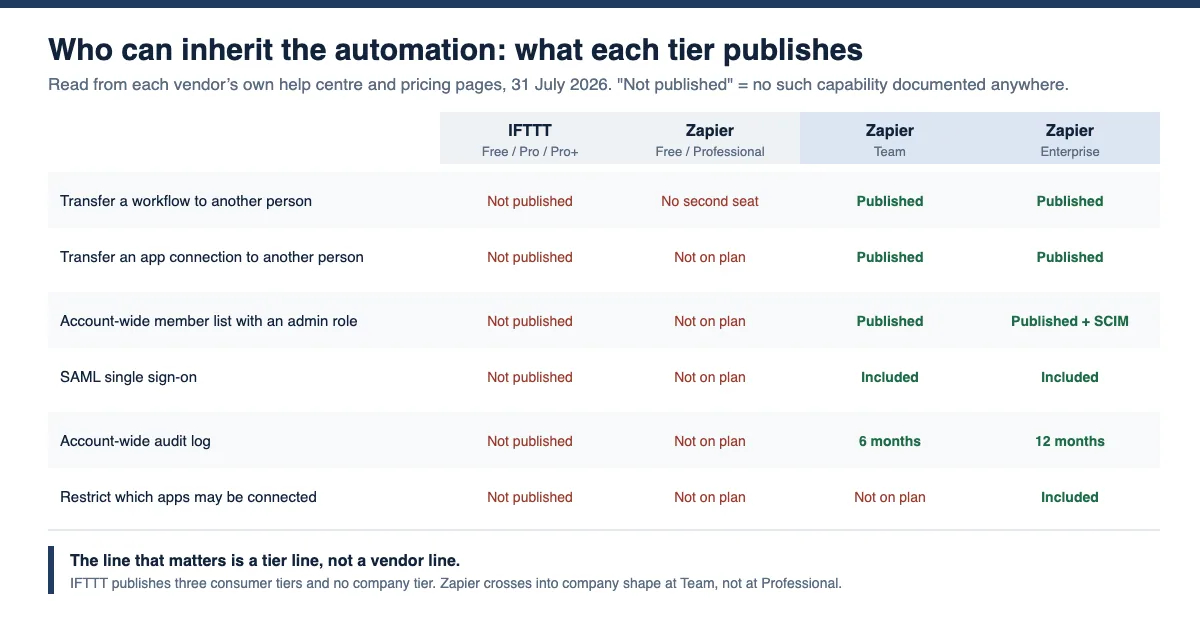
IFTTT vs Zapier at a glance
The comparison below is built from documentation and pricing pages fetched on July 31, 2026. Every row is sourced in the section that follows it. Note that the interesting boundaries are vertical, not horizontal: two of the four columns behave the same way regardless of which logo is on them.
| IFTTT Free / Pro / Pro+ | Zapier Free / Professional | Zapier Team | Zapier Enterprise | |
|---|---|---|---|---|
| Entry price | $0 / $2.99 / $8.99 per month billed annually | $0 / from $19.99 per month | from $69 per month | quote only |
| Seats in the account | not published; plans are described as being "for users" | 1 | 25 | unlimited |
| Transfer a workflow to another person | not published | control exists, no second seat to transfer to | yes, "another user in your account" | yes |
| Transfer an app connection | not published | not on plan | yes | yes |
| Share a connection so a colleague can build on it | not published | not on plan | yes | yes |
| Admin role over other people's work | not published | not on plan | Owner access | Super Admin, advanced permissions |
| SAML single sign-on | not published | not on plan | included | included |
| User provisioning (SCIM) | not published | not on plan | not on plan | included |
| Account-wide audit log | not published | not on plan | past 6 months | past 12 months |
| Restrict which apps may be connected | not published | not on plan | not on plan | App access controls |
| Where the account-activity record lives | the builder's personal Activity feed | the builder's Zap history only | audit log, account-wide | audit log, account-wide |
"Not published" throughout this article means one specific thing: we searched the vendor's own documentation and found no such capability described. It is a statement about the documentation, not a claim about the product's internals. Where that distinction matters, we say so.
Read the table by column and the usual story inverts. Zapier Free and Zapier Professional sit in the same governance bracket as every IFTTT tier: one person, one login, no admin above them, no record anyone else can read. Professional costs roughly seven times what IFTTT Pro costs and buys enormously more automation capability, and it buys exactly zero of the things on the bottom half of that table. The governance line arrives at Team, at $69 per month, and it arrives all at once.
What each vendor actually sells you an account of
IFTTT's plans page lists three tiers. Free is $0 with 2 Applets. Pro is $2.99 per month billed annually at $35.88, or $4.99 paid monthly, and allows 20 Applets. Pro+ is $8.99 per month billed annually at $107.88, or $14.99 monthly, and allows unlimited Applets plus filter code, queries, the AI services and the ability to connect multiple accounts per service. IFTTT's own help centre summarises the structure in a sentence that is doing more work than it looks: "For users, IFTTT comes in three flavors - Free, Pro and Pro+."
For users. Not for teams, not for accounts, not for organisations. There is no fourth tier below or above those three where a company becomes the customer, and the plans page's own "Looking for a business solution?" panel does not lead to one. It links to ifttt.com/developers, the platform product for brands who want their own service to appear inside other people's Applets. That is a genuine business offering and it is a completely different purchase from our operations team depends on an Applet and would like to manage it. A company that runs a process on IFTTT is not an IFTTT customer in the corporate sense. An employee is.
Zapier's pricing page is structured the same way for its first two tiers and then changes shape. Its own plan-comparison matrix gives the number that settles it: the Seats row reads 1 for Free, 1 for Professional, 25 for Team, and Unlimited for Enterprise. A Professional account, however much automation runs through it, has exactly one human in it.
Everything else follows from that number. Zapier's matrix marks Audit log, Owner access, SAML single sign-on and Shared app connections as absent on Free and Professional and present on Team and Enterprise. User provisioning by SCIM, Super Admin, advanced admin permissions, App access controls, action restrictions and custom data retention are Enterprise-only. The Team plan's own summary on the pricing page names five things: "25 users", "Shared Zap workflows and folders", "Shared app connections", "SAML SSO" and "Priority support". The first four are the entire difference between an automation your company owns and an automation your colleague owns.
This is why the honest version of this comparison is not IFTTT versus Zapier. It is personal account versus company account, and both vendors sell the personal one.
The sentence Zapier publishes about a leaver
Most vendors leave the offboarding question to be discovered. Zapier does not. It publishes a help article titled "How do I access an account after a user leaves?", and it opens by setting out what the vendor will and will not do:
"When a Zapier user in your company leaves, business-critical workflows that they built could be disrupted. While Zapier cannot grant another person access to a user's Zapier account, transfer ownership of that account, or update its connected app accounts, it may be possible for you to do so depending on the user's Zapier plan and your user role in the Zapier account."
The article then splits into three tabs, and the tabs are the argument of this whole piece in miniature.
On Enterprise, if the departed person was a member, admin or super admin, "Another super admin or the owner of your account can transfer ownership of the member's Zap workflows and update their connected app accounts." On Team, the same, with the owner of the account holding the power. Both of those are ordinary administration: a role above the individual exists, and it can reach into their work.
On Pro or Free, there is no such paragraph, because there is no role above the individual. What the page gives instead is a bulleted statement of what the vendor will not do, verbatim:
"Zapier cannot: - Transfer ownership of Zapier accounts - Update connected app accounts - Transfer ownership of connected app accounts"
And then the remedy: "Your IT administrator may be able to grant you access to the account owner's email address that was used in the Zapier account, or complete the request on your behalf. Then, reset their Zapier password." The same paragraph appears on the Team and Enterprise tabs for the specific case where the person who left was the account owner rather than a member.
Read that as a procedure and notice what it is. It is not a handover feature. It is a mailbox recovery followed by a password reset — your IT team taking control of a former employee's inbox in order to take control of a login that was never yours. It works. Companies do it. But it is a break-glass procedure with a person's private correspondence sitting in the middle of it, and it is the only route the vendor publishes for two of its four tiers.
It also has a hard failure case, which the wording implies rather than states: the remedy begins "Your IT administrator may be able to grant you access", so it depends on the email address being one your IT administrator controls. If the builder signed up with a personal address — which is exactly what happens when someone tries a tool before asking anyone — that lever does not exist either.
There is one further detail worth pulling out of the Team and Enterprise tabs, because it is the thing that makes them work: the phrase names two objects, not one — "transfer ownership of the member's Zap workflows and update their connected app accounts". Hold that thought; the second one is where most of the real breakage lives.
The sentence IFTTT publishes about a leaver
IFTTT publishes the same scenario, from the opposite side. Its help article "How to stop Applets or connections that you can't locate from running?" begins:
"On occasion, users will run into a scenario where something on IFTTT is running but they can't locate it. This sometimes happens at companies where the person managing the IFTTT account is no longer there, but the Applets or connections are still active."
That is the vendor describing the exact failure this article is about, in its own words, unprompted. What it recommends next is the part worth reading closely. It does not describe an admin console, a recovery request, or an ownership transfer. It says: "Many platforms offer ways to control permissions for connected services. You can revoke access to IFTTT in their settings", and it lists where — Facebook apps and websites settings, Facebook pages business integrations, Twitter application settings, Instagram authorized applications, Pinterest apps.
The remedy is to go to the other system and cut the connection from that end. That is a coherent answer, and it is the right one given the architecture, but it tells you what kind of object you are dealing with. You are not administering an automation. You are severing an OAuth grant that a person made from an account you cannot see into. The article closes by offering the only escalation available: "Get in touch with us below if you're still having trouble locating the IFTTT account connected to your services."
Can you simply hand the account over instead? IFTTT's Terms of Use address this directly, and the answer is contractual rather than technical:
"You may not assign, delegate or transfer these Terms or your rights or obligations hereunder, or your Service account, in any way (by operation of law or otherwise) without IFTTT's prior written consent."
That is a term about the account, not about an individual Applet, and it is a standard non-assignment clause of the sort that appears in a great many consumer terms. It is worth quoting anyway, because it is the closest thing IFTTT publishes to an answer on succession, and the answer is ask us first. Meanwhile the help centre's own catalogue is silent: of the 184 articles listed in IFTTT's help-centre sitemap on July 31, 2026, none covers transferring an account or an Applet to another person, administering members, single sign-on, or an audit log. We searched their help-centre API for "transfer", "SSO", "audit", "admin" and "ownership" as well; nothing on-topic came back.
What IFTTT does publish is a copy mechanism. Its article on duplicating an Applet explains how to open your own Applet and click Copy, and how to convert a published Applet "to your own" because "Published Applets can only be enabled once". Copying is a real migration path — the successor rebuilds the thing in their own account and reconnects every service under their own login. It is also not inheritance. Nothing carries over: not the history, not the grants, not the knowledge of what the Applet was for.
The grant is the dependency, not the workflow
Both vendors, in different words, make the same architectural point, and it is the one that most procurement conversations skip. The fragile object is not the workflow. It is the authorisation sitting underneath it.
Zapier states the shape directly: "An app connection links to a single user account, and is reusable in multiple workflows." One person's OAuth grant, many dependents. The same page lists the conditions under which that grant stops working, and one of them is a security event your own IT department causes: "You must reconnect your app connection if your password changed recently or if your organization enforced additional security controls."
Sit with that for a second in the context of a leaver. A routine security response — a password rotation, an enforced MFA policy, a token revocation on a suspected compromise — is enough to break an automation nobody knew existed, and Zapier's connections documentation says the Reconnect option "is only available for connections you own". If that account holder is a former employee, the sequence is: the automation silently stops, and the only person who can restart it does not work here any more.
IFTTT's architecture is the same and its consequences are documented in the same way. Its account security page explains that "Most services on IFTTT use OAuth, or Open Authorization, which means users can grant IFTTT restricted access to their third-party account without having to give IFTTT their password", and that revocation happens per-user at ifttt.com/my_services. Its article on why Applets get disabled names authentication failure as the first cause: among the listed causes of automatic disabling is "One of the services in the Applet or connection has an authentication failure".
Zapier's Team tier is where this stops being a personal object, and the mechanism is specific enough to be worth naming. Its shared app connections documentation — marked unavailable on Free and Professional — says that sharing a connection "makes it available to everyone with whom you share it. This allows them to create Zap workflows with the app account without needing your login credentials to that app." It also documents a Change ownership control, with a sentence that explains exactly what does and does not move: "When you transfer an app connection, the connected account remains the same. Only the owner of the connection changes."
That distinction is the whole difference between a workflow you can inherit and one you can only rebuild. The Salesforce or Google account behind the connection is still the same account; what changes is which Zapier user is responsible for it. Rebuild-from-scratch, by contrast, means going back to every third-party system and re-authorising from a different identity, which is a security review in its own right.
Zapier's own documentation even suggests the pattern that avoids the problem before it starts, in a tip on the same page: instead of sharing a connection to your own email account, "you can create a shared email account like zapier@yourcompany.com. Then, you can connect that account in Zapier and share it with members of your account." That is a service-account discipline, described in a help article, on a plan tier most small teams do not buy. It is also the single cheapest thing in this entire article to act on.
One more line from that page belongs in any risk assessment: "If a Zap owner loses access to an app connection used in their Zap, the Zap can no longer run." Losing access is not an exotic event. It is what offboarding is.
What survives to be read afterwards
Suppose the automation has been running for a year and someone now asks what it did. The answer depends entirely on which of the four columns you are in.
Zapier publishes an audit log whose plan badge marks Free and Professional ineligible and Team and Enterprise eligible. Its Limitations section states that "The Audit log is only available to users on Team and Enterprise plans", and sets the retention per tier. In Team accounts you must be the owner and "You have access to the past 6 months of account activity"; in Enterprise accounts you must be a super admin or owner and "You have access to the past 12 months of account activity".
What it records is more interesting than how long it keeps it. The documented activity list includes "Member logged in", "Member removed from account", "Connection created", "Connection owner changed" ("A user transferred ownership of their app connection to another user in the account"), "Connection shared", "Connection stale" ("A connection expired and requires reconnection"), and "Asset shared". That is, precisely, the vocabulary of inheritance. The Team tier does not merely give you an admin who can transfer things; it gives you a record of transfers having happened, and of connections going stale before anyone noticed.
IFTTT's equivalent is the Activity feed, which "gives you a log of your Applet runs" and shows Applet actions, error messages, and service connections and disconnections. Two properties matter. It is scoped to the person: it is your feed inside your account, and IFTTT publishes no account-wide view above it. And it is short. The Activity feed article states that it "will show only the events from the last few days, with a maximum of 100 of the most recent items", while IFTTT's account security page gives a different figure for the underlying data — "These logs are kept for 7 days to help monitor system performance, while activity feed information is stored for 30 days to assist with troubleshooting." We are not going to reconcile those two numbers for you; we could not, from the outside. What we can say is that both are short, both are personal, and the one you can actually read in the interface is the shorter of the two.
There is an export. IFTTT's account security page notes "you can request an export of your data from the same page. This will be sent to you via email as a JSON file." Read that in the leaver scenario and the loop closes: the export of the automation's history is delivered to the mailbox of the person who left.
The consumer-tier limits your process inherits too
Governance is the sharpest version of this problem, but it is not the only one. When a company process runs on a personal plan, it also inherits the plan's consumer-shaped ceilings, and both vendors publish theirs.
IFTTT's ceiling is a count of Applets: 2 on Free, 20 on Pro, unlimited on Pro+. A business process is rarely one Applet, and a person who has already spent their allowance on smart-home automations has less headroom than the count suggests. On top of that sits a published rate-limit table with per-plan numbers that read exactly like what they are — limits designed for a household. The Email service's "Send me an email" action is capped at 30 per day on Free and 750 per day on Pro. SMS is "Not available" on Free and 100 per month on Pro and Pro+ in the US and Canada, 10 per month worldwide. The AI services are 200 queries per day and available only on Pro+. If a notification workflow is load-bearing, 30 emails a day is a number worth knowing before the busy week rather than during it.
Zapier's Free tier publishes its own ceilings: 100 tasks per month, two-step Zaps only, and a 15-minute polling interval, against 2 minutes on Professional and 1 minute on Team and Enterprise. A process that quietly matters and runs on a Free account is a process running on a fifteen-minute delay with a hundred actions a month.
Then there is a limit specific to consumer products, which is being consumer-shaped about inactivity. IFTTT publishes an article called "Disconnected Applets for inactive users": "For increased reliability of IFTTT, we review users who have not recently created new Applets or updated their IFTTT accounts. In the event that account has been inactive for a while, it is possible that your Applets have since been disconnected." No threshold is published. For a personal automation this is sensible housekeeping. For a business process it is a shutdown condition triggered by the builder's engagement with the product rather than by anything about the process — and a well-built automation that runs perfectly for a year without anyone touching it is, by this definition, an inactive account.
The last category is the connector itself disappearing. IFTTT's article on why services get removed is candid: reasons include "The company goes out of business or shifts their focus" and "The API used by the company for the IFTTT integration is being discontinued", and the consequence is that "all existing Applets and connections using that service will be archived." Its recent help-centre entries record this happening repeatedly — dedicated articles cover important updates to the Pocket, LINE, Instagram, Alexa, Nest and Gmail services. That is not a criticism of IFTTT, which is downstream of other people's API decisions like every integration vendor. It is a reminder that the archive notice goes to the account holder's email, and you already know whose mailbox that is.
IFTTT: verdict block
Best for. Individuals, households and one-person operations. Smart-home routines, personal social posting, notification plumbing, and the enormous category of small automations that are genuinely nobody's business but yours. It is very good at this, priced for it, and its help centre is written for that reader throughout.
What it publishes. Three plans described as being for users. Free at 2 Applets, Pro at $2.99 per month billed annually for 20, Pro+ at $8.99 per month billed annually for unlimited plus filter code, queries, AI services and multiple accounts per service. OAuth-based connections, revocable per service. A personal Activity feed. Two-step verification. A JSON data export by email. A published rate-limit table. A published policy on service removal.
Pros. By a wide margin the cheaper of the two products compared here. Enormous consumer-device coverage. A genuinely honest help centre — the article that describes a company losing track of an Applet is a piece of documentation many vendors would not publish. Applets are trivial to duplicate, so rebuilding is quick when it comes to that.
Cons for business use. No published account transfer, no admin role, no member list, no single sign-on, no account-wide audit log, and no published account-wide view of what exists. The Terms require IFTTT's written consent to transfer an account. Applet allowances and rate limits are set for personal use. Inactive accounts may have their Applets disconnected. There is no company-tier plan to escalate to, so the fix is not an upgrade — it is a migration.
Pricing. $0 / $2.99 / $8.99 per month billed annually ($35.88 and $107.88 per year); $4.99 and $14.99 paid monthly. A 7-day free trial on paid tiers.
Bottom line. Excellent at what it is for. A business process on IFTTT is not a cheap Zapier; it is an undocumented personal dependency with a monthly invoice, and the honest response to finding one is to plan its migration, not to upgrade it.
Zapier: verdict block
Best for. Free and Professional: one person automating their own work, with real multi-step capability. Team and above: a company that wants automations to be organisational assets with owners, admins and a record.
What it publishes. Four tiers with a per-plan feature matrix. Seats of 1, 1, 25 and unlimited. Shared Zaps and folders, shared app connections, ownership transfer, SAML SSO and a 6-month audit log at Team. SCIM, Super Admin, advanced admin permissions, App access controls, action restrictions, custom data retention and a 12-month audit log at Enterprise. A connections page that filters by owner and shows how many Zap workflows depend on each connection. A help article stating exactly what the vendor will not do when someone leaves.
Pros. The governance surface is published in detail rather than hidden behind a sales call, which makes it reviewable before you buy. The Team tier is a coherent bundle rather than an upsell drip: identity, sharing, ownership and audit arrive together. The connections view is the single most useful inventory artefact either vendor ships. Documentation quality is high and dated.
Cons. The two cheapest tiers are governance-identical to a consumer product while looking like business software, which is the trap this article exists to name. Team pricing starts at $69 per month and rises with the task tier. App access controls, SCIM and custom retention are Enterprise-only, and Enterprise has no published price. Even at Enterprise, if the person who left was the account owner rather than a member, the published remedy is still mailbox recovery and a password reset.
Pricing. Free at $0 with 100 tasks per month. Professional from $19.99 per month. Team from $69 per month for 25 users. Enterprise by quote.
Bottom line. The right question is not whether to buy Zapier. It is whether to buy Team. Everything a company needs to inherit an automation is on one side of that line, and nothing is on the other.
The Inheritance Test
Run this on an automation, not on a vendor. The same product will pass on one account and fail on another, because the score is set by how the account was created and which plan it is on.
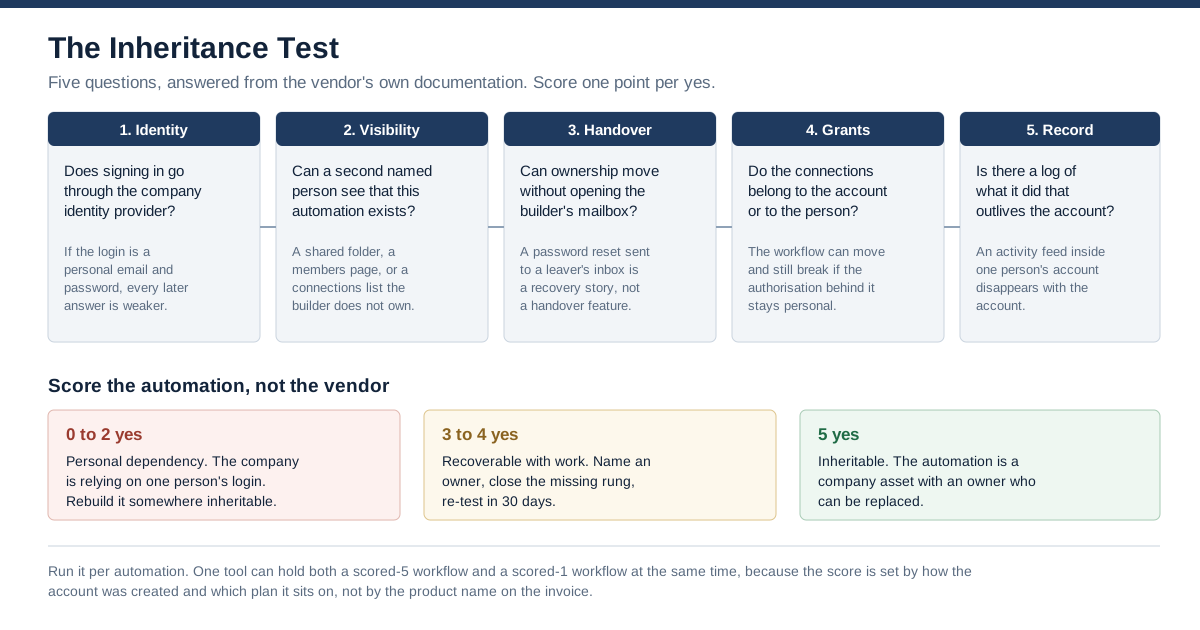
1. Identity. Does signing in to the automation tool go through the company identity provider? If the login is a personal email address and a password, every answer below it is weaker, because the account itself is outside your control. SAML SSO is the Team-tier line at Zapier and is not published by IFTTT at any tier.
2. Visibility. Can a second named person see that this automation exists, without asking the builder? A shared folder, a members page, or a connections list the builder does not own. Absent that, discovery is guesswork.
3. Handover. Can ownership move without opening the builder's mailbox? Zapier's Change owner control "transfers ownership of the Zap to another user in your account" — and on Free and Professional, the Seats row says there is no other user in your account. A password reset sent to a leaver's inbox is a recovery story, not a handover feature.
4. Grants. Do the app connections belong to the account or to the person? This is the one people skip, and it is the one that breaks. The workflow can transfer cleanly and still stop working, because the authorisation behind it was personal and has expired, been revoked, or been invalidated by a password change.
5. Record. Is there a log of what the automation did that outlives the account? Zapier's audit log is 6 months at Team and 12 at Enterprise; IFTTT's Activity feed is personal and short by the vendor's own description.
Score one point per yes. Zero to two means the company is relying on one person's login; rebuild it somewhere inheritable before you need to. Three to four means it is recoverable with work — name an owner, close the missing rung, re-test in 30 days. Five means the automation is a company asset with an owner who can be replaced.
This is a different question from the one our earlier leaver test for workflow management software asks. That test assumes there is a company account and asks what the platform does when you deactivate a user in it. This one asks the prior question: whether a company account exists at all. When the answer is no, deactivation is not a lever you hold — which is why every rung here is about establishing control rather than exercising it.
Finding the automations nobody told you about
The test above assumes you know the automation exists. Frequently the harder problem comes first, and it has an unpleasant property: when the account is personal, there is no company-wide list to query, so discovery has to happen from the far side of the connection.
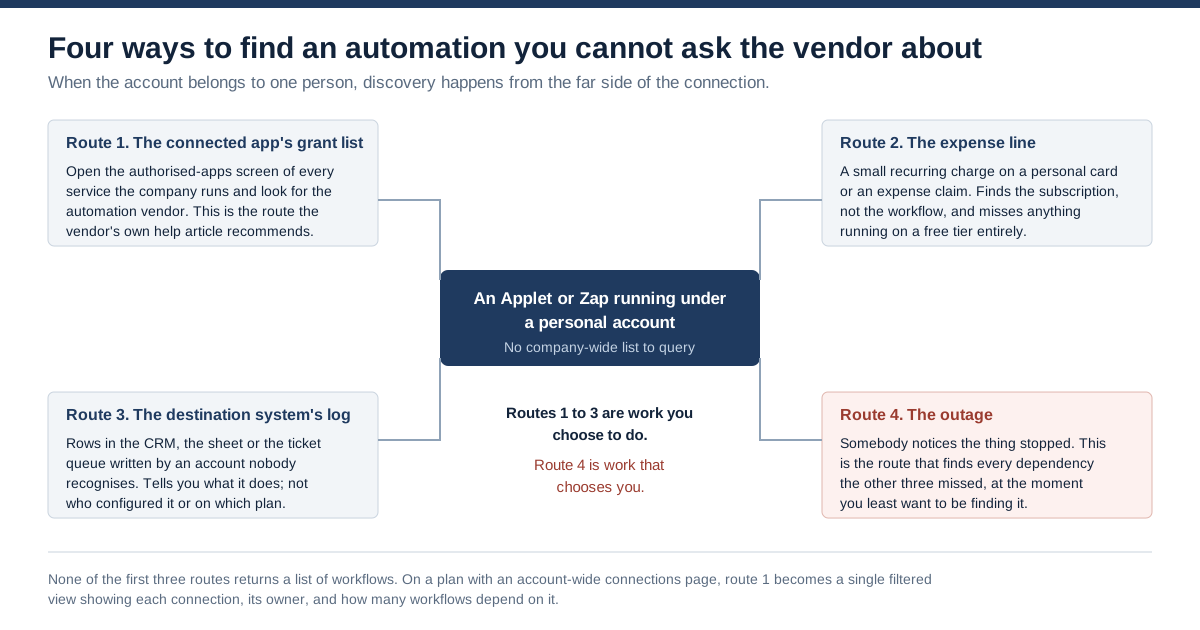
Route 1: the connected app's grant list. Open the authorised-applications screen of every service your company runs and look for the automation vendor. This is the route IFTTT's own help article recommends, naming Facebook apps and websites settings, Facebook pages business integrations, Twitter application settings, Instagram authorized applications and Pinterest apps as places to revoke access. It finds grants reliably. It does not tell you what the automation does or who made it.
Route 2: the expense line. A small recurring charge on a personal card or an expense claim. At $2.99 a month this is below most review thresholds, and it finds the subscription rather than the workflow — and it misses entirely anything running on a free tier, which is where a great deal of this lives.
Route 3: the destination system's log. Rows appearing in the CRM, the sheet or the ticket queue, written by an account nobody recognises. This tells you what the automation does. It does not tell you who configured it, on which product, or on which plan.
Route 4: the outage. Somebody notices the thing stopped. This route finds every dependency the other three missed, at the moment you least want to be finding it.
Routes 1 to 3 are work you choose to do. Route 4 is work that chooses you. And none of the first three returns a list of workflows — which is precisely what the Team tier changes at Zapier. Its connections page documentation describes a Connections tab that can be filtered by "owner of the connection", where each row shows the app, "the number of Zap workflows associated with the connection", when it was last modified, and "the avatars of all users who you shared the connection with". Route 1 stops being an archaeology exercise and becomes a filtered view. That single screen is a better argument for the Team tier than most of the feature list.
If your discovery problem is broader than automation tools — personal ChatGPT accounts, unsanctioned copilots, browser extensions with document access — the general version of it is covered in our earlier piece on why half your company uses ungoverned AI. The automation case is narrower and harsher, because an ungoverned chat session ends when the person closes the tab, and an ungoverned Applet keeps running after they leave the building.
Choose IFTTT if, choose Zapier if
Choose IFTTT if the automation is genuinely personal and you would be comfortable if it vanished with the person: home devices, individual social posting, personal reminders, hobby projects. Also choose it if you are a one-person business and you accept, explicitly, that the automation is you. At $2.99 a month it is the correct tool for that job and nothing else in this comparison competes on price.
Choose Zapier Free or Professional if you are one person automating your own work and the same acceptance applies. Professional buys multi-step Zaps, premium apps, webhooks, faster polling and far more capability than IFTTT — and, on the evidence of Zapier's own plan matrix, not one governance control. Do not let the price difference persuade you that you have bought company software.
Choose Zapier Team if any of the following is true: more than one person needs to see or edit an automation; the process would need to survive its builder leaving; you need SAML SSO in front of it; you will need to answer a question about what it did more than a few weeks later; or you simply want a list of what exists. At $69 per month it is more expensive than every other option here by a multiple, and the four things it adds are the four things this article is about.
Talk to Zapier about Enterprise if you need to restrict which apps may be connected at all (App access controls), provision and deprovision users automatically (SCIM), set your own data retention, or hold audit history for a full year. There is no published price; budget for a quote rather than a number.
Choose neither if the automation touches regulated data, moves money, or makes a decision a customer could challenge. Both products are integration tools, not systems of record, and neither publishes the kind of controls that conversation will require.
Where this argument runs out
This is documentation, not behaviour. Every claim above is what each vendor publishes, quoted and dated July 31, 2026. We have not held a Zapier Team or Enterprise account, nor an IFTTT Pro+ account, for this article, and we make no claim about how any of these controls behave in practice.
Absence in the documentation is weak evidence. Our statements that IFTTT publishes no account transfer, no admin role, no SSO and no audit log are conclusions from its help-centre sitemap of 184 articles, its plans page and its terms. A capability could exist unpublished, in a beta, under a name we did not search, or in a private arrangement with a large partner. Treat "not published" as a question to put to the vendor, not as a finding about the product. The same caution applies in the opposite direction: the presence of a documented control does not mean it is switched on in your account.
We could not reconcile IFTTT's two retention figures. The Activity feed article says the last few days and a maximum of 100 items; the account security page says activity feed information is stored for 30 days. Both are IFTTT's own pages. We report both rather than choosing, and if retention matters to you, ask which governs the view you will actually be looking at.
Prices move and plan matrices move faster. The Zapier matrix we read carries "New" badges on Observability API, Analytics, Annual task limits and Workspaces, which means that table was being edited recently. Re-read both pricing pages before you decide anything on the strength of this one.
We did not compare integration counts, and deliberately so. Zapier's pricing page says 9,000-plus apps and IFTTT's plans page says over 1,000 brands and services; neither number is load-bearing for the question this article asks, and a connector you cannot govern is not an advantage.
On vendor health, neither looks like a wind-down. IFTTT's help centre carries articles updated in June and July 2026 and recent additions for HubSpot, Klaviyo and LinkedIn integrations, which is not the profile of an abandoned product. Zapier's pricing page is actively adding admin-tier features and its help centre banner promotes a customer conference in 2026. Against that, IFTTT's own catalogue of important-update notices for Pocket, LINE, Instagram, Alexa, Nest and Gmail shows how often an individual integration can change under you regardless of the vendor's health — which is a dependency risk on the connector, not on the company.
The legal question is not ours to settle. Whether a company can require an employee to hand over a personal account, and what a non-assignment clause means when the account was used for company work, are questions for your own counsel and your acceptable-use policy. We quote IFTTT's terms because they are the vendor's published position; we are not telling you what follows from them.
Where LeapForce fits
Everything above is a symptom of one thing: the identity that runs the automation is a person, and people leave. The tools can only fix that within their own walls, and only on the tier where they sell an admin. A company with automations across two or three products, plus a handful of AI tools nobody registered, has the same problem in several places at once and no single place to answer it.
That layer is what LeapForce builds — one controlled layer for every AI tool, connector, model and agent. Access and Identity puts SSO in front of AI surfaces and treats non-human identities as first-class, so every agent has an owner, a scope and an expiry, and offboarding is one step rather than a hunt; our earlier write-up of owner, scope and expiry for non-human identities sets out that model. Connectors are a registry IT vets once, with action-level scoping, credential brokering so the grant does not belong to a person's personal login, and human-in-the-loop gates. Observability and Audit records what ran and what was refused. AI Coworkers exist precisely for the promotion this article keeps circling: taking a proven personal workflow and turning it into a named, owned, scoped company asset whose ownership survives the person leaving — the argument for which we made in personal prompts to owned assets.
We are candid about sequencing, because the failure mode of governance projects is a policy written before anyone has looked at the traffic. Our gateway rollout is deliberately staged: observe first, enforce second, optimize third. And we disclose build status per capability rather than implying everything ships today — the live product pages carry that labelling, and the shadow-AI discovery capability that would automate route 1 above is on the roadmap, not in your hands this quarter.
LeapForce does not replace Zapier or IFTTT and does not build your automations. It governs the layer they sit on, so that the answer to "who inherits this" is a role rather than a person.
Frequently asked questions
It depends what "safe" has to mean. IFTTT documents OAuth-based connections, two-step verification, per-service revocation and a data export, and it is a mature product used at scale. What it does not publish is anything that makes a business process inheritable: no admin role, no member list, no single sign-on, no account-wide audit log, and no company tier at all — its plans page describes three tiers "for users", and its business link goes to a developer platform for brands publishing their own integrations. If the process would need to survive its builder leaving, or if anyone will later ask what it did, IFTTT does not publish an answer.
IFTTT publishes no account or Applet transfer feature; we found none among the 184 articles in its help-centre sitemap on July 31, 2026. Its Terms of Use state that you "may not assign, delegate or transfer these Terms or your rights or obligations hereunder, or your Service account, in any way (by operation of law or otherwise) without IFTTT's prior written consent." What IFTTT does document is duplication: a successor can copy an Applet and rebuild it under their own login, reconnecting each service themselves. That is a rebuild, not an inheritance — no history and no grants carry across.
Within a Team or Enterprise account, yes. Zapier's asset documentation describes a Change owner control that "transfers ownership of the Zap to another user in your account", and app connections have their own Change ownership control, where "the connected account remains the same. Only the owner of the connection changes." On Free and Professional the control has nothing to work with, because Zapier's own pricing matrix lists 1 seat on both. Between two separate Zapier accounts, the vendor is explicit that it will not help — under the heading "Zapier cannot:" the first item is "Transfer ownership of Zapier accounts".
For automation capability, often yes. For governance, no, and the gap is bigger than the price difference suggests. Zapier's plan matrix marks Professional as having 1 seat and as lacking the audit log, Owner access, SAML SSO and shared app connections — every one of which is present on Team. A Professional account is a personal account with better automation, which is fine when the automation is genuinely one person's and a problem the moment the company depends on it.
On Zapier Team or Enterprise, an owner or super admin can transfer the departed member's Zap workflows and update their connected app accounts — ordinary administration. On Zapier Free or Professional, and where the leaver was the account owner on any tier, Zapier's published remedy is different: it states it cannot transfer accounts or connected app accounts, and directs you to have your IT administrator grant access to the leaver's email address so you can reset the Zapier password. On IFTTT there is no published transfer at all; its own help article describes this scenario at companies and recommends revoking IFTTT's access from each connected service's settings.
Four routes, and only the first three are voluntary. Check the authorised-applications screen of every service your company runs and look for the automation vendor, which is the route IFTTT's own documentation recommends. Look for small recurring charges on expense claims, which finds subscriptions but never free tiers. Look in destination systems for rows written by an account nobody recognises. The fourth route is the outage, which finds everything the first three missed at the worst possible time. On a Zapier Team or Enterprise account this gets much easier: the connections page can be filtered by owner and shows how many Zap workflows depend on each connection.
None is published. We checked its plans page, its help-centre sitemap of 184 articles and its help-centre search API on July 31, 2026 and found no documentation of SAML single sign-on, an account-wide audit log, a member list or an admin role. What exists is a personal Activity feed inside each account and two-step verification for that account. Treat this as a documentation finding and put the question to IFTTT directly if it is decisive for you.
On Zapier, the audit log is stated as the past 6 months for Team account owners and the past 12 months for Enterprise super admins or owners, and it is marked unavailable on Free and Professional. On IFTTT, the Activity feed article says it shows "only the events from the last few days, with a maximum of 100 of the most recent items", while IFTTT's account security page says activity feed information is stored for 30 days. Both figures are IFTTT's own; we could not reconcile them from outside. Either way it is personal to one account and short, so if an auditor's question could arrive months later, plan the export before you need it.
Neither looks like one on the evidence available in July 2026. IFTTT's help centre carries articles updated in June and July 2026 and recent integration additions including HubSpot, Klaviyo and LinkedIn. Zapier is a long-established platform whose pricing page is actively gaining admin-tier features. The sharper risk with both is per-connector rather than per-company: IFTTT publishes that a service may be removed when "The company goes out of business or shifts their focus" or its API is discontinued, and that existing Applets using it "will be archived" — and the notice of that goes to the account holder's email, which in the case this article is about may be a mailbox nobody reads.
Five questions, in this order. Which identity signs in, and can it be ours? Who besides the builder can see that this automation exists? Can ownership move without recovering somebody's mailbox? Do the app connections belong to the account or to the person, and what happens to them when that person's password is rotated? And how long is the record of what this thing did, and who can read it? Then ask which plan tier each answer requires — because at both vendors in this comparison, the answers change at a tier boundary rather than at the logo.
Ready to Govern Your AI?
Talk to LeapForce — one controlled layer for every AI tool, connector, model, and agent.
Comments