
Choose a no-code AI agent builder on its credential model first and its canvas second. If the agent acts on a person's connected accounts, you have bought a personal automation wearing a company logo, and the controls that make it reviewable sit one or two price tiers above the plan you are trialling.
That position is narrower than the usual advice. The market compares these tools on templates, integrations and ease of use, which are real axes and also the ones almost every product now clears. What separates them is what a buyer discovers after rollout: what identity the agent authenticates as, what it can reach, who can reconstruct what it did, and what happens the day the person who built it leaves. Those four questions are the Handover Test, and it runs in one sitting.
The gap is not theoretical. On Hacker News in June 2026, a developer posting as nehpets asked a room of practitioners a question no vendor comparison answers: how do you get "any visibility into what Copilot Studio agents are actually doing" (item 48500234). The question drew no reply. Eleven days later, in a separate thread, another engineer described his own internal build approvingly: users "connect the agent via OAuth and that inherits all of their permissions" (pants2, item 48651681). Both comments describe the same architecture. One person is worried about it and the other considers it a security improvement.
The short answer: Score every no-code AI agent builder out of 8 on identity, reach, record and handover, two points each, and refuse to expand anything below 5 past the team that built it, because every point missing below that line is paid back later in incident response rather than in licence fees.
Last updated: July 30, 2026.
One disclosure before anything else: we have not run a head-to-head bake-off of the platforms named below on a common task, and we will not imply that we did. Every price, unit, quota and capability statement in this article comes from the vendor's own published pricing page or documentation, fetched on 30 July 2026 and linked so you can re-check it. The judgement is ours. The measurements are theirs.
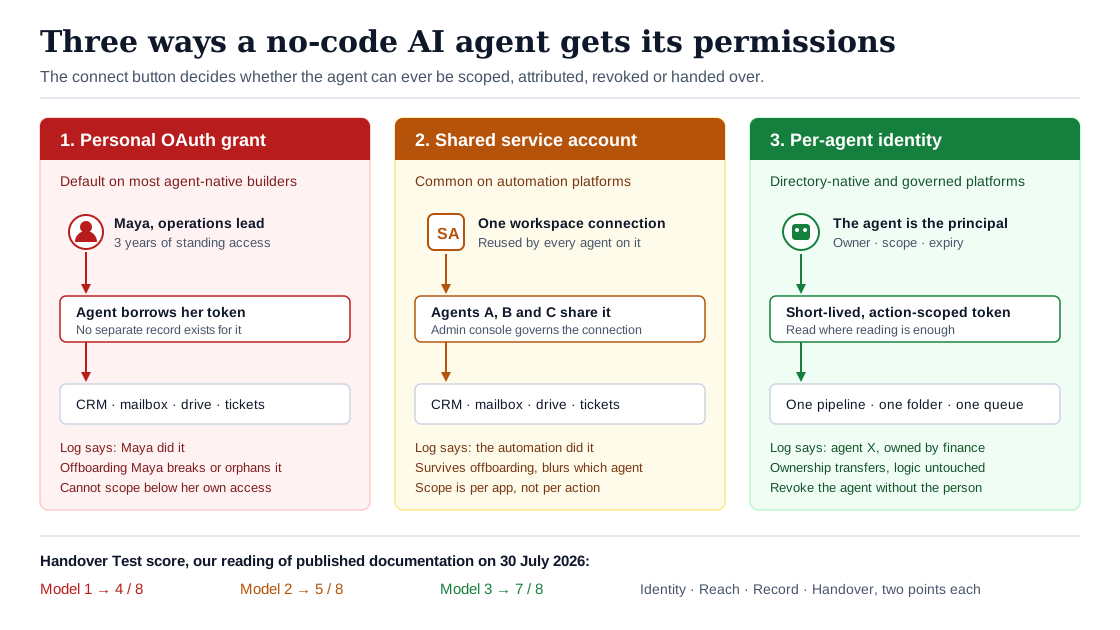
How an agent gets its permissions decides everything that happens after it works.
What a No-Code AI Agent Builder Actually Is
A no-code AI agent builder is a hosted product that lets someone who does not write code assemble a system that reasons over a goal, calls real business tools to pursue it, and keeps enough context to take several steps. You describe the job in plain language, attach connectors by clicking through an authorisation screen, set a trigger, and publish. Microsoft's identity documentation gives the same anatomy from the platform side: an agent is a model, an orchestration loop, memory, and tools, where "each tool requires careful consideration of security, permissions, and error handling" (Microsoft Entra Agent ID docs).
Three things it is not, because the category label has stretched to cover all of them.
It is not a chatbot. A chatbot answers; an agent acts. The line between them is write access, which we have argued elsewhere is the only boundary that changes your risk profile (our earlier analysis of the write-access line). A tool that can only read your CRM and summarise it is a different purchase, and a different approval, from one that can update a record.
It is not a workflow automation tool with an AI step bolted on, although the two are converging fast enough that the distinction is now about determinism rather than branding. A Zap or a scenario runs the same path every time. An agent chooses its path. That difference is the whole reason governance questions apply to one and not always to the other, and it is worth quoting the way Zapier itself puts it on the pricing page. Outcomes vary because of non-determinism, "what makes LLMs different from computers, which will do the same thing every single time" (Zapier pricing FAQ, fetched 30 July 2026).
It is not an agent framework. LangGraph, CrewAI and the Agents SDK are libraries. They assume an engineer, a repository and a deployment pipeline. If you are reading a no-code comparison, that is a different article and a different budget.
The category matters because adoption is genuinely early, and the pattern of that adoption is what creates the handover problem. McKinsey's most recent global survey, published 5 November 2025, found 23 percent of respondents scaling an agentic AI system somewhere in the enterprise and a further 39 percent experimenting. It also noted that "in any given business function, no more than 10 percent of respondents say their organizations are scaling AI agents" (The state of AI in 2025). Read that distribution carefully. Most agents in most companies right now are one team's project, built by one person, on that person's connected accounts. That is exactly the population the Handover Test is designed for.
The Canvas Is Not the Choice. The Credential Is.
The defining affordance of every no-code AI agent builder is the connect button. You click "Connect Gmail", an OAuth consent screen appears, you approve, and the agent can now send mail. The screen you just cleared is the entire security architecture of that agent, and almost no comparison article mentions it, because it takes four seconds and feels like plumbing.
What that click does is bind the agent to a delegated grant on a named human. The agent does not have permissions of its own. It borrows yours. Microsoft names this pattern explicitly as one of two access modes for agents: "Agents can act on behalf of human users, using access rights given to the user" (Entra agent identities). Zapier states the same boundary from the product side: "Zapier Agents can only take actions in the apps you've connected and use the triggers and actions you've set up."
Both statements are accurate and both are reassuring in the wrong direction. The reassurance is that the agent can do no more than you can. The problem is that you can do rather a lot. A mid-level operations manager typically holds standing write access to the CRM, the ticketing system, the shared drive and the outbound mailbox, accumulated over three years and never reviewed. Handing an agent a delegated grant on that account does not create a new permission, which is why it clears every existing control. It creates a new actor exercising an old permission, at machine speed, without the judgement that made the permission safe to grant.
OWASP put a name to the resulting failure mode when it published its Top 10 for Agentic Applications on 9 December 2025. The list runs ASI01 Agent Goal Hijack, ASI02 Tool Misuse, ASI03 Identity and Privilege Abuse, ASI04 Agentic Supply Chain Vulnerabilities, ASI05 Unexpected Code Execution, ASI06 Memory and Context Poisoning, ASI07 Insecure Inter-Agent Communication, ASI08 Cascading Failures, ASI09 Human-Agent Trust Exploitation, and ASI10 Rogue Agents (OWASP Gen AI Security Project). Two of the top three are direct consequences of the connect button. Tool misuse is an agent using a granted permission in a way nobody intended. Identity and privilege abuse is what a leaked or over-broad grant enables. Neither requires an attacker.
There is a second, quieter consequence, and it is the one that eventually reaches finance rather than security. A no-code AI agent builder that runs on personal grants produces an audit trail scoped to the person, not the agent. When somebody asks in six months why a customer received a particular email, the answer available to you is that it came from Maya's mailbox. Whether Maya wrote it, or an agent Maya built in March wrote it, or an agent someone else cloned from Maya's template wrote it, is not a question the mailbox can answer.
This is precisely the ground the US National Institute of Standards and Technology moved onto in 2026. Its National Cybersecurity Center of Excellence published a concept paper on 5 February 2026, "Accelerating the Adoption of Software and Artificial Intelligence Agent Identity and Authorization", with a comment window that closed on 2 April. The framing is blunt about what is missing: realising the benefits of agents "requires understanding the potential risks from giving AI agents access to diverse data sets, tools, and applications, and applying appropriate identification and authorization controls to mitigate these risks" (NIST CSRC). A national standards body is running a lab demonstration on this in 2026. That is a reasonable signal that the question is not settled, and a very poor reason to assume your builder's default answer is the right one.
There is a sharper edge to this that belongs in the same section, because it is the objection a security reviewer will raise in the first meeting. An agent that reads untrusted input, a web page, an inbound email, a customer ticket, can be talked into doing something. OWASP calls it goal hijack and ranks it first, above every other agentic risk. Combine that with a borrowed permission and the arithmetic changes: the question stops being whether your colleague would ever email the customer list to an outside address, and becomes whether a crafted support ticket could persuade an agent holding her mailbox grant to do it. That is why reach matters more than intent. You are not scoping against your employee's judgement. You are scoping against whatever text reaches the agent.
The practical version of the argument is short. Two products can have identical canvases, identical template galleries and identical connector counts, and be separated by whether the agent gets a credential of its own. That single fact determines whether you can scope it below the builder's own access, revoke it without disabling a person, attribute an action to it, and keep it running when the builder leaves. Compare that first.
Kayla Underkoffler's OWASP conference talk on the new Top 10 for citizen-developer risk covers the same collision from the platform-security side, and it is worth the 26 minutes if you are the person who has to say yes or no to these tools.

The Handover Test: Four Questions, One Sitting
The Handover Test scores any no-code AI agent builder on four questions, zero to two points each, answerable from vendor documentation and one hour inside a trial account. It is named for the fourth question because that is the one nobody asks and the one that decides whether the agent survives contact with normal staff turnover.
Score honestly. A partial or roadmap answer is a one, not a two. Below is the rubric we use.
| # | Question | 0 points | 1 point | 2 points |
|---|---|---|---|---|
| 1 | Identity. What does the agent authenticate as when it calls a business system? | A person's connected account, with no separate agent record | A shared service account or workspace-level connection several agents reuse | A per-agent identity with a named owner, issued and revocable independently of any human |
| 2 | Reach. What can it touch, and can you narrow that below the builder's own access? | Whatever the connected account can do | Connector-level on or off, all-or-nothing per app | Action-level scoping: read without write, one pipeline not the CRM, one folder not the drive |
| 3 | Record. Can a third party reconstruct one action six months later? | Run history visible to the builder only, no retention guarantee | An admin activity log with a stated retention period | Per-action log with inputs, tool calls, approvals and the identity that acted, exportable to your SIEM |
| 4 | Handover. What happens the day the builder leaves? | The agent stops, or keeps running on a revoked or orphaned grant | Ownership transfers manually, credentials must be reconnected by the new owner | Ownership is a property of the agent, transfers without touching the logic, and offboarding the human does not stop the agent or silently keep it running |
Add the four. Our thresholds, and they are judgements rather than measurements:
- 7 to 8. Safe to expand across teams and to point at systems that hold customer or financial data.
- 5 to 6. Fine for one team on read-mostly work. Put a human approval gate in front of anything irreversible before you widen it.
- 3 to 4. Prototype only. Useful for proving a workflow is worth automating, not for running it.
- 0 to 2. Do not connect it to a system of record at all. It will work beautifully and you will not be able to explain it.
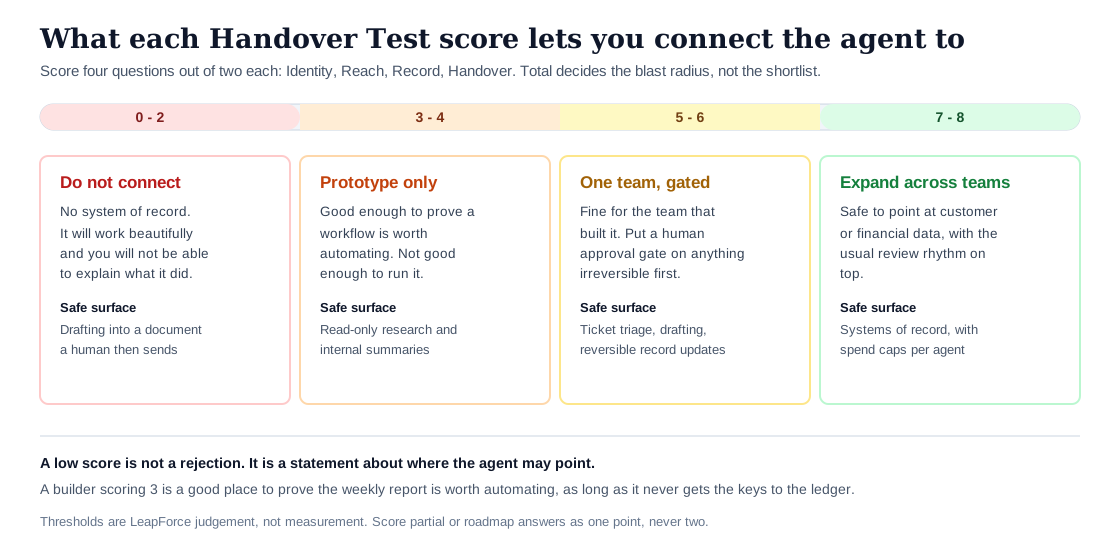
The score sets the blast radius, not the shortlist.
Three practical notes on running the test. First, answer question 4 by actually doing it: create a second user in the trial, build a trivial agent as user A, then try to hand it to user B and disable user A. Most vendor documentation is silent here, and the ten minutes it takes to try produces a better answer than any sales call. Second, score silence as zero. If the documentation does not say, and the trial does not show, the honest score is not a generous one; vendors document the controls they are proud of. Third, two points on Record is deliberately hard to earn and most products will not, because exporting per-action detail to your own monitoring stack is rare below the top tier. That is the point of a filter. If everything scores well, you have written a rubric that cannot eliminate anything.
When the score comes out low, that is not automatically a rejection. It is a statement about where the agent may point. A builder scoring 3 is a perfectly good place to prove that the weekly reporting job is worth automating, as long as it never gets the keys to the ledger.
This test deliberately overlaps with the five control questions we published for AI agent platforms, and the difference is who is holding the budget. That framework scores a platform IT is buying, and it includes spend caps and policy locus because IT owns those. The Handover Test scores a builder an operations team has already opened a trial account on, often without telling anyone, and it drops to the four questions that decide whether the resulting agent can ever become a company asset.
Five Kinds of No-Code AI Agent Builder, Scored
The eight-tool roundup is the wrong unit of comparison, because an AI agent builder aimed at a support team and one aimed at a platform engineer are not competing on the same axis. Sort them into five archetypes and the trade-offs become legible. Scores below are our reading of published documentation on 30 July 2026, not a bake-off, and any individual product can sit a point either side of its archetype.
Suite-native agent builders
Examples: Microsoft Copilot Studio, Salesforce Agentforce, Google Gemini Enterprise.
Best for: organisations whose work already lives inside one vendor's suite, and whose IT function will be asked to approve the agent.
What it gets right: identity, down to the individual agent. Every agent created in Copilot Studio "gets an agent identity in the Microsoft Entra tenant" and "the user who created the agent is recorded as its sponsor", with authentication logged and visible in the admin centre (Microsoft Learn). That single design decision answers questions 1, 3 and most of 4 before you build anything. Directory-native agents can be created in bulk, held to consistent policy, and retired "without leaving orphaned credentials or permission assignments behind".
Where it breaks: reach outside the suite, and cost structure. The identity story is real but it is licensed separately. Microsoft's own documentation states that extending Entra security features to agents requires Microsoft 365 E7, or E5 paired with a Microsoft Agent 365 licence, with conditional access for agents needing Entra ID P1 and identity protection needing P2. The build experience is also not universally loved by the people who have to use it. On Hacker News in May 2026, a commenter posting as Atiscant wrote flatly that "Copilot studio really is a hot mess, at least for me" (item 48265249). Take that as one practitioner's view rather than a survey, but it matches the pattern that suite-native tools trade approachability for integration.
Credential model: per-agent directory identity, with delegated user access available where the agent must act as a person.
Handover Test: 7 of 8. Loses a point on reach, where connector scoping outside the suite is coarser than inside it.
Agent-native SaaS builders
Examples: Lindy, Relevance AI, Gumloop.
Best for: a single team that needs something working this week and can keep the agent pointed at low-consequence work.
What it gets right: speed and the quality of the building experience. These products are designed for the person doing the job rather than the person administering it, and it shows. Templates are genuinely usable, the reasoning is exposed in readable steps, and the gap between an idea and a running agent is measured in hours.
Where it breaks: everything downstream of the build. The governance features exist, but they are the enterprise upsell in every case we checked. Lindy publishes Plus at $49.99, Pro at $99.99 and Max at $199.99 per month, with SSO, SCIM and audit logs available only on the custom-priced Enterprise plan (Lindy pricing). Gumloop publishes Pro at $37 per month for 20,000 credits and places role-based access control, SCIM/SAML, the admin dashboard and audit logs on Enterprise (Gumloop pricing). Relevance AI does not publish a price at all and lists "SSO, RBAC & Audit Logs" as an Enterprise line item (Relevance AI pricing). The team trialling these tools is on the plan without the controls, by design.
Credential model: personal OAuth grants by default, with workspace sharing layered on top.
Handover Test: 4 of 8 on the published plans a team actually trials, rising toward 6 or 7 on the enterprise tier.
Automation veterans with AI steps
Examples: Zapier, Make, Workato.
Best for: companies that already run hundreds of deterministic automations and want agents to handle the branches that rules could never cover.
What it gets right: the connector estate and the administrative machinery around the classic product. Zapier's Team plan at $69 per month includes SAML single sign-on and a six-month audit log; the Enterprise plan adds advanced admin permissions, app access controls, action restrictions, a twelve-month audit log and log streaming to Datadog or Splunk (Zapier pricing, fetched 30 July 2026).
Where it breaks: and this is the most important sentence in the article, the agent product does not always inherit the automation product's controls. Zapier's own pricing FAQ states it plainly: "Zapier Agents doesn't currently support app and action restrictions that may be in place on an Enterprise account." An organisation that spent a quarter defining which apps its automation platform may touch should read that twice. The restriction survives in Zaps and does not currently apply to Agents. Agents are also billed separately, in activities rather than tasks, on their own ladder: 400 activities a month free, 1,500 for $33.33 a month on Agents Pro, custom on Agents Enterprise, which is where "Enterprise-grade audit logs" and "Restricted apps support" appear.
Credential model: shared workspace connections, administered centrally on higher tiers, with the agent surface partially outside that administration today.
Handover Test: 5 of 8 on Team, higher on Enterprise, with a specific and documented gap at question 2.
Self-hosted open-source builders
Examples: n8n, Flowise, Dify.
Best for: teams with an engineer to spare, data that cannot leave a boundary, and a real appetite for owning the operational burden.
What it gets right: you own the tenant, the database and the logs. Nobody else's retention policy governs your evidence. For regulated work, that is often the deciding factor rather than a preference.
Where it breaks: the licensing of the governance features, and the assumption that self-hosting equals control. n8n publishes Starter at €20 per month for 2,500 executions, Pro at €50 for 10,000 and Business at €667 for 40,000, with SSO, SAML and LDAP arriving at Business and audit logging plus log streaming reserved for Enterprise (n8n pricing). Self-hosting does not exempt you: the pricing page notes that a self-hosted instance running Business or Enterprise features receives a licence key "that must ping our license server daily". Running the software on your own hardware and getting an audit log are two separate purchases.
Credential model: credentials stored in your instance, shared across workflows, scoped by whatever discipline your team maintains.
Handover Test: 6 of 8 with a competent operator, 3 without one. This archetype has the widest variance of the five, and the variance is entirely about you.
Internal-app builders with AI added
Examples: Retool, Budibase, Appsmith.
Best for: teams whose real requirement is an internal tool with a human in the loop, where the AI writes the first draft and a person clicks the button.
What it gets right: permissions, because these products were access-control tools before they were AI tools. Retool publishes Team at $10 per builder per month billed annually and Business at $50, with granular permission controls and audit logs on Business, and custom SSO on Enterprise (Retool pricing). That is one of the earliest points at which any product here exposes an audit log to a customer who has not spoken to a salesperson.
Where it breaks: the agent layer is thin. If what you need is genuinely autonomous multi-step work rather than an assisted internal app, you will be building the agency yourself, and the no-code promise erodes as you go. Include this archetype in the comparison honestly, and then check whether your actual requirement was ever an agent.
Credential model: application-level resource connections with role-based access on top, closest of the five to conventional software.
Handover Test: 6 of 8 for the app layer, with question 1 unresolved for whatever autonomous behaviour you add.
At a glance
| Archetype | Best for | Credential model | Earliest tier with an audit log | Handover Test |
|---|---|---|---|---|
| Suite-native | Approval-heavy orgs inside one vendor's stack | Per-agent directory identity | Included with the identity platform licence | 7 / 8 |
| Agent-native SaaS | One team, this week, low-consequence work | Personal OAuth grants | Enterprise, custom priced | 4 / 8 |
| Automation veterans | Large existing automation estates | Shared workspace connections | Team ($69/mo at Zapier) | 5 / 8 |
| Self-hosted open source | Data-boundary constraints, engineer available | Instance-held credentials | Enterprise, custom priced | 6 / 8 |
| Internal-app builders | Human-in-the-loop internal tools | App resources plus RBAC | Business ($50/builder/mo at Retool) | 6 / 8 |
One exclusion, stated rather than hidden: Make is a mainstream option in this category and we could not verify its current pricing. The page sat behind a bot challenge on every tier of our fetch ladder on 30 July 2026, so rather than quote a figure we could not confirm, we left it out of the tables. Treat its absence as a gap in our evidence, not as a judgement about the product.
Where the Governance Controls Sit on the Price List
Here is the finding that surprised us, and it is the reason this article exists. Across seven no-code AI agent builder and automation vendors checked on the same day, the controls that make an agent reviewable are almost never on the plan a team evaluates. They sit at the top of the ladder, usually behind a "contact sales" button, which means the trial that convinced the team is structurally incapable of demonstrating the thing IT will ask about.
| Product | Cheapest published paid plan | Plan where SSO appears | Plan where an audit log appears |
|---|---|---|---|
| Zapier (Zaps) | Professional from $19.99/mo | Team, $69/mo | Team, 6 months retention |
| Zapier (Agents) | Agents Pro, $33.33/mo | Not stated on Agents tiers | Agents Enterprise, custom |
| n8n | Starter, €20/mo | Business, €667/mo | Enterprise, custom |
| Lindy | Plus, $49.99/mo | Enterprise, custom | Enterprise, custom |
| Gumloop | Pro, $37/mo | Enterprise, custom | Enterprise, custom |
| Relevance AI | Not published | Enterprise, custom | Enterprise, custom |
| Retool | Team, $10/builder/mo | Enterprise, custom | Business, $50/builder/mo |
| Copilot Studio | Credit packs, $200/pack/mo | Included with Entra tenant | Included with Entra tenant |
All figures from each vendor's published pricing page, fetched 30 July 2026. Currencies as published; n8n prices in euros. Zapier and Retool figures are annual-billing rates. The Copilot Studio pack price is from Microsoft's Copilot Studio product page; its identity and logging come with the Entra tenant rather than with a Copilot Studio plan.
Three things follow from that table, and none of them are the vendors' fault.
The pilot is a bad predictor of the rollout. Whatever a team learns on Lindy Plus or Gumloop Pro tells them about the building experience and nothing about the operating experience. When the pilot succeeds and someone asks to widen it, the price step is not incremental. It is a move to a custom-priced tier negotiated with a salesperson, at exactly the moment the team has least room to walk away, because it has already built the thing.
Budget for the tier you will need, not the tier you will trial. If an agent will ever touch a system of record, the enterprise tier is not an upgrade path, it is the actual price of the project. Model it at the business case, not after the pilot.
Ask for the control on the plan you can afford. Some vendors will unbundle a single control. Nobody will if you never ask, and asking during evaluation costs nothing.
The obvious follow-up question is what a team on a real budget should do when the enterprise tier is out of reach this quarter. Four compensating controls, in the order we would apply them, none of which require a plan change:
- Give the agent its own account rather than a person's. A dedicated user with its own licence, connected only to what the agent needs, gets you most of question 1 and much of question 4 for the price of one seat. Check the target application's terms first; some vendors restrict shared or non-human accounts, and some charge for the seat anyway.
- Narrow the connector, not the prompt. Connect the agent to one pipeline, one folder or one queue rather than the whole system, using whatever granularity the target app offers. Instructions in a prompt are not a permission boundary.
- Route irreversible actions through a human step you already own. A message into a channel where somebody clicks approve is a crude gate, and a crude gate that exists beats a sophisticated one on a plan you have not bought.
- Export the run history on a schedule. Weekly, to somewhere the platform does not control. It will not satisfy an auditor, but it means the record survives a retention window you did not choose.
One real number on the alternative. The cheapest published Zapier combination that gives you both an audit log and agents is Team at $69 a month plus Agents Pro at $33.33. That is $102.33 a month before any enterprise conversation, and the app and action restrictions still do not apply to the agent surface. Arithmetic on published prices, not a quote.
The pattern also shows up inside the biggest vendor. Copilot Studio's identity and logging come with the Entra tenant, which reads as generous until you check the licensing note: extending Entra security features to agents requires Microsoft 365 E7, or E5 with a Microsoft Agent 365 licence, with conditional access and identity protection for agents needing Entra ID P1 and P2 respectively. The control is not on a SaaS pricing page, so it looks free. It is on an enterprise agreement instead.
What It Actually Costs to Run a No-Code AI Agent
The honest answer to "how much does it cost to build an AI agent" is that the subscription is the smaller half, and no two no-code AI agent builder vendors meter in the same unit, so sticker prices are not comparable. Here is what each one actually meters.
| Product | Billing unit | What consumes one | Published quota at the entry paid tier |
|---|---|---|---|
| Zapier Zaps | Task | One successful action step in a Zap | 750 tasks at $19.99/mo (Professional) |
| Zapier Agents | Activity | An action, a chat turn, web browsing, or a knowledge lookup | 1,500 activities at $33.33/mo |
| n8n | Execution | One full workflow run, regardless of steps | 2,500 executions at €20/mo |
| Gumloop | Credit | Varies by node and model | 20,000 credits at $37/mo |
| Copilot Studio | Copilot Credit | Varies with "the complexity of the task the agent completes" | 25,000 credits per $200 pack |
| Retool | Workflow run | One workflow execution | 5,000 runs at Team and Business |
| Lindy | Not published as a unit on the pricing page | Not stated | Not stated |
Two of those units are dangerous in different ways. n8n's execution is generous, because a workflow that makes forty tool calls still burns one execution, which is why self-hosting plus n8n is often the cheapest way to run something chatty. Zapier's activity is the opposite: an agent that browses, checks a knowledge base and then acts has spent three, so a 1,500-activity allowance is smaller than it reads. On a conservative estimate of four activities per meaningful piece of work, Agents Pro covers roughly 375 completed jobs a month before overage.
Credit-metered products introduce a second exposure that the sticker price hides. Microsoft's documentation states that Copilot Studio "enforces purchased capacity monthly, and unused Copilot Credit don't carry over to the next month", and that if usage exceeds purchased capacity "technical enforcement applies and can result in service denial" (Copilot Studio licensing). An agent whose consumption varies with task complexity, metered in a currency you prepay monthly with no rollover and a hard stop at the top, is a budgeting problem as much as a technical one.
Then there is the cost nobody meters. An agent that loops is not a rare pathological case; it is the ordinary failure mode of a system that decides its own next step. The Hacker News commenter devincrane, describing nine agents running across outreach and development work in March 2026, listed it first: they had seen "agents looping API calls overnight" and rewriting working code from misread context, and concluded that costs "can be pretty wild" (item 47426071). Ask every vendor on your shortlist one question about this: can I cap spend per agent, in money, and what happens when the cap is hit. If the answer is a dashboard rather than a limit, you do not have a cap. You have a report.
The full economics of getting past a pilot go well beyond the licence, and we have written the longer version of that argument separately in our analysis of enterprise AI implementation cost.
Choose This If: An Explicit Decision Path
Run these branches in order against your shortlist of no-code AI agent builder options and stop at the first match.
Choose a suite-native builder if your data already lives in Microsoft 365, Salesforce or Google Workspace, and the agent will touch a system of record. You are buying identity and audit that arrive by default, and you are paying for them in licence tiers rather than in incident response. The build experience will be the least pleasant of the five. Accept that trade.
Choose an agent-native SaaS builder if the work is read-mostly, the blast radius is one team, and you need the thing running before the quarter ends. Get real value out of it, keep it off systems of record, and set a date to reassess. Just do not tell yourself the enterprise plan is a formality; price it now.
Choose an automation veteran if you already run a large automation estate on their platform, because the connector work is done and the administrative habits exist. Verify the agent product's specific control gaps before you widen it, and reread the Zapier restriction above as an example of what to look for rather than a criticism of one vendor.
Choose a self-hosted open-source builder if a data-residency or regulatory constraint makes the tenant boundary non-negotiable, and you have an engineer who wants this job. Without that person, this archetype scores worst of the five in practice regardless of what the feature matrix says.
Choose an internal-app builder if the honest requirement is a tool a human operates with AI assistance. This is the most common misdiagnosis in the category, and choosing correctly here saves a year.
Choose nothing yet if you cannot name the workflow, its current owner and its current cost in hours. An agent built on a process nobody has described is an expensive way to automate confusion.
When You Should Not Buy a No-Code AI Agent Builder
Three cases, and the first two are common enough that we would put them ahead of any vendor comparison.
You already own something adequate. If your team runs Zapier or Power Automate today and the job is genuinely deterministic, adding an agent adds non-determinism to a problem that did not have any. The incumbent wins on merit here, and it wins more often than the market's tone suggests. Agents earn their keep on tasks with judgement, ambiguity or unstructured input. On "when a form is submitted, create a row and notify the channel", they are a downgrade in reliability and an upgrade in cost.
The task is irreversible and high-volume. Payments, deletions, external communications at scale, anything with a regulatory consequence. Not because agents cannot do these, but because the control you need, a human approval gate on the specific action, is exactly the feature that sits on the enterprise tier. The OWASP AI Agent Security cheat sheet is unambiguous on the requirement: "Require explicit approval for high-impact or irreversible actions", with step-up authentication for account recovery, payment initiation, privilege changes, bulk deletion or production deployment (OWASP). If you cannot implement that on the plan you can afford, the honest answer is not yet.
Nobody will own it. Not sponsor it, own it. A named person accountable for what the agent does, who reviews it, and whose successor inherits it. Agents without owners do not fail loudly; they drift, and then someone finds them. That is the same root cause behind why so many AI pilots stall before production.
Four Failures That Reach an Executive
Four patterns are worth designing against before a no-code AI agent builder gets anywhere near a system of record. All four are drawn from public practitioner accounts and vendor documentation rather than from clients of ours.
The overnight loop. An agent misreads a condition, retries, and burns a month of budget between midnight and the standup. This is the failure with a published account attached, and the defence is a hard monetary cap per agent, not an alert.
The invisible action. Something happened, a customer noticed, and the log shows only that it came from a person's account. The defence is question 3 of the Handover Test, resolved before the agent is pointed at anything customer-facing. Reconstructing an agent action after the fact is a design property, not an investigation technique, and we have set out what a usable trail contains in our work on audit trails that prove agent actions.
The orphan. The builder changes team or leaves. Either the agent stops, and nobody knows which downstream report just went stale, or it keeps running on a credential that should have been revoked at offboarding. Both outcomes are worse than they sound, and the second is a finding in any access review that looks for it.
The confident wrong answer, approved. OWASP catalogues this as ASI09, Human-Agent Trust Exploitation, describing how "confident, polished explanations misled human operators into approving harmful actions". An approval gate is only a control if the human at the gate has enough context to say no. Show the reviewer the action and its consequence, not the agent's reasoning about why it is fine.
Notice what those four have in common. None of them is a failure of the model, the prompt or the canvas. All four are failures of the layer underneath, which is why comparing builders on template galleries produces the wrong shortlist.
Promoting a Personal Agent Into a Company Asset
The realistic starting position for most companies is not a purchase decision. It is an agent that already exists, built by someone competent, running on their connected accounts, producing value nobody wants to switch off. The question is how to promote it without breaking it.
The lifecycle we build to at LeapForce runs Build, Scope, Review, Share, Improve, and it is designed for exactly this transition. Build captures a workflow someone already runs by hand. Scope gives the resulting coworker its own non-human identity, with a named owner and the minimum connector scopes it needs. Review puts the responsible owner in front of what it does and what it costs before anything is published. Share publishes it by role, so each user works with it under their own identity on top of the agent's scope. Improve versions and measures it like any other asset. The step that matters for handover is the second one. Once the agent holds its own identity rather than borrowing a person's, ownership becomes a property you can transfer instead of an account you must reconnect.
That is one honest sentence about where LeapForce fits, and here is the matching sentence about where it does not: LeapForce is not a no-code AI agent builder and does not compete with the products compared above. We build the governed layer underneath them, one controlled place where every AI tool, connector, model and agent is identified, scoped, logged and paid for, so that the tool a team chooses stops being a governance decision. If your requirement is a drag-and-drop canvas for building agents, buy one of the tools in this article, and use the Handover Test to pick which. Our related work on turning personal prompts into owned assets and on giving non-human identities an owner, a scope and an expiry is the deeper version of that argument, and neither requires buying anything.
Whatever platform you use, the promotion sequence is the same, and you can run it without us:
- Name an owner. A person, not a team inbox. Write it down where the agent lives.
- Re-create the connections under an account the agent can keep. A service identity, a dedicated account, or a per-agent identity if the platform offers one. This is the step teams skip, and it is the step that decides question 4. Expect friction: several major SaaS applications either charge a full seat for a non-human account or restrict them in their terms, so budget a licence and read the terms before you promise IT this is free.
- Narrow the scope. Take away every permission the agent has not actually used in a month of run history. Read where reading is enough.
- Put a gate on the irreversible actions. Even a crude one. Route the action through a channel where a person clicks approve.
- Establish the record. Confirm you can answer, in a single query, what the agent did on a given day and on whose authority. If you cannot, fix that before you widen access.
- Set a review date. Ninety days. Agents rot the way scripts rot, quietly and in the direction of doing more than they were meant to.
Honest Limits and Open Questions
Several things in this article are weaker than we would like, and it is more useful to name them than to imply a confidence we do not hold.
We have not tested these tools head to head. Everything scored above is our reading of published documentation and pricing on a single day. A hands-on comparison would change some of the reach and record scores, particularly for the self-hosted archetype, where the real answer depends on the operator rather than the software. Treat the archetype scores as a starting shortlist, not a verdict.
Pricing moves faster than articles. Every figure here carries its fetch date for that reason. Five of the seven products put at least one of single sign-on or the audit log on a tier with no published price, and one publishes no price at all, which means the total cost of a governed rollout is not knowable from public information for those products. That is a real limit on any comparison, including this one.
Make is missing. Its pricing page resisted all three tiers of our fetch process on 30 July 2026. It belongs in the automation-veteran archetype and we have not scored it.
The identity picture is mid-change. NIST's concept paper is a concept paper, its comment window closed in April 2026, and the lab demonstration has not produced a practice guide yet. Vendor implementations of agent identity are shipping ahead of the standard. Anything you buy this year will be revisited when the standard lands, and a builder that scores 7 today may score differently against a more precise definition.
We have not costed the governance work itself. The promotion sequence and the ninety-day review are real hours belonging to real people, and we have deliberately not put a figure on them because we would be guessing. Assume they are not free when you build the business case.
We left the regulatory question out on purpose. Deployer obligations under the EU AI Act change what an audit trail has to contain for some use cases, and that argument is long enough to deserve its own treatment rather than a paragraph here. If the agent touches employment, credit, education or safety decisions, start with the regulatory scope question before the tooling one.
The Handover Test has a known blind spot. It says nothing about model quality, output accuracy or whether the agent does the job well. Those matter enormously and they are not what this test measures. Run it as a filter to eliminate candidates, then evaluate the survivors on whether they actually work.
We are not neutral. LeapForce sells a governance layer, so an article arguing that governance is the deciding axis is an article arguing for our own worldview. The evidence is linked and dated so you can check it against your own reading, and the recommendation in several branches above is to buy a product we do not sell.
Frequently asked questions
A no-code AI agent builder is a hosted product that lets a non-developer assemble an AI system that reasons about a goal, calls real business tools, and takes multiple steps to complete a task, all through a visual interface rather than code. You describe the job, connect apps through an authorisation screen, set a trigger and publish. The distinction from workflow automation is determinism: an automation runs the same path every time, while an agent chooses its path, which is why permissions and logging matter more than they did for scripts.
There is no single best one, and any article that names one without naming the constraint is selling something. For a non-technical team whose work is read-mostly and contained to one department, agent-native SaaS builders such as Lindy, Gumloop or Relevance AI give the fastest path from idea to running agent. For a team whose agent will touch a system of record and face an IT review, a suite-native builder inside the vendor stack you already use will clear that review far more easily, at the cost of a rougher building experience.
Score each candidate out of 8 on the Handover Test: identity, reach, record and handover, two points each. Every question is answerable from vendor documentation plus one hour in a trial, and the fourth is answerable by creating a second user, building a trivial agent, and trying to transfer it. That eliminates candidates faster than any feature matrix, because feature matrices compare canvases and the canvases are all fine.
The subscription is the smaller half, and vendors do not share a unit, so sticker prices are not comparable. Zapier meters agents in activities at 1,500 for $33.33 a month; n8n meters whole workflow executions at 2,500 for €20; Gumloop meters credits at 20,000 for $37; Copilot Studio sells Copilot Credits in packs of 25,000 at $200 a month. Add the tier step for controls, which usually means moving to a custom-priced enterprise plan, and add an unmetered exposure for runaway loops unless you can set a spend cap in money per agent.
Yes, and this is where the category has genuinely moved. Most of the platforms here support chaining several agents, or an orchestrating agent that delegates to specialists, entirely through the visual builder. The caution is that multi-agent workflows multiply the questions in the Handover Test rather than sharing them: each agent needs its own identity and scope, and inter-agent communication is a distinct risk that OWASP tracks separately as ASI07. Start with one agent doing one job well.
On most no-code builders, the agent acts on a delegated OAuth grant belonging to the person who connected the app, so from the target system's perspective the agent is that person. Suite-native platforms are the exception: an agent created in Copilot Studio receives its own agent identity in the Microsoft Entra tenant, with the creator recorded as its sponsor, and its authentications logged separately. Ask this question first, because the answer determines whether you can scope, revoke, attribute or transfer anything later.
Rebuild the connections under an identity the agent can keep, then move ownership, then narrow the scope to what the run history shows it actually used. Copying the agent to a colleague's account reproduces the problem with a new name on it. If the platform has no concept of an agent-held credential, the realistic options are a dedicated service account with its own licence, or moving the agent to a platform that does, and the second is worth pricing if the agent has become important.
For anything that reads or writes a system of record, yes, and the reason is unglamorous: the agent will be exercising an employee's standing access at machine speed, which is a change in risk even though it is not a change in permissions. A useful shortcut is to bring IT the completed Handover Test rather than a product name. It converts the conversation from "can we use this tool" into "here is what it can reach and here is how we would prove what it did", which is the question they were going to ask anyway.
On most platforms, at some tier, yes, but check where the gate lives and what the reviewer sees. OWASP's guidance is to require explicit approval for high-impact or irreversible actions and to show an action preview before execution. The failure mode it also documents is a reviewer approving a harmful action because the agent's explanation was convincing, so the gate should display the action and its consequence rather than the agent's reasoning about why it is safe.
Hours to days for a first useful agent on an agent-native builder, a week or two on suite-native platforms where the connector approvals are the long pole. Getting one live is not the constraint anymore. The constraint is the second month, when the agent needs an owner, a scope, a record and a budget, and the plan you built it on does not include three of those. Plan the calendar around the governance step, not the build step.
Often, yes, in the precise sense that they are ungoverned rather than unauthorised. An agent built by a competent employee on an approved tool, connected to sanctioned systems through their own account, is invisible to most discovery methods because every component is legitimate. That is a harder problem than an unapproved tool, and it is why we treat shadow AI as an access question rather than a policy question.
No, though the products are converging from both directions. Workflow automation executes a fixed path you designed; an agent decides its own path toward a goal you described. That difference is what makes agents useful on ambiguous or unstructured work, and it is also what makes them unpredictable enough to need identity, scoping and logs that a deterministic automation never required. If your task has no ambiguity in it, the automation tool is the better engineering choice and usually the cheaper one.
Ready to Govern Your AI?
Talk to LeapForce — one controlled layer for every AI tool, connector, model, and agent.
Comments