
Workato pricing is quote-only: there is no public price list, no self-serve tier, and no published rate per unit. Vendr's Workato marketplace page, which brokers software purchases, lists an average contract value of $64,543 alongside 189 deals handled. Budget five figures, minimum.
That is the number. Here is our position on it, and it is not the one most pricing articles take: the annual figure you negotiate is the least interesting part of Workato pricing. Workato bills on meters that your own builders create, one step at a time, after the contract is signed. The contract sets a ceiling. A loop width inside a boring sync recipe sets the actual consumption. Which means the real cost control is not a procurement skill at all. It is a permission setting, and in Workato it has a name, a default, and an owner.
Practitioners say this out loud in review data, just not in cost language. Rohit Sircar, Integration Solutions Lead at Hexaware Technologies, told PeerSpot that commercial pricing runs "around 50K per year" while enterprise sits "about 120k-130K". Then he added the line that matters: "for every recipe you add, it makes a price difference." He is describing a platform where the people who add cost and the people who sign for it are different people.
The short answer: Expect a five-figure annual Workato commitment with an average around $64,543, but treat the quote as a ceiling you have to defend, because usage is generated by whoever holds the deployment privilege, not by whoever signed the order form.
Last updated: July 30, 2026.
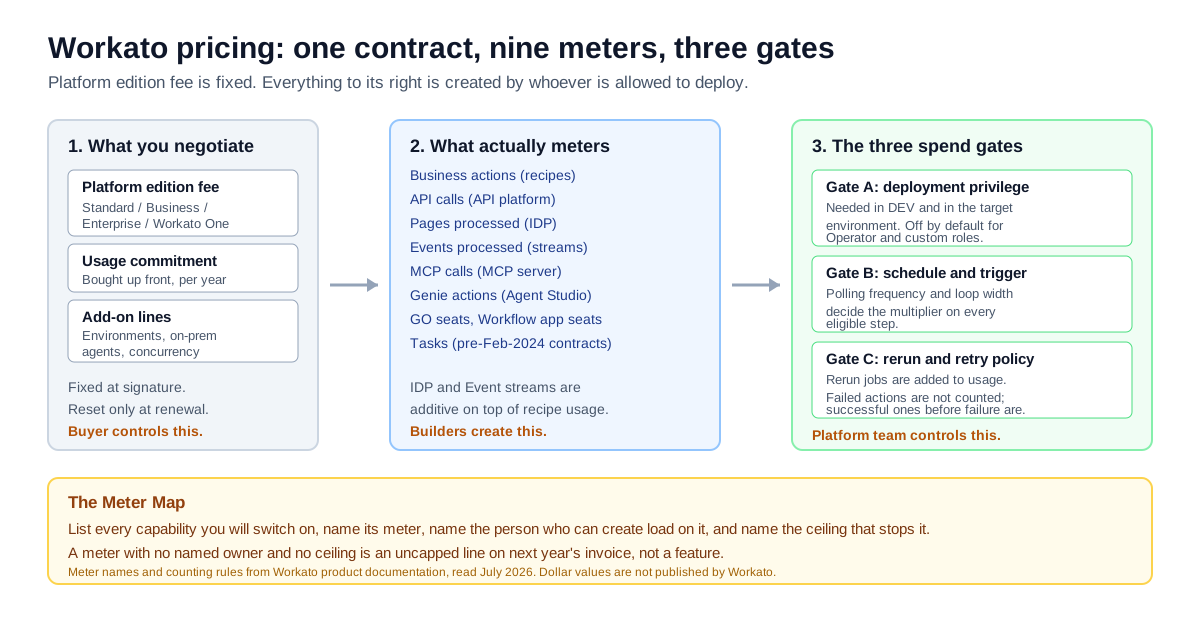
The Meter Map: what you negotiate, what actually meters, and the three gates that decide how much of it you burn.
What Workato Pricing Actually Is in 2026
Workato pricing has two components and one absence. Workato's own pricing documentation describes "a platform edition fee, which determines access to platform capabilities" and "a usage fee, which scales based on your usage volume." The absence is the rate card: Workato's public pricing page carries the headline "Pricing built for flexibility" and two calls to action, and no prices at all.
There are four editions, and each one contains the one below it: Standard, Business, Enterprise, and Workato One. Workato describes Standard as its introductory offering with "core integration capabilities," Business as adding "advanced orchestration capabilities, enhanced connectivity," Enterprise as adding further orchestration plus security and governance features, and Workato One as the tier that adds agentic capabilities. Nothing in the documentation tells you which specific features sit at which boundary, which is the first thing to ask for in writing.
There is also a date that quietly invalidates a lot of the Workato pricing content you will find online. Workato's documentation states that the usage-based model "applies only to direct customers who are part of the usage-based pricing model" and that customers who joined before February 2024 sit in a separate, older model. If an article, a consultant, or a colleague describes Workato pricing in terms of a recipe count or a flat task allowance, check which side of that line they are on. Several widely-cited pages for this keyword, Vendr's own buyer guide among them, still use a Professional/Enterprise tier vocabulary that does not match Workato's current edition documentation.
That staleness is the most expensive thing about researching Workato pricing. The vendor publishes the mechanics but not the money; third parties publish the money but keep the mechanics from three years ago. This article separates the two on purpose, and labels the provenance of every number.
| Layer | What it is | Published? | Where it comes from |
|---|---|---|---|
| Platform edition fee | Access to capabilities, four tiers | Mechanics yes, price no | Workato docs |
| Usage fee | Metered consumption, purchased as capacity | Meters yes, rate no | Workato docs |
| Additional capabilities | Extra on-prem agents, concurrency | Named only | Workato docs |
| Annual contract value | What companies actually pay | Aggregated only | Vendr, PeerSpot |
| Discount achieved | Movement off an undefined baseline | Aggregated only | Vendr |
The Meter Map: Nine Meters Under One Contract
The single most useful thing a Workato buyer can do before a first sales call is stop thinking in tasks. Workato's usage documentation lists ten product capabilities carrying nine distinct usage metrics, and states that "our usage strategy enables you to use a common billing unit for all of our capabilities." Workato recipes no longer meter in tasks on the current model; they meter in business actions. Tasks still exist as a metric. The docs point at them and add "refer to your contract for more information", which is exactly how a legacy unit gets described.
Here is the full list, taken from Workato's usage-metrics documentation:
| Capability | Usage metric | What generates it |
|---|---|---|
| Workflows (recipes) | Business actions | Triggers and app action steps |
| API platform | API calls | Successful API requests |
| Intelligent document processing | Pages processed | Each page, standalone or in a multi-page doc |
| Event streams | Events processed | Published messages only |
| Recipe functions / callable recipes | Business actions or API calls | Inherited from the calling recipe |
| MCP | MCP calls | Requests to an API collection configured as an MCP server |
| Agent Studio | Genie actions | Each prompt sent to a genie |
| Workato GO | GO seats | Number of GO users |
| Workflow apps | Workflow app seats | Seats, plus the recipes those apps call |
| Task | Tasks | Legacy unit; docs say to refer to your contract |
Two counting rules in that documentation deserve to be read twice, because they are where a forecast goes wrong.
Some meters stack. Workato states that "usage for certain features, such as IDP (Intelligent Document Processing) and Event streams, is calculated in addition to the primary usage metric of the recipe in which they occur." An invoice-parsing recipe therefore bills business actions for its steps and pages processed for its documents. So does a workflow app: its seats bill, and the recipes it calls bill as well.
Some meters do not double-count. The same page states that "Workato doesn't count product usage already calculated in another category," giving IDP as the example. An IDP step measured in pages is not also counted as a business action. Good. But you cannot infer the rule for a capability you have not read the page for, and there is a page per capability.
The practical output of reading that table is what we call the Meter Map, and it is a one-sitting exercise rather than a framework you have to adopt. Take a sheet, one row per capability you intend to switch on. Four columns: the meter, the thing that increments it, the named person or team whose work creates that increment, and the ceiling that stops it. Any row where columns three and four are blank is not a feature you bought; it is an uncapped line on next year's invoice.
Most buyers can fill in column one and two from the documentation in twenty minutes. Almost nobody can fill in column four before signing, because Workato does not publish per-meter caps and rarely volunteers them. That gap is the single best-value question to put into a procurement email, and we list the exact wording later in this article.
From Steps to Dollars: A Worked Business-Action Count
Workato recipes bill by business action, and a business action is not a recipe and it is not a job. Workato's recipe usage documentation defines business actions as measured on "triggers and actions in an app steps in the recipe," and says plainly that "other recipe steps, including conditional statements, monitoring blocks, and more, don't count as Business actions." Not every connector is even eligible: Workato lists the eligible and ineligible apps explicitly, and the ineligible list includes several of its own utility connectors: Logger, Mapper, Lookup Tables, Scheduler, Variables, Workato Data Tables.
The rule that decides your invoice is the one about loops. Workato's own example: a recipe reading a CSV and looping over its rows, where the loop itself is free but each eligible step inside it bills per iteration. For a ten-row file with two steps inside the loop, the documentation gives the arithmetic as (1+(2*10)). That is 21 business actions out of a recipe whose canvas shows a handful of steps.
That is the entire cost model in one line. Steps you can see on the canvas are not the multiplier. The width of the data flowing through the loop is.
Now a full worked example. Everything below is our arithmetic on stated assumptions, not a Workato rate card. Workato does not publish a dollar rate per business action, so we derive an implied rate and label it as implied.
The recipe
An order-to-cash sync, the most common enterprise automation platform workload there is:
| Step | Type | Counts? | Business actions |
|---|---|---|---|
| 1. Trigger: new closed-won opportunity in Salesforce | Third-party trigger | Yes | 1 |
| 2. Look up customer in NetSuite | App action | Yes | 1 |
| 3. IF customer not found | Conditional | No | 0 |
| 4. Create customer in NetSuite | App action, inside IF | Yes, when taken | 1 |
| 5. Repeat for each line item | Loop control | No | 0 |
| 6. Create sales order line in NetSuite | App action, in loop | Yes, per iteration | 1 × N |
| 7. Post confirmation to Slack | App action | Yes | 1 |
With an average of eight line items per order, one job costs 12 business actions: 1 + 1 + 1 + 8 + 1. A builder asked how many steps that recipe has would say seven.
The volume
| Assumption | Value |
|---|---|
| Orders per business day | 300 |
| Business days per year | 250 |
| Jobs per year | 75,000 |
| Business actions per job | 12 |
| Business actions per year, one recipe | 900,000 |
The portfolio
One recipe is never the contract. A realistic mid-market production portfolio, on our assumptions:
| Recipe class | Count | Jobs/day each | Business actions/job | Business actions/year |
|---|---|---|---|---|
| High-frequency syncs | 4 | 500 | 9 | 4,500,000 |
| Routine departmental flows | 16 | 120 | 9 | 4,320,000 |
| Total | 20 | 3,920/day | — | 8,820,000 |
Eight point eight million billable units from twenty recipes that nobody in the business would describe as high-volume. That figure is the one to hold in your head through the rest of this article.
The doc discrepancy worth knowing about
While working through Workato's published examples we hit one that does not reconcile. In the "Recipe with failed actions" example on the recipes usage page, the explanation says the total is three business actions when everything succeeds and four when a step fails and is retried, while the usage-totals box reads "Business actions: 4" followed by a parenthetical listing three step numbers. We could not resolve which is intended from the page alone. It is a small thing, and we raise it only because it is the vendor's flagship worked example on the page a buyer uses to forecast. If your own forecast depends on retry behaviour, get the retry rule confirmed in writing rather than inferred from the example.
The Number in Every Unit: Year, Month, Day, Action
Searchers ask for Workato pricing in four different units and most articles answer in one. Here are all four, with the provenance of each column stated.
| Unit | Vendr average contract | Vendr's stated workspace ceiling | Basis |
|---|---|---|---|
| Per year | $64,543 | up to $17,500 | Vendr, 189 deals |
| Per month | $5,378.58 | $1,458.33 | Our division by 12 |
| Per business day | $258.17 | $70.00 | Our division by 250 |
| Per business action | $0.0053 implied | n/a | Our model, see below |
The two Vendr figures are different things and mixing them is a common error. The $64,543 is Vendr's stated average annual contract value for Workato across 189 deals it has handled, alongside an average saving of 19.01%. The $17,500 comes from Vendr's own buyer-guide copy on the same page, which says that for the basic workspace tier "subscription fees can be up to $17,500 per year." One is the whole deal; the other is a component ceiling.
Put them together and you get an implied usage rate. If the average contract is $64,543 and the platform edition line absorbs $17,500 of it, then $47,043 buys usage. Divide by the 8,820,000 business actions in the portfolio above and each one implies $0.0053. Run the same division against a single-recipe deployment at 900,000 business actions and it implies $0.052. Ten times more per unit, for the same contract.
If you need one number for a budget line today, before any of the modelling below is possible, use $65,000 for the first year plus a separate implementation line, and expect the second year to be re-based on measured consumption rather than on the first year's figure. That is a placeholder, not a forecast, and the rest of this article exists to replace it.
That tenfold spread is the finding. Cost per business action is close to meaningless as a comparison metric, because at low volume the platform fee dominates completely and at high volume it disappears into the noise. Anyone quoting you a per-unit Workato cost without stating the volume behind it is quoting an artifact of their own assumptions.
| Annual business actions | Implied cost per business action | What dominates |
|---|---|---|
| 200,000 | $0.235 | Platform fee, almost entirely |
| 900,000 | $0.052 | Platform fee |
| 8,820,000 | $0.0053 | Balanced |
| 25,000,000 | $0.0019 | Usage |
Implied rates only. Derived from Vendr's $64,543 average contract and $17,500 workspace ceiling on our stated volume assumptions. Workato publishes no per-unit rate.
Sliced Three Ways: Company Size, Workload Shape, Retry Rate
A single average hides more than it reveals on a quote-only platform, so here are three slices through the same number. The first two draw on third-party aggregation; the third is arithmetic on Workato's own counting rules.
By company size
Vendr's buyer guide puts small-to-mid deployments "in the $30,000–$80,000 range" and enterprise deployments with high-volume workflows and premium connectors at "$150,000–$400,000 annually." PeerSpot reviewers give a narrower and more specific picture: Rohit Sircar's "around 50K per year" for commercial against "about 120k-130K" for enterprise. The two sources bracket each other reasonably.
| Buyer profile | Indicative annual range | Source type |
|---|---|---|
| Small to mid-market | $30,000–$80,000 | Vendr editorial estimate |
| Commercial mid-market | ~$50,000 | Named PeerSpot reviewer |
| Enterprise | $120,000–$130,000 | Named PeerSpot reviewer |
| Enterprise, high volume | $150,000–$400,000+ | Vendr editorial estimate |
| Broker-handled average, all sizes | $64,543 | Vendr transaction data, 189 deals |
Only the last row is transaction data. The rest are estimates or single reports, and we label them that way rather than blending everything into one confident-looking band.
By workload shape
Two companies with identical headcount can differ by an order of magnitude on Workato pricing because of what their recipes do, not how many they have.
| Workload shape | Business actions per job | Why |
|---|---|---|
| Notification and alerting | 2–3 | Trigger plus one or two writes, no loops |
| Record sync, single object | 3–5 | Lookup, branch, write |
| Line-item processing | 10–25 | Loop width multiplies every step inside it |
| Document-heavy intake | 5–10 plus pages | IDP pages bill in addition to business actions |
| Agentic and MCP surfaces | Variable | Genie actions and MCP calls meter separately |
The line-item row is where budgets break. Three teams building "simple" order, invoice and shipment syncs will generate more billable volume than thirty teams building Slack notifications.
By retry rate
This slice barely appears in Workato pricing coverage and it is one of the few that a platform team can actually move. Workato's pricing FAQ is explicit on two points: "Failed actions aren't counted as usage," but "Rerun jobs are added to your usage calculations." And when a job fails partway, "only the successfully completed actions before that point are counted."
So a flaky downstream API does not cost you nothing. It costs you every successful step that ran before the failure, plus the whole job again on rerun.
| Hypothetical rerun rate | Business actions/year | Delta | Business events behind the delta |
|---|---|---|---|
| 0% | 8,820,000 | — | — |
| 3% | 9,084,600 | +264,600 | zero |
| 6% | 9,349,200 | +529,200 | zero |
| 10% | 9,702,000 | +882,000 | zero |
Those rates are scenario inputs, not measurements; we have no rerun-rate data for Workato estates and are not aware of any published. Read the table as a sensitivity, which is all it is. At the implied $0.0053, a full year at a 6% rerun rate would add roughly $2,800 of usage that transacted no additional business. That is small against a $64,543 contract and large against the patience of whoever owns the budget, and it is the kind of line that only ever gets found after the fact, which is an observability problem before it is a pricing one. We wrote about that class of problem separately in our earlier analysis of audit trails that prove what an automated action actually did.
The Add-On Lines That Sit Outside the Platform Fee
Workato's pricing documentation says you can purchase certain features individually "depending on your contract and plan," naming additional on-prem agents and concurrency. Those two are confirmed by the vendor. The rest of this section separates what Workato documents from what buyers report, because that distinction is exactly what most Workato pricing articles collapse.
| Line | Status | Evidence |
|---|---|---|
| Additional on-prem agents (OPAs) | Purchasable separately | Workato pricing docs, named explicitly |
| Additional concurrency | Purchasable separately | Workato pricing docs, named explicitly |
| Environments (DEV/TEST/PROD) | Plan-gated | Workato docs: "available to customers on specific pricing plans" |
| On-prem connectivity at all | Plan-gated | Workato docs: "available on specific pricing plans" |
| High-volume recipe handling | Tiered mechanism, price not published | Workato usage dashboard docs |
| Premium connector fees | Reported, not documented | Third-party buyer guides only |
| Professional services | Reported, not documented | Third-party buyer guides only |
| Premium support uplift | Reported, not documented | Third-party buyer guides only |
Environments are not free by default
Workato's environments documentation describes three automatically provisioned environments, Development, Test and Production, with deployment flowing one way from Development outward. And it states that "environments are available to customers on specific pricing plans."
That sentence has a budget consequence and a governance consequence. The budget consequence is obvious. The governance consequence is that a buyer who economises on environments has bought a platform where builders edit production directly, which removes the only structural place a spend review could sit.
On-prem connectivity is a plan feature
The on-prem agent runs inside your network and, per Workato's documentation, "establishes a TLS WebSocket tunnel to connect out to Workato." The docs decline to say how many agents a plan includes, saying only that on-prem connectivity is "available on specific pricing plans" and telling you to check your contract. If your integration estate includes a mainframe, an on-premise ERP, or a database behind a firewall, this line is not optional and you should price it before you compare Workato against anything cloud-only.
High-volume recipes are almost certainly not your problem
Workato's usage dashboard documentation defines a high-volume recipe as one that "consumes more than four million tasks in a billing cycle," sorted into three tiers: 4–15 million, 15–30 million, and above 30 million.
Read the threshold carefully. Four million in a billing cycle, from a single recipe. On a monthly cycle that is roughly 133,000 tasks a day out of one recipe. Our twenty-recipe portfolio above generates 8.82 million a year in total, and its biggest single recipe generates 1.125 million a year, against an annual equivalent of roughly 48 million if the cycle is monthly.
HVRs get disproportionate airtime in Workato pricing content because they are one of the few concrete numbers the vendor publishes. For most mid-market buyers they are irrelevant, and the attention would be better spent on loop width in three ordinary syncs.
Capped Recipes, the mechanism nobody can price
Workato does market a predictability mechanism. Its predictable pricing page is titled around Workato Capped Recipes and describes "a customer-friendly pricing model for predictable, scalable integration and automation." The detail behind that sentence is rendered client-side and we could not extract thresholds, tiers, or any numbers from the page through any fetch method. So we will not characterise how it works. Ask about it by name in the sales call. A vendor-named predictability mechanism is a good thing to have in a contract, and it is unusual for a buyer to know it exists.
Spend Authority Is an Access Control, Not a Budget Line
Here is the thing that converts Workato pricing from a procurement exercise into a platform-team exercise. On a metered platform, the person who can put a recipe into production is the person who can create spend. Workato happens to document that boundary precisely, which most metered vendors do not.
Since December 12, 2023, Workato has had a dedicated Deployment permission. To deploy anything, a collaborator needs it enabled in the Development environment and in the target environment. The defaults are worth writing down, because they are the closest thing Workato has to a published spend policy:
| Role | Deployment permission by default |
|---|---|
| Admin | Enabled |
| Analyst | Enabled |
| Operator | Disabled |
| Custom roles | Disabled |
An Analyst can push to production by default. Whether that is right depends entirely on your organisation, but it should be a decision somebody made rather than a default nobody read. Workato's environment-role model supports the finer version. A collaborator can hold different roles in different environments, so a builder can be an environment admin in Development and have no access in Production.
That mapping is the second half of the Meter Map. Column three, "who creates load on this meter," is not a guess. It is a query you can run against your own workspace:
- List every collaborator with the Deployment permission enabled in Production.
- For each, list the recipes they own that are currently active.
- For each active recipe, record the trigger type and the schedule or polling frequency.
- For each recipe containing a loop, record the average and the p95 collection width over the last 30 days.
- Multiply. That is your run rate, and it belongs to a named list of people.
Do that once before renewal and the negotiation changes character. You stop arguing about a discount percentage on an opaque total and start arguing about the specific capacity a specific set of flows requires.
The wider pattern here is not specific to Workato. It is the reason FinOps has stopped being a cloud-only discipline: the FinOps Foundation's State of FinOps 2026 data puts AI management at 98%, up from 63%, alongside licensing at 64%, private cloud at 57% and data centre at 48%. Metered software is being pulled into the same governance frame as metered infrastructure, and the platform teams doing it are the ones who can name which identity generated which unit.
The non-human identity question
Every scheduled recipe in Workato runs as a connection, and every connection holds credentials to a system of record. That connection is a non-human identity with standing access, and on a metered platform it is also a standing spend surface. The two facts are usually managed by different teams and reconciled by nobody.
The questions worth answering before the contract, not after the invoice:
- Which named person owns each production connection, and what happens to it when they leave?
- What is each connection's scope, and can it write to objects the recipe does not need?
- Does any connection have an expiry, or does it live until someone notices?
- If a recipe consumed 400,000 unexpected business actions last month, can you name the person, the flow and the credential in under an hour?
We have written at length on the general version of this in our analysis of owner, scope and expiry for non-human identities. The Workato-specific point is narrower and sharper: on a task-based pricing model, a credential without an owner is also a budget line without an owner.
This is also why governance frameworks are drifting toward the same vocabulary. The NIST AI Risk Management Framework, released on January 26, 2023 and intended for voluntary use, exists precisely to give organisations a structured way to talk about risks from systems that act. Cost is one of those risks once the acting is unattended.
The Renewal Ratchet: What Changes Once Your Volume Is Known
The first Workato contract is priced against a forecast. Every one after it is priced against your actual consumption, which the vendor can see and you may not have been watching. We call that asymmetry the renewal ratchet, and it is the part of Workato pricing with the least published guidance and the highest stakes.
We should be direct about the evidence here. We have not bought or negotiated a Workato contract ourselves, and there is no first-hand purchase behind this section. What follows is drawn from what the vendor documents about how usage is measured, plus what buyers report publicly. Where we are inferring, we say so.
What the aggregate data supports. Vendr reports an average saving of 19.01% across the Workato deals it handled. It is a real third-party number, though Vendr does not state the baseline it is measured against, so read it as evidence that movement exists rather than as a discount you can bank. Martin Rubens, a practice manager at a consultancy, told PeerSpot his team "managed to negotiate a flexible deal that suited our needs." Flexibility exists. It is not automatic.
What is structurally negotiable on a usage model. Four things, in rough order of how much a vendor tends to move:
| Lever | Why it moves | What to ask for |
|---|---|---|
| Committed usage volume | Vendor wants a predictable annual number | A commitment sized to measured p50, not forecast peak |
| Term length | Multi-year reduces churn risk | A rate lock across the term, in writing |
| Edition boundary | Some governance features sit one tier up | The specific feature list per edition, before you agree a tier |
| Add-on capacity | On-prem agents and concurrency are separate SKUs | Quantity included, and the unit price of the next one |
What to ask about explicitly, because Workato does not publish it. Whether unused committed usage rolls into the next period. What the overage rate is once you exceed commitment, and whether it is the same rate as committed volume or a premium. Whether you can true up mid-term at the committed rate rather than at a spot rate. And whether the Capped Recipes mechanism can be applied to a named set of flows in your contract.
We could not verify any of those four from public sources. Workato's pricing FAQ covers how usage is counted but is silent on overage, rollover, true-up and renewal. That silence is normal for quote-only enterprise software and it is also the reason these belong in an email rather than a phone call.
The behavioural half. The ratchet is not really about the vendor. It is about the fact that between signature and renewal, an organisation typically adds builders, adds recipes, widens loops, adds retries, and switches on a capability that meters separately, usually agentic or document processing, both of which stack on top of recipe usage rather than replacing it. Nobody decided to double consumption. Twenty people each decided something reasonable.
The counter is boring and effective: a monthly reading of the usage dashboard, attributed by recipe and by owner, reviewed by the same person who signs the renewal. Workato's usage dashboard supports grouping by environment, so the reading can be split by where the load actually runs.
The Costed Middle Option: Commit Low, Gate the Spikes
Most Workato pricing advice presents a binary: commit big and negotiate hard, or pick a cheaper enterprise automation platform. There is a third shape, and on a metered platform it is usually the cheapest total.
Commit to your measured floor, gate everything above it, and buy capacity mid-term if the gate opens.
Costed out on the same portfolio assumptions:
| Approach | Committed usage | Actual consumed | Modelled annual cost | Risk carried |
|---|---|---|---|---|
| Commit to forecast peak | 12,000,000 | 8,820,000 | $81,100 | Paying for 3.2M units of headroom |
| Commit to floor, no gates | 6,000,000 | 8,820,000 | $71,719 | 2.82M units at an unknown overage rate |
| Commit to floor, gate the spikes | 6,000,000 | 6,400,000 | $52,480 | Requires a platform team to run the gates |
All three rows assume a $17,500 platform edition fee, the implied $0.0053 committed rate derived earlier, and an overage rate of 1.5× committed. The overage multiplier is our assumption. Workato does not publish one. Change it and the middle row moves; the ranking of the three rows does not.
Even if the overage premium turns out to be 1.0× rather than 1.5×, gating still wins, because the gated row consumes 2.4 million fewer units in the first place. The middle column is doing the work. Three gates, all of which Workato's own model supports:
Gate A, deployment. Production deployment sits with a named small group, and the Deployment permission stays off for custom roles as it already defaults to. New production recipes get a stated expected volume before they go live. This is not bureaucracy for its own sake; it is the only point in the lifecycle where a number can be attached to a flow.
Gate B, schedule and shape. Any recipe whose loop can process an unbounded collection gets a documented p95 width and a batch strategy. Workato's task documentation notes that a bulk operation counts as a single unit regardless of how many rows it processes, while a repeat loop counts per iteration. Choosing between those two is a five-figure decision at scale and it is made by a builder in an afternoon.
Gate C, rerun policy. Reruns bill. A retry loop that hammers a failing endpoint is a spend event as well as a reliability event. Cap it, alert on it, and review the top rerun offenders monthly.
Run all three and the committed number can be honestly sized to the floor rather than defensively sized to the peak. That is where the money is on a usage model. Not in the discount percentage, which averaged 19.01% in Vendr's data, but in not buying headroom you added gates to avoid needing.
Nine Questions to Put in Writing Before You Sign
Workato pricing is quote-based, which means the deal is shaped by what you ask. These are the nine that public documentation cannot answer for you, phrased so a sales engineer can answer them without escalating.
- Which specific features sit at the Standard, Business, Enterprise and Workato One boundaries, as a list rather than a description?
- Which usage meters are in scope for our contract, and what is the committed capacity for each?
- What is the overage rate once we exceed committed usage, and does it differ from the committed rate?
- Does unused committed usage roll forward, expire at period end, or convert?
- Can we true up mid-term at the committed rate rather than at spot?
- How many environments and how many on-prem agents are included, and what does each additional one cost?
- Under what conditions can Capped Recipes be applied to a named set of our flows?
- What concurrency is included, and what is the observable symptom when we exceed it?
- At renewal, what is the mechanism for re-pricing if our measured volume is materially below our committed volume?
Question nine is the one people forget. Commitments ratchet up easily and down with difficulty, and asking about the downward path before signing is far cheaper than discovering there is not one.
When Workato Is Still the Right Purchase
It would be easy to read everything above as an argument against Workato. It is not. Judged as an iPaaS rather than as a line item, it is one of the strongest products in its category. The complexity described here is largely the cost of doing something genuinely hard, and there is a class of buyer for whom the alternative is worse.
Workato earns its price when three things are true at once. First, the processes actually span systems of record, an ERP, an HRIS, a CRM, a data warehouse, rather than SaaS tools with clean modern APIs. Second, you need on-premise connectivity, lifecycle-managed environments, and role-scoped deployment as first-class platform features rather than things you build. Third, somebody in your organisation is accountable to an auditor for what the automation did.
A senior software engineer at a large tech vendor, writing on PeerSpot, framed the trade-off as high upfront cost from task-based pricing set against comparatively low development cost, because the connectors already exist. That is the honest shape of the deal. You are buying the connector catalogue, the governance surface, and the operational reliability, and you are paying for them through a meter.
Where Workato is a poor purchase is equally clear. If your integrations are half a dozen SaaS-to-SaaS syncs with no on-prem component, you are paying an enterprise governance premium for capability you will never switch on. If you need to be live in two weeks, a quote-only procurement cycle is itself a cost. And if nobody on your side will own the Meter Map, you will pay for the meters anyway and simply not know why.
There is a second-order version of the same warning. If the reason you are evaluating an enterprise automation platform is that shadow automation has already spread across departmental tools, the Workato contract will not solve that on its own. It gives you somewhere better to put the work, but the migration is a programme, not a purchase. We laid out the general version of this trap in our earlier analysis of what enterprise AI implementation costs beyond the license, and the platform-selection version in our diagnostic for choosing AI automation platforms.
Where LeapForce Fits, and Where It Does Not
LeapForce does not compete with Workato and is not a substitute for it. We do not sell an integration platform, a connector catalogue, or a recipe builder, and if what you need is an enterprise automation platform then you need an enterprise automation platform. What LeapForce builds is the governed layer that sits in front of AI tools, connectors, models and agents: access, policy, cost and audit as one control plane rather than four vendor dashboards. On the pricing question in this article, that layer matters in exactly one way: when a Workato recipe calls a model, or an Agent Studio genie starts metering in Genie actions, the spend and the access have left your integration platform and landed somewhere with its own meter and its own credentials. Our AI Gateway exists to make that boundary one identified, checked, routed and recorded step rather than an unattributed line, and our rollout model for it is deliberately slow: observe first, enforce second, optimize third, because a policy written before you can see the traffic is a guess. Per our published honesty convention, gateway endpoints and tracing are live today while dollar-denominated budget enforcement is still in development, and we would rather say that than imply otherwise.
Honest Limits and What We Could Not Verify
Several things in this article are less certain than the confident tone of pricing content usually admits, and it is worth being specific about which.
We have not bought Workato. There is no first-hand negotiation, quote, or order form behind this analysis. Every dollar figure is either third-party aggregate data or our own arithmetic on stated assumptions, and we have labelled which is which throughout. Where we describe procurement mechanics such as overage, rollover and true-up, we are describing what to ask, not what we were told.
Workato publishes no rate card. The implied per-business-action figures in this article are division, not pricing. They are useful for comparing the shape of two deployments against each other and useless as a quote.
Vendr's ranges are editorial, its averages are transactional. We treated the $64,543 average, the 189-deal count and the 19.01% saving as data, and the $30,000–$80,000 and $150,000–$400,000 bands as estimates. A reader who wants to lean on the bands should ask Vendr how they were derived.
The 19.01% saving has an undefined baseline. Vendr labels it "Avg Savings" without stating whether the comparison is against list price, against the vendor's first offer, or against a benchmark. Those are three different claims and only one of them is a discount in the sense a CFO means. We use the figure to establish that movement exists, not to predict how much you will get.
Our overage multiplier is invented for the model. The 1.5× used in the costed middle option is a placeholder because Workato publishes nothing on overage rates. It is there to make the comparison arithmetic complete, and we flagged it in place rather than burying it.
Third-party tier names do not match the vendor's. Vendr's Workato buyer guide prices a Professional tier and an Enterprise tier. Workato's current edition documentation lists Standard, Business, Enterprise and Workato One. We could not determine whether the mismatch reflects the pre-February-2024 model, Vendr's internal SKU taxonomy, or both, so we did not map one onto the other.
Some sources a buyer would expect are unreachable. Gartner Peer Insights, G2 and TrustRadius all blocked automated retrieval while we were researching, as did Reddit, so no review-aggregate scores or community threads appear here. That is an absence in our sourcing, not evidence that those sources disagree.
Capped Recipes is named but not characterised. Workato's own page for it renders its substance client-side and we could not extract thresholds or mechanics. We have deliberately not guessed at how it works.
The retry and doc-example ambiguity is unresolved. As noted above, Workato's published failed-actions example does not internally reconcile on our reading. We flagged it rather than picking an interpretation.
Our portfolio model is illustrative. Twenty recipes, 3,920 jobs a day, nine business actions each. Your loop widths, your polling frequencies and your capability mix will move that number more than any negotiation will.
Frequently asked questions
No. Workato's pricing page publishes the structure and not the price. The headline is "Pricing built for flexibility" with calls to book a demo, and no figures. Workato's documentation describes a two-part model of a platform edition fee plus a usage fee, and names four editions, but publishes no rate for either. Every dollar figure available publicly comes from third-party aggregators or from buyers reporting their own contracts, which is why provenance labelling matters more on this keyword than on almost any other.
Plan for a five-figure annual commitment. Vendr reports an average contract value of $64,543 across 189 Workato deals it has handled, with an average saving of 19.01%. Vendr's buyer guide places small-to-mid deployments in a $30,000–$80,000 range and enterprise deployments at $150,000–$400,000 annually, though those bands are editorial estimates rather than transaction data. A named PeerSpot reviewer reports roughly $50,000 for commercial pricing and $120,000–$130,000 for enterprise, which brackets the same territory from a different direction.
A business action is the current billing unit for Workato recipes; a task is the older one. Workato's usage documentation defines business actions as measured on the triggers and app action steps within a recipe, excluding conditionals, monitoring blocks and its own utility connectors like Logger, Mapper and Scheduler. Tasks still appear in the metric list, pointed at a page that says to refer to your contract. If you joined Workato before February 2024 you may still be on the older model entirely, so the first thing to confirm is which unit your contract actually meters in.
Failed actions do not count; reruns do. Workato's pricing FAQ states plainly that "failed actions aren't counted as usage" and that "rerun jobs are added to your usage calculations." It also notes that when a job fails or is cancelled, the successfully completed actions before that point are still counted. The practical consequence is that an unreliable downstream system costs you twice: once for the partial run and again for the rerun, with no additional business outcome behind either.
Probably not. Workato's usage dashboard documentation defines a high-volume recipe as one consuming more than four million tasks in a single billing cycle, tiered at 4–15 million, 15–30 million, and above 30 million. That threshold applies per recipe, per cycle: on a monthly cycle, roughly 133,000 tasks a day from one flow. The twenty-recipe portfolio modelled in this article generates 8.8 million business actions across an entire year. HVRs get far more attention in Workato pricing content than they deserve for most buyers, largely because they are one of the few published numbers.
Not universally. Workato's environments documentation describes three automatically provisioned environments, Development, Test and Production, and states that environments are "available to customers on specific pricing plans," without saying which. Since deployment flows one way from Development outward, and since the deployment privilege is the natural place to put a spend review, economising here has a governance cost as well as an operational one. Get the environment entitlement written into the order form rather than assumed.
Vendr's Workato page reports an average saving of 19.01% across 189 deals it handled, which is the best public anchor available. On a usage-based model the highest-value levers are usually not the headline discount: sizing the committed volume to measured median rather than forecast peak, locking the rate across a multi-year term, and pinning the overage rate and the unit price of additional on-prem agents and concurrency. A PeerSpot reviewer reports negotiating "a flexible deal that suited our needs," so flexibility exists. It is asked for, not offered.
Count steps, not recipes. For each intended flow, list its triggers and app action steps, exclude conditionals and control statements, then multiply anything inside a loop by the expected collection width. Workato's own worked example gives (1+(2*10)), or 21 business actions, for a recipe looping twice over a ten-row file. Multiply per-job counts by expected job frequency and business days, sum across flows, then add a margin for reruns. Our worked model in this article produces 8.82 million business actions a year from twenty recipes at 3,920 jobs a day.
Anyone who can deploy to production. Workato introduced a dedicated Deployment permission on December 12, 2023, required in both the Development environment and the target environment; it is enabled by default for Admin and Analyst roles and disabled for Operator and custom roles. That list is effectively your spend-authority list on a metered platform, and most organisations have never read it as one. Pair it with each production connection's owner, scope and expiry, because a credential without an owner is also a budget line without an owner.
It is plan-gated, and additional agents are a separate purchase. Workato's on-prem agent documentation says the agent runs inside your network and "establishes a TLS WebSocket tunnel," and that on-prem connectivity is "available on specific pricing plans." Workato's pricing page separately confirms that additional on-prem agents can be purchased individually. If your estate includes an on-premise ERP or a firewalled database, price this line explicitly before comparing Workato against cloud-only alternatives, and ask how many agents the plan includes.
The information asymmetry flips. The first contract is priced against your forecast; every subsequent one is priced against measured consumption the vendor can see in full. Between the two, organisations typically add builders, widen loops, raise polling frequency and switch on a capability that meters separately, such as document processing or agentic features, both of which stack on top of recipe usage rather than replacing it. The defence is a monthly reading of the usage dashboard attributed by recipe and owner, reviewed by whoever signs the renewal. Workato does not publish its rollover, true-up or overage terms, so those belong in writing before the first signature.
Usually not, on capability grounds rather than price. A twenty-person team whose integrations are SaaS-to-SaaS with modern APIs is paying an enterprise governance premium for on-prem connectivity, lifecycle-managed environments and role-scoped deployment it will not switch on. Workato earns a five-figure commitment when processes span systems of record, when on-premise connectivity is genuinely required, and when someone is accountable to an auditor for what the automation did. If none of those three is true, the procurement cycle alone is a cost worth avoiding.
Ready to Govern Your AI?
Talk to LeapForce — one controlled layer for every AI tool, connector, model, and agent.
Comments