
An AI business assistant is software that does a recurring office job — taking meeting notes, triaging an inbox, holding a calendar, answering questions from internal documents — by connecting to the systems where that job lives. Choose one on what it is permitted to touch, not on what it can do. The feature list is nearly the same across the category; the permission grant is not, and the permission grant is what your security review, your auditor and your incident response will care about.
That is our position, and it cuts against how this category is normally sold. Almost every roundup of the best AI business assistants ranks products by capability, then adds a price column. We think both columns are close to decided before you read them: within an archetype the capabilities converge, and per-seat prices sit inside a narrow band. The variable that actually differs by an order of magnitude between two superficially similar assistants is reach: which mailboxes, which CRM objects, whose identity it acts under, and whether it can do anything irreversible without a person saying yes.
You can see the cost of ignoring that in public. On the Hacker News thread about the Otter.ai class-action suit in August 2025, one commenter described being pulled into a tool they had never signed up for: they were "inviting Otter into very private work meetings and i don't even have an account" (nearysvoice, Hacker News). Another described chasing a bot around a sensitive call — "Had to track down which person was using it" (athenot, Hacker News). Nobody in either story was complaining about summary quality. They were complaining about reach.
The short answer: Pick an AI business assistant by scoring five permission questions — scope, custody, override, provenance, exit — before you compare features, because reach is the only dimension in this category where two similar-looking products differ by an order of magnitude.
Last updated: July 30, 2026.
We have not run a controlled bake-off of these products ourselves, so nothing below is presented as a first-hand test result. What is first-hand is the permission model: every price, plan limit and permission definition here was fetched from the vendor or platform documentation on July 30, 2026, and the framework is ours.
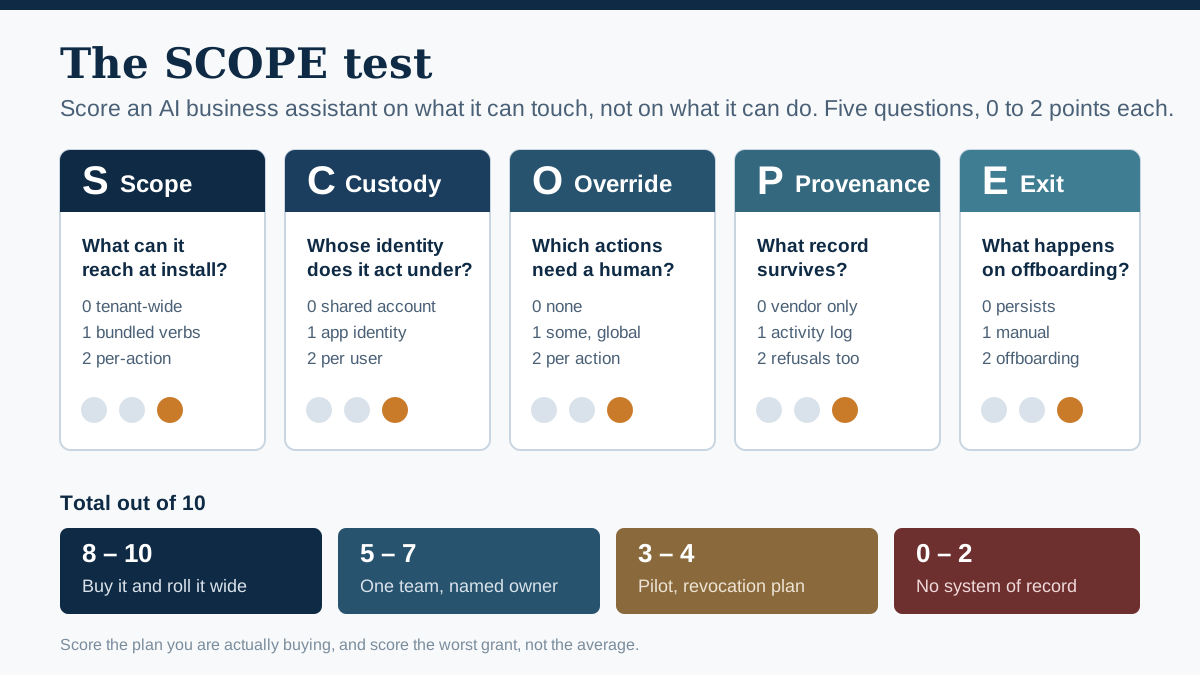
The SCOPE test scores an assistant on reach rather than features. Ten points available; the decision sits in the score bands at the bottom.
What an AI business assistant actually is
An AI business assistant is a language-model application that holds a standing connection to your work systems and performs a recurring operational job inside them. The connection is the definition. A chat window you paste text into is a chatbot; the moment the same model holds a token to your calendar, your mailbox or your CRM and acts there on a schedule or a trigger, it has become an assistant, and it has acquired a blast radius.
That boundary is worth being pedantic about, because the two things get sold under one name. Most vendors describe an assistant by the job — "your AI chief of staff", "your AI SDR" — and describe the connection as an integration, a checkbox in a settings page. Reverse the emphasis. The job description is marketing copy; the integration is a contract that survives the person who signed it.
Three properties separate one of these from the general chat assistant most of your company is already using:
| Property | General chat assistant | AI business assistant |
|---|---|---|
| Data access | whatever the user pastes in | a standing grant to a system of record |
| Trigger | a human types | a schedule, a webhook, a calendar event |
| Failure mode | a wrong answer the user reads | a wrong action nobody reads |
| Identity | the logged-in person | often a separate app identity |
| Offboarding | disable the account | revoke grants, reassign the workflow |
The fourth row is the one people miss. A general chat assistant fails in front of a human who can catch it. A business assistant fails in a system, at 3am, with a token that still works. We wrote about that distinction in more detail in our earlier analysis of write-access as the real line between agents and chatbots.
There is also a boundary at the top end. If the thing you are buying decides its own multi-step plan, calls tools it selects at run time and keeps going without a check-in, you are past "assistant" and into agent territory, where the autonomy level matters more than the permission set. We treat that as a different purchase with a different question — set the autonomy ceiling before the use case — and this article stays on the assistant side of the line: bounded jobs, standing access, human still in the room.
The install moment: what you are really agreeing to
The consent screen you click through in about four seconds is the entire security posture of an AI business assistant. Everything downstream — what it can read, what it can change, whose data it can see, what it can still do after you stop paying — was decided there. Read it as a contract, because that is the only moment in the product's life when the full permission set is displayed in plain language on one screen.
Two identity platforms cover most business software, and both make the same distinction under different names.
Microsoft's documentation is unusually direct about it. In Microsoft Graph, delegated permissions let an application "act on behalf of a signed-in user", and Microsoft is explicit that in this mode "the application can't access anything the signed-in user couldn't access". Application permissions work without a signed-in user, and there the app "can access any data that the permission is associated with", Microsoft's own example is that an app granted Files.Read.All as an application permission "can read any file in the organization" (according to Microsoft's Graph permissions overview). Same permission name. Two completely different companies' worth of exposure.
Google draws the line in the admin console instead of the manifest. Workspace administrators set an access level per third-party app — Trusted, Limited or Blocked — where "Trusting an app overrides a service restriction" and Limited means the app "can access only unrestricted Google services" (Google Workspace admin help). Since December 2024, admins have also been able to configure third-party apps by selected API scopes, letting them "limit third-party app access to specific OAuth 2.0 scopes for Google APIs, like Drive or Gmail" (Google Workspace Updates, 3 December 2024). That is the setting that lets you say yes to an assistant's calendar read and no to its Drive write, rather than yes or no to the whole product.
So the practical reading of a consent screen has three questions in it:
- Verb. Does the string say
Read, or does it sayReadWrite,Send,CreateorManage? Microsoft's scope naming follows{resource}.{operation}.{constraint}, so the verb is literally in the middle of the string. Google's equivalents are longer URLs, but the same word appears near the end. - Constraint. Microsoft's third segment is the giveaway:
.Allmeans tenant-wide,.OwnedBymeans only what the app created, and an absent constraint defaults to the signed-in user's own data. An assistant asking forMail.ReadWriteis asking about one mailbox.Mail.ReadWrite.Allis asking about every mailbox you have. - Who consents. If the screen says an administrator must approve, the vendor has asked for application permissions — the app is getting its own identity, not borrowing the user's. That is not automatically wrong, but it changes who is accountable and it makes the grant invisible to the person whose data it touches.
There is a fourth question the consent screen will not answer, and you have to ask the vendor: does the assistant re-check the user's own permissions at read time, or does it index everything once with a privileged account and then filter results in its own layer? Knowledge assistants in particular often do the latter, and the filter is application code, not your identity provider. When it has a bug, it leaks in the direction of showing people documents they were never allowed to see.
Why permission outranks features in this category
Third parties now feature in nearly half of all breaches, and AI assistants are exactly the kind of third party that gets standing access to systems of record. Verizon's 2026 Data Breach Investigations Report, drawn from a dataset spanning November 2024 to October 2025, found that "breaches with third-party involvement have increased by 60% from last year's dataset, reaching 48% of total breaches" (2026 DBIR). That is the second consecutive jump of that scale in the same number.
The same report puts numbers on how much AI is already inside the perimeter without a purchase order. Verizon found that "45% of employees are now considered regular users of AI (authorized or not) on their corporate devices, up from 15% in the previous year", and that "67% percent of users are using non-corporate accounts on their corporate devices to access AI services". Shadow AI, in their words, "is now the third most common non-malicious insider action detected in our data loss prevention (DLP) dataset in 2025, a fourfold increase in percentage from the previous year".
Independent survey work points the same way at the integration layer specifically. Sapio Research, surveying 2,000 employees at organisations with 500 or more staff across the UK and US in November 2025 for BlackFog, found that "around half (51%) of employees admit to connecting or integrating AI tools with other work systems or apps without IT department approval or oversight" (BlackFog research). Half of your workforce is already doing the install step this article is about, without you.
What that looks like when it goes wrong is documented. In August 2025, Google Threat Intelligence Group published an advisory on a campaign it attributes to the actor UNC6395, which between roughly 8 and 18 August 2025 "targeted Salesforce customer instances through compromised OAuth tokens associated with the Salesloft Drift third-party application" (GTIG advisory). The actor exported data from Salesforce objects including Cases, Accounts, Users and Opportunities, hunting specifically for AWS access keys, passwords, Snowflake tokens and organisation-specific SSO and VPN login URLs. GTIG's advice, updated on 28 August, was blunt: customers should "treat any and all authentication tokens stored in or connected to the Drift platform as potentially compromised", and organisations should ensure applications hold "minimum necessary permissions" and avoid "overly permissive scopes like full access".
Nothing about that incident required the AI to malfunction. Drift is a conversational assistant. It behaved exactly as designed. The compromise was of the tokens it held, and the loss was proportional to the scope those tokens carried, which is the entire argument of this article compressed into one event.
The security literature has already named the failure class. OWASP's 2025 Top 10 for LLM Applications lists LLM06: Excessive Agency, which it defines as "the vulnerability that enables damaging actions to be performed in response to unexpected, ambiguous or manipulated outputs from an LLM, regardless of what is causing the LLM to malfunction" (OWASP). OWASP splits the root cause three ways, and the three map cleanly onto the questions a buyer can actually ask:
| OWASP root cause | OWASP's own example | Buyer's version of the question |
|---|---|---|
| Excessive functionality | an extension chosen to read documents "also includes the ability to modify and delete documents" | which verbs did we have to accept to get the one we wanted? |
| Excessive permissions | an extension "accesses downstream systems with a generic high-privileged identity" | does it act as the user, or as one shared super-account? |
| Excessive autonomy | deletions performed "without any confirmation from the user" | which irreversible actions need a human click? |
OWASP's first two mitigations are "minimize extensions" and "minimize extension functionality" — for a mailbox-summarising assistant, they note it "may only require the ability to read emails, so the extension should not contain other functionality such as deleting or sending messages". That is a procurement instruction disguised as a security control, and almost no buying guide treats it as one.
If you want a longer treatment of the authorisation side, this NDC Copenhagen talk covers fine-grained authorisation for agent systems in more depth than a blog section can:

The SCOPE test: five questions, one sitting
The SCOPE test is our five-question scorecard for an AI business assistant, scored zero to two per question for a maximum of ten. It takes about twenty minutes per product if you have the vendor's docs and a trial tenant open, and it is designed to be run by whoever is doing the buying, not by a security team you have to book three weeks out.
The five letters stand for Scope, Custody, Override, Provenance and Exit.
| Letter | The question | 0 points | 1 point | 2 points |
|---|---|---|---|---|
| S — Scope | What data classes and verbs does it request at install? | tenant-wide read/write to a system of record, no per-scope choice | narrower than tenant-wide but bundled — you accept write to get read | per-action grants; read-only is a supported configuration |
| C — Custody | Whose identity does it act under? | one shared service account with elevated rights | app identity with per-user impersonation | delegated per user; it can never exceed what that person could do |
| O — Override | Which irreversible actions require a human? | it sends, posts, pays or deletes autonomously | some actions gated, configurable per workspace only | every externally visible or destructive action gated per action, by policy |
| P — Provenance | What record survives? | vendor-side logs only, retrievable by support ticket | exportable activity log of what ran | actor, action, data touched and what was refused, exportable to your SIEM |
| E — Exit | What happens when the owner leaves or you cancel? | access persists until someone remembers to revoke it | revocation is possible but manual and per-integration | grants are tied to an identity in your directory; one offboarding action removes them |
Read the totals like this:
| Score | Verdict |
|---|---|
| 8–10 | Buy it and roll it wide. The permission model will survive an audit. |
| 5–7 | Buy it for one team with a named owner and a review date. Do not make it default across the company. |
| 3–4 | Pilot only, on non-sensitive data, with a written revocation plan. Expect to replace it. |
| 0–2 | Do not connect it to a system of record. If the team needs the capability, buy it inside a suite you already govern. |
Two rules make the scoring honest rather than decorative.
Score what the product does by default, not what the enterprise tier can be configured to do. Vendors routinely put SSO, audit export and scope controls behind the tier above the one you are actually buying. If the plan on your quote cannot do it, it scores zero on your card. Otter.ai, for instance, lists SSO and SCIM under Enterprise rather than Business, so a team buying Business is scoring a different product than the one on the security page.
Score the worst grant, not the average. An assistant with four narrow scopes and one tenant-wide write is a tenant-wide-write product. Blast radius does not average.
The output of the test is not a ranking. It is a sentence you can put in a purchase request: this assistant scores 6, one team, named owner, review in 90 days. That sentence is what turns a security review from a three-week queue into a fifteen-minute conversation, because it arrives with the answer already in it.
Two assistants through the SCOPE test
Worked examples make a rubric usable, so here are two, built from the permission behaviour these product classes actually document rather than from any bake-off we ran.
Assistant A — a standalone meeting notetaker on a per-seat business plan. It joins calls through a calendar integration, records, transcribes and emails a summary to participants.
| Letter | Score | Reasoning |
|---|---|---|
| S | 1 | Calendar read plus meeting join; it does not need your CRM, but the calendar grant is usually all-or-nothing per user rather than per-calendar. |
| C | 1 | Acts as the user who installed it, but its bot joins meetings that user was invited to — including meetings other people own. |
| O | 0 | The externally visible action, sending the summary to every participant, happens automatically. That is the design. |
| P | 1 | An exportable activity log exists on business tiers; "what was refused" is not a concept the category has. |
| E | 0 | On a per-seat plan without SSO or SCIM, the grant lives in one employee's account and survives their departure until someone audits it. Otter.ai, for example, publishes SSO and SCIM under Enterprise rather than Business. |
| Total | 3 | Pilot only, non-sensitive meetings, written revocation plan. |
A fair objection to that row: the zero on Override is not sloppiness, it is the product working as intended. True, and it does not change the score. What it changes is the remediation. A fixable zero gets fixed in configuration; a design zero gets managed with policy and consent, or the archetype gets rejected for that use. Scoring them the same is deliberate, because blast radius does not care about intent.
That score matches the lived complaints. The Hacker News thread quoted earlier is full of people discovering the O and E rows the hard way, a bot in a meeting nobody consented to, and access that outlived anyone's attention. One commenter on that thread described a company that "kept getting into meetings it had no business getting into" until IT purged it (edot, Hacker News).
Assistant B — the assistant built into the productivity suite you already run. Same job, plus drafting and search across the suite.
| Letter | Score | Reasoning |
|---|---|---|
| S | 2 | Scopes are per-service and admin-configurable; the suite's own admin console is the grant surface. |
| C | 2 | It runs under the signed-in user's identity and inherits that user's existing permissions — Microsoft's delegated model, or the equivalent. |
| O | 1 | Drafts are the default for outbound; some connected actions are gated, but gating is configured per tenant, not per action. |
| P | 2 | Activity lands in the suite's existing audit log with the actor attached and exports to your SIEM. |
| E | 2 | The grant is a licence attached to a directory identity. Offboarding removes it in the same step as everything else. |
| Total | 9 | Buy and roll wide. |
The C row there is not our assertion; it is Microsoft's documented behaviour for delegated permissions, where the application "can't access anything the signed-in user couldn't access". Google's Workspace equivalent works the same way when an admin restricts the app to selected API scopes. Where a suite assistant is configured with application permissions instead, the row drops to zero and the score with it, so check the configuration rather than the brand.
The uncomfortable implication is that the suite assistant usually wins on reach even when it loses on features, and it frequently does lose on features, because the standalone tools are better at their one job. That is a real trade, not a rhetorical one, and the honest way to make it is: buy the suite assistant as the default, and buy a standalone only where the capability gap is large enough that you are willing to run it as a scored exception with an owner.
A third pattern deserves naming because it scores badly for a reason people find surprising. An assistant connected through a general automation platform — where the platform holds one connection to your CRM and every workflow rides on it — collapses C to zero. Every automation acts as the same integration user. The audit trail says the integration did it. There is no way to answer "which employee's assistant sent that", because architecturally there is no answer. We wrote about the same failure at the connector layer in our analysis of governing AI connectors and MCP servers.
Five kinds of AI business assistant, scored on reach
The category has split into five archetypes with genuinely different permission profiles. Prices below were fetched from the vendors' own pricing pages on July 30, 2026 and will drift; the named products are examples of the archetype, not endorsements or a ranking.
| Archetype | Typical reach at install | Typical SCOPE band | Representative published price |
|---|---|---|---|
| Meeting assistant | calendar + meeting audio; sends to participants | 3–5 | Otter Business $30/user/mo monthly, $19.99 annual; Fireflies Business $29/seat monthly, $19 annual |
| Calendar and task assistant | calendar read/write + task system | 4–6 | Motion Pro AI $19/seat/mo, Business AI $29/seat/mo |
| Inbox and outreach assistant | mailbox read/write/send + CRM write | 2–4 | varies; often bundled into sales platforms |
| Knowledge assistant | full-tenant index across document stores | 4–7 | no public price published |
| Suite-native assistant | per-service scopes inside a suite you already administer | 7–9 | Microsoft 365 Copilot Business add-on $21.00/user/mo, promotional $18.00 with annual commitment |
Meeting assistant — best for teams who lose decisions between calls
Best for: small teams where nobody writes the notes and decisions get relitigated. The value is real and immediate.
What it asks for: calendar read, meeting join, and the right to send output to participants. The last one is the problem: the send is the product, so it cannot be gated without breaking the workflow.
Pricing, fetched July 30, 2026: Otter.ai lists Pro at "$16.99/user/month" monthly or "$8.33/user/month" annual, and Business at "$30/user/month" monthly or "$19.99/user/month" annual, with SSO, SCIM and API access reserved for Enterprise (Otter pricing). Fireflies.ai lists Pro at $18/seat monthly or $10 annual, Business at $29 monthly or $19 annual, and Enterprise at $39/seat annual-only (Fireflies pricing).
When it is the wrong buy: any meeting where a participant has not consented, and any regulated conversation. The consent problem is not hypothetical, it is the subject of active litigation and of the complaints quoted earlier in this article.
Verdict: buy it for one team, on a plan that includes SSO if the team touches anything confidential, and write the meeting-consent rule down before the first call.
Calendar and task assistant — best for a single overloaded person
Best for: an individual whose calendar is the bottleneck. This archetype scores moderately because its reach is genuinely narrow: it wants your calendar and your task list, and neither is usually a system of record.
Pricing, fetched July 30, 2026: Motion lists Pro AI at $19/seat/month and Business AI at $29/seat/month, with an annual toggle advertising "Save 33%", the discounted annual figures are not stated as absolute numbers on the page, so we are not quoting one (Motion pricing).
When it is the wrong buy: when the real problem is that the person has too many meetings, not badly ordered ones. Rescheduling a calendar that should be half as full is optimisation of the wrong thing.
Verdict: the safest per-seat purchase in the category, and the one least likely to need a security review.
Inbox and outreach assistant — best for teams with a volume problem, worst on reach
Best for: sales and support teams where response latency is the constraint.
What it asks for: this archetype has the worst permission profile on the market, and it is structural rather than sloppy. To draft from context it needs mailbox read. To send it needs send. To keep the CRM current it needs CRM write. Each grant is individually defensible and the combination is a tool that can read everything, write to your revenue system and send mail as you.
When it is the wrong buy: whenever it cannot be configured to stop at draft. An assistant that sends autonomously scores zero on Override, and Override is the row that turns a bad output into a customer-visible incident. Our position is that this archetype should be bought draft-only for at least a quarter, and promoted to autonomous send only per-action, per-template, the principle we set out in our earlier analysis of when approval is the actual control.
Verdict: highest value, highest reach, buy last. If your organisation is going to have exactly one governed assistant, do not make it this one.
Knowledge assistant — best for large document estates, hardest to verify
Best for: companies past a few hundred people where the answer exists but nobody can find it.
What it asks for: everything. This archetype indexes across your document stores, wikis, tickets and chat, which means a tenant-wide read grant is the minimum viable configuration. Its C and P scores hinge entirely on one question: does it enforce your existing per-document permissions at query time, or does it index with a privileged account and filter afterwards?
Pricing, fetched July 30, 2026: the strongest example in this class, Glean, publishes no per-seat price on its pricing page at all, the page carries product and customer content and a demo request, and no pricing model (Glean pricing). That is worth noting plainly: the archetype with the broadest reach is the one where you cannot compare cost without entering a sales cycle.
When it is the wrong buy: below roughly a hundred people, where the index is small enough that search already works and the permission surface is not worth it.
Verdict: genuinely transformative at scale, and the one archetype where you should demand a written answer on permission enforcement before signing.
Suite-native assistant — best default for most companies
Best for: almost everyone, as the baseline, with specialists layered on top by exception.
What it asks for: nothing new. That is the entire pitch. It operates inside an identity boundary you already administer, under the user's own permissions, and its activity lands in an audit log your security team already reads.
Pricing, fetched July 30, 2026: Microsoft lists the Microsoft 365 Copilot Business add-on at "$21.00 now starting from $18.00" per user per month with an annual commitment, and states that "A Microsoft 365 Business plan is required to purchase Microsoft 365 Copilot Business". Bundles are listed at $32.00/user/month for Business Premium with Copilot and $23.50/user/month for Business Standard with Copilot (Microsoft 365 Copilot for business).
When it is the wrong buy: when the specific job genuinely is not covered. Suite assistants are usually second-best at any single job, and "second-best at everything" is the right answer more often than the category's marketing suggests, but not always.
The obvious objection: recommending the suite assistant sounds like recommending whichever giant you already pay. It partly is, and the reasoning is worth stating so you can disagree with it. The argument is about the identity boundary, not the vendor, it applies identically to Google Workspace and to Microsoft 365, and it would apply to any third party that agreed to run under your directory's delegated permissions rather than its own. The cost is real: you deepen a dependency on a suite whose AI pricing you do not control, and every subsequent negotiation gets harder. Most rankings of the best AI business assistants score that dependency at zero because it does not appear in a feature matrix. We think it is a genuine mark against the recommendation, and still smaller than the mark against five ungoverned consent grants.
Verdict: the default. Start here, then justify every standalone assistant as an exception with a score attached.
What an AI business assistant actually costs
The per-seat price is the smallest number in the decision. From the fetched prices above, a mid-tier business assistant costs roughly $19 to $30 per user per month — a spread of about $130 per user per year between the cheapest and dearest business plans in this set. That spread is real but small next to the costs that never appear on the pricing page.
Here is the model we would use. It has no invented numbers in it; the point is which lines exist, and you fill them with your own.
| Cost line | How to estimate it | Why it is usually missed |
|---|---|---|
| Licence | seats × plan price × 12 | the only line most buying guides show |
| Tier uplift for governance | (enterprise tier − business tier) × seats, where SSO, SCIM or audit export sit above your plan | discovered during security review, after the budget is set |
| Review time | hours of security, legal and IT review × loaded hourly rate | not charged to the tool's budget, so invisible |
| Rework at draft stage | share of outputs a human corrects × minutes × volume | the assistant's real accuracy shows up here, not in the demo |
| Storage and retention | transcript and log retention, and whether legal hold is supported | becomes a discovery problem, not a cost problem, at the worst moment |
| Offboarding and audit | recurring hours to enumerate and revoke grants | grows with every additional standalone assistant |
| Incident exposure | probability × cost of one wrong autonomous action on the broadest grant you approved | the only line where the SCOPE score changes the number |
Two of those lines can be made concrete from fetched numbers alone. On the licence line, fifty seats of Otter Business is $18,000 a year at the monthly rate of $30 per user and $11,994 at the annual rate of $19.99, so the billing-cycle choice alone moves $6,006, more than most teams spend arguing about which product to buy. On the tier-uplift line, the same fifty seats needing SSO and SCIM cannot stay on Business at all, because Otter lists both under Enterprise, which is quoted rather than published; the budget you approved is not the budget you will spend, and you find that out during security review. That pattern is the real answer to most AI business assistant pricing questions: the sticker is knowable, the governed sticker is not.
On incident exposure, the shape is visible even though the number is not. GTIG's remediation advice after the Salesloft Drift compromise was to treat every token stored in or connected to the platform as compromised and to rotate credentials across every integrated application. Price that instruction against your own environment — how many systems, how many keys, how many hours, how much downtime — and you have the order of magnitude. It scales with the scopes you accepted, which is the only line in the table the SCOPE score directly controls.
The last two lines are where a portfolio of five standalone assistants diverges sharply from one suite assistant with five capabilities. The licences may total similarly. The revocation surface does not: five vendors, five consent grants, five audit logs in five formats, and five separate answers to "what does it still have access to". We put numbers on the general shape of this in our analysis of enterprise AI implementation cost beyond the licence.
One honest note on sourcing. Buyers reasonably expect analyst pricing benchmarks for this category, and the obvious source is paywalled and blocks automated access — Gartner returned 403 to every retrieval method we tried on July 30, 2026, so no analyst figure appears in this article. Every price above is from the vendor's own public page, fetched on that date, and vendor pricing pages change without notice. Treat them as a snapshot, not a quote.
Choose this if: a decision tree that ends in a purchase
Most guides on how to choose an AI business assistant stop at a feature comparison and leave the reader to decide. Here is the decision itself. Run it in order and stop at the first line that matches.
Choose the suite-native assistant if you already run Microsoft 365 or Google Workspace and no single job is costing you more than a few hours a week per person. You get the best SCOPE score available, no new vendor, and no new consent grant. This is the right answer for most companies most of the time, and the reason buying guides rarely say so is that there is nothing to rank.
Choose a calendar and task assistant if exactly one or two people are the bottleneck and the bottleneck is scheduling. Narrow reach, low price, no security review needed in most organisations.
Choose a meeting assistant if decisions are genuinely being lost between calls, and you can answer the consent question for every meeting it will join. Buy the tier with SSO if the meetings touch anything confidential, even though it costs more, because the E row of the SCOPE test is what protects you eighteen months from now.
Choose a knowledge assistant if you are past a few hundred people, you have a real document estate, and you can get a written answer on query-time permission enforcement. Below that size, the reach is not worth what you get.
Choose an inbox and outreach assistant if you have already governed one of the above successfully, you can configure it draft-only, and there is a named human who owns every send. Do not make this your first one.
Choose none of them if your answer to "who owns this in six months" is silence. An unowned AI business assistant is not a cheap experiment; it is a standing grant with no expiry date, and the cost of it lands on whoever eventually has to enumerate it.
When a human assistant still wins
The incumbent here is not another product. It is a person, or nobody. Both still beat an AI business assistant in specific, predictable situations, and a buying guide that cannot say so is selling.
A human assistant wins when the work is relational, negotiating with a difficult counterpart's office, reading a room, knowing which of two conflicting requests actually matters this week. None of that is a context window problem. It is a judgment-under-relationship problem, and the current generation does not do it.
A human wins when the work is irreversible and unbounded. Booking non-refundable travel, signing anything, moving money. You can gate those actions in an AI system, but once every meaningful action is gated behind human approval, you have bought an expensive drafting tool and kept the labour, which may still be worth it but should be a conscious choice.
A human wins when accountability has to be personal. Regulated processes, board material, anything where "the system did it" is not an acceptable answer. Ownership of an AI business assistant can be assigned, but it is assigned to the person who configured it, and that person's exposure grows with every scope they accepted.
And doing nothing wins more often than the category admits. If the work you are trying to delegate exists because of a process that should be deleted, an assistant makes the wrong process cheaper to run and therefore harder to kill. Before buying, spend a fortnight logging what you would hand over — our twenty-minute self-test for whether you need an assistant at all and the fully-loaded cost of a human personal assistant both start from that log rather than from a product list.
Rolling one out without starting a governance project
The failure mode for a first AI business assistant is not that it does the job badly. It is that it works, spreads by word of mouth, and arrives at IT eighteen months later as a discovery problem across nine teams and four vendors. The Verizon shadow-AI numbers quoted earlier are the aggregate of exactly that pattern.
The sequence that avoids it is the one we use for gateway rollouts on our own platform: Observe first. Enforce second. Optimize third. It transfers cleanly to assistant procurement.
Observe. Before you buy anything, find out what is already installed. In Google Workspace, the app access list in the admin console shows every third-party app holding a grant. In Microsoft Entra, the enterprise applications list plus the consent grant records shows the same. Most organisations running this for the first time find AI tools they did not know were connected, which is both the point and the argument for doing it before rather than after. Write down what you find and who owns it. No rules yet.
That inventory has a blind spot worth naming, because an IT team that trusts it will under-count. It only sees tools that took an OAuth grant. Assistants that work as a browser extension, or as a desktop application capturing your machine's audio, never appear, and that architecture is common in this category precisely because it sidesteps the admin console. One practitioner described the pattern on the Hacker News thread cited earlier: you install an app that "hooks in to your computer's audio in/out" rather than joining the meeting as a participant (cj, Hacker News). Close that gap with endpoint software inventory and an explicit question in the survey you send the teams, not with the OAuth list alone.
Enforce. Set the two controls that prevent incidents rather than the ten that annoy people. First, move third-party app access from the default to selected scopes, so a new AI business assistant cannot arrive with tenant-wide grants on a single employee's click. Second, require that any assistant touching a system of record is draft-only until a named owner signs off on promoting specific actions. Nothing about daily work changes for people using approved tools.
Optimize. Once you can see usage, the interesting question becomes which assistants are actually used, which duplicate each other, and where a suite capability has quietly made a standalone subscription redundant. That is a consolidation exercise, and it is only possible after the first two steps.
Three practical additions. Give every assistant an owner and a review date at purchase, in the same field where you record the cost centre — this is the single cheapest control in the list, and the one most often skipped. Run the SCOPE test again at renewal, because vendors add scopes between versions; the grant you approved is not necessarily the grant you have. And negotiate SSO down a tier rather than accepting the enterprise quote: single sign-on and directory-linked provisioning are the two features that move the E row from zero to two, they cost the vendor almost nothing to enable, and they are a routine concession on a multi-seat annual commitment. Asking is free and the answer is often yes.
There is a compliance dimension to all of this that a buying decision cannot outrun. In the EU, an organisation deploying an assistant that processes personal data is generally acting as a controller for that processing, and the vendor's own view of who is responsible may not match yours. One European user on the Hacker News thread cited earlier documented a vendor responding to a deletion request by positioning itself as "the processor or hosting platform" and pointing the request back at the account holder (Confiks, Hacker News). Whatever the eventual legal answer, plan for the vendor to take that position. The EU AI Act adds duties on the deployer rather than only the provider, including human oversight and monitoring of use; we walk through what that means operationally in our guide to EU AI Act compliance for deployers. None of this is legal advice, and a regulated process needs counsel rather than a scorecard.
Where this framework is wrong or incomplete
The SCOPE test is a purchasing heuristic, not a security assessment, and it has real limits we would rather state than have you discover.
It measures posture, not implementation. A product can score 9 and still leak, because the test reads what the vendor documents and configures, not what the code does. Query-time permission enforcement is the clearest example: the vendor's answer is a claim, and verifying it needs a penetration test we are not proposing you run for a $30-a-seat purchase.
It penalises young products for missing enterprise plumbing. SSO, SCIM and SIEM export are the difference between a 4 and an 8, and small vendors ship them late. A genuinely better assistant from a twelve-person company will score below a mediocre one from an incumbent. That is a real bias in the framework, and the honest mitigation is to treat a low E score as a term to negotiate rather than a disqualification.
It says nothing about output quality. Nothing in SCOPE tells you whether the summaries are any good. You still need a trial on your own work. Our claim is only that permission is the dimension buying guides systematically ignore, not that it is the only one.
The prompt-injection question is unresolved for everyone. An assistant that reads untrusted content — inbound email, a shared document, a meeting invite from outside — can be steered by that content, and the industry does not have a reliable defence. OWASP's mitigation list is essentially "reduce what it can do", which is what SCOPE scores, but reducing agency is a mitigation and not a fix. Any vendor claiming a solved answer here is ahead of the field's actual state.
Our evidence base is asymmetric. The practitioner voices in this article come from Hacker News, which skews technical and skews toward complaint; people whose meeting assistant works fine do not post about it. The survey and breach data are solid, but they describe risk, not benefit, so the picture here is deliberately weighted toward what goes wrong. Balance it with your own trial.
We did not benchmark these products. No first-hand comparative testing sits behind the archetype scores; they are derived from documented permission models and published plan contents, fetched on July 30, 2026. Where a specific product's behaviour differs from its archetype, the product is right and this article is wrong.
The layer underneath the assistant
Everything above is a procurement question until the assistants start multiplying, and then it becomes an architecture question. Once several assistant products hold standing grants across your systems, the operative questions stop being "which one" and become: who owns this agent, what is it allowed to touch, what did it actually do, and what did it cost. That layer is what LeapForce builds, one controlled place where every AI tool, connector, model and agent is identified, policy-checked, executed with brokered credentials and recorded, so an assistant's reach is a configuration rather than a consent screen somebody clicked. Non-human identities are first-class in that model: every agent carries an owner, a scope and an expiry, and offboarding a person removes what their agents could reach in one action, which is the E row of the SCOPE test solved structurally instead of by remembering. LeapForce does not sell an AI business assistant and will not replace the ones in this article — it is the control layer they run inside, and several capabilities on our own platform are still in development rather than shipping today, which we label per-capability rather than blur.
If that is the shape of your problem, our earlier analysis of owner, scope and expiry for non-human identities and the Access and Identity, Connectors and Observability and Audit pages go deeper than this article can.
Frequently asked questions
An AI business assistant is a language-model application that holds a standing connection to your work systems — calendar, mailbox, CRM, document stores — and performs a recurring operational job inside them, such as taking meeting notes, drafting replies, scheduling, or answering questions from internal documents. The standing connection is what separates it from a general chatbot: a chatbot sees what you paste, an assistant holds a token.
How to choose an AI business assistant on a small team comes down to one default and one exception. Start with whatever assistant is built into the productivity suite you already run, because it inherits an identity boundary you already administer and adds no new consent grant. Only buy a standalone product when a specific job is costing more than a few hours a week per person and the suite genuinely does not cover it. When you do, score it on scope, custody, override, provenance and exit before you compare features, within an archetype the features converge, and the permission model does not.
AI business assistant pricing is per seat almost everywhere, and business-tier plans in this category clustered between roughly $19 and $30 per user per month when we fetched vendor pricing pages on July 30, 2026 — for example Otter Business at $30 monthly or $19.99 annual, Fireflies Business at $29 monthly or $19 annual, Motion Business AI at $29, and the Microsoft 365 Copilot Business add-on listed at $21.00 with a promotional $18.00 on annual commitment. Knowledge assistants aimed at large estates frequently publish no price at all. The licence is the smallest line in the real cost: tier uplift for SSO and audit export, review time, rework and offboarding usually exceed it.
An assistant does a bounded job on a trigger with a human nearby; an agent decides its own multi-step plan, selects its own tools at run time and keeps going without a check-in. The practical difference is which question governs the purchase. For an assistant, the question is permission: what can it touch. For an agent, the question is autonomy: how far can it go before someone looks. Products increasingly ship both modes under one name, so read the run-time behaviour rather than the label.
Not for the relational and irreversible parts of the job. Current products handle scheduling, note-taking, drafting and retrieval well, and handle negotiation, judgment under relationship, and anything requiring personal accountability badly. The realistic outcome is that an assistant absorbs the reversible, low-judgment volume and the human keeps the rest, which changes the shape of the role rather than removing it. If your honest answer is that most of the role is reversible and low-judgment, the role was probably under-scoped before AI entered the picture.
Refuse tenant-wide write to any system of record on a first purchase, refuse autonomous send on anything customer-visible until a named owner has signed off per action, and refuse any grant that only exists because the vendor bundled it with one you needed. OWASP's guidance on excessive agency puts the same rule in engineering terms: an assistant summarising a mailbox "may only require the ability to read emails, so the extension should not contain other functionality such as deleting or sending messages". Where the platform supports per-scope configuration — Google Workspace has supported configuring third-party apps by selected API scopes since December 2024 — use it rather than accepting the app's default request.
In Google Workspace, the admin console's app access controls list every third-party app holding an OAuth grant and the scopes each one has. In Microsoft Entra, the enterprise applications list plus the consent grant records shows the equivalent. Run that inventory before you buy anything new, not after: Verizon's 2026 DBIR found that 45% of employees are now regular AI users on corporate devices and 67% of AI service access from those devices came from non-corporate accounts, so the realistic expectation is that you will find tools you did not authorise.
By default, nobody — which is the most common and most expensive failure in this category. On per-seat plans without SSO or SCIM, the consent grant lives inside the departing employee's account and can outlive their access to the building. Fix it at purchase rather than at exit: record an owner and a review date in the same place you record the cost centre, buy the tier that ties grants to your directory where the price difference is defensible, and make "enumerate and revoke AI grants" a line on the offboarding checklist.
It can, and the risk is about consent rather than accuracy. Recording rules differ by jurisdiction, several of them require all parties to consent, and the practical problem is that assistants join meetings without making their presence obvious to everyone on the call, which is the substance of the class-action complaint against Otter.ai reported in August 2025 and of the practitioner complaints quoted in this article. Before deploying one, decide the rule for external meetings, make the notice explicit rather than assumed, and check with counsel for regulated conversations.
Long enough to see the assistant fail at least once, which usually means four to six weeks rather than a two-week trial. The first fortnight measures novelty; the failure modes that matter — a wrong action nobody read, a scope you did not realise you granted, an output that needed more correction than it saved — surface after the enthusiasm fades. Run it with one team, a named owner, and a written note of what you will measure, then re-run the SCOPE test at the end because vendors add scopes between releases.
No. One assistant, one team, a named owner and a review date is a complete governance model, and buying a platform for it is over-engineering. The threshold is roughly when you cannot answer "what does each AI tool still have access to" from memory — typically three or more assistants across two or more teams, or the first one that touches a system of record. Before that, the admin consoles you already have are enough, and the discipline matters more than the tooling.
Ready to Govern Your AI?
Talk to LeapForce — one controlled layer for every AI tool, connector, model, and agent.
Comments