
AI sales pipeline management is safe wherever the agent reads, drafts or stages. It turns risky at one exact moment: when the agent writes to the CRM. The CRM is not a workspace. It is the record every other system derives from.
That is the distinction this piece is built on, and it is missing from almost every guide on the topic. Sales pipeline management AI automation is usually sold as a stage list — score the lead, log the call, advance the deal, refresh the close date — with no mention of the fact that every one of those four actions is a write to a system of record that comp plans, board reporting and downstream integrations read from without asking who put the value there. A Salesforce developer posting as Matthew ran into the practical version of it in December 2023, trying to give an API user permission to edit exactly two fields on Contact. He got the object permission working and then found the rest of the object came with it: "I can also edit a whole bunch of other fields".
He was not doing anything exotic. He was trying to express the single most obvious control you would want over a non-human writer, and his CRM could not express it cleanly.
The short answer: Before an agent is allowed to write any CRM field, name the second reader — the next system or person that consumes that value and what they do with it — because a write you can reverse in the CRM is not a write you can reverse in the systems that already read it.
Last updated: July 31, 2026.
AI Sales Pipeline Management, Defined by the Writes It Makes
AI sales pipeline management is the use of models and agents to observe, score, summarise and update the deals in a CRM. The useful definition is not the capability list. It is the write list: an agent doing pipeline management is an identity with credentials to change stages, dates, amounts, owners and contact details in the system of record, at a speed and volume no human editor operates at.
Read the mainstream guides on this keyword and you will find the capability framing everywhere. The monday.com guide lists seven capabilities every AI pipeline needs, including automated deal risk detection and pipeline health monitoring. The Floworks guide describes automation that moves teams "from manual updates to continuous insight." Both are competent. Neither asks what happens to a value once the automation has written it, and neither of their FAQ blocks contains a single question about reversing an automated change.
That gap is the reason this article exists. The pipeline stages are well covered elsewhere, including in our own earlier piece on sales process automation and the cost of reversing it, which asks what it costs to take back an action that has already left the building. This piece asks the narrower and, in an enterprise, more expensive question: what it costs to take back an action that never left the building at all, because it only ever touched your own database.
Three properties make CRM writes different from the writes an agent makes anywhere else.
| Property | Why the CRM is different | Consequence for an agent |
|---|---|---|
| Derived downstream | Comp attainment, board reporting, territory routing, revenue recognition timing and BI dashboards all read CRM fields as their input | A single field edit changes numbers in systems the agent has never heard of |
| Machine-speed bulk | The same API that updates one record updates a hundred thousand, with no natural stopping point | A mis-scoped run is not a mistake, it is a migration |
| Weak field granularity | Most CRM permission grants are expressed per object, not per field | "The agent may update deal stage" is often not a sentence your CRM can enforce |
Those three properties compound. Weak granularity means the agent can touch more fields than intended. Bulk means it touches them across more records than intended. Derivation means the damage is copied into systems that will not be corrected when you correct the CRM. That is the whole risk model in three lines, and everything below is the working out.
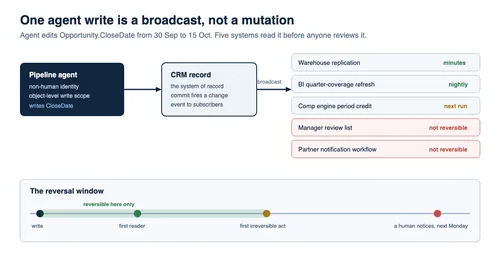
A CRM Write Is a Broadcast, Not a Mutation
When an agent updates an opportunity, the update does not sit still. Modern CRMs publish change events, and downstream systems subscribe to them. Salesforce documents this explicitly: Change Data Capture publishes change events representing "creation of a new record, updates to an existing record, deletion of a record, and undeletion of a record," so that external data stores can be synchronised in near real time.
Read that from the agent's side. The moment the write commits, the platform is actively pushing the new value outward to whatever is listening. Your warehouse replication is listening. Your marketing automation is listening. Whatever sits behind that HubSpot or Salesforce webhook someone configured in 2022 is listening. None of them will receive a later message saying the write was made by an automation nobody had reviewed.
This is the mechanism people miss when they think about undo. The intuitive model of a CRM edit is a mutation: a cell had one value, now it has another, and setting it back returns the world to its prior state. The accurate model is a broadcast: a cell had one value, the new value has been transmitted to every subscriber, and setting the cell back transmits a second message that arrives later, to consumers that may have already acted on the first one and may not process reversals at all.
A concrete chain, using the most-automated field in the pipeline. An agent reads a meeting transcript, concludes the deal has slipped, and pushes the close date from 30 September to 15 October.
- The change event fires. The warehouse ingests it within minutes.
- The nightly BI refresh recomputes quarter-end coverage from warehouse data.
- The comp engine, which credits attainment by close period, moves the projected credit out of Q3.
- The deal drops out of a "closing this quarter" list that drives a manager's Monday review.
- A partner-notification workflow keyed to close-date changes sends an update nobody asked it to send.
Reversing step zero in the CRM reverses steps one and two automatically, usually reverses step three on the next run, does not un-run the Monday review, and definitely does not recall the partner email. The reversal is partial by construction, and which parts survive depends on architecture nobody documented.
The practical implication is not "never let agents write." It is that the question "can we undo this?" has to be replaced with a better one: who reads this next, and how long do we have?
The Second Reader Test: A Diagnostic You Can Run in One Afternoon
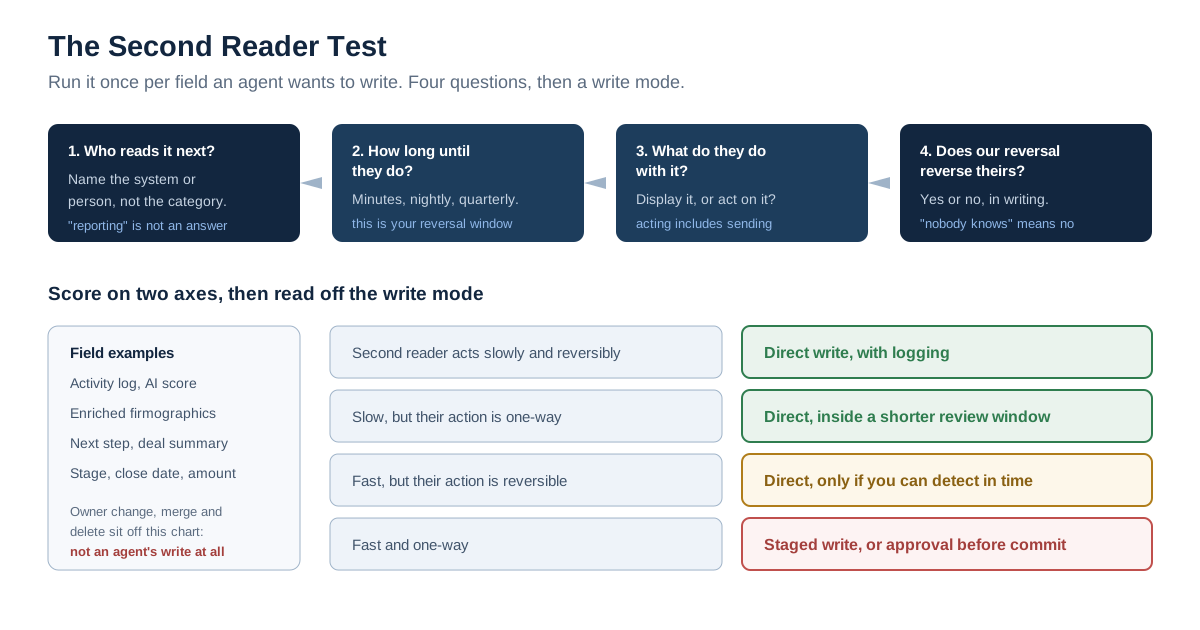
Here is the diagnostic. We call it the Second Reader Test, and it takes an afternoon with a RevOps lead, a data engineer and whoever owns the integrations.
For every field an agent is proposed to write, answer four questions in writing:
- Who reads this next? Name the specific system or person that consumes the value after the CRM does. Not "reporting". The named dashboard, the named job, the named workflow.
- How long until they do? Minutes for an event subscriber, hours for a nightly job, weeks for a quarterly comp run. This is your reversal window.
- What do they do with it? Display it, or act on it? A dashboard that shows a wrong number is embarrassing. A workflow that sends an email, changes an entitlement or credits a quota is not recoverable by editing the CRM.
- Does reversing our write reverse theirs? Answer yes or no. If nobody in the room knows, the answer is no.
Score each field on the two axes that emerge: how fast the second reader acts, and whether their action is reversible. Four quadrants fall out.
| Second reader acts | Their action reverses | Verdict for the agent |
|---|---|---|
| Slowly (days) | Yes | Direct write acceptable, with logging |
| Slowly (days) | No | Direct write acceptable only inside a review window shorter than the delay |
| Fast (minutes) | Yes | Direct write acceptable if you can detect and correct within the window |
| Fast (minutes) | No | Staged write only, or human approval before commit |
The bottom-right quadrant is where the expensive mistakes live, and it is larger than the intuition suggests. Any field wired to a notification, an entitlement, a commission accrual, a customer-visible portal or an outbound integration lands there. The reason to run the test rather than reason about it is that this list is not knowable from the CRM's own interface: subscriptions live in the subscribing systems, so you cannot govern an agent's writes to a field graph you have not mapped from the other end.
Two things make this test cheap. It needs no tooling. A spreadsheet with four columns does it. And it produces an artifact you keep: the field-to-consumer map is the same map you need for schema changes, for a CRM migration and for an incident review, so the effort is not agent-specific overhead.
One honest caveat about our own position here. We have not run this test against a customer's production CRM and cannot report a measured before-and-after from one. What we did do, on 31 July 2026, is read the published permission and scope documentation for five CRM platforms and record exactly what each grant can and cannot express — that survey is the next section, and it is our own work rather than a summary of anyone else's.
Can You Actually Stop an Agent From Writing One Field?
The control everyone reaches for first is a field allowlist: this agent may update StageName and NextStep, and nothing else. We argued in our piece on sales process automation that the credential is the real control. This section asks the follow-up that piece left open — whether the platform can express a field-level write allowlist for a non-human identity at all.
The answer depends on which layer you look at, and the layers do not agree.
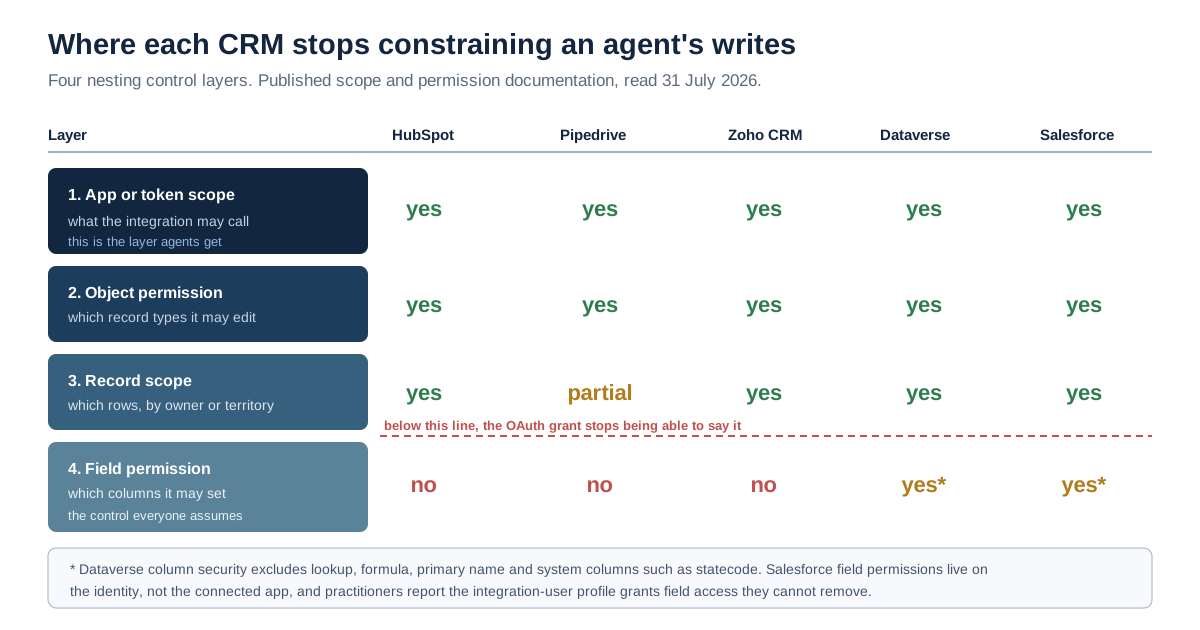
There are four places a CRM can constrain a write, and they nest:
| Layer | What it constrains | Typical granularity |
|---|---|---|
| OAuth scope on the app or token | Which APIs the integration may call at all | Object, sometimes read versus write |
| Object permission on the identity | Which record types it may create, read, edit, delete | Object |
| Record scope | Which rows, via ownership, sharing or territory | Row |
| Field permission on the identity | Which columns it may read or set | Column, where supported |
The trap is that agent platforms authorise at the top layer and teams reason about the bottom one. A connector, an MCP server or a marketplace app receives an OAuth grant. That grant is expressed in objects. The field control, where it exists at all, lives on the identity the app acts as. That only binds if someone deliberately gave the agent its own identity with a restrictive profile, rather than reusing the integration user that already works.
HubSpot's own agent documentation makes the top layer explicit. Its MCP server provides read and write access to "contacts, companies, deals, tickets, carts, products, orders, line items, invoices, quotes, subscriptions, and segments (lists)," and states that "you control what data the agent has access to through a HubSpot User-level App and its scopes." That is a clear and honest statement of the control surface. It is also an object-level one.
What We Found Reading Five CRM Permission Models
We read the published scope and permission documentation for five CRM platforms on 31 July 2026 and asked one question of each: can this platform express the sentence "this integration may update the deal stage and nothing else"?
| Platform | Write scopes in the app grant | Field-level control available? | Where it lives |
|---|---|---|---|
| HubSpot | Object-level, e.g. crm.objects.deals.write, with sensitive and highly_sensitive variants (scope docs) | Not in the grant; sensitive-property classes are the closest thing | Property classification, not per-property scope |
| Pipedrive | Object-level, e.g. deals:full — "Create, read, update and delete deals" (scope docs) | No | Nowhere in the OAuth grant |
| Zoho CRM | Module-level, e.g. modules.deals with operation types ALL, CREATE, READ, UPDATE, DELETE (scope docs) | No field-level scope documented | Nowhere in the OAuth grant |
| Microsoft Dataverse | Table privileges via security roles | Yes — column-level security with per-column Create, Read, Read unmasked and Update permissions (Microsoft Learn) | Column security profiles on the identity |
| Salesforce | Object permissions plus field permissions on profiles and permission sets | Yes, on the identity — but practitioners report the integration-user profile grants field access you cannot remove | Profile and permission set, not the connected app |
Three findings are worth spelling out, because each one changes a design decision.
The one "field" scope in the set does the opposite of what you would hope. Pipedrive's grant list includes deal-fields:full, and it is tempting to read that as per-field control. It is not. Its documented meaning is "Create, read, update and delete deal fields". That is permission to change the schema. The only field-shaped scope on offer lets an app add and delete fields, while offering no way to stop it writing to one.
Where column-level control exists, it has documented holes. Dataverse is the strongest of the five, with four separate per-column permissions. Microsoft's own documentation is candid about the limits: "Column-level security doesn't apply for users who have the system administrator role," and the columns that cannot be secured at all include lookup columns, formula columns, primary name columns and system columns such as createdon, modifiedon, statecode and statuscode. Status and state are exactly the columns a pipeline agent most wants to move. There is a further wrinkle for anyone relying on the audit trail afterwards: Microsoft notes that for secured columns, "the column values in the before-and-after audit change events show as *" in Purview activity logs. Securing a column can cost you the readable history of what changed in it.
On Salesforce, field permissions exist but do not reliably reach the integration identity. The platform genuinely has field-level security on profiles and permission sets. Whether you can apply it to an integration user is a different question, and two practitioners hit the same wall. Nathan McQueen described it precisely in August 2023: after granting object access through a permission set with no field permissions in it, "the integration user has read access to ALL the fields on the object," with the field access arriving from a profile he could neither view nor remove. Matthew's thread four months later reports the write-side twin: granting object edit permission delivered edit access to fields he had deliberately left at read.
We could not independently verify the current Salesforce behaviour from Salesforce's own documentation, because help.salesforce.com article pages did not render through any of our three retrieval methods on 31 July 2026 — the pages return their shell without the article body. Salesforce's developer documentation, which does render, is cited above where it is relevant. Treat the two Salesforce field-permission reports above as dated practitioner evidence and test the behaviour in your own sandbox before designing around it. That test costs twenty minutes and is worth more than any article's assurance, including this one.
The Bulk Write Has No Natural Ceiling
A human editing opportunities gets tired. That is not a control, but it has functioned as one for thirty years, and every CRM's oversight design quietly assumes it. Bulk APIs remove it completely.
Salesforce's published limits make the scale concrete. Its Bulk API 2.0 limits allow up to 150,000,000 records to be uploaded per rolling 24-hour period for ingest jobs, with a maximum job file size of 150 MB and a recommendation to keep uploads under 100 MB because base64 fields expand, and with batches created automatically rather than by the caller. Those numbers exist to support data migrations. They are also the ceiling on an agent that has decided every stalled opportunity in the org needs its next step rewritten.
The asymmetry matters more than the absolute figure. Set the three timescales side by side:
| What happens | Practical limit | Time to complete |
|---|---|---|
| Agent updates every open opportunity in the org | Platform ingest limits, effectively none at pipeline scale | Minutes |
| Humans review those updates | Reviewer attention | Weeks, if ever |
| Restoring the prior values | Whatever backup you have, record by record | Days, if you have one |
Nothing in a standard CRM sits between the first row and the second. There is no built-in setting that says "this identity may not modify more than 200 records per hour," which is the single control that would convert most agent write incidents from a data-recovery project into a support ticket.
So build it yourself, outside the CRM. Three mechanisms, in increasing order of effort:
- Rate-limit the agent's credential at the gateway or connector layer, not in the prompt. A cap the model can be argued out of is not a cap. This is the same argument as the one in our note on why the credential, not the instruction, is the control, applied to write volume rather than write scope.
- Require a distinct authorisation for any run touching more than N records. Pick N by asking how many wrong records your team could review by hand in a day, then halve it. Whatever number gets said first in that meeting is optimistic, because it is an estimate of reading speed rather than of judging whether each value is right.
- Make bulk runs write to a staging object first, then promote in a reviewed batch. This is slower and it is the only one of the three that gives you a genuine dry run.
An important nuance for anyone planning to lean on the third option: the platform's own recovery tooling has volume limits too, and they are much smaller than its write limits. HubSpot's restore tool "can only display and restore up to 10,000 records at a time," per its restore documentation. The write path scales to millions; the recovery path is capped at ten thousand and applies to deletions, not edits. That mismatch is the shape of the whole problem.
Undo Is Not Restore, and Recycle Bins Do Not Cover Edits
The recovery plan for a bad automated write is often some version of "we restore from the recycle bin." That plan is wrong in a specific and important way: recycle bins hold deleted records. They do not hold overwritten values. There is no equivalent bin for those.
The distinction is worth stating plainly, because the whole recovery plan turns on it.
| What happened | What the platform holds | What you can get back |
|---|---|---|
| Record deleted | The record in a recycle bin, for a bounded period | The whole record, if you act in time |
| Field overwritten | The new value, plus a history entry if that field is tracked | The prior value only if history covered that field |
| Field overwritten, untracked | The new value | Nothing, without an external backup |
| Record merged | The surviving record | Partial, and merges are frequently irreversible |
The retention windows for the deletion case are real but short. HubSpot's restore documentation, which we retrieved directly, allows restoration of most object records "up to 90 days after they were deleted," with GDPR-related and permanent deletions excluded entirely. Salesforce's help article on extended recycle bin retention is indexed as putting the default at 15 days, extendable to 30 on request from Salesforce Support, with no custom value in between; we flag that one as second-hand because, as noted below, Salesforce help pages would not render for us on the day of writing. Check it in your own org, where the answer is authoritative anyway. Those are the generous cases. For the overwrite case — which is what a pipeline agent actually does, hundreds of times a day — there is no equivalent bin at all.
Field history is the fallback, and it is a thinner fallback than most teams assume; our earlier piece on sales process automation works through the specific limits on tracked fields, retention and long-text values, and the short version is that the coverage is partial by design. The point for this article is narrower. Field history is a record of what changed. It is not a restore mechanism, and turning a history table into recovered data is a scripting exercise someone has to write under pressure, on the day it matters, without having practised.
Three practical positions follow.
Practise the restore before you need it. Take a sandbox, run a wrong bulk update against a hundred opportunities, and time how long it takes to get the prior values back. Whatever number you get is your real reversal window, and it is the only honest input to the Second Reader Test's third column.
Treat any field an agent may write as a field you must be able to reconstruct. In practice that means a daily export of the agent-writable columns, kept somewhere the agent cannot reach. It is unglamorous. It also works.
Say out loud which writes are one-way. Merges, deletions and any field wired to an outbound notification are one-way. Put them on a list, and put that list in front of whoever approves the agent's scope, because "we can undo it" is the assumption that lets scopes get wide.
Eight Pipeline Writes, With a Verdict on Each
The pipeline stages are not equally risky, and treating them as one decision is how teams end up with an agent that has more authority than anyone intended. Here is a verdict on each of the eight writes that make up day-to-day pipeline maintenance, scored with the Second Reader Test.
Activity logging — calls, emails, meetings. Best for: the agent's first job. Verdict: direct write, no gate. Second readers are dashboards and reps, and the action is display, not decision. The blast radius of a wrong activity record is embarrassment.
Contact and account enrichment — titles, firmographics, phone numbers. Verdict: direct write with source attribution and a confidence floor. The second reader is often outbound sequencing, which does act on the value, so record where each enriched value came from and let a human own the overwrite rule for fields a rep has already set by hand.
Lead scoring and prioritisation. Verdict: direct write to a score field that only the agent owns. This is the cleanest case in the pipeline, because the agent writes to a column nothing else writes to, and the second reader is a sorted list. If the score drives automated routing or an SLA clock, it moves up a tier.
Next step and deal summary text. Verdict: staged write. These are the long-text fields agents most want and the ones where platform history coverage is weakest. Write to a paired staging field the agent owns and let promotion to the field of record be a human action.
Deal stage. Verdict: human approval before commit, in most orgs. Stage drives forecast category, entitlements, notification workflows and often quote approvals. It is the most-wired field in the object. An agent may propose the stage change and evidence it from the transcript; the commit belongs to the rep or the manager.
Close date. Verdict: propose only, never direct write. Detail in the next section.
Amount. Verdict: propose only. Amount is read by forecasting, comp accrual and often revenue recognition timing. It is also the field a customer will eventually see reflected in a quote. Our piece on tying out the quote-to-cash chain covers what the downstream record has to reconcile with; an agent quietly adjusting Amount breaks that tie-out silently.
Owner reassignment, merges and deletions. Verdict: out of scope for an agent. All three are effectively irreversible in operational terms, all three have compensation consequences, and none of them is a task where machine speed buys anything. If you want an agent to help, have it produce the list and a human execute it.
Two patterns run through those verdicts. The first: an agent writing to a column it exclusively owns is nearly always fine, and an agent writing to a column humans also edit is nearly always contested. The second: risk tracks the number of subscribers to the field, not the sophistication of the model. A better model does not make close date less wired.
Close Date Is a Period Boundary Wearing a Date Field's Clothes
Close date deserves its own section because it is the field where the gap between "a date changed" and "money moved between periods" is widest, and because it is the field agents are most confidently sold as being able to maintain.
A close date is not a prediction stored in a cell. It is the key that assigns a deal to a reporting period. Move it across a quarter boundary and, without any other edit, the deal leaves one quarter's coverage and joins another's. A manager's committed number changes; a rep's projected attainment moves between comp periods; a board slide sourced from the warehouse tells a different story next week than it did last week. None of those systems receives an explanation. They receive a date.
That is why the honest verdict is propose-only, and why the proposal has to carry three things with it: the evidence the model used, the prior value, and the period effect. A close-date proposal that says "moving 30 September to 15 October, which moves £180,000 out of Q3 coverage" is a decision a manager can make in four seconds. One that says "updated close date based on recent activity" is a decision nobody makes, which is how these changes end up unreviewed.
Two boundaries worth naming, so this section stays in its lane. First, whether the resulting forecast number is any good, and how overrides to it should be recorded, is a separate governance problem with its own literature and its own failure modes; this section is only about the write to the field. Second, in businesses where close date feeds revenue recognition timing rather than just internal reporting, the field stops being a sales artifact and becomes an input to financial statements. Where that is true, the control is not a matter of sales-ops preference, and the right people to design it are your controller and your auditor, not your RevOps team and certainly not this article.
The design pattern that works is a paired field. Let the agent own AI_Suggested_Close_Date__c and write to it freely, with its reasoning in an adjacent text field. Let CloseDate remain a human-write column. The agent gets to be useful every day; the record stays a record. Reps get a queue of suggestions with evidence rather than a mystery about why their quarter changed shape.
There is a real cost to this pattern and it should be stated. Paired fields mean two columns per governed value, a promotion mechanism to build, and a rule for what happens when the human never gets to the queue. Teams that adopt it without deciding the staleness rule end up with a suggestion backlog nobody trusts. Decide up front how long a suggestion lives before it expires, and expire it noisily.
Read-Only, Staged, or Direct: Choosing the Write Mode
Every proposal to automate a pipeline task resolves to one of three write modes. Pick the mode explicitly, per field, and write the choice down.
Choose read-only if the value is consumed by anything that acts automatically within minutes, or if the field is one a customer eventually sees, or if you cannot name the second reader. A read-only agent that produces excellent briefings is worth more than a writing agent nobody trusts. This is also the correct mode for the first ninety days on any new deployment, regardless of how good the vendor demo was.
Choose staged write if the agent's output is genuinely useful but the field of record has multiple writers or weak history coverage. Staging costs you a promotion step and buys you a complete audit trail, because the staged value is a new write in a column the agent exclusively owns, and the promotion is a discrete human action with a name attached.
Choose direct write if the agent exclusively owns the column, the second reader displays rather than acts, and you have a reconstruction path — a daily export or reliable field history — for the values it touches. Log every write with the agent's identity, the prior value, and the evidence.
The mode is not permanent. The sensible progression is read-only, then staged, then direct on the specific fields that have earned it, with the promotion decision based on observed error rates rather than elapsed time. We have described the general version of this sequencing as observe first, enforce second, optimize third; the pipeline-specific version is that you should be able to show a month of the agent's proposed writes, and the rate at which humans accepted them, before any of those writes become direct.
One rule that saves arguments: the write mode is a property of the field, not of the agent. The tempting move is to certify an agent as trustworthy and then hand it a broad scope. Certify the field instead. Deal stage stays gated no matter which agent asks for it, and activity logging stays open no matter how new the agent is.
What Agent Reliability Research Says About Machine-Speed Writes
The strongest argument against broad write scopes is not a security argument. It is a reliability one, and it is measured.
The τ-bench benchmark, introduced by Yao, Shinn, Razavi and Narasimhan in June 2024, evaluates language agents in dynamic conversations with simulated users in real-world domains including retail, where agents must follow domain-specific policy rules while using tools. The headline findings are directly relevant to anyone considering an agent with CRM write access. State-of-the-art agents such as GPT-4o "succeed on <50% of the tasks," and the paper introduces a pass^k metric to measure consistency across repeated attempts, reporting "pass^8 <25% in retail."
Read the second number carefully, because it is the one that matters for pipeline writes. Succeeding on a task slightly less than half the time is a product problem. Succeeding on the same task eight times running less than a quarter of the time is a governance problem, because it means the agent's behaviour is not stable across repetitions of identical work. A pipeline agent does identical work thousands of times a week.
Two caveats keep this honest. The benchmark's domains are retail and airline customer service, not CRM administration, so the numbers do not transfer as a prediction of how your agent will behave on opportunity records. And frontier models have improved since mid-2024; anyone citing these figures as current model capability is misreading them. What transfers is the shape of the finding — that consistency degrades much faster than single-shot accuracy, and that a rule-following task with tool access is exactly where it degrades.
That shape has a direct design consequence. Controls that assume "the agent is usually right" are the wrong controls. The right controls assume the agent is usually right and occasionally, unpredictably, wrong in a way that looks exactly like being right, and they bound what a wrong run can reach. This is the same argument NIST makes structurally in the AI Risk Management Framework, released in January 2023 and organised around Govern, Map, Measure and Manage — the framework is "intended for voluntary use and to improve the ability to incorporate trustworthiness considerations into the design, development, use, and evaluation of AI products, services, and systems." Mapping is the function most teams skip, and the Second Reader Test is a small, sales-specific instance of it.
Six Numbers That Show Your Pipeline Writes Are Governed
Governance that cannot be measured is a slide. Six numbers tell you whether the controls above are real, and all six are cheap to produce once the agent has its own identity.
| Number | How to get it | What good looks like |
|---|---|---|
| Share of agent writes to agent-owned columns | Count writes by field, split by whether humans also write that field | Above 80 percent early on; a falling number means scope creep |
| Proposal acceptance rate | Staged suggestions promoted by a human, divided by suggestions made | Stable and above roughly half; very high means nobody is reading them |
| Largest single run, by record count | Max records touched in one execution, per week | Below your hand-review capacity for a day |
| Median reversal window | From the Second Reader Test, per field, weighted by write volume | Longer than your detection time |
| Refused writes | Attempts blocked by scope or approval gates, logged | Non-zero. Zero means the control is not binding on anything |
| Reconstruction coverage | Share of agent-writable fields with a daily export or tracked history | 100 percent, or you have fields you cannot restore |
The fifth row is the one most teams do not instrument and the one that tells you the most. A control that has never refused anything has not been tested. Recording refusals — what the agent tried to do and was stopped from doing — is the difference between a control you can evidence and a control you assert, which is the argument we make in more depth in our note on proving what an agent actually did.
The third row deserves a comment too. "Largest single run" is a better metric than average volume because the damage function is not linear. A thousand runs of ten records is a manageable week. One run of ten thousand is an incident. The average of the two tells you nothing.
Common Mistakes When Handing an Agent the Pipeline
Five design errors follow directly from the mechanics above, and each has a specific antidote.
Reusing the existing integration user. It works on day one, and it destroys attribution permanently. Every agent write is then indistinguishable from every other automation's write, and the question "which agent changed this opportunity" has no answer. Give each agent its own identity with a named human owner and an expiry date.
Confusing a notification with an approval gate. If the automation posts to Slack and proceeds regardless, that is a log line, not a gate. A real gate blocks the write until an approval is recorded against a named identity, and records the refusal as durably as the approval. Our earlier piece on when approval is actually control sets out the test: if the approver never responds, what happens?
Scoping by agent instead of by field. Certifying an agent as trustworthy and then granting it broad object access reverses the correct order. The field's wiring determines the risk; the agent's quality determines only how often you exercise it.
Assuming the prompt is a permission boundary. Instructions in a system prompt describe intent. The credential describes capability. Only one of them is enforced when the model behaves unexpectedly, and it is not the one you can edit in a text box. Prompts are documentation.
Skipping the sandbox restore drill. Teams design a recovery plan on paper and never time it. The first real test then happens during an incident, with an audience. Run the drill once, write down the number, and use it as the input to every write-mode decision afterwards.
When a Human Rep and a Read-Only Agent Still Win
There are cases where the honest recommendation is not to give an agent write access at all, and they are more common than vendor material admits.
When the pipeline is small. Below roughly a few hundred open opportunities, the manual maintenance burden is real but bounded, and the governance apparatus described above costs more than it saves. A read-only agent that drafts updates for a rep to apply captures most of the value at none of the risk.
When the CRM is the audited record for something else. If your close dates feed revenue recognition, or your opportunity data supports a regulatory or contractual reporting obligation, the write path needs controls designed with your auditors, and "we added an AI agent" is a change they will want to have been consulted on beforehand rather than discovered afterwards.
When nobody owns the integration map. If no one in the organisation can list what subscribes to opportunity changes, you cannot complete the Second Reader Test, and every direct-write decision is a guess. Build the map first. It is useful even if you never deploy an agent.
When the value is judgment, not throughput. Reading a room, deciding whether a champion has gone quiet because they are busy or because they have been overruled, choosing when not to push. The human rep still wins these, and an agent's confident write to a stage field can erase ambiguity a good rep was deliberately holding onto.
The read-only agent is underrated in all four cases. It reads every transcript, drafts every update, ranks the pipeline. It touches nothing. Most of the reported benefit of pipeline automation is analysis, not data entry, and analysis needs no write scope.
Where LeapForce Fits
The controls this article argues for are not CRM features, which is exactly why they are hard to assemble: they sit between the agent and the system of record. LeapForce builds that layer. Every agent gets a non-human identity with an owner, a scope and an expiry rather than a shared integration key; connectors are scoped at the action level, so "may update deal stage" is a grant the platform expresses rather than a sentence in a prompt; workflows carry an owner, a scope, policy checks at every step and human gates where judgment matters, which is where the staged writes above belong; and the audit record captures what was refused, not only what ran, which is the fifth number in the table above.
What LeapForce does not do is give your CRM field-level permissions it does not have. If your platform cannot express a column-level write restriction on the identity, the control has to live in the gateway between the agent and the API, and you should design it there deliberately rather than assume a governance layer papers over the platform's model.
Where This Analysis Is Still Uncertain
Several things in this article are less settled than the confident sections above might suggest, and it is worth being explicit about which.
The Salesforce field-permission behaviour for integration users rests on two practitioner reports from 2023, not on current vendor documentation, because Salesforce's help article pages did not render through any of our three retrieval methods. Platform behaviour changes. Test it yourself.
We have not run the Second Reader Test against a production CRM and cannot report a measured outcome from one. The test is derived from documented platform behaviour and from the propagation mechanics that Change Data Capture and equivalent event systems make explicit, not from a customer engagement we can cite. If you run it, the interesting number to report back is how many fields turned out to have second readers nobody in the room knew about.
The τ-bench figures are from mid-2024 and from retail and airline domains. They characterise a shape — consistency degrading faster than accuracy — rather than predicting behaviour on CRM tasks in 2026. Treat them accordingly.
We searched on 31 July 2026 for a published, independently sourced figure for how often agent-initiated CRM writes are wrong in production and did not find one. Every result was vendor or agency material citing itself or citing other vendor material, so we have quoted none of it. That number would be the most useful single input to every decision in this article, and its absence is why the recommendations here are structural rather than threshold-based.
Finally, the field-to-consumer map at the heart of the Second Reader Test is only as good as an organisation's knowledge of its own integrations. The test surfaces that gap rather than closing it, and in several places above the honest recommendation is to build the map before deploying anything.
Frequently asked questions
Technically yes, and for some fields that is appropriate. An agent that logs activities or writes to a score column it exclusively owns can commit directly, because the downstream consumers display those values rather than acting on them. Fields that trigger workflows, entitlements, notifications or compensation accrual should require an approval recorded against a named person before the write commits. The dividing line is not the agent's accuracy; it is what happens next to the value it wrote.
It depends entirely on your platform, and the answer is worse than most teams assume. We read the published scope documentation for five CRMs on 31 July 2026: HubSpot, Pipedrive and Zoho express write grants at the object level, with no field-level scope in the OAuth grant. Microsoft Dataverse supports genuine column-level security with separate Create, Read and Update permissions, though it excludes lookup, formula, primary name and system columns such as statecode. Salesforce has field-level security on profiles and permission sets, but practitioners report difficulty applying it to integration-user identities. Where the platform cannot express the restriction, it has to be enforced between the agent and the API.
Usually you cannot, in the sense people mean by undo. Recycle bins hold deleted records, not overwritten values. HubSpot documents restoration of most deleted records for up to 90 days; Salesforce's documented default is reported as 15 days, extendable to 30 by support request. Neither covers a field that was edited rather than deleted. For overwrites, your options are field history where the field was tracked, an external backup, or reconstruction from an export. Practise the restore in a sandbox and time it before you need the number.
Only if each agent has its own identity. If your automations share an integration user, every write is attributed to that user and per-agent attribution is impossible after the fact. Native field history also has coverage limits — tracked-field caps, retention windows and reduced detail on long-text fields — so a decision record kept outside the CRM, capturing why the agent wrote what it wrote and what it was refused, is a necessary complement rather than a nice-to-have.
Activity capture and summarisation, followed by a lead score written to a column the agent exclusively owns. Both are low-risk under the Second Reader Test: the downstream consumers are dashboards and humans, the actions are display rather than execution, and a wrong value is visible and cheap to correct. Deal stage, close date and amount should stay proposal-only until you have a month of accepted-proposal data showing the agent is right often enough to earn a direct write.
The recurring cost is small and the setup cost is mostly people-time: a field-to-consumer map, one identity per agent, staging fields for the columns that need them, a daily export of agent-writable fields, and a review queue someone actually owns. The expensive item is the one teams skip — mapping the integrations — and it is expensive because the knowledge is distributed rather than because the work is hard. Budget an afternoon per object for the map and a few days of admin configuration per agent.
Not directly, in most organisations. Close date assigns a deal to a reporting period, so a single edit moves projected revenue between quarters, changes committed numbers and can shift compensation credit, all without any consumer of that data being told an automation made the change. The workable pattern is a paired suggestion field the agent owns, carrying its evidence, the prior value and the period effect, with promotion to the field of record left to the rep or the manager.
A staging field is an extra column on the same record that only the agent writes, with a human promotion step to move its value into the field of record. A shadow record is a separate object holding the agent's proposed version of the whole record. Staging fields are simpler and keep the proposal next to its context, which is why they suit pipeline work; shadow records suit cases where the agent proposes many correlated changes at once and you want to accept or reject them as a set.
It should have an expiry date, and the specific date matters less than the fact that one exists. An agent nobody renews should stop working rather than continue indefinitely, because the most common way an over-scoped credential survives is that nobody is ever prompted to look at it again. Tie revocation to the human owner as well: when the owner leaves, the agent's access should go with them.
Yes, and it is the highest-value item on the list because it is a one-time cost that permanently determines whether attribution is possible. A shared integration user is convenient on day one and makes every subsequent question about who changed what unanswerable. Per-agent identities also let you apply different field permissions, different rate limits and different expiry dates to agents doing different jobs, which is the only way the field-by-field verdicts in this article can be enforced rather than merely intended.
Ready to Govern Your AI?
Talk to LeapForce — one controlled layer for every AI tool, connector, model, and agent.
Comments