
Rank every sales process automation candidate by what it costs to reverse, not by the hours it saves. Reads, notes and task creation are free to undo and can run unattended today. Anything that overwrites a populated CRM field, sends something a buyer can see, or moves a forecast number needs a named human approval. Those three classes are what corrupt a pipeline, and your CRM's field history will not always give you the old value back.
That ordering is our position, and it is not the one the category sells. Most guides to sales process automation rank work by time saved per rep per week, which puts "auto-update the CRM" and "auto-send the follow-up" near the top of the list. Those are the two actions with the highest reversal cost in the funnel. On Hacker News in April 2025, a company co-founder posting as ageitgey described checking his spam folder and finding, on his own count, "at least 30-50 'personal' sales outreaches a day", most obviously machine-written, including one video "personalisation" that showed nothing but a bot-blocking page. That is not a tooling gap. That is what happens when teams automate in time-saved order and never ask what an action costs to take back.
The short answer: Automate in reversal-cost order. Free-to-undo actions unattended now, field overwrites behind a shadow-write or a gate, and every buyer-visible or forecast-moving action behind a named human approval.
Last updated: July 30, 2026.
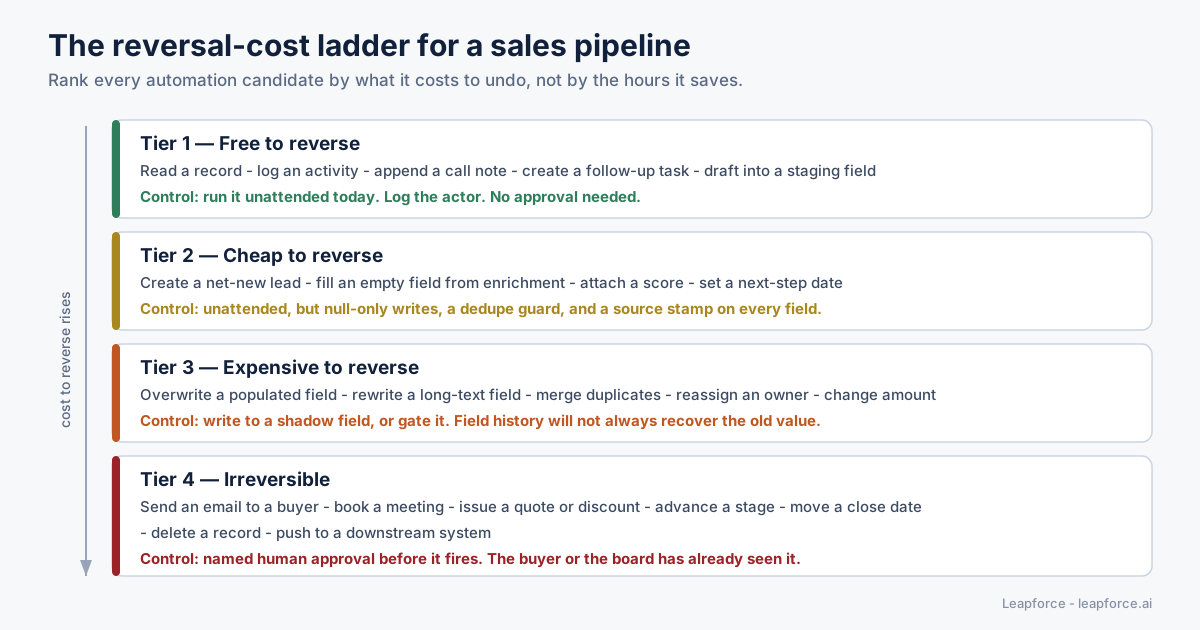
The reversal-cost ladder. Every automation candidate in a sales pipeline lands on one of four rungs, and the rung sets the control.
One disclosure first: nobody on our side ran a controlled sales-automation pilot for this article. Everything below comes from vendor documentation we fetched and quoted, regulation we read in the original, and our own work on the governance layer under agent deployments. Where a number is somebody else's it is named and linked in the same sentence. Where we are reasoning rather than measuring, we say so.
Sales Process Automation, Defined by What It Writes
Sales process automation is software that carries out steps in a revenue pipeline without a person doing them by hand: research, enrichment, scoring, routing, sequencing, note-taking, record updates, handoffs and reporting. The useful definition is narrower than that, though: a sales process automation is best classified by what it writes and who sees the result, because that is the only property that predicts what happens when it is wrong.
Two automations can save an identical 20 minutes a day and sit at opposite ends of the risk range. One transcribes a discovery call and appends the summary as a note: one new object nobody outside the company will read, deletable in a click. The other reads the same transcript, rewrites the opportunity's Next Steps field, pushes the close date out two weeks and emails the buyer a recap. That is three writes: one destroyed a prior value, one changed a number the CFO will report, one left the building. Same input, same model, same time saved.
So the category's default question, what takes my reps the longest?, is the wrong one. Ask instead: what does this action cost to take back, and who has already seen it?
The scale of the prize is real, and so is the temptation
The pressure to automate is not manufactured. Salesforce's 2026 State of Sales research, announced on 3 February 2026 from a double-anonymous survey of 4,050 sales professionals fielded between August and September 2025, found that the average seller spends 40% of their time actually selling, with Gen Z reps down at 35% and losing roughly two hours a week to manual data entry. The same research puts AI adoption in sales at 87% of organisations and agent usage at 54% of individual sellers.
Salesforce also published a first-party operating number worth reading carefully. Adam Alfano, EVP of Sales at Salesforce, said in that announcement that in four months, agents contacted 130,000 previously untouched leads and created 3,200 opportunities. That is a vendor describing its own deployment, so treat it as directional. The arithmetic is instructive anyway: one opportunity per 41 leads contacted, about 2.5%. For every opportunity the automation produced, roughly 40 people received a machine-initiated approach that went nowhere. At that ratio the quality of the 40 is not a rounding error. It is the majority of the output.
Sales process automation versus sales workflow automation
The two phrases get used interchangeably, but the distinction underneath maps onto the reversal-cost idea neatly:
| Term | What it usually means | Where the risk sits |
|---|---|---|
| Sales workflow automation | A chain of steps fires on an event trigger: form submitted, then enrich, then score, then route, then notify | In the individual steps — each one writes something |
| Sales process automation | The whole pipeline design, including which stages exist, who owns them, and what the exit criteria are | In the handoffs and the stage definitions — this is where forecast meaning is set |
| CRM automation | Writes and reads against the system of record specifically | In the writes, always |
A workflow is a thing you build. A process is a thing you agree on. Automating a workflow before you have agreed the process is how teams end up with an agent confidently populating a field that three departments define differently.
The Reversal-Cost Test: A Diagnostic You Can Run in 90 Minutes
The reversal-cost test is a single-sitting inventory: list every automation candidate, and for each write down what it writes, who sees it, and how long a reversal takes. Sort by the third column. Everything in the free and cheap tiers is buildable this quarter; everything in the expensive and irreversible tiers needs a control before it needs a builder. Two people and a whiteboard get through a mid-market pipeline in about 90 minutes.
You do not need a tool for this. You need the list of things somebody has already proposed automating, plus one person who knows what each CRM field is used for downstream.
The four columns
For each candidate, fill in:
- The write. Which object and field? "Updates the CRM" is not an answer. "Sets
Opportunity.NextStepandOpportunity.CloseDate" is. - The audience. Internal only, or does a buyer, a partner or a board pack see the output?
- The reversal. If this fires wrongly at 2am on a Saturday, what gets you back to the prior state, and is that state even recoverable?
- The detection lag. How long before somebody notices? People skip this column, and it separates an annoying bug from a quarter-end surprise.
The four tiers
| Tier | Example sales actions | Reversal | Control we recommend |
|---|---|---|---|
| 1 — Free to reverse | Read a record, log an activity, append a call note, create a follow-up task, draft into a staging field | Delete one appended object | Run unattended now. Stamp the actor on every write. |
| 2 — Cheap to reverse | Create a net-new lead, fill an empty field from enrichment, attach a score, set a first next-step date | Delete or null the field; no prior value was destroyed | Unattended, with three conditions: null-only writes, a dedupe guard, a source stamp per field |
| 3 — Expensive to reverse | Overwrite a populated field, rewrite a long-text field, merge duplicates, reassign an owner, change an amount | Requires the old value, which may not exist | Write to a shadow field and let a human promote it, or gate the write |
| 4 — Irreversible | Send a buyer-visible message, book a meeting, issue a quote or discount, advance a stage, move a close date, delete a record, push downstream | You cannot unsend it, and the forecast has already moved | Named human approval before it fires |
If the tool is already bought and it only does overwrites, you are not stuck. Point its writes at custom shadow fields you create for the purpose, keep the fields of record read-only to its user, and put a one-click promotion in front of the rep. Most CRMs let you do that with configuration rather than code, and it converts a Tier 3 vendor into a Tier 2 one without a renegotiation.
The tier boundary that matters most is between 2 and 3, and it is a single word: null. Filling an empty field is a cheap write because failure costs you nothing you had. Replacing a populated field is an expensive write because failure costs you something you had and may not be able to reconstruct. Most enrichment and AI lead scoring tooling lets you configure this in one setting, and most teams leave it on "overwrite" because that is the default that makes the demo look better.
Working the test on one real candidate
Take the most commonly proposed sales workflow automation there is: after every call, an AI agent writes the summary and the next step into the opportunity.
| Column | Answer |
|---|---|
| The write | Opportunity.Description (long text), Opportunity.NextStep (long text), Task (new object) |
| The audience | Internal — but the next step drives what the rep says on the following call, so it becomes buyer-visible one step later |
| The reversal | The Task is free to delete. The two long-text fields are the problem: in Salesforce, changes to fields longer than 255 characters record only that an edit occurred, not the before and after values. There is no old value to restore. |
| The detection lag | Until the rep reads it and notices it is wrong, or does not notice |
So the popular framing, "call summaries are a safe, low-risk starting automation", is only half right. Task creation is Tier 1. The note append is Tier 1. Overwriting two long-text fields is Tier 3, precisely because the platform's own audit mechanism cannot recover what was there. The fix is not to abandon the automation but to write the summary to a new field, and let the rep promote it into NextStep with one click. You keep most of the time saving and drop two tiers.
A version of this discipline shows up on the Weflow RevOps podcast with Mallory Lee, VP of RevOps at PhoneBurner. Weflow's own episode summary describes her team automating activity capture, call summaries and contact lifecycle updates while deliberately leaving reps owning only three fields: close date, forecast category, and line items. That short list is a reversal-cost inventory by another name.
The Seven Pipeline Stages, With a Verdict on Each
Most sales process automation guides walk the pipeline stage by stage and list what could be automated. This section does the same walk, but every stage gets a verdict: automate now, gate it, or leave it alone. The verdict follows from the reversal-cost tier, not from how much time the stage consumes. Read it as a shortlist generator. If a stage's "automate now" row is not already running in your team, that is where the cheap wins are.
Stage 1 — Lead research and list building
Automate now. Reading public sources, assembling a target list into a staging table, deduplicating against existing accounts, and flagging accounts that already have an open opportunity. Every one of these is a Tier 1 or Tier 2 write into a table that is not yet your system of record.
Gate it. Record creation directly in the CRM without a dedupe pass. Duplicates are expensive to reverse. A merge destroys field values on the losing record, and it is the most common way teams discover their audit trail is thinner than assumed.
Leave it alone. Deciding the ideal customer profile. A model can cluster your closed-won accounts; it cannot tell you which of them you want more of, because that is a strategy question with margin, delivery capacity and churn in it.
The specific failure to watch: research automation scraping a source your legal team has not cleared, at a volume that would have been impossible manually. Volume converts a grey-area practice into a visible one.
Stage 2 — Enrichment
Automate now. Null-only enrichment writes with a per-field source stamp and a timestamp. If the field is empty, fill it and record where it came from.
Gate it. Overwriting a value a human entered. A rep who typed a title after hearing it on a call has better data than a vendor's inference from a stale profile, and the rep's version is the one that vanishes.
Leave it alone. Enrichment used to make an adverse decision about an individual person rather than an account. That is a different regulatory conversation and it does not belong in a sales workflow.
The specific failure to watch: enrichment that silently reverses a correction. A rep fixes a bad phone number; the nightly job restores the bad one; the rep stops trusting the CRM. That is how hygiene becomes a trust problem rather than a data problem, and once trust goes the reps go back to their spreadsheets.
Stage 3 — Scoring and qualification
Automate now. Producing a score, writing it to a dedicated field with the model version and the input snapshot recorded, and routing based on it. AI lead scoring is a Tier 2 write when it writes to its own field, because it destroys nothing and can be recomputed.
Gate it. Auto-disqualification. Marking a lead dead is close to irreversible in practice, not because the record cannot be reopened but because nobody ever reopens it. Route low scores to a low-touch nurture, not to a bin.
Leave it alone. Letting the score set the forecast category. A score is a prediction about a lead; a forecast category is a commitment made by a named person. Collapsing them puts a model's confidence in a board pack under a human's name.
The specific failure to watch: score drift after a product or pricing change with nobody re-validating. AI lead scoring degrades quietly because the label, closed-won, arrives months after the prediction.
Stage 4 — Outreach and sequencing
Automate now. Drafting. Personalisation research. Assembling the sequence. Everything up to the moment of sending.
Gate it. The send itself, until you have a measured quality bar and a volume cap. This is the Tier 4 boundary in its purest form, and the one the category is most eager to talk you past.
Leave it alone. Multi-channel autonomous pursuit of a prospect who has not responded. The marginal value of message five is low and the reputational cost is not.
The specific failure to watch: the one the Hacker News commenter above described, which is machine-written outreach at a volume that makes the recipient feel processed. In May 2026 another Hacker News poster asked the category's question plainly: "Are AI SDRs, just a fancy term for AI Slop email Spam". When the buying population asks that openly, send volume is not a growth lever.
Stage 5 — Meetings, notes and CRM write-back
Automate now. Transcription, summarisation, activity logging, task creation, and drafting the next step into a staging field.
Gate it. Promotion of any drafted value into a populated field of record. One click by the rep converts a Tier 3 write into a Tier 1 one.
Leave it alone. Stage advancement based on meeting content. Stage definitions are the load-bearing agreement in a sales process; a model inferring them from a transcript is guessing at a definition your team argues about.
The specific failure to watch: the silent overwrite of long-text fields, where the platform records that a change happened but not what the change was.
Stage 6 — Proposals, quoting and pricing
Automate now. Assembling the document from approved components, pulling the correct current price list, and checking a draft against approval thresholds.
Gate it. Everything that leaves. A quote is a commercial statement; a discount is a margin decision. Both are Tier 4 by definition because the buyer sees them and cannot un-see them.
Leave it alone. Autonomous discount authority. No version of it survives a finance review.
The specific failure to watch: an agent that can read the price list and also write the quote, with no separation between the two permissions.
Stage 7 — Forecasting, handoff and renewal
Automate now. Detecting stalled deals, flagging opportunities whose close date has moved more than twice, surfacing accounts with no activity in 21 days, assembling the pipeline-hygiene report. Pure reads with a notification.
Gate it. Any automated change to close date, amount, or forecast category. Shortest list in the article, highest consequences.
Leave it alone. Automated commit calls. A commit is a person's word.
The specific failure to watch: an automation that "cleans up" stale close dates by pushing them to the end of the current quarter. It is a plausible-sounding hygiene rule and it silently manufactures pipeline.
The stage table at a glance
| Stage | Automate now (Tier 1–2) | Gate it (Tier 3–4) | Leave alone |
|---|---|---|---|
| Lead research | List building, dedupe check, staging table | Direct CRM record creation | ICP definition |
| Enrichment | Null-only writes with source stamp | Overwriting human-entered values | Person-level adverse decisions |
| Scoring | Score to its own field, routing | Auto-disqualification | Setting forecast category |
| Outreach | Drafting, research, assembly | The send | Autonomous multi-channel pursuit |
| Meetings and notes | Transcription, logging, staged drafts | Promotion into fields of record | Stage advancement |
| Proposals and quoting | Document assembly, threshold checks | Anything sent to the buyer | Discount authority |
| Forecast and renewal | Stall detection, hygiene reports | Close date, amount, category changes | The commit call |
Why the Forecast Breaks Before the Email Does
The failure mode teams prepare for is an embarrassing email. The failure mode that actually costs money is a forecast built on fields an agent changed and nobody reviewed. An embarrassing email is loud, immediate, and bounded to one recipient. A corrupted close date is silent, compounds across a quarter, and is discovered by the CFO.
Here is the mechanism, in order:
- An agent has write access to opportunity fields, because otherwise the automation does not save anyone time.
- It writes plausible values. Models are good at plausible. A close date three weeks out is not obviously wrong.
- Nobody reviews individual writes, because reviewing them all would cost more than the automation saved.
- The aggregate rolls up into a weekly forecast that a human presents as their own judgement.
- The error surfaces at quarter end, by which time the input data has been overwritten several times.
Every step in that chain is individually reasonable. That is what makes it dangerous.
The forecast is a data structure, not a report
Sales differs from most automation domains because the CRM is simultaneously an operational tool and a financial reporting substrate. When an agent writes to CloseDate or Amount, it is editing an input to a number that goes to a board, and in some companies to an audit.
That changes what "good enough" means. A support-ticket classifier at 92% accuracy is a good classifier. A close-date-setting agent at 92% accuracy is putting 8% noise directly into a financial projection, and unlike a classifier the errors do not cancel. They correlate, because the model's bias is systematic.
The Salesforce research points at the same tension from a different angle. It found that 51% of sales leaders with AI say disconnected systems are slowing their AI initiatives, and that 74% of sales professionals are focusing on data cleansing, rising to 79% among high performers against 54% among underperformers. The industry has correctly identified that data quality gates AI value. What it has under-discussed is that the AI is now also a writer of that data, which makes data quality a governance problem rather than a cleanup project. Our earlier analysis of why AI-powered workflows break at the step nobody owns makes the general version of that argument; sales is where it bites hardest, because the commit step has a dollar value attached.
One honest caveat on the numbers
We wanted a defensible figure for typical forecast accuracy here and could not get one. The widely repeated benchmarks sit behind analyst paywalls; Gartner's sales research returned a 403 on every attempt, and Reddit, where practitioners discuss their real variance most candidly, was unreachable throughout this research. Rather than quote a second-hand number laundered through a vendor blog, we left the claim unquantified. Your own team's historical forecast variance is the only number that matters for this decision anyway.
Your CRM Audit Trail Is Thinner Than You Think
If your plan for agent oversight is "we can always check field history", read your platform's actual limits first. Taking Salesforce as the reference implementation, standard Field History Tracking covers 20 fields per object, retains history for 18 months, and has three exclusions that matter enormously once a non-human identity is doing the writing.
Salesforce's own knowledge article, last published on 3 April 2026, states the limits plainly: the default is 20 tracked fields per object, the Field Audit Trail add-on raises that to 60, and field history data is guaranteed retained for 18 months for orgs created after 1 June 2011. Records older than that can sometimes be pulled via queryAll() or Data Loader's Export All, but the documentation is explicit that the dataset is not guaranteed complete and is subject to deletion at any time.
The three exclusions are the part nobody reads.
| Limitation | What Salesforce documents | Why it matters for an agent |
|---|---|---|
| Long text fields | For fields over 255 characters, Salesforce records only that the field was edited — not the before and after values | NextStep, Description and most custom notes fields are exactly this type, and they are the fields agents most want to rewrite |
| System-context changes | Field history "honors the permissions of the current user and doesn't record changes that occur in the system context" | An integration or automation writing where the running user lacks edit rights leaves no history entry at all |
| Timestamp precision | The timestamp is precise to one second; two updates in the same second share it, and commit order is not guaranteed | When a human and an agent both touch a record, "who wrote last" can be genuinely ambiguous |
| Activity objects | Only six fields per object can be tracked on events and tasks, and only standard fields | Activity capture is the most-automated area of the pipeline and the least auditable |
Source for all four: Salesforce's Field History Tracking Overview.
Read that table again with an agent in mind. The fields most attractive to automate are long-text. The mechanism most convenient for automation is a system-context integration user. The object most automated is the activity. Every one of those choices lands on a row where the native audit trail gives you less than you assumed.
Four practical moves, in order of how much they cost you:
- Spend your 20 tracked fields deliberately. Close date, amount, stage, forecast category and owner are non-negotiable. Then add the fields your automations write, ahead of anything only a human touches. Human edits leave other traces: a rep remembers changing something and an agent does not.
- Never let an agent write to a long-text field of record. Give it a paired staging field. The staged value is a new write, so its history is complete, and promotion is a human action against a short field.
- Give the agent its own user, not the integration user. If it runs as a shared system account, you lose per-agent attribution before you have started. This is the same argument we made in our earlier piece on giving every AI agent an owner, a scope, and an expiry, applied to the one system where the writes have a currency symbol in front of them.
- Log outside the CRM as well. Platform field history is a record of state changes. It is not a record of decisions: why the agent wrote that value, what it read first, what it was refused. Keeping the decision trail somewhere that does not age out at 18 months is the difference between "we can see the value changed" and "we can explain the change". Our note on proving what an agent actually did sets out what a defensible action record contains.
Other CRMs differ in the specifics. The limits above are Salesforce's, so pull your own platform's equivalents before designing around them. The shape holds everywhere. Platform audit trails were designed for human editors at human speed and are now being asked to account for machine editors at machine volume.
Outbound Is a Regulated Write, Not a Free One
Every automated message your sales process sends carries three separate constraints: commercial-email law, data-protection law where your prospects live, and the mailbox providers' own delivery thresholds. None of them scale with your enthusiasm, and the last one punishes you fastest.
The US rule: CAN-SPAM
The FTC's CAN-SPAM compliance guide sets out requirements that apply per message: accurate header and From information, a non-deceptive subject line, clear disclosure that the message is an advertisement, a valid physical postal address, and a clear opt-out mechanism. Two operational details matter most for automation:
- The opt-out mechanism must remain able to process requests for at least 30 days after the message is sent, and you must honour an opt-out within 10 business days.
- The FTC is explicit that hiring another company to handle your email marketing does not transfer responsibility: as the guidance puts it, you "can't contract away your legal responsibility to comply with the law", and both the company whose product is promoted and the company that sent the message may be held responsible.
That second point decides an architecture question. If a vendor's agent sends on your behalf, you stay accountable for what it sent, so you need the record of what it sent, held by you, not a dashboard you lose at renewal.
The EU rule: GDPR Article 14, and the source-disclosure trap
If you enrich a European prospect's data from a third-party provider and then contact them, Article 14 of the GDPR applies, because you obtained the personal data from somewhere other than the person. Article 14 requires you to give that person a specific list of information, and the timing rule is strict: within a reasonable period and at the latest within one month. If you are using the data to communicate with them, the deadline moves to the time of the first communication.
The item in that list that surprises sales teams is Article 14(2)(f): you must tell the person from which source the personal data originate, and whether it came from publicly accessible sources. In practice that means your first automated email to an enriched European contact may need to name the data vendor you bought them from. Very little outbound tooling makes that easy, and no article we found in this topic's search results mentions it at all.
We are describing the text of the regulation, not giving legal advice, and the application to any specific outbound programme depends on your lawful basis and your establishment. Our guide to EU AI Act compliance for deployers covers the adjacent regime in more detail.
The AI disclosure rule, live from 2 August 2026
Article 50 of the EU AI Act requires providers to ensure that AI systems intended to interact directly with natural persons are designed so those persons are informed they are interacting with an AI system, unless that is obvious to a reasonably well-informed observer. Article 50(2) goes further for generated content: providers of systems generating synthetic audio, image, video or text must ensure outputs are marked in a machine-readable format and detectable as artificially generated, with a carve-out where the system performs an assistive function for standard editing or does not substantially alter the deployer's input. Both are quoted from the Article 50 text.
Timing: the official implementation timeline records that on 2 August 2026 the remainder of the AI Act starts to apply, with the exception of Article 6(1). That is three days after this article was written.
The honest read for a sales team: an AI chat or voice agent that talks to prospects is squarely inside Article 50(1). A human-reviewed AI-drafted email is a much more arguable case, and the assistive-editing carve-out in 50(2) exists precisely for that grey area. If your automation removes the human from the loop entirely, you move from the arguable side to the clear side. That is a governance consequence of an autonomy decision, which is the pattern this whole article is about.
The rule that bites first: deliverability
Legal exposure is slow. Mailbox providers are fast. Google's email sender guidelines require, for all senders to personal Gmail accounts since 1 February 2024, SPF or DKIM authentication, valid forward and reverse DNS, TLS transmission, and spam rates reported in Postmaster Tools kept below 0.3%. Senders of more than 5,000 messages per day to Gmail accounts must additionally set up SPF, DKIM and DMARC, keep the From domain aligned with SPF or DKIM, and support one-click unsubscribe with a visible unsubscribe link in the message body.
Do the arithmetic before you scale a sequence. At a 0.3% ceiling, a programme sending 10,000 messages a month can afford roughly 30 complaints before its sending domain is at risk. Automation makes the volume trivial; nothing about automation makes the complaints go away. That is the measurable reason "send more" is not a strategy.
| Constraint | Threshold | What automation changes |
|---|---|---|
| Gmail spam rate | Below 0.3%, per Postmaster Tools | Volume rises faster than message quality |
| Gmail bulk sender rules | Trigger above 5,000 messages/day to Gmail | An agent can cross this without anyone deciding to |
| CAN-SPAM opt-out | Honour within 10 business days; mechanism live 30 days | Suppression lists must be shared across every automated channel, not per tool |
| GDPR Article 14 | Notify at latest at first communication; disclose the data source | Enrichment and outreach become one compliance event, not two |
| EU AI Act Article 50 | Applies from 2 August 2026 | Removing the human strengthens the disclosure obligation |
What Lead Enrichment and AI Lead Scoring Cost Per Lead
Nobody prices this stage honestly, so here is the arithmetic from published rate cards, fetched on 30 July 2026. The short version: at the list prices below, enriching and scoring a lead lands somewhere around 5 to 35 cents depending on how many providers you waterfall through, and agent actions against the CRM add roughly a third of a cent each. The cost driver in a sales workflow automation programme is almost never the model.
Published unit prices
| Vendor | Unit | List price | Source |
|---|---|---|---|
| Clay | Data credit (one enrichment lookup) | From $0.05 each, cheaper at volume | clay.com/pricing |
| Clay | Action (one workflow step) | From under $0.01 each | clay.com/pricing |
| Clay | Launch plan | From $185/month monthly, or $167/month billed annually | clay.com/pricing |
| Clay | Growth plan | From $495/month monthly, or $446/month billed annually | clay.com/pricing |
| Salesforce | Agentforce Flex Credits | $500 per 100,000 credits, i.e. $0.005 per credit | salesforce.com/agentforce/pricing |
| Salesforce | Agentforce User License | $5 per user per month, requires Flex Credits | salesforce.com/agentforce/pricing |
| Salesforce | Agentforce conversation | $2 per conversation | salesforce.com/agentforce/pricing |
| Salesforce | Agentforce add-on (Sales/Service/Field Service) | $125 per user per month | salesforce.com/agentforce/pricing |
| Salesforce | Agentforce 1 Editions | From $550 per user per month, including 2.5M Flex Credits per org per year | salesforce.com/agentforce/pricing |
Salesforce's own worked examples on that page show how credits convert to actions. One costs a use case at 40 Flex Credits per interaction: 40 credits by 20 requests a day across 30 days is 24,000 credits and $120 a month. Another prices case management at 60 credits: 60 credits across 3 cases a day, 20 days a month, for 100 users, is 360,000 credits and $1,800 a month. Both reconcile to the published $0.005 per credit, so the conversion is stable enough to plan against. They also imply that a moderately complex agent action costs about $0.30. Not free, not expensive, but unlike a seat licence it scales with activity rather than headcount.
A costed example at 10,000 leads a month
Assume a mid-market team processing 10,000 new leads a month, waterfalling through two enrichment providers on average, scoring each lead, and having an agent write the result into the CRM. Using the list prices above:
| Component | Volume | Unit | Monthly cost |
|---|---|---|---|
| Enrichment lookups (2 per lead average) | 20,000 | $0.05 per data credit | $1,000 |
| Workflow actions (4 per lead: dedupe, normalise, score, route) | 40,000 | $0.01 per action | $400 |
| Platform subscription (Growth tier) | 1 | $446/month annual | $446 |
| CRM write-back via agent action (1 per lead, 60 credits) | 10,000 | $0.30 per action | $3,000 |
| Total | $4,846 |
That is about $0.48 per lead, all-in, before any human touches it. It is a modelled estimate from published list prices, not a quote from any vendor, and real deployments differ enormously: volume discounts, cheaper waterfall providers, native CRM automation instead of agent actions.
Which is the actual lesson. Drop that one line, writing the score with native CRM automation instead of an agent action, and the same stack costs $1,846 a month, or about $0.18 per lead. The most expensive component was the one a rule could replace. An agent action costing $0.30 is doing the work of a field update costing nothing. If the write is deterministic, do not pay a model to perform it. Our earlier piece on rules first, model second in AI business automation works through the general case; sales makes the arithmetic unusually easy to see because the volumes are high and the writes are simple.
The cost nobody puts in the model
Three costs sit outside every vendor's pricing page and inside every real deployment:
- Review time. If 10% of Tier 3 and Tier 4 writes need a human look and each look takes 40 seconds, at 10,000 leads that is roughly 11 hours a month of somebody's attention. That is a real, recurring cost of the gate, and still cheaper than an unreviewed forecast error.
- Remediation. The cost of one bad send or one corrupted field sweep is not amortised. It is a spike, and it lands on the people you can least afford to have distracted.
- The data-quality tax. Reps who stop trusting the CRM keep a private spreadsheet, and the reporting layer quietly stops describing reality. This one never appears in a business case and it is the one that ends programmes.
The Credential Is the Control: Scoping an Agent's CRM Access
The most consequential decision in a sales process automation project is not which tool you buy. It is what credential the automation runs as. A shared admin API key gives you a system that works on day one and an audit trail that cannot answer "which agent changed this opportunity" on day 90. A per-agent identity with a scoped token gives you a slower start and a permanent answer.
A practitioner made the general version of this point sharply on Hacker News in April 2026, arguing about an agent that had wiped a production database: "The culprit is in the IAM policy, not the prompt." That is exactly right, and it transfers to sales without modification. Prompt engineering is not an access-control strategy. If an automation does not need to delete opportunities, its credential should not be able to.
What a scoped sales agent credential looks like
| Property | Bad default | What to require |
|---|---|---|
| Identity | Shared integration user, or the admin's own account | One identity per agent, with a named human owner |
| Object scope | Full CRM access | Only the objects the workflow touches |
| Field scope | Full read/write on those objects | Explicit field allowlist; a separate, shorter allowlist for writes |
| Record scope | Everything | Territory, segment or team, so a mis-scoped run has a bounded radius |
| Verb scope | Create, read, update, delete | Delete removed unless a specific step needs it; update restricted to allowlisted fields |
| Expiry | None | A date. An agent nobody renews should stop working, not run forever. |
| Offboarding | Manual, forgotten | Revoking the owner's access revokes the agent's |
The record-scope row is the one sales teams skip and the one that pays. An agent scoped to one territory damages one territory when it goes wrong; the same agent scoped org-wide rewrites the pipeline over a weekend and you find out on Monday.
Approval gates are a permission, not a UI
There is a tempting shortcut where "human in the loop" means the automation posts a Slack message and proceeds anyway. That is a notification, not a gate. A real gate has three properties: the action does not execute until an approval is recorded, the approver is a named identity, and the refusal is logged as durably as the approval. We argued the general case in when approval is real control. In a sales pipeline the test is one question. If the approver never responds, what happens? "It goes out after a timeout" means you do not have a gate on a Tier 4 action.
Refusals matter more here than almost anywhere, because the interesting question at quarter end is rarely what the agent did. It is what it tried to do that you stopped, which is the only evidence the control works rather than merely exists.
Twelve Questions to Put to a Sales Workflow Automation Vendor
Feature checklists in this category list capabilities. These twelve questions are diagnostic instead: each has a good answer and a revealing bad one, and together they tell you whether a vendor has thought about writes at all.
| # | Question | What a good answer sounds like | What a bad answer sounds like |
|---|---|---|---|
| 1 | Which CRM fields will this write to, by name? | A field-level list you can review and edit | "It's a two-way sync" |
| 2 | Can I make enrichment null-only? | Yes, per field, and it is the default | "You can turn off sync" |
| 3 | Does every written field carry a source and timestamp? | Yes, per field, queryable | "It's in the activity log" |
| 4 | What identity does it run as in my CRM? | A dedicated per-agent user I create | "Our integration user" |
| 5 | Can I restrict it to a territory or segment? | Yes, by record criteria | "You can filter the workflow" |
| 6 | Which actions can be put behind an approval gate? | Any of them, configurable, including sends | "Sends can be scheduled for review" |
| 7 | If the approver does not respond, what happens? | It does not execute | "It proceeds after 24 hours" |
| 8 | Do you log refused and blocked actions, not just completed ones? | Yes, with the reason | "We log all activity" |
| 9 | Can I export the full action log to my own systems? | Yes, API or stream, retained on my side | "It's available in the dashboard" |
| 10 | Where does enrichment data originate, per field? | Named providers, per field | "Multiple premium sources" |
| 11 | How is the suppression and opt-out list shared across channels? | One list, enforced at send time by every channel | "Each sequence has its own" |
| 12 | What is the per-action price at my volume, in writing? | A rate card with a worked example | "Contact sales" |
Questions 7, 8 and 9 are the ones we would refuse to sign without. A gate that times out into execution is not a gate; an unlogged refusal is an untestable control; and an action log you cannot export is a control you lose at renewal, which is exactly when you most need the history. Questions 1 and 4 are the cheapest tell: a vendor that cannot name the fields it writes has not designed for review, and one that insists on a shared integration user has decided your attribution problem is not their problem.
A 90-Day Rollout That Does Not Corrupt the Pipeline
Sequence the rollout so that visibility comes before enforcement and enforcement before optimisation. That ordering is the same one we publish for gateway rollouts: Observe first. Enforce second. Optimize third. It transfers to a sales pipeline cleanly, because the reason it works is not specific to gateways. It works because you cannot write a sensible rule about behaviour you have not yet measured.
Days 1–30: Observe
Run every candidate automation in shadow mode. The agent computes what it would write and records it; nothing reaches a field of record. Reads and Tier 1 appends can go live immediately.
What you are collecting: the disagreement rate between the agent's proposed value and the human's actual value, per field. This is the single most useful number in the project and almost nobody measures it, because measuring it means deliberately not shipping for a month.
Be honest about the cost of this phase. Shadow-writing is real engineering: a staging table or a parallel field set, plus a comparison job. Budget a week of a developer's time, and if that is not available, run the phase on paper: have two reps record what they would have written for 50 records and diff it by hand. A crude disagreement rate beats none.
Also in this phase: run the reversal-cost test, spend your 20 tracked history fields, and create the per-agent CRM identity.
Days 31–60: Enforce
Promote to live writes only those fields where the shadow-mode disagreement rate is low enough that you would accept the error unreviewed. Be strict, because "low enough" for NextStep is a very different threshold from "low enough" for CloseDate.
Everything else moves behind a gate. Turn on the approval requirement for all Tier 4 actions. Set the volume caps: messages per day per domain, records touched per run, and a hard stop if a single run would modify more than some fraction of the pipeline. That last cap is a circuit breaker and it is worth more than any amount of prompt tuning.
Also in this phase: turn on refusal logging, and check that you can actually export the log.
Days 61–90: Optimize
Now the routing and cost questions become answerable. Which steps need a model at all? Which drop to a rule? Where is the review queue backing up, and is that the gate being too broad or the agent being genuinely unreliable in that field? Only in this phase do you widen scope: more territories, more objects, more autonomy on the specific writes that earned it.
| Phase | Days | Writes allowed | The number you are watching |
|---|---|---|---|
| Observe | 1–30 | Tier 1 only; everything else shadow-written | Per-field disagreement rate between agent and human |
| Enforce | 31–60 | Tier 2 live; Tier 3–4 gated | Approval queue volume and time-to-approve |
| Optimize | 61–90 | Selectively widened, per field | Cost per action and rule-versus-model split |
This sequence exists to prevent one common failure: a pilot that goes live on the highest-reversal-cost automation first, because that one has the best business case, and gets switched off in week six after a visible incident, leaving no automation and a strong institutional belief that it does not work.
When Not to Automate, and What We Still Do Not Know
Some of this is genuinely uncertain, and some of it points the other way. Here is where we would not automate, and where our own reasoning has limits.
Do not automate a process you have not agreed. If sales, marketing and finance define "qualified" differently, an automation picks one definition and enforces it silently at scale. Fix the definition first; it costs a meeting and saves a quarter.
Do not automate at low volume. Below roughly a few hundred leads a month, the build, review and maintenance cost of a governed automation usually exceeds the labour it replaces. Manual is a legitimate answer, and it is under-recommended by everyone with something to sell.
Do not automate a stage you are about to redesign. Automation calcifies process. If your pipeline stages are changing next quarter, wait.
Do not automate outbound if your problem is conversion, not volume. More sends of a message that does not work produces more of nothing, faster, and burns the domain doing it.
Now the limits of our own argument:
- The reversal-cost tiers are a judgement, not a measurement. We have no experimental evidence that the four-tier split is optimal, or that the boundary between "cheap" and "expensive" belongs exactly at the null-versus-populated line. It is a framing we find defensible and useful; it is not a validated model.
- We have not run a controlled pilot. As disclosed at the top of this article, no member of our team ran a measured sales-automation experiment for this piece. Everything empirical here is somebody else's number, named and linked.
- The per-lead cost model is an estimate built from list prices. It uses published rate cards fetched on 30 July 2026 and reasonable-looking volume assumptions. Your negotiated pricing, your waterfall depth, and whether you use agent actions or native CRM automation will move it by a factor of several in either direction.
- The audit-trail limits are Salesforce-specific. We used Salesforce because its documentation is public and precise. Other CRMs have different caps, different retention, and different behaviour for long-text fields. Do not assume the numbers transfer; do assume the shape of the problem does.
- The regulatory reading is not legal advice. We quoted the regulation and the guidance directly and linked both. Whether Article 50 catches your particular outbound programme, and what your lawful basis for enrichment is, are questions for counsel who knows your setup.
- The counterargument we take most seriously: that gating Tier 4 actions removes most of the value, because the send and the field update are the work. This is a fair challenge. Our answer is that the drafting, research, assembly and staging are where most of the minutes live, and the approval click is seconds. But if your measured review burden turns out to be the dominant cost, the honest conclusion is that this particular automation is not worth building yet, not that the gate should come off.
Where Leapforce Fits
Leapforce does not sell a CRM, a sales engagement tool, or an AI SDR, and nothing here should be read as a pitch for one. What we build is the layer underneath: a single controlled place where every AI tool, connector, model and agent a company runs is identified, scoped, policy-checked and recorded. In a sales context that means the non-human identity your automation runs as, the action-level scoping on its CRM connector, the approval gates on the writes you classified as Tier 4, and an action record that outlives your platform's field history.
To be precise about what ships today, our platform pages label build status per capability. Gateway routing, SSO in front of AI surfaces and tracing are live; some governance capabilities are still in development or on the roadmap and are marked as such. Choose your sales automation tool on the twelve questions above. The governance layer is what goes underneath whichever one you pick.
Frequently asked questions
Sales process automation is software that performs steps in a revenue pipeline without a person doing them by hand: research, enrichment, lead scoring, routing, sequencing, note capture, CRM updates and reporting. The more useful way to classify any given automation is by what it writes and who sees the result, because that predicts what happens when it goes wrong. Reads and appends are recoverable; overwrites and buyer-visible sends are not.
A workflow is a specific chain of steps that fires on an event trigger: form submitted, then enrich, then score, then route. A process is the whole pipeline design: which stages exist, who owns each one, and what the exit criteria are. Sales workflow automation is a thing you build; sales process automation is a thing you agree on and then build workflows inside. The distinction matters because automating a workflow before the process is agreed means an agent enforces one department's definition of "qualified" at scale, silently.
Start with the free-to-reverse work: activity logging, call transcription, note appending, task creation, dedupe checks and list assembly into a staging table. Failure there costs one delete. Do not start with CRM field write-back or automated sending, even though the category recommends both loudest. They sit in the top two reversal-cost tiers and belong behind controls you have not built on day one.
Yes for fields it is filling from empty, and no for fields it is replacing. A null-only write destroys nothing and can be reverted by clearing the field. An overwrite destroys a value that may not be recoverable: in Salesforce, changes to fields longer than 255 characters record only that an edit occurred, not the before and after values, and changes made in system context are not recorded at all. The workable pattern is a staging field the agent writes freely and a human promotes with one click.
Using published list prices fetched on 30 July 2026, a modelled mid-market stack (two enrichment lookups at Clay's $0.05 per data credit, four workflow actions at about $0.01 each, a Growth-tier subscription at $446 a month billed annually, and one 60-credit Salesforce Agentforce write-back at $0.30) comes to roughly $4,846 a month at 10,000 leads, or about $0.48 per lead. That is an estimate, not a quote. The largest single line is the agent write-back, which is usually the line a deterministic rule could replace for nothing.
For routing, generally yes; for disqualification and for setting forecast category, no. Writing a score to its own dedicated field is a cheap, recomputable write, and routing on it is reversible. Auto-disqualification is effectively irreversible in practice because nobody reopens a dead lead, and letting a score set the forecast category converts a model's prediction into a named person's commitment. Score drift is the quiet risk: the label you are predicting arrives months later, so degradation after a pricing or product change goes unnoticed unless you deliberately re-validate.
Consent is one lawful basis and often not the one used, but the transparency obligation applies regardless. Under Article 14 of the GDPR, when you obtain personal data from a source other than the person, you must give them a defined set of information within a reasonable period and at the latest within one month, or, if you use the data to contact them, at the latest at the time of the first communication. That list includes telling them which source the data came from. This is a description of the regulation's text, not legal advice for your programme.
It depends on whether a human is still meaningfully in the loop. Article 50(1) requires that AI systems intended to interact directly with natural persons are designed so those persons are informed they are interacting with an AI, unless it is obvious. Article 50(2) requires providers of systems generating synthetic text to mark outputs as artificially generated in machine-readable form, with a carve-out for assistive standard editing that does not substantially alter the input. A conversational AI agent talking to prospects is clearly in scope; a human-reviewed AI-drafted email is arguable. The remainder of the Act, including Article 50, applies from 2 August 2026.
Cap volume and watch the complaint rate, not the send rate. Google's sender guidelines require all senders to personal Gmail accounts to keep spam rates in Postmaster Tools below 0.3%, with additional SPF, DKIM, DMARC, domain alignment and one-click unsubscribe requirements above 5,000 messages a day to Gmail. At a 0.3% ceiling, a 10,000-message month allows roughly 30 complaints. Put a hard daily cap in the automation itself rather than in a policy document, keep one suppression list enforced by every channel at send time, and treat a rising complaint rate as a stop condition rather than a metric.
Three answers are non-negotiable. First: if an approver does not respond, the action must not execute. A gate that times out into sending is not a gate. Second: refused and blocked actions must be logged with a reason, not just completed ones, because refusals are your only evidence the control works. Third: the full action log must be exportable to your own systems, since a log you lose at renewal is a control you do not own. Beyond those, ask the vendor to name the exact CRM fields it writes and what identity it runs as; a vendor that cannot answer either has not designed for review.
Plan 90 days to a governed steady state, sequenced as observe, enforce, optimise. The first 30 days run every candidate in shadow mode so you can measure the per-field disagreement rate between what the agent would have written and what the human actually wrote. The next 30 promote only the fields that passed, put every buyer-visible or forecast-moving action behind an approval, and set volume caps. The last 30 are for cost and routing work: deciding which steps need a model at all. Teams that skip the observation month usually ship faster and switch it off sooner.
Most stall because they started with the highest-value, highest-reversal-cost automation — usually automated sending or CRM write-back, since that one has the best business case. A visible incident follows, the pilot is switched off, and the organisation concludes the technology does not work. The quieter cause is an enrichment job that keeps reverting reps' corrections: trust in the CRM goes, reps move back to private spreadsheets, and nobody ever files an incident.
Ready to Govern Your AI?
Talk to LeapForce — one controlled layer for every AI tool, connector, model, and agent.
Comments