
Choose between Botpress vs Voiceflow on undo, not on features. Neither vendor documents an approval step before a change reaches customers. On both, whoever can edit can publish. What differs is what you get afterwards: a diff, a named version, an isolated copy, and a rollback that leaves a record.
Feature and price comparisons of this pair are easy to find. This one is about something else: a new hire changed a prompt at 4pm on a Friday and the bot started telling customers something wrong — who did it, how do we know, and how long until the old answer is back? The closest thing to a public voice on that question is Botpress feature request #1572, open since December 2021, which asks for exactly two things: a name on a revision, and a way to see inside one before rolling back to it. Its author writes: "I can't see what's inside that revision before rolling back to it." The handle suggests a Botpress affiliation and the product it was filed against has since been sunset, so treat it as a well-aimed statement of the gap rather than as customer testimony. More than four years on, Botpress documents annotating a Version but never describes how you inspect one before falling back on it; Voiceflow documents both, which is exactly why the two platforms diverge here. Neither has added the thing that would have stopped the bad change going out in the first place.
The short answer: Neither Botpress nor Voiceflow gates publishing behind an approval, so pick on recovery: Voiceflow gives you isolated environments, a pre-publish diff, an authored version history and a percentage rollout; Botpress gives you one working copy, a plan-capped version list and a workspace audit log Voiceflow's documentation does not describe.
Last updated: July 31, 2026.
We have not run production bots on either platform. Every factual claim below comes from each vendor's own published documentation and pricing pages, fetched on July 31, 2026, and each is linked at the point it is used.
Botpress vs Voiceflow at a glance
Botpress vs Voiceflow is usually presented as developer-tool versus designer-tool. Judged on change control the split is different: Botpress governs a workspace, Voiceflow governs a deployment. Botpress has the better record of who did what across the workspace; Voiceflow has the better machinery for making a change safely and taking it back. Every cell below is from the vendor's own documentation, checked July 31, 2026.
| Dimension | Botpress (Cloud) | Voiceflow |
|---|---|---|
| How a change reaches customers | Publishing promotes the single working version to live channels | Publishing promotes an environment's draft to that environment's live version |
| Parallel copies of the live agent | Not documented; one working version per agent | Up to 10 environments per project, each an independent copy |
| Review before publish | A change summary and enabled-channel list in the publish flow | A side-by-side diff of the live version against your draft |
| Undo | Revert overwrites the current bot, including unsaved changes | Revert makes a chosen version live and adds a new history entry |
| How far back you can go | 3 saved Versions pay-as-you-go, 15 on Team | No cap published for version history |
| Gradual exposure | Not documented | Traffic split across environments, percentages summing to 100 |
| Who may publish | No publish-specific permission; roles need a Team plan or higher | No publish-specific permission; Editor can build and publish |
| Workspace audit log | Settings > Audits, plus a getAuditRecords admin API | No audit-log page in the published documentation index |
| Published plan prices | Free $0; Plus $150/mo and Team $750/mo, both billed annually; Enterprise custom | None published publicly |
| Self-hosting | Sunset; no new self-hosted deployments | Private cloud hosting named as an Enterprise feature |
What change control actually means for a chat builder
Change control is the set of answers to four questions about a single edit: who was allowed to make it, whether anything stood between the edit and the customer, whether the edit is recorded in a form someone else can read later, and how long it takes to put the previous state back. It is not a feature list. It is a property of a workflow, and the platform either supplies the parts or you supply them yourself.
The software industry has already agreed on how to measure the fourth one. DORA's software delivery metrics name failed deployment recovery time as "the time it takes to recover from a deployment that fails and requires immediate intervention", alongside change fail rate, "the ratio of deployments that require immediate intervention following a deployment", per DORA's guide to the metrics. Those two numbers are the right lens for an AI agent platform comparison, because a chatbot prompt is a deployment. It changes what a system says to a customer, it goes live without a build, and when it is wrong the damage runs at the rate of your conversation volume.
The third question, whether the edit is recorded at all, has a standards frame too. NIST Special Publication 800-128, the Guide for Security-Focused Configuration Management of Information Systems, states that it "assumes that information security is an integral part of an organization's overall configuration management" — security is a property of how you manage change, not a separate activity bolted on beside it — with the goal of managing and monitoring system configurations "to achieve adequate security and minimize organizational risk while supporting the desired business functionality". A conversational agent's instructions, guardrails and knowledge sources are configuration in exactly that sense. It is easy not to treat them that way, because the editor looks like a design tool rather than a deployment pipeline, and nothing in either product's publish flow corrects that impression.
That is the whole reason this comparison lands differently from the usual one. Feature parity between chat builders is high and closing. Change-control parity is not, and it is the part that decides whether a bad Friday afternoon costs you ten minutes or a weekend.
Botpress: one working version, promoted
Best for: teams who want a broad workspace with many agents in it, one clear published state per agent, and a workspace-wide record of who touched what.
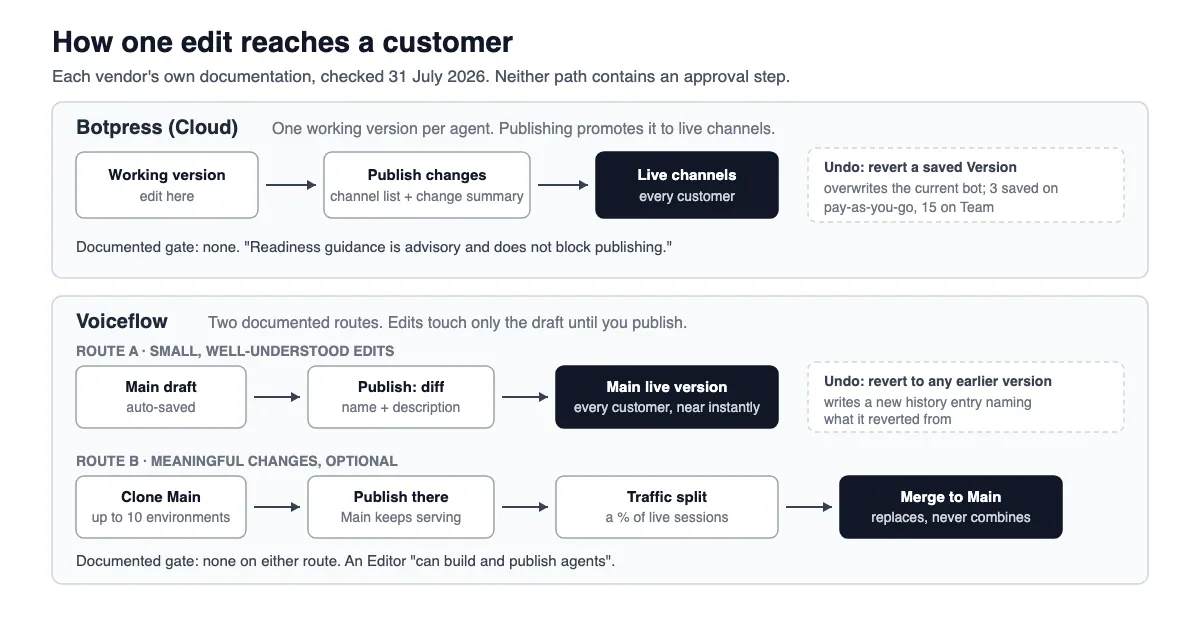
How a change reaches customers. Botpress keeps a single working version per agent. Its publish documentation, filed under a channel page rather than a general one and easy to miss because of it, is unusually blunt about the model: "Publishing promotes the current working version to the version used by live channels. It does not create a separate agent." It then lays out which surface runs which state — the built-in preview runs "the current working version, including unpublished changes", while hosted Webchat and connected channels run the published version. After you publish, later edits sit in the working version until you publish again.
What stands between an edit and a customer. Procedurally: a review screen. The documented publish flow is select Publish changes, review the enabled channels and change summary, inspect the detailed list if needed, then publish. There is one prerequisite, and it is not about content: "The only user-facing publish prerequisite is at least one enabled channel." The same page states the position that matters most here in a single sentence — "Readiness guidance is advisory and does not block publishing." Botpress is telling you plainly that nothing in the product will stop a publish. That honesty is worth something; it just means the gate has to be yours.
Versions and undo. The Versions page is titled "View, compare, and revert to previous versions of your bot", and versions are created two ways: manually from the Versions menu, or "Automatically, every time you publish your bot". Botpress recommends annotating each one. Reverting carries two documented warnings that deserve to be read twice before anyone relies on this as a safety net: "reverting to a previous version will completely overwrite your current bot, including any unsaved changes you may have made", and "Botpress can't restore lost or overwritten bot Versions." The page describes viewing and reverting in detail; how the compare in its own title works is not described in the body.
Who can publish. Botpress workspace roles are a paid feature. The Manage roles section of the workspace documentation carries a Team-plan badge. The documented roles are Viewer (view only, no edits), Billing manager, Developer ("Can create, view, and update bots in the Workspace. Can only delete bots they have created"), Manager ("Can create, view, and update bots in the Workspace. Can view audit records" — note it lacks the Developer row's delete restriction and gains the audit right), Admin ("Can add and remove Workspace collaborators, and manage all bots in the Workspace") and Owner. Read that list for a publish permission and you will not find one. Update rights are publish rights. There is a separate agent-level Access Control setting that restricts which workspace members can open a given agent, and it also requires a Team plan or higher; workspace owners and administrators always have access to every bot regardless.
What is recorded. This is where Botpress leads. Per the same workspace documentation, workspace settings include an Audits view, described as "a list of all activity that's occurred in your workspace", and the same data is reachable programmatically through the Admin API's getAuditRecords endpoint, which returns "the audit records of a workspace, sorted from most recent to oldest". Each record carries an id, recordedAt, userId, userEmail, resourceId, resourceName, value and action. A user email tied to a resource and an action with a timestamp, pullable by API, is a real audit primitive.
Pros: an explicit published-versus-working model that is easy to reason about; a workspace audit trail with an API behind it; a role that exists specifically to read audit records; published prices on every self-serve tier.
Cons: no documented way to stage a change against real traffic; a revert that overwrites rather than layers, with no undo of the undo; version retention capped by plan; roles and per-agent access control both locked behind the Team tier, which means the cheapest paid plan has no way to say "this person may look but not ship".
Bottom line. Botpress will tell you afterwards who changed the agent. It will not slow anyone down beforehand, and the safety net under a bad change is a short, plan-priced list of snapshots you can only fall onto once.
Voiceflow: environments, diffs and traffic splits
Best for: teams who ship changes to a customer-facing agent often enough that "test it somewhere else first" and "put 5% of traffic on it" are worth real machinery.
How a change reaches customers. Voiceflow's unit is the environment, and Voiceflow environments are the single feature that most changes the shape of this comparison. They are "independent copies of your AI agent", each with its own draft version, live version and independent version history. Every project starts with one called Main, "which is what your users connect to by default", and a project supports up to 10 environments including Main. Edits are safe by default: "You can edit any environment, including ones your users are currently interacting with. Edits only affect the draft version until you publish your environment."
What stands between an edit and a customer. A diff and a form field. Per the publishing documentation, clicking Publish opens "a side-by-side diff view of the current live version and your draft version". You then "Give the new version a name (a version number is filled in for you), add a description of what changed, and click Publish". The docs add the reason: "we recommend that you always add a version description. Without one, it's hard to track what changed across versions if you ever need to revert a change." The publish itself is not gentle — "The new version replaces whatever was previously live and happens near instantly" — so the protection is not delay, it is that you saw the change and wrote down what it was.
Voiceflow also documents a genuine staged rollout. Traffic splitting assigns percentages of incoming traffic across environments, percentages must sum to 100, individual users stay on the same environment across sessions, and changed splits apply only to new sessions. The docs are honest about when to bother: "For small, well-understood edits — copy tweaks, typos, minor prompt updates — you can simply edit Main and publish." A staging environment was added on September 11, 2025, enabling a dev-to-staging-to-production path plus per-environment secret overrides.
Versions and undo. Version history shows, for every entry, "the version number, description, author, and publish time", with a Live label on the one customers are currently talking to. Clicking a version opens a comparison against the live version, from which you can Revert — and the revert behaves like a new event rather than an erasure: "A new version is added to the history with a description noting which version you reverted from." Reverting affects only the environment you revert on. You can also clone any historical version into a fresh environment, which is the documented way to inspect an old state without making it live.
Promotion between environments is merging, and the docs flag the sharp edge rather than hiding it: "Merges replace, they don't combine. Whatever is on the source environment replaces what's on Main entirely. Any changes made to Main after the source environment was created are overwritten." Because a merge is itself a new version on Main, undoing one is just a revert.
Who can publish. Voiceflow documents five workspace roles: Owner, Admin, Editor, Viewer and Billing. The relevant line is the Editor definition — an Editor "can build and publish agents, manage project settings, and import or export projects" — and, as on Botpress, there is no publish-only or approve-only role. Viewers "can see projects and leave comments, but cannot make edits", and viewer seats are free and unlimited on all plans, which makes a reviewer-with-comment-rights genuinely cheap. Project-level access can grant a viewer edit rights on one project without changing their workspace role, though the docs note those people then count as editors for billing.
What is recorded. Per-version, quite a lot: number, description, author, publish time, and an entry for each revert naming what it reverted from. Workspace-wide, we found no audit-log page in Voiceflow's published documentation index when we fetched docs.voiceflow.com/llms.txt on July 31, 2026. That is an absence in the documentation, not proof that no audit facility exists; it is a question to put to a sales engineer rather than an assumption to build on.
Pros: a real diff before every publish; a version description prompted at the moment you know what changed; an author on every version; up to ten isolated copies; percentage rollouts; a revert that is additive and reversible; free unlimited viewers who can comment.
Cons: no public prices at all; no documented approval gate; merges overwrite rather than combine, so two people working in parallel environments can silently discard each other's work on Main; knowledge base document contents are shared project-wide, so editing a document affects every environment that includes it — meaning your isolated environment is not isolated on the axis most likely to change a bot's answers; no documented workspace audit log.
Bottom line. Voiceflow is the better-built change pipeline of the two, and the knowledge-base carve-out is the exception that a support team needs to know about before it trusts the isolation.
Six questions, answered side by side
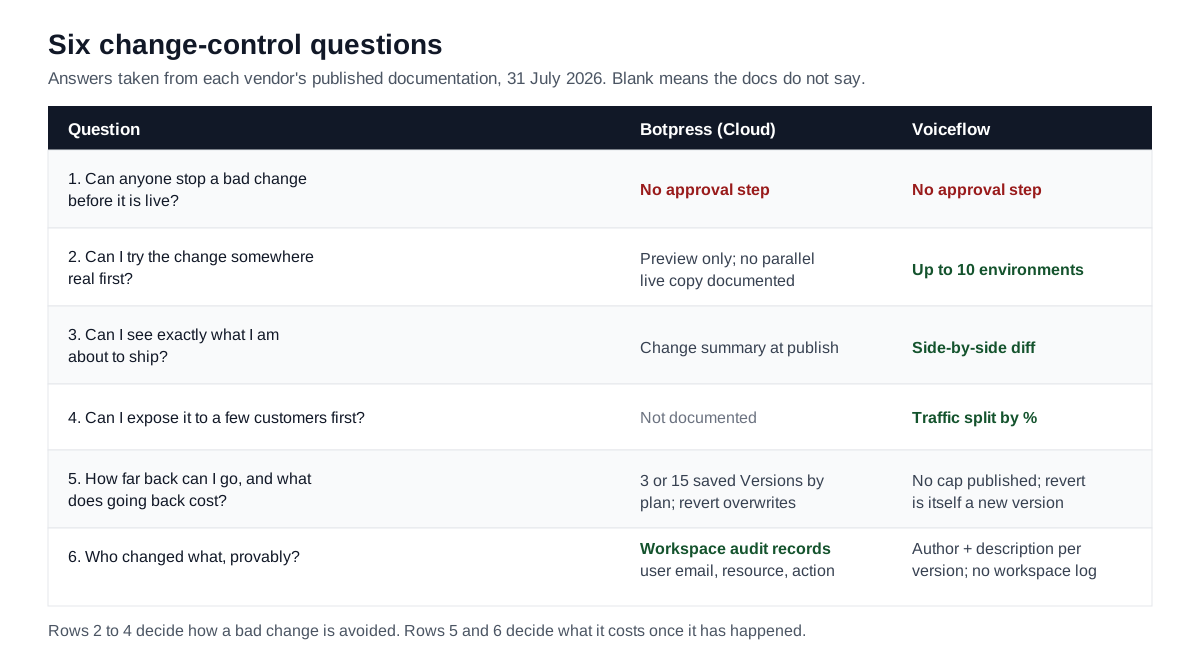
These are the six questions worth asking any chat builder before you commit, and they generalise past this pair — run any AI agent platform comparison through them and the differences that matter show up in the same order. They are ordered by how much they hurt when the answer is bad.
| Question | Botpress (Cloud) | Voiceflow |
|---|---|---|
| Can anyone stop a bad change before it is live? | No. Readiness guidance is advisory and does not block publishing | No approval step documented |
| Can I try the change somewhere real first? | Preview runs the working version; no parallel live copy documented | Up to 10 environments, each with its own live version |
| Can I see exactly what I am about to ship? | A change summary in the publish flow | A side-by-side diff of live against draft |
| Can I expose it to a few customers first? | Not documented | Traffic split by percentage, sticky per user |
| How far back can I go, and what does going back cost? | 3 or 15 saved Versions by plan; revert overwrites current state | No published cap; revert is a new version and is itself reversible |
| Who changed what, provably? | Workspace audit records with user email, resource and action | Author, description and time per version; no workspace audit log in the docs |
Read down the columns and the shape is clear. Voiceflow is stronger on everything that happens before and during a change. Botpress is stronger on the thing that happens after one, when somebody senior asks for evidence. Neither is strong on the first row, and the first row is the one buyers assume is handled.
That assumption is the expensive part. If the person editing bot copy on your team is a content designer or a support lead rather than an engineer, they have probably come from tools where "publish" meant a draft someone else reviews. Here, publish means production. If you take one thing from this Botpress vs Voiceflow comparison, take that: on both platforms, the grant to edit is the grant to ship, and the only approval gate available is a human agreement your team keeps.
The rollback ceiling that is easy to miss
Botpress publishes a number that sits in the versions documentation rather than on the pricing page, which is why it is easy to miss when you are comparing feature lists. The Versions documentation states: "Pay-as-you-go users have access to 3 saved Versions. Team Plan subscribers have access to 15 saved Versions." Since a version is created automatically on every publish, three saved Versions means you can only go back across your last three publishes — however many minutes or months that turns out to span for your team.
There is a wrinkle a buyer should raise directly with Botpress sales. The tiers on the current pricing page, checked July 31, 2026, are Free, Plus, Team and Enterprise — "pay-as-you-go" is not among them, and the string does not appear on that page. So the documented version cap references a plan name the pricing page no longer uses, and no version cap is published for Free or Plus at all. We are not going to guess which cap applies to which current tier. Ask, and get the answer in writing, because it is the number that sets your worst-case recovery time.
Voiceflow publishes no equivalent cap. Its documented limit is on environments ("Each project supports up to 10 environments, including Main"), not on entries in version history, and the version history documentation describes no retention limit. Absence of a published cap is not a guarantee of unlimited retention, and it belongs on the same list of questions for a sales engineer.
Set against DORA's framing, the practical difference is this. Failed deployment recovery time on Voiceflow is bounded by how long it takes a person to open Settings, pick a version and click Revert, and the operation is itself recorded and reversible. On Botpress the same recovery is bounded by whether a good version still exists inside a plan-priced window, and executing it overwrites whatever is currently in the editor, including anyone else's unsaved work. Those are different risk profiles, and only one of them gets worse the more people are editing.
What the audit trail of a prompt change looks like
A prompt change is the smallest, most consequential edit in a conversational system. One sentence in an agent's instructions can change a refund policy, invent an eligibility rule or drop a required disclosure, and it ships without review on both platforms. So: what does the record of that edit look like a month later, when somebody asks?
On Botpress, at the workspace level, it looks like a row with a user email, a resource id and name, an action and a recordedAt timestamp, retrievable through the Admin API and readable in-product by anyone with the Manager role or above. That is a defensible starting point for an investigation. What the published documentation does not give you is the enumeration of possible action values — the API reference's sample response shows the placeholder "UNKNOWN" — so whether a publish, a revert or an instruction edit each produce distinct, identifiable records is something to confirm in a trial rather than assume from the schema.
On Voiceflow, at the version level, it looks better: a version number, an author, a publish time, and whatever the publisher typed into the description field. The catch is that last clause. The description is prompted and recommended, not required, and a recommendation is not a control. A version history where the entries say only "v14" tells you when and who but never why, and "why" is the thing a compliance conversation actually needs.
Neither vendor documents a field for the one thing an approval process would record: a second person's name. No reviewer, no approver, no sign-off appears anywhere in either platform's published description of a version. If your controls require one, it has to live outside the builder — in a ticket, a change-request record, or an approval step in whatever orchestration sits around the agent. Our earlier analysis of human-in-the-loop automation makes the same point in the general case: an approval is only a control when it is enforced somewhere the actor cannot skip, and a norm the team agreed to in a meeting is not that.
The self-hosting claim that is now wrong
Botpress used to be a product you could download and run on your own servers. Its own sunset notice, quoted below, says v12 is "no longer available for purchase, download, or new deployments" — a sentence that only makes sense because it once was. Anything you read about Botpress written before that notice may still describe self-hosting as a live option. It is not one for anyone buying today, and it matters here because self-hosting is the classic escape hatch for a team that wants its own deployment pipeline around a chat builder.
Botpress's own documentation carries the notice: "Botpress v12 has been officially sunset and is no longer available for purchase, download, or new deployments. This includes all other self-hosted or locally installed versions of Botpress". The v12 page answers the question directly — "Can I still download Botpress v12 or a self-hosted version?" / "No." — while confirming that existing v12 customers with active subscriptions remain fully supported and directing all new development to Botpress Cloud.
So if you arrived at this comparison searching for a self-hosted chatbot builder because you wanted your own git repository, your own CI and your own staging environment wrapped around a bot, neither of these two platforms is that any more. Voiceflow lists private cloud hosting as an Enterprise-plan feature, which is managed hosting on your terms rather than software you run. A self-hosted chatbot builder is now a different product category, and choosing between these two on that basis is choosing on a fact that expired.
What each platform costs, and what the price gates
Botpress publishes its self-serve prices. Checked on the pricing page on July 31, 2026, with annual billing selected:
| Plan | Price | Included conversations | Seats | Change-control relevance |
|---|---|---|---|---|
| Free | $0 | 100 total, no top-ups or overages | 3 | No roles, no per-agent access control |
| Plus | $150/mo billed annually | 250/mo, packs of 100 at $65 | 3 | No roles, no per-agent access control |
| Team | $750/mo billed annually | 1,500/mo, packs of 100 at $50 | Unlimited | Teams, routing and RBAC; access control; 15 saved Versions |
| Enterprise | Custom | Custom | Unlimited | SLA and security review |
The line that matters is the Team row. On Botpress, the ability to say "this person may edit and this person may not" is a $750-a-month feature, and it arrives bundled with 1,500 conversations a month whether that matches your volume or not. A five-person support team that wants one publisher and four commenters has to buy the volume to get the permission. Our earlier analysis of Botpress pricing covers how the conversation meter and the bundled AI spend behave; the point here is narrower and about governance. Permissions are priced as an enterprise feature, and change control is a permissions problem.
Voiceflow publishes four plans in its billing documentation: Free, Pro, Business and Enterprise. The Free plan is described as carrying "a one-time credit grant that does not renew, so it isn't suitable for production usage", and Enterprise carries "unlimited product usage, single sign-on, private cloud hosting, and custom credit allotments". It publishes no prices for any of them. The public pricing page, checked July 31, 2026, presents two segments, agencies and partners and businesses, with "Request pricing" and "Book a demo" rather than figures, and the documentation confirms the design: "You can view current pricing for plans, add-ons, and credit bundles inside Voiceflow". That is, after you sign up.
One genuinely buyer-friendly detail sits inside that opacity. Voiceflow bills editing, not looking: "Every paid plan includes some free editor seats, and you can purchase more as needed. Viewers are free and unlimited on all plans." A team that wants many reviewers and few publishers pays for the publishers only. That is the seat model change control wants, and it is the opposite of Botpress's, where the permission to distinguish the two is what costs money.
Note also what neither vendor's documentation says: which plan tier includes environments, traffic splitting or version history on Voiceflow, and what the saved-version cap is on Botpress Free and Plus. Both are questions for procurement, and both change the answer to "how fast can we undo".
Choose Botpress if, choose Voiceflow if, stay put if
Choose Botpress if your governance requirement is evidentiary rather than preventive — you need to be able to answer "who changed this" across a workspace holding many agents, you are already going to be on the Team plan for volume, and your bots change rarely enough that a 15-snapshot horizon is comfortable. Botpress also wins if you want an API-retrievable audit feed you can pull into a SIEM or a log warehouse rather than reading in a vendor UI, and if published, self-serve pricing is itself a procurement requirement.
Choose Voiceflow if the agent is customer-facing, changes weekly or faster, and a bad answer is expensive. You get the diff, the isolated environment, the percentage rollout, the authored version history and the reversible revert. Choose it too if you want many people looking at the agent and few people shipping it, because free unlimited viewer seats make a review culture affordable in a way Botpress's role gating does not.
Stay with what you already run if your current stack is a helpdesk with a built-in bot and a real staging environment, or an in-house agent behind your own CI. Neither platform here gives you an approval gate, so migrating to one purely for change-control reasons is a downgrade dressed as an upgrade. The honest version of this comparison is that a well-set-up incumbent can win outright on this axis, and the two questions to ask before you move are whether your current tool blocks a publish and whether it records a reviewer. If it does either, you are giving something up.
Pick neither yet if you cannot get the two unpublished numbers in writing: Botpress's version cap on the plan you would actually buy, and Voiceflow's plan-level gating for environments. Both are cheap to ask for and both set your worst case.
Run the Undo Drill before you sign
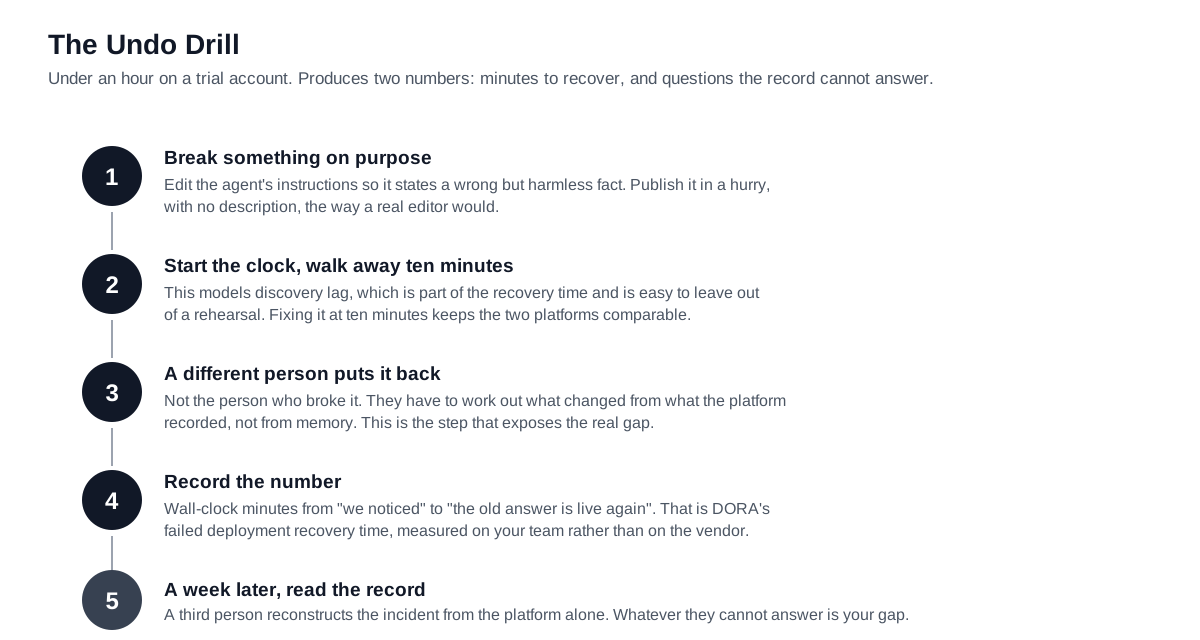
Here is a procedure, not a checklist. We call it the Undo Drill, it takes under an hour on a trial account of either platform, and it produces two numbers that beat any feature matrix, including this article's. Run it on both and the Botpress vs Voiceflow decision stops being an argument about which canvas you prefer.
- Break something on purpose. In a trial workspace, edit the agent's instructions so it says something clearly wrong but harmless — a fake refund window, a wrong opening time. Publish it the way a real editor would, in a hurry, without a description.
- Start the clock and walk away for ten minutes. This models discovery lag. Nobody notices instantly.
- **Have a different person put it back.** Not the person who broke it. This is the step that exposes the real gap, because the second person has to work out what changed from whatever the platform recorded, not from memory.
- Record the number. Wall-clock time from "we noticed" to "the old answer is live again". That is your failed deployment recovery time for this platform, in your team's hands. DORA's definition is about deployments that require immediate intervention; a wrong refund window is exactly that.
- Then read the record. A week later, ask a third person to reconstruct what happened from the platform alone: who edited, what they changed, when it went live, who reverted, and why. Whatever they cannot answer is the gap your process has to fill with a ticket, a form or an approval step.
Two numbers come out: minutes to recover, and questions the record could not answer. Run it on both platforms with the same team and the comparison decides itself. We have not run this drill ourselves on either product, so we are not publishing figures for it — the point is that a one-hour exercise on your own trial gives you better evidence than any third party can, and it is specific to the people who will actually be doing the editing.
When change control is not your real problem
There is a version of this article that overstates its case, and it is worth naming. Change control is the right lens when a wrong answer is expensive, when more than one person edits, and when someone eventually audits. It is close to irrelevant in three common situations.
If one person builds and runs the bot, a version list is a convenience and the audit log is a diary with one author. If the bot is internal, say an IT helpdesk assistant or a policy lookup for staff, then the people hitting the bad change are colleagues who can walk over and say so, which shortens discovery lag in a way an external audience never does. And if the agent's answers come overwhelmingly from a knowledge base rather than from authored instructions, then the thing that changes what customers hear is the document, not the flow. On Voiceflow specifically, that is a documented trap: knowledge base document contents "are shared project-wide", so an environment clone does not isolate them. Your careful staging story does not cover the most-changed input.
There is a fourth case worth stating plainly, because vendors will not. If your organisation's actual failure mode is that nobody knows what the bot says at all, change control is not the first fix. Getting a current, readable export of the agent's instructions into a place a non-builder can read is. Our analysis of what to demand from a no-code builder before it can approve anything works through that ordering.
Where a governance layer fits, and where it does not
LeapForce does not build chatbots and does not host or replace either platform. What LeapForce is built to cover is the layer around tools like these: the identity an agent uses, the connectors it can reach, the approval steps in a workflow, and the record of what ran. On the specific gap this article is about — neither builder having an approval gate — the honest position is that a governance layer helps only where the approval can be enforced outside the builder, in a workflow that calls the agent or in the connector it uses to act. It cannot enforce a review inside somebody else's canvas.
The design principles that do transfer are non-human identity and observability. The model is that every agent carries an owner, a scope and an expiry, so a bot outlives the person who built it without outliving their access. That is the argument we set out in owner, scope, expiry for AI agents. Our Observability and Audit surface is designed to record what ran and what was refused, and our rollout model is deliberately ordered — Observe first. Enforce second. Optimize third. — because a control you add before you can see the traffic is a guess. LeapForce is in active development and discloses per-capability build status on its own product pages: tracing is live, while shadow-AI discovery and compliance-evidence packs are on the roadmap. Read the status there before assuming any specific capability ships today; we are not going to describe a roadmap item as if it does.
Honest limits on this comparison
Everything above is documentation analysis, built from two vendors' published pages rather than from a bake-off. Neither platform was operated by us, no bot was built on either, and no recovery time was measured — which is precisely why the Undo Drill above is framed as something you run rather than a result we report.
Three sources a reader would reasonably expect are missing, and their absence shapes what this article could claim. Botpress's community forum sits behind a bot-check that refused our requests, so no user voice from it is quoted here. G2 and Capterra review pages for both products were not reachable, so no review-derived pattern is asserted, and any statement in this piece about how these features feel in practice would have been invention. Reddit was not used for the same reason. The one public voice we do quote — the 2021 Botpress feature request — is on a sunset product and from a handle that appears to be vendor-affiliated, and it is labelled as such where it appears.
The documentation itself has gaps we have flagged rather than filled: Botpress's action enum for audit records is not published; Botpress's saved-version caps do not map onto the plan names currently for sale; Voiceflow publishes no prices and no plan-level gating for environments, version history or traffic splitting; and Voiceflow's documentation index contains no audit-log page, which we report as a documentation absence rather than a product absence. Both vendors ship quickly, and every claim here carries a July 31, 2026 fetch date for that reason. If you are making a decision months from now, re-check the two publish pages and the two role tables first — they are the ones that move.
Frequently asked questions
No. On the Botpress vs Voiceflow question that matters most here, both answer the same way: neither vendor documents an approval or sign-off step before a published change reaches customers. Botpress states directly that "Readiness guidance is advisory and does not block publishing", and its only publish prerequisite is having at least one channel enabled. Voiceflow's Editor role "can build and publish agents" with no separate approver role. On both platforms, edit rights are publish rights, and any approval gate has to be a process your team enforces outside the builder.
Yes, with two documented caveats worth knowing before you rely on it. From the Versions menu you can open a previous version and restore it, but Botpress warns that "reverting to a previous version will completely overwrite your current bot, including any unsaved changes you may have made", and that "Botpress can't restore lost or overwritten bot Versions." So the revert is destructive to the current editor state and it is not itself undoable. Save or publish current work before restoring anything.
The documentation states that pay-as-you-go users have access to 3 saved Versions and Team Plan subscribers have access to 15. Note that the current pricing page lists Free, Plus, Team and Enterprise, with no pay-as-you-go tier, and publishes no version cap for Free or Plus. Since every publish creates a version automatically, this is the number that sets your worst-case rollback horizon — get the figure for the plan you intend to buy confirmed in writing.
Yes. A staging environment was added on September 11, 2025, enabling a dev-to-staging-to-production publish path plus per-environment secret overrides. More generally, Voiceflow environments are independent copies of an agent, up to 10 per project including Main, so the staging step is a naming convention on top of a general mechanism rather than a fixed three-stage pipeline. Each one carries its own draft, live version and version history, so you can create as many staging-like environments as your workflow needs and route real traffic to them by percentage.
Not for new users. Botpress documentation states that v12 "has been officially sunset and is no longer available for purchase, download, or new deployments", explicitly including all other self-hosted or locally installed versions. Existing v12 customers with active subscriptions remain supported, and all new development is directed to Botpress Cloud. Comparison articles that recommend Botpress on self-hosting grounds are describing a product you can no longer buy.
Owners, Admins and Editors. Voiceflow documents five workspace roles: Owner has full control including billing and member management; Admin can do everything except transfer ownership; Editor "can build and publish agents, manage project settings, and import or export projects"; Viewer can see projects and leave comments but not edit; Billing has viewer access plus billing rights. Viewer seats are free and unlimited on all plans, and you can grant a viewer edit access to a single project, though they then count as an editor for billing.
Botpress does. Workspace Settings includes an Audits view listing workspace activity, and the Admin API's getAuditRecords endpoint returns records containing a timestamp, user id, user email, resource id, resource name, a value and an action. The Manager role exists partly to read these. Voiceflow's published documentation index contains no audit-log page as of July 31, 2026; its change record is the per-environment version history, which carries version number, description, author and publish time. Treat the Voiceflow gap as a question for a sales engineer, not as a confirmed product limitation.
Botpress publishes self-serve prices: Free at $0 with 100 conversations, Plus at $150 a month billed annually with 250 conversations a month, Team at $750 a month billed annually with 1,500 conversations a month and unlimited seats, and custom Enterprise pricing. Voiceflow publishes none — its four plans (Free, Pro, Business, Enterprise) are described in the documentation, but prices appear only inside the product after signup, and the public pricing page offers "Request pricing" instead. Both figures were checked on July 31, 2026.
Decided on change control, Botpress vs Voiceflow splits cleanly: Voiceflow for preventing incidents, Botpress for evidencing them, and neither on its own for a control framework that requires documented approval. Voiceflow gives you staged environments, a pre-publish diff, an authored version history and a reversible revert. Botpress gives you a workspace audit trail with an API. Neither records a second person's approval on a published change, so if your framework requires segregation of duties on a change to a customer-facing system, that control has to be implemented outside the builder and evidenced from there.
Run the Undo Drill described above: break the agent deliberately, wait ten minutes, have a different person restore it, and time the recovery. Then, a week later, have a third person reconstruct the incident from the platform's own records alone. Those two outputs — minutes to recover, and the questions the record cannot answer — are worth more than any feature matrix, because they measure your team on the tool rather than the tool in isolation. Also confirm in the trial whether publish, revert and instruction edits each produce distinct, identifiable audit entries.
Partly. Approval can be enforced on the actions an agent takes, meaning the connector calls and the writes into a CRM or helpdesk, by routing them through a workflow that contains a human gate, which is the pattern orchestration and governance layers, ours included, are built around; check any given product's published build status before you rely on a specific capability. What you cannot do from outside is stop someone with edit rights from publishing a new prompt inside the vendor's own canvas. The realistic split is: enforce approvals on what the agent does, and control what the agent says through access, a documented change record and rehearsed rollback. Reducing the number of people who hold edit rights is the single most effective control available on both platforms today.
Ready to Govern Your AI?
Talk to LeapForce — one controlled layer for every AI tool, connector, model, and agent.
Comments