
Every Microsoft Copilot alternative moves your work across a boundary Copilot does not cross. Copilot runs inside the tenant that already holds the data, under the identity, labels and retention you already run. Replacing it means deciding what you are willing to export, and what your existing controls stop covering the moment it lands somewhere else.
That is the axis this comparison of Microsoft Copilot alternatives is built on, and it is not the axis a feature comparison reaches for. Feature parity is easy to test and nearly useless at procurement: the thing that decides the renewal is whether a legal hold, a data subject request or a security investigation can still reach the conversation. The answer differs enormously between the seven options below, and Microsoft publishes a capability matrix that makes the differences checkable rather than arguable.
An IT admin posting to Microsoft Q&A on 2 March 2026 described the problem precisely. Their users were supposed to sign in to ChatGPT and Claude with corporate Entra ID, but anyone who went straight to the vendor's site and clicked "Continue with Google" would, in their words, "bypass our Conditional Access policies entirely". That is the whole article in one sentence. The assistant that is not in your tenant does not authenticate as something your tenant governs.
The short answer: Judge Copilot alternatives on what copy leaves the tenant, what identity the tool acts as, and what your existing eDiscovery and retention can still reach afterwards — Microsoft 365 Copilot supports all eleven Purview capabilities, ChatGPT Enterprise supports eight behind a connector, and Claude Enterprise supports two.
Last updated: July 31, 2026.
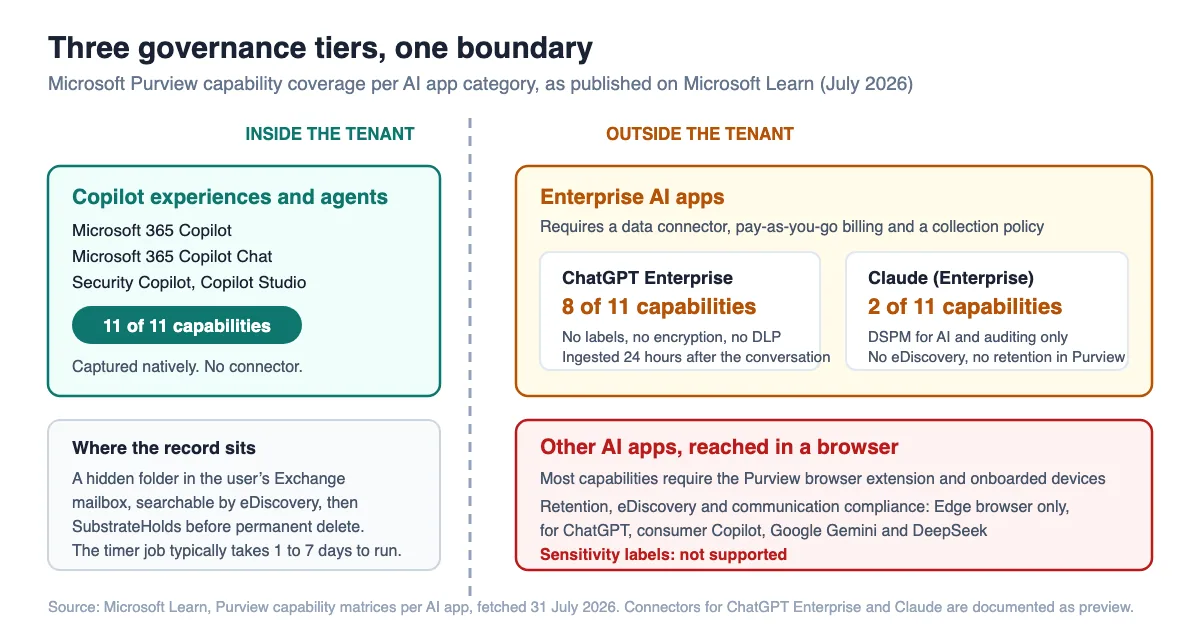
What Actually Leaves the Tenant
When you replace a tenant-native assistant, three things move: the content the assistant reads, the conversation the assistant produces, and the identity it acts under. Microsoft 365 Copilot moves none of them outside the Microsoft 365 service boundary. Microsoft's documentation states that Copilot "only surfaces organizational data to which individual users have at least view permissions" and that its "Semantic Index honors the user identity-based access boundary so that the grounding process only accesses content that the current user is authorized to access," per Microsoft Learn.
The useful discovery is that Microsoft has already sorted every AI tool your staff might use into three governance tiers, and published what each tier supports. In Microsoft Purview, the categories are:
| Purview category | What it contains | How interactions are captured |
|---|---|---|
| Copilot experiences and agents | Microsoft 365 Copilot, Security Copilot, Copilot in Fabric, Copilot Studio | Natively, no connector |
| Enterprise AI apps | Microsoft Foundry, Entra-registered AI apps, ChatGPT Enterprise, Anthropic Claude (Enterprise) | Data connector plus a collection policy |
| Other AI apps | Any site categorised "Generative AI" in the Defender for Cloud Apps catalog, including ChatGPT, Google Gemini, DeepSeek and consumer Copilot | Browser extension and onboarded endpoints |
Those tiers are not marketing segments. They are the actual determinant of what your compliance team can do after the switch, and they cut across vendor boundaries rather than following them. ChatGPT sits in two of the three tiers depending on whether it is the Enterprise workspace or the same person's browser tab.
This is a supply-chain question, and the governance frameworks an enterprise assessment already cites treat it as one. NIST's AI Risk Management Framework states under GOVERN 6 that "Policies and procedures are in place to address AI risks and benefits arising from third-party software and data and other supply chain issues," with GOVERN 6.2 requiring contingency processes for failures in third-party AI systems. A Copilot alternative is third-party AI software processing first-party data. Evaluating it on summarisation quality alone skips the control the framework asks for.
The following nine-minute walkthrough from Microsoft Mechanics shows what the Purview side of this actually looks like in the portal, which is worth watching before you commit to a vendor evaluation on features:

The Boundary Five: Questions That Decide the Switch
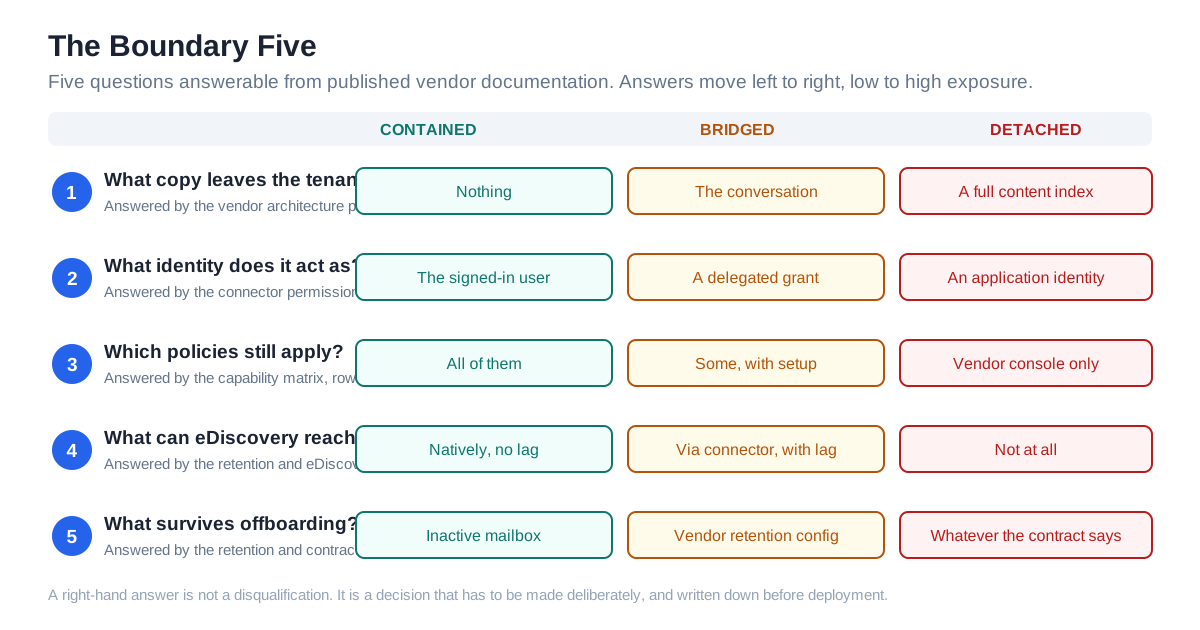
Five questions separate a Copilot alternative that your existing governance can absorb from one that quietly creates a parallel, ungoverned record. We call them the Boundary Five, and they can be answered from published vendor documentation in an afternoon. No trial, no sales call.
- What copy must leave the tenant for this to work? Nothing, a conversation stream, or a full index of your content.
- What identity does it authenticate as? The signed-in user, a delegated OAuth grant, or a standing application identity with tenant-wide scope.
- Which of your existing policies still apply? Sensitivity labels, DLP, insider risk, communication compliance. Check each row, not the category.
- What can eDiscovery reach, and with what lag? Native, connector-fed with a delay, or nothing at all.
- What happens at offboarding and after cancellation? Whose console holds the record when the person leaves or the contract ends.
The second question is the one a feature comparison has no column for, and it is the one that outlives the contract. An assistant that runs as the user inherits the user's blast radius, which is bounded and revocable. An assistant that runs as an application identity has its own reach, and revoking a person's access does not necessarily revoke the tool's. That distinction is covered in more depth in our earlier analysis of how an AI assistant inherits your access and of the grant ladder a work assistant asks you to climb.
We have not run any of these products in a controlled trial. Everything below is drawn from vendor and platform documentation fetched on 31 July 2026, with the date and source named at each claim, and where a vendor does not publish something we say so rather than estimating it.
The Baseline: What Microsoft 365 Copilot Costs and Covers
Microsoft 365 Copilot is the enterprise add-on priced at "$30.00 user/month, paid yearly" or "$31.50 paid monthly (Annual commitment)" on Microsoft's enterprise pricing page, and "A qualifying Microsoft 365 subscription is required to purchase Copilot." The small-business route is cheaper: the business plans page lists Microsoft 365 Copilot Business from "$18.00 user/month, paid yearly."
That is the number every list of Copilot alternatives is implicitly arguing against. What it buys, from a governance standpoint, is the only entry in this comparison with a full row of ticks. Per Microsoft Learn, Microsoft 365 Copilot and Copilot Chat support all eleven Purview capabilities: DSPM for AI, auditing, data classification, sensitivity labels, encryption without sensitivity labels, data loss prevention, insider risk management, communication compliance, eDiscovery, data lifecycle management and Compliance Manager.
Three of those matter more than the rest when you are comparing against a third party. Sensitivity labels carry through. Where a label applies encryption, "users must have the EXTRACT usage right, as well as VIEW, for the AI apps to return the data." DLP has a dedicated policy location for Copilot, so you can stop prompts containing specific sensitive information types from being processed at all. And retention is native, with a policy location named Microsoft Copilot experiences.
One caveat on the full row of ticks, because it is the first objection worth pre-empting: a supported capability is not an entitled one. Purview's solutions carry their own licensing, set out in the Microsoft Purview service description, and a tick in the AI capability matrix means the integration exists, not that your current subscription includes it. Check the entitlement before you count the coverage.
Residency is the fourth. Copilot "was added as a covered workload in the data residency commitments in Microsoft Product Terms on March 1, 2024," and for EU customers it is an EU Data Boundary service. One caveat Microsoft states plainly: "Models provided by Anthropic as a subprocessor are currently excluded from the EU Data Boundary." If you have turned on Anthropic models inside Copilot and you are relying on EUDB, that is a configuration decision, not a given.
Seven Copilot Alternatives at a Glance
The table below scores each option on the Boundary Five. "Purview capabilities" counts the eleven-row matrix Microsoft publishes per app; it is a proxy for how much of your existing compliance estate keeps working, not a quality score.
| Option | What leaves the tenant | Identity it acts as | Purview capabilities | eDiscovery reach | Published price |
|---|---|---|---|---|---|
| Microsoft 365 Copilot (baseline) | Nothing | Signed-in user | 11 of 11 | Native, no lag | $30.00 user/month, paid yearly |
| Microsoft 365 Copilot Chat | Nothing for tenant-grounded chat | Signed-in user (Entra) | 11 of 11 | Native, no lag | Included with eligible M365 subscription |
| Google Workspace with Gemini | Whole productivity estate, to a Google tenant | Signed-in Google user | Not applicable — Google Vault instead | Vault, on Plus and Enterprise only | Plus $22 per user/month; Enterprise on request |
| ChatGPT Enterprise | Prompts, responses, uploaded context | Workspace account, ideally SSO | 8 of 11 | Yes, via connector, ~24h ingestion lag | Not published |
| Claude Enterprise | Prompts, responses, uploaded context | Workspace account, SSO and SCIM available | 2 of 11 | Not supported in Purview | Enterprise from "$20/seat"; usage extra |
| Glean | A full index of your content and its permissions | Application identity, tenant-wide | Not in the published matrix | Vendor console only | Not published |
| Notion AI | Whatever you migrate into Notion | Notion workspace account | Not in the published matrix | Vendor audit log, Enterprise plan | Published per-plan pricing; AI included |
| Consumer AI in a browser | Whatever the employee pastes | The employee's personal account | 9 of 11, conditionally | Edge only, four named apps | Free |
Read the "identity" column before the price column. Three of these options change who the assistant is, and that is the change that outlives the contract.
Microsoft 365 Copilot Chat: The Alternative Inside the Boundary
Best for: organisations that want to cut Copilot spend without changing anything about their compliance posture.
Microsoft 365 Copilot Chat sits outside the usual alternatives list, because it is not a competing vendor and does not market itself as one. Microsoft states it "is available at no additional cost for all Microsoft Entra account users with an eligible Microsoft 365 subscription." It sits in the same Purview category as the paid product — the capability matrix covers "Microsoft 365 Copilot & Microsoft 365 Copilot Chat" together, with the same eleven ticks.
Key features: web-grounded chat, tenant-grounded chat where licensed, sensitivity label display on citations, and Endpoint DLP support on the web version for blocking paste of sensitive content and blocking files by sensitivity label.
Pros: no new vendor, no new identity, no new record store, no procurement cycle. Retention and eDiscovery work the day you turn it on. The cost of a failed evaluation is zero.
Cons: it is not the in-app Copilot experience. There is no Copilot in Word drafting from a referenced file, no meeting recap in Teams. Sensitivity label inheritance for newly created content is documented for Copilot in Word, PowerPoint and Outlook, which are the licensed surfaces. If the workflow you are trying to serve lives inside an Office document, Chat is not a substitute for it.
Price: included with an eligible Microsoft 365 subscription, per Microsoft's enterprise page.
Bottom line: if the reason you are shopping for Copilot alternatives is the $30 line item rather than a capability gap, test Chat first. It is the only option on this list where the Boundary Five answers are identical to the incumbent's.
Google Workspace with Gemini: A Different Tenant, Same Shape
Best for: organisations already on, or seriously considering, Google Workspace as the primary productivity suite.
This is the only alternative that replaces the boundary rather than crossing it. Gemini in Workspace is tenant-native in exactly the way Copilot is — the assistant sits inside the estate that holds the data, and the compliance tool is Google Vault rather than Purview. Google's Vault documentation confirms Vault can retain "Gemini app conversations (comprising user prompts and Gemini app responses)," with holds overriding retention rules and purges taking "at least 30 days for affected messages to be purged from all Google systems," per Google Vault Help.
Key features: Gemini included across plan tiers at no additional cost, Vault retention rules and holds over Gemini conversations, and the same admin console that already governs Gmail and Drive.
Pros: the assistant inherits the tenant's identity and policy, not a bolt-on. One console, one retention story, one eDiscovery surface. For an organisation that is genuinely Google-first, this is the structurally clean answer.
Cons: it is a suite migration, not an assistant swap, and pricing that looks cheap gets expensive at the tier where governance lives. Per Google's pricing page, Vault is included on Plus at "$22 / user per month" and Enterprise, and is not listed on Starter at "$7.00 USD per user / month" or Standard at "$14.00 USD per user / month." Buying Workspace Standard to save money and then discovering you cannot place a hold on Gemini conversations is the failure this section exists to prevent.
Price: Starter $7.00, Standard $14.00, Plus $22 per user per month; Enterprise is "Let's talk."
Bottom line: the honest alternative to a tenant-native assistant is another tenant-native assistant. A suite migration is a programme rather than a procurement decision, and the governance argument here does not shorten it. Treat this option as a strategic answer to "which estate do we run", not as a swap for a $30 add-on.
ChatGPT Enterprise: Coverage You Buy Back With a Connector
Best for: organisations that want frontier-model quality on a work account and are willing to run a Purview connector to keep their compliance estate intact.
Of the genuinely third-party Copilot alternatives, ChatGPT Enterprise has the most interesting governance answer, because Microsoft and OpenAI built a bridge across the boundary. Purview classes it as an Enterprise AI app and supports eight of the eleven capabilities: DSPM for AI, auditing, data classification, insider risk management, communication compliance, eDiscovery, data lifecycle management and Compliance Manager. The three crosses are sensitivity labels, encryption without sensitivity labels, and data loss prevention, per Microsoft Learn.
Getting those eight is not a checkbox. Microsoft's connector documentation requires an Azure subscription, an enterprise Purview account, pay-as-you-go billing enabled in your organisation, a collection policy permitting ingestion of prompts and responses, and an OpenAI API key whose Compliance API scope is granted by emailing OpenAI support with "The last 4 digits of the API key," the key name, the creator's name and the requested scope. The connector supports metadata extraction, full and incremental scans and classification; it does not support labeling, access policy or lineage.
Then there is the lag. Microsoft states: "Due to OpenAI's current API limitations, conversations are ingested 24 hours after they occur." The connector is documented as preview.
Key features: SSO-based workspace, Compliance API access for third-party archiving, Purview connector for eDiscovery and retention, and admin-controlled workspace settings.
Pros: you can genuinely put ChatGPT Enterprise conversations under a tenant retention policy and search them in an eDiscovery case. On Microsoft's published matrix, that is more than any other third-party assistant here manages, and it is the difference between a governed tool and a shadow one.
Cons: DLP does not apply to the interactions themselves — the DLP you get is endpoint and browser DLP stopping data on the way out, not a policy inside the app. Sensitivity labels do not travel. The pipeline has a documented one-day delay and a preview label. And the whole thing depends on a support email to a third party to scope an API key.
Price: not published. OpenAI does not list ChatGPT Enterprise pricing on a public page. Nor is the governance side priced here: Microsoft states the connector scans are "subject to the new Microsoft Purview billing model" and require pay-as-you-go billing, without a rate on the connector page. Carry it into the business case as a metered line with an unknown unit, not as zero.
Bottom line: the best-governed genuinely-third-party option here, and the one where the gap between "we bought it" and "it is governed" is largest. Budget the connector work as part of the purchase, not as an afterthought.
Claude Enterprise: Strong Native Controls, Thin Tenant Reach
Best for: teams that want Claude's long-context work and are prepared to run governance in Anthropic's console rather than their own.
Among Copilot alternatives, Claude is the clearest illustration of why "does it have audit logs" is the wrong question. Anthropic's pricing page lists Team at "$20 per seat / month if billed annually. $25 if billed monthly" and Enterprise from "$20/seat. Usage cost scales with model and task," with both tiers including single sign-on, SCIM, audit logs and custom data retention controls. Those are real controls, and on their own terms they are good.
But they live in Anthropic's console. In Purview's matrix, Anthropic Claude (Enterprise) supports two of eleven capabilities — DSPM for AI and auditing — with crosses against data classification, sensitivity labels, encryption, DLP, insider risk management, communication compliance, eDiscovery, data lifecycle management and Compliance Manager, per Microsoft Learn. Microsoft notes "The Anthropic Claude connector is currently in preview," and that managing these interactions requires pay-as-you-go billing enabled in your organisation.
Key features: SSO and SCIM, audit logs, custom data retention controls, a Purview connector in preview feeding DSPM and the unified audit log.
Pros: the vendor-side control set is genuinely strong, and SCIM means offboarding is a directory event rather than a manual one. For engineering and research teams doing long-document work, the capability case is real.
Cons: your eDiscovery cannot reach it. If your legal team's process is "search the tenant," Claude Enterprise conversations are outside that process, and answering a discovery request means a separate export from a separate console under a separate retention configuration. That is a workable arrangement. It is just a different one, and it needs to be written down before, not after, the first request arrives.
Price: Team "$20 per seat / month if billed annually"; Enterprise from "$20/seat. Usage cost scales with model and task."
Bottom line: choose Claude Enterprise on capability and accept that its compliance record lives in a second place. Do not choose it believing Purview will absorb it — today, on Microsoft's own matrix, it absorbs two rows out of eleven.
Glean: The Second Index and the Application Identity
Best for: organisations whose actual problem is search across many disconnected systems, not drafting.
Glean is the option that most changes the answer to Boundary question one. It does not read your content on demand under the user's identity; it crawls and indexes it, and holds a copy of the content and of the permission map alongside it. That is how permission-aware search across a dozen systems works, and it is a legitimate architecture. But it means a second, complete copy of your corpus exists outside the tenant, with its own access model and its own lifecycle.
The identity detail is documented and specific. Glean's SharePoint connector documentation states that "All permissions must be granted as Application permissions. Delegated permissions cannot be used," and lists Sites.FullControl.All and Files.ReadWrite.All among the required scopes. The reason given for the elevated scope is freshness: "Without this permission scope, permission-only changes are not returned by the Graph API, hence Glean will only be able to process them in non-real time (once every 24 hours during an incremental API crawl)."
Read that trade twice, because it is the sharpest one in this comparison. Grant the full-control scope and a revoked permission propagates to the index in near real time. Withhold it and there is a window of up to a day in which the second copy still answers questions from a document the person is no longer allowed to see. Glean states its "crawlers have no capability to perform tools that would write/alter/modify data in a customer environment," which addresses the write concern but not the standing-reach one.
Key features: permission-aware enterprise search across connected systems, connectors with per-source permission mapping and crawl restrictions by site URL.
Pros: it solves a problem Copilot solves less well: retrieval across systems Microsoft Graph does not reach. If your users' real complaint is "I cannot find anything," this is the category that addresses it.
Cons: the index is a second copy under a standing application identity with tenant-wide read across SharePoint and OneDrive. Neither the copy nor the conversations appear in Microsoft's published Purview capability matrix, so retention and eDiscovery are vendor-console questions. And the freshness-versus-scope trade above is a decision your security team should make explicitly rather than inherit from an implementation guide.
Price: not published. Glean's pricing page carries a demo request rather than a rate card.
Bottom line: the strongest answer to a search problem and the largest boundary crossing on this list. Evaluate it as a data-copy programme with a search product attached, because that is what it is.
Notion AI: The Content Has to Move First
Best for: teams whose knowledge already lives in Notion and who want AI over it without adding a vendor.
Notion AI inverts the boundary question. It does not reach into your tenant at all. It operates over content that is already in Notion, which means the export decision happens at migration time, months before anyone evaluates the AI. That is a cleaner story than it first appears, and a harder one to reverse.
Notion's AI security documentation states that "By default, Notion and its AI Subprocessors do not use Customer Data to train any models," and that "by default our LLM providers utilize zero data retention for Enterprise plan workspaces, so no data is stored with LLM providers," while non-Enterprise workspaces see LLM providers retain data "for 30 days or fewer before deletion." Notion also notes that some features "may require the use of data-retaining LLMs," and that such models "will remain off in your Workspace by default" with an admin setting to enable them.
Key features: AI over Notion-resident content, SAML SSO and SCIM provisioning on Enterprise, and, per Notion's audit log documentation, a workspace audit log available "to organization owners on the Enterprise Plan" plus a webhook that sends "a continuous stream of audit log events to your SIEM platform in real-time".
Pros: the zero-data-retention default at the LLM layer for Enterprise workspaces is a stronger published position than several vendors here take, and the audit-log-to-SIEM path means the record can at least land in the same place as everything else you monitor.
Cons: the plan boundary is the governance boundary. The audit log is Enterprise-only, and the zero-retention default is Enterprise-only. A team that adopted Notion on a lower tier and turned on AI has neither. Nothing here appears in Purview's matrix, so this is a second console by design.
Price: published per-plan pricing on Notion's pricing page, with AI included in paid plans.
Bottom line: a reasonable answer if Notion is already your system of record, and a poor reason to make it one. Check which plan tier you are on before you count the controls.
Consumer AI in a Browser: The Alternative You Get by Default
Best for: nobody, deliberately. But it is what happens when the evaluation stalls.
This is the option that wins by attrition. If the $30 add-on is declined and no alternative is chosen, people use the free tools in a browser tab, and the Microsoft Q&A admin quoted at the top of this article is describing exactly that. It belongs in a Copilot alternatives comparison because it is the realistic counterfactual, not a strawman.
Purview does cover it, conditionally. Per Microsoft Learn, "Other AI apps" support DSPM, auditing, data classification, DLP, insider risk management, communication compliance, eDiscovery, data lifecycle management and Compliance Manager — but "Most of the supported capabilities and solutions require the Microsoft Purview browser extension and devices onboarded to Microsoft Purview," and for retention, eDiscovery and communication compliance, "Support restricted to the Edge browser, for ChatGPT, Microsoft Chat (consumer version), Google Gemini, and DeepSeek."
Key features: Endpoint DLP that can warn or block paste of sensitive content into third-party generative AI sites, one-click policies to block elevated-risk users from submitting prompts in Edge, and network-layer detection through a SASE or SSE integration.
Pros: the controls are real and they are already in your licence estate. Endpoint DLP blocking a paste of card numbers into a chat box is a genuine, deployable mitigation.
Cons: coverage depends on the browser the employee chose and the device being onboarded. An employee on Chrome, on an unmanaged laptop, signed in with a personal Google account is outside all of it. That is the exact gap the Q&A post described. Sensitivity labels are marked unsupported for this category in the matrix.
Price: free to the employee, which is the problem.
Bottom line: treat this as the baseline you are competing against, not the outcome you tolerate. Our earlier piece on why half a company ends up on ungoverned AI covers the migration-not-ban approach that follows from it.
What eDiscovery Can Still Reach, and How Late
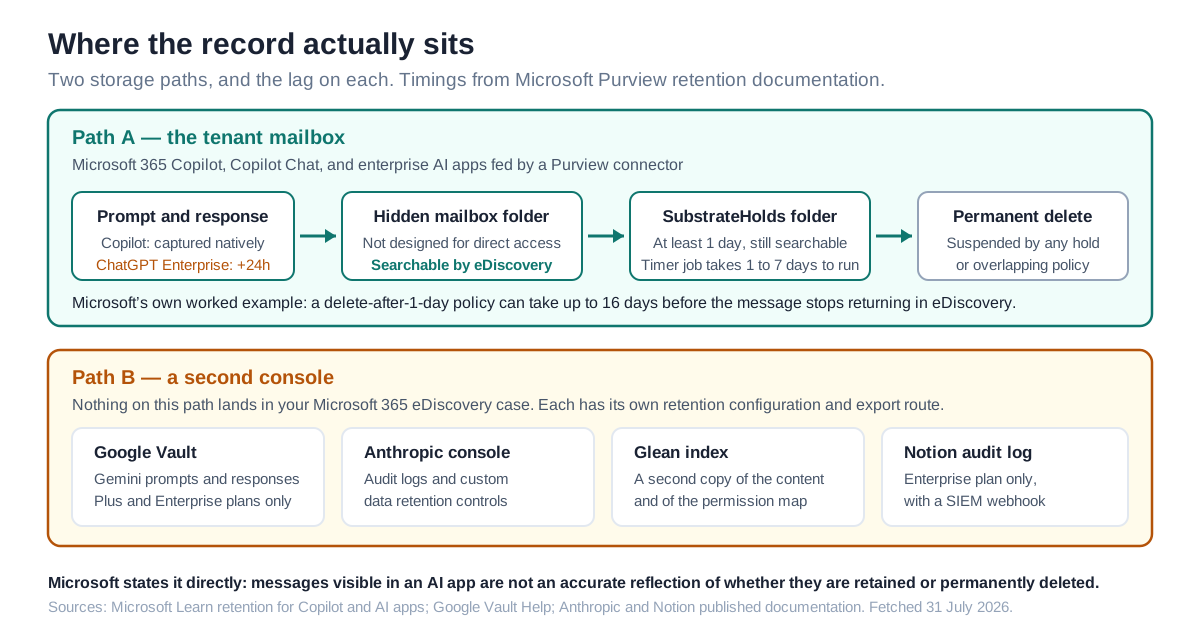
The single most useful thing to understand before switching to any of these Copilot alternatives is where AI conversations physically sit and how long they take to become findable and un-findable. For every app in the Copilot and Enterprise AI tiers, Microsoft's answer is the same for all of them, and it is not the obvious one: the mailbox.
Purview's retention documentation states that "Data from generative AI messages is stored in a hidden folder in the mailbox of the user who runs the AI app," a folder that "isn't designed to be directly accessible to users or administrators," and that expired items move to a second hidden folder called SubstrateHolds before permanent deletion. The timer job that does this "typically takes 1-7 days to run," which produces the counter-intuitive worked example Microsoft publishes itself: a delete-after-one-day policy "could take 16 days before the message is permanently deleted so that it's no longer returned in eDiscovery searches," per Microsoft Learn.
| Option | Where the record sits | Lag to searchable | What survives offboarding |
|---|---|---|---|
| Microsoft 365 Copilot / Copilot Chat | Hidden folder in the user's Exchange mailbox | Native | Inactive mailbox, still eDiscovery-searchable |
| ChatGPT Enterprise | Same mailbox path, fed by the Purview connector | ~24 hours, per OpenAI API limits | Inherits the mailbox path once ingested |
| Claude Enterprise | Anthropic's console; Purview gets audit events only | Not applicable for eDiscovery | Anthropic's retention configuration |
| Google Workspace with Gemini | Google Vault, on Plus and Enterprise | Native to Vault | Account cannot be deleted while on hold |
| Glean | Glean's index and console | Not published | Vendor console |
| Notion AI | Notion workspace audit log, Enterprise plan | Real time via SIEM webhook | Vendor console |
| Consumer AI in a browser | Mailbox path, Edge only, four named apps | Depends on collection policy | Only what was captured |
Two lines from that documentation are worth pinning to the wall. The first: "Messages visible in your AI apps are not an accurate reflection of whether they are retained or permanently deleted for compliance requirements." The second, on leavers: if a user's account is deleted, their AI app messages subject to retention "are stored in an inactive mailbox," remain under the retention policy that applied, and "the contents are available to an eDiscovery search."
That second line is the offboarding answer for the in-tenant options and the reason Boundary question five matters. For everything outside the tenant, the equivalent guarantee is whatever the vendor's contract says, and it is not usually in the marketing pages.
Choose by the Boundary: A Decision Tree
Work down this list and stop at the first match. It resolves faster than a feature matrix because each branch turns on a fact you can look up rather than a preference you have to elicit.
Choose Microsoft 365 Copilot Chat if the objection is the $30 line and not a missing capability. You keep every Purview control and spend nothing to find out whether the demand is real.
Choose Microsoft 365 Copilot if the work happens inside Office documents and meetings, you rely on sensitivity labels, and a DLP policy that stops a prompt before it is processed is a requirement rather than a nice-to-have. It is the option where sensitivity label inheritance applies to newly created content in Word, PowerPoint and Outlook.
Choose Google Workspace with Gemini if you are already running Workspace, or the suite decision is genuinely open. Buy Plus or Enterprise, because Vault is where the governance lives.
Choose ChatGPT Enterprise if you need frontier-model breadth on a work account and you will fund the Purview connector, the pay-as-you-go billing and the collection policy as part of the project. Accept the roughly one-day ingestion lag as a documented property, not a bug to escalate.
Choose Claude Enterprise if the capability case is strong for a defined team and you are willing to run its compliance record in Anthropic's console. Write the discovery procedure down before you deploy, not after.
Choose Glean if the real problem is retrieval across systems Graph does not reach, and your security team has explicitly decided the application-identity and second-copy questions rather than inherited the answers.
Choose Notion AI if Notion is already your system of record and you are on the Enterprise plan. If you are not on Enterprise, price that upgrade into the comparison, because the audit log and the zero-retention default sit behind it.
Choose none of them, and fix the boundary first, if you cannot currently answer where your AI conversations are stored today. Adding a second tool to an unmeasured estate makes the next answer harder, not easier.
When the Incumbent Still Wins, and When It Does Not
Against every one of these Copilot alternatives, the incumbent wins on exactly one thing, and it wins on it decisively: nothing has to move. Eleven of eleven Purview capabilities, native retention, native eDiscovery, sensitivity labels that carry their usage rights into the response, DLP with its own policy location, and a residency commitment in Microsoft Product Terms since March 2024. No third party on this list matches that, and the ones that come closest do so by connecting back into the same Microsoft machinery.
It does not follow that Copilot is the right purchase. Three honest cases against it:
The capability is elsewhere. If the work is long-document analysis or code, Claude's own users make a capability argument that a Purview matrix does not answer. Governance tells you what it costs to choose that, not that you must not.
The problem is search, not generation. Copilot grounds in Microsoft Graph. If half your institutional knowledge is in Jira, Salesforce and Confluence, a permission-aware search product addresses the actual complaint, and paying $30 per seat to not fix it is the worse outcome.
The estate is not Microsoft. For a Google-first organisation, Copilot is the third-party assistant and Gemini is the tenant-native one. The argument in this article does not favour Microsoft; it favours whichever assistant is already inside the boundary that holds the data.
There is also a case against the framing itself, and it deserves a hearing. A compliance capability matrix measures what a platform vendor has built integrations for, and Microsoft has the strongest incentive to build them for its own product first. Claude Enterprise scoring two of eleven in Purview is a statement about integration coverage, not about Anthropic's security engineering — Anthropic publishes SSO, SCIM, audit logs and custom retention controls, and a buyer who governs Claude in Anthropic's console is not ungoverned. The matrix is the right tool for answering "will my existing process still work," and the wrong tool for answering "is this vendor careful."
Where This Comparison Is Wrong or Incomplete
Four limits, stated plainly.
We have not used these products. No trial, no benchmark, no timing data. Every claim here comes from vendor and platform documentation fetched on 31 July 2026 with the source linked at the claim. Where the documentation is silent, we say "not published" rather than estimating.
Two recognisable sources were unreachable. OpenAI's own enterprise privacy page and its Compliance API help article both returned HTTP 403 to direct fetches, and the browser fallback was unavailable during this run. Everything stated about ChatGPT Enterprise's compliance surface therefore comes from Microsoft's connector and capability documentation rather than from OpenAI's own pages. Treat OpenAI's published terms as the authority if the two ever disagree.
Two connectors are labelled preview. Microsoft describes both the ChatGPT Enterprise connector and the Anthropic Claude connector as preview. Preview capability matrices move. The eight-of-eleven and two-of-eleven counts are accurate on the pages as published; they are not commitments, and of everything in this article they are what we would expect to have moved in six months.
Pricing is partial by vendor choice. ChatGPT Enterprise and Glean publish no rate card. Google Workspace Enterprise is "Let's talk." Claude Enterprise publishes a seat price but states usage "scales with model and task," which is not a total. Any total cost of ownership comparison built on this table has three holes in it, and the vendors put them there. We did not fill them with estimates.
One further open question we cannot resolve from documentation: whether a connector-fed record ingested roughly a day late is treated as adequate for a given organisation's preservation obligations is a question for that organisation's counsel and records-management policy, not for a blog. The documented facts are the storage location and the timings; the sufficiency judgment is not ours to make.
The Layer Underneath the Assistant
The pattern across all seven options is that the assistant is the easy part and the record is the hard part. Every one of these tools produces conversations, actions and derived artefacts that somebody will eventually need to find, retain, expire or prove. The vendors each solve that in their own console, on their own schedule, with their own definition of what counts as an event. Fine at one tool and unmanageable at five.
That layer is what LeapForce builds: one controlled place where access, policy, cost and audit live across every AI tool, connector, model and agent, rather than a governance story per vendor. Our AI Gateway is rolled out on the principle Observe first. Enforce second. Optimize third. — you measure what is actually being used before you write a policy about it, because a policy written against assumed usage is the one people route around. Observability and Audit records what was refused as well as what ran, and Access and Identity treats non-human identities as first-class, with an owner, a scope and an expiry — the standing application identity problem from the Glean section, handled as a lifecycle rather than a one-time consent.
To be clear about what this does not do: LeapForce does not replace Microsoft Purview, Google Vault, or a vendor's own retention configuration, and it does not make a third-party assistant's conversations appear in your eDiscovery case. It gives you one place to see and control the estate those tools sit in.
Frequently asked questions
No. Microsoft 365 Copilot is the only widely-deployed assistant that grounds in Microsoft Graph without exporting a copy, and Microsoft states its Semantic Index "honors the user identity-based access boundary." Every third-party alternative moves something — a conversation stream at minimum, a full content index at most. The practical question is not whether data crosses the boundary but whether your existing retention, eDiscovery and DLP can still reach it after it does, which Microsoft publishes per app in the Purview capability matrix.
Yes, with setup. Purview supports eDiscovery for ChatGPT Enterprise once you have registered the workspace as a data source, run a connector scan, enabled pay-as-you-go billing and created a collection policy that captures prompts and responses. Searches use the ItemClass property with values such as IPM.SkypeTeams.Message.ConnectedAIApp.Connector.<ChatGPTEnterprise>. Microsoft notes that "conversations are ingested 24 hours after they occur" because of OpenAI API limits, and the connector is documented as preview.
Microsoft 365 Copilot Chat, at no additional cost for users with an eligible Microsoft 365 subscription and a Microsoft Entra account. It is the only option that costs nothing and changes nothing about your compliance posture. Beyond that, the cheapest published paid figure is Microsoft's own: Microsoft 365 Copilot Business from $18.00 user/month, paid yearly. Among third-party options, published prices are Claude Team at $20 per seat per month billed annually and Google Workspace Plus at $22 per user per month, against Microsoft 365 Copilot at $30.00 user/month paid yearly. ChatGPT Enterprise and Glean do not publish pricing, so a full cost comparison is not possible from public sources.
No. Microsoft states that "Prompts, responses, and data accessed through Microsoft Graph aren't used to train foundation LLMs, including those used by Microsoft 365 Copilot," and that Copilot services have opted out of Azure OpenAI abuse monitoring, which includes human review of content. Optional customer feedback may be used to improve the service but not to train the foundation models, and admins can manage feedback centrally.
For Copilot and connector-fed enterprise AI apps, the conversations sit in a hidden folder in that user's Exchange mailbox. Microsoft states that when the account is deleted, messages subject to retention "are stored in an inactive mailbox," stay under the retention policy that applied before, and remain "available to an eDiscovery search." For assistants outside the tenant, the equivalent answer is whatever the vendor's retention configuration and contract specify. Check it before you deploy, because it is easy to leave unasked until the first departure that matters.
Not automatically, and often the opposite on the identity axis. Permission-aware search products build an index of your content and its permissions outside the tenant, and they authenticate as an application rather than as the signed-in user. Glean's SharePoint documentation states that "All permissions must be granted as Application permissions. Delegated permissions cannot be used," and that without the Sites.FullControl.All scope, permission changes propagate only "once every 24 hours during an incremental API crawl." That is a real trade-off to decide deliberately, not a safety upgrade.
Yes, at the endpoint, with conditions. Windows devices onboarded to Purview can run Endpoint DLP policies that warn or block users sharing sensitive information with third-party generative AI sites in a browser. Microsoft's example is preventing a paste of credit card numbers into ChatGPT. Coverage requires the device to be onboarded and, for retention and eDiscovery of those interactions, the Edge browser and one of four named apps. An unmanaged device on a different browser is outside it.
You lose Microsoft's specific commitment, which may or may not matter depending on the replacement. Copilot "was added as a covered workload in the data residency commitments in Microsoft Product Terms on March 1, 2024," and is an EU Data Boundary service for EU customers. Note the published exception: "Models provided by Anthropic as a subprocessor are currently excluded from the EU Data Boundary," so even staying on Copilot requires a configuration choice. Any alternative's residency position needs reading in its own contract rather than assumed from a certification list.
The Boundary Five can be answered from published documentation in a working day per vendor, because every input is a public page: the capability matrix, the connector prerequisites, the identity model in the connector docs, the retention location, and the offboarding behaviour. What takes longer is the internal decision the documentation surfaces — whether your legal and records teams accept a compliance record living in a second console. Start that conversation at the same time as the vendor evaluation, not after it.
Five questions, all answerable in writing: what copy of our content leaves our tenant and where is it stored; what identity does the product authenticate as, and is it delegated or an application permission with tenant-wide scope; which of our existing policies keep applying to the interactions; how do we place a legal hold and export conversations, and what is the lag; and what happens to the record when a user is deprovisioned or the contract ends. Ask for the documentation page, not the sales answer. NIST's AI RMF makes third-party AI supply-chain policy an explicit governance expectation under GOVERN 6, so this is a reasonable thing to put in an assessment.
Ready to Govern Your AI?
Talk to LeapForce — one controlled layer for every AI tool, connector, model, and agent.
Comments