
The honest answer to n8n vs Zapier on data handling is that there are three options, not two, and they differ by where the payload sits mid-run: Zapier runs it in AWS in the United States, n8n Cloud runs it on European infrastructure, and self-hosted n8n runs it wherever you put it — and writes the whole failed payload into your own database by default.
Our position is that the usual framing gets this backwards. "Self-hosting is more private" is a slogan, not a control. What actually changes between the three options is not privacy in the abstract; it is the reader set — the list of parties who can open a failed run and see the customer record that was moving through it. That list has three layers in a hosted model: your own colleagues, the vendor's staff and support entities, and the vendor's named sub-processors. Self-hosting deletes the two vendor-side layers for the runtime and hands you the operational duties they were performing. Your colleagues stay on the list either way. That is a trade, and it is worth making deliberately.
This is a question people ask in concrete terms, not abstract ones. On the n8n community forum in February 2025, a user opening a thread titled "N8n server location for hosted offer" wrote that they could not find out whether they could choose a server location, and that it mattered before signing up. The answer came on the forum eight days later, from an n8n team member — not from the product documentation, which still does not publish a customer-selectable region setting.
The short answer: Pick Zapier if you can accept that Customer Content lives in US AWS with no EU-only option and a 29–69 day account window; pick n8n Cloud if EU processing and a 7/30/unlimited retention ladder is enough; pick self-hosted n8n only if you will actually own execution-data pruning, log rotation, encryption at rest and patching — because n8n's own documentation says that in that model it is "neither a Controller nor a Processor".
Last updated: July 31, 2026.
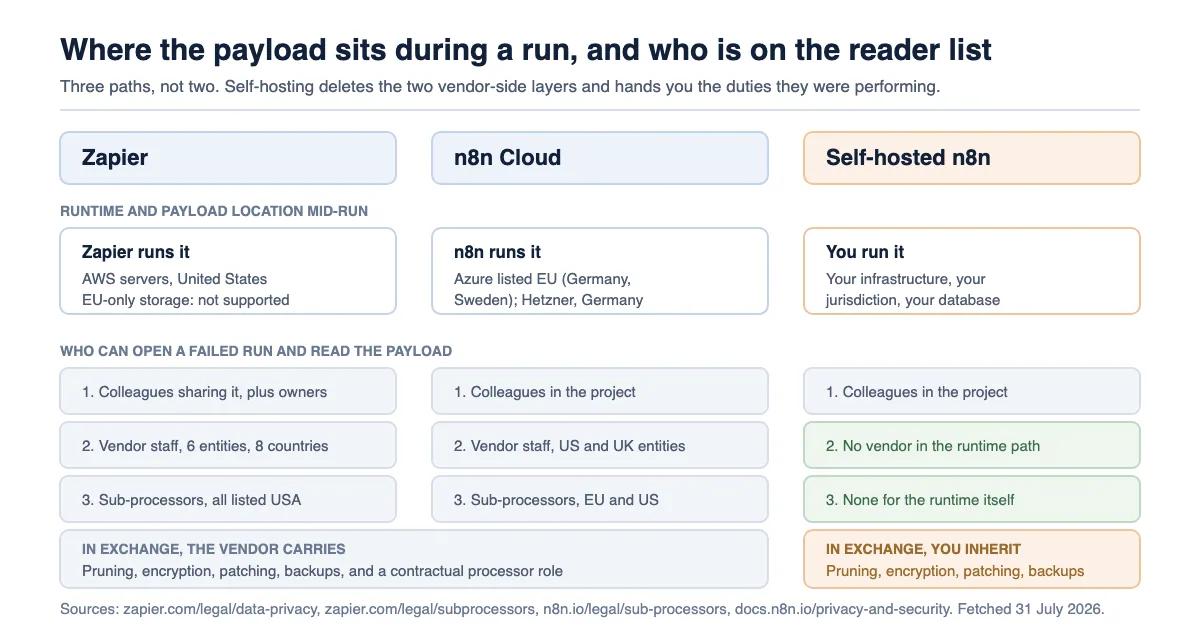
The three data paths, side by side
Every claim in the table below comes from a page the vendor publishes and maintains, fetched on 31 July 2026. Nothing here is inferred from a review site. The single most decision-relevant row is the last one: Zapier's own privacy page answers the EU-residency question with a flat no, while n8n's sub-processor register lists its cloud providers' processing locations inside the EU.
| Zapier | n8n Cloud | Self-hosted n8n | |
|---|---|---|---|
| Who runs the workflow | Zapier | n8n | You |
| Payload location during a run | AWS, United States | n8n's cloud infrastructure | Your infrastructure |
| Run data kept in your account | 29–69 days | 7 / 30 / unlimited days by plan | Your setting; default 336 hours |
| Run data in vendor logs | 7 days | Most internal logs 90 days | Your logs, your rotation |
| Run data in vendor backups | Up to 4 months | Backups deleted within 90 days after account deletion | Your backups |
| Customer-set retention | Enterprise, 7–30 days | Workflow-level and plan-level | Any value you configure |
| Vendor sub-processor locations | All listed as USA | Azure listed as EU (Germany, Sweden); Hetzner, Germany | None for the runtime |
| EU-only storage option | Not supported | Not published as a customer-selectable setting | Yours to choose |
Sources for every cell: Zapier's Data Retention/Deletion/Export page, its Data Privacy Overview, its Subprocessors register, n8n's Privacy documentation, n8n's execution environment variables reference, and n8n's sub-processor list.
One caveat before you read further: we have not run either platform in production ourselves for this article. Everything below is read from published documentation, licence text and vendor legal pages, each fetched and dated. Where a vendor does not publish an answer, we say so rather than filling the gap.
What actually crosses the vendor during a run
In a hosted automation platform the vendor is the runtime, which means the payload does not merely pass through — it is processed, held in memory, written to a run record, and mirrored into logs and backups on the vendor's schedule. In a self-hosted deployment the runtime is yours, and what crosses to the vendor shrinks to telemetry and, on paid tiers, a licence check.
Zapier is explicit about its own role. Its Data Privacy Overview states that for Customer Content, "you, the customer, are considered the 'data controller' of that data from a privacy perspective. In turn, Zapier is the 'data processor' responsible for safeguarding Customer Content as it flows through Zapier's systems." That is the correct description of a hosted runtime: the content flows through their systems because their systems are what runs it.
n8n's documentation draws the line in the other direction for self-hosting. Its Privacy page says plainly: "For self-hosted versions, n8n is neither a Controller nor a Processor, as we don't manage your data." Further down the same page, under the heading on GDPR for self-hosted users, it states the consequence: "If you self-host n8n, you are responsible for deleting user data."
That is the whole trade in eleven words. The vendor stops being a processor, and the deletion duty does not vanish — it moves to you.
What a self-hosted instance still sends home
Self-hosting does not mean nothing leaves. n8n's Privacy page lists exactly what a self-hosted instance reports by default, and it is worth reading rather than assuming. It collects error codes and messages of failed executions — the documentation adds the parenthetical "(excluding any payload data, and not for custom nodes)" — plus the workflow graph, the resource and operation a node is set to, the domain, path and method of HTTP request nodes with personal data anonymised, execution status, the user ID that ran an execution, n8n version, OS/RAM/CPU, an anonymous instance ID, and the IP address.
The same page lists what is not collected, and execution data and error payloads both appear on that list. Telemetry is on by default; the documented way to switch it off is the environment variable N8N_DIAGNOSTICS_ENABLED=false.
What n8n Cloud adds on top
n8n Cloud, per the same page, "collects everything listed in Data collection in self-hosted n8n." It then adds one thing that changes the answer to "who can see a failed run": PostHog session recording. The documentation states that "Session recordings comprise the data seen by a user on screen, with the exception of credential values," that n8n's product team uses this data to improve the product, and that "All recordings are deleted after 21 days."
Read that against how anybody actually debugs a failed run: you open the execution, you look at the item that broke, and the payload renders on screen. Credential values are carved out. The record you were inspecting is not named as carved out. This is not a scandal and it is not hidden — it is published, scoped and time-bounded — but it is a concrete answer to a question a feature-by-feature n8n vs Zapier comparison has no reason to reach, and it belongs in a data-protection impact assessment rather than in a footnote.
n8n's AI Assistant sits in the same category. The docs say node-specific data is transmitted "only during direct interactions and active sessions with the AI assistant", that what is shared includes input and output schemas of nodes, node configuration, and "any code or expressions in the node in question", and that what is not shared includes credentials and "Output Data: The actual data processed by your workflows." The retention line: "Any data will be deleted after 30 days." One operational detail matters for a governance review — the documentation states "The Assistant is enabled by default for n8n Cloud users."
What gets written to a log, and for how long
Retention is where the two products stop being comparable on marketing terms and start being comparable on numbers. Zapier publishes a single retention schedule that applies to every account; n8n publishes a plan ladder for Cloud and a set of defaults for self-hosting that you can change to anything you like.
Zapier's retention page, which carries the note "last updated: April 17, 2026", gives the same figures for both Zap Content and Zap Runs:
| Zapier data class | In logs | In your account | In backups |
|---|---|---|---|
| Zap Content (content transferred in and out of Zap workflows) | 7 days | 29–69 days | Up to 4 months |
| Zap Runs (metadata: Zap name, dates and times, status) | 7 days | 29–69 days | Up to 4 months |
| Function Run Content (Functions, Beta) | 7 days | 9 months | Up to 4 months |
| Chatbots conversations | — | 60 days, then deleted | Up to 4 months |
The 29–69 day band is not a fudge; Zapier explains the mechanic on its Data Privacy Overview page. Deletion runs "On the first Monday of each month", and at that point Zapier "only retains Zap Content and Zap History from the current and previous month." Before that Monday you can be holding up to 69 days of content; immediately after it, at least 29.
Two lines on that retention page deserve to be read twice by anyone doing a vendor assessment. The first: Zap Content transferred when you test a Zap "is stored until you delete the Zap." Test data does not age out on the normal clock — it sits with the Zap. The second: "Zap Runs are also stored in Zapier's non-production database for internal Zapier product analytics purposes." That is metadata rather than content, and it is disclosed, but it is a second copy on a different clock.
Shortening the window is a plan feature. Zapier's help article on customising data retention states: "If your account is on the Enterprise plan, admins, super admins, and owners can customize retention settings", that "Zap history retention can be customized to 7-30 days long", and that "Zap history deletion is permanent and may take immediate effect."
There is a wrinkle worth flagging rather than resolving. Zapier's legal page says a shorter period is available "If you subscribe to the Company or Enterprise plan", and its Data Privacy Overview repeats that customers "on Company or Enterprise plans" can set 7–30 days. The help-centre article names only Enterprise, and the public pricing page as fetched on 31 July 2026 lists Free, Professional, Team and Enterprise — no plan called Company. If custom retention is a requirement for you, get the entitlement written into the order form rather than inferring it from whichever page you happened to read.
The n8n retention ladder
n8n Cloud's ladder is published on both the pricing page and the Cloud data documentation, and the two agree:
| n8n Cloud plan | Max saved executions | Saved-execution storage | Max execution log retention |
|---|---|---|---|
| Starter | 2,500 | 2.5 GB | 7 days |
| Pro | 25,000 | 25 GB | 30 days |
| Enterprise | 50,000 | 50 GB | Unlimited |
n8n's Cloud documentation adds the rule that decides which limit bites first: n8n "automatically prunes execution logs after a certain time or once you reach the max storage limit, whichever comes first." A high-volume workflow on Starter will hit 2,500 saved executions long before it hits seven days, so the effective window is shorter than the advertised one.
For the vendor's own logs, n8n's Privacy page states: "n8n deletes most internal application logs and logs tied to subprocessors within 90 days. The company retains a subset of logs for longer periods where required for security investigations." Workflow code and credentials on Cloud are held "indefinitely, until you choose to delete it or close your account", and after account deletion n8n "deletes customer data in backups within 90 days."
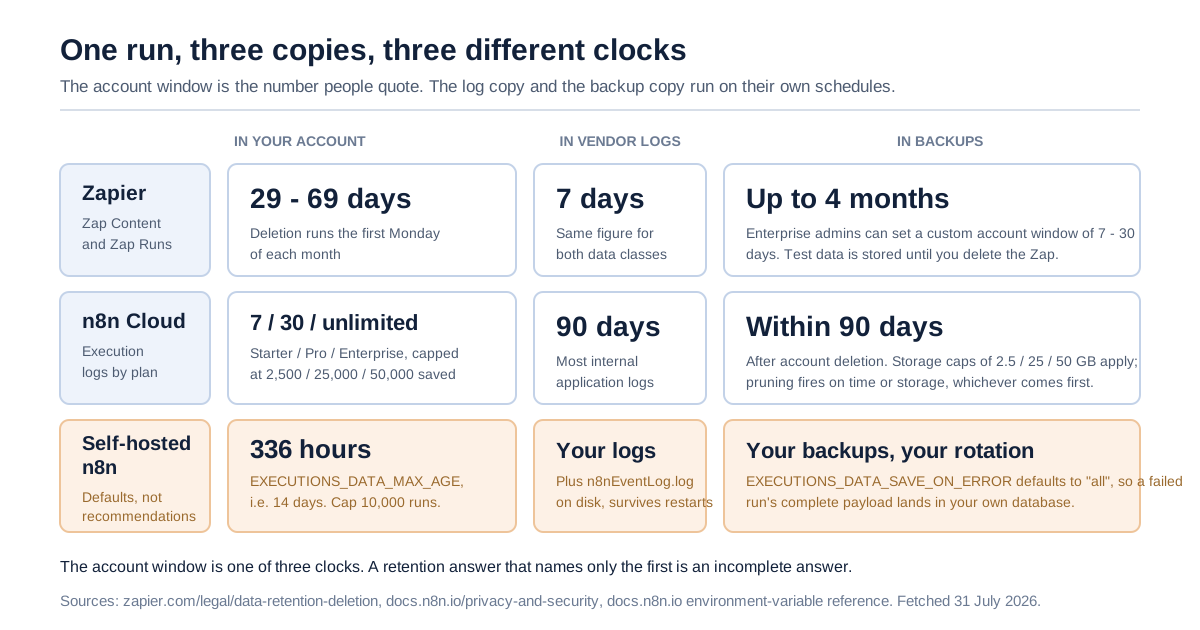
The failed run is the one that keeps the payload
Here is the specific fact that most n8n vs Zapier comparisons miss, and it is the reason we chose this angle. On a self-hosted n8n instance, the out-of-the-box configuration saves the complete data of every failed execution into your database and keeps it for two weeks.
The relevant defaults, from n8n's environment-variable reference:
| Variable | Default | What it does |
|---|---|---|
EXECUTIONS_DATA_SAVE_ON_ERROR | all | Whether n8n saves execution data on error |
EXECUTIONS_DATA_SAVE_ON_SUCCESS | all | Whether n8n saves execution data on success |
EXECUTIONS_DATA_SAVE_MANUAL_EXECUTIONS | true | Whether to save data of executions started manually |
EXECUTIONS_DATA_SAVE_ON_PROGRESS | false | Whether to save progress for each node executed |
N8N_EXECUTION_DATA_STORAGE_MODE | database | Where execution data is stored |
EXECUTIONS_DATA_PRUNE | true | Whether to delete data of past executions on a rolling basis |
EXECUTIONS_DATA_MAX_AGE | 336 | The execution age, in hours, before it is deleted |
EXECUTIONS_DATA_PRUNE_MAX_COUNT | 10000 | Maximum executions retained; 0 means unlimited |
EXECUTIONS_DATA_HARD_DELETE_BUFFER | 1 | Hours of age required before hard-deleting execution data |
Three hundred and thirty-six hours is fourteen days. So the default self-hosted posture is: every payload that flowed through a broken workflow — the customer record, the invoice line, the support ticket body, whatever it was — is written to your application database in full and stays there for a fortnight, on a rolling window that also caps at ten thousand executions.
That is a perfectly reasonable default for debugging. It is a terrible default to discover during an incident review, and it is the single strongest argument against treating self-hosting as automatically the more private choice. The data did not go to a vendor. It went into a database that is now in scope for your own access control, your own backups, your own encryption-at-rest decision and your own subject-access requests.
n8n itself makes the connection between that variable and data-subject requests explicit. On its Privacy page, under GDPR for self-hosted users, it recommends "configuring n8n to prune execution data automatically every few days to avoid effortful GDPR request handling as much as possible", and names EXECUTIONS_DATA_MAX_AGE as the control.
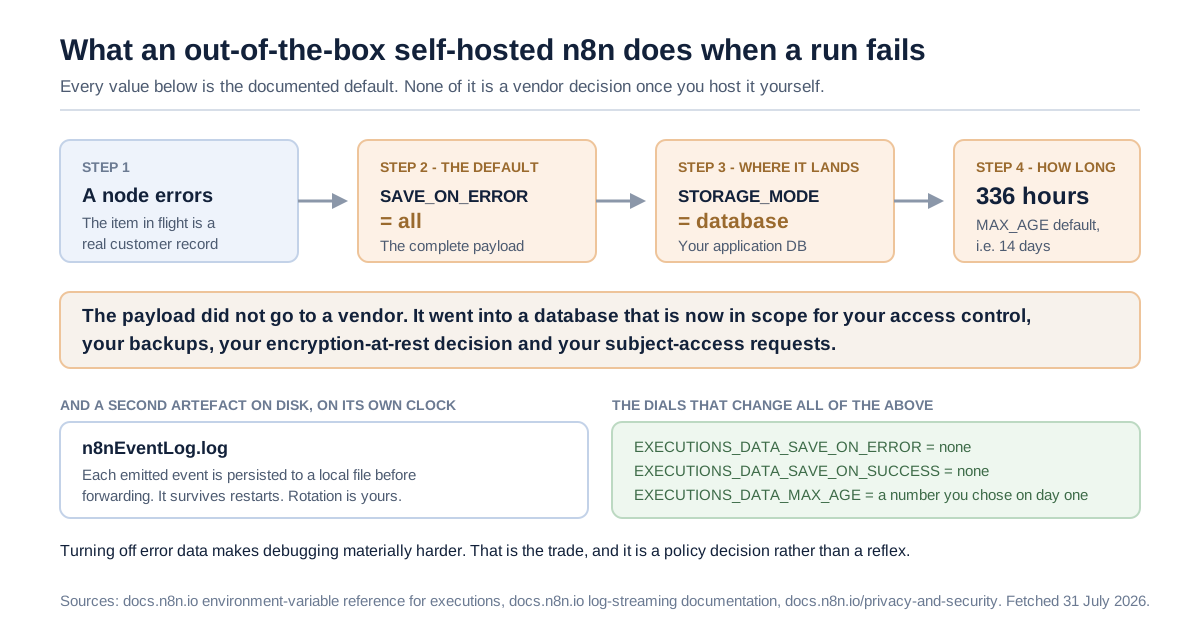
The second on-disk artefact
There is a second on-disk artefact that the executions table does not account for. n8n's log-streaming documentation states that "n8n persists each emitted event to a local log file before forwarding it to streaming destinations", written by default to <n8n-user-folder>/n8nEventLog.log, with a -worker or -webhook-processor suffix on those processes. The file "survives restarts" so that undelivered events can be re-emitted.
Log streaming itself is gated: the same page states "Log Streaming is available on all Enterprise plans." On the Zapier side, Log Streams and the Observability API both sit in the Enterprise column of the public feature comparison. Neither vendor gives you an audit-grade export of run activity on a mid-tier plan. If getting run events into your own SIEM is a control your security team requires, on both products that is an enterprise-tier line item, and it should be priced during evaluation rather than after.
Who can read a failed payload inside your own org
Vendor access gets all the attention in security reviews. Colleague access is the layer that actually leaks, and it is governed by the product's permission model rather than by any contract.
Zapier documents this with unusual clarity, and the sentence is worth quoting exactly because its implication is easy to miss. On private connected accounts in a shared Zap, the help centre says: "Any members, admins, super admins, and owners that have access to the Zap only have view permissions in that step. They can also view any information that passes through its Zap history."
Read the second sentence on its own. A private connection restricts who can use the credential. It does not restrict who can read the data that credential pulled. Anyone with access to the Zap can open the history and read what moved through it. Zapier's Zap-history documentation describes the run-details view as showing, per step, "data that was received and sent by the step" — the payload, not a hash of it.
Zapier's role model — Owner, Super Admin, Admin, Member, with Super Admin available only on Enterprise accounts — governs who has that access, and it is not uniform. Members and Admins see what is shared with them. Owners and Super Admins are the exception the permission matrix spells out. Those two roles, and only those two, are marked as able to "View assets that you do not own and are not shared with you", to "Access folders that you do not own and are not shared with you", and to "Access app connections that you do not own and are not shared with you". For them the reader set is the whole account rather than the shared set. Sharing hygiene governs most of your org; the top two roles sit outside it by design.
n8n's equivalent lever is project scoping. The public feature comparison lists project admins, project editors and project viewers, with shared projects capped at one on Starter, three on Pro and unlimited on Enterprise. With a ceiling of one shared project on the entry plan there is exactly one shared boundary available to draw, so above that boundary the only place left to put a workflow is a personal project or the single shared one.
Neither product is unusual here. What makes this layer worth a line in the evaluation is that it is the one an auditor can test in five minutes, by asking a junior team member to open a failed run and describe what they can see.
Who can read it at the vendor
This is the question the "self-hosting is more private" slogan is really about, and both vendors publish enough to answer it without speculation.
Zapier's answer is a register. Its Subprocessors page, posted 10 June 2026 with an effective date of 24 June 2026, lists every third party that stores or helps process Customer Content, and every single entry in the infrastructure and support tables carries the location "USA". The infrastructure list includes AWS, Google, Microsoft, Anthropic, OpenAI, Fireworks AI, Databricks, Datadog, Sentry, Grafana Labs, Redis, Pinecone, Heroku, Vercel, Algolia, Firecrawl, Knock, Liveblocks, Looker, Stytch, Uploadcare and Fullstory. The support list — the one that matters for "who reads my failed run when I open a ticket" — is Ada, Gong, Vitally, Zendesk and Zoom.
Then there are the affiliates. Zapier lists five group entities that provide "Zapier services and support": Zapier Australia Pty Ltd (Australia, with a New Zealand branch), Zapier Automation Inc. (Canada), Zapier Automation Ireland Ltd (Ireland, with a Spanish branch), Zapier India Private Limited (India), and Zapier UK Ltd (UK). So the practical answer to "who at the vendor can see a failed run's payload" is: Zapier personnel across six group entities spanning eight jurisdictions, plus whatever you paste into a Zendesk ticket or share on a Zoom screen while troubleshooting.
Zapier bounds this in two published ways. Its Data Privacy Overview says Zapier "periodically reviews the types of data that it collects, the reasons for collecting that data, and when Zapier personnel might need to access it", and its subprocessor page states that "Customer Content will not be used by artificial intelligence subprocessors for modeling purposes", noting that Zapier has implemented OpenAI's Zero Day Retention feature.
n8n's register is shorter and geographically different. Its sub-processor page lists Microsoft Azure with a geographic location of processing of "EU (Germany, Sweden)", Hetzner Online in Germany, OpenAI in the US, Anthropic in the US, Google Vertex AI in "EU, US", LangChain in the US, and Daytona — described as sandbox provider for the AI Assistant — in the US. Its affiliate entities are n8n US Inc. in the US and n8n UK Ltd in the UK.
The pattern is clear enough to act on. Both are hosted services with staff and sub-processors who can, under their own controls, reach customer data. The difference is not "one is safe and one is not" — it is that the two registers point at different continents, and one of them has a US-only infrastructure list.
Self-hosting removes this layer entirely for the runtime. It does not remove it for the AI nodes you call from inside a workflow: if a self-hosted workflow sends a document to a model provider, that provider's data path applies regardless of where n8n is running. Self-hosting the orchestrator is not self-hosting the model.
Where the data physically sits
Zapier answers this question directly and in the negative, which is the most useful thing a vendor page can do. From its Data Privacy Overview: "Zapier hosts data in AWS servers located in the United States, including customers' personal data and the data that is processed on behalf of customers." And, verbatim, under the heading asking whether data can be stored only within the EU: "Zapier does not support this option."
Zapier pairs this with an EU-US Data Privacy Framework certification, a DPA containing Standard Contractual Clauses, and SOC 2 Type 2 and SOC 3 attestations. Whether that combination satisfies a given organisation's transfer position is a question for that organisation's legal advisers and its data protection officer, not for a blog post — but the underlying fact is not ambiguous, and it should be established on page one of an evaluation rather than page forty.
Zapier is equally direct about one category it declines: "The use of regulated healthcare and medical data including Protected Health Information (PHI) under HIPAA isn't supported on Zapier", and Zapier "can't sign business associate agreements (BAAs) or equivalent agreements for handling PHI or other similar information." That sentence is on Zapier's own page, and it settles the point without any need to characterise a rival's healthcare posture.
n8n Cloud's location is the one place in this analysis where the primary documentation is thinner than we would like. n8n's sub-processor register names its cloud providers and their geographic locations of processing — Azure in "EU (Germany, Sweden)", Hetzner in Germany — which is a published, current, first-party statement. But n8n's product documentation does not publish a customer-selectable region setting, and the specific data-centre answer sits in a January 2023 forum reply — from n8n's founder — stating that n8n Cloud used Azure Germany West Central, Frankfurt am Main. A forum reply from 2023 is not a documentation commitment, whoever wrote it. If EU residency is a contractual requirement for you, get it in the DPA.
We could not verify n8n Cloud's current region from n8n's own product documentation, and we are not treating a three-year-old forum answer as equivalent. That is a gap in what the vendor publishes, and naming it is more useful than papering over it.
What the self-hosted operator inherits instead
Removing the vendor from the data path does not remove the work the vendor was doing. It reassigns it. n8n's own documentation is refreshingly blunt about this, which makes it a good checklist.
| Duty | Who holds it on Zapier | Who holds it on n8n Cloud | Who holds it self-hosted |
|---|---|---|---|
| Running the workflow | Vendor | Vendor | You |
| Deleting user data on request | Vendor process + your deletion options | Vendor process + your settings | You: "you are responsible for deleting user data" |
| Execution-data pruning | Vendor schedule | Vendor prune + plan ceiling | You, via EXECUTIONS_DATA_MAX_AGE |
| Encryption in transit at the edge | Vendor | Vendor | You, via a reverse proxy |
| Encryption at rest | Vendor | Vendor | You |
| Patching the runtime | Vendor | Vendor | You |
| Backups and their retention | Vendor, up to 4 months | Vendor | You |
| Log rotation for the event log | Vendor | Vendor | You |
| Controller/processor role | Zapier is processor | n8n is Controller and Processor | n8n is "neither" |
n8n's guidance page on what a self-hosting customer should do says: "It's also your responsibility as a customer to ensure you are securing your code and data." It recommends encrypted transit through a reverse proxy, ensuring encryption at rest, running security audits, caution with community nodes, and disabling risky nodes such as Execute Command or SSH where they are not needed. On the Cloud side, n8n's Privacy page states that for Cloud versions n8n "is considered both a Controller and a Processor as defined by the GDPR", with a Data Processing Agreement including Standard Contractual Clauses as part of its standard terms.
The cost of that inheritance is not the licence fee. We deliberately are not re-deriving the economics here — our earlier analysis of n8n's pricing and the governance cliff works through what the self-hosted path actually costs once the first security control is required, and our breakdown of Zapier's task multipliers does the same on the other side. This article is about where the bytes are, not what they cost.
One point of overlap worth naming: our earlier piece on choosing between SaaS, dedicated and your own cloud argues that deployment models are a sequence rather than a one-time choice. That argument holds here. The interesting question is not "hosted or self-hosted" as an identity; it is which of the three payload paths you can actually operate today, and whether moving between them later will require rebuilding your workflows.
The licence is a procurement fact, not a philosophy
If you are evaluating self-hosted n8n, the licence is a decision input rather than a footnote. Here is what the text says, quoted from the file rather than characterised.
LICENSE.md in n8n's repository splits the code three ways. Content of branches other than the main branch is, in the file's own words, "not licensed". Source code files containing .ee. in the filename or .ee in the dirname are "NOT licensed under the Sustainable Use License" and require "a valid n8n Enterprise License". Everything outside those carve-outs is available under the Sustainable Use License, version 1.0. That licence's copyright grant is broad: a "non-exclusive, royalty-free, worldwide, non-sublicensable, non-transferable license to use, copy, distribute, make available, and prepare derivative works of the software, in each case subject to the limitations below."
The limitations section, verbatim and complete from LICENSE.md, is four sentences:
You may use or modify the software only for your own internal business purposes or for non-commercial or personal use. You may distribute the software or provide it to others only if you do so free of charge for non-commercial purposes. You may not alter, remove, or obscure any licensing, copyright, or other notices of the licensor in the software. Any use of the licensor's trademarks is subject to applicable law.
n8n's licence FAQ then defines the operative phrase. Restricting use to internal business purposes means, in n8n's words, "all use is allowed unless you are selling a product, service, or module in which the value derives entirely or substantially from n8n functionality." The FAQ gives examples on both sides: white-labelling n8n and offering it to customers for money is not allowed, nor is hosting n8n and charging people money to access it; syncing data you control as a company, building an n8n node for your product, providing n8n consulting, and maintaining n8n on an internal company server are all allowed.
And the point everyone gets wrong. n8n does not describe itself as open source, and says so directly: "Although n8n's source code is available under the Sustainable Use License, according to the Open Source Initiative (OSI), open source licenses can't include limitations on use, so we do not call ourselves open source." The term n8n uses is fair-code, which its documentation describes as a software model rather than a licence — software that is generally free to use, has openly available source, can be extended publicly and privately, and "is commercially restricted by its authors."
We are not going to tell you what that licence permits in your specific commercial context, and you should be suspicious of any article that does. Whether a given product architecture counts as "internal business purposes", and what "derives entirely or substantially from n8n functionality" means for an embedded use case, are questions for your counsel reading the actual text and, if needed, n8n's own licensing contact. What we can say is procedural: if self-hosted n8n will sit anywhere near a product you sell, put the licence in front of legal before it goes into an architecture diagram, not after.
The three options, scored the same way
Same template for each, same evidence bar, same date. Prices below are as published on 31 July 2026.
Zapier
Best for: teams whose data-protection position permits US processing, who want the widest connector catalogue, and who need zero infrastructure ownership.
What it gives you on this axis: a single published retention schedule that applies to everyone; a documented 29–69 day account window with a first-Monday-of-the-month deletion mechanic; a complete, dated sub-processor register; DPF certification, SCCs in the DPA, and SOC 2 Type 2 / SOC 3 attestations; per-Zap sharing that governs who can read run history.
Pros: the retention position is knowable in a single page, which is rarer than it should be. Deletion controls are self-service — you can delete individual Zap runs, specific Zap Content, or all data in the account. The subprocessor page carries a posted date and an effective date, which is what a vendor-risk process actually wants.
Cons: no EU-only storage option, stated flatly. PHI under HIPAA is not supported and no BAA is available. Custom retention is gated to the top tier, and the plan name for that entitlement is inconsistent between Zapier's legal pages and its help centre. Test data persists with the Zap rather than ageing out. Zap Runs metadata also lands in a non-production analytics database.
Pricing (Zapier pricing): Free at $0/month for 100 tasks; Professional from $19.99/month; Team from $69/month for 25 users; Enterprise is quote-only. Custom data retention, Log Streams and the Observability API appear in the Enterprise column of the public feature table.
Bottom line: the most legible data-handling story of the three, provided the geography works for you. If it does not, no plan tier fixes it.
n8n Cloud
Best for: teams who want EU-based processing without operating a runtime, and who can live with a retention ceiling set by plan.
What it gives you on this axis: a published retention ladder of 7 / 30 / unlimited days by plan, coupled to saved-execution and storage caps; workflow-level control over whether successful production executions are saved at all; a sub-processor register whose cloud providers are listed with EU processing locations; a DPA with SCCs, and n8n acting as both Controller and Processor.
Pros: you can turn off saving successful production executions per workflow, which is a real reduction in what exists to be read. The Cloud admin dashboard lets you deselect which executions to log. The plan ladder is stated in the same numbers on two separate vendor pages, which is a good sign.
Cons: PostHog session recordings capture what a user sees on screen, credentials excepted, for 21 days. The AI Assistant is on by default. The effective retention window is whichever of time, execution count or storage runs out first, so the advertised days can overstate what you get. Region is not published as a customer-selectable setting in the product documentation. Log streaming is Enterprise-only.
Pricing: Starter €20/month billed annually for 2,500 workflow executions; Pro €50/month for 10,000; Enterprise is quote-only. n8n's pricing page tags each plan with its deployment, and Business (€667/month, 40,000 executions) is tagged self-hosted rather than hosted by n8n — it is not a Cloud plan, which is why it does not appear in the Cloud retention ladder above.
Bottom line: the option that changes the geography without changing who operates the runtime. Read the session-recording and AI-Assistant defaults before your DPIA, not after.
Self-hosted n8n
Best for: organisations with a platform team who will genuinely own pruning, patching, encryption and backups — and who need the payload never to leave their boundary.
What it gives you on this axis: total control of where execution data lives and how long it survives, through documented environment variables; no vendor in the runtime data path; the option to move execution data out of the database entirely, though S3 and Azure storage modes require Enterprise.
Pros: EXECUTIONS_DATA_MAX_AGE is a real dial, not a support request. You choose the jurisdiction. n8n is, in its own words, "neither a Controller nor a Processor" in this model, which simplifies one part of your data map even as it complicates another. Telemetry is documented and can be switched off.
Cons: the defaults save everything. Failed and successful executions are both saved in full by default, for 336 hours, into your database. You inherit encryption at rest, TLS termination, patching, backups, log rotation and the deletion duty. The event log file persists on disk independently of the executions table. Community nodes are your supply-chain risk. Log streaming and external secret stores are Enterprise features even when you host it yourself. And the licence is not OSI open source, which some procurement policies treat as a distinct category.
Pricing: the Community Edition is available on GitHub under the Sustainable Use License. n8n's paid self-hosted tiers are the Business plan at €667/month billed annually and Enterprise by quote.
Bottom line: the strongest control, and the largest standing obligation. Choose it because you have a platform team, not because you read that self-hosting is private.
The Payload Path Test
Five questions. Every one is answerable this afternoon from vendor documentation and your own configuration, and each has a right answer that is a fact rather than an opinion. We call it the Payload Path Test because the thing being traced is a single record moving through a single run.
- Where does the payload sit while the run is executing? Name the country and the operator. If you cannot name both, you do not yet have an answer.
- What is written when the run fails, and where? Check the actual setting, not the documented default — on self-hosted n8n read
EXECUTIONS_DATA_SAVE_ON_ERROR; on a hosted plan read the retention row for your tier. - How long does that copy survive, in each of the three places it exists? Account store, vendor logs, backups. All three have different clocks and only the first is usually quoted.
- Who can open it? List them in three layers: colleagues with access to the workflow, vendor staff and support entities, and named sub-processors. Use the vendor's own register for the third.
- Which of those can you change without a new contract? Retention on Zapier below Enterprise: no. Per-workflow execution saving on n8n Cloud: yes. Everything on self-hosted: yes, and it is now your job.
A team that can answer all five in writing has a defensible position regardless of which product it chose. A team that cannot has an undocumented data path, and the product name is not what fixes that.
Choose each one if
Choose Zapier if your data-protection position permits US processing, you want the vendor to carry the operational duties, connector breadth is decisive, and a 29–69 day window (or 7–30 days on Enterprise) fits your retention policy. Also choose it if the thing you most need is a single page you can hand to a security reviewer.
Choose n8n Cloud if you want EU-based processing without running infrastructure, your volumes fit inside a plan's saved-execution and storage ceilings, and you are prepared to disable session recording and the AI Assistant if your assessment requires it. It is also the better fit if you want per-workflow control over whether successful runs are stored at all.
Choose self-hosted n8n if you have a team that will own the runtime — patching, TLS, encryption at rest, backups, log rotation and pruning — and a genuine requirement that the payload never leave your boundary. Set EXECUTIONS_DATA_MAX_AGE on day one, not after the first audit.
Stick with your incumbent if the workflows already run, the data path is documented, and nothing in your regulatory position has changed. Migration has its own risk surface: credentials get re-issued, error handling gets rebuilt, and for a period you are operating two systems. A retention window you dislike is a smaller problem than a half-migrated estate.
When the hosted option genuinely wins
Self-hosting loses on two axes that rarely make it into a comparison table.
The first is patch latency. On a hosted plan the vendor ships fixes; on your own instance the clock between a published advisory and your deployment is a number your team owns. If nobody is on the hook for that number, self-hosting has moved risk rather than reduced it.
The second is the deletion duty. "You are responsible for deleting user data" is not a philosophical position; it is an operational commitment that shows up every time somebody exercises a data right. n8n's recommendation to prune every few days is exactly the mitigation, and it only works if somebody configured it.
Where this analysis is uncertain
Several things here are genuinely open, and we would rather list them than let them read as settled.
n8n Cloud's current region is not confirmed by n8n's product documentation. The sub-processor register gives processing locations for its providers; the specific data-centre answer comes from a 2023 forum reply. Treat the DPA as the authority.
We have not run either platform for this article. No timings, no reproduced failure, no measured retention behaviour. Everything above is documentation, licence text and vendor legal pages, fetched on 31 July 2026 and cited inline. Vendor documentation can lag the product, and both of these products ship frequently.
Zapier's custom-retention entitlement is described inconsistently across its own legal pages, help centre and pricing page, as set out earlier. We have quoted all three rather than picking a winner.
The licence question is not resolved here, deliberately. We quoted the Sustainable Use License and n8n's own FAQ definition of internal business purposes. What that means for a particular commercial architecture is a legal question, and it belongs with counsel and with n8n's licensing contact.
Reddit and several review aggregators were not reachable through our fetch ladder for this piece, so practitioner sentiment is under-represented relative to vendor documentation. We would rather cite a licence file we can quote than a review we cannot verify.
Enterprise contract terms are invisible to us. Both vendors negotiate. Retention floors, regional commitments and log-export entitlements that are unavailable on public plans may well be available on a signed agreement, and nothing on a public pricing page tells you that.
The layer above whichever one you pick
Whichever of the three paths you choose, the same governance questions remain unanswered by the automation tool itself: which agent or workflow is allowed to touch which system, who owns it, when its access expires, what it actually did, and what it cost. LeapForce builds that layer — one controlled layer for every AI tool, connector, model and agent, with access and identity treating non-human identities as first-class (every agent gets an owner, a scope and an expiry), a curated connector registry with action-level scoping and credential brokering, and observability and audit that records what was refused, not only what ran. Our gateway rollout model is deliberately staged — Observe first. Enforce second. Optimize third. — because a control you cannot yet measure is a control you cannot yet defend.
To be clear about the boundary: LeapForce is not a replacement for Zapier or n8n, and it does not change where either vendor stores your run data. It governs the layer above them, so that the answers to the Payload Path Test are recorded once rather than rediscovered during an audit.
Frequently asked questions
Neither vendor's documentation supports that framing. Zapier publishes SOC 2 Type 2 and SOC 3 attestations, a DPF certification and a dated sub-processor register; n8n publishes its own sub-processor register, a DPA with Standard Contractual Clauses, and detailed self-hosting guidance. The real difference in n8n vs Zapier on this axis is where the payload sits during a run and who is on the reader list — Zapier's infrastructure and support sub-processors are all listed as USA, while n8n's cloud providers are listed with EU processing locations. Self-hosted n8n removes the vendor from the runtime path and hands you the operational duties instead.
No. Zapier's Data Privacy Overview states that "Zapier hosts data in AWS servers located in the United States, including customers' personal data and the data that is processed on behalf of customers," and answers the question of EU-only storage with "Zapier does not support this option." Zapier addresses transfers through EU-US Data Privacy Framework certification and Standard Contractual Clauses in its DPA. Whether that satisfies your organisation's transfer position is a question for your legal advisers.
Per Zapier's retention page, last updated 17 April 2026: Zap Content and Zap Runs are held 7 days in logs, 29–69 days in your Zapier account, and up to 4 months in backups. The 29–69 day range comes from a deletion that runs on the first Monday of each month, after which only the current and previous month remain. Content transferred when you test a Zap is stored until you delete the Zap. Enterprise admins can set a custom window of 7–30 days.
On n8n Cloud it depends on the plan: 7 days on Starter, 30 days on Pro, unlimited on Enterprise, with saved-execution caps of 2,500 / 25,000 / 50,000 and storage caps of 2.5 / 25 / 50 GB. n8n's Cloud documentation says pruning happens "after a certain time or once you reach the max storage limit, whichever comes first," so the effective window can be shorter than the advertised one. Self-hosted, the default is EXECUTIONS_DATA_MAX_AGE=336 hours — fourteen days — with EXECUTIONS_DATA_PRUNE_MAX_COUNT defaulting to 10,000.
Yes, and this is the highest-value configuration change in the whole n8n vs Zapier comparison. Self-hosted, EXECUTIONS_DATA_SAVE_ON_ERROR and EXECUTIONS_DATA_SAVE_ON_SUCCESS both default to all and can be set to none; EXECUTIONS_DATA_MAX_AGE sets the retention window in hours. On n8n Cloud you can change "Save successful production executions" to "Do not save" in workflow settings, and deselect which executions to log in the admin dashboard. Turning off error data makes debugging materially harder, so decide it as a policy rather than a reflex.
Zapier's Data Privacy Overview says it periodically reviews "when Zapier personnel might need to access it." Its subprocessor page names the support sub-processors involved — Ada, Gong, Vitally, Zendesk and Zoom, all listed as USA — and five affiliate entities providing Zapier services and support in Australia and New Zealand, Canada, Ireland and Spain, India, and the UK. Inside your own account, Zapier's help centre states that members, admins, super admins and owners with access to a Zap "can also view any information that passes through its Zap history," even where the connected account is private. Access is not uniform across roles: the Team and Enterprise permission matrix marks super admins and owners as able to "Access folders that you do not own and are not shared with you", so for those two roles the reader set is the whole account rather than only what was shared.
No, and n8n says so itself: "Although n8n's source code is available under the Sustainable Use License, according to the Open Source Initiative (OSI), open source licenses can't include limitations on use, so we do not call ourselves open source." n8n uses the term fair-code, which its documentation describes as a model rather than a licence — free to use, source openly available, extensible by anybody, and commercially restricted by its authors. If your procurement policy distinguishes OSI-approved licences from source-available ones, that distinction applies here.
The Sustainable Use License permits use and modification "only for your own internal business purposes or for non-commercial or personal use," and n8n's FAQ defines internal business purposes as: "all use is allowed unless you are selling a product, service, or module in which the value derives entirely or substantially from n8n functionality." Its own examples list internal data syncing and n8n consulting as allowed, and white-labelling or paid hosting of n8n as not allowed. Note separately that files containing .ee. require an n8n Enterprise License. Whether a specific commercial architecture falls inside the permitted scope is a question for your counsel and for n8n's licensing contact, not for a comparison article.
Zapier's own page answers this: "The use of regulated healthcare and medical data including Protected Health Information (PHI) under HIPAA isn't supported on Zapier," and Zapier "can't sign business associate agreements (BAAs) or equivalent agreements for handling PHI or other similar information." If your workflows carry PHI, that sentence is decisive on its own and should be read before any feature comparison.
Self-hosting changes who holds the obligations rather than removing them. n8n's Privacy page states that for self-hosted versions n8n "is neither a Controller nor a Processor, as we don't manage your data", and that "If you self-host n8n, you are responsible for deleting user data." n8n recommends pruning execution data every few days via EXECUTIONS_DATA_MAX_AGE specifically to make data-subject requests less effortful. Whether your overall deployment meets your obligations is a determination for your data protection officer and legal advisers.
The licence fee is the smaller number in both cases. The self-hosted path adds infrastructure, patching, backup and monitoring effort that does not appear on any pricing page, and the controls a security team usually asks for — log streaming to your SIEM, external secret stores, custom retention — sit in the enterprise tier of both products. Our separate analyses of n8n's pricing cliff and Zapier's task multipliers work through those totals properly; this article deliberately does not re-derive them.
Run the Payload Path Test: name the country and operator holding the payload mid-run; confirm what is written on failure and where; get the retention clock for the account store, the vendor logs and the backups separately; list who can open a failed run across your colleagues, vendor staff and named sub-processors; and establish which of those you can change without a new contract. Then get the answers that matter to you — region, retention floor, log export — written into the DPA or order form rather than inferred from a public page.
Ready to Govern Your AI?
Talk to LeapForce — one controlled layer for every AI tool, connector, model, and agent.
Comments