
A SaaS demo environment is a live data path, not a toy. Treat any demo or sandbox tenant as production the moment it holds a copy of real customer records or a live connection to the system that has them, and record four facts about it: who owns it, what it can reach, who can reset it, and when it dies.
Our position is that the demo tenant should be treated as the least governed environment in the estate until somebody proves otherwise, because the way it comes into existence rarely assigns it an owner, an access list or an expiry, and the register below is how you check whether yours did. It gets created by sales, populated by an engineer in a hurry, handed to a prospect, cloned for the next deal, and then never closed. One of the clearest public statements of the problem comes not from a security team but from a product manager, posting on Hacker News, who wrote that they had hit it "in literally every company I've been at" — asked for a better demo environment, they would say "give me two engineers for several weeks" and be told no (ftio, Hacker News, March 2021). The environment nobody would fund is the environment nobody governs.
The short answer: Treat every demo and sandbox tenant as a production data path until you can name its Source, its Reach, who holds Reset rights, and its Retire date. Four facts, one row per tenant, and any tenant missing a row gets frozen rather than trusted.
Last updated: July 31, 2026.
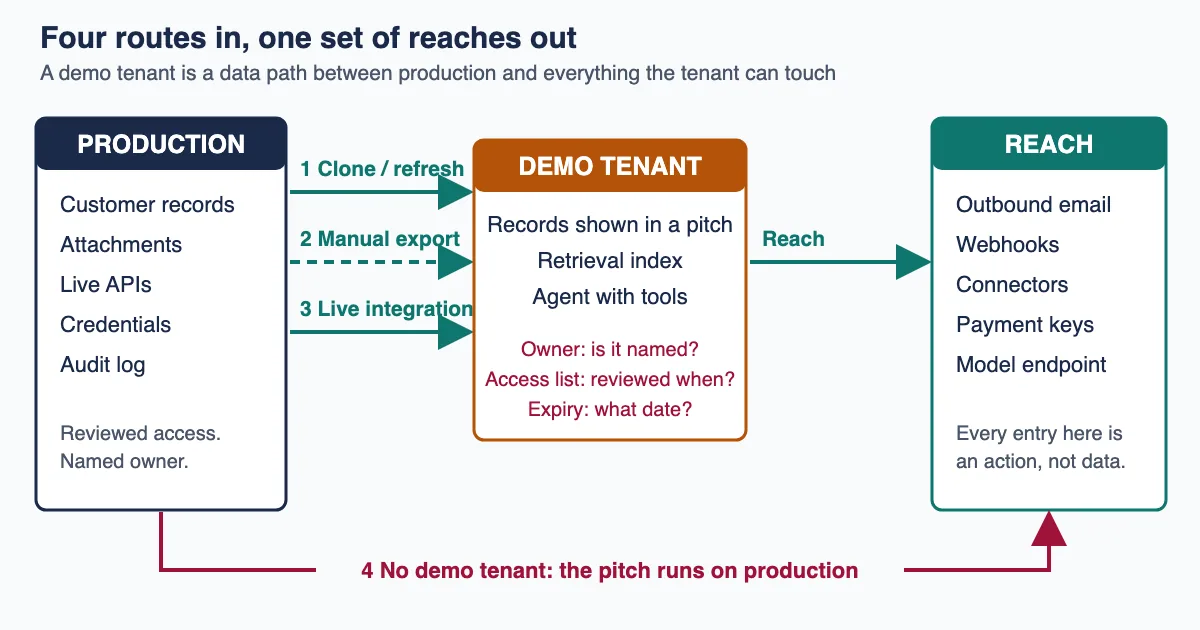
The demo tenant sits between a production data source and a set of outbound reaches nobody registered.
What a SaaS demo environment actually is
A SaaS demo environment is any tenant, org, workspace or instance created so that someone can be shown the product working, rather than so that someone can do work in it. That covers the sales demo org, the prospect's trial tenant, the proof-of-concept workspace, the partner sandbox, the training instance, and the internal "playground" a team spun up to try a feature. The label varies; the governance question does not. Each one is an account with data in it and credentials attached to it.
The distinction people reach for — demo is fake, production is real — collapses the moment you look at how demo tenants get populated. A convincing demo needs data that looks like the buyer's data. Generated data looks generated. So the fastest path to a credible demo is a copy of something real, and the fastest path to a copy of something real is a clone, an export, or a live integration. Every one of those is a data path out of production.
This is not a hypothetical failure mode. In April 2026, 404 Media reported that employees at the surveillance company Flock had accessed cameras in Dunwoody, Georgia — including cameras covering a children's gymnastics room, a pool, a playground and a Jewish community centre — in order to demonstrate products to other police departments. The company's own explanation was that "the camera was only viewed during a routine demo" (404 Media, April 2026). Whatever else that story is, it is an environment story: the demonstration was performed against cameras that were also serving a live customer.
A commenter on the Hacker News thread about that report described the pattern from the inside, in one of the clearest public accounts of how demo environments are actually run. Test environments, the comment says, are "filled with garbage data" with users named 1111111, while "Sales demos are generally done on a production environment, but on dedicated tenants" seeded with tidy-looking records (xp84, Hacker News, May 2026). That single sentence contains the governance problem: the demo tenant is a production tenant wearing different data.
Read it that way and the question stops being "how do we run a better demo" and becomes four ordinary operational questions. Where did the data in this tenant come from? What can this tenant reach? Who can reset or clone it? When does it die? Those four are the register this article builds.
Four routes real customer data takes into a demo tenant
Real customer data reaches a demo environment by four routes, and they need different controls. Route one is the platform clone or refresh: a vendor-supported copy of the production instance into a lower environment. Route two is a manual export and import, usually a CSV somebody pulled to make the demo look right. Route three is a live integration: the demo tenant is genuinely separate, but one of its connectors points at a production API. Route four is the one the Flock report describes — there is no demo tenant at all, and the demo runs on production with a friendly-looking account.
Route one is the best documented because platform vendors sell it. ServiceNow's clone copies a production instance into a sub-production instance, and administrators control what comes across through table exclusions and data preservers. The practical limit matters more than the feature. A community article on removing HR case records during a clone, written by a ServiceNow practitioner rather than by the vendor and posted in 2019, describes the constraint: the system cannot exclude tables that extend the Task table, because those tables are flattened into the same physical table under the platform's hierarchy extension model (ServiceNow Community). Anything finer-grained than an excludable table has to be deleted afterwards by a post-clone script that somebody has to write, test and keep working. Check your own platform's current documentation before relying on that; it is an older post, and the platform has moved on since.
Salesforce sells a product specifically because this route leaks. Salesforce Data Mask anonymises, pseudonymises or deletes field contents in sandbox orgs, using what Salesforce describes as nondeterministic obfuscation so the masking cannot be reversed. The company's own framing of the need is the useful part: "Sandbox environments are one place where strict data privacy protocols often get overlooked" (Salesforce, Data Mask announcement). That is a platform vendor describing its customers' non-production estate.
Route two — the manual export — is the least visible and the hardest to audit, because it leaves no trace in either environment's change log. Somebody ran a report, saved a file, and loaded it into the demo tenant so the pipeline chart would look full. There is no clone record to inspect, no refresh timestamp, and often no memory of which report it was. When you run the audit in the next section, this route is the one that produces the "we don't know" answers.
Route three is the integration path, and it is the one that survives cleanup. A team builds a genuinely fresh demo tenant with fabricated records, then wires it to the real CRM so the demo can show a live sync, or points its outbound email at the real mail provider so a triggered message actually arrives. The data inside the tenant is fake. The reach is not.
| Route | How data arrives | What it leaves behind to audit | The control that works |
|---|---|---|---|
| Platform clone / refresh | Vendor-supported copy of production | Clone or refresh record with a timestamp | Exclusion rules plus a masking job that runs on every refresh |
| Manual export and import | CSV or report pulled by a person | Usually nothing | Block bulk export from production for the roles that build demos |
| Live integration | Demo tenant's connector points at a production API | Connector config and API logs | Registry of what each non-production tenant may connect to |
| Demo on production | No demo tenant exists | Production access logs, if anyone reads them | A funded demo tenant, and access review on production accounts used by sales |
The reason to separate the four is that a cleanup programme aimed at route one will not touch routes two, three or four, and route one is the one vendor tooling is built for. A masked sandbox refresh is real progress and it does nothing about the CSV a solutions engineer loaded last March.
When the sandbox is quietly pointed at production
"Sandbox" describes an intention, not a boundary. The boundary exists only where somebody built one, and the useful exercise is checking which halves of it actually exist rather than assuming all of them do: separate data store but shared identity provider; separate tenant but shared outbound email; separate app instance but shared payment or messaging credential. The failure this produces is not usually a breach. It is an action taken in a demo that lands somewhere real. An invoice sent. A webhook fired. A record updated. A customer emailed.
NIST is unusually direct about this. In SP 800-53 Rev. 5, control CM-4(1) requires analysing changes "in a separate test environment", and the supplemental guidance defines what separate has to mean: separation "sufficient to ensure that activities in the test environment do not impact activities in the operational environment and that information in the operational environment is not inadvertently transmitted to the test environment" (NIST SP 800-53 Rev. 5). Both halves of that sentence can be false in a demo tenant, and the audit below is how you find out which. Activities impact production wherever the connector is live. Information flows in wherever somebody refreshed the sandbox.
The same catalogue carries the control that names the practice directly. SA-3(2), "Use of Live or Operational Data", asks organisations to "approve, document, and control the use of live data in preproduction environments" and to "protect preproduction environments … at the same impact or classification level as any live data in use within the preproduction environments". Read as an operating instruction rather than a compliance line, it says something blunt: if you put real data in the demo tenant, the demo tenant is now production, and you owe it production controls. A separate NIST control, PM-25, asks organisations to limit or minimise personally identifiable information used for internal testing and training, and to use "placeholder data" where possible.
NIST's Secure Software Development Framework says it a third way. Task PO.5.1 tells organisations to "Separate and protect each environment involved in software development", with the second example spelling out the mechanism: "Use network segmentation and access controls to separate the environments from each other and from production environments …" (NIST SP 800-218). Four separate provisions across two NIST publications converge on the same instruction, which is at least a signal that the practice they are correcting is worth correcting.
Practitioners reach the same conclusion without the control numbers. Reviewing a tool for cloning production databases into staging, one commenter argued that the README needed a warning box saying that staging databases built from production data "should be considered production data, with the same level of consideration for security and access" (onion2k, Hacker News, April 2022). Another, discussing the same class of tooling, put the security argument in one line: a staging environment with production data "has a higher chance of shipping a security vulnerability than the production environment does", and it also exposes that data to staff (simonw, Hacker News, July 2021).
That last clause is the part governance teams underrate. The consequence worth planning for is not an external attacker. It is ordinary internal over-exposure: a copy of the customer table sitting in an environment where the access list was never reviewed, visible to contractors, partners and every sales engineer who was ever added and never removed. We wrote about the same mechanism in a different setting in our analysis of the second-copy problem — the governed system is rarely the one that leaks; the copy is.
Before you audit: five things you need in hand
You cannot audit demo environments by reading a policy. You need five concrete inputs, and gathering them is the slow part. Get these first or the audit stalls halfway.
One: a tenant list that includes the ones nobody registered. Start from billing and identity, not from a wiki page. Wherever a platform meters per org, per instance or per workspace, the invoice knows about tenants the asset register does not. Cross-reference with your identity provider's application list and with the sub-domains resolving to your own product.
Two: the clone and refresh history for every platform that supports it. Check each platform's admin logs rather than assuming either way. Where a refresh record exists, it is the highest-value artefact in this audit, because it converts "we think it's fake data" into a date. Where it does not exist, that tenant goes straight to the unknown queue.
Three: an outbound inventory per tenant. Every connector, webhook, API key, SMTP configuration, payment credential and message-provider token attached to each non-production tenant. This is the reach column. If it has never been written down anywhere, that absence is itself the first finding.
Four: the access list per tenant, with joiner and leaver status. Not the role model. The actual list of humans and service accounts that can log in today, matched against your HR leaver feed. A demo tenant is a common place for a departed employee's access to survive, because offboarding runbooks are written around production systems. That is the same failure we described in the leaver test.
Five: a named owner for the exercise who can say no. Demo environments exist because someone needed a deal to close. An audit that cannot pause a demo tenant has no teeth, and an audit that pauses one during a live sales cycle without an executive backing it will be overruled by lunchtime. Agree in advance who arbitrates.
If you can only get three of the five, take one, two and four. A tenant list, a refresh history and an access list will already tell you more than most non-production estates have written down anywhere.
The demo tenant register: Source, Reach, Reset, Retire
The register is one row per demo, sandbox, trial or proof-of-concept tenant, and four columns. We call it Source, Reach, Reset, Retire, because those are the four facts that determine what a tenant can cost you, and because a four-word name survives being repeated in a meeting where the full framework is not on screen.
Source answers: where did the data in this tenant come from, and when? Valid answers are a named generation script, a named masking job with a run date, a clone from production on a specific date, a manual import with a named importer, or "unknown". Unknown is a legitimate entry and it is the most important one — it is the queue you work through.
Reach answers: what can this tenant touch outside itself? Outbound email and SMS. Webhooks. Connectors into real systems. Payment credentials. Any AI model endpoint, retrieval index or agent with tools attached. Reach is what turns a data-at-rest problem into an action problem, and it is an easy cell to leave blank, because outbound configuration usually lives in a different console from the one the tenant owner uses.
Reset answers: who can refresh, clone, re-seed or wipe this tenant, and does that action get logged and reviewed? Reset rights are the sharpest control in the register and, in our reading, the one most likely to have been inherited rather than granted, so the next-but-one section is devoted to them.
Retire answers: on what date does this tenant stop existing, and what event starts that clock? Not "when the deal closes". A date. A tenant with no retire date is a permanent tenant, whatever anyone intended.
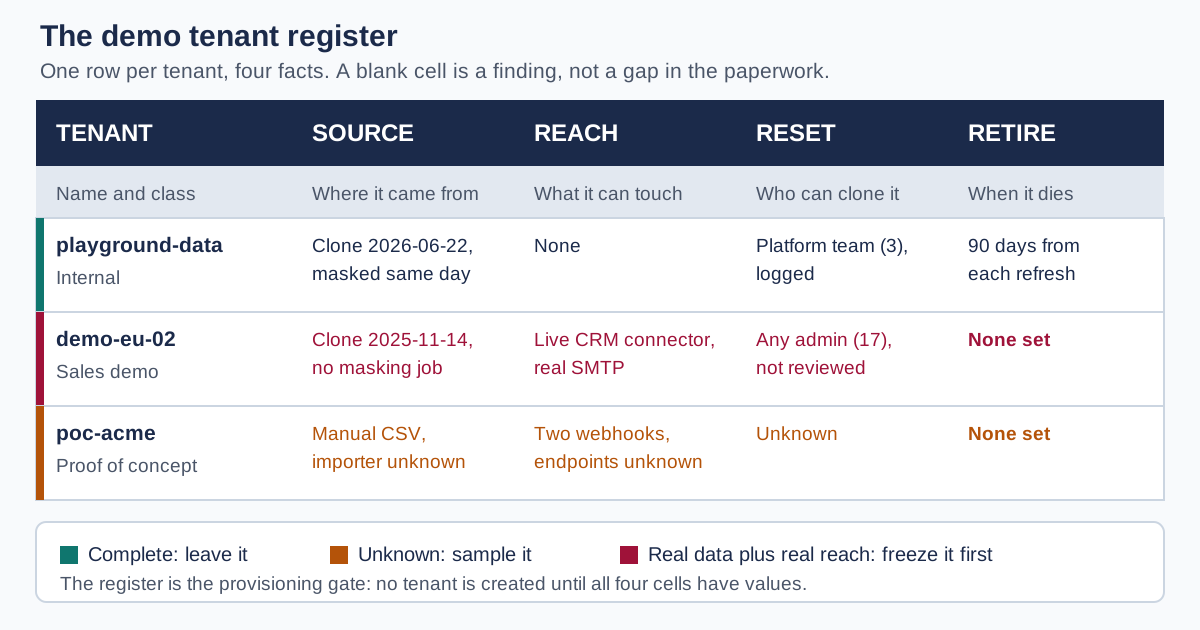
Source, Reach, Reset, Retire: four facts per tenant, and a blank cell is a finding.
Two rules make the register work rather than becoming another spreadsheet. First, a blank cell is a finding, not a gap in the paperwork, so it goes on the remediation list with an owner. Second, the register is the provisioning gate: a new demo tenant cannot be created without its four values, which means the row exists before the tenant does rather than being reconstructed a year later by an auditor. That second rule is what stops the register decaying, and it is the reason to build it into whatever request flow already creates these tenants rather than as a standalone document.
Many organisations have no such flow — demo tenants get created directly by whoever holds the admin role, which is exactly why nobody knows how many exist. If that is your situation, do not build a request portal first. Take the ability to create tenants away from everyone except a small named group, and have that group fill the four cells at creation time. A four-field form in whatever ticketing tool you already run is enough; the control is the restriction, not the form.
The audit, step by step
This is a nine-step procedure. We have not run it inside a customer engagement, so we are not going to tell you how long it takes or what proportion of tenants fail. The sequence below is assembled from the platform mechanics and the control requirements cited above, and every number it produces will be your own.
- Enumerate. Build the tenant list from billing, identity and DNS, as described in the prerequisites. Include tenants belonging to partners and resellers if you provisioned them.
- Classify by intent. Mark each tenant as sales demo, prospect trial, proof of concept, partner, training, or internal playground. Different classes get different retire clocks, and mixing them produces a policy nobody can apply.
- Fill Source from the refresh log first. Every tenant with a clone or refresh record gets a dated entry. Everything else moves to the unknown queue.
- Sample the unknown queue. For each unknown tenant, pull a small sample of records and look for the tells of real data: real domain names in email fields, plausible surnames, phone numbers in valid ranges, invoice values that are not round, attachments. You are not proving the data is real; you are deciding which tenants need a proper look.
- Fill Reach from configuration, not from memory. Export the connector, webhook, API-key and SMTP configuration for each tenant. Ask specifically whether outbound email is pointed at a real provider and whether any credential in the tenant also works in production.
- Fill Reset from the permission model. List every principal, human and service account alike, that can clone, refresh or re-seed. Check whether the action writes an auditable record and whether anyone reads it.
- Fill Retire from the commercial record. For sales demo and trial tenants, find the opportunity or deal record. Closed-won, closed-lost and stalled all need a date; stalled is the one that gets forgotten.
- Freeze, do not delete. For every tenant that fails on Source or Reach, remove the outbound reach and suspend access before anyone argues about deletion. Freezing is reversible, fast, and does not require the meeting that deletion requires.
- Set the gate. Wire the four columns into the request flow that creates new tenants, so the next tenant arrives with its row already filled.
Freezing means something specific, and it is worth agreeing the definition before step eight rather than during it: disable outbound email and SMS at the tenant level, disable or point every webhook at a null endpoint, revoke or rotate any credential the tenant holds against a real system, and suspend interactive logins for everyone except the named owner. The data stays. The reach stops. Nothing is destroyed, which is why it can be done without a change board.
The obvious risk is freezing a tenant that is in a live sales cycle on Thursday afternoon. Two things keep that from happening: run the freeze against tenants with no login activity in the last 30 days first, and announce the list before you act on it rather than after. Both are cheap, and the second is what buys the political room to freeze the active ones later.
Step eight is the one that determines whether this exercise finishes. Deletion is a decision with a business owner and a risk of breaking a live sales cycle; freezing reach is a technical action with a very low blast radius. Sequence deletion first and step eight turns into a negotiation, which means step nine, the part that stops the problem recurring, never gets started.
This short recorded discussion of cloning production data into test environments covers the operational trade-off from the database side, which is the half of the problem this article treats as given:

One completed register, filled in
Here is the artefact the audit produces, filled in for an illustrative six-tenant estate. The values are constructed to show what a completed row looks like and what a failing one looks like; they are not measurements from a real company.
| Tenant | Class | Source | Reach | Reset rights | Retire |
|---|---|---|---|---|---|
demo-eu-01 | Sales demo | Generated seed script v4, re-run 2026-06-02 | Outbound email to a capture inbox only; no live connectors | Sales engineering leads (4), logged | Standing tenant, access reviewed quarterly |
demo-eu-02 | Sales demo | Clone of production 2025-11-14, no masking job | Live CRM connector; real SMTP | Anyone with the platform admin role (17), not reviewed | None set |
trial-northwind | Prospect trial | Prospect's own uploaded data | Prospect's Google Workspace, OAuth still active | Prospect admin plus our support team | Deal closed-lost 2026-03-09; no date set |
poc-acme | Proof of concept | Manual CSV import, importer unknown | Two webhooks to endpoints nobody recognises | Unknown | None set |
partner-sandbox-3 | Partner | Generated, refreshed monthly | Partner's staging API | Partner administrators | Reviewed at contract renewal |
playground-data | Internal | Clone of production 2026-06-22, masked 2026-06-22 | None | Platform team (3), logged | 90 days from refresh, next expiry 2026-09-20 |
Read the table as a triage list rather than an inventory. demo-eu-02 is the worst row, and it is the shape this article is really about: real data, real reach, seventeen people who can reset it, no expiry. poc-acme is the second worst because every cell is unknown, and unknown reach, two webhooks nobody recognises, is the entry that should stop the meeting. trial-northwind is the row that is easiest to miss, because the deal was lost, nobody revisits a lost deal, and the OAuth grant into the prospect's own Google Workspace is still live months later. That grant is a token your company holds against a third party's systems for a customer you do not have.
playground-data is what a passing row looks like: dated clone, dated mask, no reach, three named resetters, and a specific expiry that follows from the refresh rather than from a promise. Notice that it is passing not because it is clean of production data, since it is a clone, but because every one of the four facts is written down and one of them is a date in the near future.
Reset and clone rights: the control that gets inherited
Reset rights are the entry in the register with the largest effect per unit of work, and in our reading the one most likely to have been inherited from a broad role rather than granted deliberately. Whoever can refresh a sandbox can move a fresh copy of production data into a lower-controlled environment on demand, which means the reset permission is functionally an export permission on the production database. Check where that permission actually sits. Where it is bundled into a broad administrator role granted for unrelated reasons, the population holding it is large, unreviewed and unaware that it holds an export permission at all.
The asymmetry is what makes this control worth a section. Masking is a recurring engineering job that has to be maintained per object and per field, and it degrades silently when someone adds a column. Restricting who may clone is a one-time permission change that is trivially auditable. If you can only do one thing this quarter, cut the reset population and log the action. It is a one-off change that holds, where a masking programme is a standing engineering commitment maintained per object and per field.
Three properties turn reset rights into a real control rather than a checkbox:
- The population is named and small. Four people is a control; "anyone with the admin role" is not. Write the names in the register, not the role.
- The action is logged where someone reads it. A clone that appears in an audit table nobody queries is not logged in any operational sense. Route it to whatever channel your team actually watches.
- A refresh re-arms the clock. Every refresh restarts the retire timer, because a tenant refreshed yesterday holds yesterday's customer data regardless of when it was created. This is the rule most retention policies miss: they date the tenant, not the data.
The third property is the one to argue for hardest, because it is the difference between a policy that expires empty containers and one that expires actual copies of customer records. A demo tenant created in 2023 and refreshed last week is a week-old copy of production, and any retention rule that files it under "2023" is measuring the wrong thing.
The retirement clock: demo tenants after the deal
Demo and trial tenants tend to outlive the commercial relationship that justified them, and where they do, the reason is structural rather than negligent: the event that should trigger cleanup is an event nobody wants to process. A closed-won deal moves attention to onboarding. A closed-lost deal moves attention to the next opportunity. A stalled deal produces no event at all. It simply stops being discussed, and its tenant, its data and its access list stay exactly as they were.
The fix is to define the clock in terms of a system event you already record, not an intention. Four clocks cover most estates.
| Tenant class | Clock starts at | Suggested window | What must happen at expiry |
|---|---|---|---|
| Prospect trial | Opportunity reaches closed-won, closed-lost, or no activity for 60 days | 30 days after the trigger | Revoke OAuth grants both directions, delete uploaded data, remove the prospect's users |
| Proof of concept | Documented end of the PoC period | 30 days | Delete all imported data, remove every connector, archive the config only |
| Sales demo org | Each refresh | 90 days from refresh, renewable | Re-seed from the generation script or re-run the masking job |
| Partner or reseller sandbox | Contract renewal date | Reviewed, not auto-deleted | Re-confirm the access list and the reach inventory |
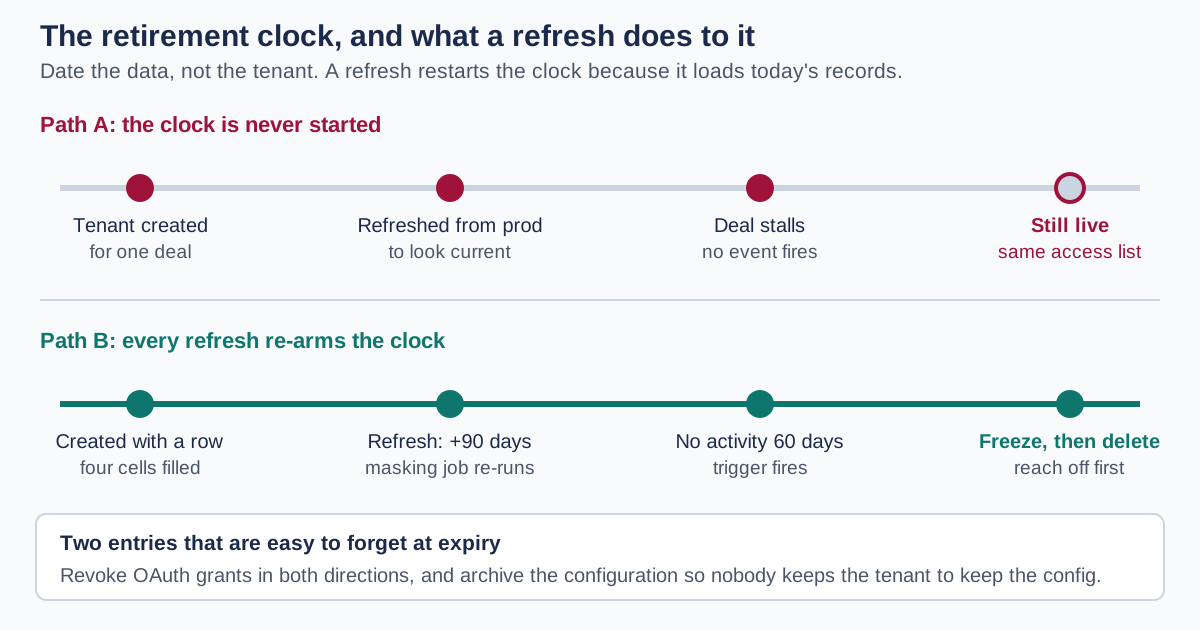
Date the data, not the tenant: a refresh loads today's records into an old container.
Two of those rows carry the entries teams forget. The trial row says revoke OAuth grants both directions — if the trial involved the prospect authorising your product against their systems, that grant is a live credential your company holds against a company that is not your customer. It does not expire when the deal is lost. The proof-of-concept row says archive the config only: one reason PoC tenants survive is that somebody wants to keep the configuration work, and if you do not give them a way to keep the configuration they will keep the tenant.
The window lengths above are a starting point rather than a finding. We are not aware of published research establishing an optimal retention window for non-production tenants, and we are not going to invent one. What the standards require is that the use of live data in preproduction be approved, documented and controlled; the specific number of days is a decision your risk owner makes, and the important property is that a number exists and something happens when it is reached.
AI makes the demo tenant a bigger surface, not a smaller one
Two things changed in the last two years, and both push in the same direction. Demo environments are now expected to show AI features working, which means the demo tenant needs a model endpoint, a retrieval index, and often an agent with tools attached. And AI features are exactly what buyers want to see running on data that resembles their own, which raises the pressure to seed the tenant from something real.
The result is that a demo tenant is no longer just a copy of records. It is a copy of records plus an index built from those records, plus a model endpoint that saw them, plus an agent that can act on them. Deleting the tenant's records does not necessarily delete the index, and revoking a person's access does not revoke the agent's. If you have built a retrieval index in a demo environment, that index is a second copy of whatever was in the tenant when it was built, and it needs its own row in the register.
Agents raise the Reach column from a data question to an action question. A demo agent with a calendar tool, a mail tool and a CRM tool can send a real message from a fake environment if any one of those tools holds a production credential. The governing facts for an agent are the same three we argue for everywhere, owner and scope and expiry, and they are the subject of our analysis of non-human identity. A demo agent is a non-human identity that was created for a meeting and never retired, which is the worst combination of the two problems in this article.
There is a specific trap in the connector layer worth naming. Demo environments are where teams are most willing to install a connector quickly, because the tenant is "not real", and connector installation is the step where scope decisions actually get made. A connector approved into a demo tenant with broad scopes can easily become the template that gets copied into production, because the config that worked is the config that gets reused. We covered the mechanics of scoping those connectors in our write-up on governing AI connectors. The demo tenant is where the scope precedent is set, which makes it worth governing even when the data inside it is genuinely fabricated.
The honest counter-argument is that this pushes cost onto an environment that produces no revenue directly, which is the argument the product manager quoted at the top of this article kept losing. The response is not that demo governance is free. It is that the register costs a row per tenant and the freeze in step eight costs a configuration change, and neither has to wait for the engineering budget that a data-generation script needs.
Common mistakes when cleaning up demo environments
Six failure patterns recur in demo-environment cleanups, and most of them are scoping or sequencing errors rather than technical ones.
Starting with deletion. Deletion needs a business decision; freezing reach does not. Open with "we're deleting old demo orgs" and you have opened a negotiation with every tenant's sponsor at once. Open with "we've removed outbound email and live connectors from twelve dormant tenants, tell us if that breaks something" and you have made a reversible change most sponsors will not contest.
Auditing only the platforms with a clone feature. The clone log is the easiest source of truth, which is exactly why it is the wrong place to stop. Route two, the manual CSV, leaves no log at all, and it is exactly the route you would expect in a tenant that was never refreshed.
Treating masking as completion. A masking job covers the fields it was configured for. Add an object, add a custom field, add an attachment type, and the mask silently stops covering it. Masking needs a review cadence tied to schema change, not a one-off project sign-off.
Confusing the tenant's age with the data's age. Covered above and worth repeating because it defeats otherwise good retention policies: a refresh makes an old tenant a new copy.
Leaving prospect-side OAuth grants in place. The cleanup runs on your systems and stops at your boundary. The grant your product holds against the prospect's Google Workspace, Slack or CRM lives on their side and expires when somebody revokes it.
Registering the tenant but not its derived artefacts. Indexes, embeddings, exported reports, screenshots used in a deck, recordings of the demo call. The recording is the one that surprises people: a demo call recorded and stored in a sales tool contains whatever was on screen, which for a route-four demo is production data, sitting in a system with a different access list and a different retention rule.
The pattern under most of these is the same. The cleanup is scoped to the thing that is easy to enumerate, the tenant, rather than to the data path, and the data path has ends outside the tenant.
Where a governance layer fits, and where it does not
Most of this article is environment hygiene, and environment hygiene is not something a governance platform does for you. Nobody's control plane will find the CSV a solutions engineer imported in March, and no product removes the need to decide who may clone production.
Where a layer like LeapForce does apply is the part of the register that is about identity, reach and evidence rather than about the data itself. Access and Identity treats non-human identities as first-class, with an owner, a scope and an expiry on every agent and service account. That is the Reset and Retire columns expressed as a system property rather than a spreadsheet entry, and it is what makes a demo agent expire on schedule instead of on memory. The Connectors registry is where the Reach column stops being a manual inventory: connectors are vetted once, scoped at the action level, and their credentials are brokered rather than pasted into a tenant. Observability and Audit is what makes a clone or a refresh visible to somebody who reads it, and it records what was refused as well as what ran. Our recommended rollout for that layer is deliberately staged: Observe first. Enforce second. Optimize third. Pointing traffic at a gateway in observe mode tells you what your non-production estate is actually doing before any rule blocks a live demo.
Honest limits on this analysis
Several things in this article are weaker than they look, and it is worth being specific about which.
We have not run this audit inside a customer engagement. The nine-step procedure is derived from platform mechanics and the NIST controls cited above, not from a measured deployment, and the completed register in the worked example is illustrative rather than observed. Any timing, hit rate or population figure you need should come from your own first pass.
The retention windows are a starting point, not a finding. We could not locate published research establishing an optimal retention period for non-production tenants, and we have not invented one. The 30/90-day figures above are conventional, defensible and unmeasured.
Some vendor documentation could not be independently fetched. Salesforce's sandbox-type documentation and several other enterprise help portals render only in a browser and were not retrievable through our normal fetch path, so this article makes no claims about specific refresh intervals, storage limits or data-copy defaults for those platforms. The Salesforce statements above come from the company's own published announcement, which we did retrieve. Check your platform's current documentation before relying on any interval.
The practitioner voices skew technical. Reddit was not reachable for this piece, so the field voices quoted here all come from Hacker News, whose readership is more engineering-heavy than the sales and revenue-operations teams who request most of these tenants in the first place. Their description of the practice matches the platform documentation, but the sample is not representative of the people making these decisions.
This is an operations article, not a legal one. Copying customer records into a demo environment can raise obligations under data-protection law, sector rules and your own customer contracts, and those questions are genuinely contested in places. We have deliberately not resolved them here. Take the register to counsel and let them tell you which rows create exposure.
The last one is a governance limit rather than a technical one. Every control in this article can be overruled by a large enough deal. If the escalation path from "this demo tenant fails the register" to "ship it anyway" is one sales VP, the register is documentation rather than control, and you should know that about your own organisation before you build it.
Frequently asked questions
Any tenant, org, workspace or instance created so somebody can be shown the product rather than do work in it. That includes sales demo orgs, prospect trials, proof-of-concept workspaces, partner sandboxes, training instances and internal playgrounds. The label does not matter for governance purposes; what matters is that each one is an account that holds data and has credentials attached. If it can be logged into and it contains records, it needs a row in the register.
This is two questions, and this article answers only the operational one. On the control side, NIST SP 800-53 treats live data in preproduction as something to be managed rather than assumed: control SA-3(2) asks organisations to "approve, document, and control the use of live data in preproduction environments" and to protect those environments at the same impact level as the live data inside them. Read as an operating instruction, that means a named control owner decides, the decision is written down, and the tenant then carries production controls from that point on. Whether your particular records may lawfully be copied into a demo tenant is a separate question that turns on your customer contracts, your sector and your jurisdiction. Take that one to counsel rather than to a control catalogue.
Set the clock from a system event rather than an intention: opportunity closed-won, closed-lost, or no activity for 60 days. A common convention is 30 days after that trigger for prospect trials and proofs of concept, and 90 days from each refresh for standing sales demo orgs. We are not aware of research establishing an optimal window, so treat those numbers as a defensible starting point your risk owner adjusts. The property that matters more than the number is that a date exists and something specific happens when it is reached.
A named person in the team that benefits from it, with a named platform-side administrator as the technical owner. Splitting the two is deliberate: the business owner justifies the tenant's existence and its retire date, and the technical owner holds reset rights and the reach inventory. Ownership by a team name rather than a person is the failure mode worth naming, because a team cannot be asked a question and cannot be offboarded.
If it holds a copy of production data or a live connection to production systems, treat it as production. That is the plain reading of NIST SA-3(2), which requires preproduction environments to be protected at the same impact level as any live data in use within them, and it is what practitioners conclude independently. One Hacker News commenter argued that staging databases holding production data "should be considered production data, with the same level of consideration for security and access". A sandbox with genuinely generated data and no outbound reach is a different case and can carry lighter controls.
Five questions, and ask them before the demo rather than after. Is the environment I am being shown a dedicated demo tenant or a production one? If we run a trial, where does our uploaded data live, and when is it deleted after we decide? What OAuth grants will your product hold against our systems, and how do we revoke them? Who at your company can access our trial tenant, and is that list reviewed? And if the demo includes AI features, is an index or model endpoint built from our data, and what happens to it? A vendor who cannot answer the third and fifth quickly has not thought about their own retirement clock.
The honest answer is that the cost lands in engineering time for a data-generation script and its maintenance, and we cannot give you a figure that would mean anything across different platforms. The one account we can point to is the Hacker News comment quoted at the top of this article, where the ask was framed as two engineers for several weeks and refused every time it was made. The cheaper path this article argues for is to start with the register and the reach freeze, both of which are configuration rather than engineering, and to use the findings from those to justify the generation script afterwards.
Masking materially reduces the exposure and does not eliminate the environment problem. Salesforce Data Mask, for example, anonymises, pseudonymises or deletes field contents in sandboxes using obfuscation the vendor describes as non-reversible. Two limits remain. A mask covers the fields it was configured for, so schema changes silently create gaps, which means masking needs a review cadence tied to schema change rather than a project sign-off. And masking addresses the Source column only. A perfectly masked tenant with a live production connector and seventeen unreviewed administrators still fails on Reach and Reset.
Point outbound mail at a capture inbox or a mail-trap service at the tenant level, not at the application level, so a new feature cannot route around it. Then verify it by sending, rather than by reading the configuration: trigger the workflow that sends and confirm the message lands in the trap. The same applies to SMS, webhooks and payment calls. In the register this is a Reach entry, and it is an easy one to leave blank: the tenant owner rarely administers the mail and messaging providers, so nobody with the answer is being asked the question.
Whoever will be accountable for its retire date, which in practice means the sales or partner leader requesting it rather than the engineer provisioning it. The mechanism that makes sign-off real is making the register the provisioning gate: the tenant cannot be created until Source, Reach, Reset and Retire have values. This is the same "verify before you grant" discipline we have argued for in customer onboarding — the cheapest moment to establish who owns an environment is before it exists, and every moment after that is archaeology.
Ready to Govern Your AI?
Talk to LeapForce — one controlled layer for every AI tool, connector, model, and agent.
Comments